
惯性聚合 高效追踪和阅读你感兴趣的博客、新闻、科技资讯
阅读原文 在惯性聚合中打开

推荐订阅源

WordPress大学
WordPress大学
Cyberwarzone
Cyberwarzone
The GitHub Blog
The GitHub Blog
云风的 BLOG
云风的 BLOG
P
Proofpoint News Feed
小众软件
小众软件
Recent Announcements
博客园 - 三生石上(FineUI控件)
Security Archives - TechRepublic
W
WeLiveSecurity
Cloudbric
Cloudbric
博客园 - 司徒正美
美团技术团队
N
News and Events Feed by Topic
Exploit-DB.com RSS Feed
PCI Perspectives
PCI Perspectives
宝玉的分享
宝玉的分享
H
Help Net Security
H
Hackread – Cybersecurity News, Data Breaches, AI and More
Google DeepMind News
Help Net Security
Help Net Security
Last Week in AI
Last Week in AI
S
Schneier on Security
N
News | PayPal Newsroom
B
Blog RSS Feed
L
LINUX DO - 最新话题
T
Troy Hunt's Blog
S
Secure Thoughts
雷峰网
雷峰网
aimingoo的专栏
aimingoo的专栏
L
Lohrmann on Cybersecurity
G
Google Developers Blog
Microsoft Azure Blog
Hacker News - Newest:
Hacker News - Newest: "LLM"
T
Tenable Blog
S
Securelist
L
LangChain Blog
Recent Commits to openclaw:main
I
InfoQ
H
Heimdal Security Blog
Cisco Talos Blog
Cisco Talos Blog
F
Full Disclosure
Y
Y Combinator Blog
酷 壳 – CoolShell
酷 壳 – CoolShell
K
Kaspersky official blog
T
Tailwind CSS Blog
奇客Solidot–传递最新科技情报
奇客Solidot–传递最新科技情报
钛媒体:引领未来商业与生活新知
钛媒体:引领未来商业与生活新知
阮一峰的网络日志
阮一峰的网络日志
C
Cisco Blogs

Netlify Changelog

Gemini 3.5 Flash now available in Agent Runners 4 Nuxt CVEs: what Netlify users need to know Gemini 3.5 Flash now available in AI Gateway Agent Runners workflow improvements Next.js & React security release (May 2026): what to know Block project transfers out of your team Gemini 3.1 Flash-Lite now available in AI Gateway OpenAI GPT-5.5 Instant now available in AI Gateway New `netlify logs` CLI command Deploy to Netlify with Stripe Projects Netlify Database is now generally available OpenAI GPT-5.5 and GPT-5.5 Pro in AI Gateway & Agent Runners Rename an agent run GPT Image 2 now available in AI Gateway New frontend-design skill for Agent Runners Claude Opus 4.7 now available in AI Gateway and Agent Runners Pricing updates for Credit-based plans New sorting and filter controls on the Members page Netlify Database GA coming soon, no new databases for now Deploy logs streaming is now faster Netlify CLI adds prompt-based creation and anonymous deploys Deploy from Codex with the Netlify Plugin Hydrogen with React Router 7 now supported on Netlify Monitor credit usage by day Invoices for Enterprise Available on the Billing Page AI app development on production infrastructure with Netlify Introducing Prompt Templates OpenAI GPT-5.4 Nano and GPT-5.4 Mini in AI Gateway Change your pricing plan Internal Builder Role & Project Access Controls See your available credits at a glance Astro 6 just works on Netlify Limit AI feature usage OpenAI GPT-5.4 and GPT-5.4 Pro in AI Gateway & Agent Runners Deploy Preview screenshots in agent runs Gemini 3.1 Flash-Lite Preview now available in AI Gateway GPT-5.3 Instant now available in AI Gateway Use Netlify Agent Runners from Linear Automatic PHP bot scan blocking now live on all plans Support for stale-while-revalidate in Cache API Gemini 3.1 Flash Image Preview now available in AI Gateway GPT-5.3-Codex now available in AI Gateway Gemini 3.1 Pro Preview now available in AI Gateway Claude Sonnet 4.6 now available in AI Gateway and Agent Runners Sync changes with Agent Runners without Git Claude Opus 4.6 now available in AI Gateway and Agent Runners Agent Runners improvements recap 6 new React Router & Remix CVEs: what you need to know Vulnerability in Node.js: what Netlify users need to know 5 SvelteKit security vulnerabilities: what Netlify users need to know GPT-5.2-Codex Now Available in AI Gateway and Agent Runners Play Games While Agent Runners Do the Work Prerender.io support updated as new extension Gemini 3 Flash Preview now available in AI Gateway GPT-image-1.5 now available in AI Gateway AI Gateway now Generally Available Observability release is here Prerender extension now generally available Action required: React/Next.js CVE-2025-55184 and CVE-2025-55183 GPT-5.2 and GPT-5.2-Pro now available in AI Gateway and Agent Runners GPT-5.1-Codex-Max now available in AI Gateway and Agent Runners Netlify’s response to the critical React security vulnerability Netlify Vite Plugin now supports AI Gateway locally Claude Opus 4.5 now available in AI Gateway Projects deployed using a zip file via API now support branch deploys Day one support for Angular v21 on Netlify Gemini 3 now available in AI Gateway and Agent Runners DNS record management simplified for teams in Netlify organizations Skew protection for CLI workflows Support for more domain TLDs GPT-5.1 model now available in AI Gateway React Router 7 apps can now be deployed to Edge Functions | Netlify Changelog Git SHA exposed for triggered deploys | Netlify Changelog Test scheduled functions in Netlify dashboard | Netlify Changelog Revert agent run in a task | Netlify Changelog Deletion improvements with Netlify Blobs | Netlify Changelog Preview Server restart for cross-functional collaborators | Netlify Changelog AI inference usage graphs | Netlify Changelog Buy credit packs on demand | Netlify Changelog React Router 7 middleware now supported | Netlify Changelog Skew protection now available | Netlify Changelog Next.js 16 is ready to deploy on Netlify | Netlify Changelog Enforce Git-based workflows for production deploys | Netlify Changelog Claude Haiku 4.5 is now available in the AI Gateway | Netlify Changelog GPT 5 Pro now available in the AI Gateway | Netlify Changelog Updates to credit-based Personal and Pro plans | Netlify Changelog New AI workflows: Agent Runners and AI Gateway (beta) | Netlify Changelog Netlify pricing update: Introducing credit-based plans | Netlify Changelog Security Update: Multiple vulnerabilities in Next.js | Netlify Changelog ChatGPT deep link for failed deploy analysis | Netlify Changelog Equinix IP address expiring for 4-year old sites | Netlify Changelog Nuxt 4 support + new @netlify/nuxt module for local dev | Netlify Changelog Smart Secret Scanning for AI-Generated Code | Netlify Netlify DB: Serverless PostgreSQL Database | Netlify One-click install Netlify MCP on Cursor | Netlify Changelog Netlify MCP Server: AI Agents Can Now Deploy Code Directly | Netlify Netlify Becomes Official Vite Deployment Partner + New Plugin | Netlify Angular 20 support | Netlify Changelog Netlify CLI 21.4.1 UI and workflow enhancements | Netlify Changelog Security Update: Next.js sites on Netlify not vulnerable to CVE-2025-32421 | Netlify Changelog
Introducing Netlify Web Application Firewall (WAF) Traffic Rules
Nahrin Jalal · 2023-08-23 · via Netlify Changelog

Web applications and websites are common targets of malicious attacks. Firewall functionality, including blocking and allowing requests from specific IP addresses and geographic locations, is one of the powerful industry-standard principles of zero trust to help ensure only the appropriate visitors can access your web properties.

Mitigate web application vulnerabilities with Netlify Firewall Traffic Rules

Today, we are excited to announce the release of Netlify Firewall Traffic Rules. This new feature empowers Enterprise customers with Netlify High-Performance Edge to proactively control who can access their Netlify web properties based on the geographic location and IP address of the requestor, in real-time, to align with your business and security policy requirements.

With Firewall Traffic Rules, Netlify Team owners can now create and manage IP and geo restriction rules for their websites, directly from within the Neltify platform. These rules can be set at the team level for all sites, or per-team. Furthermore, discrete rules can be set for published and non-published site contexts, which means your team can combine level-3 traffic rule protection with level 7 site protection and apply it to unpublished content from unauthorized access easily from the Netlify UI. This means your team can now apply a layered approach to securing your Netlify infrastructure, tailored to your unique business needs.

Watch the 1-minute demo video

Configuring traffic rules is quick and easy, starting with simple, high-level “Allow All” and “Block All” traffic options that can be fine-tuned for more advanced needs with granular IP and geo restrictions and exceptions. These access controls enable your team to easily implement and maintain rules that fit your unique business policies.

Benefits of Netlify Firewall Traffic Rules

Netlify Firewall Traffic Rules offer your team an added layer of protection against malicious web attacks. By limiting access to your web properties, you can:

  • Protect non-published website updates from unwanted visitors prior to publication
  • Grant explicit website access for vendor and contractor networks
  • Block malicious traffic to production sites
  • Prevent visitors from accessing your sites from countries that do not adhere to your organization’s business policies
  • Control infrastructure bandwidth spend by blocking unwanted traffic from specific IPs, IP ranges, and countries.

On-demand webinar

Use cases and configurations for IP and geo blocking

Prevent visitor access from countries where you cannot conduct business

With Netlify Firewall Traffic Rules, you can easily and proactively restrict access to your website based on your visitors’ geographic location for all of your sites at the team level, or individually by site. For the purposes of this example, we’ll set this rule at the team level.

To configure, navigate to Team settings > Firewall > Traffic rules. Under Traffic rules, click “Configure” under Published deploys. With the “Allow all traffic” setting selected, expand the Geographic restrictions section and select “Add another geographic restriction”.
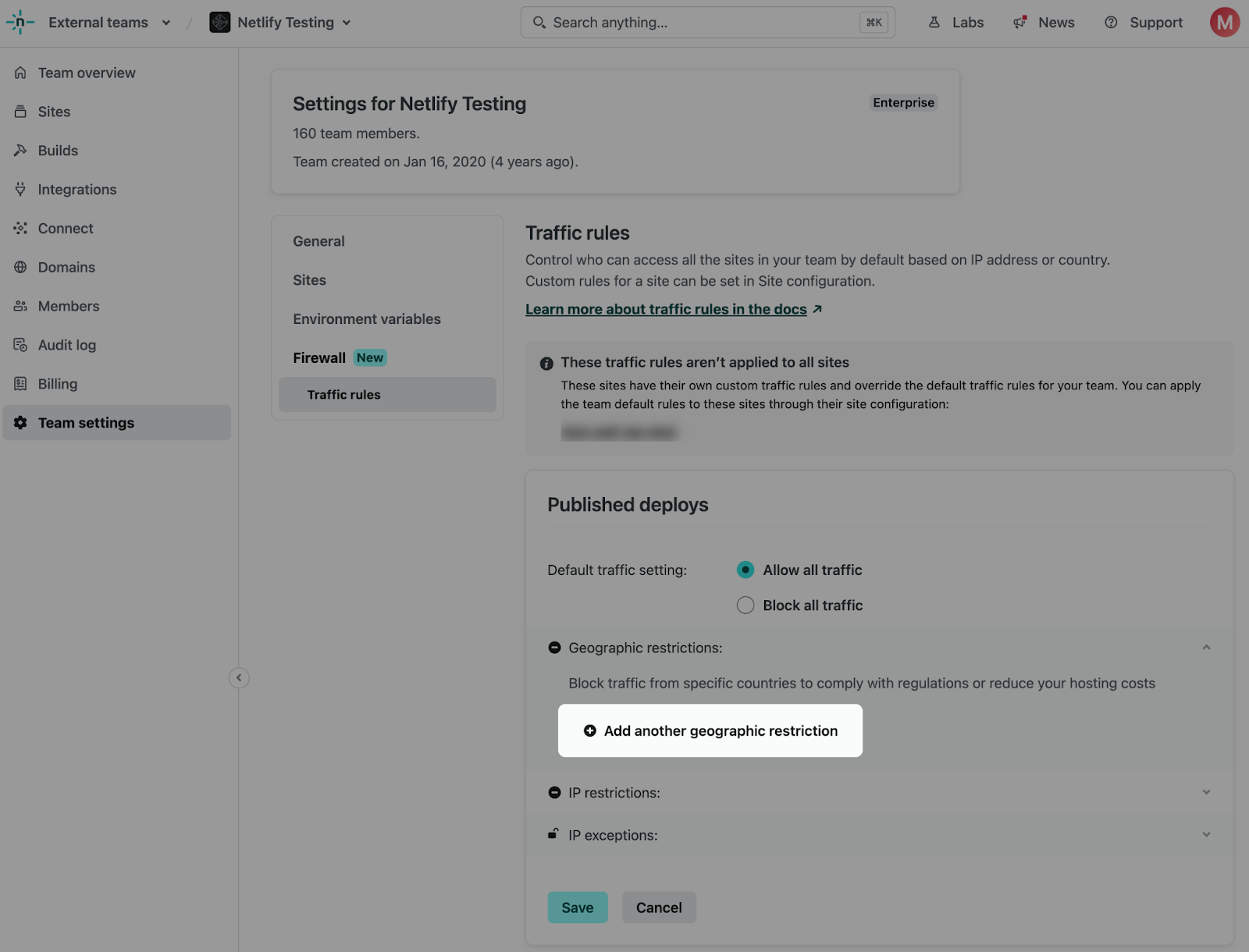
Where you can add geo restrictions to your web application firewall (WAF) traffic rules in the Netlify app UI

You can then select the country or countries which you wish to restrict traffic from.
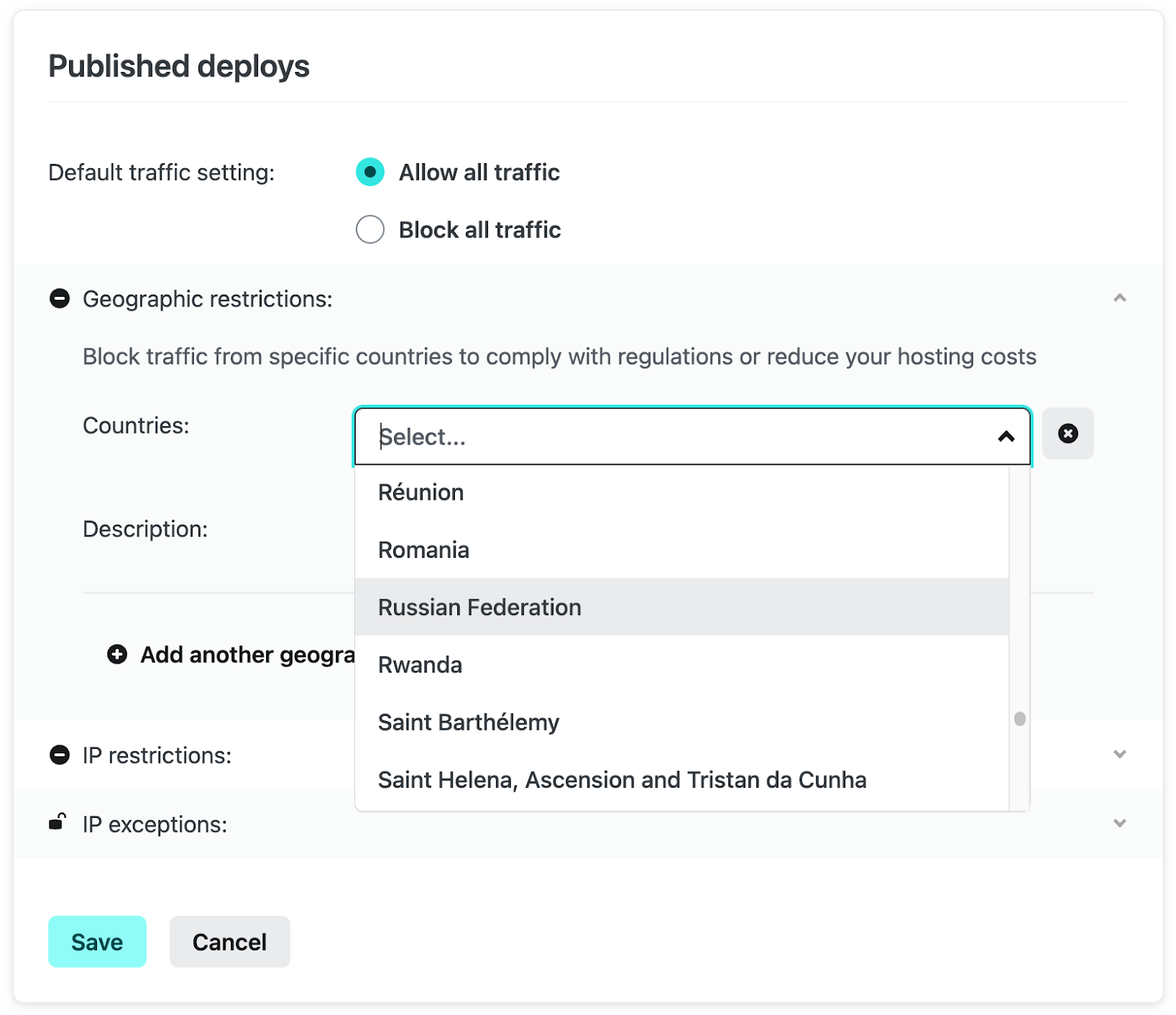
List of countries which you can select to restrict traffic from

You can also provide a short description to the rule before saving to make it easier to review the geo blocking rules you have in place at a quick glance.
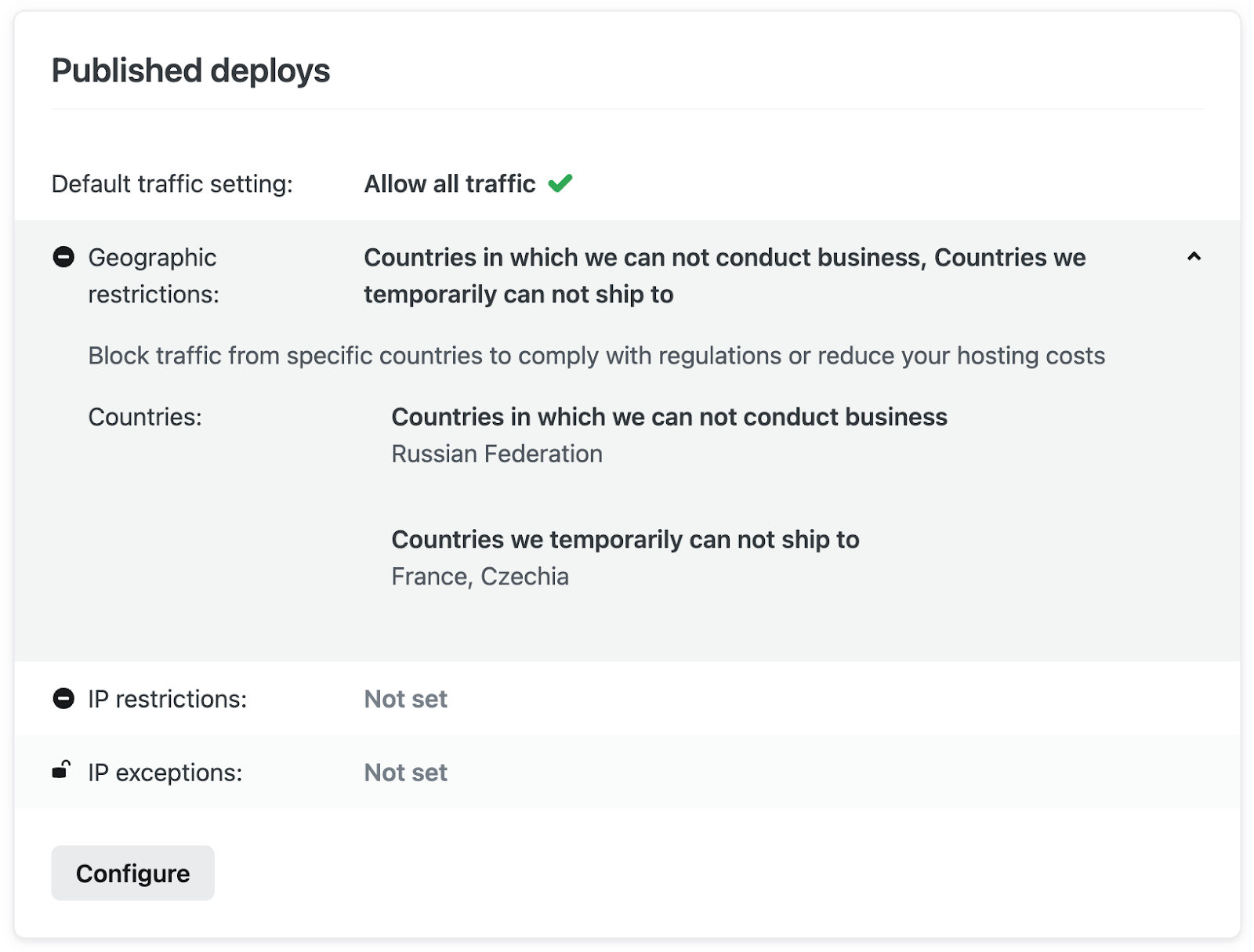
Short description providing context behind each geo restriction

Grant IP exceptions for visitor access from within blocked countries

Let’s say you have a contractor in one of the blocked countries that needs to access your sites. You can easily provide access to their IP address in the rules we configured above.

Click “Configure” under Published deploys and expand the IP exceptions section. Then select “Add another IP exception”.
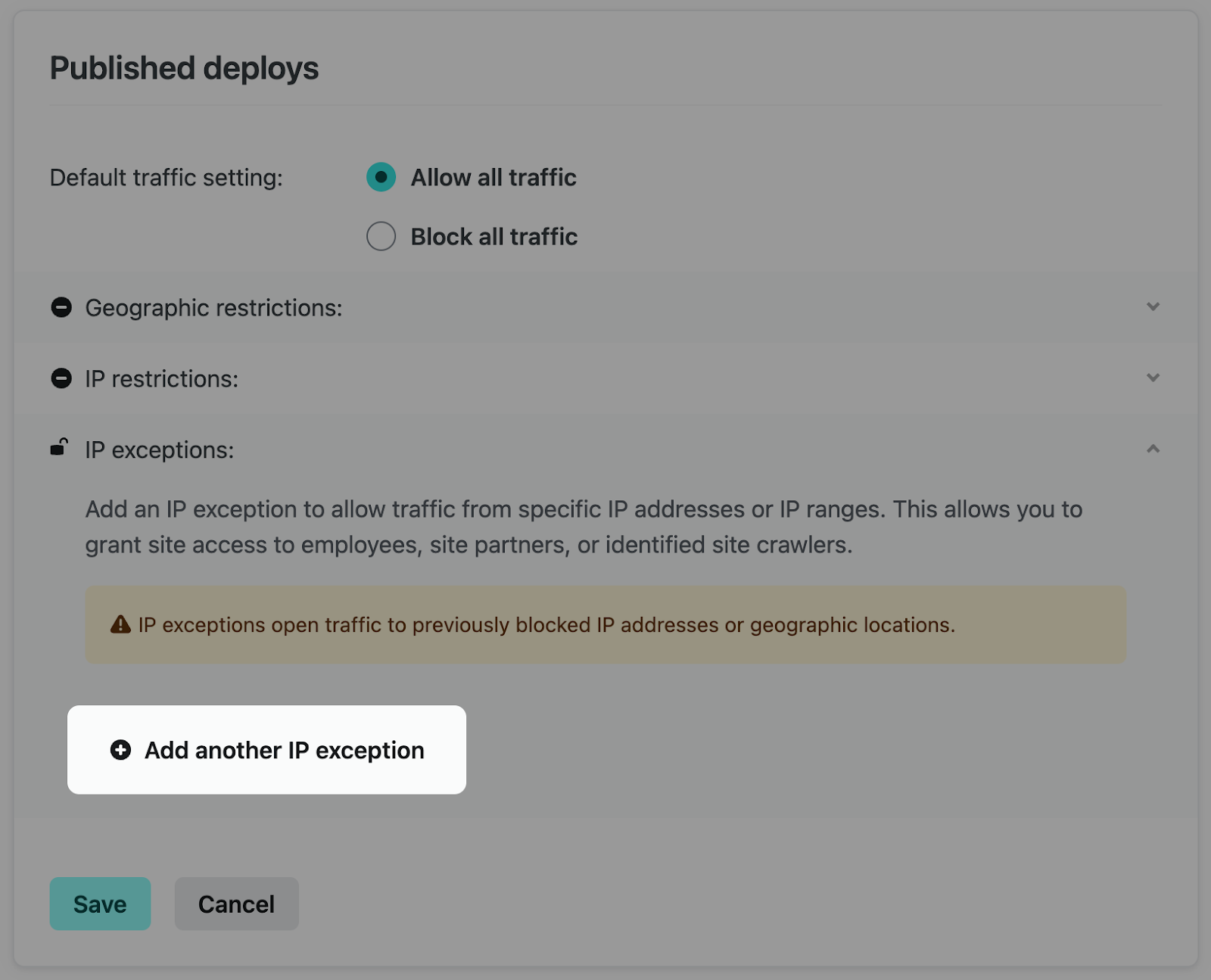
Where you can add IP exceptions to your web application firewall (WAF) traffic rules in the Netlify app UI

You can then add the IP address for the user, or network, within one of the restricted countries to grant access to your site.
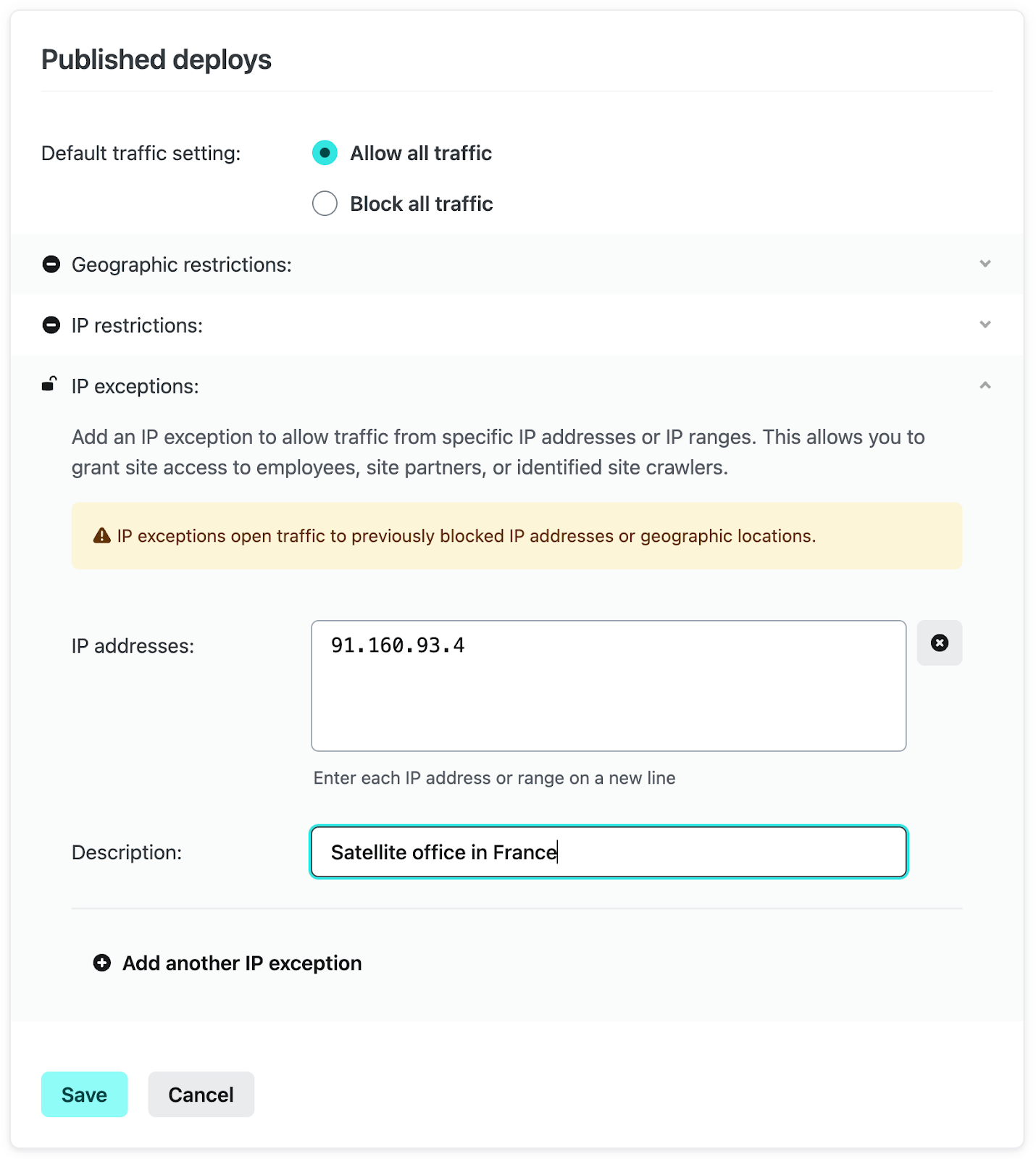
IP addresses for users or networks you'd like to grant access to your site, although within any of your geo restrictions

Providing a brief description makes it easy to see the purpose of the exception as well as provide other team members clear context for this traffic rule.
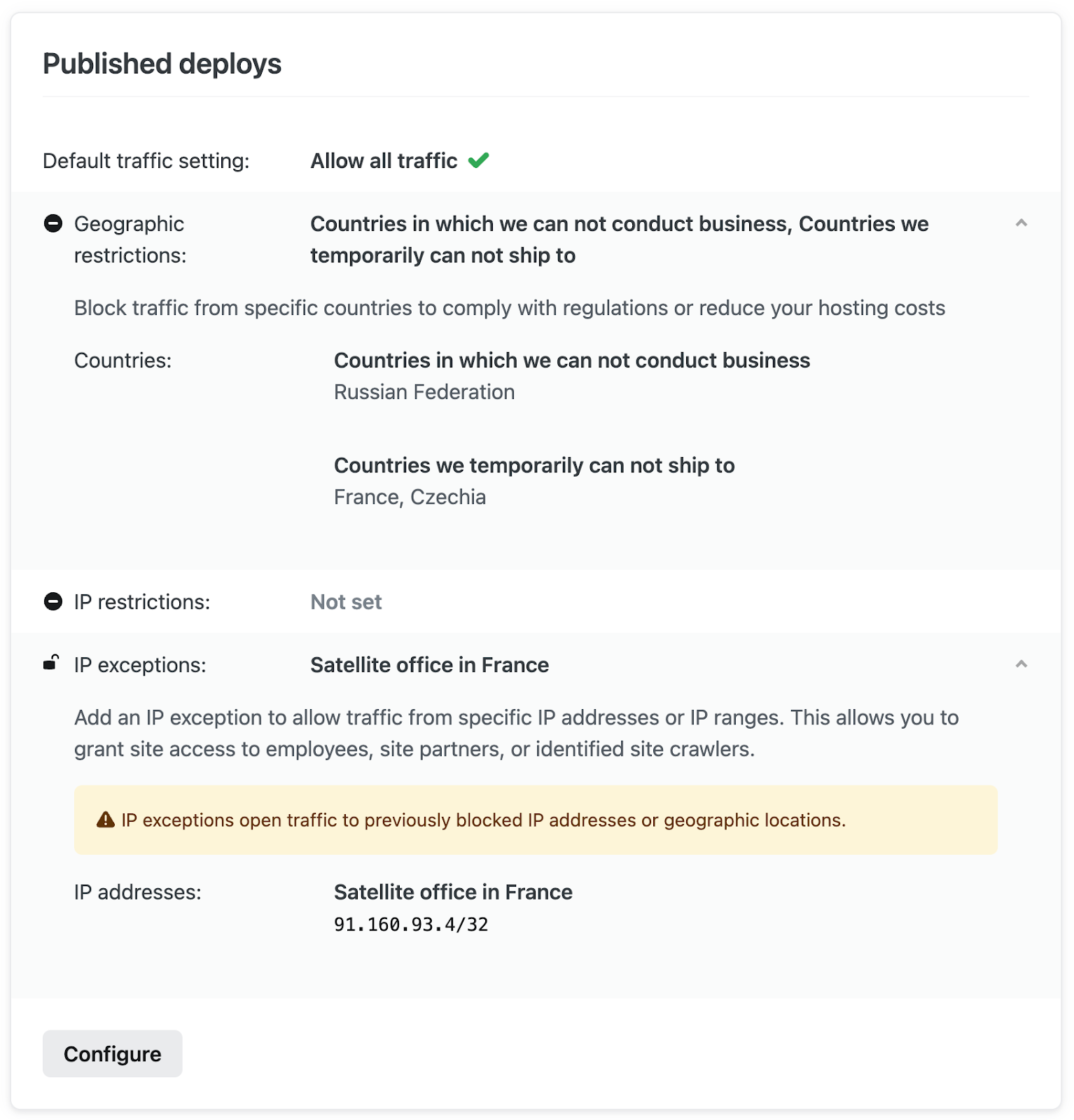
Short description providing context behind each IP exception

Restrict access to only requests routed through your external firewall

If your organization has requirements to protect all of its web properties behind an existing firewall, an easy way to help guarantee that only authorized traffic can make its way to your Netlify websites is to prevent traffic requests that originate from outside of your trusted network.

To do this, start by selecting “Configure” under Published deploys on the Firewall Traffic Rules view. From here, select “Block all traffic”, then expand the IP exceptions selection, and select “Add another IP exception”.

Add your Web Application Firewall (WAF) IP addresses here, give it a brief description, and click “Save”.
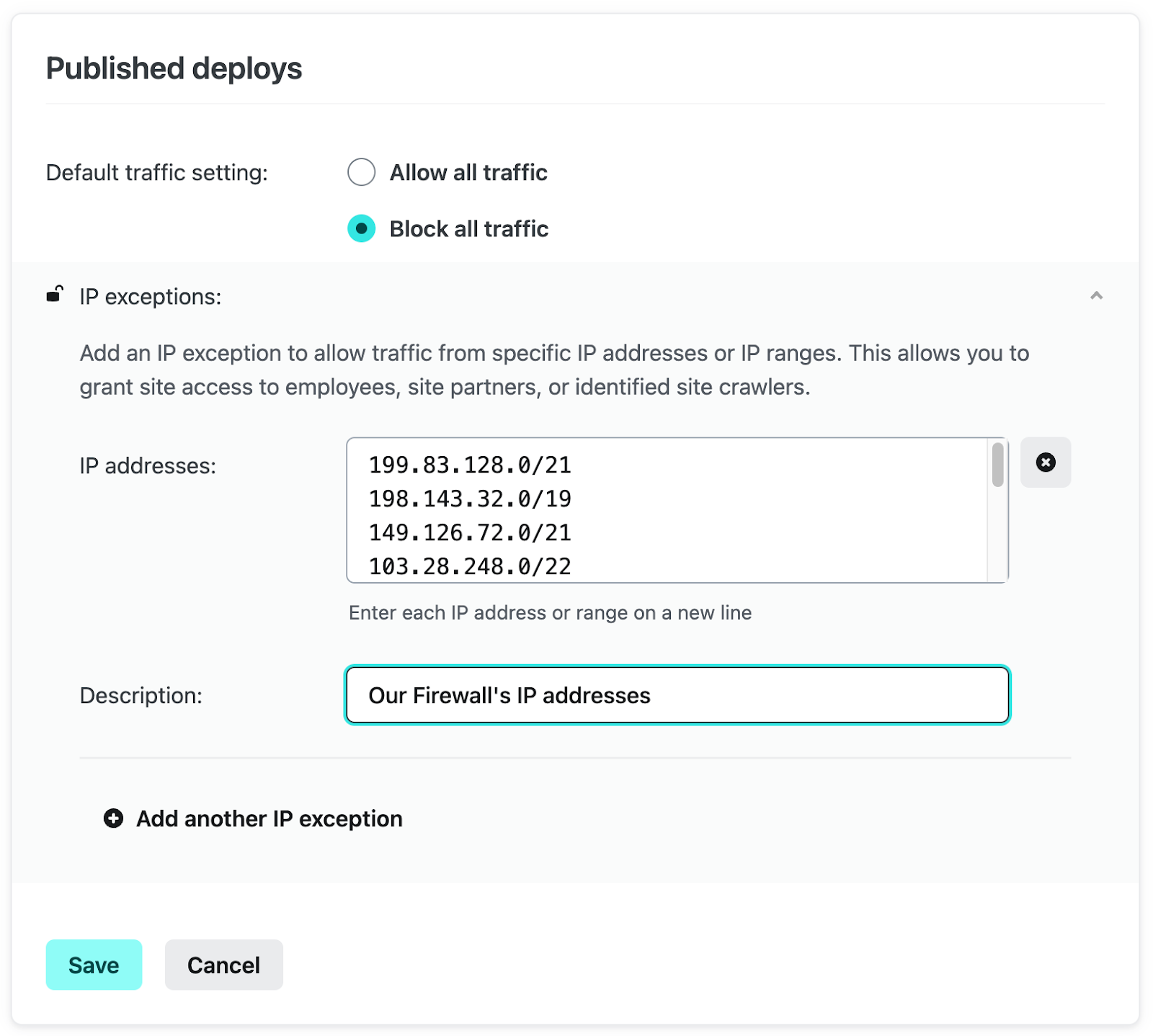
Where you can add authorized IP addresses behind an existing firewall with a short description providing context

Once configured, only traffic that comes through your firewall will be able to access your sites.
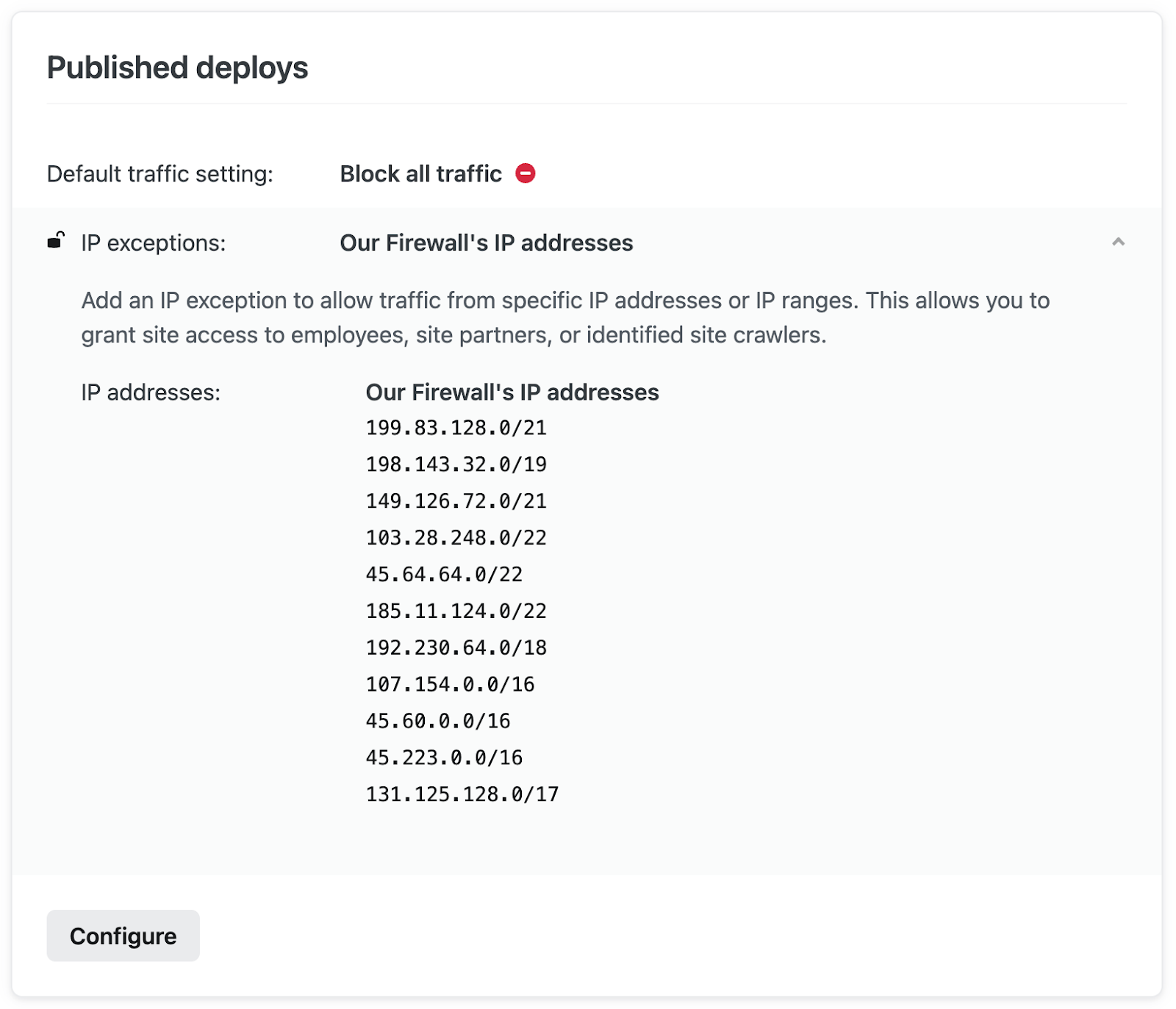
Example of the configuration to restrict access to requests routed through your external firewall in the Netlify app UI

Please note: We recommend using caution when using the “Block all traffic” setting, especially on published and/or production sites. With no exceptions defined, it will render your site(s) inaccessible to all requests.

Secure non-published deploys with default traffic rules

Another powerful capability of Firewall Traffic Rules is to prevent unwanted access to all of your non-published deploys (or even your Published deploys before officially launching).

To accomplish this, start by selecting “Config” under Unpublished deploys, then select “Block all traffic”. Click “Add another IP exception”, then add your team’s IP address and a brief description, then click “Save”.
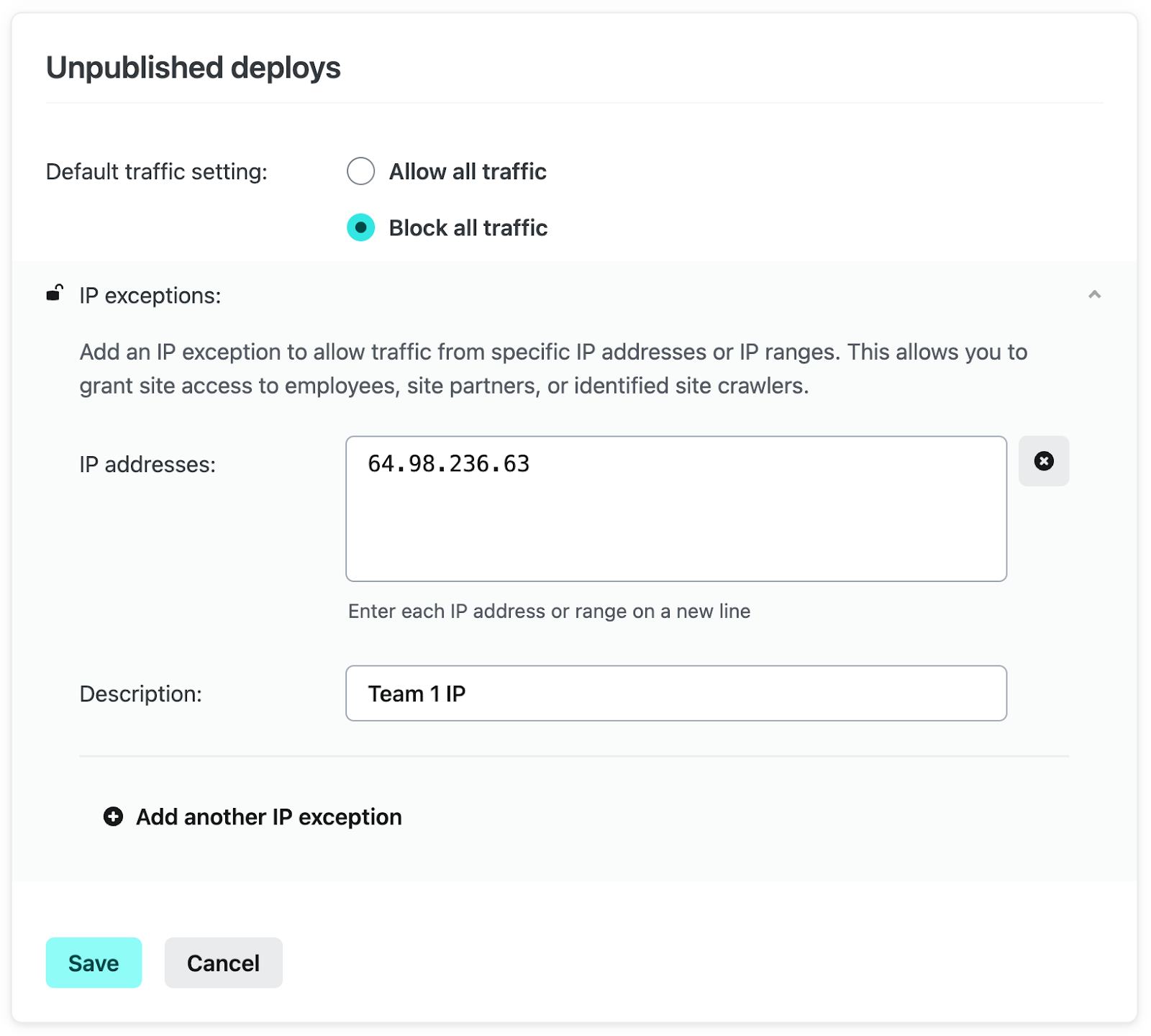
Where you can add your team's IP addresses for access, while blocking all other traffic in the Netlify app UI

Once saved, only requests from the configured IP exception will be able to access your non-published deploys.

This is only the beginning of Netlify’s Firewall functionality

Current Netlify customers can learn more about how to implement and take full advantage in the Netlify Firewall Traffic Rules docs.

Already a Netlify customer? Tell us about other Firewall needs you’d like to see offered on our platform.

Not yet on Netlify? Talk with a Netlify team member and get a complimentary tailored walkthrough of the platform.