
惯性聚合 高效追踪和阅读你感兴趣的博客、新闻、科技资讯
阅读原文 在惯性聚合中打开

推荐订阅源

G
GRAHAM CLULEY
V
V2EX
WordPress大学
WordPress大学
博客园 - Franky
Last Week in AI
Last Week in AI
博客园 - 司徒正美
有赞技术团队
有赞技术团队
freeCodeCamp Programming Tutorials: Python, JavaScript, Git & More
博客园 - 【当耐特】
V
Visual Studio Blog
C
CERT Recently Published Vulnerability Notes
OSCHINA 社区最新新闻
OSCHINA 社区最新新闻
cs.CL updates on arXiv.org
Jina AI
Jina AI
Attack and Defense Labs
腾讯CDC
The Hacker News
The Hacker News
Hugging Face - Blog
Hugging Face - Blog
K
KPMG report finds enterprise disconnect between AI and its ROI | CIO
J
Java Code Geeks
人人都是产品经理
人人都是产品经理
阮一峰的网络日志
阮一峰的网络日志
T
Tailwind CSS Blog
S
SegmentFault 最新的问题
大猫的无限游戏
大猫的无限游戏
小众软件
小众软件
A
Arctic Wolf
量子位
博客园 - 聂微东
奇客Solidot–传递最新科技情报
奇客Solidot–传递最新科技情报
N
News and Events Feed by Topic
雷峰网
雷峰网
博客园_首页
Google Online Security Blog
Spread Privacy
Spread Privacy
罗磊的独立博客
H
Hacker News: Front Page
让小产品的独立变现更简单 - ezindie.com
月光博客
月光博客
TaoSecurity Blog
TaoSecurity Blog
Exploit-DB.com RSS Feed
博客园 - 三生石上(FineUI控件)
宝玉的分享
宝玉的分享
IT之家
IT之家
The Cloudflare Blog
爱范儿
爱范儿
博客园 - 叶小钗
Threat Intelligence Blog | Flashpoint
Apple Machine Learning Research
酷 壳 – CoolShell
酷 壳 – CoolShell

Netlify Changelog

Gemini 3.5 Flash now available in Agent Runners 4 Nuxt CVEs: what Netlify users need to know Gemini 3.5 Flash now available in AI Gateway Agent Runners workflow improvements Next.js & React security release (May 2026): what to know Block project transfers out of your team Gemini 3.1 Flash-Lite now available in AI Gateway OpenAI GPT-5.5 Instant now available in AI Gateway New `netlify logs` CLI command Deploy to Netlify with Stripe Projects Netlify Database is now generally available OpenAI GPT-5.5 and GPT-5.5 Pro in AI Gateway & Agent Runners Rename an agent run GPT Image 2 now available in AI Gateway New frontend-design skill for Agent Runners Claude Opus 4.7 now available in AI Gateway and Agent Runners Pricing updates for Credit-based plans New sorting and filter controls on the Members page Netlify Database GA coming soon, no new databases for now Deploy logs streaming is now faster Netlify CLI adds prompt-based creation and anonymous deploys Deploy from Codex with the Netlify Plugin Hydrogen with React Router 7 now supported on Netlify Monitor credit usage by day Invoices for Enterprise Available on the Billing Page AI app development on production infrastructure with Netlify Introducing Prompt Templates OpenAI GPT-5.4 Nano and GPT-5.4 Mini in AI Gateway Change your pricing plan Internal Builder Role & Project Access Controls See your available credits at a glance Astro 6 just works on Netlify Limit AI feature usage OpenAI GPT-5.4 and GPT-5.4 Pro in AI Gateway & Agent Runners Deploy Preview screenshots in agent runs Gemini 3.1 Flash-Lite Preview now available in AI Gateway GPT-5.3 Instant now available in AI Gateway Use Netlify Agent Runners from Linear Automatic PHP bot scan blocking now live on all plans Support for stale-while-revalidate in Cache API Gemini 3.1 Flash Image Preview now available in AI Gateway GPT-5.3-Codex now available in AI Gateway Gemini 3.1 Pro Preview now available in AI Gateway Claude Sonnet 4.6 now available in AI Gateway and Agent Runners Sync changes with Agent Runners without Git Claude Opus 4.6 now available in AI Gateway and Agent Runners Agent Runners improvements recap 6 new React Router & Remix CVEs: what you need to know Vulnerability in Node.js: what Netlify users need to know 5 SvelteKit security vulnerabilities: what Netlify users need to know GPT-5.2-Codex Now Available in AI Gateway and Agent Runners Play Games While Agent Runners Do the Work Prerender.io support updated as new extension Gemini 3 Flash Preview now available in AI Gateway GPT-image-1.5 now available in AI Gateway AI Gateway now Generally Available Observability release is here Prerender extension now generally available Action required: React/Next.js CVE-2025-55184 and CVE-2025-55183 GPT-5.2 and GPT-5.2-Pro now available in AI Gateway and Agent Runners GPT-5.1-Codex-Max now available in AI Gateway and Agent Runners Netlify’s response to the critical React security vulnerability Netlify Vite Plugin now supports AI Gateway locally Claude Opus 4.5 now available in AI Gateway Projects deployed using a zip file via API now support branch deploys Day one support for Angular v21 on Netlify Gemini 3 now available in AI Gateway and Agent Runners DNS record management simplified for teams in Netlify organizations Skew protection for CLI workflows Support for more domain TLDs GPT-5.1 model now available in AI Gateway React Router 7 apps can now be deployed to Edge Functions | Netlify Changelog Git SHA exposed for triggered deploys | Netlify Changelog Test scheduled functions in Netlify dashboard | Netlify Changelog Revert agent run in a task | Netlify Changelog Deletion improvements with Netlify Blobs | Netlify Changelog Preview Server restart for cross-functional collaborators | Netlify Changelog AI inference usage graphs | Netlify Changelog Buy credit packs on demand | Netlify Changelog React Router 7 middleware now supported | Netlify Changelog Skew protection now available | Netlify Changelog Next.js 16 is ready to deploy on Netlify | Netlify Changelog Enforce Git-based workflows for production deploys | Netlify Changelog Claude Haiku 4.5 is now available in the AI Gateway | Netlify Changelog GPT 5 Pro now available in the AI Gateway | Netlify Changelog Updates to credit-based Personal and Pro plans | Netlify Changelog New AI workflows: Agent Runners and AI Gateway (beta) | Netlify Changelog Netlify pricing update: Introducing credit-based plans | Netlify Changelog Security Update: Multiple vulnerabilities in Next.js | Netlify Changelog ChatGPT deep link for failed deploy analysis | Netlify Changelog Equinix IP address expiring for 4-year old sites | Netlify Changelog Nuxt 4 support + new @netlify/nuxt module for local dev | Netlify Changelog Smart Secret Scanning for AI-Generated Code | Netlify Netlify DB: Serverless PostgreSQL Database | Netlify One-click install Netlify MCP on Cursor | Netlify Changelog Netlify MCP Server: AI Agents Can Now Deploy Code Directly | Netlify Netlify Becomes Official Vite Deployment Partner + New Plugin | Netlify Angular 20 support | Netlify Changelog Netlify CLI 21.4.1 UI and workflow enhancements | Netlify Changelog Security Update: Next.js sites on Netlify not vulnerable to CVE-2025-32421 | Netlify Changelog
New Netlify AI Feature: Why’d My Deploy Fail?
Nahrin Jalal · 2024-03-08 · via Netlify Changelog

We’re excited to announce a brand new AI feature designed to troubleshoot failed deploys. Netlify’s Composable Web Platform now detects failed deploys and highlights solutions to fix failures with unprecedented speed. This enhancement reflects our investment in advancing the developer workflow with world-class developer tooling and AI features.

The pain of troubleshooting failed builds

Developers can empathize with the frustration of when, after hours of coding, their deployment fails. The process of sifting through logs, diagnosing the issue, and then crafting a solution is painstaking, time-consuming, and energy-draining.

Now developers can harness the power of AI built into the Netlify Platform to diagnose and solve deployment failures. With the click of a button, Netlify can identify the cause of deploy failures and provide solutions to fix the problem.

By bypassing the need for sifting through logs and other time-intensive tasks, developers gain hours of productivity through insights surfaced by AI. You probably don’t even have to imagine how much frustration is alleviated in the process.

What are the core benefits of this new AI feature?

This feature is not just an add-on; it’s a paradigm shift in how developers approach diagnosing and solving build failures. This isn’t just about fixing code; it’s about taking the guesswork out of troubleshooting failed deploys.

Remember that time when you were up against a deadline to deliver a new feature to your website? You spent hours researching, coding, and documenting the changes. Finally, you committed the changes. You were relieved, the deadline was aggressive but you did it! And then.. the build failed. After two hours of troubleshooting, you pulled in additional help. After two more hours, you committed the changes and redeployed the site with fingers, toes, arms, and legs crossed.

Hopefully, all was resolved. Worst case, you’re stuck with another failed deployment. By leveraging this new AI feature, developers gain:

  • A starting point for troubleshooting
  • Freedom to focus
  • More predictable go-to-market workflows
  • More satisfying developer experience

1. Begin troubleshooting with a clear starting point

Manually troubleshooting failed builds typically begins with sifting through logs. This can include some back and forth between the logs, your code editor, and multiple files within your code repo. Picture yourself clicking a button, leveraging AI to troubleshoot your builds, and receiving a clear starting place to fix the failures.

2. Freedom to focus

Investing in your developer experience yields fantastic dividends. When developers are freed from time-consuming tasks, they can focus on shipping campaigns, features, and additional functionality without roadblocks. Taking the guesswork out of troubleshooting failed deployments gives developers the opportunity to innovate without restriction.

3. More predictable go-to-market workflows

When developing digital experiences, the ability to detect errors, course correct, and quickly deploy your website is of the utmost importance—especially when keeping pace with ever-changing customer expectations.

4. More satisfying developer experience

It’s rare that developers would prefer to spend their time sifting through logs than working on important code.

How to use this feature

When this feature is enabled for your team, a failed deploy will show a Why did it fail? button.
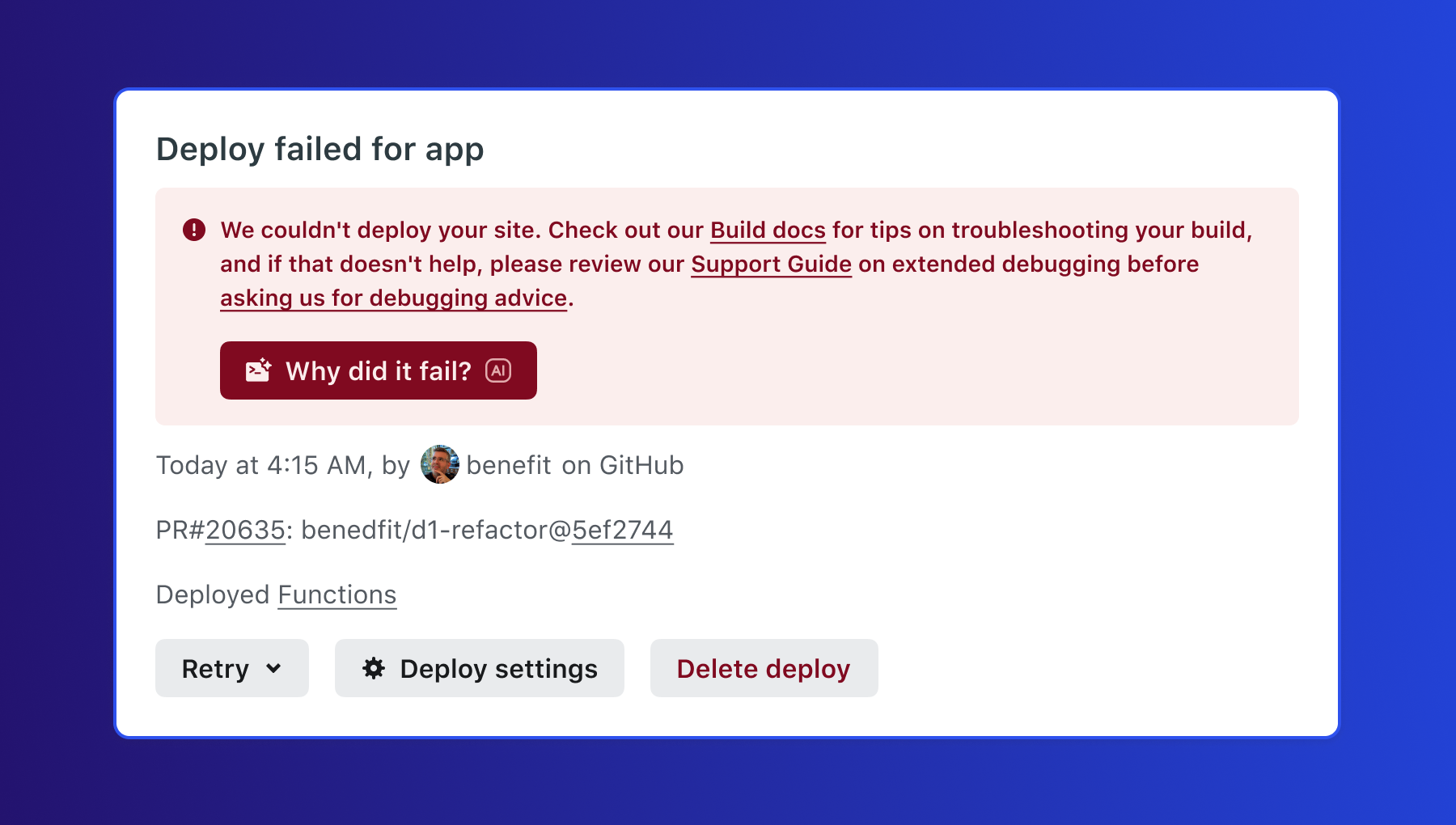
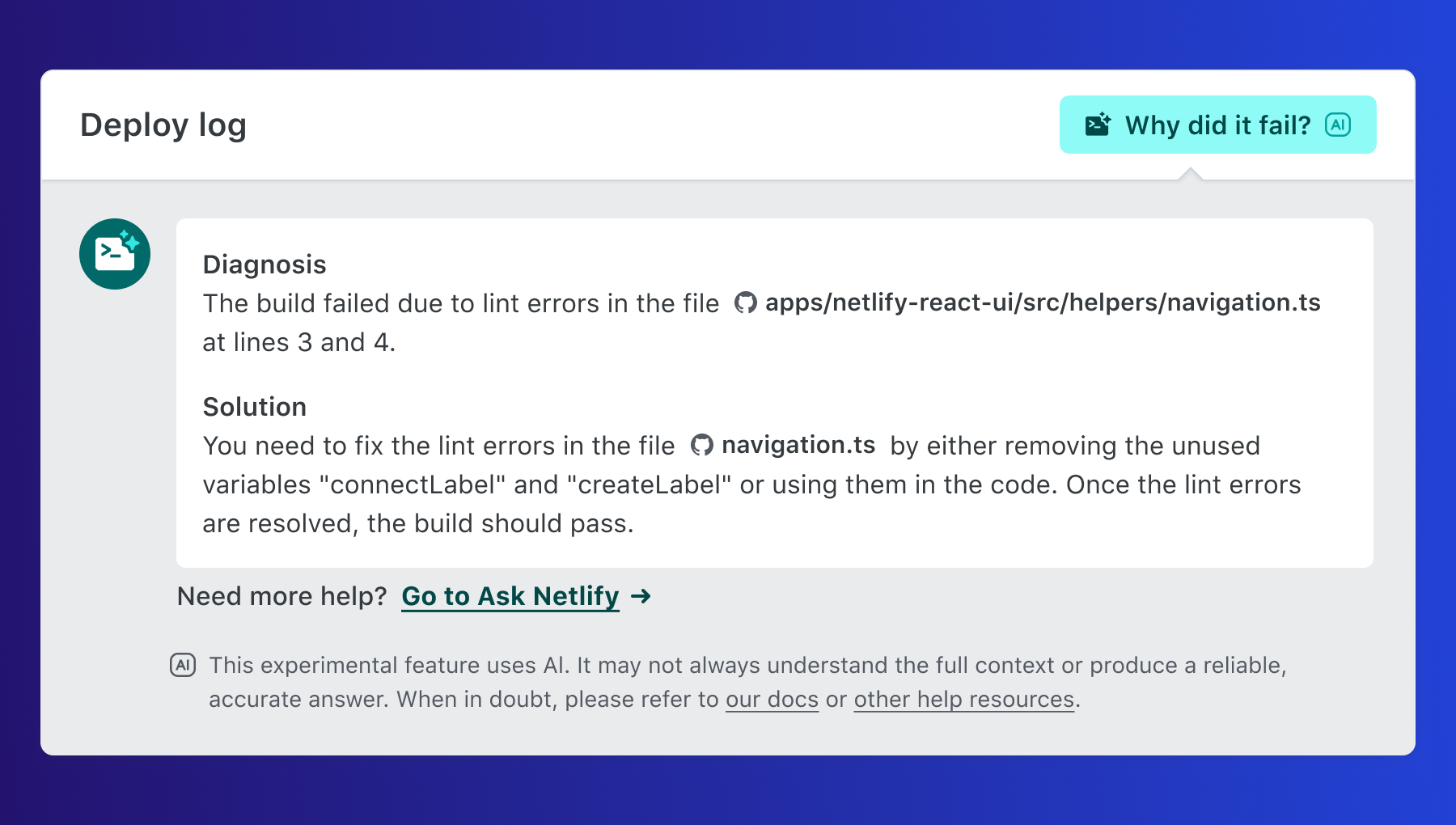
Pressing the button will generate a Diagnosis, or details on what caused the failure. Additionally, a Solution is provided based on the failure diagnosis—detailing next steps and suggested actions to quickly resolve the issue.
How to activate this feature on Netlify

Someone with the user role can enable deploy failure solution suggestions by:

  1. Going to Team settings > General > AI enablement
  2. Select Configure.
  3. Choose Enabled.

For a more detailed explanation, see our docs for complete details.

Is this feature available to me?

Yes! This feature is now available to all members of our Starter, Pro, and Enterprise platform plans.

Additional support and resources:

Visit Netlify Docs