


Monitoring your team activities is critical for effective management and operational oversight. To further simplify monitoring and save you time, we’re launching enhanced filtering capabilities for the team audit log, designed to significantly improve the monitoring and tracking of team activities on Netlify. These updates empower owners and developers with advanced filtering options, making it easier to find relevant log entries, identify significant events, and ensure compliance with organizational policies and regulations.
What is Team Audit log?
Audit logs are comprehensive records of actions performed by team members within your Netlify environment. They list detailed information about changes made, including the date of the change, the specific action taken, and the team member responsible. These logs are crucial for monitoring access permissions, troubleshooting issues, and keeping track of significant events such as Git contributor added, new members added, builds, deploys, and errors.
What’s changed?
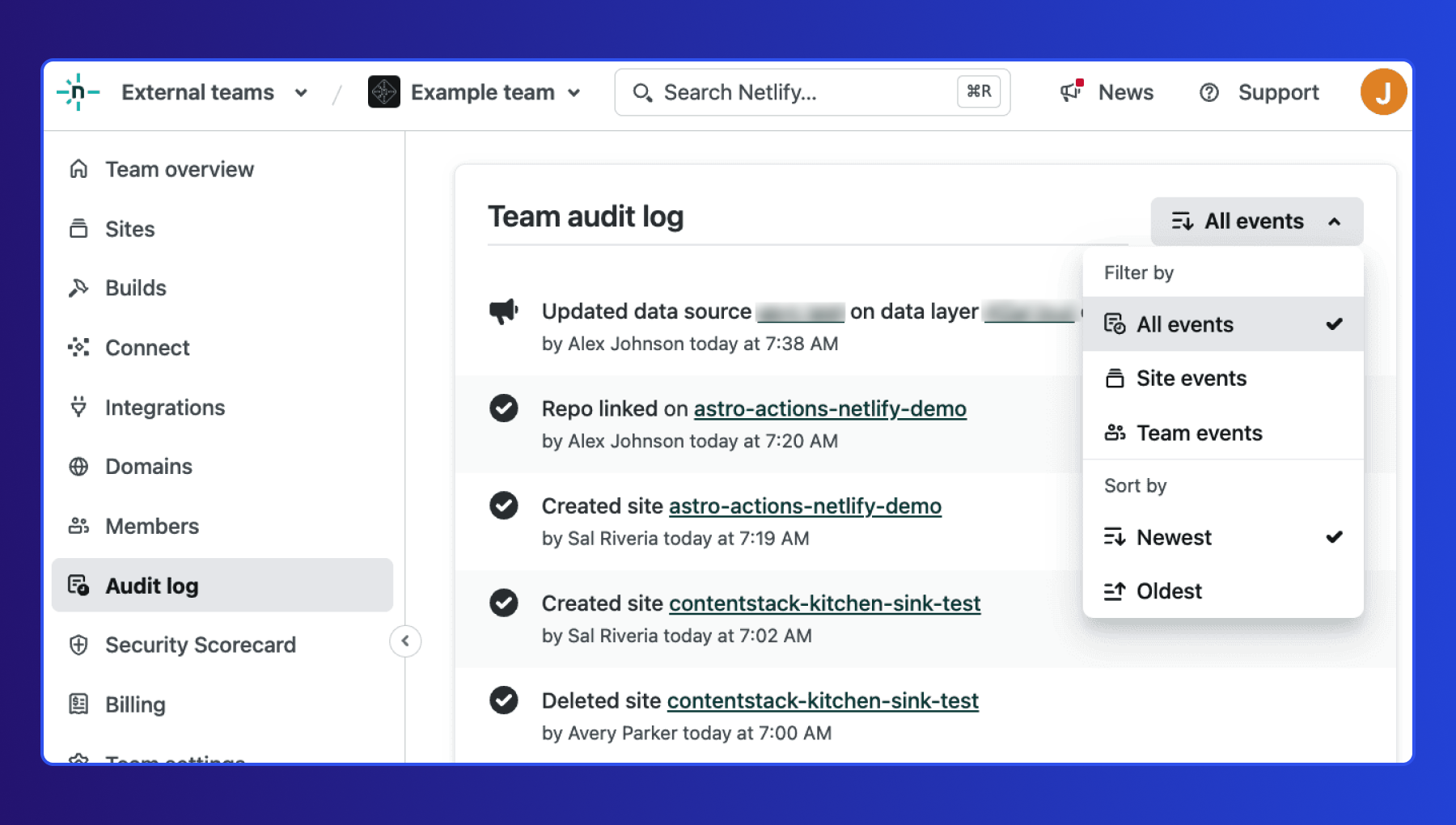
We’ve introduced new filtering options in the team audit logs to help you quickly identify and review relevant entries. You can now filter logs by:
- Team events: Changes that apply to the entire team, including team settings adjustments, Connect activities, and team membership changes.
- Site events: Changes specific to an individual site, such as updates to site settings, configuration changes, and integration updates.
Additionally, you can sort team audit log events by the oldest and newest to streamline your search process further. Here is a quick demo to walk you through the changes.
Benefits and use cases
The new team audit log empowers the owners and developers with improved filtering options. Now, they can easily sift through logs and pinpoint the ones that matter most to them. This enhancement streamlines the auditing process, allowing users to efficiently identify relevant activities, monitor changes, flag anomalies, and maintain compliance with organizational protocols and regulations.
Here are some use cases for each persona:
Owners
Owners can use the audit log to track changes made by all team members. This includes creating sites, triggering builds, modifying billing information, adding or removing members, modifying member roles, and more.
Check out a couple of examples of what we mean:
**1. Manage members:** Keep an eye on who is being added or removed from the team and their assigned roles. This ensures that only authorized personnel have access to critical resources.
**2. Tracking team changes:** Monitor the creation of new sites, build triggers, and billing information modifications. This helps ensure that all actions align with organizational goals and policies. Tracking changes becomes even more important for open-source organizations that allow anyone to contribute to the code base.
Developers
As a developer, you focus on building and maintaining the technical aspects of sites, managing site deploys and configuration. The audit log is essential for collaboration and accountability.
Here’s an example of what we mean:
**Troubleshooting and error handling:** Review your actions and those of your peers, including site creation and build triggers. This helps maintain a clear record of development activities and facilitates troubleshooting when issues arise.
Is this feature available to me?
The enhanced audit log filtering feature is available to owners and developers on paid plans. However, the extent of audit log history accessible depends on your plan:
Pro Plan: Access to 7 days of audit log history. Higher Plans: Access to full audit log history.
Resources
Please refer to our documentation for more detailed information on how to use the new filtering options and make the most of your audit logs.