
惯性聚合 高效追踪和阅读你感兴趣的博客、新闻、科技资讯
阅读原文 在惯性聚合中打开

推荐订阅源

Blog — PlanetScale
Blog — PlanetScale
博客园 - 司徒正美
Vercel News
Vercel News
F
Fortinet All Blogs
月光博客
月光博客
G
Google Developers Blog
博客园 - Franky
GbyAI
GbyAI
The Cloudflare Blog
I
InfoQ
雷峰网
雷峰网
WordPress大学
WordPress大学
罗磊的独立博客
大猫的无限游戏
大猫的无限游戏
T
The Blog of Author Tim Ferriss
Apple Machine Learning Research
博客园 - 聂微东
小众软件
小众软件
腾讯CDC
B
Blog
量子位
V
V2EX
S
SegmentFault 最新的问题
Google DeepMind News

Netlify Changelog

Gemini 3.5 Flash now available in Agent Runners 4 Nuxt CVEs: what Netlify users need to know Gemini 3.5 Flash now available in AI Gateway Agent Runners workflow improvements Next.js & React security release (May 2026): what to know Block project transfers out of your team Gemini 3.1 Flash-Lite now available in AI Gateway OpenAI GPT-5.5 Instant now available in AI Gateway Deploy to Netlify with Stripe Projects Netlify Database is now generally available OpenAI GPT-5.5 and GPT-5.5 Pro in AI Gateway & Agent Runners Rename an agent run GPT Image 2 now available in AI Gateway New frontend-design skill for Agent Runners Claude Opus 4.7 now available in AI Gateway and Agent Runners Pricing updates for Credit-based plans New sorting and filter controls on the Members page Netlify Database GA coming soon, no new databases for now Deploy logs streaming is now faster Netlify CLI adds prompt-based creation and anonymous deploys Deploy from Codex with the Netlify Plugin Hydrogen with React Router 7 now supported on Netlify Monitor credit usage by day Invoices for Enterprise Available on the Billing Page AI app development on production infrastructure with Netlify Introducing Prompt Templates OpenAI GPT-5.4 Nano and GPT-5.4 Mini in AI Gateway Change your pricing plan Internal Builder Role & Project Access Controls See your available credits at a glance
New `netlify logs` CLI command
2026-05-01 · via Netlify Changelog

The Netlify CLI now includes a netlify logs command, giving you a powerful and flexible way to access logs for your projects whether you’re a developer debugging locally or an AI agent processing structured output.

Filter by source

Use --source to pull logs from functions, edge functions, deploys, or any combination of them together. Color-coded output makes it easy to tell sources apart at a glance when you’re tailing multiple at once.
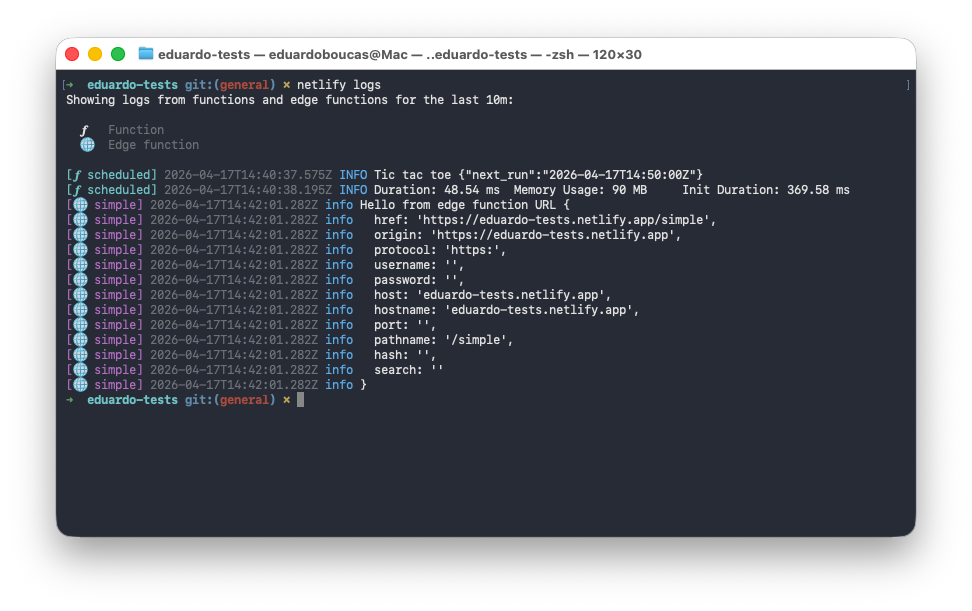
netlify logs CLI showing colour-coded output from functions and edge functions

Need to narrow it down further? The --function and --edge-function flags let you filter to a specific function by name, and --url lets you target the exact deploy you want logs from.

Historical and real-time views

The --since and --until flags let you query logs over any specific time window — useful for tracking down what happened during a past deploy or incident. When you want to watch logs as they come in, --follow streams them in real time.

JSON Lines support

Pass --json to get structured output in JSON Lines format. This works in both historical and real-time modes, making netlify logs easy to pipe into your own tooling or integrate into automated workflows.
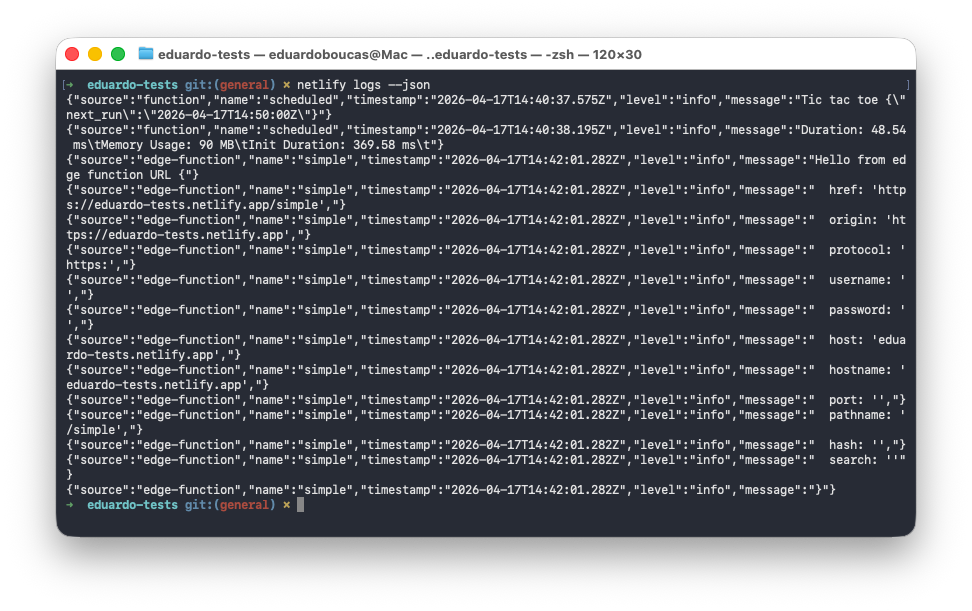
netlify logs CLI with --json flag showing JSON Lines output

Update to the latest Netlify CLI to start using it:

npm install -g netlify-cli@latest

Then run netlify logs --help to see all available options.