





Contents
中文版:电子邮件防伪:SPF, DKIM与DMARC – Frank’s Weblog
If your employer uses Knowbe4 for information security training, you probably have received emails like this:
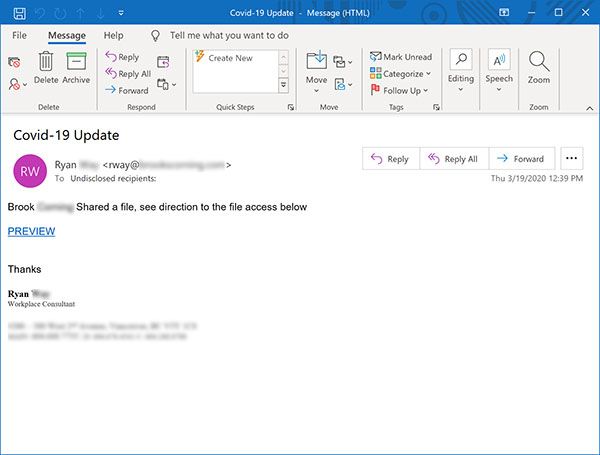
When you click on the link
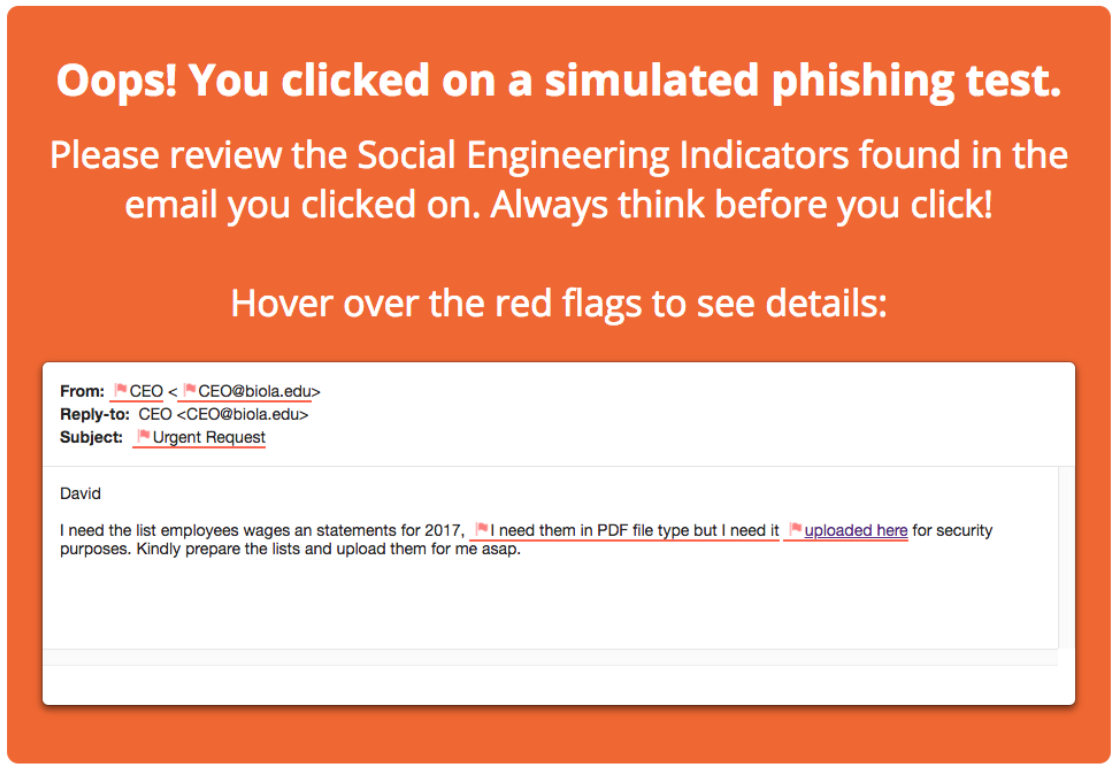
Fortunately this is a simulated phishing email from Knowbe4, you and your employer’s information will not be stolen.
Take the domain biola.edu in the screenshot as an example, some phishing emails are simple, they use domains similar to the real domain, such as bio1a.edu, while others are more subtle, such as the email in the picture above, where the sender field does show that it is from biola.edu, so why do phishing emails show the same address as the real ones, while not authorized by the domain owner?
The answer to this question already did a good job explaining it.
There are two different concepts of “envelope” and “letterhead” in ordinary mail: the information on the envelope is for the letter carrier, containing the basic addressing information of where the mail is coming from and where it is going; while the information on the letterhead is for the recipient, with some additional information labeled in it. You’ve probably noticed that when writing a formal letter, the beginning of the letterhead also contains specific information about the sender and recipient…
The most important thing to remember here is that the information about the sender and recipient on the letterhead and the information about the sender and recipient on the envelope can be completely unrelated, because the carrier won’t see the address information on the letterhead when he delivers the mail, but decides how to deliver the mail based solely on the information on the envelope…
Email has a similar concept of “envelope” and “letterhead”, and the worst part is that, unlike regular mail, the “envelope” of an email is usually invisible to the user, and is only visible to the servers throughout the route. All the user sees is the recipient’s address on the letterhead displayed by the email client. This design mistake is the main reason why various email “phishing” scams are used to defraud users’ information: malicious phishing email senders will write the sender of the letterhead as a familiar or trusted organization or individual, and then put malicious attachments in the email for you to click on.
How to explain the DMARC protocol in layman’s terms to the general public? – Zhihu
To solve this problem, three Internet standards, SPF, DKIM and DMARC, were created. If you have used AWS SES, Sendgrid and other email hosting services, when you add your domain name to these services, in addition to the MX records used for email, these services will also require the additional records such as SPF and DKIM to ensure that outgoing emails can be delivered successfully.
Sender Policy Framework (SPF) is an email validation mechanism designed to prevent email spoofing. It allows administrators of domains to publish an SPF record in the DNS, specifying which mail servers are authorized to send emails using their domain. Recipient servers can query the SPF record of the domain in the Return-Path header(AKA. envelop sender) to verify whether an incoming email is sent from an authorized server.
Return-Path is a special header field used to specify the email address that bounce messages are sent to. Different from the From field, Return-Path field is usually added by the sender server, instead of specified by the sender.
SPF record is a TXT record,Let’s try dig the domain name of this site, the second one in the response is the SPF record.
$ dig +short txt nyan.im
"google-site-verification=2wX_1AQnUlrh9IGcRpZ81X_bEFX3r1iJVdjbFZSFOD4"
"v=spf1 include:spf.messagingengine.com ?all"
The SPF record lists the IP addresses that are allowed to use the domain name to send emails. The mail server that receives the email can check against the SPF record to see if the originating server is located within the IP CIDR in the record, and then deliver it to the recipient’s inbox after it passes the check. For example, the following spf record allows emails from 192.0.2.0/24.
"v=spf1 ip4:192.0.2.0/24 a -all"Of course, nowadays individuals and organizations rarely host their own mail servers, and most of them use third-party email services, such as AWS SES. when using such services, we have no way of knowing what IP the service provider is using. In this case, you can use include to delegate the SPF check to the domain name of the service provider. For example, the following record delegates the SPF check to amazonses.com.
"v=spf1 include:amazonses.com ~all"There will also be an SPF record for amazonses.com, we can dig txt amazonses.com to get the SPF record for amazonses.com as follows:
amazonses.com. 345 IN TXT "v=spf1 ip4:199.255.192.0/22 ip4:199.127.232.0/22 ip4:54.240.0.0/18 ip4:69.169.224.0/20 ip4:23.249.208.0/20 ip4:23.251.224.0/19 ip4:76.223.176.0/20 ip4:52.82.172.0/22 ip4:54.240.64.0/19 ip4:54.240.96.0/19 ip4:76.223.128.0/19 ip4:216.221.160.0/19 -all"The recipient server will verify SPF record of amazonses.com, and if SPF check for amazonses.com passes, then this check passes as well.
DomainKeys Identified Mail (DKIM) is an email authentication method designed to detect email spoofing. It achieves this by adding a signature to each outgoing email. The recipient server can verify the signature by looking up the sender’s public key published in the DNS. A valid signature also guarantees that some parts of the email (possibly including attachments) have not been modified.
DKIM is another application of asymmetric encryption. The sender of the email possess a key pair, the private key is held only by the sender, and the public key is available for the public to query via DNS records. For each outgoing email, the body of the email and specific header fields are signed using the private key, and the signature is attached to the email header. The recipient verifies the signature with the public key to ensure that the email is from the real sender and that the email has not been tampered.
The header of each email contains the DKIM signature of the email, you can view it by exporting the message to EML format and open it with a text editor. Here is an example of a DKIM signature.
DKIM-Signature: v=1; a=rsa-sha256; c=relaxed/relaxed; d=nyan.im; h=cc
	:content-type:content-type:date:date:from:from:in-reply-to
	:message-id:mime-version:reply-to:subject:subject:to:to; s=fm3;
	 t=1705722369; x=1705808769; bh=ULqA9++UbPZqGI33Fvdg+Ogy/g+TdMiA
	er5LoQ8Dh8Y=; b=f/C5iY9E+ooeU6kRwLNh+h3U1/TJPv6UObQIc2CE3gduXnEX
	nX0MjHnpkMB1BdVnTwPeAPmixCXEqJ56//WgyM39JOkgMMy4E1csAIlDL0SZ+TjM
	0fHHPUIIZh1s/5GNFqbFxBK1qf6JQ7oJ489awlRPZ5rjm6swFLmWzDXUWE4La15D
	i+3w8BECGCTwHuiO3bgDjP32z6COCglPoj7ApwAOahwpMqOga52/HW9udQxYCB5k
	WiM1TGTbP6c6sdj6R4ivYYkMp1uEPjiwNCvvkobhrAP4EVBxbxCsYcbHYLd5/THn
	cxZtJ8zYp02ZO37RY9NMHhQlGOX8Uxh2HvSztw==
Here are the explanation for the header fields:
v=1: Version
a=rsa-sha256: Hashing and signature algorithm
c=relaxed/relaxed: The canonicalization method of the message. The value can be simple or relaxed。See RFC6376 Section 3.4
d=nyan.im: The top level domain for querying DKIM record
h=cc :content-type:content-type:date:date:from:from:in-reply-to :message-id:mime-version:reply-to:subject:subject:to:to: The header fields need to be signed
s=fm3: The sub domain for querying DKIM record. For example, if s=fm3,d=nyan.im, the full domain for querying the DKIM record from will be fm3._domainkey.nyan.im
t=1705722369: Signature timestamp
x=1705808769: Expiration timestamp
bh=ULqA9++UbPZqGI33Fvdg+Ogy/g+TdMiA er5LoQ8Dh8Y=: Body hash, the colonized and hashed email body
b=f/C5iY9E+ooeU6kRwLNh+h3U1/TJPv6UObQIc2CE3gduXnEX nX0MjHnpkMB1BdVnTwPeAPmixCXEqJ56//WgyM39JOkgMMy4E1csAIlDL0SZ+TjM 0fHHPUIIZh1s/5GNFqbFxBK1qf6JQ7oJ489awlRPZ5rjm6swFLmWzDXUWE4La15D i+3w8BECGCTwHuiO3bgDjP32z6COCglPoj7ApwAOahwpMqOga52/HW9udQxYCB5k WiM1TGTbP6c6sdj6R4ivYYkMp1uEPjiwNCvvkobhrAP4EVBxbxCsYcbHYLd5/THn cxZtJ8zYp02ZO37RY9NMHhQlGOX8Uxh2HvSztw==: The base64 encoded signature
Similar to SPF, the DKIM record is a TXT record that the domain owner needs to add to the DNS record that contains information such as the public key for the recipient to receive and verify. If you use an email hosting service, this record may be a CNAME and the actual DKIM record is managed by the service provider.
$ dig +short txt fm3._domainkey.nyan.im
fm3.nyan.im.dkim.fmhosted.com.
"v=DKIM1; k=rsa; p=MIIBIjANBgkqhkiG9w0BAQEFAAOCAQ8AMIIBCgKCAQEA60xfhfS80aBeqoHdFRHrYLXyAYn8xpApRdHMJaGw5qArkkLaisxvbmQ9+XCWUXIJ6YYW7GCIfn2rKhSMy1yOob59SpPX9YnnSx4Z28TBxKWD4hHtxIjplmvuHJlk/6nnI7aduhhj7Zc63to1OiGKApZrg45QVc1aZJHZWfQGQ9S4OeDX1g5Rq4FZH1qNNtbws" "G/k2yySDb7Db5cS4kXP1udNdVylg9uzO52KHE5cu6GttJhZVTPgt9b/jmtEUFNnG7gxhRgoZiFqrC5sWyS3IAE+dWIZvRxSdSYJLQVZMYN4oQ51nkHo7odfDKSO3FtnmL3Tn5S+HUvkmWwghowhawIDAQAB"
Here are the explanation for the fields:
v: Version
k: Type of the crypto, by default is RSA
p: Text of the public key
When the recipient receives an email with this signature, it will be verified by the following steps:
bh in the DKIM header.h and sign it with the public key in the DKIM recordIf you want to try verifying the DKIM by hand, see: https://github.com/kmille/dkim-verify
Domain-based Message Authentication, Reporting, and Conformance(DMARC) is an email-validation system designed to protect domain names from being used in email spoofing. DMARC is built on top of two existing email authentication mechanisms: SPF and DKIM. These two techniques are used to verify that outgoing emails are authorized by the domain owner.
By adding DMARC record in the DNS records, the owner of the domain can specify the DMARC policy to let recipient server know what to do with the emails that failed SPF or DKIM verification. The policy can be:
none: Take no actionquarantine: Label the email as spamreject: Reject the emailFurthermore, domain owners can also configure DMARC records to receive aggregate reports sent by email recipients. This is for senders to understand the status of emails sent using their domain and unauthorized usage, helping domain owners understand and optimize their email sending strategy.
Following is the DMARC policy of this site:
$ dig +short txt _dmarc.nyan.im
"v=DMARC1; p=none; rua=mailto:[email protected]"
v stands for version; p is the policy, specifying how to handle emails that fail SPF or DKIM verification. none is chosen here, meaning no action is taken. rua specifies the email address to receive reports.
The DMARC validation by the email recipient server includes querying the sender domain’s DMARC record, then validate and process the received emails based on the policy defined in the record. This process generally follows these steps:
_dmarc.<domain.tld>.When SPF and DKIM are used individually, attackers can still exploit the following vulnerabilities: SPF only checks the envelope sender (Return-Path) and does not check the From address in the email header. This means an attacker could forge the From address in the header to bypass the SPF check; DKIM requires the sender to sign the email, however, DKIM allows the signature to be signed using any domain, and attackers could use their own domain to sign the email. This signing technique itself cannot guarantee the authenticity of the From address in the email header.
In DMARC, alignment refers to the requirement for consistency in the sender domain name during the validation process in SPF and DKIM verifications, ensuring that the email’s sender domain matches the domain used for SPF validation and the domain used for DKIM signing.
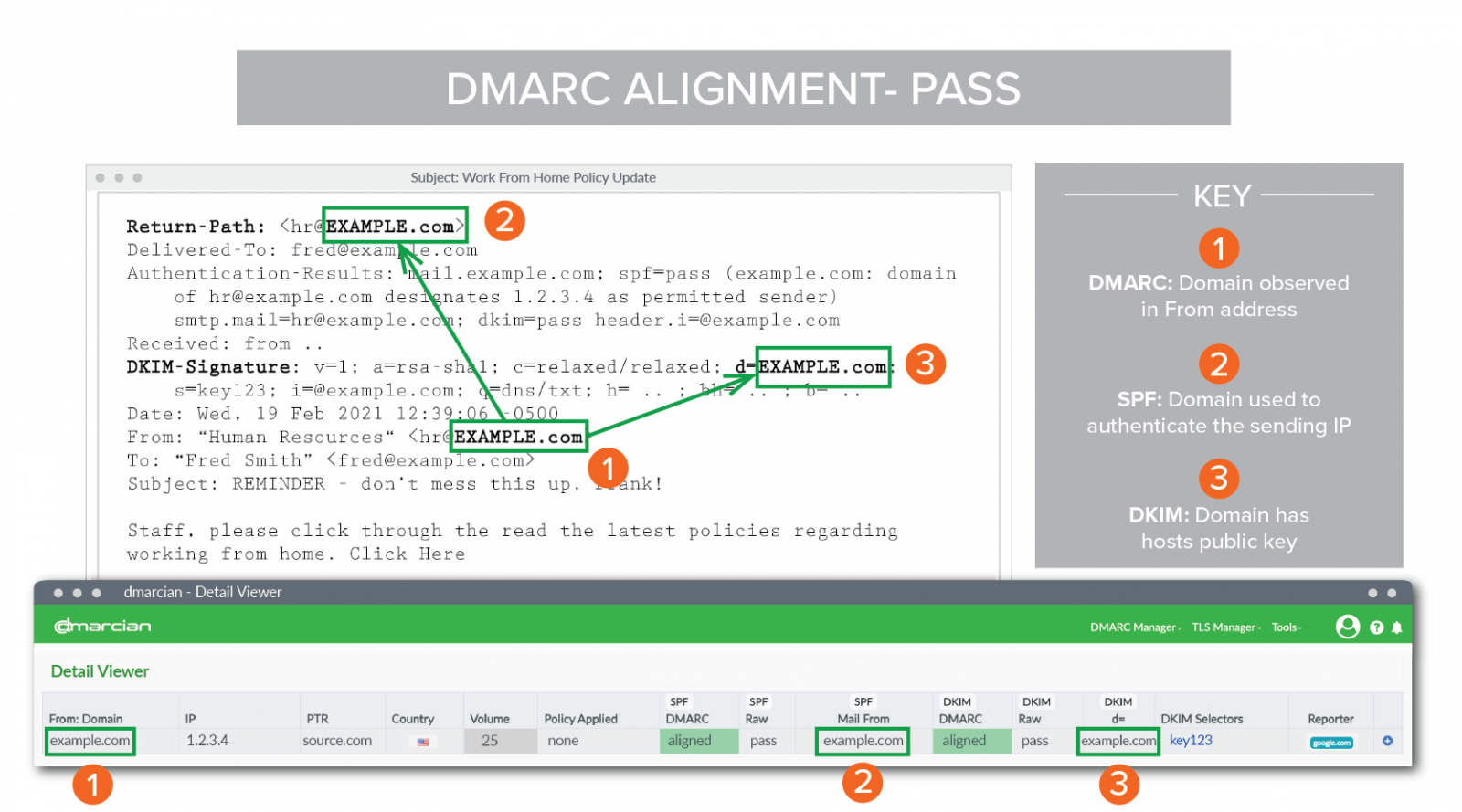
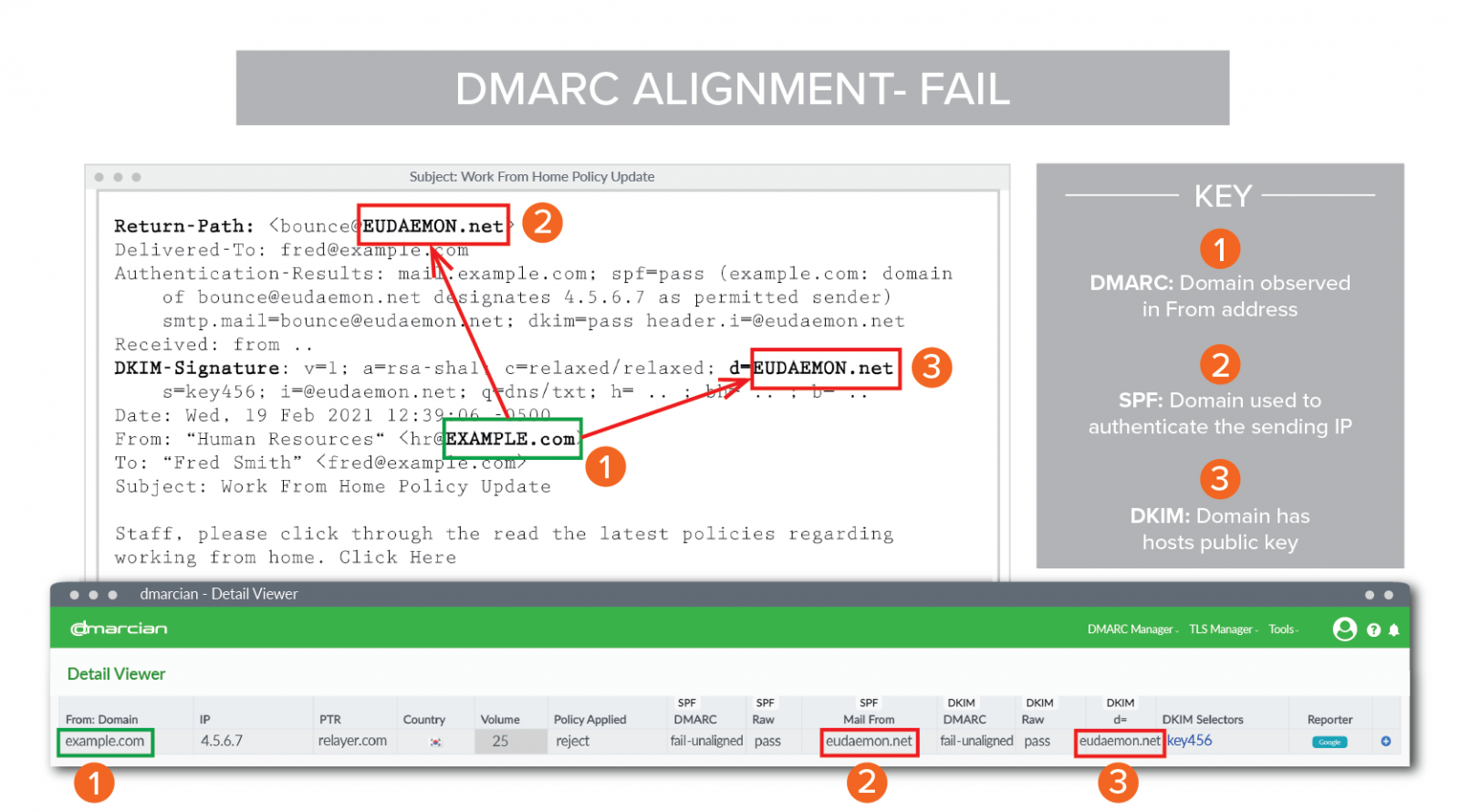
There are two types of alignment in DMARC, it can be configured with aspf(SPF) or adkim (DKIM) in DMARC policy.
Relaxed
In relaxed mode, SPF requires that the domain of the Return-Path (or envelope sender domain) must have the domain as in the “From” header, while a subdomain of that domain will still pass. For example, if the domain in the “From” header is example.com, then a domain like sub.example.com in the Return-Path would also pass the relaxed mode validation. For DKIM, similar rules apply to the “d=” domain (i.e., the signing domain) in the DKIM signature.
Strict
In strict mode, SPF and DKIM validations have stricter requirements. SPF validation mandates that the Return-Path domain must match the domain in the “From” header exactly. Similarly, the “d=” domain in DKIM must also precisely match the domain in the “From” header.
If a report address is specified in the DMARC record, the recipient server will periodically send DMARC reports to that email address. These reports provide information about the compliance of emails, assisting senders in analyzing and improving their email delivery strategies.
Here is an example report file: https://gist.github.com/frankgx97/3388177b973e298cf81d7f10bbd3ccbb
These reports are usually in XML format, and there are websites (DMARC Report Analyzer – DMARC Email XML Parser – MxToolbox) that can provide analysis or visualization of the reports.

[1] DomainKeys Identified Mail – Wikipedia
[2] Sender Policy Framework – Wikipedia
[3] https://www.rfc-editor.org/rfc/rfc6376.txt
此内容由惯性聚合(RSS阅读器)自动聚合整理,仅供阅读参考。 原文来自 — 版权归原作者所有。