









This post was updated 406 days ago and some of the ideas may be out of date.
使用 node.offsetWidth 方法可以获取到元素的宽度,类似的方法如下:
offsetHeightoffsetTopoffsetBottmoffsetLeftoffsetRight我们通过offset方法获取的数值会以四舍五入方式取整,然而在我们开发的时候,有些地方需要精准的数值,这时候,用offset方法就不太可行。
通过 getBoundingClientRect() 方法就能获取到元素的精确数值 (精确到小数点后6位) 。
如 node.getBoundingClientRect().width 就可以获取到元素的宽度,类似的方法如下:
getBoundingClientRect().heightgetBoundingClientRect().topgetBoundingClientRect().bottomgetBoundingClientRect().leftgetBoundingClientRect().right精确到两位:getBoundingClientRect().height.toFixed(2)
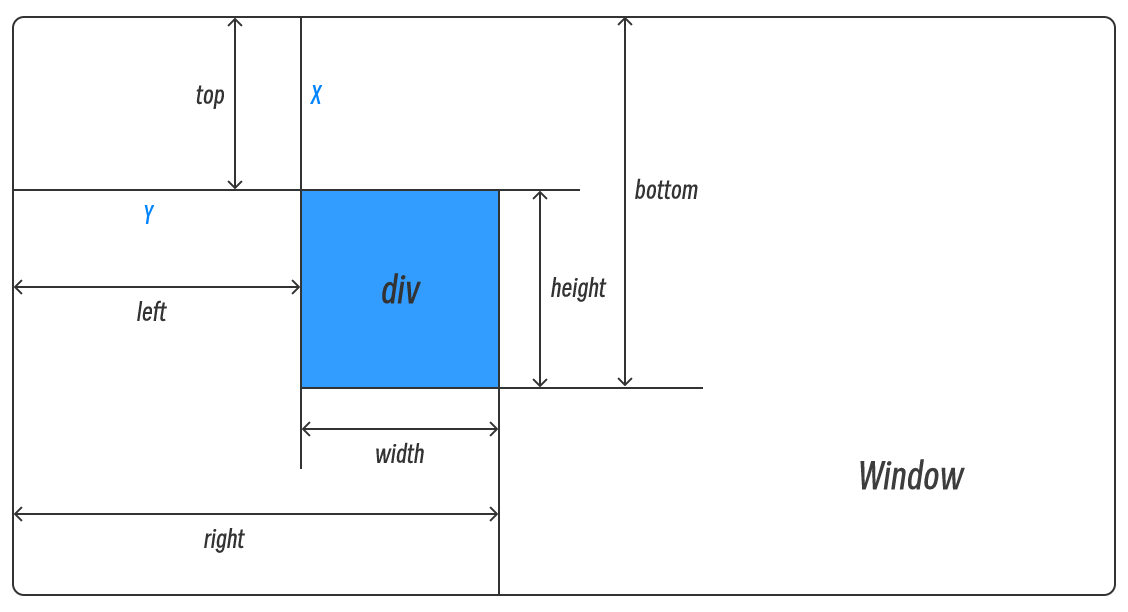
getBoundingClientRect() 返回的是矩形的集合。表示当前元素在浏览器中的位置以及占用的空间大小,除 width 和 height 外,其他属性是相对于视图窗口的左上角进行计算,如下图:
此内容由惯性聚合(RSS阅读器)自动聚合整理,仅供阅读参考。 原文来自 — 版权归原作者所有。