


一个是mcp的服务描述,一个是头提供那些方法,还有一个调用的能力
go
switch method {
case "initialize":
    sendResponse(id, ...)  // ✅ 必须响应

case "tools/list":
    sendResponse(id, ...)  // ✅ 必须响应

case "tools/call":
    sendResponse(id, ...)  // ✅ 有工具时必需

default:
    // 对于 notifications/initialized 或其他未知方法
    // 什么都不做即可,不需要报错
    // 因为通知本来就不期待响应
}json
{
  "jsonrpc": "2.0",
  "id": 1,
  "method": "initialize",
  "params": {
    "protocolVersion": "0.1.0",
    "capabilities": {},
    "clientInfo": {
      "name": "Claude Desktop",
      "version": "1.0.0"
    }
  }
}
字段说明
| 字段 | 类型 | 必填 | 说明 |
|---|---|---|---|
jsonrpc | string | ✅ | 固定为 "2.0",表示使用 JSON-RPC 2.0 协议 |
id | number/string | ✅ | 请求唯一标识,响应时必须原样返回,用于匹配请求和响应 |
method | string | ✅ | 固定为 "initialize",表示这是一个初始化请求 |
params | object | ✅ | 初始化参数对象 |
params.protocolVersion | string | ✅ | 客户端支持的 MCP 协议版本号,目前为 "0.1.0" |
params.capabilities | object | ✅ | 客户端支持的能力列表(如工具、资源、提示等),空对象表示不支持任何扩展能力 |
params.clientInfo | object | ✅ | 客户端信息 |
params.clientInfo.name | string | ✅ | 客户端名称,如 "Claude Desktop"、"Zed" 等 |
params.clientInfo.version | string | ✅ | 客户端版本号 |
initialize 响应(必须按格式)
json
{
  "jsonrpc": "2.0",
  "id": 1,
  "result": {
    "protocolVersion": "0.1.0",
    "capabilities": {
      "tools": {}
    },
    "serverInfo": {
      "name": "my-server",
      "version": "1.0.0"
    }
  }
}| 字段 | 类型 | 必填 | 说明 |
|---|---|---|---|
jsonrpc | string | ✅ | 固定为 "2.0" |
id | number/string | ✅ | 与请求中的 id 值相同,用于匹配 |
result | object | ✅ | 响应结果对象(成功时返回) |
result.protocolVersion | string | ✅ | 服务器选择的协议版本,通常与客户端请求版本一致 |
result.capabilities | object | ✅ | 服务器支持的能力列表 |
result.capabilities.tools | object | ❌ | 如果支持工具功能,此字段存在;空对象 {} 表示支持但暂无特殊配置 |
result.serverInfo | object | ✅ | 服务器信息 |
result.serverInfo.name | string | ✅ | 服务器名称,用于标识这个 MCP 服务 |
result.serverInfo.version | string | ✅ | 服务器版本号 |
json
{
  "jsonrpc": "2.0",
  "id": 2,
  "method": "tools/list"
}
字段说明
| 字段 | 类型 | 必填 | 说明 |
|---|---|---|---|
jsonrpc | string | ✅ | 固定为 "2.0" |
id | number/string | ✅ | 请求唯一标识,响应时必须原样返回 |
method | string | ✅ | 固定为 "tools/list",表示请求获取工具列表 |
注意:tools/list 请求没有 params 字段,因为获取工具列表不需要额外参数。
tools/list 响应(必须按格式)
json
{
  "jsonrpc": "2.0",
  "id": 2,
  "result": {
    "tools": [
      {
        "name": "say_hello",
        "description": "打招呼用",
        "inputSchema": {
          "type": "object",
          "properties": {}
        }
      }
    ]
  }
}
字段说明
| 字段 | 类型 | 必填 | 说明 |
|---|---|---|---|
jsonrpc | string | ✅ | 固定为 "2.0" |
id | number/string | ✅ | 与请求中的 id 值相同 |
result | object | ✅ | 响应结果对象 |
result.tools | array | ✅ | 工具列表数组,可以为空数组 [] |
result.tools[0] | object | ✅ | 单个工具对象 |
result.tools[0].name | string | ✅ | 工具名称,用于后续 tools/call 调用时识别 |
result.tools[0].description | string | ✅ | 工具描述,Claude 根据此描述判断何时调用该工具 |
result.tools[0].inputSchema | object | ✅ | 工具参数的 JSON Schema 定义 |
inputSchema.type | string | ✅ | 固定为 "object",表示参数是一个对象 |
inputSchema.properties | object | ❌ | 参数属性定义,每个属性描述一个参数 |
inputSchema.required | array | ❌ | 必填参数名称列表 |
json
{
  "jsonrpc": "2.0",
  "id": 123,
  "method": "tools/call",
  "params": {
    "name": "to_upper",
    "arguments": {
      "text": "hello world"
    }
  }
}| 字段 | 类型 | 必填 | 说明 |
|---|---|---|---|
jsonrpc | string | ✅ | 固定为 "2.0" |
id | number/string | ✅ | 请求ID,响应时必须原样返回 |
method | string | ✅ | 固定为 "tools/call" |
params | object | ✅ | 参数对象 |
params.name | string | ✅ | 要调用的工具名称 |
params.arguments | object | ❌ | 工具参数(根据工具的 inputSchema 定义) |
json
{
  "jsonrpc": "2.0",
  "id": 123,
  "result": {
    "content": [
      {
        "type": "text",
        "text": "HELLO WORLD"
      }
    ],
    "isError": false
  }
}| 字段 | 类型 | 必填 | 说明 |
|---|---|---|---|
jsonrpc | string | ✅ | 固定为 "2.0" |
id | number/string | ✅ | 与请求的 id 相同 |
result | object | ✅ | 结果对象 |
result.content | array | ✅ | 内容数组,至少一个元素 |
result.content[].type | string | ✅ | 内容类型:"text", "image", "resource" |
result.content[].text | string | 条件 | type为"text"时必填 |
result.isError | boolean | ❌ | 是否错误,默认 false |
json
{
  "jsonrpc": "2.0",
  "id": 123,
  "error": {
    "code": -32601,
    "message": "Tool not found: unknown_tool"
  }
}go
// toupper_mcp.go
package main

import (
	"bufio"
	"encoding/json"
	"fmt"
	"os"
	"strings"
)

func main() {
	scanner := bufio.NewScanner(os.Stdin)

	for scanner.Scan() {
		line := scanner.Text()
		if line == "" {
			continue
		}

		var req map[string]interface{}
		if err := json.Unmarshal([]byte(line), &req); err != nil {
			fmt.Fprintf(os.Stderr, "解析错误: %v\n", err)
			continue
		}

		id, _ := req["id"].(float64)
		method, _ := req["method"].(string)

		switch method {
		case "initialize":
			sendResponse(id, map[string]interface{}{
				"protocolVersion": "2025-03-26",
				"capabilities": map[string]interface{}{
					"tools": map[string]interface{}{}, // 声明支持 tools 能力
				},
				"serverInfo": map[string]string{
					"name":    "toupper-mcp",
					"version": "1.0.0",
				},
			})

		case "tools/list":
			sendResponse(id, map[string]interface{}{
				"tools": []map[string]interface{}{
					{
						"name":        "to_upper",
						"description": "将输入的文本转换为大写",
						"inputSchema": map[string]interface{}{
							"type": "object",
							"properties": map[string]interface{}{
								"text": map[string]string{
									"type":        "string",
									"description": "要转换的文本",
								},
							},
							"required": []string{"text"},
						},
					},
				},
			})

		case "tools/call":
			// 解析工具名称和参数
			params, ok := req["params"].(map[string]interface{})
			if !ok {
				sendError(id, -32602, "Invalid params")
				continue
			}

			toolName, _ := params["name"].(string)
			arguments, _ := params["arguments"].(map[string]interface{})

			if toolName == "to_upper" {
				text, _ := arguments["text"].(string)
				result := strings.ToUpper(text)

				sendResponse(id, map[string]interface{}{
					"content": []map[string]string{
						{
							"type": "text",
							"text": result,
						},
					},
				})
			} else {
				sendError(id, -32601, "Tool not found: "+toolName)
			}

		default:
			// notifications/initialized 或其他方法,忽略即可
			continue
		}
	}
}

func sendResponse(id float64, result interface{}) {
	resp := map[string]interface{}{
		"jsonrpc": "2.0",
		"id":      id,
		"result":  result,
	}
	data, _ := json.Marshal(resp)
	fmt.Println(string(data))
}

func sendError(id float64, code int, message string) {
	resp := map[string]interface{}{
		"jsonrpc": "2.0",
		"id":      id,
		"error": map[string]interface{}{
			"code":    code,
			"message": message,
		},
	}
	data, _ := json.Marshal(resp)
	fmt.Println(string(data))
}启动服务 输入下面的入参 查看结果
shell
{"jsonrpc":"2.0","id":1,"method":"initialize","params":{}}

{"jsonrpc":"2.0","id":1,"method":"tools/list","params":{}}

{"jsonrpc":"2.0","id":1,"method":"tools/call","params":{"name":"to_upper","arguments":{"text":"hello"}}}shell
go build -o toupper_mcp.exe toupper_mcp.go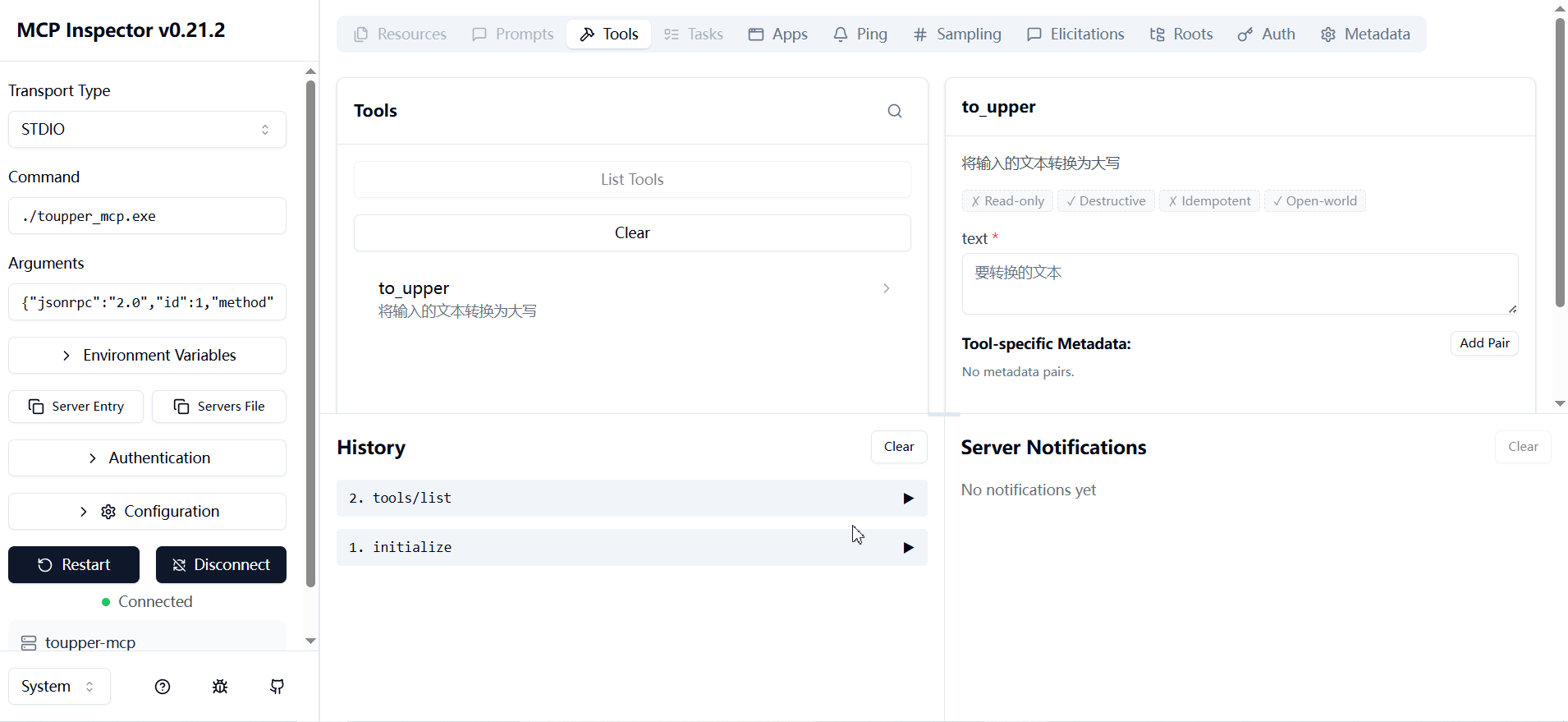 这是 MCP 官方提供的可视化调试工具,不需要任何 AI 客户端就能测试你的服务
shell
# 一行命令启动
npx @modelcontextprotocol/inspector your-mcp-server

# 如果是 Go 编译的
npx @modelcontextprotocol/inspector ./your-mcp-server

# 如果是 Python 脚本
npx @modelcontextprotocol/inspector python your_mcp_server.py


# 你也可以用命令行参数直接指定 URL,让 Inspector 启动时自动连接
npx @modelcontextprotocol/inspector --url https://your-server.com/mcp
实际
shell
npx @modelcontextprotocol/inspector -- ./toupper_mcp.exe

npx @modelcontextprotocol/inspector -- "E:\go_ws\demo\toupper_mcp.exe"
启动后浏览器会自动打开 http://127.0.0.1:6274,你可以:
点击 List Tools 查看所有工具
点击具体工具,填写参数,Run Tool 直接测试
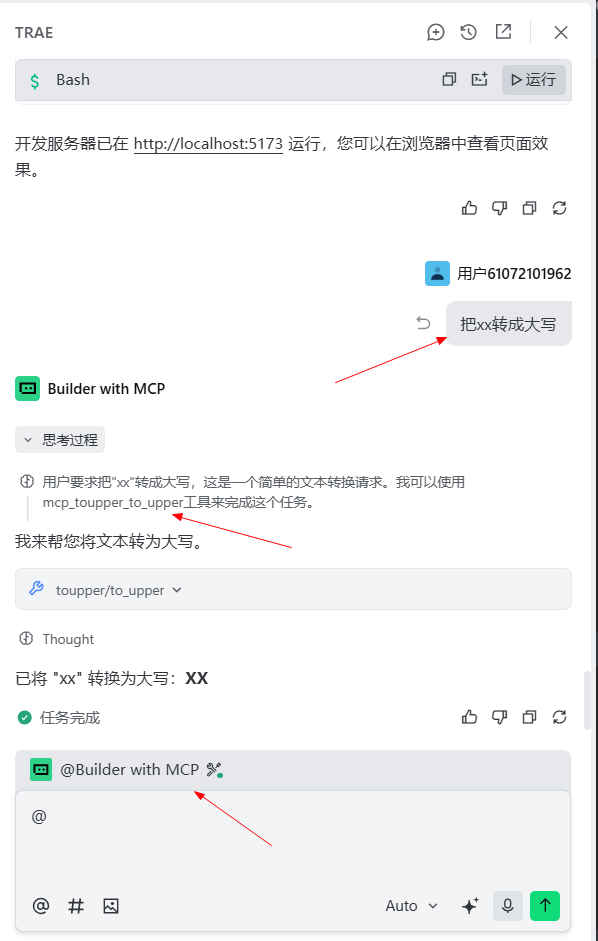
json
{
  "mcpServers": {
   "toupper": {
      "command": "E:\\go_ws\\demo\\toupper_mcp.exe",
      "args": []
    }
  }
}
此内容由惯性聚合(RSS阅读器)自动聚合整理,仅供阅读参考。 原文来自 — 版权归原作者所有。