FailedCreatePodSandBox
Error response from daemon: OCI runtime create failed: container_linux.go:380: starting container process caused: process_linux.go:402: getting the final child's pid from pipe caused: EOF: unknown
清理 cache
1
| echo 3 > /proc/sys/vm/drop_caches
|
内存碎片过多
calico-node 不停重启 increase max user
runtime: failed to create new OS thread (have 11 already; errno=11),runtime: may need to increase max user processes (ulimit -u)
增加 ulimit 限制额度
用户进程数耗尽
calico-node BIRD is not ready
Readiness probe failed: calico/node is not ready: BIRD is not ready: Error querying BIRD: unable to connect to BIRDv4 socket: dial unix /var/run/calico/bird.ctl: connect: connection refused
执行 ifconfig 找到当前主机 IP 绑定的网卡,例如 ens192。
kubectl -n kube-system edit ds calico-node
将
1
2
| - name: IP_AUTODETECTION_METHOD
value: can-reach=$(NODEIP)
|
改为
1
2
| - name: IP_AUTODETECTION_METHOD
value: "interface=ens192"
|
使得 interface 值能正则匹配上 ens192 即可。
Calico 没有自动识别到正确的网卡。
cgroup 内存泄露问题 cannot allocate memory
mkdir /sys/fs/cgroup/memory/kubepods/burstable/pod7a1e89bd-b85e-46c6-9674-bbfd3ead02d1: cannot allocate memory
如果有 fork 相关字样,可能是 PID 耗尽。
清理 cache
1
| echo 3 > /proc/sys/vm/drop_caches
|
- 修改
/etc/default/grub
GRUB_CMDLINE_LINUX 加上了 cgroup.memory=nokmem
- 生成配置
/usr/sbin/grub2-mkconfig -o /boot/grub2/grub.cfg
- 重启机器
reboot
cgroup 内存泄露
kubectl 404 page not found
执行 kubectl exec 时,报错 error: unable to upgrade connection: 404 page not found
在 kubelet 启动参数中添加当前节点的 IP,Environment="KUBELET_EXTRA_ARGS=--node-ip=x.x.x.x"
安装工具未能准确识别主机 IP
容器内系统调用出错、没权限
Problem executing scripts Post-Invoke Sub-process returned an error code 没权限提示
在运行时,添加参数 --security-opt seccomp=unconfined 禁用 seccomp
内核中的 Seccomp 安全模块,限制了容器对主机的系统调用能力。
NodePort 服务不能通过 localhost 访问
NodePort 暴露的服务,不能通过 localhost:port 访问,只能通过主机的 ip:port 访问。
检测回环转发参数
1
| sysctl net.ipv4.conf.all.route_localnet
|
临时生效
1
| sysctl -w net.ipv4.conf.all.route_localnet=1
|
永久生效
1
| echo "net.ipv4.conf.all.route_localnet=1" >> /etc/sysctl.conf && sysctl -p
|
ipvs 模式默认关闭了该转发路径
创建 Pod 失败 fork/exec /usr/bin/runc
1
| OCI runtime create failed: unable to retrieve OCI runtime error (open /run/docker/containerd/daemon/io.containerd.runtime.v1.linux/moby/488165d6dd80c997d252ac1a5f36f41edc567cc828d98c0c0b8f1c2acf2e2524/log.json: no such file or directory):
|
查看 PID 限制
1
| cat /proc/sys/kernel/pid_max
|
查看当前用户使用
永久调大 PID 限制
echo "kernel.pid_max=65535 " >> /etc/sysctl.conf && sysctl -p
kubelet volume subpaths are still present on disk
kubelet 大量错误日志
1
| Jan 29 01:37:40 k8s-node-2510 kubelet[2080]: E0129 01:37:40.567812 2080 kubelet_volumes.go:154] orphaned pod "1683eaf9-1b46-4ea1-99e5-337bc9c2232c" found, but volume subpaths are still present on disk : There were a total of 14 errors similar to this. Turn up verbosity to see them.
|
使用 --force --grace-period=0 强制删除 Pod 时,资源没有被回收。
在 /var/lib/kubelet/pods/ 找到相关 Pod 信息,确认 Pod 已经停止之后,删除 Pod 的目录。
查看 Pod 名字
1
2
3
4
5
6
7
| cat /var/lib/kubelet/pods/1683eaf9-1b46-4ea1-99e5-337bc9c2232c/etc-hosts
# Kubernetes-managed hosts file.
127.0.0.1 localhost
::1 localhost ip6-localhost ip6-loopback
10.233.73.154 fmovedaemon-b9c68cd45-qm2wr
|
fmovedaemon-b9c68cd45-qm2wr 即为 Pod 名字,确认 Pod 停止后,直接删除目录即可。
1
| rm -rf /var/lib/kubelet/pods/1683eaf9-1b46-4ea1-99e5-337bc9c2232c/
|
kubelet MountVolume failed
1
2
3
| kubelet MountVolume.MountDevice failed for volume "pvc-4c79c2aa-3a55-4dde-92f2-636b30ea8921" : rpc error: code = Internal desc = format of disk "/dev/longhorn/pvc-4c79c2aa-3a55-4dde-92f2-636b30ea8921" failed: type:("ext4") target:("/var/lib/kubelet/plugins/kubernetes.io/csi/pv/pvc-4c79c2aa-3a55-4dde-92f2-636b30ea8921/globalmount") options:("defaults") errcode:(exit status 1) output:(mke2fs 1.46.4 (18-Aug-2021)
/dev/longhorn/pvc-4c79c2aa-3a55-4dde-92f2-636b30ea8921 is apparently in use by the system; will not make a filesystem here!
)
|
编辑多路径文件
1
| vim /etc/multipath.conf
|
新增如下内容:
1
2
3
| blacklist {
devnode "^sd[a-z0-9]+"
}
|
重启服务
1
| systemctl restart multipathd.service
|
多路径为任何符合条件的设备路径创建了多路径设备,包括 Longhorn 存储卷设备,导致 Kubelet 挂载错误。
大内存 Pod 启动失败 page allocation failure
1
| starting container process caused \"process_linux.go:245: running exec setns process for init caused \\\"exit status 6
|
1
| echo 3 > /proc/sys/vm/drop_caches
|
系统内存碎片化,导致创建系统 namespace 时没有足够的大页内存。可以通过一下命令查看内存使用,如果 0 较多说明内存碎片化严重:
使用 IPVS 模式下,服务 No route to host
No route to host
当有大量短连接时,很多链接处于 TIME_WAIT 状态,内核会重用这些链接端口。
内核参数 net.ipv4.vs.conn_reuse_mode 设置为 0 ,重用端口时,IPVS 将流量直接转发至之前的 RS,绕过负载均衡,部分流量被转发到销毁的 Pod 上,导致 No route to host。
在内核 5.9 版本之前建议使用 iptables 模式。
但 iptables 模式下,当集群的服务数量超过 2000 之后,变更规则、转发效率会开始明显下降,CPU 使用率会上升。
在内核 5.9 版本之后建议使用 IPVS 模式。
net.ipv4.vs.conn_reuse_mode设为 1,强制复用连接走负载均衡net.ipv4.vs.conntrack 设为 0,防止 IPVS 对复用连接进行 DROP SYNC 操作
集群 kube-apiserver P99 解决 20s
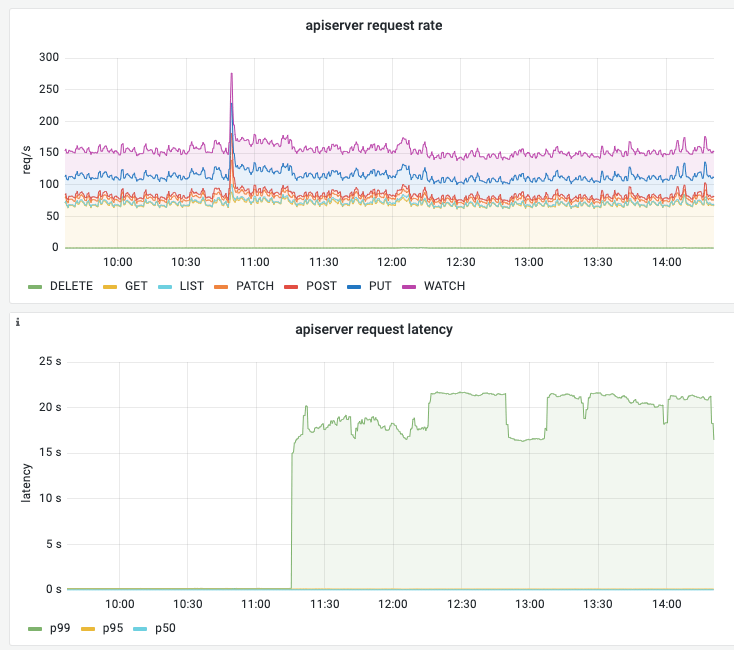
删除掉已经停机的、状态为 NotReady 的节点。
可能的原因是,集群中有节点已经停机,但是没有从集群中被剔除。导致某处经过 kube-apiserver 的请求,需要等待超时,超时时间为 20s。
具体原因还需要进一步验证,但删除已经停机的节点后,kube-apiserver P99 能恢复正常。
Pod 创建慢
Sep 11 08:23:17 node3 kubelet[1437]: E0911 08:23:17.770706 1437 kubelet_volumes.go:225] "There were many similar errors. Turn up verbosity to see them." err="orphaned pod \"10ff3c51-ebf2-47dd-b837-fd584319a754\" found, but error not a directory occurred when trying to remove the volumes dir" numErrs=10
可能的原因之一是,创建 Pod 依赖 Secret、ConfigMap 等资源,但在当前命名空间下,这些资源不存在,导致 Kubelet 一直尝试去获取这些资源,直到超时,影响了 Pod 的创建。
找到缺失的资源,创建之。
创建调试的 Pod
 1
 2
 3
 4
 5
 6
 7
 8
 9
10
11
12
13
14
15
16
17
18
19
| kubectl apply -f - <<EOF
apiVersion: apps/v1
kind: DaemonSet
metadata:
name: demo-ubuntu-daemonset
namespace: default
spec:
selector:
matchLabels:
app: demo-ubuntu-daemonset
template:
metadata:
labels:
app: demo-ubuntu-daemonset
spec:
containers:
- name: ubuntu
image: shaowenchen/demo:ubuntu
EOF
|
1
| export NODE_NAME=MyHostName
|
 1
 2
 3
 4
 5
 6
 7
 8
 9
10
11
12
13
14
15
16
17
18
19
20
21
| kubectl apply -f - <<EOF
apiVersion: apps/v1
kind: Deployment
metadata:
name: demo-ubuntu-deploy
namespace: default
spec:
replicas: 1
selector:
matchLabels:
app: demo-ubuntu-deploy
template:
metadata:
labels:
app: demo-ubuntu-deploy
spec:
nodeName: $NODE_NAME
containers:
- name: demo-ubuntu
image: shaowenchen/demo:ubuntu
EOF
|
Calico 报错 timeout
1
2
| 2025-02-24 09:24:35.783 [ERROR][1] cni-installer/<nil> <nil>: Unable to create token for CNI kubeconfig error=Post "https://10.96.0.1:443/api/v1/namespaces/calico-system/serviceaccounts/calico-node/token": dial tcp 10.96.0.1:443: i/o timeout
2025-02-24 09:24:35.783 [FATAL][1] cni-installer/<nil> <nil>: Unable to create token for CNI kubeconfig error=Post "https://10.96.0.1:443/api/v1/namespaces/calico-system/serviceaccounts/calico-node/token": dial tcp 10.96.0.1:443: i/o timeout
|
检查 Calico Pod 所在的节点与 master 节点的网络连通性。
配置 sysctl 参数 does not exist
1
| [ERROR FileContent--proc-sys-net-bridge-bridge-nf-call-iptables]: /proc/sys/net/bridge/bridge-nf-call-iptables does not exist
|
1
2
| modprobe br_netfilter
echo "net.bridge.bridge-nf-call-iptables = 1" >> /etc/sysctl.conf
|
Kubelet 报错 rpc error
1
| err="rpc error: code = DeadlineExceeded desc = context deadline exceeded"
|
Kubelet 调用 Containerd 时,超时时间过短,导致请求超时。升级 runc 可以解决:
1
2
| wget https://github.com/opencontainers/runc/releases/download/v1.2.5/runc.amd64
chmod +x runc.amd64
|
下载之后,替换 runc
1
2
| mv /usr/bin/runc /usr/bin/runc.bak
mv runc.amd64 /usr/bin/runc
|
重启 Kubelet、Containerd
1
2
| systemctl restart containerd
systemctl restart kubelet
|
要尽量使用 Containerd 1.7.0 以上版本。
Kube-Proxy 报错 xtables lock
1
| Another app is currently holding the xtables lock; still 1s 100000us time ahead to have a chance to grab the lock...
|
有程序与 Kube-Proxy 争抢 xtables 锁,可能是在一直不断重启或重试的 Pod。常见的有
- Flannel,增加其 CPU、Memory 资源可以解决
cni 组件连不上 apiserver
1
| cni-installer/<nil> <nil>: Unable to create token for CNI kubeconfig error=Post "https://10.96.0.1:443/api/v1/namespaces/calico-system/serviceaccounts/calico-node/token": dial tcp 10.96.0.1:443: i/o timeout^C
|
可以先重置节点试试
1
2
3
4
5
6
7
8
9
10
11
12
13
14
| kubeadm reset -f
systemctl restart containerd
systemctl restart kubelet
iptables -F
iptables -t nat -F
iptables -t mangle -F
iptables -X
rm -rf /etc/cni/net.d
rm -rf /var/lib/cni/
ip link delete cni0
ip link delete flannel.1
|
如果还是不行,大概率是防火墙配置的问题。
Istio 426 Upgrade Required
访问 Istio 服务时,遇到 426 Upgrade Required 或 low_version 报错。
Istio 默认只启用 HTTP/1.1 和 HTTP/2 支持。要启用对 HTTP/1.0 的支持,需要设置:
1
2
3
4
5
6
7
8
| spec:
template:
spec:
containers:
- name: istio-proxy
env:
- name: ISTIO_META_HTTP10
value: "1"
|
nerdctl failed to create default network
使用 nerdctl 时,报错:
1
| failed to create default network: needs CNI plugin "bridge" to be installed in CNI_PATH (/opt/cni/bin)
|
解决方法:
1
2
3
4
5
| mkdir -p /opt/cni/bin
curl -L -o cni-plugins.tgz https://github.com/containernetworking/plugins/releases/download/v1.8.0/cni-plugins-linux-amd64-v1.8.0.tgz
tar -C /opt/cni/bin -xzf cni-plugins.tgz
|
使用自定义镜像加入集群的节点引发 NotReady
1
2
| Warning Rebooted 5m3s (x819 over 3h14m) kubelet Node l2d01rt6b2e9hnq has been rebooted, boot id: 6a2086cb-c63e-4ae0-9b84-caf332e92cc1
Warning Rebooted 99s (x704 over 121m) kubelet Node l2d01rt6b2e9hnq has been rebooted, boot id: c0617e04-729b-4ad8-af6f-425eba67a8f6
|
解决办法:
1
| vim /etc/systemd/system/kubelet.service.d/10-kubeadm.conf
|
将 Environment="KUBELET_EXTRA_ARGS=--node-ip=x.x.x.x --hostname-override=xxx" 修改为正确的值或者直接移除。
hostname 名重复了,导致一个 hostname 上传了多个节点的状态。
重启 kubelet
1
2
| systemctl daemon-reload
systemctl restart kubelet
|
cni0 already has an ip address
1
| Failed to create pod sandbox: rpc error: code = Unknown desc = failed to set up sandbox container "main" network for pod "gpu-manager-containerd-daemonset-device-g2hj2": networkPlugin cni failed to set up pod "gpu-manager-containerd-daemonset-device-g2hj2" network: failed to set bridge addr: "cni0" already has an IP address different from 10.244.6.1/24
|
解决办法:
1
2
3
4
5
6
7
8
9
| # 删除 cni0 网桥
ip link set cni0 down
ip link delete cni0
# 同时建议清理 flannel.1 接口
ip link delete flannel.1
# 删除 CNI 缓存
rm -rf /var/lib/cni/*
rm -rf /var/run/flannel/subnet.env
|
通常是节点上有残留的 cni0 配置,导致 Flannel 无法正常初始化节点所致,需要删除 CNI 相关的配置重新初始化。
节点 pod 数量达到上限
1
| export NODE_NAME=your-node-name
|
1
| kubectl describe node $NODE_NAME | grep -i pods
|
1
2
3
| pods: 110
pods: 110
Non-terminated Pods: (69 in total)
|
1
| vim /var/lib/kubelet/config.yaml
|
将 maxPods 修改为更大的值,例如 250。这里设置的值要与网段设置相匹配,否则会引发网络冲突问题。
1
2
| systemctl daemon-reload
systemctl restart kubelet
|
节点用户密码过期 Your password has expired
1
2
| WARNING: Your password has expired.
You must change your password now and login again!
|
节点上 Istio 管理的 Pod 流量慢
访问节点上运行的 Pod 流量很慢。
kubelet 有如下报错:
1
2
| downstream [2585] terminated with unexpected error send error for type url type.googleapis.com/envoy.config.route.v3.RouteConfiguration:
rpc error: code = Canceled desc = context canceled
|
1
| systemctl restart kubelet
|
可能原因是 Istiod 压力过大或者网络连接问题,导致与节点上 Envoy 代理的连接中断,重启 kubelet 会重新建立连接。
Istio Permission denied
报错信息:
1
2
3
4
| error envoy config external/envoy/source/common/listener_manager/listener_manager_impl.cc:1182 listener '0.0.0.0_80' failed to bind or apply socket options: cannot bind '0.0.0.0:80': Permission denied thread=44
warning envoy config external/envoy/source/extensions/config_subscription/grpc/grpc_subscription_impl.cc:138 gRPC config for type.googleapis.com/envoy.config.listener.v3.Listener rejected: Error adding/updating listener(s) 0.0.0.0_80: cannot bind '0.0.0.0:80': Permission denied
thread=44
warn Envoy proxy is NOT ready: config received from XDS server, but was rejected: cds updates: 2 successful, 0 rejected; lds updates: 0 successful, 1 rejected
|
正常情况下创建 Pod 时,会进行如下配置允许监听 1024 以下的端口。
1
2
3
4
| securityContext:
sysctls:
- name: net.ipv4.ip_unprivileged_port_start
value: "0"
|
但是可能未生效,可以手工设置一下:
验证问题
1
| sysctl net.ipv4.ip_unprivileged_port_start
|
临时生效
1
| sysctl -w net.ipv4.ip_unprivileged_port_start=0
|
永久生效
1
2
| echo "net.ipv4.ip_unprivileged_port_start = 0" >> /etc/sysctl.conf
sysctl -p
|
应用报错 CSI Driver not found
报错信息:
1
| kubernetes.io/csi: attacher.MountDevice failed to create newCsiDriverClient: driver name fuse.csi.fluid.io not found in the list of registered CSI drivers
|
解决办法:
- 重启存储注册的 CSI Driver
- 重启 Kubelet
突然出现大量 PUT: /resource/apiservices/v1
apiserver 日志出现大量类似错误
1
| E0331 07:03:10.251586 1 authentication.go:70] "Unable to authenticate the request" err="[x509: certificate has expired or is not yet valid: current time 2026-03-31T07:03:10Z is after 2026-03-31T06:42:46Z, verifying certificate SN=8103692049818249166, SKID=, AKID=61:EC:11:70:82:D5:DD:91:10:A7:6B:63:9A:11:2D:88:52:C7:04:0B failed: x509: certificate has expired or is not yet valid: current time 2026-03-31T07:03:10Z is after 2026-03-31T06:42:46Z]"
|
apiserver 指标监控在 /resource/apiservices/v1 端点下出现大量请求。
原因是节点上的证书过期了,但是其他节点上正常,整个集群处于能用的状态。
解决办法:
更新异常 apiserver 节点上的证书。
自动清理 Failed + Succeeded 的 Pod
编辑 kube-controller-manager 的配置文件:
1
| vim /etc/kubernetes/manifests/kube-controller-manager.yaml
|
添加如下参数:
1
| - --terminated-pod-gc-threshold=5
|
单节点上 Pod 连接数不均
1
| kubectl edit cm kube-proxy -n kube-system
|
1
2
3
4
| apiVersion: kubeproxy.config.k8s.io/v1alpha1
kind: KubeProxyConfiguration
ipvs:
scheduler: "lc"
|
设置为最小链接算法,即每个 RS 的连接数尽可能均匀。
重启 kube-proxy
1
| kubectl -n kube-system rollout restart daemonset kube-proxy
|
可以看到 lc 算法生效。
1
2
| TCP current-node lc
-> 10.233.73.204:8000 Masq 1 0 0
|
需要注意的是,IPVS 只会影响当前节点上的流量,而无法感知到全局流量。






