1. 什么是 kubectl
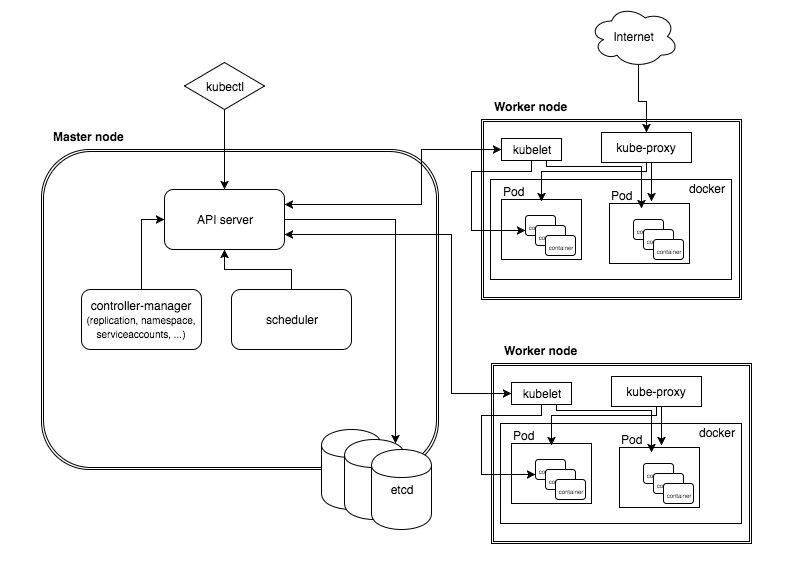
kubectl 是 Kubernetes 的命令行工具,通过 API server 与集群进行交互。
2. 配置 kubectl
kubectl 可以通过 ~/.kube/config 配置连接到一个或多个集群。
具体如何配置可以参考: 配置对多集群的访问 。如果需要配置远程集群,可以参考: 搭建远程 Kubernetes 开发环境。
查看配置的集群:
1
2
3
| kubectl config get-contexts
CURRENT NAME CLUSTER AUTHINFO NAMESPACE
* minikube minikube minikube
|
选择某个集群:
1
2
| kubectl config set-context minikube
Context "minikube" modified.
|
3. kubectl 命令
 1
 2
 3
 4
 5
 6
 7
 8
 9
10
11
12
13
14
15
16
17
18
19
20
21
22
23
24
25
26
27
28
29
30
31
32
33
34
35
36
37
38
39
40
41
42
43
44
45
46
47
48
49
50
51
52
53
54
55
56
57
58
59
60
61
62
63
64
65
66
| kubectl
kubectl controls the Kubernetes cluster manager.
Find more information at: https://kubernetes.io/docs/reference/kubectl/overview/
Basic Commands (Beginner):
create Create a resource from a file or from stdin.
expose Take a replication controller, service, deployment or pod and expose it as a new Kubernetes Service
run Run a particular image on the cluster
set Set specific features on objects
run-container Run a particular image on the cluster. This command is deprecated, use "run" instead
Basic Commands (Intermediate):
get Display one or many resources
explain Documentation of resources
edit Edit a resource on the server
delete Delete resources by filenames, stdin, resources and names, or by resources and label selector
Deploy Commands:
rollout Manage the rollout of a resource
rolling-update Perform a rolling update of the given ReplicationController
scale Set a new size for a Deployment, ReplicaSet, Replication Controller, or Job
autoscale Auto-scale a Deployment, ReplicaSet, or ReplicationController
Cluster Management Commands:
certificate Modify certificate resources.
cluster-info Display cluster info
top Display Resource (CPU/Memory/Storage) usage.
cordon Mark node as unschedulable
uncordon Mark node as schedulable
drain Drain node in preparation for maintenance
taint Update the taints on one or more nodes
Troubleshooting and Debugging Commands:
describe Show details of a specific resource or group of resources
logs Print the logs for a container in a pod
attach Attach to a running container
exec Execute a command in a container
port-forward Forward one or more local ports to a pod
proxy Run a proxy to the Kubernetes API server
cp Copy files and directories to and from containers.
auth Inspect authorization
Advanced Commands:
apply Apply a configuration to a resource by filename or stdin
patch Update field(s) of a resource using strategic merge patch
replace Replace a resource by filename or stdin
convert Convert config files between different API versions
Settings Commands:
label Update the labels on a resource
annotate Update the annotations on a resource
completion Output shell completion code for the specified shell (bash or zsh)
Other Commands:
api-versions Print the supported API versions on the server, in the form of "group/version"
config Modify kubeconfig files
help Help about any command
plugin Runs a command-line plugin
version Print the client and server version information
Usage:
kubectl [flags] [options]
Use "kubectl <command> --help" for more information about a given command.
Use "kubectl options" for a list of global command-line options (applies to all commands).
|
使用语法:
1
| kubectl [command] [TYPE] [NAME] [flags]
|
- command,指定要对一个或多个资源执行的操作,例如
create、get、describe、delete。 - TYPE,指定资源类型。资源类型不区分大小写,可以指定单数、复数或缩写形式。例如:
kubectl get pod pod_name 。 - NAME,指定资源的名称。名称区分大小写。如果省略名称,则显示所有资源的详细信息。例如:
kubectl get pods 。 - flags,指定可选的参数。例如,可以使用 -s 或 -server 参数指定 Kubernetes API 服务器的地址和端口。
4. kubectl 部署 Jenkins
- 创建 Namespace ,隔离服务
1
| kubectl create namespace jenkins
|
- 使用 Deployment 部署 Jenkins
新增 jenkins-deployment.yaml 文件。
 1
 2
 3
 4
 5
 6
 7
 8
 9
10
11
12
13
14
15
16
17
18
19
20
| cat jenkins-deployment.yaml
apiVersion: extensions/v1beta1
kind: Deployment
metadata:
name: jenkins-deployment
spec:
replicas: 1
selector:
matchLabels:
app: jenkins
template:
metadata:
labels:
app: jenkins
spec:
containers:
- name: jenkins
image: jenkins:2.60.3
ports:
- containerPort: 8080
|
执行命令,部署 Deployment。
1
2
| kubectl create -f jenkins-deployment.yaml --namespace=jenkins
deployment.extensions/jenkins-deployment created
|
- 查看相关信息
1
| kubectl describe deployments --namespace=jenkins
|
- 创建 service 暴露服务
新增 jenkins-service.yaml 文件。
 1
 2
 3
 4
 5
 6
 7
 8
 9
10
11
12
13
| cat jenkins-service.yaml
apiVersion: v1
kind: Service
metadata:
name: jenkins
spec:
type: NodePort
ports:
- port: 8080
targetPort: 8080
nodePort: 30000
selector:
app: jenkins
|
执行命令,部署 service ,nodePort 参数指定对外的服务端口。
1
| kubectl create -f jenkins-service.yaml --namespace=jenkins
|
- 访问服务
在浏览器打开链接: http://your_node_host_ip:30000 ,发现需要输入初始密码。
- 从日志获取访问初始密码
查看 Pod 名称:
1
2
3
| kubectl get pods --namespace=jenkins
NAME READY STATUS RESTARTS AGE
jenkins-deployment-868cc579df-42lpn 1/1 Running 0 21m
|
获取密码:
1
| kubectl log jenkins-deployment-868cc579df-42lpn --namespace=jenkins
|
在日志中,可以查看到初始化密码。
5. 重启 Kubernetes 中的 Job
以 CentOS 7 为例:
1
2
| yum install -y https://dl.fedoraproject.org/pub/epel/epel-release-latest-7.noarch.rpm
yum install -y jq
|
1
2
3
| kubectl get job
job_name
|
1
| kubectl get job job_name -o json | jq 'del(.spec.selector)' | jq 'del(.spec.template.metadata.labels)' | kubectl replace --force -f -
|
6. 参考



