1. 背景
在Web开发的过程当中,常会涉及多个环境(本地、测试、正式环境)之间数据的迁移。本文主要探讨在django开发过程中,可能涉及的数据迁移路径,并寻找可行的方法。
2. 场景
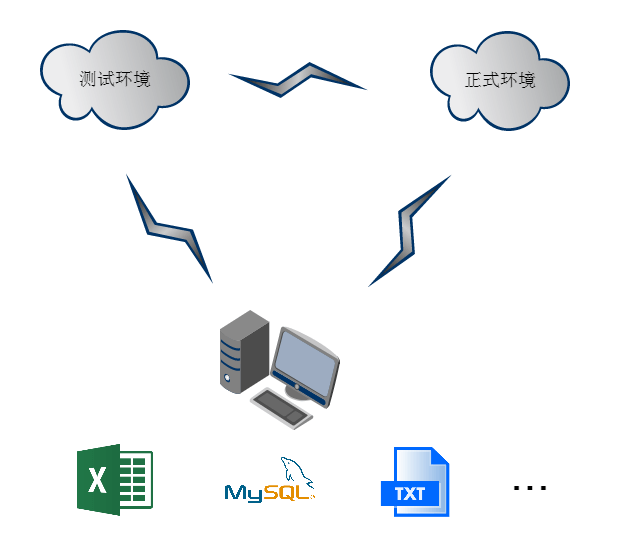
数据迁移对象,一共分为四个:测试环境数据库、正式环境数据库、本地开发机数据库、其他形式存在的数据源。这里其他形式存在的数据源包括:1. Excel、txt、sql、json等,以一定文本形式存在; 2. 提供访问接口的数据源。
3. 其他数据源到本地
对于 excel、txt、json 格式的数据:
- 第一步:Python 读取文本中的数据;
- 第二步:有两种方法。一种方法是,直接将读取的数据初始化为 django model 中的对象,保存在数据库。另一种方法是通过接口,客户端发送 POST 请求,django 中需要配置 url、编写专用的 views 函数处理这些 POST 请求,写入数据库。 后一种方法,通用性更强,兼容本地、线上的数据导入,推荐使用。
对于SQL格式的数据,可以建一个临时的数据库,然后使用django提供的工具反向创建model。通过两个model之间的字段映射关系,可以很方便的相互读写数据。
废话不多说,直接看代码!
3.1 读取 Excel
Python读取excel数据,通过接口发送给django处理。
 1
 2
 3
 4
 5
 6
 7
 8
 9
10
11
12
13
14
15
16
17
18
19
20
21
22
23
24
25
26
27
28
| # -*- coding: utf-8 -*-
import time
import requests
import xlrd
url = "http://127.0.0.1:8000/import_data/"
filename = "data.xlsx"
datalength = 4
def main():
workbook = xlrd.open_workbook(filename)
sheets1 = workbook.sheets()[0]
for i in range(datalength):
data1 = sheets1.row_values(i)[0]
data2 = sheets1.row_values(i)[1]
data3 = sheets1.row_values(i)[2]
data = {
"data1": data1,
"data2": data2,
"data3": data3
}
res = requests.post(url, data=data)
print i, res
time.sleep(1)
if __name__ == "__main__":
main()
|
3.2 读取TXT
Python 读取 txt 数据,注意数据的分隔符。逐行读取数据,复制给变量。
1
2
3
| with open('data.txt', 'rt') as f:
for line in f:
data1,data2 = line.split(' ')
|
3.3 读取JSON
Python读取json数据。
1
2
| with open('data.json', 'r') as f:
data = json.load(f)
|
3.4 读取SQL
- 第一步,在本地新建数据库temp_db,执行data.sql,将数据导入库。
- 第二步,使用dango提供的inspectdb命令,获得数据的model
- 第三步,编写处理函数,转换两个model的数据
 1
 2
 3
 4
 5
 6
 7
 8
 9
10
11
12
| # 修改settings中默认DB的配置,将数据库名改为temp_db
# DATABASES = {
# 'default': {
# 'ENGINE': 'django.db.backends.mysql',
# 'NAME': 'temp_db',
# 'USER': 'root',
# 'PASSWORD': '',
# 'HOST': '127.0.0.1',
# 'PORT': '3306',
# },
#}
python manage.py inspectdb > data_models.py
|
4. 从本地到线上
着重讨论的是本地数据库与线上数据库之前的迁移。
4.1 dumpdata与loaddata 命令
1
2
| # 本地,导出django app - app_label的数据,也可以不加app_label导出全部数据
manage.py dumpdata app_label > data.json
|
通过 SVN 提交 data.json 至线上
线上,导入数据时不需要指定 app,因为在 json 文件 model 字段中已经指明
 1
 2
 3
 4
 5
 6
 7
 8
 9
10
11
12
13
14
15
| def jsonimport(request):
import subprocess
from django.http import HttpResponse
cmd = '/cache/python/bin/python manage.py loaddata data.json'
p = subprocess.Popen(cmd, shell=True, stdout=subprocess.PIPE, stderr=subprocess.STDOUT)
out, err = p.communicate()
msg = '【%s】:stdout--%s stderr--%s' % (cmd, out, err)
try:
return HttpResponse(msg)
except IOError:
return HttpResponse(u'磁盘中不存在该文件!')
except Exception, e:
return HttpResponse(u'系统异常!%s' % e)
|
4.2 subprocess执行SQL - 导入数据
本地将数据库导出为sql文件,提交到线上后,执行sql语句。
 1
 2
 3
 4
 5
 6
 7
 8
 9
10
11
12
13
14
15
16
17
18
19
20
21
22
23
24
25
26
27
28
29
30
31
| def dbimport(request):
import subprocess
from django.conf import settings
from django.http import HttpResponse
db = settings.DATABASES['default']
dbfile = 'static/%s.sql' % db.get('NAME')
mysql = 'mysql'
importdb = '{dumpcmd} --user={user} ' \
'--password={password} ' \
'--host={host} ' \
'--port={port} ' \
'-f --default-character-set=utf8 ' \
'{dbname} < {dbfile}'.format(dumpcmd=mysql,
user=db.get('USER'),
password=db.get('PASSWORD'),
host=db.get('HOST'),
port=db.get('PORT'),
dbname=db.get('NAME'),
dbfile=dbfile)
p = subprocess.Popen(importdb, shell=True, stdout=subprocess.PIPE, stderr=subprocess.STDOUT)
out, err = p.communicate()
msg = '【%s】:stdout--%s stderr--%s' % (importdb, out, err)
try:
return HttpResponse(msg)
except IOError:
return HttpResponse(u'磁盘中不存在该文件!')
except Exception, e:
return HttpResponse(u'系统异常!%s' % e)
|
5. 从线上到线上
线上的数据迁移,可以走接口、保存为文本再迁移、直接复制库。
- 通过接口来迁移数据,客户端发送GET请求数据,数据源端提供API。
- 通过保存为文本迁移,推荐使用 json 文件。json 库提供的 load 和 dump 函数,可以很方便的读写数据。
- 直接拷贝库,利用 subprocess 库,执行 mysqldump 和 mysql。
5.1 通过json中转
读取数据,写入json
1
2
3
4
5
6
7
8
9
| def dumptojson(request):
import json
from django.http import HttpResponse
data = [{'id': 1}, {'id': 2}, {'id': 3}]
fd = json.dumps(data)
response = HttpResponse(fd)
response['Content-Type'] = 'application/json'
response['Content-Disposition'] = 'attachment;filename=data.json'
return response
|
读取json,写入数据
1
2
| with open('data.json', 'r') as f:
data = json.load(f)
|
5.2 通过dumpdata与loaddata 命令
线上的机器,不是想登就能登。上文提到了通过 views 函数执行 loaddata ,将 data.json 导入数据库。下面是执行 dumpdata,将数据从线上导出的 views 函数代码。
 1
 2
 3
 4
 5
 6
 7
 8
 9
10
11
12
13
14
15
16
| def jsondump(request):
import subprocess
from datetime import datetime
from django.http import HttpResponse
file = 'data.json'
cmd = '/cache/python/bin/python manage.py dumpdata > %s' % file
p = subprocess.Popen(cmd, shell=True, stdout=subprocess.PIPE, stderr=subprocess.STDOUT)
out, err = p.communicate()
print '【%s】:stdout--%s stderr--%s' % (cmd, out, err)
with open(file, 'rb') as fd:
file_content = fd.read()
response = HttpResponse(file_content)
response['Content-Type'] = 'application/octet-stream'
response['Content-Disposition'] = 'attachment;filename="%s_%s"' % (datetime.now(), file)
return response
|
5.3 subprocess执行SQL - 导出数据
在上文中有通过SQL文件导入数据的代码,下面是从线上导出数据保存为SQL文件的代码。
 1
 2
 3
 4
 5
 6
 7
 8
 9
10
11
12
13
14
15
16
17
18
19
20
21
22
23
24
25
26
27
28
29
30
31
32
33
| def dump(request):
import os, subprocess
from datetime import datetime
from django.conf import settings
from django.http import HttpResponse
db = settings.DATABASES['default']
dbfile = 'static/%s.sql' % db.get('NAME')
dumpcmd = 'mysqldump'
dumpdb = '{dumpcmd} --user={user} ' \
'--password={password} ' \
'--host={host} ' \
'--port={port} ' \
'--single-transaction ' \
'{dbname} > {dbfile}'.format(dumpcmd=dumpcmd,
user=db.get('USER'),
password=db.get('PASSWORD'),
host=db.get('HOST'),
port=db.get('PORT'),
dbname=db.get('NAME'),
dbfile=dbfile)
p = subprocess.Popen(dumpdb, shell=True, stdout=subprocess.PIPE, stderr=subprocess.STDOUT)
out, err = p.communicate()
print u'【%s】:stdout--%s stderr--%s' % (dumpdb, out, err)
ret = os.popen('/bin/ls static')
print u'os.popen:%s' % ret.readlines()
with open(dbfile, 'rb') as fd:
file_content = fd.read()
response = HttpResponse(file_content)
response['Content-Type'] = 'application/octet-stream'
response['Content-Disposition'] = 'attachment;filename="%s_%s.sql"' % (db.get('NAME'),
datetime.now())
return response
|
6. 最佳实践
建议在本地开发测试阶段,以 Python 读取文本、发送 POST 请求的方式迁移数据。 数据再次迁移至测试、正式环境时,只需要修改接口 url 即可。但是要注意,接口的安全性,控制接口的频率。
测试环境的测试数据迁移正式环境,可以考虑使用 subprocess 库进行处理。如果对线上环境不确定,可以结合 webshell 等工具,先进行探测,减少调试时间。



