1. TensorRT-LLM 编译模型
1.1 TensorRT-LLM 简介
使用 TensorRT 时,通常需要将模型转换为 ONNX 格式,再将 ONNX 转换为 TensorRT 格式,然后在 TensorRT、Triton Server 中进行推理。
但这个转换过程并不简单,经常会遇到各种报错,需要对模型结构、平台算子有一定的掌握,具备转换和调试能力。而 TensorRT-LLM 的目标就是降低这一过程的复杂度,让大模型更容易跑在 TensorRT 引擎上。
需要注意的是,TensorRT 针对的是具体硬件,不同的 GPU 型号需要编译不同的 TensorRT 格式模型。这与 ONNX 模型格式的通用性定位显著不同。
同时,TensortRT-LLM 并不支持全部 GPU 型号,仅支持 H100、L40S、A100、A30、V100 等显卡。
1.2 配置编译环境
1
| docker run --gpus device=0 -v $PWD:/app/tensorrt_llm/models -it --rm shaowenchen/nvidia-tensorrt-llm:v0.7.1 bash
|
--gpus device=0 表示使用编号为 0 的 GPU 卡,这里的 shaowenchen/nvidia-tensorrt-llm:v0.7.1 对应的就是 TensorRT-LLM v0.7.1 的 Release 版本。
由于自行打镜像非常麻烦,这里提供几个可选版本的镜像:
- shaowenchen/nvidia-tensorrt-llm:v0.7.1
- shaowenchen/nvidia-tensorrt-llm:v0.7.0
- shaowenchen/nvidia-tensorrt-llm:v0.6.1
1.3 编译生成 TensorRT 格式模型
在上述容器环境下,执行命令:
1
2
3
4
5
6
7
8
9
| python examples/baichuan/build.py --model_version v2_7b \
--model_dir ./models/Baichuan2-7B-Chat \
--dtype float16 \
--parallel_build \
--use_inflight_batching \
--enable_context_fmha \
--use_gemm_plugin float16 \
--use_gpt_attention_plugin float16 \
--output_dir ./models/Baichuan2-7B-trt-engines
|
生成的文件主要有三个:
- baichuan_float16_tp1_rank0.engine,嵌入权重的模型计算图文件
- config.json,模型结构、精度、插件等详细配置信息文件
- model.cache,编译缓存文件,可以加速后续编译速度
1.4 推理测试
1
2
3
4
| python examples/run.py --input_text "世界上第二高的山峰是哪座?" \
--max_output_len=200 \
--tokenizer_dir ./models/Baichuan2-7B-Chat \
--engine_dir=./models/Baichuan2-7B-trt-engines
|
1
2
3
4
| [02/03/2024-10:02:58] [TRT-LLM] [W] Found pynvml==11.4.1. Please use pynvml>=11.5.0 to get accurate memory usage
Input [Text 0]: "世界上第二高的山峰是哪座?"
Output [Text 0 Beam 0]: "
珠穆朗玛峰(Mount Everest)是地球上最高的山峰,海拔高度为8,848米(29,029英尺)。第二高的山峰是喀喇昆仑山脉的乔戈里峰(K2),海拔高度为8,611米(28,251英尺)。"
|
1.5 验证是否严重退化
模型推理优化,可以替换算子、量化、裁剪反向传播等手段,但有一个基本线一定要达到,那就是模型不能退化很多。
在精度损失可接受的范围内,模型的推理优化才有意义。TensorRT-LLM 项目提供的 summarize.py 可以跑一些测试,给模型打分,rouge1、rouge2 和 rougeLsum 是用于评价文本生成质量的指标,可以用于评估模型推理质量。
1
| pip install datasets nltk rouge_score -i https://pypi.tuna.tsinghua.edu.cn/simple
|
由于目前 optimum 不支持 Baichuan 模型,因此,需要编辑 examples/summarize.py 注释掉 model.to_bettertransformer(),这个问题在最新的 TensorRT-LLM 代码中已经解决,我使用的是当前最新的 Release 版本 (v0.7.1)。
1
2
3
4
| python examples/summarize.py --test_hf \
--hf_model_dir ./models/Baichuan2-7B-Chat \
--data_type fp16 \
--engine_dir ./models/Baichuan2-7B-trt-engines
|
输出结果:
1
2
3
4
5
6
| [02/03/2024-10:21:45] [TRT-LLM] [I] Hugging Face (total latency: 31.27020287513733 sec)
[02/03/2024-10:21:45] [TRT-LLM] [I] HF beam 0 result
[02/03/2024-10:21:45] [TRT-LLM] [I] rouge1 : 28.847385241217726
[02/03/2024-10:21:45] [TRT-LLM] [I] rouge2 : 9.519352831698162
[02/03/2024-10:21:45] [TRT-LLM] [I] rougeL : 20.85486489462602
[02/03/2024-10:21:45] [TRT-LLM] [I] rougeLsum : 24.090111126907733
|
- 获取 TensorRT 格式模型的 Rouge 指标
1
2
3
4
| python examples/summarize.py --test_trt_llm \
--hf_model_dir ./models/Baichuan2-7B-Chat \
--data_type fp16 \
--engine_dir ./models/Baichuan2-7B-trt-engines
|
输出结果:
1
2
3
4
5
6
| [02/03/2024-10:23:16] [TRT-LLM] [I] TensorRT-LLM (total latency: 28.360705375671387 sec)
[02/03/2024-10:23:16] [TRT-LLM] [I] TensorRT-LLM beam 0 result
[02/03/2024-10:23:16] [TRT-LLM] [I] rouge1 : 26.557043897453102
[02/03/2024-10:23:16] [TRT-LLM] [I] rouge2 : 8.28672928021811
[02/03/2024-10:23:16] [TRT-LLM] [I] rougeL : 19.13639628365737
[02/03/2024-10:23:16] [TRT-LLM] [I] rougeLsum : 22.0436013250798
|
TensorRT-LLM 编译之后的模型,rougeLsum 从 24 降到了 22,说明能力会有退化,但只要在可接受的范围之内,还是可以使用的,因为推理速度会有较大的提升。
完成这步之后,就可以退出容器了,推理是在另外一个容器中进行。
2. Triton Server 配置说明
2.1 Triton Server 简介
Triton Server 是一个推理框架,提供用户规模化进行推理的能力。具体包括:
- 支持多种后端,
tensorrt、onnxruntime、pytorch、python、vllm、tensorrtllm 等,还可以自定义后端,只需要相应的 shared library 即可。 - 对外提供 HTTP、GRPC 接口
- batch 能力,支持批量进行推理,而开启 Dynamic batching 之后,多个 batch 可以合并之后同时进行推理,实现更高吞吐量
- pipeline 能力,一个 Triton Server 可以同时推理多个模型,并且模型之间可以进行编排,支持 Concurrent Model Execution 流水线并行推理
- 观测能力,提供有 Metrics 可以实时监控推理的各种指标
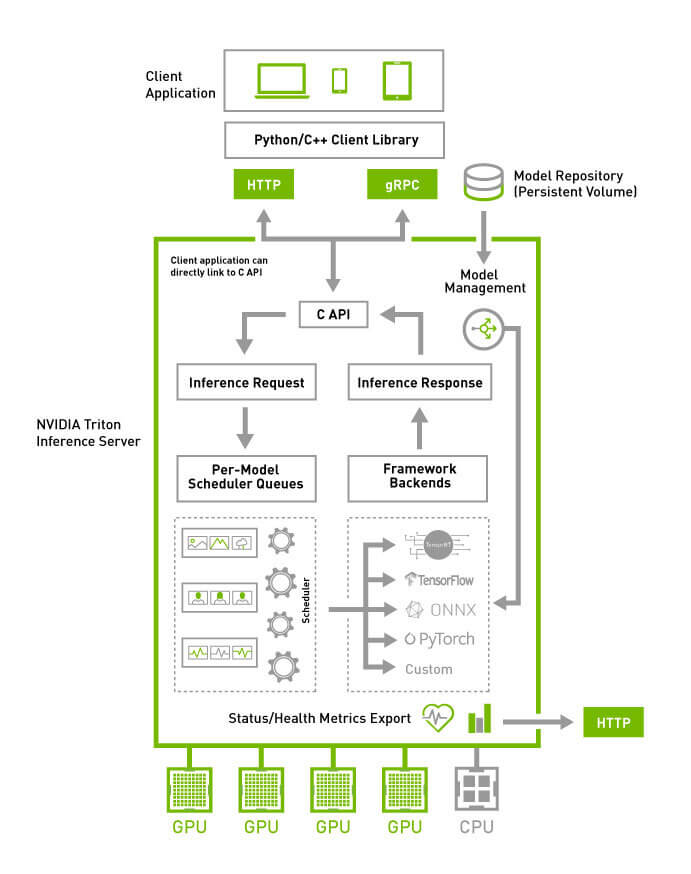
上面是 Triton Server 的架构图,简单点说 Triton Server 是一个端(模型)到端(应用)的推理框架,提供了围绕推理的生命周期过程管理,配置好模型之后,就能直接对应用层提供服务。
2.2 Triton Server 使用配置
在 Triton 社区的示例中,通常会有这样四个目录:
 1
 2
 3
 4
 5
 6
 7
 8
 9
10
11
12
13
14
15
16
17
| .
├── ensemble
│ ├── 1
│ └── config.pbtxt
├── postprocessing
│ ├── 1
│ │ └── model.py
│ └── config.pbtxt
├── preprocessing
│ ├── 1
│ │ └── model.py
│ └── config.pbtxt
└── tensorrt_llm
├── 1
└── config.pbtxt
9 directories, 6 files
|
对于 Triton Server 来说,上面的目录格式实际上是定义了四个模型,分别是 preprocessing、tensorrt_llm、postprocessing、ensemble,只不过 ensemble 是一个组合模型,定义多个模型来融合。
ensemble 存在的原因在于 tensorrt_llm 的推理并不是 text2text ,借助 Triton Server 的 Pipeline 能力,通过 preprocessing 对输入进行 Tokenizing,postprocessing 对输出进行 Detokenizing,就能够实现端到端的推理能力。否则,在客户端直接使用 TensorRT-LLM 时,还需要自行处理词与索引的双向映射。
这四个模型具体作用如下:
preprocessing, 用于输入文本的预处理,包括分词、词向量化等,实现类似 text2vec 的预处理。
tensorrt_llm, 用于 TensorRT 格式模型的 vec2vec 的推理
postprocessing,用于输出文本的后处理,包括生成文本的后处理,如对齐、截断等,实现类似 vec2text 的后处理。
ensemble,将上面的是三个模型进行融合,提供 text2text 的推理
上面定义的模型都有一个 1 目录表示版本 1 ,在版本目录中放置模型文件,在模型目录下放置 config.pbtxt 描述推理的参数 input、output、version 等。
2.3 模型加载的控制管理
Triton Server 通过参数 --model-control-mode 来控制模型加载的方式,目前有三种加载模式:
none,加载目录下的全部模型explicit,加载目录下的指定模型,通过参数 --load-model 加载指定的模型poll,定时轮询加载目录下的全部模型,通过参数 --repository-poll-secs 配置轮询周期
2.4 模型版本的控制管理
Triton Server 在模型的配置文件 config.pbtxt 中提供有 Version Policy,每个模型可以有多个版本共存。默认使用版本号为 1 的模型,目前有三种版本策略:
version_policy: { all: {}}
version_policy: { latest: { num_versions: 3}}
version_policy: { specific: { versions: [1, 3, 5]}}
3. Triton Server 中使用 TensorRT-LLM
3.1 克隆配置文件
本文示例相关的配置已经整理了一份到 GitHub 上,拷贝模型到指定的目之后,就可以直接进行推理了。
1
| git clone https://github.com/shaowenchen/demo
|
3.2 组织推理目录
1
| cp Baichuan2-7B-trt-engines/* modelops/triton-tensorrtllm/Baichuan2-7B-Chat/tensorrt_llm/1/
|
1
| cp -r Baichuan2-7B-Chat modelops/triton-tensorrtllm/downloads
|
此时文件的目录结构是:
 1
 2
 3
 4
 5
 6
 7
 8
 9
10
11
12
13
14
15
16
17
18
19
20
21
22
23
24
25
26
27
28
29
30
31
32
33
34
35
36
37
38
39
40
41
42
43
44
| tree modelops/triton-tensorrtllm
modelops/triton-tensorrtllm
├── Baichuan2-7B-Chat
│ ├── end_to_end_grpc_client.py
│ ├── ensemble
│ │ ├── 1
│ │ └── config.pbtxt
│ ├── postprocessing
│ │ ├── 1
│ │ │ ├── model.py
│ │ │ └── __pycache__
│ │ │ └── model.cpython-310.pyc
│ │ └── config.pbtxt
│ ├── preprocessing
│ │ ├── 1
│ │ │ ├── model.py
│ │ │ └── __pycache__
│ │ │ └── model.cpython-310.pyc
│ │ └── config.pbtxt
│ └── tensorrt_llm
│ ├── 1
│ │ ├── baichuan_float16_tp1_rank0.engine
│ │ ├── config.json
│ │ └── model.cache
│ └── config.pbtxt
└── downloads
└── Baichuan2-7B-Chat
├── Baichuan2 模型社区许可协议.pdf
├── Community License for Baichuan2 Model.pdf
├── config.json
├── configuration_baichuan.py
├── generation_config.json
├── generation_utils.py
├── modeling_baichuan.py
├── pytorch_model.bin
├── quantizer.py
├── README.md
├── special_tokens_map.json
├── tokenization_baichuan.py
├── tokenizer_config.json
└── tokenizer.model
13 directories, 26 files
|
3.3 启动推理服务
1
2
3
4
5
6
| docker run --gpus device=0 --rm -p 38000:8000 -p 38001:8001 -p 38002:8002 \
-v $PWD/modelops/triton-tensorrtllm:/models \
shaowenchen/nvidia-triton-trt-llm:v0.7.1 \
tritonserver --model-repository=/models/Baichuan2-7B-Chat \
--disable-auto-complete-config \
--backend-config=python,shm-region-prefix-name=prefix0_:
|
如果一台机器上运行了多个 triton server,那么需要用 shm-region-prefix-name=prefix0_ 区分一下共享内存的前缀,详情可以参考 https://github.com/triton-inference-server/server/issues/4145 。
启动日志:
 1
 2
 3
 4
 5
 6
 7
 8
 9
10
11
12
13
14
15
16
17
18
19
20
21
| I0129 10:27:31.658112 1 server.cc:619]
+-------------+-----------------------------------------------------------------+-----------------------------------------------------------------------------------------------------------------------------------------------------------------------------------------------------+
| Backend | Path | Config |
+-------------+-----------------------------------------------------------------+-----------------------------------------------------------------------------------------------------------------------------------------------------------------------------------------------------+
| python | /opt/tritonserver/backends/python/libtriton_python.so | {"cmdline":{"auto-complete-config":"false","backend-directory":"/opt/tritonserver/backends","min-compute-capability":"6.000000","shm-region-prefix-name":"prefix0_:","default-max-batch-size":"4"}} |
| tensorrtllm | /opt/tritonserver/backends/tensorrtllm/libtriton_tensorrtllm.so | {"cmdline":{"auto-complete-config":"false","backend-directory":"/opt/tritonserver/backends","min-compute-capability":"6.000000","default-max-batch-size":"4"}} |
+-------------+-----------------------------------------------------------------+-----------------------------------------------------------------------------------------------------------------------------------------------------------------------------------------------------+
I0129 10:27:31.658192 1 server.cc:662]
+----------------+---------+--------+
| Model | Version | Status |
+----------------+---------+--------+
| ensemble | 1 | READY |
| postprocessing | 1 | READY |
| preprocessing | 1 | READY |
| tensorrt_llm | 1 | READY |
+----------------+---------+--------+
...
I0129 10:27:31.745587 1 grpc_server.cc:2513] Started GRPCInferenceService at 0.0.0.0:8001
I0129 10:27:31.745810 1 http_server.cc:4497] Started HTTPService at 0.0.0.0:8000
I0129 10:27:31.787129 1 http_server.cc:270] Started Metrics Service at 0.0.0.0:8002
|
四个模型都处于 READY 状态,就可以正常推理了。
1
2
3
| curl localhost:38000/v2/models/ensemble/config
{"name":"ensemble","platform":"ensemble","backend":"","version_policy":{"latest":{"num_versions":1}},"max_batch_size":32,"input":[{"name":"text_input","data_type":"TYPE_STRING",...
|
可以查看模型的推理参数。如果使用的是 auto-complete-config,那么这个接口可以用于导出 Triton Server 自动生成的模型推理参数,用于修改和调试。
1
2
3
4
5
| curl -v localhost:38000/v2/health/ready
< HTTP/1.1 200 OK
< Content-Length: 0
< Content-Type: text/plain
|
3.4 客户端调用
1
| pip install tritonclient[grpc] -i https://pypi.tuna.tsinghua.edu.cn/simple
|
Triton GRPC 接口的性能显著高于 HTTP 接口,同时在容器中,我也没有找到 HTTP 接口的示例,这里就直接用 GRPC 了。
1
| wget https://raw.githubusercontent.com/shaowenchen/demo/master/triton-tensorrtllm/Baichuan2-7B-Chat/end_to_end_grpc_client.py
|
1
2
3
4
| python3 ./end_to_end_grpc_client.py -u 127.0.0.1:38001 -p "世界上第三高的山峰是哪座?" -S -o 128
珠穆朗玛峰(Mount Everest)是世界上最高的山峰,海拔高度为8,848米(29,029英尺)。在世界上,珠穆朗玛峰之后,第二高的山峰是喀喇昆仑山脉的乔戈里峰(K2,又称K2峰),海拔高度为8,611米(28,251英尺)。第三高的山峰是喜马拉雅山脉的坎钦隆加峰(Kangchenjunga),海拔高度为8,586米(28,169英尺)。</s>
|
3.5 查看指标
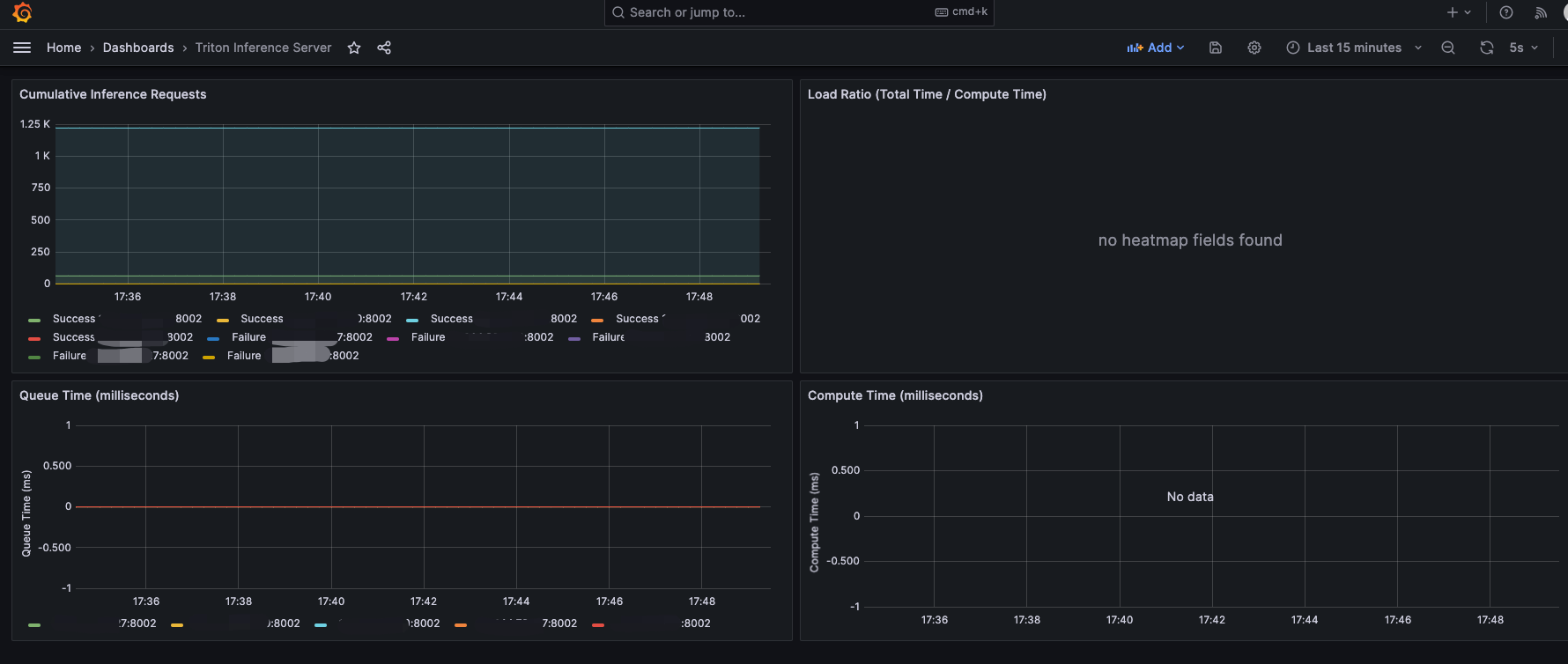
Triton Server 已经提供了推理指标,监听在 8002 端口。在本文的示例中,就是 38002 端口。
 1
 2
 3
 4
 5
 6
 7
 8
 9
10
11
12
| curl -v localhost:38002/metrics
nv_inference_request_success{model="ensemble",version="1"} 1
nv_inference_request_success{model="tensorrt_llm",version="1"} 1
nv_inference_request_success{model="preprocessing",version="1"} 1
nv_inference_request_success{model="postprocessing",version="1"} 128
# HELP nv_inference_request_failure Number of failed inference requests, all batch sizes
# TYPE nv_inference_request_failure counter
nv_inference_request_failure{model="ensemble",version="1"} 0
nv_inference_request_failure{model="tensorrt_llm",version="1"} 0
nv_inference_request_failure{model="preprocessing",version="1"} 0
nv_inference_request_failure{model="postprocessing",version="1"} 0
|
在 Grafana 中可以导入面板 https://grafana.com/grafana/dashboards/18737-triton-inference-server/ 查看指标,如下图:
4. 总结
本文主要是在学习使用 TensorRT 和 Triton Server 进行推理过程的记录,主要内容如下:
- TensorRT 是一种针对 Nvidia GPU 硬件更高效的模型推理引擎
- TensorRT-LLM 能让大模型更快使用上 TensorRT 引擎
- Triton Server 是一个端到端的推理框架,支持大部分的模型框架,能帮助用户快速实现规模化的推理服务
- Triton Server 下使用 TensorRT-LLM 进行推理的示例
5. 参考



