1. 什么是 pyfiglet
pyfiglet 是一个用 Python 实现的 ASCII 艺术字生成工具。可以根据字符生成如下图形:
1
2
3
4
5
6
| _ _ _ _ _ _
| |__ ___| | | ___ __ _____ _ __| | __| | |
| '_ \ / _ \ | |/ _ \ \ \ /\ / / _ \| '__| |/ _` | |
| | | | __/ | | (_) | \ V V / (_) | | | | (_| |_|
|_| |_|\___|_|_|\___( ) \_/\_/ \___/|_| |_|\__,_(_)
|/
|
在编写 CLI 工具时,可以用 pyfiglet 生成 Banner 展示在命令行。
2. 安装
在 Python 环境下,使用 pip 安装:
3. 演示使用
先查看一下帮助文档:
 1
 2
 3
 4
 5
 6
 7
 8
 9
10
11
12
13
14
15
16
17
18
19
20
21
22
23
24
25
26
27
28
| pyfiglet --help
Usage: pyfiglet [options] [text..]
Options:
--version show program's version number and exit
-h, --help show this help message and exit
-f FONT, --font=FONT font to render with (default: standard)
-D DIRECTION, --direction=DIRECTION
set direction text will be formatted in (default:
auto)
-j SIDE, --justify=SIDE
set justification, defaults to print direction
-w COLS, --width=COLS
set terminal width for wrapping/justification
(default: 80)
-r, --reverse shows mirror image of output text
-F, --flip flips rendered output text over
-l, --list_fonts show installed fonts list
-i, --info_font show font's information, use with -f FONT
-L LOAD, --load=LOAD load and install the specified font definition
-c COLOR, --color=COLOR
prints text with passed foreground color,
--color=foreground:background
--color=:background # only background
--color=foreground | foreground: # only foreground
--color=list # list all colors
COLOR = list[COLOR] | [0-255];[0-255];[0-255] (RGB)
|
下面直接试试这些参数:
1
2
3
4
5
6
7
| pyfiglet Kube
_ __ _
| |/ / _| |__ ___
| ' / | | | '_ \ / _ \
| . \ |_| | |_) | __/
|_|\_\__,_|_.__/ \___|
|
1
2
3
4
5
6
| pyfiglet Kube -j center
_ __ _
| |/ / _| |__ ___
| ' / | | | '_ \ / _ \
| . \ |_| | |_) | __/
|_|\_\__,_|_.__/ \___|
|
字体可以在 http://www.figlet.org/fontdb.cgi 查找。
 1
 2
 3
 4
 5
 6
 7
 8
 9
10
11
12
13
| pyfiglet -f isometric3 Kube
___ ___ ___
/__/| /__/\ _____ / /\
| |:| \ \:\ / /::\ / /:/_
| |:| \ \:\ / /:/\:\ / /:/ /\
__| |:| ___ \ \:\ / /:/~/::\ / /:/ /:/_
/__/\_|:|____ /__/\ \__\:\ /__/:/ /:/\:| /__/:/ /:/ /\
\ \:\/:::::/ \ \:\ / /:/ \ \:\/:/~/:/ \ \:\/:/ /:/
\ \::/~~~~ \ \:\ /:/ \ \::/ /:/ \ \::/ /:/
\ \:\ \ \:\/:/ \ \:\/:/ \ \:\/:/
\ \:\ \ \::/ \ \::/ \ \::/
\__\/ \__\/ \__\/ \__\/
|
1
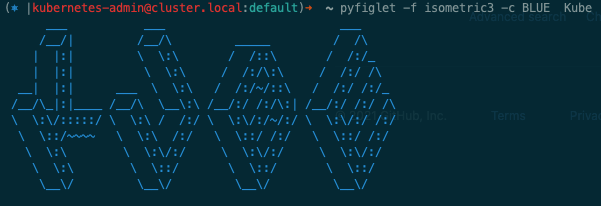
| pyfiglet -f isometric3 -c BLUE Kube
|
1
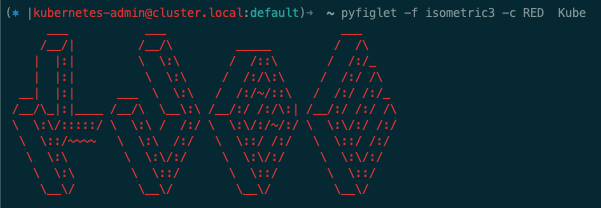
| pyfiglet -f isometric3 -c RED Kube
|
除此,还可以通过 from pyfiglet import Figlet 的方式,在 Python 代码中渲染字体。



