惯性聚合 高效追踪和阅读你感兴趣的博客、新闻、科技资讯
阅读原文 在惯性聚合中打开

推荐订阅源

C
Check Point Blog
GbyAI
GbyAI
奇客Solidot–传递最新科技情报
奇客Solidot–传递最新科技情报
U
Unit 42
美团技术团队
NISL@THU
NISL@THU
C
Cisco Blogs
SecWiki News
SecWiki News
N
Netflix TechBlog - Medium
Forbes - Security
Forbes - Security
Cloudbric
Cloudbric
雷峰网
雷峰网
T
Tailwind CSS Blog
博客园 - 司徒正美
The Register - Security
L
LangChain Blog
S
Security Affairs
Hacker News - Newest:
Hacker News - Newest: "LLM"
B
Blog
OSCHINA 社区最新新闻
OSCHINA 社区最新新闻
T
Threat Research - Cisco Blogs
I
InfoQ
S
Schneier on Security
L
Lohrmann on Cybersecurity
量子位
cs.CL updates on arXiv.org
Martin Fowler
Martin Fowler
Schneier on Security
F
Fortinet All Blogs
TaoSecurity Blog
TaoSecurity Blog
K
Kaspersky official blog
Google DeepMind News
Cisco Talos Blog
Cisco Talos Blog
PCI Perspectives
PCI Perspectives
Attack and Defense Labs
WordPress大学
WordPress大学
Microsoft Azure Blog
H
Help Net Security
Project Zero
Project Zero
The GitHub Blog
The GitHub Blog
D
Docker
N
News | PayPal Newsroom
K
KPMG report finds enterprise disconnect between AI and its ROI | CIO
H
Hacker News: Front Page
云风的 BLOG
云风的 BLOG
Microsoft Security Blog
freeCodeCamp Programming Tutorials: Python, JavaScript, Git & More
博客园 - 聂微东
Webroot Blog
Webroot Blog
MongoDB | Blog
MongoDB | Blog

陈少文的网站

巨变与机遇的未来十年 Kubernetes 平台管理软件压力测试方案 使用镜像部署 Hexo 静态页面 终于等到你 - GitHub 镜像仓库服务(ghcr.io) 一起来学 Go --(6)Interface 一起来学 Go --(5)Goroutine 和 Channel 什么是函数式编程 如何在 Kubernetes 集群集成 Kata 柯里化与偏函数 使用 PyGithub 自动创建 Label 软件产品是团队能力的输出 Helm 2 、Helm 3 比较 IoT 变现 Kubernetes 中的 DNS 服务 国内的 Helm 镜像源 Harbor 使用自签证书支持 Https 访问 DevOps 工具链之 Prow 如何使用 kfctl 安装 Kubeflow VS Code 无法下载 Go 插件的工具包 工程师更应具有服务精神 你不知道的 Docker 使用技巧 使用 Docker 运行 Tensorflow 论中国 什么是左移 如何清空 Git 仓库全部历史记录 一禅小和尚 有风吹过厨房 时间的玫瑰 如何在 CentOS 安装 GPU 驱动 开发 Tips(19) 使用 Velero 备份 Kubernetes 集群 Kubernetes Cheat Sheet 开发 Tips(18) 如何构建一个 Java 工程 开发 Tips(17) KubeSpray 安装 Kubernetes 报错 ip in ansible_all_ipv4_addresses 基于 Kubernetes 和 Jenkins 搭建自动化测试系统 在 Kubernetes 上动态创建 Jenkins Slave 使用 Jenkins 进行服务拨测 开发 Tips(16) Kubernetes 签发 Ingress 证书及日常故障运维 Kubernetes 中 Deployment 的基本操作 Kubernetes 中的证书 如何使用 KubeBuilder 开发一个 Operator Kubernetes 1.6.0 安装问题汇总 镜像管理工具 -- Harbor 开发 Tips(15) Docker 如何拉取镜像 开发 Tips(14) 使用 Helm 安装 harbor 开发 Tips(13) 使用 S2I 构建云原生应用 在 Kubernetes 中使用 emptyDir、hostPath、localVolume 开发 Tips(12) 开发 Tips(11) 代码质量分析工具 SonarQube 使用 Kubeadm 安装 Kubernetes 集群 一起来学 Go --(4)常用函数 Kubernetes 中的 Ceph Kubernetes 之 Volumes Kubernetes 之 Labels、Selectors 开发 Tips(10) 开源正在重构商业模式 Kubernetes 之网络 Kubernetes 之 API 使用 Helm 和 Operator 快速部署 Prometheus Kubernetes 复杂有状态应用管理框架 -- Operator Kubernetes 的包管理器 -- Helm 一起来学 Go --(3)Go Modules 如何一步一步地优化博客方案 kubectl 实用指南 Kubernetes 中的基本概念 搭建远程 Kubernetes 开发环境 大公司和小公司的 ToB 思路 开发 Tips(9) Go 入门指南 一起来学 Go --(2)数据与逻辑结构 如何预防 Web 富文本中的 XSS 攻击 django-xss-cleaner 云工作时代 一起来学 Go --(1)背景与特点 SaaS 开发团队的不同阶段 你不知道的 Git 使用技巧 输出既服务 微服务设计 继续奔跑 开发 Tips(8) 从账户安全到二次验证 Django 性能之数据库查询优化 Django 性能之分库分表 敏捷开发之研发流程 打造一致性的团队 开发 Tips(7) Pytest 进阶学习之 Mock PaaS 部署之 buildpack Go 开发配置 领域输出才是 PaaS 的核心竞争力 Pytest 入门学习 开发 Tips(6) 如何使用 Jenkins、Docker、GitLab 搭建 Django 自动化部署流程
分阶段构建如何缓存第三方依赖
微信公众号 · 2022-02-22 · via 陈少文的网站

Please enable Javascript to view the contents

分阶段构建如何缓存第三方依赖

非分阶段构建场景下,使用容器进行构建时,我们可以将容器中的缓存目录挂载到构建主机上,执行构建任务;然后将产物拷贝到运行镜像,制作应用镜像。但是在分阶段构建时,构建镜像和运行镜像在同一个 Dockerfile 中,这给优化第三方依赖的缓存带来了难度。

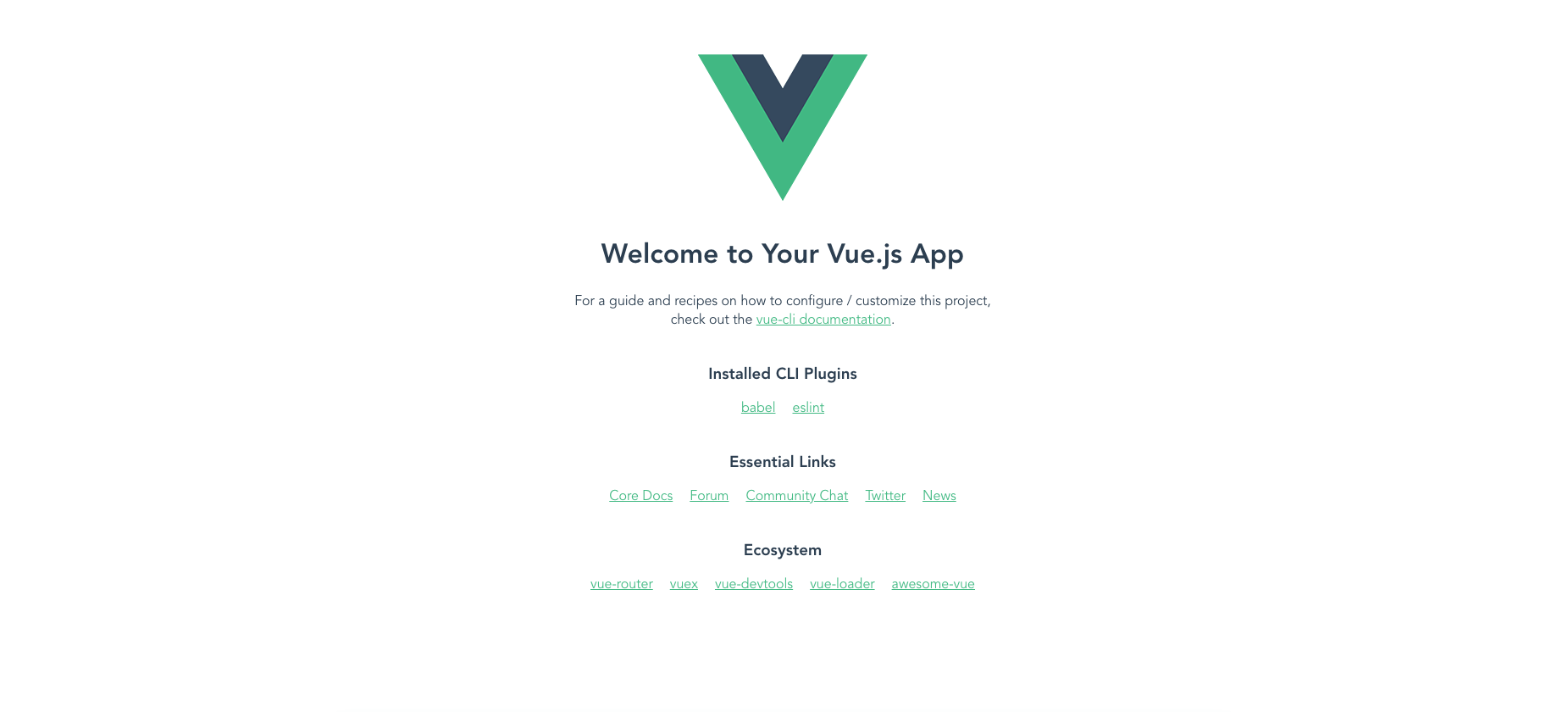
1. 创建一个 Vue 实例项目

  • 安装 Vue CLI
1
npm install -g @vue/cli --force
  • 初始化示例项目

使用默认配置,创建示例项目: hello-world

  • 运行项目

此时,项目已经包含全部依赖,可以直接运行项目:

  • 删除依赖

依赖包通常不会提交到代码仓库,为了更好模拟构建情形,这里删除依赖,进行构建

  • 项目中添加 Dockerfile 文件

进入项目目录:

编辑并保存 Dockerfile 文件:

 1
 2
 3
 4
 5
 6
 7
 8
 9
10
11
12
13
vim Dockerfile

FROM node:lts-alpine as builder
WORKDIR /
COPY package.json /
RUN npm install

COPY . .
RUN npm run build

FROM nginx:alpine
COPY --from=builder /dist/ /usr/share/nginx/html/
EXPOSE 80
  • 构建镜像

执行命令:

 1
 2
 3
 4
 5
 6
 7
 8
 9
10
11
12
13
14
15
16
17
18
19
20
21
22
docker build --no-cache -t shaowenchen/hello-world:v1 -f Dockerfile .

[+] Building 139.2s (13/13) FINISHED
 => [internal] load build definition from Dockerfile                                                                                                                        2.6s
 => => transferring dockerfile: 228B                                                                                                                                        0.2s
 => [internal] load .dockerignore                                                                                                                                           3.4s
 => => transferring context: 2B                                                                                                                                             0.0s
 => [internal] load metadata for docker.io/library/nginx:alpine                                                                                                             4.2s
 => [internal] load metadata for docker.io/library/node:lts-alpine                                                                                                          4.3s
 => CACHED [builder 1/6] FROM docker.io/library/node:lts-alpine@sha256:2c6c59cf4d34d4f937ddfcf33bab9d8bbad8658d1b9de7b97622566a52167f2b                                     0.0s
 => [internal] load build context                                                                                                                                           1.8s
 => => transferring context: 5.03kB                                                                                                                                         0.4s
 => CACHED [stage-1 1/2] FROM docker.io/library/nginx:alpine@sha256:da9c94bec1da829ebd52431a84502ec471c8e548ffb2cedbf36260fd9bd1d4d3                                        0.0s
 => [builder 2/6] COPY package.json /                                                                                                                                       5.3s
 => [builder 3/6] RUN npm install                                                                                                                                          93.1s
 => [builder 4/6] COPY . .                                                                                                                                                  5.9s
 => [builder 5/6] RUN npm run build                                                                                                                                        13.6s
 => [stage-1 2/2] COPY --from=builder /dist/ /usr/share/nginx/html/                                                                                                         4.0s
 => exporting to image                                                                                                                                                      4.0s
 => => exporting layers                                                                                                                                                     2.3s
 => => writing image sha256:dc0f72b655eb95235b51d8fb30c430c3c1803c2d538d9948941f3e7afd23ab56                                                                                0.2s
 => => naming to docker.io/shaowenchen/hello-world:v1                                                                                                                       0.2s
  • 测试镜像

执行命令,创建容器:

1
docker run --rm -it -p 80:80 shaowenchen/hello-world:v1
  • 访问服务

在本地打开: http://localhost, 可以看到页面

2. 利用 Buildkit 挂载缓存优化

这种方式的思路是,将第三方包单独存储在一个缓存镜像中,当构建应用镜像时,将缓存镜像中的文件挂载到构建环境中。

2.1 开启 Buildkit

Buildkit 默认是关闭的。有两种方式打开 Buildkit:

  • 第一种,在 /etc/docker/daemon.json 中增加 buildkit 配置,{ "features": { "buildkit": true }} 默认开启 buildkit 特性。
  • 第二种,每次执行 docker 命令时,加上环境变量 DOCKER_BUILDKIT=1

2.2 使用 Bind 的方式挂载缓存

  • 准备缓存镜像的 Dockerfile

创建 Dockerfile 文件:

1
2
3
4
5
6
7
vim Dockerfile-Cache

FROM node:lts-alpine as builder
WORKDIR /
COPY . .
RUN npm install
RUN npm run build

这里有一个小细节就是,需要 npm run build编译第三方包。仅仅缓存第三方包,是不能获得很好的加速效果的。同时,预编译能减少 CPU 和内存的消耗。

  • 编译包含第三方包的缓存镜像
 1
 2
 3
 4
 5
 6
 7
 8
 9
10
11
12
13
14
15
16
17
18
docker build --no-cache -t shaowenchen/hello-world:cache -f Dockerfile-Cache .

[+] Building 111.9s (9/9) FINISHED
 => [internal] load build definition from Dockerfile-Cache                                                                                                                  1.8s
 => => transferring dockerfile: 132B                                                                                                                                        0.0s
 => [internal] load .dockerignore                                                                                                                                           2.9s
 => => transferring context: 2B                                                                                                                                             0.0s
 => [internal] load metadata for docker.io/library/node:lts-alpine                                                                                                          4.2s
 => [internal] load build context                                                                                                                                           1.7s
 => => transferring context: 4.57kB                                                                                                                                         0.2s
 => CACHED [1/5] FROM docker.io/library/node:lts-alpine@sha256:2c6c59cf4d34d4f937ddfcf33bab9d8bbad8658d1b9de7b97622566a52167f2b                                             0.0s
 => [2/5] COPY . .                                                                                                                                                          3.6s
 => [3/5] RUN npm install                                                                                                                                                  69.2s
 => [4/5] RUN npm run build                                                                                                                                                14.5s
 => exporting to image                                                                                                                                                     13.9s
 => => exporting layers                                                                                                                                                    13.0s
 => => writing image sha256:e6ba7406f5d0c33d446ecc9a3c8e35fa593176ec9dedd899d39a1c00a14a5179                                                                                0.2s
 => => naming to docker.io/shaowenchen/hello-world:cache                                                                                                                    0.2s
  • 准备应用的构建 Dockerfile 文件
 1
 2
 3
 4
 5
 6
 7
 8
 9
10
11
12
13
vim Dockerfile-Bind

FROM node:lts-alpine as builder
WORKDIR /
COPY . .
RUN --mount=type=bind,from=shaowenchen/hello-world:cache,source=/node_modules,target=/node_modules \
--mount=type=bind,from=shaowenchen/hello-world:cache,source=/root/.npm,target=/root/.npm npm install
RUN --mount=type=bind,from=shaowenchen/hello-world:cache,source=/node_modules,target=/node_modules \
--mount=type=bind,from=shaowenchen/hello-world:cache,source=/root/.npm,target=/root/.npm npm run build

FROM nginx:alpine
COPY --from=builder /dist/ /usr/share/nginx/html/
EXPOSE 80

在每个使用缓存的命令前面都需要加 --mount

  • 编译应用镜像镜像
 1
 2
 3
 4
 5
 6
 7
 8
 9
10
11
12
13
14
15
16
17
18
19
20
21
22
docker build --no-cache -t shaowenchen/hello-world:v1-bind -f Dockerfile-Bind .

[+] Building 55.3s (13/13) FINISHED
 => [internal] load build definition from Dockerfile-Bind                                                                                                                   2.5s
 => => transferring dockerfile: 42B                                                                                                                                         0.0s
 => [internal] load .dockerignore                                                                                                                                           3.4s
 => => transferring context: 2B                                                                                                                                             0.0s
 => [internal] load metadata for docker.io/library/nginx:alpine                                                                                                             4.0s
 => [internal] load metadata for docker.io/library/node:lts-alpine                                                                                                          3.8s
 => [internal] load build context                                                                                                                                           2.4s
 => => transferring context: 4.47kB                                                                                                                                         0.2s
 => CACHED FROM docker.io/shaowenchen/hello-world:cache                                                                                                                     0.3s
 => CACHED [stage-1 1/2] FROM docker.io/library/nginx:alpine@sha256:da9c94bec1da829ebd52431a84502ec471c8e548ffb2cedbf36260fd9bd1d4d3                                        0.0s
 => CACHED [builder 1/5] FROM docker.io/library/node:lts-alpine@sha256:2c6c59cf4d34d4f937ddfcf33bab9d8bbad8658d1b9de7b97622566a52167f2b                                     0.0s
 => [builder 2/5] COPY . .                                                                                                                                                  4.2s
 => [builder 3/5] RUN --mount=type=bind,from=shaowenchen/hello-world:cache,source=/node_modules,target=/node_modules --mount=type=bind,from=shaowenchen/hello-world:cache  16.8s
 => [builder 4/5] RUN --mount=type=bind,from=shaowenchen/hello-world:cache,source=/node_modules,target=/node_modules --mount=type=bind,from=shaowenchen/hello-world:cache  13.2s
 => [stage-1 2/2] COPY --from=builder /dist/ /usr/share/nginx/html/                                                                                                         3.7s
 => exporting to image                                                                                                                                                      4.8s
 => => exporting layers                                                                                                                                                     3.1s
 => => writing image sha256:de18663c5752a41cd61c23fb2cbbc1ac9c4c79cf5fdbe15ca16e806d0ce18d9d                                                                                0.2s
 => => naming to docker.io/shaowenchen/hello-world:v1-bind                                                                                                                  0.1s

可以看到,加缓存之后,执行 install 和 build 总时长从 100 多秒降到了不到 30 秒。

3. 利用 S3 存储缓存优化

3.1 快速部署一个 minio

参考文件: Jenkins 中的构建产物与缓存

3.2 配置秘钥

在 hello-world 目录下创建凭证文件 .s3cfg

host_base = 1.1.1.1:9000
host_bucket = 1.1.1.1:9000
use_https = False

access_key =  minio
secret_key = minio123

signature_v2 = False

3.3 改造 Dockerfile 适配 S3 缓存

这里主要的工作点在:

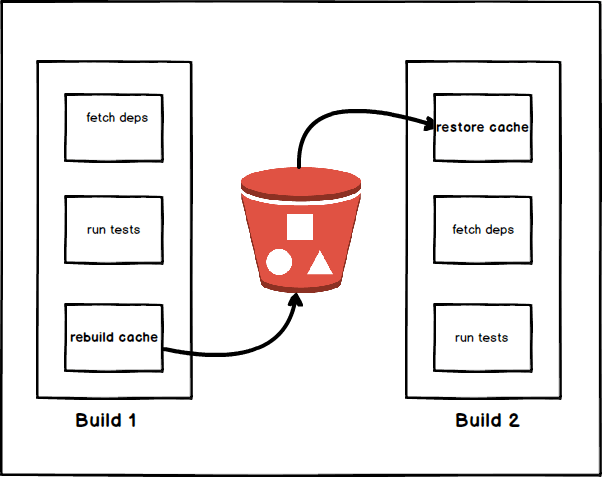
  1. 安装 s3cmd
  2. 获取并解压缓存,忽略错误(第一次为空)
  3. … 安装依赖,进行构建
  4. 压缩并上传缓存
 1
 2
 3
 4
 5
 6
 7
 8
 9
10
11
12
13
14
15
16
17
18
19
20
21
22
23
24
25
26
27
28
29
30
31
32
vim Dockerfile-S3

FROM node:lts-alpine as builder

ARG BUCKETNAME
ENV BUCKETNAME=$BUCKETNAME

RUN apk add python3 && ln -sf python3 /usr/bin/python && apk add py3-pip
RUN wget https://sourceforge.net/projects/s3tools/files/s3cmd/2.2.0/s3cmd-2.2.0.tar.gz \
    && mkdir -p /usr/local/s3cmd && tar -zxf s3cmd-2.2.0.tar.gz -C /usr/local/s3cmd \
    && ln -s /usr/local/s3cmd/s3cmd-2.2.0/s3cmd /usr/bin/s3cmd && pip3 install python-dateutil
WORKDIR /

# Get Cache
COPY .s3cfg /root/
RUN s3cmd get s3://$BUCKETNAME/node_modules.tar.gz && tar xf node_modules.tar.gz || exit 0
RUN s3cmd get s3://$BUCKETNAME/npm.tar.gz && tar xf npm.tar.gz || exit 0
COPY . .
RUN npm install
RUN npm run build

# Uploda Cache
RUN s3cmd del s3://$BUCKETNAME/node_modules.tar.gz || exit 0
RUN s3cmd del s3://$BUCKETNAME/npm.tar.gz || exit 0
RUN tar cvfz node_modules.tar.gz node_modules
RUN tar cvfz npm.tar.gz ~/.npm
RUN s3cmd put node_modules.tar.gz s3://$BUCKETNAME/
RUN s3cmd put npm.tar.gz s3://$BUCKETNAME/

FROM nginx:alpine
COPY --from=builder /dist/ /usr/share/nginx/html/
EXPOSE 80
  • 首次使用 S3 缓存构建应用镜像

构建之前,需要提前创建一个名为 hello-world 的 Bucket。

 1
 2
 3
 4
 5
 6
 7
 8
 9
10
11
12
13
14
15
16
17
18
19
20
21
22
23
24
25
26
27
28
29
30
31
32
docker build --no-cache --build-arg BUCKETNAME="hello-world" -t shaowenchen/hello-world:v1-s3 -f Dockerfile-S3 .

[+] Building 244.7s (23/23) FINISHED
 => [internal] load build definition from Dockerfile-S3                                                                                                                     1.7s
 => => transferring dockerfile: 40B                                                                                                                                         0.1s
 => [internal] load .dockerignore                                                                                                                                           2.6s
 => => transferring context: 2B                                                                                                                                             0.1s
 => [internal] load metadata for docker.io/library/nginx:alpine                                                                                                             2.6s
 => [internal] load metadata for docker.io/library/node:lts-alpine                                                                                                          0.0s
 => CACHED [builder  1/16] FROM docker.io/library/node:lts-alpine                                                                                                           0.0s
 => [internal] load build context                                                                                                                                           2.2s
 => => transferring context: 4.53kB                                                                                                                                         0.1s
 => CACHED [stage-1 1/2] FROM docker.io/library/nginx:alpine@sha256:da9c94bec1da829ebd52431a84502ec471c8e548ffb2cedbf36260fd9bd1d4d3                                        0.0s
 => [builder  2/16] RUN apk add python3 && ln -sf python3 /usr/bin/python && apk add py3-pip                                                                               32.3s
 => [builder  3/16] RUN wget https://sourceforge.net/projects/s3tools/files/s3cmd/2.2.0/s3cmd-2.2.0.tar.gz     && mkdir -p /usr/local/s3cmd && tar -zxf s3cmd-2.2.0.tar.g  12.8s
 => [builder  4/16] COPY .s3cfg /root/                                                                                                                                      5.8s
 => [builder  5/16] RUN s3cmd get s3://hello-world/node_modules.tar.gz && tar xf node_modules.tar.gz || exit 0                                                              6.7s
 => [builder  6/16] RUN s3cmd get s3://hello-world/npm.tar.gz && tar xf npm.tar.gz || exit 0                                                                                7.3s
 => [builder  7/16] COPY . .                                                                                                                                                5.7s
 => [builder  8/16] RUN npm install                                                                                                                                        71.3s
 => [builder  9/16] RUN npm run build                                                                                                                                      14.4s
 => [builder 10/16] RUN s3cmd del s3://hello-world/node_modules.tar.gz || exit 0                                                                                            7.5s
 => [builder 11/16] RUN s3cmd del s3://hello-world/npm.tar.gz || exit 0                                                                                                     6.9s
 => [builder 12/16] RUN tar cvfz node_modules.tar.gz node_modules                                                                                                          11.3s
 => [builder 13/16] RUN tar cvfz npm.tar.gz ~/.npm                                                                                                                          9.4s
 => [builder 14/16] RUN s3cmd put node_modules.tar.gz s3://hello-world/                                                                                                    14.8s
 => [builder 15/16] RUN s3cmd put npm.tar.gz s3://hello-world/                                                                                                             15.9s
 => [stage-1 2/2] COPY --from=builder /dist/ /usr/share/nginx/html/                                                                                                         4.5s
 => exporting to image                                                                                                                                                      3.9s
 => => exporting layers                                                                                                                                                     2.5s
 => => writing image sha256:dceead698b2c5f3980bf17f246078fe967dda2d9b009c30d9fdb0c60263146e5                                                                                0.1s
 => => naming to docker.io/shaowenchen/hello-world:v1-s3                                                                                                                    0.2s

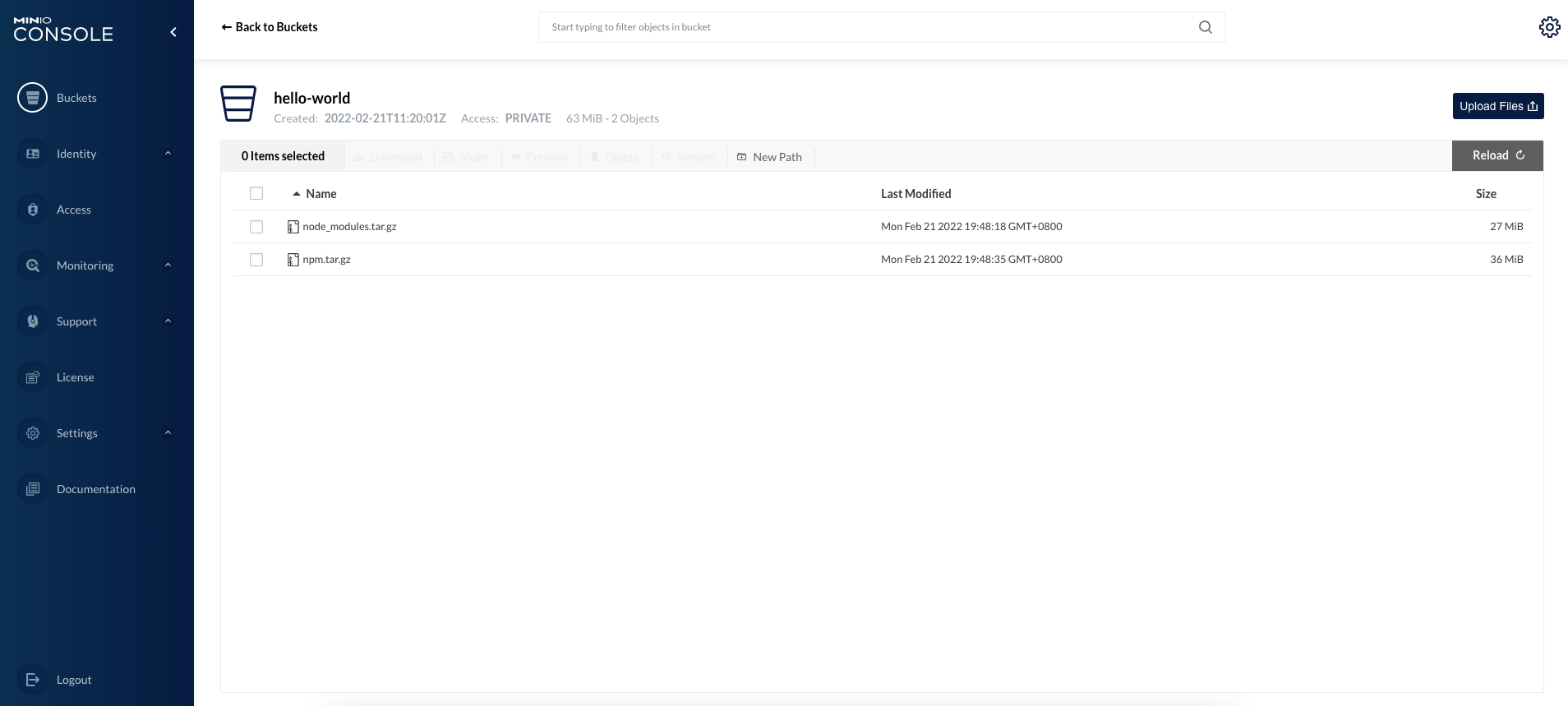
在 Minio 的 UI 端可以看到相关的缓存文件:

  • 再次使用 S3 缓存构建应用镜像
 1
 2
 3
 4
 5
 6
 7
 8
 9
10
11
12
13
14
15
16
17
18
19
20
21
22
23
24
25
26
27
28
29
30
31
 docker build --no-cache --build-arg BUCKETNAME="hello-world" -t shaowenchen/hello-world:v1-s3 -f Dockerfile-S3 .
[+] Building 213.8s (23/23) FINISHED
 => [internal] load build definition from Dockerfile-S3                                                                                                                     2.0s
 => => transferring dockerfile: 40B                                                                                                                                         0.0s
 => [internal] load .dockerignore                                                                                                                                           2.7s
 => => transferring context: 2B                                                                                                                                             0.0s
 => [internal] load metadata for docker.io/library/nginx:alpine                                                                                                             4.6s
 => [internal] load metadata for docker.io/library/node:lts-alpine                                                                                                          0.0s
 => CACHED [builder  1/16] FROM docker.io/library/node:lts-alpine                                                                                                           0.0s
 => CACHED [stage-1 1/2] FROM docker.io/library/nginx:alpine@sha256:da9c94bec1da829ebd52431a84502ec471c8e548ffb2cedbf36260fd9bd1d4d3                                        0.0s
 => [internal] load build context                                                                                                                                           1.9s
 => => transferring context: 4.53kB                                                                                                                                         0.1s
 => [builder  2/16] RUN apk add python3 && ln -sf python3 /usr/bin/python && apk add py3-pip                                                                               30.9s
 => [builder  3/16] RUN wget https://sourceforge.net/projects/s3tools/files/s3cmd/2.2.0/s3cmd-2.2.0.tar.gz     && mkdir -p /usr/local/s3cmd && tar -zxf s3cmd-2.2.0.tar.g  13.2s
 => [builder  4/16] COPY .s3cfg /root/                                                                                                                                      5.5s
 => [builder  5/16] RUN s3cmd get s3://hello-world/node_modules.tar.gz && tar xf node_modules.tar.gz || exit 0                                                             16.7s
 => [builder  6/16] RUN s3cmd get s3://hello-world/npm.tar.gz && tar xf npm.tar.gz || exit 0                                                                               15.3s
 => [builder  7/16] COPY . .                                                                                                                                                4.7s
 => [builder  8/16] RUN npm install                                                                                                                                        18.4s
 => [builder  9/16] RUN npm run build                                                                                                                                      13.6s
 => [builder 10/16] RUN s3cmd del s3://hello-world/node_modules.tar.gz || exit 0                                                                                            7.4s
 => [builder 11/16] RUN s3cmd del s3://hello-world/npm.tar.gz || exit 0                                                                                                     7.9s
 => [builder 12/16] RUN tar cvfz node_modules.tar.gz node_modules                                                                                                          10.8s
 => [builder 13/16] RUN tar cvfz npm.tar.gz ~/.npm                                                                                                                         10.0s
 => [builder 14/16] RUN s3cmd put node_modules.tar.gz s3://hello-world/                                                                                                    17.9s
 => [builder 15/16] RUN s3cmd put npm.tar.gz s3://hello-world/                                                                                                             16.3s
 => [stage-1 2/2] COPY --from=builder /dist/ /usr/share/nginx/html/                                                                                                         5.0s
 => exporting to image                                                                                                                                                      3.8s
 => => exporting layers                                                                                                                                                     2.5s
 => => writing image sha256:a9c46eef6073b3ef8e6c4cd33cc1ed11c94dcebdb0883c89283883d9434de331                                                                                0.2s
 => => naming to docker.io/shaowenchen/hello-world:v1-s3                                                                                                                    0.2s

可以看到,install 和 build 命令大约需要 80 秒,但是 S3 缓存相关的操作占用了大约 50 秒。

其中的 80 秒还可以优化的地方是,构建环境和 S3 服务之间网络限速为 1.2 MB/S 导致拉取和推送占用时间过长,就有较大优化空间。我认为在 30 秒以内,比较合理。

4. 总结

缓存加速是 CI 产品的一个难点。用户使用的方式各不相同,我们能做的是针对用户的场景提供解决方案,而不能强制改变用户的使用习惯。在我之前开发的 CI 产品中,主要是将主机上的缓存挂载到构建环境中加速,无法适用分阶段构建的场景。这里主要提供了两个方案:

第一种,开启 Buildkit 特性,将第三方依赖包存储在缓存镜像。缓存镜像可以根据策略,定时进行更新。构建镜像时,挂载缓存镜像中的第三方包。

第二种,使用 S3 存储第三方依赖包,在构建时,使用 s3cmd 命令管理缓存。

以上两种方式,都不算很好。主要的原因是,它们都需要对 Dockerfile 进行修改,对业务的入侵较大。

5. 参考


微信公众号