惯性聚合 高效追踪和阅读你感兴趣的博客、新闻、科技资讯
阅读原文 在惯性聚合中打开

推荐订阅源

G
Google Developers Blog
F
Fortinet All Blogs
Microsoft Azure Blog
腾讯CDC
Vercel News
Vercel News
Recent Announcements
博客园 - Franky
小众软件
小众软件
freeCodeCamp Programming Tutorials: Python, JavaScript, Git & More
The Cloudflare Blog
宝玉的分享
宝玉的分享
I
InfoQ
博客园 - 聂微东
Jina AI
Jina AI
J
Java Code Geeks
V
V2EX
U
Unit 42
Stack Overflow Blog
Stack Overflow Blog
奇客Solidot–传递最新科技情报
奇客Solidot–传递最新科技情报
Cyber Security Advisories - MS-ISAC
阮一峰的网络日志
阮一峰的网络日志
L
LangChain Blog
T
The Blog of Author Tim Ferriss
量子位

陈少文的网站

巨变与机遇的未来十年 Kubernetes 平台管理软件压力测试方案 使用镜像部署 Hexo 静态页面 终于等到你 - GitHub 镜像仓库服务(ghcr.io) 一起来学 Go --(6)Interface 一起来学 Go --(5)Goroutine 和 Channel 什么是函数式编程 如何在 Kubernetes 集群集成 Kata 柯里化与偏函数 使用 PyGithub 自动创建 Label 软件产品是团队能力的输出 Helm 2 、Helm 3 比较 IoT 变现 Kubernetes 中的 DNS 服务 国内的 Helm 镜像源 Harbor 使用自签证书支持 Https 访问 DevOps 工具链之 Prow 如何使用 kfctl 安装 Kubeflow VS Code 无法下载 Go 插件的工具包 工程师更应具有服务精神 你不知道的 Docker 使用技巧 使用 Docker 运行 Tensorflow 论中国 什么是左移 如何清空 Git 仓库全部历史记录 一禅小和尚 有风吹过厨房 时间的玫瑰 如何在 CentOS 安装 GPU 驱动 开发 Tips(19)
Jenkins 中 Lightweight 拉取代码问题分析
微信公众号 · 2020-06-22 · via 陈少文的网站

1. 遇到了什么问题

Jenkins 执行日志报错:

1
2
3
4
5
6
Started by user admin
Lightweight checkout support not available, falling back to full checkout.
Checking out git https://github.com/shaowenchen/pipeline-test.git into /var/jenkins_home/workspace/abc@script to read Jenkinsfile
...
...
Unable to access '.git/index.lock': File exists.

原因分析:

简单介绍一下 Jenkins 的部署情况,Jenkins 使用 Helm Chart 部署在 Kubernetes,使用 Kubernetes 动态 Pod 进行构建。Jenkins 的 /var/jenkins_home 挂载到 PV 进行持久化。

并发的流水线,抢占同一个 workspace 导致执行失败。这是一个好问题,梳理 Pipeline 的执行流程,有利于对 Jenkins 更深入地理解。解决办法: 可以直接进入 workspace 目录,删掉 index.lock ,也可以尝试解决一下 Lightweight failed 问题。

2. Jenkins 中常用的新建类型

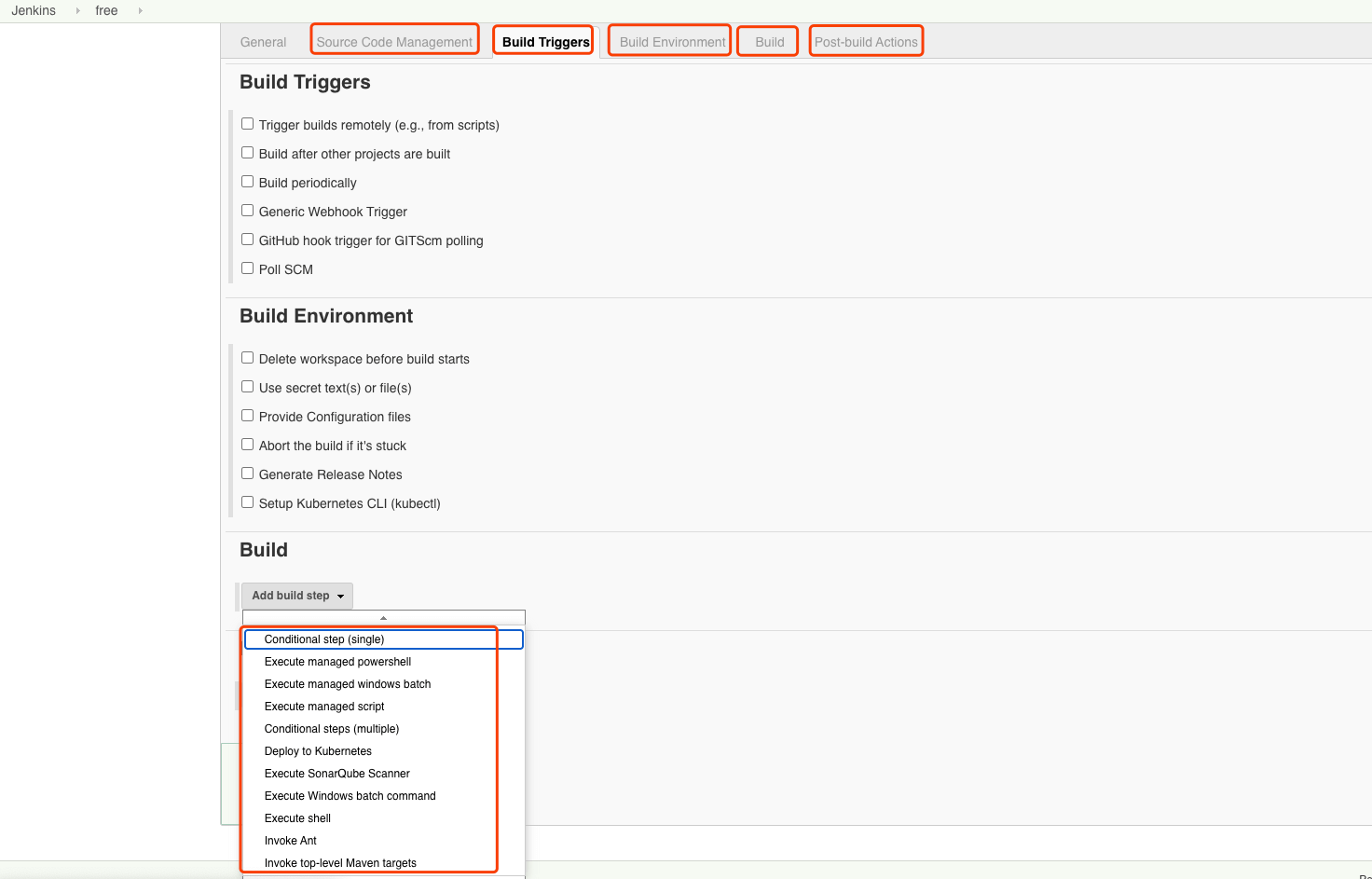
首先,我们来看看 Jenkins 中,常见的几种新建类型。主要有三种:

  • Freestyle project

Freestyle project 类型,提供直接在 Jenkins 页面编辑流程的能力。

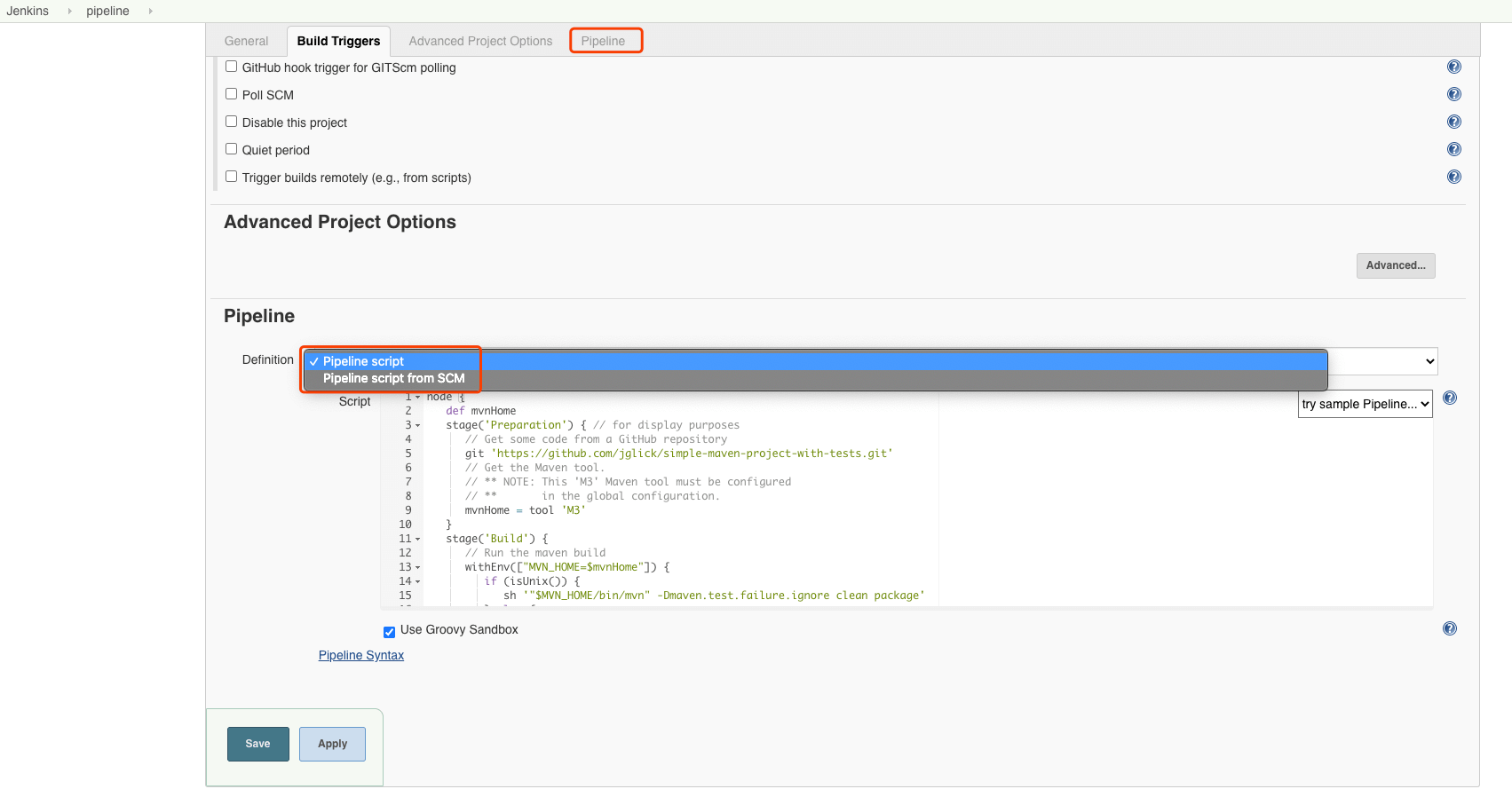
  • 流水线

流水线类型将,执行部分的编排交给了用户,提供更加灵活的执行方式。

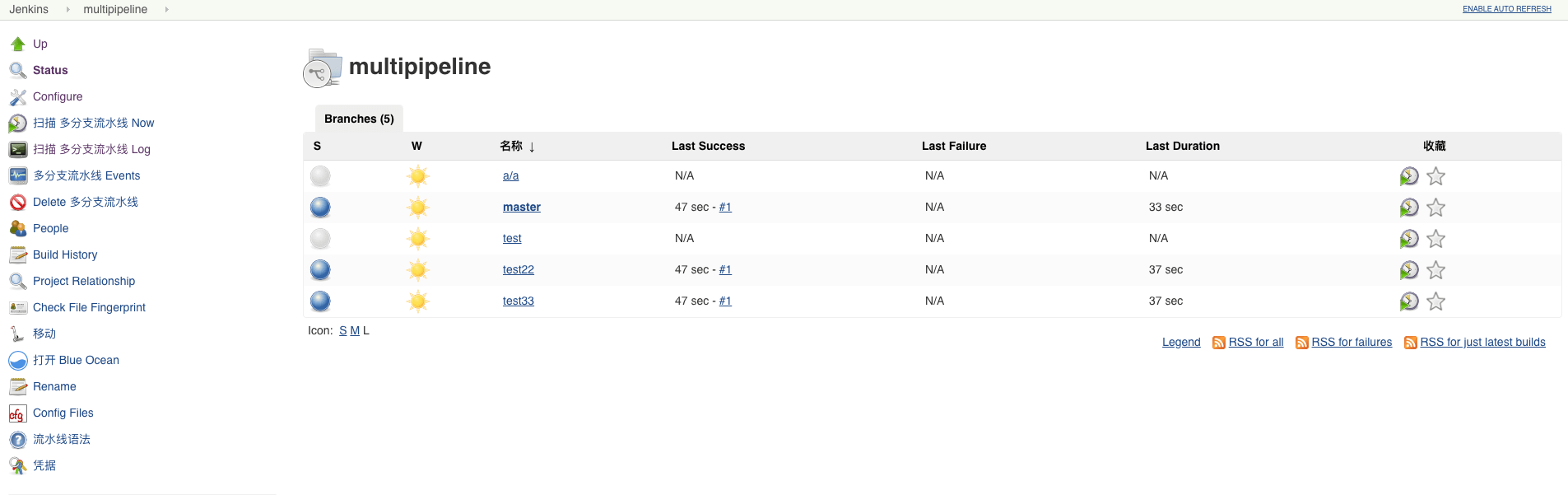
  • 多分支流水线

多分支流水线类型,提供了更加丰富的多分支应用场景。

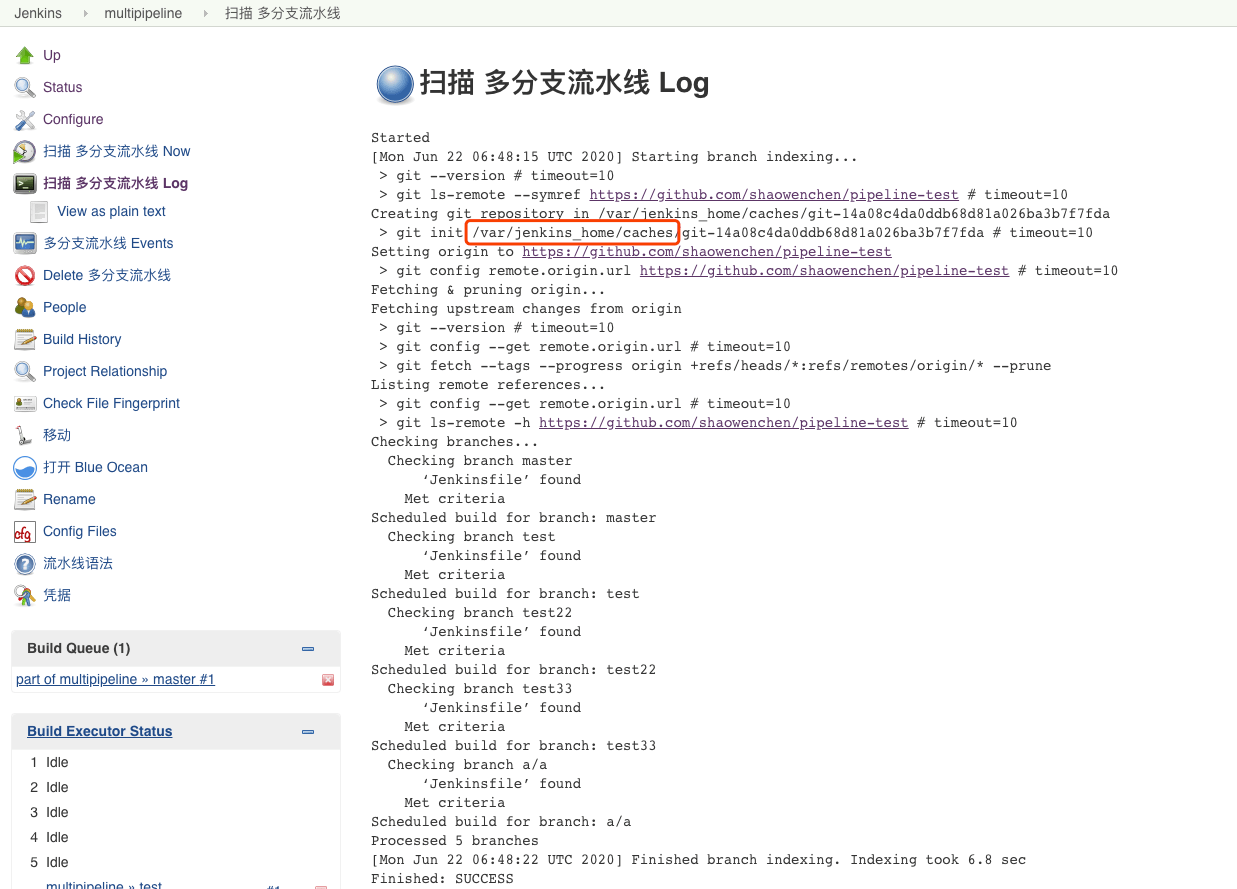
如上图,是多分支流水线扫描的日志。可以看到多分支扫描会在 /var/jenkins_home/cache 下占用大量硬盘空间,所以不能因为使用了动态 Pod 、外部对象存储归档就减少 Jenkins 的磁盘空间。

3. Jenkinsfile 语法类型

除了使用 Freestyle project 直接编辑,Jenkinsfile 也是常见的一种定义流水线的方式。Jenkinsfile 遵循的是 Groovy DSL ,主要有两种类型的语法:

  • 脚本式
  • 声明式

3.1 Scripted Pipeline - 脚本式流水线

 1
 2
 3
 4
 5
 6
 7
 8
 9
10
11
node {
    stage('Build') {
        //
    }
    stage('Test') {
        //
    }
    stage('Deploy') {
        //
    }
}

3.2 Declarative Pipeline - 声明式流水线

 1
 2
 3
 4
 5
 6
 7
 8
 9
10
11
12
13
14
15
16
17
18
19
20
21
pipeline {
    agent any
    stages {
        stage('Build') {
            steps {
                sh 'make'
            }
        }
        stage('Test'){
            steps {
                sh 'make check'
                junit 'reports/**/*.xml'
            }
        }
        stage('Deploy') {
            steps {
                sh 'make publish'
            }
        }
    }
}

4. Jenkinsfile 来源类型

在使用 Jenkinsfile 定义流水线时,主要有两种方式:

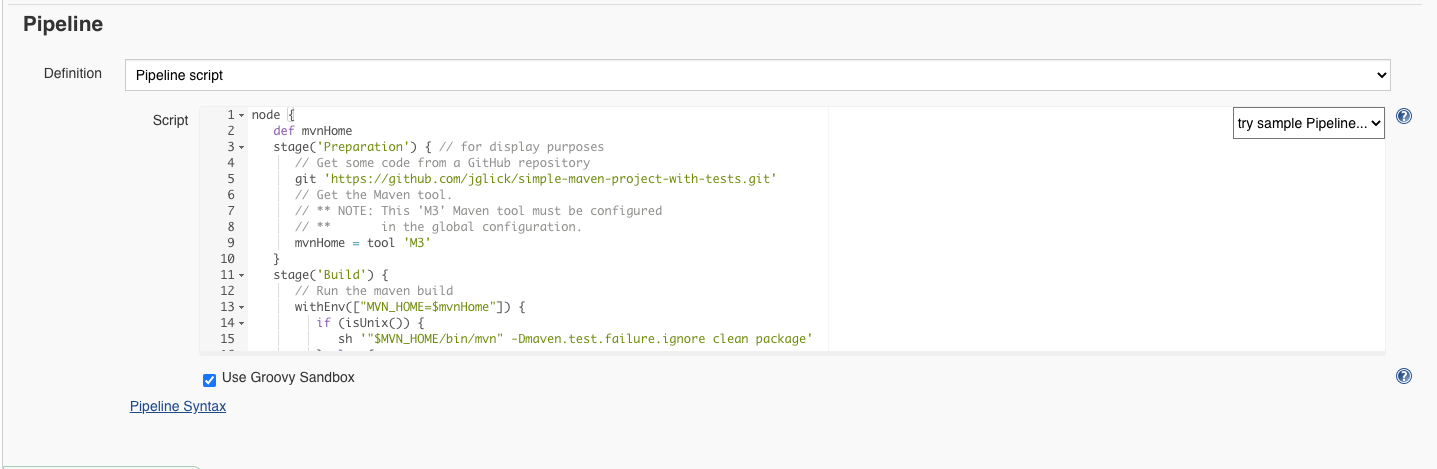
  • Pipeline script

如上图,直接在页面上编辑流水线流程。

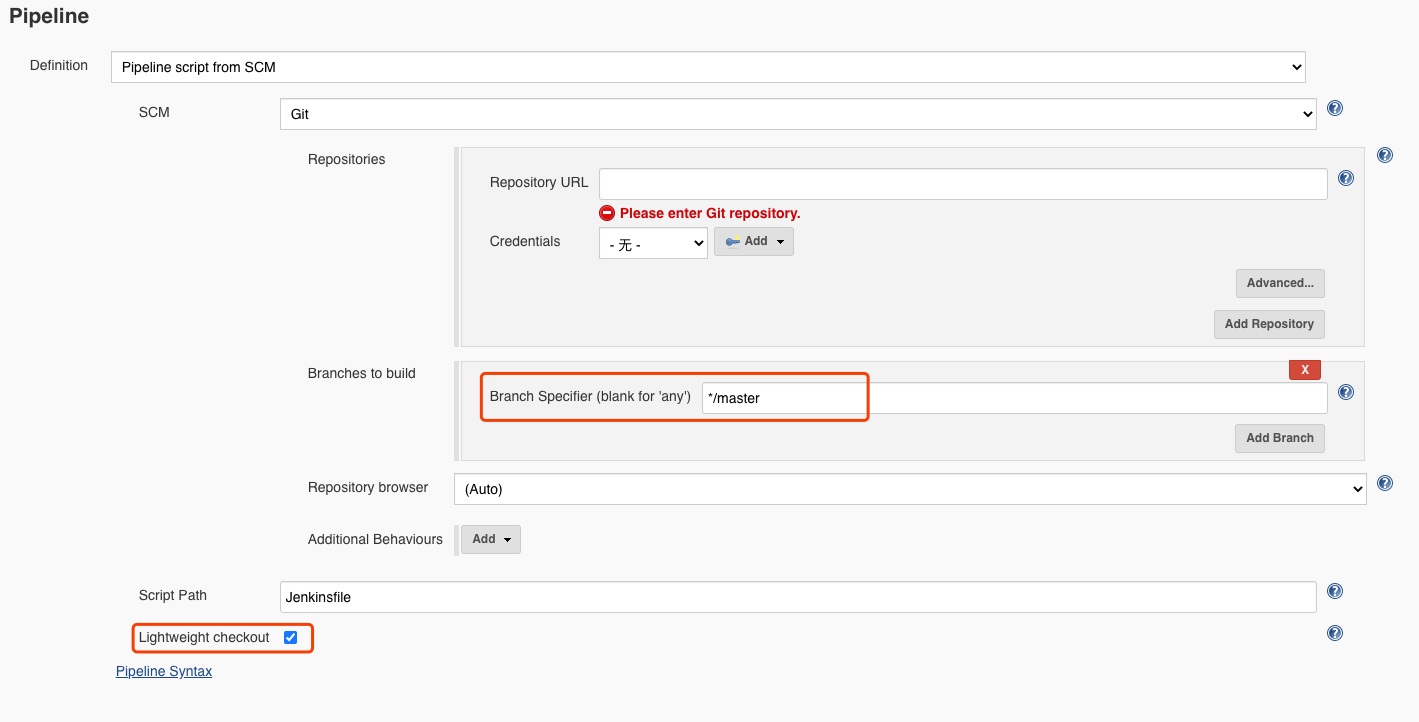
  • Pipeline script from SCM

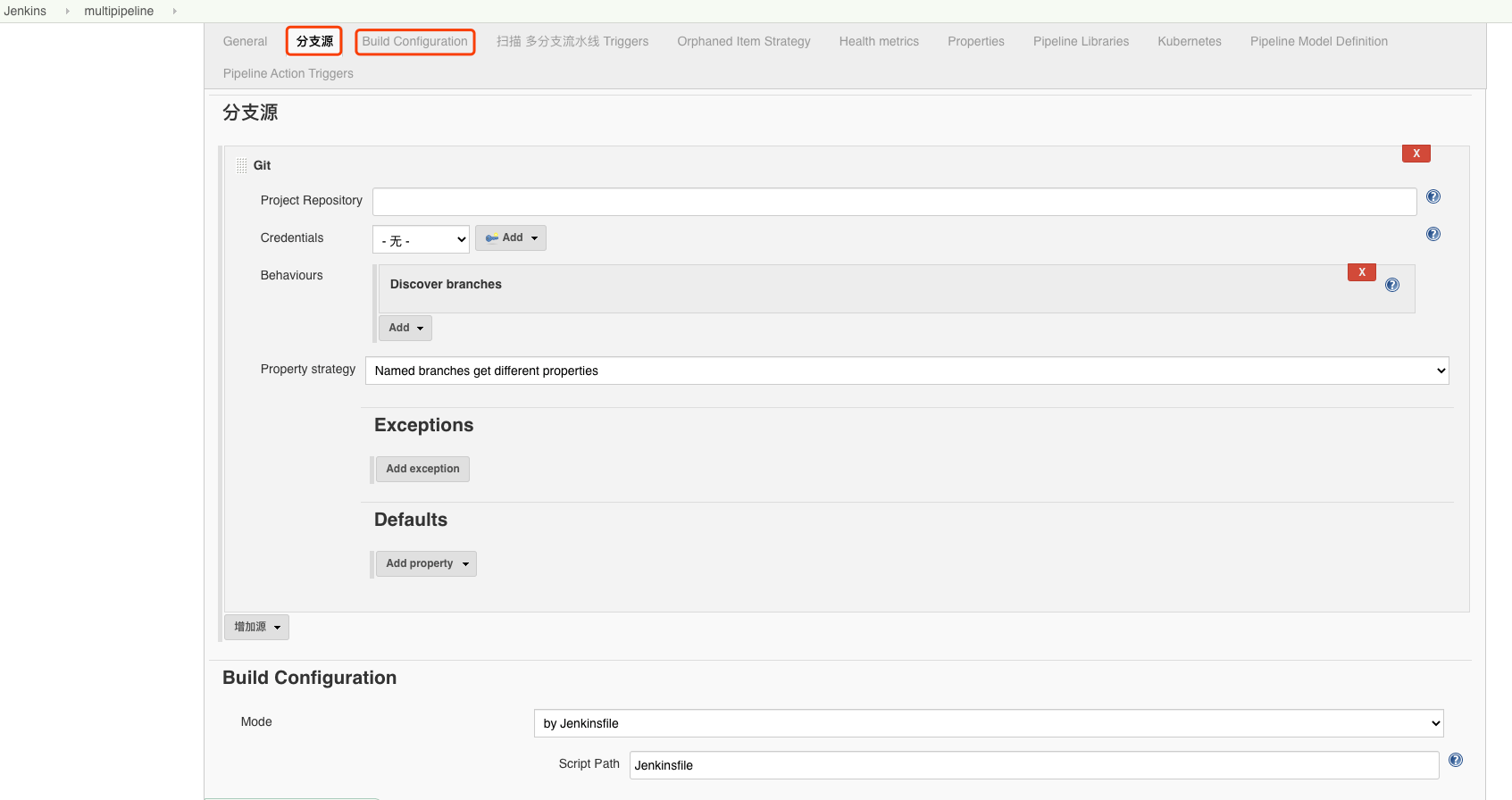
由于在 DevOps 实践过程中,配置也属于需要管理的部分。通常会将 Jenkinsfile 也添加到仓库中,跟随版本一起维护。如上图,可以直接指定仓库和路径,选择 Jenkinsfile 文件。

这里的 Branches to buildLightweight checkout 需要特别注意,下面会进行讨论。

5. SCM 流水线的执行流程

5.1 从仓库获取 Jenkinsfile 文件

如果 Lightweight checkout 开启,并生效,Jenkins 将直接获取到 Jenkinsfile。具体有两种方式:

  • 通过 API ,可以看到如下日志
1
2
3
4
Branch indexing
05:05:03 Connecting to https://api.github.com using /******
Obtained Jenkinsfile from e216c1ce3bed549462c2bb6762b6dbce32f220e6
Running in Durability level: MAX_SURVIVABILITY
  • 通过 Git ,可以看到如下日志
1
2
3
4
5
Branch indexing
 > git rev-parse --is-inside-work-tree # timeout=10
Setting origin to https://github.com/shaowenchen/pipeline-test.git
 > git config remote.origin.url https://github.com/shaowenchen/pipeline-test.git # timeout=10
Fetching origin...

如果没有开启 Lightweight checkout 或者 Lightweight checkout 失败,则会看到如下日志。

1
2
3
Started by user admin
Lightweight checkout support not available, falling back to full checkout.
Checking out git https://github.com/shaowenchen/pipeline-test.git into /var/jenkins_home/workspace/abc@script to read Jenkinsfile

Lightweight checkout 失败的原因有很多可能:

  • Jenkins 版本旧
  • Git Server 版本旧
  • Branches to build 参数多选或错误

通过测试不同版本的组件,可以很容易检测相关问题。这里主要说下 Branches to build

Branches to build 参数指定了可以从哪些分支获取 Jenkinsfile 。如果设置为 */master ,则指定只有 master 分支的 Jenkinsfile 有效。如果设置为 */* ,则意味着全部分支的 Jenkinsfile 有效。但此时由于 Jenkins 也不清楚应该请求,哪个分支的流水线。

只能 Lightweight 失败,退化为将整个仓库 checkout 到 /var/jenkins_home/workspaces 目录下,以正则匹配的全部分支中,最后一次提交记录所在的分支的 Jenkinsfile 作为当次流水线定义。

最开始提到的问题很明显,多分支流水线场景却使用了流水线类型。如果 Branches to build 配置导致 Lightweight 退化,同时存在大量并发时,SCM 流水线会共用一个 /var/jenkins_home/workspaces/{pipeline_name} 导致并发问题。

而多分支流水线 Lightweight 退化时,会将仓库代码 checkout 到 /var/jenkins_home/workspaces/{pipeline_name_branch_name} 目录下,隔离不同的分支,可以减少并发冲突。

5.2 根据 Jenkinsfile 内容进行构建

在获得 Jenkinsfile 之后,就很简单了,根据定义动态创建 Pod 。

 1
 2
 3
 4
 5
 6
 7
 8
 9
10
11
12
13
14
15
16
17
18
19
20
21
22
23
24
25
Obtained Jenkinsfile from ce0b611f3c443d423dcc499575eb560630625712
Running in Durability level: MAX_SURVIVABILITY
[Pipeline] Start of Pipeline
[Pipeline] node
Agent base-zrz3f is provisioned from template Kubernetes Pod Template
---
apiVersion: "v1"
kind: "Pod"
metadata:
  annotations: {}
  labels:
    jenkins: "slave"
    jenkins/base: "true"
  name: "base-zrz3f"
spec:
  affinity:
    nodeAffinity:
      preferredDuringSchedulingIgnoredDuringExecution:
      - preference:
          matchExpressions:
          - key: "node-role.kubernetes.io/worker"
            operator: "In"
            values:
            - "ci"
        weight: 1

在动态 Pod 上,进行流水线的构建。

1
Running on base-zrz3f in /home/jenkins/agent/workspace/hotfix_bugfix_REQ-12956_20200618