惯性聚合 高效追踪和阅读你感兴趣的博客、新闻、科技资讯
阅读原文 在惯性聚合中打开

推荐订阅源

freeCodeCamp Programming Tutorials: Python, JavaScript, Git & More
Jina AI
Jina AI
钛媒体:引领未来商业与生活新知
钛媒体:引领未来商业与生活新知
T
Troy Hunt's Blog
T
The Exploit Database - CXSecurity.com
Microsoft Security Blog
V
Visual Studio Blog
F
Fortinet All Blogs
博客园_首页
P
Proofpoint News Feed
V
Vulnerabilities – Threatpost
The Cloudflare Blog
C
Cyber Attacks, Cyber Crime and Cyber Security
cs.CL updates on arXiv.org
H
Heimdal Security Blog
cs.AI updates on arXiv.org
A
About on SuperTechFans
Cyber Security Advisories - MS-ISAC
AI
AI
奇客Solidot–传递最新科技情报
奇客Solidot–传递最新科技情报
S
Security Affairs
The Register - Security
S
Security @ Cisco Blogs
Hugging Face - Blog
Hugging Face - Blog
OSCHINA 社区最新新闻
OSCHINA 社区最新新闻
博客园 - 聂微东
Schneier on Security
WordPress大学
WordPress大学
Google DeepMind News
GbyAI
GbyAI
T
Tailwind CSS Blog
Hacker News: Ask HN
Hacker News: Ask HN
W
WeLiveSecurity
D
Docker
L
LangChain Blog
B
Blog RSS Feed
The Last Watchdog
The Last Watchdog
Cloudbric
Cloudbric
TaoSecurity Blog
TaoSecurity Blog
N
Netflix TechBlog - Medium
酷 壳 – CoolShell
酷 壳 – CoolShell
I
InfoQ
The Hacker News
The Hacker News
AWS News Blog
AWS News Blog
Exploit-DB.com RSS Feed
宝玉的分享
宝玉的分享
I
Intezer
云风的 BLOG
云风的 BLOG
V2EX - 技术
V2EX - 技术
K
KPMG report finds enterprise disconnect between AI and its ROI | CIO

陈少文的网站

巨变与机遇的未来十年 Kubernetes 平台管理软件压力测试方案 使用镜像部署 Hexo 静态页面 终于等到你 - GitHub 镜像仓库服务(ghcr.io) 一起来学 Go --(6)Interface 一起来学 Go --(5)Goroutine 和 Channel 什么是函数式编程 如何在 Kubernetes 集群集成 Kata 柯里化与偏函数 使用 PyGithub 自动创建 Label 软件产品是团队能力的输出 Helm 2 、Helm 3 比较 IoT 变现 Kubernetes 中的 DNS 服务 国内的 Helm 镜像源 Harbor 使用自签证书支持 Https 访问 DevOps 工具链之 Prow 如何使用 kfctl 安装 Kubeflow VS Code 无法下载 Go 插件的工具包 工程师更应具有服务精神 你不知道的 Docker 使用技巧 使用 Docker 运行 Tensorflow 论中国 什么是左移 如何清空 Git 仓库全部历史记录 一禅小和尚 有风吹过厨房 时间的玫瑰 如何在 CentOS 安装 GPU 驱动 开发 Tips(19) 使用 Velero 备份 Kubernetes 集群 Kubernetes Cheat Sheet 开发 Tips(18) 如何构建一个 Java 工程 开发 Tips(17) KubeSpray 安装 Kubernetes 报错 ip in ansible_all_ipv4_addresses 基于 Kubernetes 和 Jenkins 搭建自动化测试系统 在 Kubernetes 上动态创建 Jenkins Slave 使用 Jenkins 进行服务拨测 开发 Tips(16) Kubernetes 签发 Ingress 证书及日常故障运维 Kubernetes 中 Deployment 的基本操作 Kubernetes 中的证书 如何使用 KubeBuilder 开发一个 Operator Kubernetes 1.6.0 安装问题汇总 镜像管理工具 -- Harbor 开发 Tips(15) Docker 如何拉取镜像 开发 Tips(14) 使用 Helm 安装 harbor 开发 Tips(13) 使用 S2I 构建云原生应用 在 Kubernetes 中使用 emptyDir、hostPath、localVolume 开发 Tips(12) 开发 Tips(11) 代码质量分析工具 SonarQube 使用 Kubeadm 安装 Kubernetes 集群 一起来学 Go --(4)常用函数 Kubernetes 中的 Ceph Kubernetes 之 Volumes Kubernetes 之 Labels、Selectors 开发 Tips(10) 开源正在重构商业模式 Kubernetes 之网络 Kubernetes 之 API 使用 Helm 和 Operator 快速部署 Prometheus Kubernetes 复杂有状态应用管理框架 -- Operator Kubernetes 的包管理器 -- Helm 一起来学 Go --(3)Go Modules 如何一步一步地优化博客方案 kubectl 实用指南 Kubernetes 中的基本概念 搭建远程 Kubernetes 开发环境 大公司和小公司的 ToB 思路 开发 Tips(9) Go 入门指南 一起来学 Go --(2)数据与逻辑结构 如何预防 Web 富文本中的 XSS 攻击 django-xss-cleaner 云工作时代 一起来学 Go --(1)背景与特点 SaaS 开发团队的不同阶段 你不知道的 Git 使用技巧 输出既服务 微服务设计 继续奔跑 开发 Tips(8) 从账户安全到二次验证 Django 性能之数据库查询优化 Django 性能之分库分表 敏捷开发之研发流程 打造一致性的团队 开发 Tips(7) Pytest 进阶学习之 Mock PaaS 部署之 buildpack Go 开发配置 领域输出才是 PaaS 的核心竞争力 Pytest 入门学习 开发 Tips(6) 如何使用 Jenkins、Docker、GitLab 搭建 Django 自动化部署流程
Apidoc 实践和自动化生成
微信公众号 · 2017-06-15 · via 陈少文的网站

Please enable Javascript to view the contents

在前后端分离框架中,API 文档频繁交接。如果涉及到第三方接口调用,多方合作场景下,API 和文档变更可能会更快。为了方便维护 API 和交接文档,这里给大家推荐一款文档生成工具 - apidoc

1.apidoc 简介

apidoc 是一个基于 nodejs 的 API 文档生成工具,从代码注释中提取特定格式的内容,生成 API 文档。

目前支持的语言有:C#、C/C++、D、Erlang、Go、Groovy、Java、Javascript、Pascal/Delphi、Perl、PHP、Python、Rust、Ruby、Scala 和 Swift。

特点:

  • 跨平台,linux、windows、macOS 等都支持。
  • 支持语言广泛。
  • 支持文档版本管理。
  • 支持多个不同语言的多个项目生成一份文档。
  • 输出模板可自定义。

2. 举个例子

以 Django 为例,在 views 函数中写注释

 1
 2
 3
 4
 5
 6
 7
 8
 9
10
11
12
13
14
15
16
17
18
19
20
def myview(request, id):
    """
    @api {GET} ci/app/:id/ 获取应用详情
    @apiVersion 1.0.0
    @apiDescription 获取应用详情
    @apiName getAppDetail
    @apiGroup Application
    @apiSuccessExample  请求成功
    HTTP/1.1 200 OK
    {
        "result": true,
        "data": [],
        "code": 0,
        "message": u'成功说明'
    }
    @apiSuccess {Boolean} result true
    @apiSuccess {Array} data  数据列表
    @apiSuccess {Number} code 0
    @apiSuccess {String} message 说明
    """

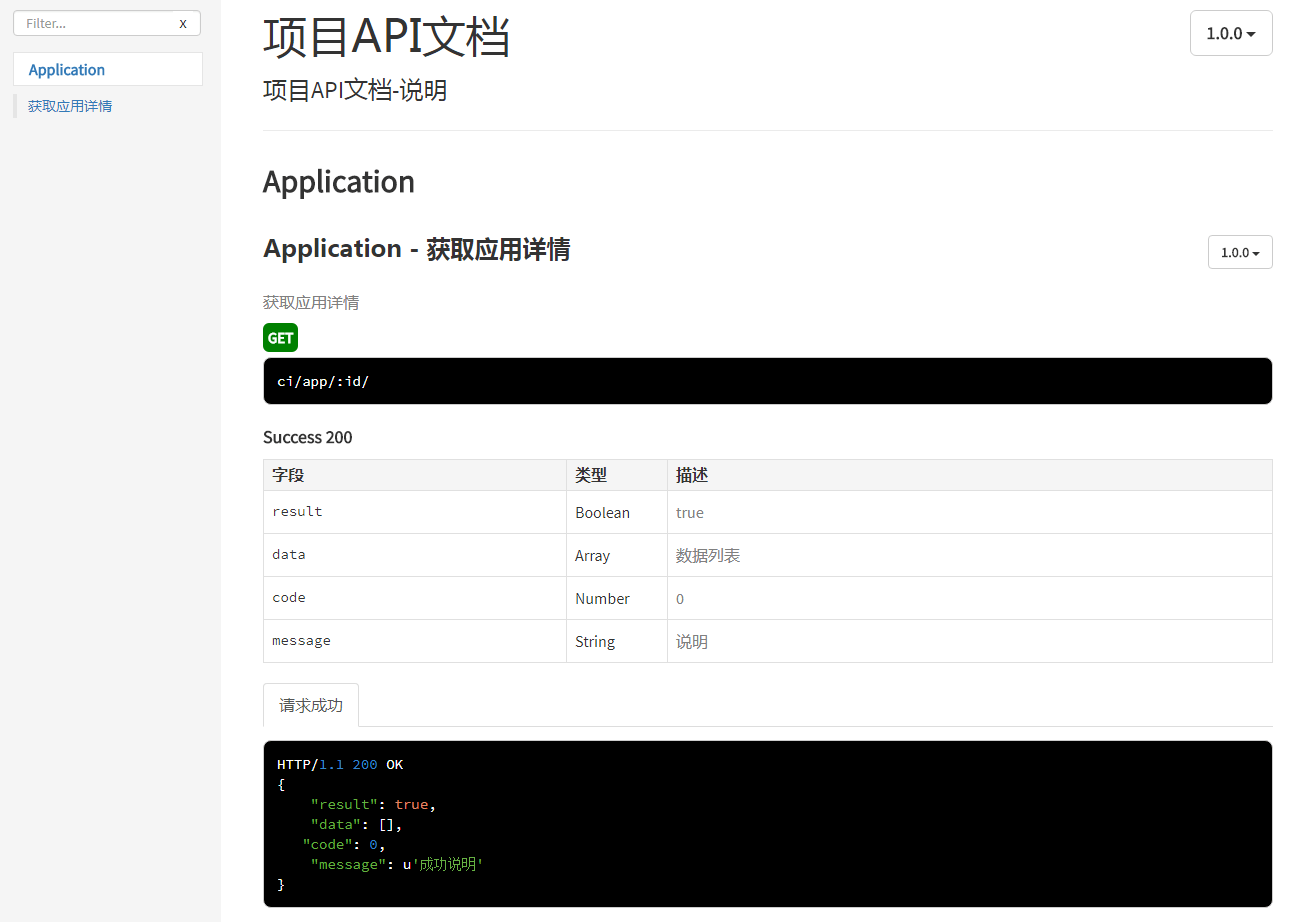
生成的 API 文档

3. apidoc 支持的关键字

apidoc 通过抽取代码注释,根据关键字语法生成 API 文档。所以,如果想生成理想的 API 文档,一定要遵循 apidoc 的相关关键字语法。下面是一个关键字语法的 list,{ }表示需要替换的变量,[ ]表示可选参数:

  • @api {method} path [title]。
    只有使用@api 标注的注释块才会在解析之后生成文档,title 会被解析为导航菜单(@apiGroup)下的小菜单
    method 可以有空格,如{POST GET}
  • @apiGroup name。
    分组名称,被解析为导航栏菜单
  • @apiName name。
    接口名称,在同一个@apiGroup 下,名称相同的@api 通过@apiVersion 区分,否者后面@api 会覆盖前面定义的@api
  • @apiDescription text。
    接口描述,支持 html 语法
  • @apiVersion verison。
    接口版本,major.minor.patch 的形式
  • @apiIgnore [hint]。
    apidoc 会忽略使用@apiIgnore 标注的接口,hint 为描述
  • @apiSampleRequest url。
    接口测试地址以供测试,发送请求时,@api method 必须为 POST/GET 等其中一种
  • @apiDefine name [title] [description]。
    定义一个注释块(不包含@api),配合@apiUse 使用可以引入注释块
    在@apiDefine 内部不可以使用@apiUse
  • @apiUse name。
    引入一个@apiDefine 的注释块
  • @apiParam [(group)] [{type}] [field=defaultValue] [description]。请求参数
  • @apiHeader [(group)] [{type}] [field=defaultValue] [description]。头部参数
  • @apiError [(group)] [{type}] field [description]。响应错误时参数
  • @apiSuccess [(group)] [{type}] field [description]。成功时参数,
    group 表示参数的分组,type 表示类型(不能有空格),入参可以定义默认值(不能有空格)
  • @apiParamExample [{type}] [title] example。参数请求用例
  • @apiHeaderExample [{type}] [title] example。头部请求用例
  • @apiErrorExample [{type}] [title] example。错误请求用例
  • @apiSuccessExample [{type}] [title] example。成功请求用例
    type 表示的是 example 的语言类型, example 内容会被直接解析显示。
  • @apiPermission name。
    name 必须独一无二,描述@api 的访问权限,如 admin/anyone

4. 安装配置 apidoc

  • 安装 apidoc

这里默认已经安装了 nodejs,如果没有安装,请自行下载安装。全局安装 apidoc:

  • 配置

配置是可选的,没有配置并不影响文档的生成。只是缺失部分 API 文档信息而已。在工程的根目录下,创建 apidoc.json 文件,配置文档的基本信息:

1
2
3
4
5
6
{
  "name": "项目API文档",
  "version": "1.0.0",
  "description": "项目API文档-说明",
  "title": "项目API文档-title"
}
  • 生成文档

在 apidoc.json 所在的目录下,执行命令:

-i 参数表示输入的目录,默认生成的文档在当前目录下的/doc,也可以通过-o 参数指定。

5. apidoc 自动生成

每次更新代码注释之后,执行一次**apidoc -i ./**才能看到 API 文档,比较麻烦。能不能每次修改注释之后,自动生成 API 文档呢?当然可以。

  • 安装 gaze

gaze 是基于 nodejs 的文件监控项目。

  • 编写监控代码

apidoc-watch.js

 1
 2
 3
 4
 5
 6
 7
 8
 9
10
11
12
13
14
15
16
17
18
19
20
21
22
23
24
25
26
var gaze = require("gaze");
var exec = require("child_process").exec;

function Watch() {
  gaze("./*.*", function (error, watcher) {
    this.on("all", function (event, filepath) {
      console.log(filepath + " was " + event);
      Geneartion();
    });
  });
}

function Geneartion() {
  var msg = exec("apidoc -e ./node_modules/");
  msg.stdout.on("data", function (data) {
    console.log("生成Api->" + data);
  });

  msg.stderr.on("data", function (data) {
    console.log("生成出错->" + data);
  });
}

Geneartion();
Watch();
console.log("正在监听......");
  • 执行监控

只需要更新注释之前,执行一次命令即可。

6. 项目实践建议

6.1 文档的交接方式

建议将 API 文档生成在前端的 static 目录下,以链接的形式交接,比如: htttp://example.com/static/doc/index.html。

6.2 后端注释组织方式

以 Django 为例,由于 apidoc 需要的注释量比较大,有两种选择:

  • 一种是将注释直接写在每个 views 函数中,
  • 一种是单独使用一个文件或文件夹来写注释。

django 中建议skinny controller, fat model,views.py 中少些代码,多写注释,第一种方案比较合适。同时,注释和接口实现放在一起,可以降低二次维护学习成本。

6.3 使用 apiDefine 和 apiUse

由于前后端,常常会约定固定格式的返回。可以将格式固定的部分,使用 apiDefine 定义为一个注释块,在其他地方使用 apiUse 引用。可以有效减少注释量。

定义注释块,注意:一个注释块应该被定义为一个单独的注释:

 1
 2
 3
 4
 5
 6
 7
 8
 9
10
11
12
13
14
15
16
17
18
19
20
21
22
23
24
25
26
27
28
29
30
31
"""
@apiDefine success
@apiSuccessExample  请求成功
HTTP/1.1 200 OK
{
    "result": true,
    "data": [],
    "code": 0,
    "message": u'成功说明'
}
@apiSuccess {Boolean} result true
@apiSuccess {Array} data  数据列表
@apiSuccess {Number} code 0
@apiSuccess {String} message 说明
"""

"""
@apiDefine error
@apiErrorExample  请求失败
HTTP/1.1 40X  error
{
    "result": false,
    "data": [],
    "code": -1,
    "message": u'失败提示'
}
@apiError {Boolean} result false
@apiError {Array} data  空
@apiError {Number} code  错误码
@apiError {String} message 提示
"""

其他地方引用

1
2
3
4
5
6
7
8
9
def myview(request, id):
    """
    @api {GET} ci/app/:id/ 获取应用详情
    @apiVersion 1.0.0
    @apiDescription 获取应用详情
    @apiName getAppDetail
    @apiGroup Application
    @apiUse success
    """

6.4 合理使用 apiGroup 分组

apiGroup、apiName 会被拼接到 URL 中,比如:static/doc/index.html#api-apiGroup-apiName。给 apiGroup、apiName 取个容易理解的名字很重要。合理使用 apiGroup,将前端相关的功能聚集在一起,有利于前端理解 API 的用途。

7. 参考


微信公众号