请注意文中的 --block-size 4096 为 4GB,如果使用 --block-size 4 会更合理,在写数据性能上会更好。
1. 环境准备
1
| mkdir -p /data/test && cd /data/test
|
在这个目录下完成全部的测试任务。
建议新建一个目录,因为 Redis 会将当前目录文件的 Owner 改成 systemd-coredump。如果是 HOME 目录下,可能会导致 SSH 验证失败,无法登录机器。
1
| nerdctl run -d --name redis --network host -v $PWD/redis-data:/data -e REDIS_PASSWORD=mypassword redis:6
|
1
2
3
4
| export REDIS_IP=x.x.x.x
export REDIS_PORT=6379
export REDIS_USER=default
export REDIS_PASSWORD=mypassword
|
1
2
3
4
5
| export ACCESS_KEY=xxx
export SECRET_KEY=xxx
export BUCKET=xxx
export ENDPOINT=xxx
export BUCKET_ENPOINT=$BUCKET.$ENDPOINT
|
Dragonfly Peer 之间的带宽: 25 Gbps
Dragonfly Peer 到对象存储源站的带宽: 20 Gbps,在测试机器能打满
1
2
| perPeerRateLimit: 5120Mi
totalRateLimit: 10240Mi
|
2. 本地磁盘
2.1 dd 读写测试
1
2
3
4
5
6
7
| time dd if=/dev/zero of=./dd.txt bs=4M count=2500
10485760000 bytes (10 GB, 9.8 GiB) copied, 10.8478 s, 967 MB/s
real 0m11.625s
user 0m0.008s
sys 0m11.442s
|
1
2
3
4
5
6
| sync && echo 3 > /proc/sys/vm/drop_caches
time cp ./dd.txt /dev/null
real 0m9.048s
user 0m0.021s
sys 0m4.431s
|
1
2
3
4
5
| time cp ./dd.txt /dev/null
real 0m2.015s
user 0m0.004s
sys 0m2.009s
|
这里直接使用了内存缓存。
2.2 benchmark 测试
 1
 2
 3
 4
 5
 6
 7
 8
 9
10
11
| juicefs bench --block-size 4096 --big-file-size 1024 --threads 30 ./
+------------------+------------------+--------------+
| ITEM | VALUE | COST |
+------------------+------------------+--------------+
| Write big file | 2067.12 MiB/s | 14.86 s/file |
| Read big file | 6295.55 MiB/s | 4.88 s/file |
| Write small file | 12358.1 files/s | 2.43 ms/file |
| Read small file | 17480.9 files/s | 1.72 ms/file |
| Stat file | 192702.6 files/s | 0.16 ms/file |
+------------------+------------------+--------------+
|
2.3 fio 测试
1
| curl -sfL https://raw.githubusercontent.com/shaowenchen/ops/main/getcli.sh |VERSION=latest sh -
|
1
| opscli task -f ~/.ops/tasks/get-diskio-byfio.yaml --size 10g --filename=/data/test/${TEST_CASE}-fio.txt
|
| Test Type | IOPS | Bandwidth | Duration |
|---|
| Rand_Read_Testing | 164k | 639 MiB/s | 16027 msec |
| Rand_Write_Testing | 46.7k | 182 MiB/s | 56175 msec |
| Sequ_Read_Testing | 7754 | 969 MiB/s | 10564 msec |
| Sequ_Write_Testing | 5055 | 632 MiB/s | 16203 msec |
3. 社区版 JuiceFS
在使用时,应该都会带 Cache,这里就不验证不带 Cache 的情况了。
3.1 挂载文件系统
1
| export REDIS_DIRECTSERVER=redis://${REDIS_USER}:${REDIS_PASSWORD}@${REDIS_IP}:${REDIS_PORT}/1
|
1
2
3
4
5
| juicefs format \
--storage ks3 \
--bucket ${BUCKET_ENPOINT}\
${REDIS_DIRECTSERVER} \
${TEST_CASE}-direct
|
1
| juicefs mount -d --buffer-size 2000 --max-uploads 150 ${REDIS_DIRECTSERVER} ./${TEST_CASE}-direct --cache-dir=/data/jfs-${TEST_CASE}
|
此时,在 ${TEST_CASE}-direct 目录下的操作,都会被同步到桶的 ${TEST_CASE}-direct 文件中。
3.2 dd 读写测试
1
2
3
4
5
6
7
| time dd if=/dev/zero of=./dd.txt bs=4M count=2500
10485760000 bytes (10 GB, 9.8 GiB) copied, 16.3898 s, 640 MB/s
real 0m16.406s
user 0m0.008s
sys 0m8.233s
|
1
2
3
4
5
6
| sync && echo 3 > /proc/sys/vm/drop_caches
time cp ./dd.txt /dev/null
real 2m2.601s
user 0m0.040s
sys 0m7.424s
|
此时 JuiceFS 已经在本地缓存了数据。
1
2
3
4
5
6
| sync && echo 3 > /proc/sys/vm/drop_caches
time cp ./dd.txt /dev/null
real 0m5.824s
user 0m0.020s
sys 0m5.684s
|
3.3 benchmark 测试
 1
 2
 3
 4
 5
 6
 7
 8
 9
10
11
| juicefs bench --block-size 4096 --big-file-size 1024 --threads 30 ./
+------------------+----------------+---------------+
| ITEM | VALUE | COST |
+------------------+----------------+---------------+
| Write big file | 560.37 MiB/s | 36.55 s/file |
| Read big file | 1353.06 MiB/s | 15.14 s/file |
| Write small file | 238.0 files/s | 84.02 ms/file |
| Read small file | 11527.3 files/s | 1.74 ms/file |
| Stat file | 24699.4 files/s | 0.81 ms/file |
+------------------+----------------+---------------+
|
通过不断增加 threads,可以得到更好的性能数据,打满对象存储后端的带宽。我在 threads 维度测试了多组数据
| Threads | Operation | Write Speed (MiB/s) | Write Time (s/file) | Read Speed (MiB/s) | Read Time (s/file) |
|---|
| 20 | Write big file | 1491.96 | 13.73 | 1776.85 | 11.53 |
| 30 | Write big file | 1610.24 | 19.08 | 2136.94 | 14.38 |
| 40 | Write big file | 1689.97 | 24.24 | 2803.49 | 14.61 |
| 50 | Write big file | 1714.95 | 29.86 | 3200.11 | 16.00 |
其他测试用例,选择了 threads = 30 作为统一的测试参数。
3.4 fio 测试
1
| curl -sfL https://raw.githubusercontent.com/shaowenchen/ops/main/getcli.sh |VERSION=latest sh -
|
1
| opscli task -f ~/.ops/tasks/get-diskio-byfio.yaml --size 10g --filename=/data/test/${TEST_CASE}-direct/fio.txt
|
| Test Type | IOPS | Bandwidth | Duration |
|---|
| Rand_Read_Testing | 159k | 621 MiB/s | 16486 msec |
| Rand_Write_Testing | 47.7k | 187 MiB/s | 54906 msec |
| Sequ_Read_Testing | 8189 | 1024 MiB/s | 10003 msec |
| Sequ_Write_Testing | 5182 | 648 MiB/s | 15806 msec |
3.5 卸载文件系统
1
2
| cd ..
juicefs umount ./${TEST_CASE}-direct
|
4. 企业版 JuiceFS
4.1 挂载
挂载企业版 JuiceFS 需要去控制台获取挂载命令,如下图:
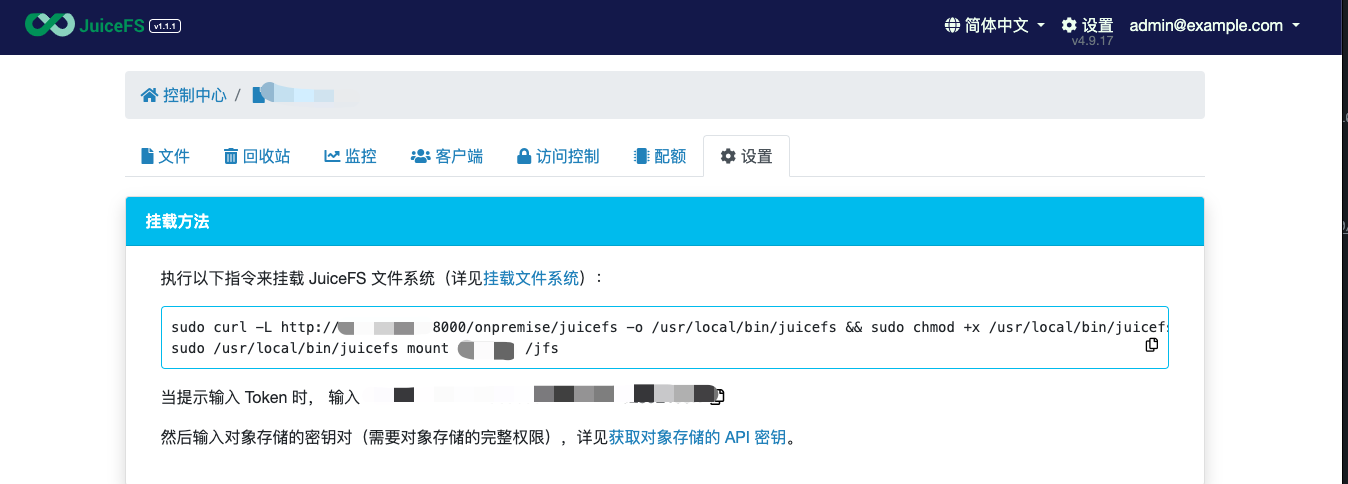
执行挂载命令之后,还需要输入 Bucket 的 AccessKey 和 SecretKey。企业版的 JuiceFS 只是负责存储元数据,数据还是存储在对象存储中。
4.2 dd 读写测试
1
2
3
4
5
6
7
| time dd if=/dev/zero of=./dd.txt bs=4M count=2500
10485760000 bytes (10 GB, 9.8 GiB) copied, 16.2446 s, 645 MB/s
real 0m16.294s
user 0m0.012s
sys 0m8.963s
|
1
2
3
4
5
6
| sync && echo 3 > /proc/sys/vm/drop_caches
time cp ./dd.txt /dev/null
real 0m12.947s
user 0m0.036s
sys 0m7.715s
|
1
2
3
4
5
6
| sync && echo 3 > /proc/sys/vm/drop_caches
time cp ./dd.txt /dev/null
real 0m1.969s
user 0m0.020s
sys 0m1.927s
|
4.3 benchmark 测试
 1
 2
 3
 4
 5
 6
 7
 8
 9
10
11
| juicefs bench --block-size 4096 --big-file-size 1024 --threads 30 ./
+------------------+------------------+----------------+
| ITEM | VALUE | COST |
+------------------+------------------+----------------+
| Write big file | 349.72 MiB/s | 87.84 s/file |
| Read big file | 710.07 MiB/s | 43.26 s/file |
| Write small file | 41.7 files/s | 719.14 ms/file |
| Read small file | 672.3 files/s | 44.62 ms/file |
| Stat file | 162303.2 files/s | 0.18 ms/file |
+------------------+-----------------+---------------+
|
4.4 fio 测试
1
| curl -sfL https://raw.githubusercontent.com/shaowenchen/ops/main/getcli.sh |VERSION=latest sh -
|
1
| opscli task -f ~/.ops/tasks/get-diskio-byfio.yaml --size 10g --filename=/jfs/${TEST_CASE}-ee/fio.txt
|
| Test Type | IOPS | Bandwidth | Duration |
|---|
| Rand_Read_Testing | 147k | 573 MiB/s | 17864 msec |
| Rand_Write_Testing | 45.0k | 176 MiB/s | 58244 msec |
| Sequ_Read_Testing | 7565 | 946 MiB/s | 10828 msec |
| Sequ_Write_Testing | 5182 | 648 MiB/s | 15806 msec |
5. Dragonfly + 社区版 JuiceFS
默认安装的 JuiceFS 客户端是 Lite 版本,不支持 Dragonfly,需要自行编译最新的客户端。在 https://github.com/juicedata/juicefs/pull/4057 之后的版本中,已经支持了 Dragonfly dfstore 对象存储加速的方式,但 PR https://github.com/juicedata/juicefs/pull/4302 采用的是与镜像同路的代理方式,可以无需修改 manager 的情况下,配置多个 Bucket 进行加速。本节的 client 就是来自此 PR。
5.1 配置 Dragonfly
在 Seed Peer 和 Peer 中添加如下配置:
1
2
3
4
5
| proxies:
- regx: s3.*amazonaws.com.*
- regx: oss.*aliyuncs.com.*
- regx: obs.*myhuaweicloud.com.*
- regx: ks3.*ksyun.com.*
|
5.2 挂载
1
| export REDIS_DRAGONFLY=redis://${REDIS_USER}:${REDIS_PASSWORD}@${REDIS_IP}:${REDIS_PORT}/2
|
1
2
3
4
5
| juicefs format \
${REDIS_DRAGONFLY} \
${TEST_CASE}-df \
--storage dragonfly \
--bucket "https://${BUCKET_ENPOINT}?proxy=http://127.0.0.1:65001&backendStorage=s3"
|
在 Kubernetes 集群中,可以在每个节点运行一个代理,也可以在若干缓存节点部署代理,提供区域化加速的能力。
1
| juicefs mount ${REDIS_DRAGONFLY} ./${TEST_CASE}-df --cache-dir=/data/jfs-${TEST_CASE}-df -d
|
这里也不验证不带 Local Cache 的情况了。
5.3 dd 读写测试
1
2
3
4
5
6
7
| time dd if=/dev/zero of=./dd.txt bs=4M count=2500
10485760000 bytes (10 GB, 9.8 GiB) copied, 27.422 s, 382 MB/s
real 0m27.434s
user 0m0.012s
sys 0m9.840s
|
1
2
3
4
5
6
| sync && echo 3 > /proc/sys/vm/drop_caches
time cp ./dd.txt /dev/null
real 5m21.089s
user 0m0.044s
sys 0m8.175s
|
1
2
3
4
5
6
| sync && echo 3 > /proc/sys/vm/drop_caches
time cp ./dd.txt /dev/null
real 0m7.077s
user 0m0.048s
sys 0m6.928s
|
此时的缓存既有 JuiceFS 本地缓存,也有 Dragonfly 的缓存。
5.4 benchmark
 1
 2
 3
 4
 5
 6
 7
 8
 9
10
11
| juicefs bench --block-size 4096 --big-file-size 1024 --threads 30 ./
+------------------+----------------+---------------+
| ITEM | VALUE | COST |
+------------------+----------------+---------------+
| Write big file | 355.03 MiB/s | 86.53 s/file |
| Read big file | 110.07 MiB/s | 279.09 s/file |
| Write small file | 347.1 files/s | 86.43 ms/file |
| Read small file | 14406.9 files/s | 2.08 ms/file |
| Stat file | 40294.0 files/s | 0.74 ms/file |
+------------------+-----------------+---------------+
|
此时 /data/dfget/data/ 目录下已经有 39G 的文件了。
5.5 fio 测试
1
| curl -sfL https://raw.githubusercontent.com/shaowenchen/ops/main/getcli.sh |VERSION=latest sh -
|
1
| opscli task -f ~/.ops/tasks/get-diskio-byfio.yaml --size 10g --filename=/data/test/${TEST_CASE}-df/fio.txt
|
| Test Type | IOPS | Bandwidth | Duration |
|---|
| Rand_Read_Testing | 152k | 592 MiB/s | 17293 msec |
| Rand_Write_Testing | 48.0k | 187 MiB/s | 54625 msec |
| Sequ_Read_Testing | 8225 | 1028 MiB/s | 9959 msec |
| Sequ_Write_Testing | 5171 | 646 MiB/s | 15840 msec |
6. 总结
6.1 dd
bs=4M count=2500
| 测试环境 | 本地磁盘 | 社区版 JuiceFS | 企业版 JuiceFS | 社区版 JuiceFS + Dragonfly |
|---|
| 写速度 | 967 MB/s | 640 MB/s | 645 MB/s | 382 MB/s |
| 首次读速度 | 1138 MB/s | 84 MB/s | 853 MB/s | 31 MB/s |
| 缓存读速度 | 5120 MB/s | 1765 MB/s | 1024 MB/s | 1463 MB/s |
- 企业版的 JuiceFS 首次读速度非常快,远超社区版 JuiceFS
- 在没有缓存命中的情况下,Dragonfly 对社区版 JuiceFS 有明显减速效果,因为 Dragonfly 对文件切分、做种有开销
- 在缓存命中的情况下,社区版 JuiceFS 的缓存读取速度也非常快
6.2 benchmark
–block-size 4096 –big-file-size 1024 –threads 30
| 项/环境 | 本地磁盘 | 社区版 JuiceFS | 企业版 JuiceFS | 社区版+Dragonfly |
|---|
| 写大文件速度 | 2067 MiB/s | 560 MiB/s | 350 MiB/s | 355 MiB/s |
| 读大文件速度 | 6295 MiB/s | 1353 MiB/s | 710 MiB/s | 110 MiB/s |
| 写小文件 IOPS | 12358 | 238 | 42 | 347 |
| 读小文件 IOPS | 17480 | 11527 | 672 | 14406 |
| Stat 文件 IOPS | 192703 | 24699 | 162303 | 40294 |
- Dragonfly 可以大幅提高社区版 JuiceFS 的小文件读写性能,Dragonfly 对小文件有优化处理
- Dragonfly 对社区版 JuiceFS 读取大文件有明显减速效果
- 企业版 JuiceFS 相较于社区版 JuiceFS,有明显的全方面加速
6.3 fio
10G 文件
| 测试项/环境 | 本地磁盘 | 社区版 JuiceFS | 企业版 JuiceFS | 社区版+Dragonfly |
|---|
| 随机读 IOPS | 164k | 159k | 147k | 152k |
| 随机读带宽 | 639 MiB/s | 621 MiB/s | 573 MiB/s | 592 MiB/s |
| 随机写 IOPS | 46.7k | 47.7k | 45k | 48k |
| 随机写带宽 | 182 MiB/s | 187 MiB/s | 176 MiB/s | 187 MiB/s |
| 顺序读 IOPS | 7.8k | 8.2k | 7.6k | 8.2k |
| 顺序读带宽 | 969 MiB/s | 1 GB/s | 946 MiB/s | 1 GB/s |
| 顺序写 IOPS | 5.1k | 5.2k | 5.2k | 5.2k |
| 顺序写带宽 | 632 MiB/s | 648 MiB/s | 648 MiB/s | 646 MiB/s |
fio 的结果显示,各种情况的差异不大。
6.4 一些思考和建议
企业版的 JuiceFS 只是负责存储元数据,类似社区版需要使用 MySQL、Redis 存储元数据一样。但 JuiceFS EE 的部署节点,提供有缓存加速的能力。另外一点是企业级存储软件提供服务质量兜底。
- Dragonfly + 社区版 JuiceFS 的性能测试结果
上面的测试是基于单机,而 Dragonfly 的优势在于大规模 P2P 组网的加速能力。因此,并不需要简单从性能角度做出选择,而是应该考虑到源站带宽、数据规模等因素。
同时,从上面的结果可以看出,在读文件时,如果命中缓存,Dragonfly + 社区版 JuiceFS 能媲美企业版 JuiceFS。
- 社区版 JuiceFS 是否应该上 Dragonfly
主要需要根据服务访问对象存储源站的带宽判断。
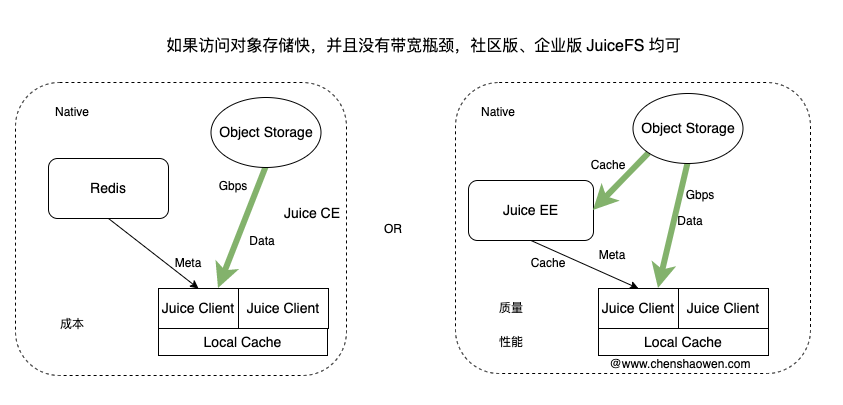
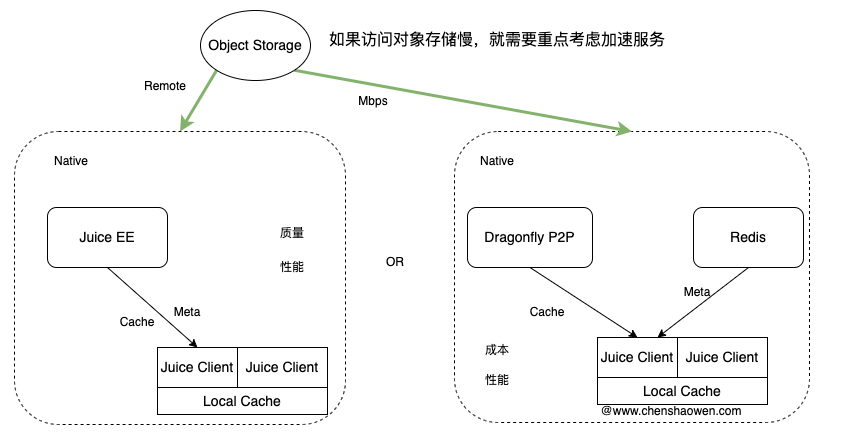
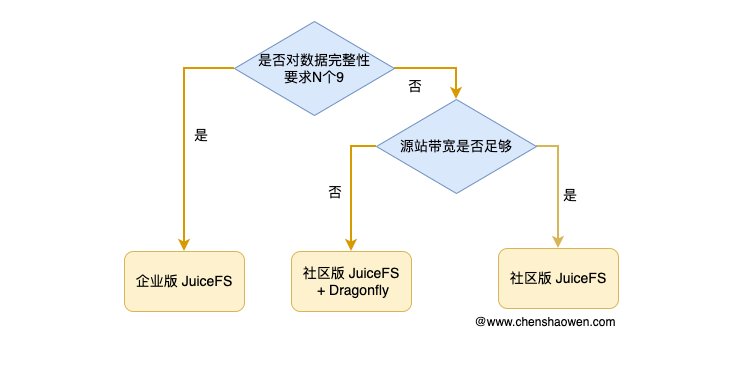
如果服务访问对象存储源站的带宽足够,那么直接使用社区版 JuiceFS 就行。如果服务访问对象存储源站的带宽不稳定、不够,那么就需要着重考虑缓存加速服务,再来根据具体情况选择企业版 JuiceFS 或 Dragonfly + 社区版 JuiceFS。下面是一个供参考的决策图:
在选择采用哪种方式时,主要考虑的是成本、性能、质量,结合业务的现状、体量做出选择。下面给出两张示意图,以供参考: