1. 硬件测试
有两块 NVMe SSD SAMSUNG MZQL27T6HBLA-00A07,两个节点组成的 3FS 集群,每个节点有 4 个 IB 网口。
1.1 单线程
1
| fio -numjobs=1 -fallocate=none -iodepth=2 -ioengine=libaio -direct=1 -rw=read -bs=128K --group_reporting -size=100M -time_based -runtime=30 -name=fio-test -directory=/data/fio
|
1
| Jobs: 1 (f=1): [R(1)][100.0%][r=2211MiB/s][r=17.7k IOPS][eta 00m:00s]
|
1
| fio -numjobs=1 -fallocate=none -iodepth=2 -ioengine=libaio -direct=1 -rw=write -bs=128K --group_reporting -size=100M -time_based -runtime=30 -name=fio-test -directory=/data/fio
|
1
| Jobs: 1 (f=1): [W(1)][100.0%][w=3703MiB/s][w=29.6k IOPS][eta 00m:00s]
|
1
| fio -numjobs=1 -fallocate=none -iodepth=2 -ioengine=libaio -direct=1 -rw=read -bs=4M --group_reporting -size=100M -time_based -runtime=30 -name=fio-test -directory=/data/fio
|
1
| Jobs: 1 (f=1): [R(1)][100.0%][r=6294MiB/s][r=1573 IOPS][eta 00m:00s]
|
1
| fio -numjobs=1 -fallocate=none -iodepth=2 -ioengine=libaio -direct=1 -rw=write -bs=4M --group_reporting -size=100M -time_based -runtime=30 -name=fio-test -directory=/data/fio
|
1
| Jobs: 1 (f=1): [W(1)][100.0%][w=3872MiB/s][w=967 IOPS][eta 00m:00s]
|
设备单线程
| 块大小 | 操作 | 读/写速率 | IOPS |
|---|
| 128 K | 读 | 2211 MiB/s | 17.7k |
| 128 K | 写 | 3703 MiB/s | 29.6k |
| 4 M | 读 | 6294 MiB/s | 1573 |
| 4 M | 写 | 3872 MiB/s | 967 |
1.2 多线程
1
| fio -numjobs=128 -fallocate=none -iodepth=2 -ioengine=libaio -direct=1 -rw=read -bs=128K --group_reporting -size=100M -time_based -runtime=30 -name=fio-test -directory=/data/fio
|
1
| Jobs: 128 (f=128): [R(128)][100.0%][r=6237MiB/s][r=49.9k IOPS][eta 00m:00s]
|
1
| fio -numjobs=128 -fallocate=none -iodepth=2 -ioengine=libaio -direct=1 -rw=write -bs=128K --group_reporting -size=100M -time_based -runtime=30 -name=fio-test -directory=/data/fio
|
1
| Jobs: 128 (f=128): [W(128)][100.0%][w=3873MiB/s][w=31.0k IOPS][eta 00m:00s]
|
1
| fio -numjobs=128 -fallocate=none -iodepth=2 -ioengine=libaio -direct=1 -rw=read -bs=4M --group_reporting -size=100M -time_based -runtime=30 -name=fio-test -directory=/data/fio
|
1
| Jobs: 128 (f=128): [R(128)][100.0%][r=5832MiB/s][r=1458 IOPS][eta 00m:00s]
|
1
| fio -numjobs=128 -fallocate=none -iodepth=2 -ioengine=libaio -direct=1 -rw=write -bs=4M --group_reporting -size=100M -time_based -runtime=30 -name=fio-test -directory=/data/fio
|
1
| Jobs: 128 (f=128): [W(128)][100.0%][w=3768MiB/s][w=941 IOPS][eta 00m:00s]
|
设备多线程
| 块大小 | 操作 | 读/写速率 | IOPS |
|---|
| 128 K | 读 | 6237 MiB/s | 49.9k |
| 128 K | 写 | 3873 MiB/s | 31.0k |
| 4 M | 读 | 5832 MiB/s | 1458 |
| 4 M | 写 | 3768 MiB/s | 941 |
1.3 IB 设备
1
2
3
4
5
6
| ibdev2netdev
mlx5_0 port 1 ==> ibp25s0 (Up)
mlx5_1 port 1 ==> ibp59s0 (Up)
mlx5_2 port 1 ==> ibp155s0 (Up)
mlx5_3 port 1 ==> ibp187s0 (Up)
|
1
2
3
4
| iblinkinfo |grep h100
65 19[ ] ==( 4X 53.125 Gbps Active/ LinkUp)==> 172 1[ ] "h100-03 mlx5_0" ( )
...
|
在其中一台机器上运行
1
| ib_write_bw -d mlx5_0 -x3
|
在另外一台机器上运行
1
| ib_write_bw -d mlx5_0 -x3 x.x.x.x --report_gbits
|
1
2
3
4
5
| ---------------------------------------------------------------------------------------
#bytes #iterations BW peak[Gb/sec] BW average[Gb/sec] MsgRate[Mpps]
Conflicting CPU frequency values detected: 2101.000000 != 3100.000000. CPU Frequency is not max.
65536 5000 195.48 195.46 0.372806
---------------------------------------------------------------------------------------
|
单网口能提供 195 Gbps 的带宽。
2 3FS 挂载主机测试
2.1 单线程
1
| fio -numjobs=1 -fallocate=none -iodepth=2 -ioengine=libaio -direct=1 -rw=read -bs=128K --group_reporting -size=100M -time_based -runtime=30 -name=fio-test -directory=/3fs/stage/fio
|
1
| Jobs: 1 (f=1): [R(1)][100.0%][r=937MiB/s][r=7497 IOPS][eta 00m:00s]
|
1
| fio -numjobs=1 -fallocate=none -iodepth=2 -ioengine=libaio -direct=1 -rw=write -bs=128K --group_reporting -size=100M -time_based -runtime=30 -name=fio-test -directory=/3fs/stage/fio
|
1
| Jobs: 1 (f=1): [W(1)][100.0%][w=25.6MiB/s][w=205 IOPS][eta 00m:00s]
|
1
| fio -numjobs=1 -fallocate=none -iodepth=2 -ioengine=libaio -direct=1 -rw=read -bs=4M --group_reporting -size=100M -time_based -runtime=30 -name=fio-test -directory=/3fs/stage/fio
|
1
| Jobs: 1 (f=1): [R(1)][100.0%][r=7736MiB/s][r=1934 IOPS][eta 00m:00s]
|
1
| fio -numjobs=1 -fallocate=none -iodepth=2 -ioengine=libaio -direct=1 -rw=write -bs=4M --group_reporting -size=100M -time_based -runtime=30 -name=fio-test -directory=/3fs/stage/fio
|
1
| Jobs: 1 (f=1): [W(1)][100.0%][w=1233MiB/s][w=308 IOPS][eta 00m:00s]
|
3FS 单线程
| 块大小 | 操作 | 读/写速率 | IOPS |
|---|
| 128 K | 读 | 937 MiB/s | 7497 |
| 128 K | 写 | 25.6 MiB/s | 205 |
| 4 M | 读 | 7736 MiB/s | 1934 |
| 4 M | 写 | 1233 MiB/s | 308 |
2.2 多线程
1
| fio -numjobs=128 -fallocate=none -iodepth=2 -ioengine=libaio -direct=1 -rw=read -bs=128K --group_reporting -size=100M -time_based -runtime=30 -name=fio-test -directory=/3fs/stage/fio
|
1
| Jobs: 128 (f=128): [R(128)][100.0%][r=6941MiB/s][r=55.5k IOPS][eta 00m:00s]
|
1
| fio -numjobs=128 -fallocate=none -iodepth=2 -ioengine=libaio -direct=1 -rw=write -bs=128K --group_reporting -size=100M -time_based -runtime=30 -name=fio-test -directory=/3fs/stage/fio
|
1
| Jobs: 128 (f=128): [W(128)][100.0%][w=209MiB/s][w=1675 IOPS][eta 00m:00s]
|
1
| fio -numjobs=128 -fallocate=none -iodepth=2 -ioengine=libaio -direct=1 -rw=read -bs=4M --group_reporting -size=100M -time_based -runtime=30 -name=fio-test -directory=/3fs/stage/fio
|
1
| Jobs: 128 (f=128): [R(128)][100.0%][r=11.9GiB/s][r=3056 IOPS][eta 00m:00s]
|
1
| fio -numjobs=128 -fallocate=none -iodepth=2 -ioengine=libaio -direct=1 -rw=write -bs=4M --group_reporting -size=100M -time_based -runtime=30 -name=fio-test -directory=/3fs/stage/fio
|
1
| Jobs: 128 (f=128): [W(128)][100.0%][w=1648MiB/s][w=412 IOPS][eta 00m:00s]
|
3FS 多线程
| 块大小 | 操作 | 读/写速率 | IOPS |
|---|
| 128 K | 读 | 6941 MiB/s | 55.5k |
| 128 K | 写 | 209 MiB/s | 1675 |
| 4 M | 读 | 11.9 GiB/s | 3056 |
| 4 M | 写 | 1648 MiB/s | 412 |
2.3 3FS VS 设备
| 块大小 | 操作 | 设备读/写速率 | 设备 IOPS | 3FS 读/写速率 | 3FS IOPS |
|---|
| 128 K | 读 | 2211 MiB/s | 17.7k | 937 MiB/s | 7497 |
| 128 K | 写 | 3703 MiB/s | 29.6k | 25.6 MiB/s | 205 |
| 4 M | 读 | 6294 MiB/s | 1573 | 7736 MiB/s | 1934 |
| 4 M | 写 | 3872 MiB/s | 967 | 1233 MiB/s | 308 |
| 块大小 | 操作 | 设备 读/写速率 | 设备 IOPS | 3FS 读/写速率 | 3FS IOPS |
|---|
| 128 K | 读 | 6237 MiB/s | 49.9k | 6941 MiB/s | 55.5k |
| 128 K | 写 | 3873 MiB/s | 31.0k | 209 MiB/s | 1675 |
| 4 M | 读 | 5832 MiB/s | 1458 | 11.9 GiB/s | 3056 |
| 4 M | 写 | 3768 MiB/s | 941 | 1648 MiB/s | 412 |
3FS 适合多线程、大块读写操作,单线程、小块读写操作性能较差。
3. Checkpoint 存储速度测试
 1
 2
 3
 4
 5
 6
 7
 8
 9
10
11
12
13
14
15
16
17
18
19
20
21
22
23
24
25
26
27
28
29
30
31
32
33
34
35
36
37
38
39
40
41
42
43
44
45
46
47
48
49
| import os
import time
import torch
import argparse
def generate_dummy_checkpoint(size_mb):
"""
生成一个指定大小的模拟 checkpoint 文件。
size_mb: 文件大小,以 MB 为单位。
"""
# 1 MB = 1024 * 1024 bytes
size_bytes = size_mb * 1024 * 1024
dummy_data = torch.rand(size_bytes // 4) # 随机生成数据,假设每个浮点数占 4 字节
return {"dummy_data": dummy_data}
def save_checkpoint(checkpoint, save_dir):
"""
将 checkpoint 保存到指定目录,并测量存储速度。
checkpoint: 要保存的 checkpoint 数据。
save_dir: 保存目录。
"""
start_time = time.time()
os.makedirs(save_dir, exist_ok=True)
save_path = os.path.join(save_dir, "checkpoint.pt")
torch.save(checkpoint, save_path)
end_time = time.time()
# 计算存储速度 (MB/s)
file_size_mb = os.path.getsize(save_path) / (1024 * 1024)
duration = end_time - start_time
speed_mb_per_sec = file_size_mb / duration
return speed_mb_per_sec
def main():
parser = argparse.ArgumentParser(description="Test storage speed for checkpoint saving.")
parser.add_argument("--size_mb", type=int, default=100, help="Size of the dummy checkpoint in MB (default: 100MB)")
parser.add_argument("--save_dir", type=str, default="/3fs/stage/checkpoint", help="Directory to save the checkpoint (default: /3fs/stage/checkpoint)")
args = parser.parse_args()
# 生成模拟的 checkpoint 文件
checkpoint = generate_dummy_checkpoint(args.size_mb)
# 数与存储速度
speed = save_checkpoint(checkpoint, args.save_dir)
print(f"Storage speed: {speed:.2f} MB/s")
if __name__ == "__main__":
main()
|
保存为 torch_test.py。
1
| pip install torch -i https://pypi.mirrors.ustc.edu.cn/simple
|
1
| python3 torch_test.py --size_mb 2000 --save_dir /3fs/stage/checkpoint
|
1
| Storage speed: 246.50 MB/s
|
4. 模型加载速度测试
这里的测试模型为 DeepSeek R1
1
2
3
4
5
6
| ls /3fs/stage/model
chkp.py model-00084-of-000163.safetensors
config.json model-00085-of-000163.safetensors
configuration_deepseek.py model-00086-of-000163.safetensors
...
|
模型大小约 687 GB
1
2
3
| du -sh /3fs/stage/model
687G /3fs/stage/model
|
在两台 H100 上同时执行测试命令
 1
 2
 3
 4
 5
 6
 7
 8
 9
10
11
| python3 -u -m sglang.launch_server \
--model-path /3fs/stage/model \
--quantization fp8 \
--tp 16 \
--chunked-prefill-size 4096 \
--dist-init-addr ${MASTER_ADDR}:${PORT} \
--nnodes ${NNODES} \
--node-rank ${NODE_RANK} \
--trust-remote-code \
--host 0.0.0.0 \
--port 30000
|
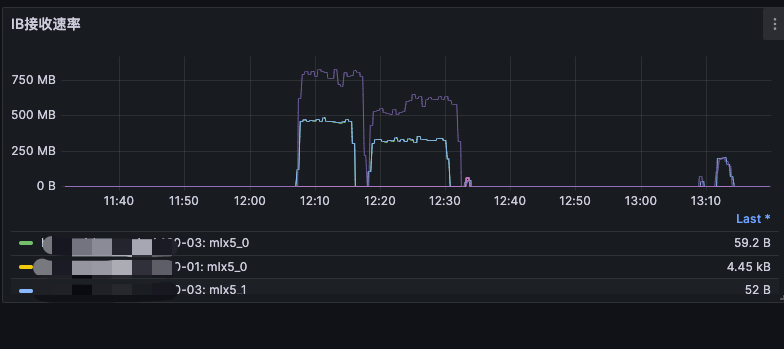
一共进行了两次测试,第一次加载时间为 10 分钟,第二次加载时间为 12 分钟。
可以看到两个 Pod 同时加载模型时,总的带宽约为 1~1.2 GBps。
5. 4K 随机读写
4K 读写决定了小文件的读写性能,对于构建等场景会有较大的影响。这是在另外一套 5 个存储节点的 3FS 集群上进行的测试。
1
| fio -direct=1 -iodepth=128 -rw=randwrite -ioengine=libaio -bs=4k -size=100m -numjobs=1 -runtime=1000 -group_reporting --allow_mounted_write=1 -name=Rand_Write_Testing -filename=/data1/fiofile
|
1
| WRITE: bw=97.5MiB/s (102MB/s), 97.5MiB/s-97.5MiB/s (102MB/s-102MB/s), io=100MiB (105MB), run=1026-1026msec
|
1
| fio -direct=1 -iodepth=128 -rw=randread -ioengine=libaio -bs=4k -size=100m -numjobs=1 -runtime=1000 -group_reporting --allow_mounted_write=1 -name=Rand_Read_Testing -filename=/data1/fiofile
|
1
| READ: bw=1408MiB/s (1477MB/s), 1408MiB/s-1408MiB/s (1477MB/s-1477MB/s), io=100MiB (105MB), run=71-71msec
|
1
| fio -direct=1 -iodepth=128 -rw=randwrite -ioengine=libaio -bs=4k -size=100m -numjobs=1 -runtime=1000 -group_reporting --allow_mounted_write=1 -name=Rand_Write_Testing -filename=/mnt/3fs/fiofile
|
1
| WRITE: bw=746KiB/s (764kB/s), 746KiB/s-746KiB/s (764kB/s-764kB/s), io=99.9MiB (105MB), run=137123-137123msec
|
1
| fio -direct=1 -iodepth=128 -rw=randread -ioengine=libaio -bs=4k -size=100m -numjobs=1 -runtime=1000 -group_reporting --allow_mounted_write=1 -name=Rand_Read_Testing -filename=/mnt/3fs/fiofile
|
1
| WRITE: bw=127MiB/s (133MB/s), 127MiB/s-127MiB/s (133MB/s-133MB/s), io=100MiB (105MB), run=789-789msec
|
| 操作 | 读/写速率 | 设备 |
|---|
| 4K 读 | 1408 MiB/s | 磁盘 |
| 4K 写 | 97.5 MiB/s | 磁盘 |
| 4K 读 | 127 MiB/s | 3FS |
| 4K 写 | 746 KiB/s | 3FS |



