
惯性聚合 高效追踪和阅读你感兴趣的博客、新闻、科技资讯
阅读原文 在惯性聚合中打开

推荐订阅源

U
Unit 42
C
Cybersecurity and Infrastructure Security Agency CISA
Exploit-DB.com RSS Feed
Know Your Adversary
Know Your Adversary
S
Securelist
I
Intezer
AWS News Blog
AWS News Blog
L
LINUX DO - 热门话题
P
Privacy International News Feed
Recent Announcements
cs.CL updates on arXiv.org
博客园 - 聂微东
Threat Intelligence Blog | Flashpoint
Attack and Defense Labs
N
News and Events Feed by Topic
The GitHub Blog
The GitHub Blog
C
Cyber Attacks, Cyber Crime and Cyber Security
Schneier on Security
N
Netflix TechBlog - Medium
爱范儿
爱范儿
B
Blog
CTFtime.org: upcoming CTF events
cs.CV updates on arXiv.org
C
CERT Recently Published Vulnerability Notes
Hacker News: Ask HN
Hacker News: Ask HN
Google DeepMind News
Engineering at Meta
Engineering at Meta
Blog — PlanetScale
Blog — PlanetScale
WordPress大学
WordPress大学
S
Secure Thoughts
K
Kaspersky official blog
N
News | PayPal Newsroom
O
OpenAI News
Last Week in AI
Last Week in AI
C
Check Point Blog
D
Darknet – Hacking Tools, Hacker News & Cyber Security
Cyberwarzone
Cyberwarzone
Application and Cybersecurity Blog
T
Tor Project blog
大猫的无限游戏
大猫的无限游戏
Vercel News
Vercel News
D
Docker
Hugging Face - Blog
Hugging Face - Blog
T
Threat Research - Cisco Blogs
Cisco Talos Blog
Cisco Talos Blog
The Register - Security
博客园 - 司徒正美
Martin Fowler
Martin Fowler
人人都是产品经理
人人都是产品经理
P
Palo Alto Networks Blog

陈少文的网站

巨变与机遇的未来十年 Kubernetes 平台管理软件压力测试方案 使用镜像部署 Hexo 静态页面 终于等到你 - GitHub 镜像仓库服务(ghcr.io) 一起来学 Go --(6)Interface 一起来学 Go --(5)Goroutine 和 Channel 什么是函数式编程 如何在 Kubernetes 集群集成 Kata 柯里化与偏函数 使用 PyGithub 自动创建 Label 软件产品是团队能力的输出 Helm 2 、Helm 3 比较 IoT 变现 Kubernetes 中的 DNS 服务 国内的 Helm 镜像源 Harbor 使用自签证书支持 Https 访问 DevOps 工具链之 Prow 如何使用 kfctl 安装 Kubeflow VS Code 无法下载 Go 插件的工具包 工程师更应具有服务精神 你不知道的 Docker 使用技巧 使用 Docker 运行 Tensorflow 论中国 什么是左移 如何清空 Git 仓库全部历史记录 一禅小和尚 有风吹过厨房 时间的玫瑰 如何在 CentOS 安装 GPU 驱动 开发 Tips(19) 使用 Velero 备份 Kubernetes 集群 Kubernetes Cheat Sheet 开发 Tips(18) 如何构建一个 Java 工程 开发 Tips(17) KubeSpray 安装 Kubernetes 报错 ip in ansible_all_ipv4_addresses 基于 Kubernetes 和 Jenkins 搭建自动化测试系统 在 Kubernetes 上动态创建 Jenkins Slave 使用 Jenkins 进行服务拨测 开发 Tips(16) Kubernetes 签发 Ingress 证书及日常故障运维 Kubernetes 中 Deployment 的基本操作 Kubernetes 中的证书 如何使用 KubeBuilder 开发一个 Operator Kubernetes 1.6.0 安装问题汇总 镜像管理工具 -- Harbor 开发 Tips(15) Docker 如何拉取镜像 开发 Tips(14) 使用 Helm 安装 harbor 开发 Tips(13) 使用 S2I 构建云原生应用 在 Kubernetes 中使用 emptyDir、hostPath、localVolume 开发 Tips(12) 开发 Tips(11) 代码质量分析工具 SonarQube 使用 Kubeadm 安装 Kubernetes 集群 一起来学 Go --(4)常用函数 Kubernetes 中的 Ceph Kubernetes 之 Volumes Kubernetes 之 Labels、Selectors 开发 Tips(10) 开源正在重构商业模式 Kubernetes 之网络 Kubernetes 之 API 使用 Helm 和 Operator 快速部署 Prometheus Kubernetes 复杂有状态应用管理框架 -- Operator Kubernetes 的包管理器 -- Helm 一起来学 Go --(3)Go Modules 如何一步一步地优化博客方案 kubectl 实用指南 Kubernetes 中的基本概念 搭建远程 Kubernetes 开发环境 大公司和小公司的 ToB 思路 开发 Tips(9) Go 入门指南 一起来学 Go --(2)数据与逻辑结构 如何预防 Web 富文本中的 XSS 攻击 django-xss-cleaner 云工作时代 一起来学 Go --(1)背景与特点 SaaS 开发团队的不同阶段 你不知道的 Git 使用技巧 输出既服务 微服务设计 继续奔跑 开发 Tips(8) 从账户安全到二次验证 Django 性能之数据库查询优化 Django 性能之分库分表 敏捷开发之研发流程 打造一致性的团队 开发 Tips(7) Pytest 进阶学习之 Mock PaaS 部署之 buildpack Go 开发配置 领域输出才是 PaaS 的核心竞争力 Pytest 入门学习 开发 Tips(6) 如何使用 Jenkins、Docker、GitLab 搭建 Django 自动化部署流程
月度分享第一期
微信公众号 · 2018-09-01 · via 陈少文的网站

Please enable Javascript to view the contents

月度分享第一期

给大家分享一下,最近一个月,关注的一些技术动态。同时,也有一些工具、学习资料、小技巧等有意思的内容。

前端

Webpack

在今年 2 月份,Webpack 已经推出 4.0.0 的版本。Wepack 4 不再支持 Node.js 4,在编译速度上也有很大优化提升。同时,Webpack 4 移除了 commonchunk 插件,改用了optimization 属性进行更加灵活的配置,这部分可能是升级改造中最复杂的一部分。

Fastpack

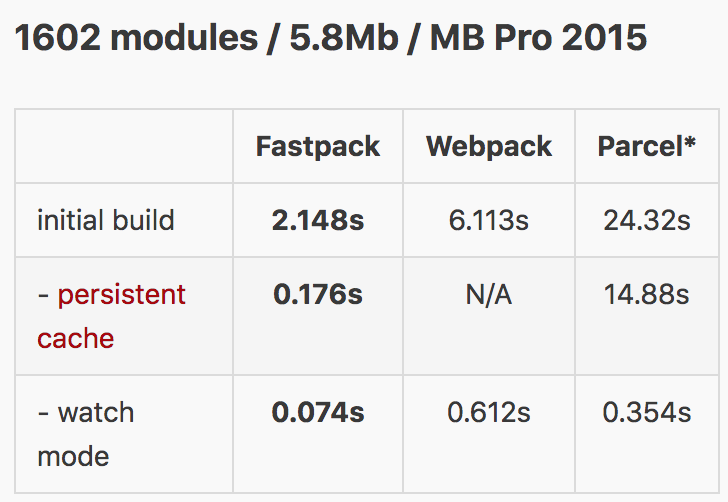
Fastpack 是一个 JavaScript 应用打包器,目标是做到对于中型应用(约1000个模块)的打包时间小于1000ms,增量重新打包时间低于100ms。

下面是基准测试结果:
Vue CLI 3.0

尤雨溪在 Medium 上宣布正式发布 Vue CLI 3.0

Vue CLI 的核心目标是为基于 Webpack 4 构建的预配置,提供构建设置。目标是最大限度地减少开发人员配置的次数。

官方文档:https://cli.vuejs.org/zh/guide/

后端

Python

版本更新:Python 3.7.0 & 3.6.6 已经放出

学习资料:

  1. RealPython:Socket Programming in Python (Guide) :https://realpython.com/python-sockets/
  2. RealPython:Python Code Quality: Tools & Best Practices:https://realpython.com/python-code-quality/
  3. Python 101 : subprocess 模块:https://python101.pythonlibrary.org/intro.html

Python 相关工具

  1. Jupyter Notebook 是以网页的形式打开,可以在网页页面中直接编写代码和运行代码,代码的运行结果也会直接在代码块下显示的程序。Jupyter Notebook 101 Preview Chapter : http://www.blog.pythonlibrary.org/
  2. PyCharm 2018.2 Out Now,相关链接:https://blog.jetbrains.com/pycharm/2018/07/pycharm-2018-2-out-now/
  3. Nice Vim trick for Python code:https://jugad2.blogspot.com/2018/08/nice-vim-trick-for-python-code.html
  4. Seaborn 是一个在 matplotlib 的基础上,进行了更高级的 API 封装的数据可视化工具:https://seaborn.pydata.org/

celery

2018.07.18 版本更新: v4.2.1

相关链接:http://docs.celeryproject.org/en/latest/whatsnew-4.2.html

更新特征如下:

 1
 2
 3
 4
 5
 6
 7
 8
 9
10
11
12
## Result Backends
### New Redis Sentinel Results Backend(Sentinel:哨兵模式,高可用)
### Cassandra Results Backend(cassandra: Apache 分布式 NoSQL 数据库)
### DynamoDB Results Backend(DynamoDB:Amazon 完全托管、无缝扩展的 NoSQL 数据库)
### Python 2/3 Compatibility Fixes
## Canvas
## Tasks
### Bound Tasks as Error Callbacks
### Task Representation
### Custom Requests
### Retries with Exponential Backoff(Exponential Backoff:指数退避算法)
## Sphinx Extension(Sphinx:一种文档工具,它可以令人轻松的撰写出清晰且优美的文档,已成为Python项目首选的文档工具)

redis

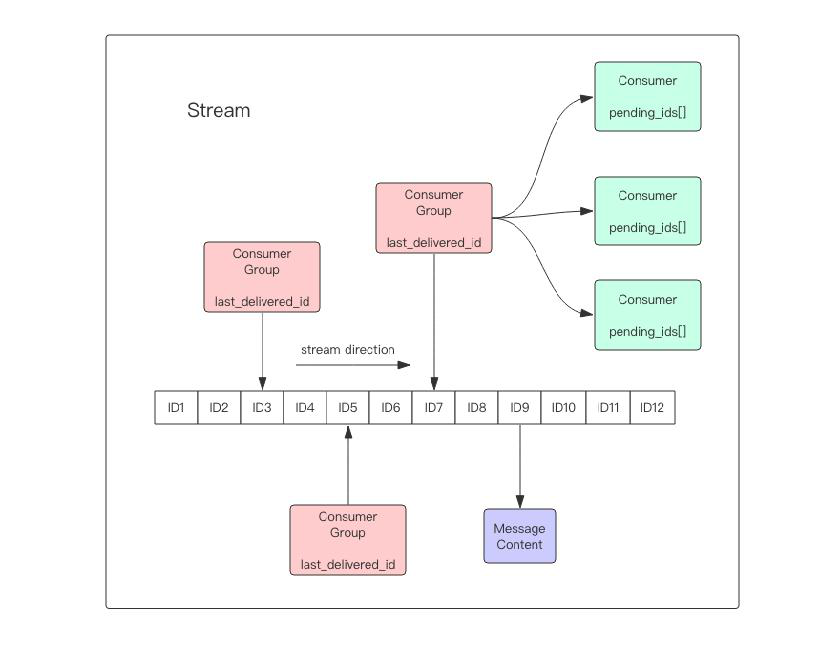
redis 最近发布了 5.0 版本,其中添加了一个新的数据结构 stream,该结构是一个支持多播的可持久化消息队列,并且 Redis 的作者坦言 stream 的设计很大程度上借鉴了 Kafka 的设计。
工具

Windows 下的 Console

Windowns 下使用 CMD、PowerShell 通常不能完全满足开发需求。这里给大家介绍几种 Console 工具:

特点CygwinMinGW/MSYSMSYS2
是否 GNU
更多软件支持支持绝大多数的 GNU 软件支持常用软件,Git、Vim 等软件需要独立支持支持大多数 GNU 软件
更类 LinuxCygwin 在 Windows 中就好像 Wine 在 Linux 中实现了 Bash 等主要的 Linux 程序原生 64/32 bit 支持
GCC 编译内含 MingGW32 交叉编译功能,既支持依赖 cygwin.dll 的程序编译,也支持独立的 Windows 程序编译;可以直接编译 Linux 下的应用程序支持独立的 Windows 程序编译支持独立的 Windows 程序编译
中文支持直接支持中文显示和输入法需要配置才能支持中文显示和输入,删除一个中文字符需要删除 2 次支持中文显示和输入法,中文帮助系统和中文提示(部分软件)
运行速度

Windows 下的包管理工具:chocolatey

官方网站:https://chocolatey.org/

如何安装 chocolatey ?以管理员权限执行如下命令:

1
 @"%SystemRoot%\System32\WindowsPowerShell\v1.0\powershell.exe" -NoProfile -InputFormat None -ExecutionPolicy Bypass -Command "iex ((New-Object System.Net.WebClient).DownloadString('https://chocolatey.org/install.ps1'))" && SET "PATH=%PATH%;%ALLUSERSPROFILE%\chocolatey\bin"

有意思的

Chrome 是如何把 html 文档渲染为页面上的像素的

视频:https://drive.google.com/file/d/1Ky59m-F79ULs4ydMbD4Mp1dBXvs_eDes/view

文档:https://docs.google.com/presentation/d/1boPxbgNrTU0ddsc144rcXayGA_WF53k96imRH8Mp34Y/edit#slide=id.g25ae9c179b_0_75

小技巧

Webpack 通过代理解决跨域问题

在本地开发调试时,通常需要访问线上数据, http://localhost:8008/api -> http://online.com/api , 通过代理能够有效解决跨域问题。通过配置代理,可以有效避免 django-cors-headers 留下的安全隐患。

 1
 2
 3
 4
 5
 6
 7
 8
 9
10
11
12
13
14
15
16
17
18
19
const proxyPath = [
    '/api'
]
const proxyRule = {}
proxyPath.forEach(item => {
    proxyRule[item] = {
        target: 'http://online.com',
        secure: false,
        changeOrigin: true
    }
})


devServer: {
     port: 8008,
     public: 'localhost',
     hot: true,
     proxy: proxyRule
}

微信公众号