1. Velero 简介
Velero 是 heptio 团队(被 VMWare 收购)开源的 Kubernetes 集群备份、迁移工具。
Velero 使用对象存储保存集群资源。默认支持的对象存储有 AWS、Azure、GCP ,兼容 S3 协议,也可以通过插件来扩展到其他平台,比如 Aliyun OSS。
目前,Velero 不具备版本管理功能,只能进行增量恢复,不会进行删除或覆盖操作。
2. Velero 工作原理
Velero 首先会在集群中创建各种 CRD 以及相关的控制器,通过对 CRD 对象的操作完成备份、恢复行为。Velero 的工作原理图如下:

- Velero 客户端调用 Kubernetes API 服务器创建 Backup 对象。
- BackupController 监听 Backup 对象变化,以执行备份过程。
- 备份时,BackupController 通过 API Server 查询相关数据。
- 备份后,BackupController 将数据上传到对象存储。
运维拓扑图如下:
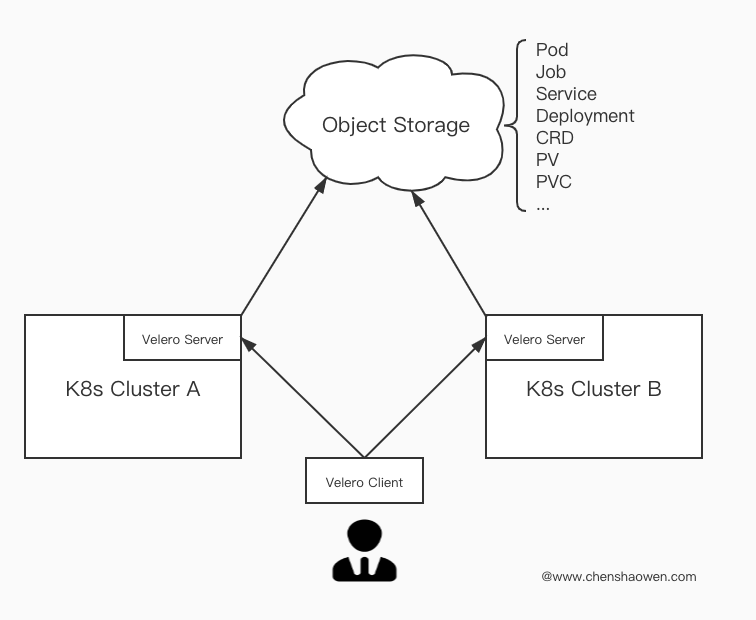
在所有集群上安装 Velero,运维人员通过 Velero Client 给 Velero Server 发送备份、恢复请求。Velero Server 推拉指定的 Kubernetes 对象的数据。这些数据以 Json 格式压缩存储在对象存储服务中。
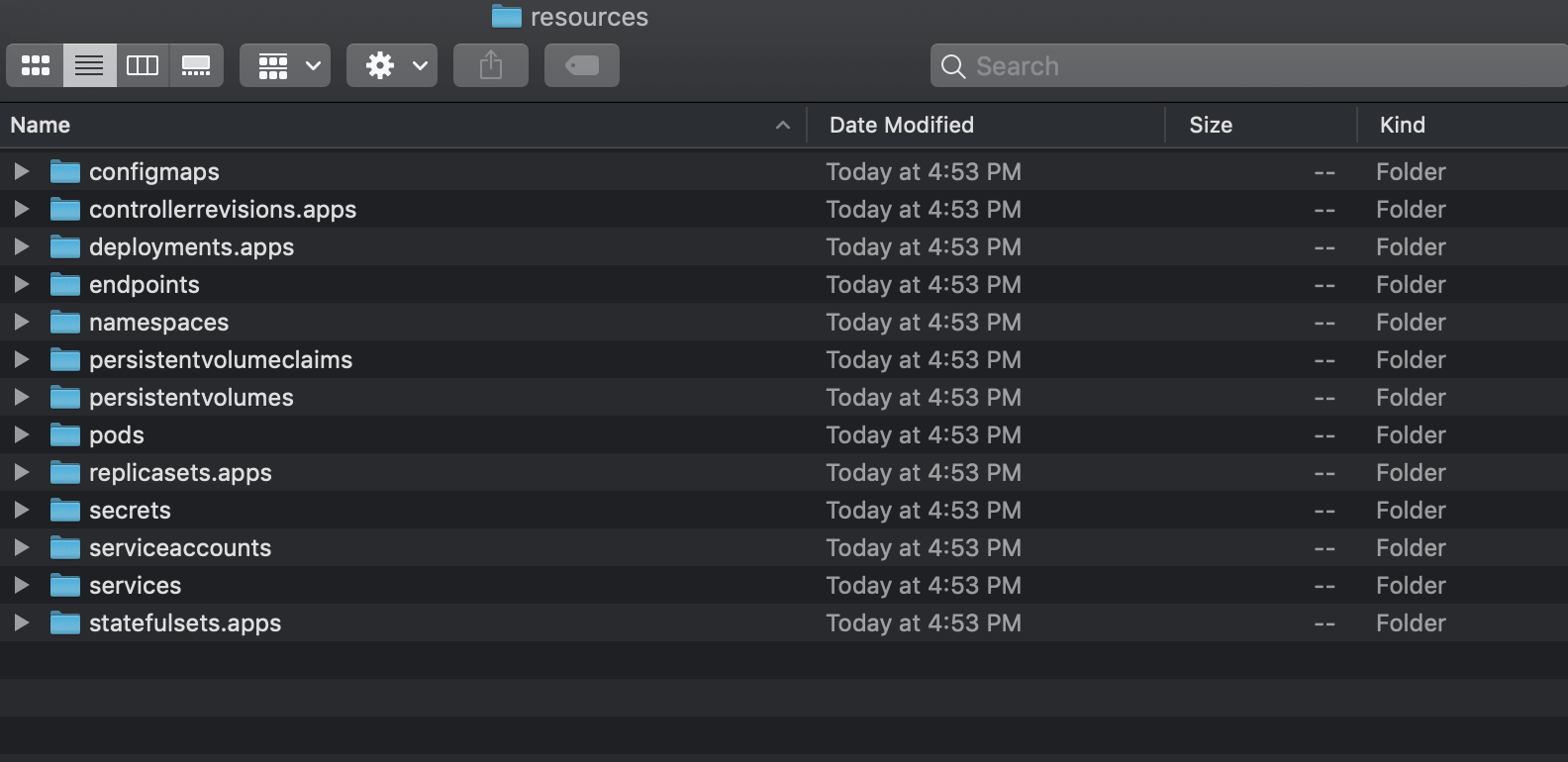
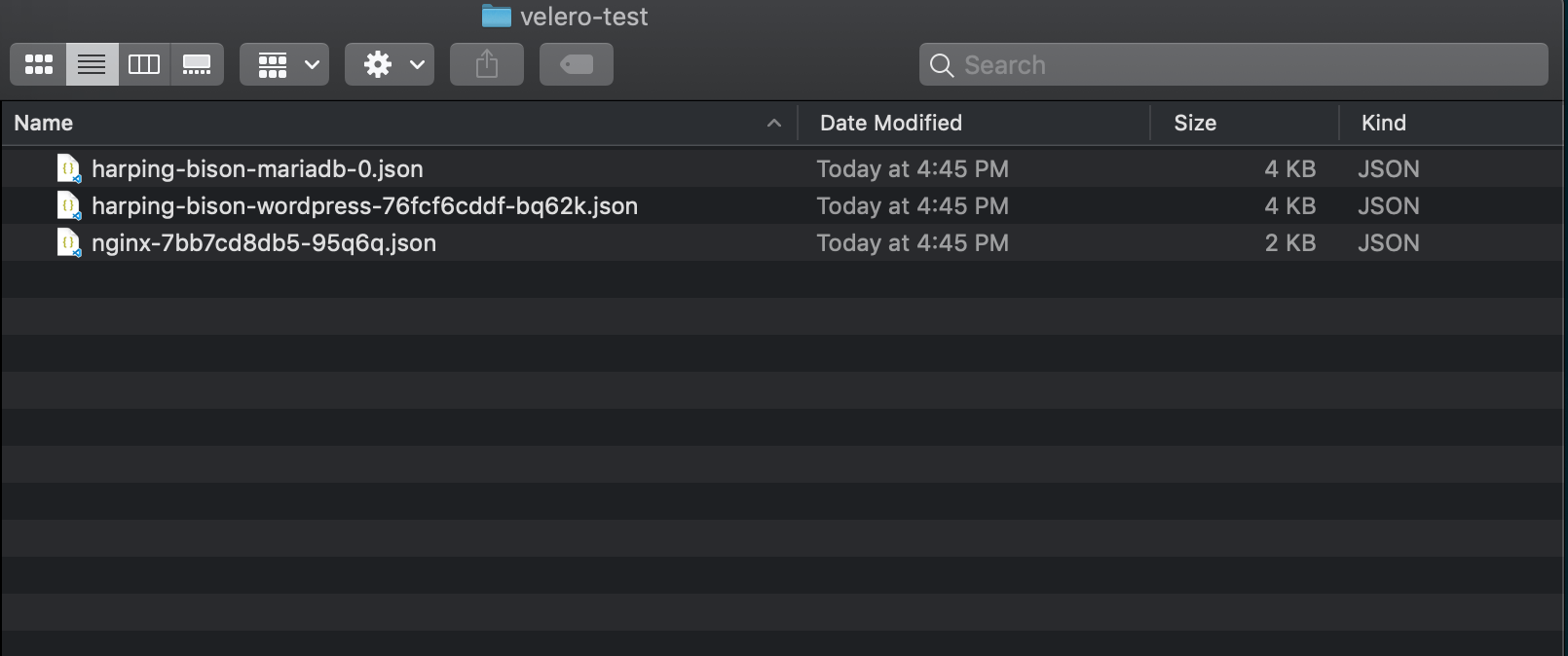
下图是备份数据的目录结构:
3. 安装 Velero
3.1 下载文件
二进制文件下载地址:Github。
这里以 CentOS 操作系统、Velero 1.1.0 为例:
下载二进制文件,然后复制到 /user/local/bin 目录下。
- 下载压缩包
1
2
| wget https://github.com/vmware-tanzu/velero/releases/download/v1.1.0/velero-v1.1.0-linux-amd64.tar.gz
tar xvf velero-v1.1.0-linux-amd64.tar.gz
|
- 查看目录结构
 1
 2
 3
 4
 5
 6
 7
 8
 9
10
11
12
13
14
| cd velero-v1.1.0-linux-amd64
tree .
.
|-- examples
| |-- minio
| | `-- 00-minio-deployment.yaml
| |-- nginx-app
| | |-- base.yaml
| | |-- README.md
| | `-- with-pv.yaml
| `-- README.md
|-- LICENSE
`-- velero
|
3.2 配置对象存储服务
考虑到可能没有直接可用的对象存储服务,本文使用 Velero 提供的 minio 搭建一个对象存储服务。如果是公有云服务,这里部署 minio 的步骤可以省略,只需要创建 credentials-velero 文件。
- 创建 minio 服务
1
| sed -i "/type: /s#ClusterIP#NodePort#" examples/minio/00-minio-deployment.yaml
|
1
| kubectl apply -f examples/minio/00-minio-deployment.yaml
|
1
2
3
4
| kubectl get svc -n velero
NAME TYPE CLUSTER-IP EXTERNAL-IP PORT(S) AGE
minio NodePort 10.233.34.181 <none> 9000:31489/TCP 60s
|
这里的 {minio_service_ip}:31489 服务将被用于存储 Velero 的备份数据。
- 创建 minio 的访问密钥文件 credentials-velero
1
2
3
4
5
| cat <<'EOF' > credentials-velero
[default]
aws_access_key_id = minio
aws_secret_access_key = minio123
EOF
|
1
2
3
| ls
credentials-velero examples LICENSE velero
|
3.3 安装 Velero 客户端
拷贝可执行文件 velero
1
| cp velero /usr/local/bin/
|
3.4 安装 Velero 服务端
执行安装命令
 1
 2
 3
 4
 5
 6
 7
 8
 9
10
11
12
13
14
15
16
17
| velero install \
--image velero/velero:v1.1.0 \
--provider aws \
--bucket velero \
--namespace velero \
--secret-file ./credentials-velero \
--velero-pod-cpu-request 200m \
--velero-pod-mem-request 200Mi \
--velero-pod-cpu-limit 1000m \
--velero-pod-mem-limit 1000Mi \
--use-volume-snapshots=false \
--use-restic \
--restic-pod-cpu-request 200m \
--restic-pod-mem-request 200Mi \
--restic-pod-cpu-limit 1000m \
--restic-pod-mem-limit 1000Mi \
--backup-location-config region=minio,s3ForcePathStyle="true",s3Url=http://{minio_service_ip}:31489
|
1.2.0 版本,需要增加 --plugins velero/velero-plugin-for-aws:v1.0.0 参数。
相关参数在官方文档中有所描述,值得注意的是 use-restic 开启了 PV 备份的支持。
执行安装命令,会有回显日志。下面继续查看新创建的相关资源:
 1
 2
 3
 4
 5
 6
 7
 8
 9
10
11
12
13
14
| kubectl get crd|grep velero
NAME CREATED AT
backups.velero.io 2019-12-24T01:39:51Z
backupstoragelocations.velero.io 2019-12-24T01:39:51Z
deletebackuprequests.velero.io 2019-12-24T01:39:51Z
downloadrequests.velero.io 2019-12-24T01:39:51Z
podvolumebackups.velero.io 2019-12-24T01:39:51Z
podvolumerestores.velero.io 2019-12-24T01:39:51Z
resticrepositories.velero.io 2019-12-24T01:39:51Z
restores.velero.io 2019-12-24T01:39:51Z
schedules.velero.io 2019-12-24T01:39:51Z
serverstatusrequests.velero.io 2019-12-24T01:39:51Z
volumesnapshotlocations.velero.io 2019-12-24T01:39:51Z
|
 1
 2
 3
 4
 5
 6
 7
 8
 9
10
11
12
13
14
15
16
17
18
19
20
21
22
23
24
25
26
| kubectl get all -n velero
NAME READY STATUS RESTARTS AGE
pod/minio-fdd868c5-bl2gl 1/1 Running 0 13h
pod/minio-setup-sm2jb 0/1 Completed 2 13h
pod/restic-997lt 1/1 Running 0 4m40s
pod/restic-kg549 1/1 Running 0 4m40s
pod/restic-wjxvw 1/1 Running 0 4m40s
pod/velero-67c9ff9c66-llwqs 1/1 Running 0 4m41s
NAME TYPE CLUSTER-IP EXTERNAL-IP PORT(S) AGE
service/minio NodePort 10.233.34.181 <none> 9000:31639/TCP 13h
NAME DESIRED CURRENT READY UP-TO-DATE AVAILABLE NODE SELECTOR AGE
daemonset.apps/restic 3 3 3 3 3 <none> 4m40s
NAME READY UP-TO-DATE AVAILABLE AGE
deployment.apps/minio 1/1 1 1 13h
deployment.apps/velero 1/1 1 1 4m41s
NAME DESIRED CURRENT READY AGE
replicaset.apps/minio-fdd868c5 1 1 1 13h
replicaset.apps/velero-67c9ff9c66 1 1 1 4m41s
NAME COMPLETIONS DURATION AGE
job.batch/minio-setup 1/1 23s 13h
|
可以看到相关服务已经正常运行,Job 任务正常完成退出,大量 CRD 被创建。
4. 使用测试
4.1 备份 - 集群 A
1
2
| kubectl create ns velero-test
kubectl run nginx --image=nginx -n velero-test
|
1
2
3
4
5
| helm install stable/wordpress \
--namespace velero-test \
--set service.type=NodePort \
--set wordpressUsername=admin \
--set wordpressPassword=Pass@Word
|
获取服务端口
1
2
3
4
5
| kubectl get svc -n velero-test
NAME TYPE CLUSTER-IP EXTERNAL-IP PORT(S) AGE
harping-bison-mariadb ClusterIP 10.233.17.43 <none> 3306/TCP 2m36s
harping-bison-wordpress NodePort 10.233.15.158 <none> 80:30979/TCP,443:30561/TCP 2m36s
|
访问 http://{cluster_a_ip}:30979 , 使用安装时设置的账户密码登录 Wordpress,进行一些简单的操作,比如发表一篇文章,用于验证 PV 的迁移。
备份 PV 需要使用 restic 。但 restic 不支持 hostPath、需要 Kubernetes v1.10.0 及以上版本、需要对 POD 使用 annotate 提前标记。下面是标记命令模板:
1
| kubectl -n YOUR_POD_NAMESPACE annotate pod/YOUR_POD_NAME backup.velero.io/backup-volumes=YOUR_VOLUME_NAME_1,YOUR_VOLUME_NAME_2,...
|
查找 Wordpress 相关 Pod,这里有两个,下面仅截取了 Volumes 部分:
 1
 2
 3
 4
 5
 6
 7
 8
 9
10
11
12
13
14
15
16
17
18
19
20
21
22
23
24
25
26
27
| kubectl describe pod -n velero-test
Name: harping-bison-mariadb-0
Volumes:
data:
Type: PersistentVolumeClaim (a reference to a PersistentVolumeClaim in the same namespace)
ClaimName: data-harping-bison-mariadb-0
ReadOnly: false
config:
Type: ConfigMap (a volume populated by a ConfigMap)
Name: harping-bison-mariadb
Optional: false
default-token-t6zvv:
Type: Secret (a volume populated by a Secret)
SecretName: default-token-t6zvv
Optional: false
Name: harping-bison-wordpress-76fcf6cddf-bq62k
Volumes:
wordpress-data:
Type: PersistentVolumeClaim (a reference to a PersistentVolumeClaim in the same namespace)
ClaimName: harping-bison-wordpress
ReadOnly: false
default-token-t6zvv:
Type: Secret (a volume populated by a Secret)
SecretName: default-token-t6zvv
Optional: false
|
进行标记:
1
2
| kubectl -n velero-test annotate pod harping-bison-mariadb-0 backup.velero.io/backup-volumes=data,config
kubectl -n velero-test annotate pod harping-bison-wordpress-76fcf6cddf-bq62k backup.velero.io/backup-volumes=wordpress-data
|
备份指定 namespaces
1
| velero backup create test-1 --include-namespaces velero-test
|
备份全部 namespaces
1
| velero backup create all
|
备份完成之后,可以在 minio 页面查看到相关数据目录,如下图:
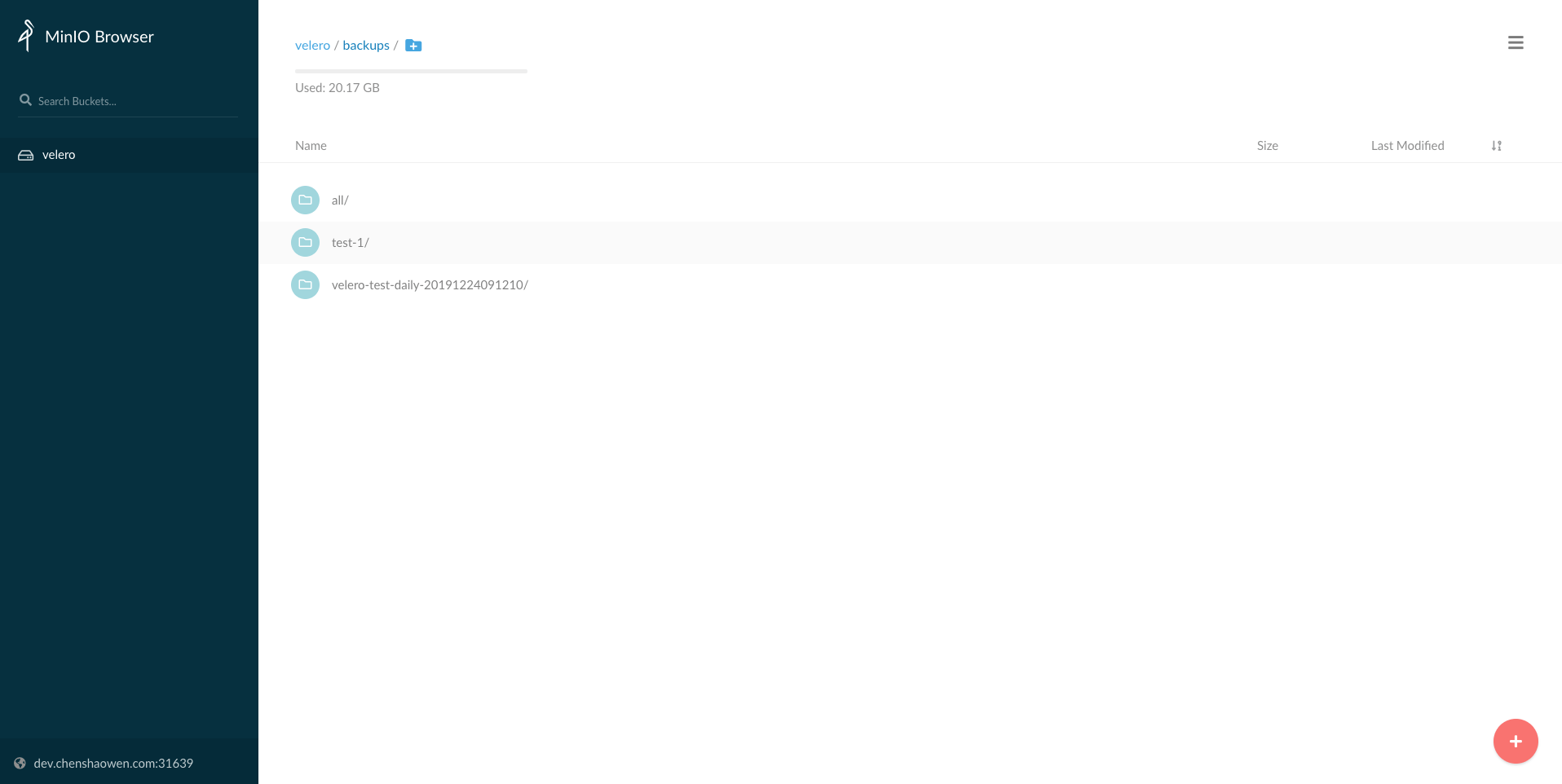
PV 的数据会备份在 bucket 的 restic 目录,上图没有体现。
1
2
3
4
5
| velero backup get
NAME STATUS CREATED EXPIRES STORAGE LOCATION SELECTOR
all Completed 2019-12-24 16:22:13 +0800 CST 29d default <none>
test-1 Completed 2019-12-24 16:19:49 +0800 CST 29d default <none>
|
处于 Completed 状态,表示备份已经完成。还可以通过 velero backup describe test-1 --details 命令,查看详细的备份数据清单。
 1
 2
 3
 4
 5
 6
 7
 8
 9
10
11
12
13
14
15
16
17
18
19
20
21
22
23
24
25
26
27
28
29
30
31
32
33
34
35
36
37
38
39
40
41
42
43
44
45
46
47
48
49
50
| Resource List:
apps/v1/ControllerRevision:
- velero-test/harping-bison-mariadb-8bb76d5
apps/v1/Deployment:
- velero-test/harping-bison-wordpress
- velero-test/nginx
apps/v1/ReplicaSet:
- velero-test/harping-bison-wordpress-76fcf6cddf
- velero-test/nginx-7bb7cd8db5
apps/v1/StatefulSet:
- velero-test/harping-bison-mariadb
v1/ConfigMap:
- velero-test/harping-bison-mariadb
- velero-test/harping-bison-mariadb-tests
v1/Endpoints:
- velero-test/harping-bison-mariadb
- velero-test/harping-bison-wordpress
v1/Namespace:
- velero-test
v1/PersistentVolume:
- pvc-04be4971-5afc-4310-bc78-6f3f206d3f71
- pvc-997763be-956f-4814-81f0-0f9373731694
- pvc-a893e92b-32da-41c3-9059-abe6a043a864
- pvc-dc9124b8-f6f6-4e6c-a31a-b279b802e313
v1/PersistentVolumeClaim:
- velero-test/data-deadly-gnat-mariadb-0
- velero-test/data-harping-bison-mariadb-0
- velero-test/data-wordpress-mariadb-0
- velero-test/harping-bison-wordpress
v1/Pod:
- velero-test/harping-bison-mariadb-0
- velero-test/harping-bison-wordpress-76fcf6cddf-bq62k
- velero-test/nginx-7bb7cd8db5-95q6q
v1/Secret:
- velero-test/default-token-t6zvv
- velero-test/harping-bison-mariadb
- velero-test/harping-bison-wordpress
- velero-test/istio.default
v1/Service:
- velero-test/harping-bison-mariadb
- velero-test/harping-bison-wordpress
v1/ServiceAccount:
- velero-test/default
Persistent Volumes: <none included>
Restic Backups:
Completed:
velero-test/harping-bison-mariadb-0: config, data
velero-test/harping-bison-wordpress-76fcf6cddf-bq62k: wordpress-data
|
4.2 恢复 - 集群 B
1
| velero restore create --from-backup test-1
|
1
2
3
4
| velero restore get
NAME BACKUP STATUS WARNINGS ERRORS CREATED SELECTOR
test-1-20191224162109 test-1 Completed 0 0 2019-12-24 16:21:09 +0800 CST <none>
|
1
2
| velero restore logs test-1-20191224162109
velero restore describe test-1-20191224162109
|
1
2
3
4
5
6
| kubectl get pod -n velero-test
NAME READY STATUS RESTARTS AGE
harping-bison-mariadb-0 1/1 Running 0 4m50s
harping-bison-wordpress-76fcf6cddf-bq62k 1/1 Running 0 4m50s
nginx-7bb7cd8db5-95q6q 1/1 Running 0 4m50s
|
1
2
3
4
5
| kubectl get svc -n velero-test
NAME TYPE CLUSTER-IP EXTERNAL-IP PORT(S) AGE
harping-bison-mariadb ClusterIP 10.233.51.16 <none> 3306/TCP 23m
harping-bison-wordpress NodePort 10.233.27.43 <none> 80:31193/TCP,443:31828/TCP 23m
|
打开 http://{cluster_b_ip}:31193 ,可以看到修改之后的 Wordpress 页面,即验证 PV 数据恢复正常。
5. 定时备份
Velero 支持 cron 表达式,进行定时备份。
1
| velero schedule create velero-test-daily --schedule="0 1 * * *" --include-namespaces velero-test
|
6. 参考








