
如果你已经在使用 GitHub Actions ,那么阅读本文你将获得更多有趣而有用的打开方式。阅读完,我又给仓库新增了几个 workflow 。
1. workflow 执行时,传入参数
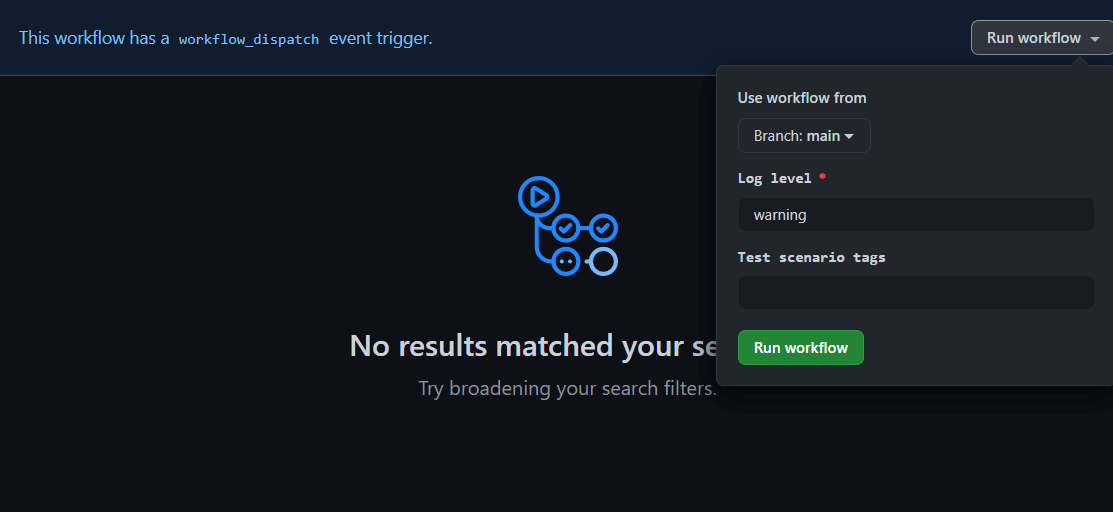
在执行 workflow 时, 允许在 GitHub Actions 页面输入参数,控制执行逻辑。我们可以将人工处理的逻辑,在 GitHub Actions 参数化执行,适用于持续部署场景。
 1
 2
 3
 4
 5
 6
 7
 8
 9
10
11
12
13
14
15
16
| on:
workflow_dispatch:
inputs:
logLevel:
description: "Log level"
required: true
default: "warning"
tags:
description: "Test scenario tags"
jobs:
printInputs:
runs-on: ubuntu-latest
steps:
- run: |
echo "Log level: ${{ github.event.inputs.logLevel }}"
echo "Tags: ${{ github.event.inputs.tags }}"
|
上面的 workflow 执行时,会弹出如下对话框。
2. Job 编排控制执行顺序
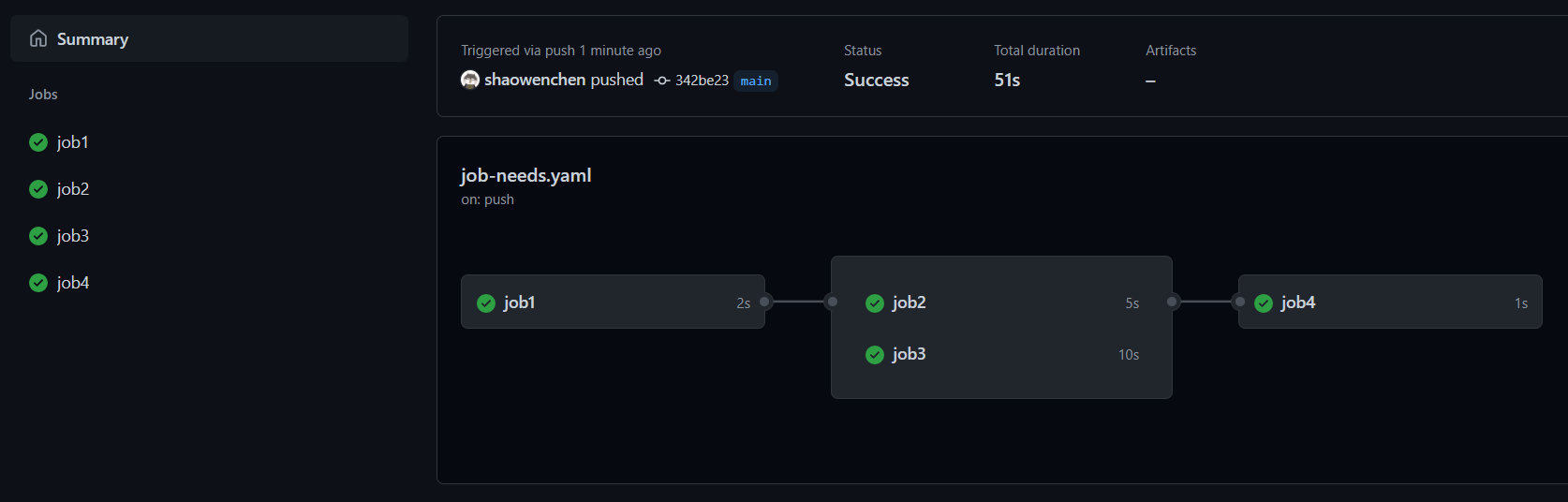
一个 workflow 由很多个 job 组成,借助于 needs 参数,我们可以管理这些 job 之间的依赖,控制其执行流程。
 1
 2
 3
 4
 5
 6
 7
 8
 9
10
11
12
13
14
15
16
17
18
19
20
21
| on: push
jobs:
job1:
runs-on: ubuntu-latest
steps:
- run: echo "job1"
job2:
runs-on: ubuntu-latest
steps:
- run: sleep 5
needs: job1
job3:
runs-on: ubuntu-latest
steps:
- run: sleep 10
needs: job1
job4:
runs-on: ubuntu-latest
steps:
- run: echo "job4"
needs: [job2, job3]
|
上面的 workflows 执行时,job2 和 job3 会等 job1 执行成功时才执行,job4 会等 job2 和 job3 执行成功时才执行。
3. 用于项目管理
Kubernetes 基于 ChatOps 使用 Prow 协调社区有序协作。但并不是每个团队,都愿意搭建并维护一套 Prow 机器人系统。ChatOps 实现的核心是事件驱动,这在 GitHub 中使用 Actions 也能实现。
下面是几个项目管理相关的 action
1
2
3
| - uses: actions/labeler@main
with:
repo-token: "${{ secrets.GITHUB_TOKEN }}"
|
在配置文件 .github/workflows/labeler.yml 中添加规则,给对 docs 目录进行修改的 Pull Requests(以下简称 PR) 自动添加 docs_label 标签:
1
2
| docs_label:
- ./docs/*
|
使用 srggrs/assign-one-project-github-action , 我们可以将新增的 Issues 或者 PR 添加到指定的 Projects 中。
1
2
3
4
5
| - name: Assign NEW issues and NEW pull requests to project 2
uses: srggrs/assign-one-project-github-action@1.2.0
if: github.event.action == 'opened'
with:
project: "https://github.com/srggrs/assign-one-project-github-action/projects/2"
|
也可以将包含指定标签的 Issues 或 PR 添加到指定 Project 的指定 Column 中。
1
2
3
4
5
6
7
8
| - name: Assign issues and pull requests with `bug` label to project 3
uses: srggrs/assign-one-project-github-action@1.2.0
if: |
contains(github.event.issue.labels.*.name, 'bug') ||
contains(github.event.pull_request.labels.*.name, 'bug')
with:
project: "https://github.com/srggrs/assign-one-project-github-action/projects/3"
column_name: "Labeled"
|
如果一个 Issue 长达 30 天没有更新,那么下面的 workflow 将会再等 5 天,然后将其关闭。
 1
 2
 3
 4
 5
 6
 7
 8
 9
10
11
12
13
14
| name: "Close stale issues and PRs"
on:
schedule:
- cron: "30 1 * * *"
jobs:
stale:
runs-on: ubuntu-latest
steps:
- uses: actions/stale@v3
with:
stale-issue-message: "This issue is stale because it has been open 30 days with no activity. Remove stale label or comment or this will be closed in 5 days."
days-before-stale: 30
days-before-close: 5
|
GitHub 上的项目管理,主要是围绕 Issues、Projects、Labels、Pull Requests 展开,可以在 GitHub Actions 的 Marketplace 中搜索相关的 Action 使用。
4. 在线调试
在使用 GitHub Actions 的过程中,如果需要登录到 Runner 上调试命令,那么下面这个技巧你一定会感兴趣。
1
2
3
4
5
6
| - uses: shaowenchen/debugger-action@v2
name: debugger
timeout-minutes: 30
continue-on-error: true
with:
ngrok_token: ${{ secrets.NGROK_TOKEN }}
|
只需要去 Ngrok 官网申请一个 token,就可以通过 ssh 远程登录到 Runner。当然,也可以暴露 Runner 上的服务,提供外网访问的链接,最长可达 6 小时。
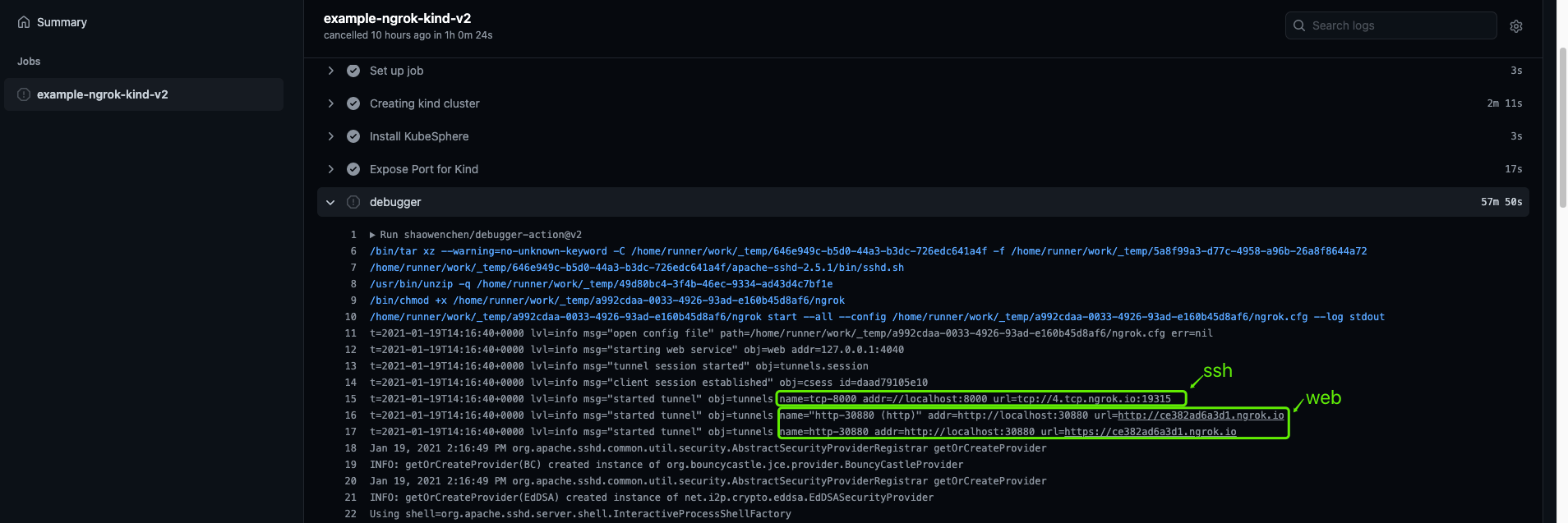
在执行日志中,我们可以找到 ssh 的登录链接,使用 root/root 即可登录 Runner。如果配置了 web 的端口映射,还可以查看到相关的服务链接。
5. 设置缓存
缓存能有效地加快构建速度,减少网络请求,复用中间码。这对于 Java、Nodejs、Python 等项目,非常有用。
 1
 2
 3
 4
 5
 6
 7
 8
 9
10
11
| - name: Get yarn cache directory path
id: yarn-cache-dir-path
run: echo "::set-output name=dir::$(yarn cache dir)"
- uses: actions/cache@v2
id: yarn-cache # use this to check for `cache-hit` (`steps.yarn-cache.outputs.cache-hit != 'true'`)
with:
path: ${{ steps.yarn-cache-dir-path.outputs.dir }}
key: ${{ runner.os }}-yarn-${{ hashFiles('**/yarn.lock') }}
restore-keys: |
${{ runner.os }}-yarn-
|
6. 检测项目中的问题链接
项目维护时间长了之后,最令人头疼的就是文档。研发、测试跟进的是代码、功能,而文档却时常无人更新。缺少维护的文档,会让潜在参与者流失。下面这个 Action 能检测文档中的 Broken 链接。
 1
 2
 3
 4
 5
 6
 7
 8
 9
10
11
12
13
14
| name: Check Markdown links
on: push
jobs:
markdown-link-check:
runs-on: ubuntu-latest
steps:
- uses: actions/checkout@master
- uses: gaurav-nelson/github-action-markdown-link-check@v1
with:
use-quiet-mode: "yes"
config-file: ".github/workflows/checklink_config.json"
max-depth: 3
|
gaurav-nelson/github-action-markdown-link-check 支持自定义配置,非常灵活易用,堪称必备 Action。
下面是一个 .github/workflows/checklink_config.json 的示例:
1
2
3
4
5
6
7
8
9
| {
"replacementPatterns": [
{
"pattern": "^/",
"replacement": "/github/workspace/"
}
],
"aliveStatusCodes": [429, 200]
}
|
最后在 GitHub Actions 日志页面,会输出这样的检测结果:
 1
 2
 3
 4
 5
 6
 7
 8
 9
10
11
12
13
14
15
16
17
18
19
| =========================> MARKDOWN LINK CHECK <=========================
FILE: ./docs/governance.md
4 links checked.
FILE: ./docs/configuration/cri.md
[✖] https://build.opensuse.org/project/show/devel:kubic:libcontainers:stable
7 links checked.
ERROR: 1 dead links found!
[✖] https://build.opensuse.org/project/show/devel:kubic:libcontainers:stable → Status: 404
FILE: ./docs/configuration/kubeedge.md
21 links checked.
=========================================================================
|
7. Job 批量执行,参数排列组合执行任务
数据驱动测试的场景下,可以通过输入的参数控制测试的流程。在 GitHub Actions 中,我们也可以通过参数化的方式,批量地执行或编排流程。
GitHub Actions 会将 matrix 中的每个参数排列组合,产生一个新的运行实例。
 1
 2
 3
 4
 5
 6
 7
 8
 9
10
11
12
13
| on: push
jobs:
node:
runs-on: ${{ matrix.os }}
strategy:
matrix:
os: [ubuntu-16.04, ubuntu-18.04]
node: [6, 8, 10]
steps:
- uses: actions/setup-node@v1
with:
node-version: ${{ matrix.node }}
- run: node --version
|
上面的 workflow 执行时, 会执行 6 个 job。
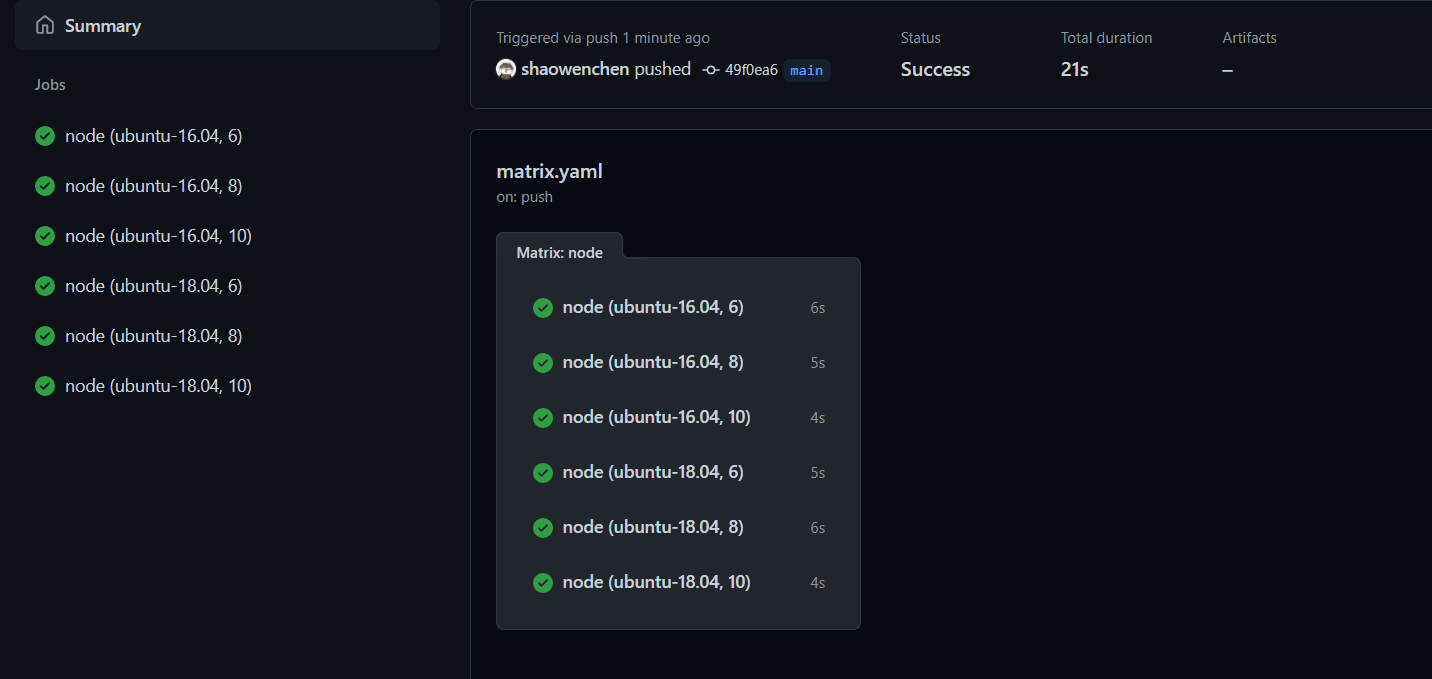
无论是用来测试兼容性, 还是批量执行 Job, 都是非常好的。
8. 拷贝 Action 的 Badge 状态显示在文档中
通常,我们使用 GitHub Actions 对项目进行代码分析、执行测试、编译、打包、构建、推送镜像等。这些行为对于保证项目的稳定,至关重要。
但并不是每个人都会关注 Actions 的执行细节。我们可以在显眼的地方,给出这些过程的最终实时状态,以提醒用户和开发者。如果 main 分支构建失败了,能提醒用户谨慎使用,能提醒研发尽快修复问题。
在 GitHub Actions 页面中, 点击 Create status badge。
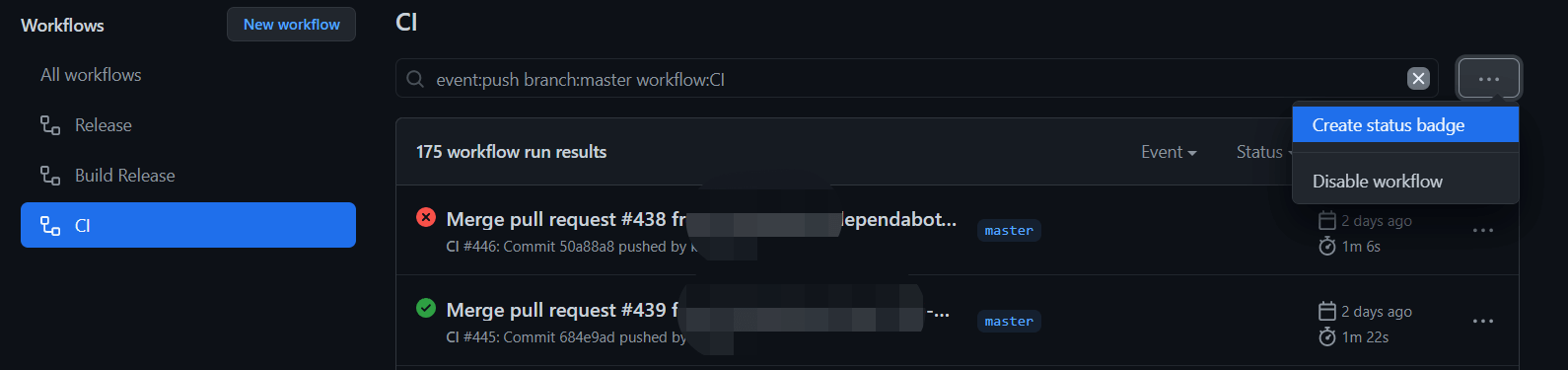
将弹框中的 URL 链接,增加在 Readme 文档中,即可实时快速地查看到 workflow 的执行结果。

9. 精准 hook GitHub 上的行为
workflow 通过 on 关键字定义触发条件。 主要有三类触发事件:
每隔 15 分钟触发一次 workflows。
1
2
3
| on:
schedule:
- cron: "*/15 * * * *"
|
我们在 GitHub 上的操作,比如创建 Issues、新增 Deployment 等,都能够通过 API 获取到相关的事件。通过这些事件,我们可以精准地定制 workflow 的行为。通常我们都是基于 push 或者 pull requests 触发,下面列举几个不常见的示例:
当有人 fork 仓库时触发
当有人 star 仓库时触发
1
2
3
| on:
watch:
types: [started]
|
当有新建的 Issue 时触发
1
2
3
| on:
issues:
types: [opened]
|
10. 开发一个 Action 很简单
如果在 Marketplace 找不到合适的 Action,那么自己开发 Action 也是一个不错的选择。
其实,开发一个 Action 没有想象中那么难。一个 Action 就是一个处理逻辑,接收输入参数,执行一定的逻辑,然后输出参数。有三种类型的 Action:
- Docker container, 适用 Linux 系统
通过 Docker 容器,提供 Action 的执行逻辑处理。比如下面这个例子:
Dockerfile
1
2
3
4
5
| FROM appleboy/drone-scp:1.6.2-linux-amd64
ADD entrypoint.sh /entrypoint.sh
RUN chmod +x /entrypoint.sh
ENTRYPOINT ["/entrypoint.sh"]
|
entrypoint.sh
1
2
3
4
5
6
7
| #!/bin/sh
set -eu
[ -n "$INPUT_STRIP_COMPONENTS" ] && export INPUT_STRIP_COMPONENTS=$((INPUT_STRIP_COMPONENTS + 0))
sh -c "/bin/drone-scp $*"
|
通过 dron-scp 镜像,快速开发了一个提供 scp 文件拷贝的 Action。
- JavaScript, 适用 Linux、macOS、Windows 系统
通过执行 JavaScript 处理 Action 逻辑。官方提供了 JavaScript 和 TypeScript 的 Action 模板。在创建项目时,使用模板创建,然后编写处理逻辑,发布自己的 Action 即可。
GitHub Actions 提供了工具包,以支持这种方式的扩展,例如执行命令、操作 GitHub 等,都可以通过引用包,直接调用相关函数实现。下面是其中几个工具包:
@actions/exec, 执行命令
@actions/core, 输入、输出、日志、秘钥相关
@actions/io, 操作文件
- Composite run steps, 适用 Linux, macOS, Windows 系统
这种类型,允许将一连串的 Shell 操作作为一个 Action 使用。
 1
 2
 3
 4
 5
 6
 7
 8
 9
10
11
12
13
14
15
16
17
18
19
20
21
| name: "Hello World"
description: "Greet someone"
inputs:
who-to-greet: # id of input
description: "Who to greet"
required: true
default: "World"
outputs:
random-number:
description: "Random number"
value: ${{ steps.random-number-generator.outputs.random-id }}
runs:
using: "composite"
steps:
- run: echo Hello ${{ inputs.who-to-greet }}.
shell: bash
- id: random-number-generator
run: echo "::set-output name=random-id::$(echo $RANDOM)"
shell: bash
- run: ${{ github.action_path }}/goodbye.sh
shell: bash
|
11. 参考








