webservice复杂加密签名(1)SoapUI
祈雨的笔记
·
2020-04-07
·
via 祈雨的笔记
概述
WebService本来以为很简单,直到我遇到了万事达的一个对接项目,万事达提供的网关接口是WebService协议,而报文涉及到了WebService的加密,复杂到令人怀疑人生。例如下方两个XML报文,第一个XML报文是加密前的明文报文,而第二个XML报文则是加密签名后的报文。
1
2
3
4
5
6
7
8
9
10
11
| <soapenv:Envelope xmlns:soapenv="http://schemas.xmlsoap.org/soap/envelope/" xmlns:com="http://common.ws.mcrewards.mastercard.com/" xmlns:diag="http://diagnostic.ws.mcrewards.mastercard.com/">
<soapenv:Header>
<com:identity>
<com:appID>0</com:appID>
<com:institutionName>cardinfolink</com:institutionName>
</com:identity>
</soapenv:Header>
<soapenv:Body>
<diag:doEcho>World</diag:doEcho>
</soapenv:Body>
</soapenv:Envelope>
|
1
2
3
4
5
6
7
8
9
10
11
12
13
14
15
16
17
18
19
20
21
22
23
24
25
26
27
28
29
30
31
32
33
34
35
36
37
38
39
40
41
42
43
44
45
46
47
48
49
50
51
52
53
54
55
56
57
58
59
60
61
62
63
64
65
66
67
68
69
70
71
72
73
74
75
76
| <soapenv:Envelope xmlns:com="http://common.ws.mcrewards.mastercard.com/" xmlns:diag="http://diagnostic.ws.mcrewards.mastercard.com/" xmlns:soapenv="http://schemas.xmlsoap.org/soap/envelope/">
<soapenv:Header>
<wsse:Security xmlns:wsse="http://docs.oasis-open.org/wss/2004/01/oasis-200401-wss-wssecurity-secext-1.0.xsd" xmlns:wsu="http://docs.oasis-open.org/wss/2004/01/oasis-200401-wss-wssecurity-utility-1.0.xsd">
<wsse:BinarySecurityToken EncodingType="http://docs.oasis-open.org/wss/2004/01/oasis-200401-wss-soap-message-security-1.0#Base64Binary" ValueType="http://docs.oasis-open.org/wss/2004/01/oasis-200401-wss-x509-token-profile-1.0#X509v3" wsu:Id="X509-75772E58C9E43DD45C158624254101723">MIID8jCCAtqgAwIBAgIQJ0Ebry4sVHgJJ6WWt6tKODANBgkqhkiG9w0BAQsFADCBhTELMAkGA1UEBhMCQkUxHDAaBgNVBAoTE01hc3RlQ2FyZCBXb3JsZHdpZGUxJDAiBgNVBAsTG0dsb2JhbCBJbmZvcm1hdGlvbiBTZWN1cml0eTEyMDAGA1UEAxMpTWFzdGVyQ2FyZCBQUkQgTWVzc2FnZXMgU2lnbmluZyBTdWIgQ0EgRzIwHhcNMTkxMjE2MjE0NTQxWhcNMjMxMjE1MjEzNjEyWjCBgTELMAkGA1UEBhMCQ04xETAPBgNVBAgTCFNoYW5naGFpMSowKAYDVQQKEyFNYXN0ZXJDYXJkIFdvcmxkd2lkZSAtIFNpZ25pbmcgU1cxFDASBgNVBAsTC0NIUyAwMDA0ODg2MR0wGwYDVQQDExRtdGYuQ0hTLkNhcmRJbmZvTGluazCCASIwDQYJKoZIhvcNAQEBBQADggEPADCCAQoCggEBAN06EuNnbt/Nnnji73POrIw5FAIuxtikgSplOv7fM7VJaMgzH1Ed3FpIugXafciOHovT44QlJLJeJuf0rgpY2ydVtImeVcUMcTcplluklDx63pVOjYiMgfBUa34ejjezbVtoP/f/C9hjLZHVIRIwEmwICiKEu0RXSUu5Copa8k4QZcza/SMC/8szilDg3ZWlv3zGl8+WJPzJkDNuuhElYDqonKBO1S6zIEhcf1/NtmcanwilJJXR4N/038C2wo7hWL2yURczx18R7Ysn0tWiZjHVKvjMVbE8LRkYCgR0nhJB/Y5Uo2zcJZUo7OdBfDe5C8Jh2N8U15SeCMdtciQhON8CAwEAAaNgMF4wDgYDVR0PAQH/BAQDAgeAMAwGA1UdEwQFMAMCAQAwHwYDVR0jBBgwFoAU66ASd4JT9FhYrwHp4f9kBT5H2aowHQYDVR0OBBYEFJtKSpdYD3UynkN70V/zsTcSrkeZMA0GCSqGSIb3DQEBCwUAA4IBAQCzM5gOylWXU/maOaCyxdFGrt8tTjoH9dWw40gW7/bwU1N7+vcFnUlyZi+XjClbcP38e8uiirM1nJe3cJWoQf+wcdOwmn20W7ZUdaqiXrwYKP2KHqOOZ1WIH5xbw/0Dd09gVuQAhcE3QxuH8D0Eb8tCCudEMNwfl8QI8SibLEyKreKuaXitcNSX1dP5pgCmeiu3sJHLVSjIYXbFv3HQDtswqG2Smd60e+nyRNxIVQVc2sM5uiDRSHUN/LR4ZX6IA2G6nwkp6oYlNp5fsxrkvr/nUpMR7cogUlp41RwbSRFk+IyG8MvuFWm2rIqkmAqTUv1YtUEghrqYoBhehdXm7GXT</wsse:BinarySecurityToken>
<ds:Signature Id="SIG-75772E58C9E43DD45C158624254107928" xmlns:ds="http://www.w3.org/2000/09/xmldsig#">
<ds:SignedInfo>
<ds:CanonicalizationMethod Algorithm="http://www.w3.org/2001/10/xml-exc-c14n#">
<ec:InclusiveNamespaces PrefixList="com diag soapenv" xmlns:ec="http://www.w3.org/2001/10/xml-exc-c14n#"/>
</ds:CanonicalizationMethod>
<ds:SignatureMethod Algorithm="http://www.w3.org/2001/04/xmldsig-more#rsa-sha512"/>
<ds:Reference URI="#TS-75772E58C9E43DD45C158624254101622">
<ds:Transforms>
<ds:Transform Algorithm="http://www.w3.org/2001/10/xml-exc-c14n#">
<ec:InclusiveNamespaces PrefixList="wsse com diag soapenv" xmlns:ec="http://www.w3.org/2001/10/xml-exc-c14n#"/>
</ds:Transform>
</ds:Transforms>
<ds:DigestMethod Algorithm="http://www.w3.org/2001/04/xmlenc#sha512"/>
<ds:DigestValue>hfsb367zFUFCoRFxt5R7sOoW6U1pTFV7P+/ZGhz0AkIkNy8H33bKLr0/DobFrJXvmpEY9ZSWyKMG
AoudAOQk2w==</ds:DigestValue>
</ds:Reference>
<ds:Reference URI="#id-75772E58C9E43DD45C158624254101826">
<ds:Transforms>
<ds:Transform Algorithm="http://www.w3.org/2001/10/xml-exc-c14n#">
<ec:InclusiveNamespaces PrefixList="com diag" xmlns:ec="http://www.w3.org/2001/10/xml-exc-c14n#"/>
</ds:Transform>
</ds:Transforms>
<ds:DigestMethod Algorithm="http://www.w3.org/2001/04/xmlenc#sha512"/>
<ds:DigestValue>JY6P+ZgECfWf4/fo3RpN8vd5wiHQyw8+xRix4okJmXFZvwIiid6wL7CiJYpaMfMAVy++t2SOq3jw
wjPJYPEHQA==</ds:DigestValue>
</ds:Reference>
<ds:Reference URI="#X509-75772E58C9E43DD45C158624254101723">
<ds:Transforms>
<ds:Transform Algorithm="http://www.w3.org/2001/10/xml-exc-c14n#">
<ec:InclusiveNamespaces PrefixList="" xmlns:ec="http://www.w3.org/2001/10/xml-exc-c14n#"/>
</ds:Transform>
</ds:Transforms>
<ds:DigestMethod Algorithm="http://www.w3.org/2001/04/xmlenc#sha512"/>
<ds:DigestValue>Qkk5+Zl1TG1G2tphnMPt4ZIE9XJEHoJzjfJZwcZIO7AyDFJqIasjEnOg/OcNyDSxYc3S8IFdD8uW
517RJ5QEjw==</ds:DigestValue>
</ds:Reference>
<ds:Reference URI="#id-75772E58C9E43DD45C158624254102427">
<ds:Transforms>
<ds:Transform Algorithm="http://www.w3.org/2001/10/xml-exc-c14n#">
<ec:InclusiveNamespaces PrefixList="diag soapenv" xmlns:ec="http://www.w3.org/2001/10/xml-exc-c14n#"/>
</ds:Transform>
</ds:Transforms>
<ds:DigestMethod Algorithm="http://www.w3.org/2001/04/xmlenc#sha512"/>
<ds:DigestValue>RJlWhk0rPXrHVkNlVPISUAwYEHP6u/bMTrbtJ3xVTwMJ62CIfoEomoSX2hJWyOFm2cJezaXiWaW/
1r0NvFg8pQ==</ds:DigestValue>
</ds:Reference>
</ds:SignedInfo>
<ds:SignatureValue>1FdgK0XSZInwSgNjwB06SGHbzPLH+cwAwb3VqU3aejHL36/YGyquyyfzVSdFDpGTjro00S3Lr1n+
xaLbt61SGJQKCwVHV+TKCQruINEftGgJpTaddm4Kt3AH27WvGveKJobqzojqNpRlSKkcYMTOcltJ
jCSo62ME8W+JTVoDAXSoCuGLXo0O1tsDBgSHM3RHOk6xPATOGULYngE6Ll/CAP5KodzlVTEuLZI8
D/C0cvg8HTScErf6o6WeeEgkn3udsDtq5dVUWGP3NePVxVZ4mhvtAv2qhS9IXVCtIPJVt4BtJY90
Y+KoBvdUhZczqLPJXWkiz1F/AphpN2x7wbVjUA==</ds:SignatureValue>
<ds:KeyInfo Id="KI-75772E58C9E43DD45C158624254101824">
<wsse:SecurityTokenReference wsu:Id="STR-75772E58C9E43DD45C158624254101825">
<wsse:Reference URI="#X509-75772E58C9E43DD45C158624254101723" ValueType="http://docs.oasis-open.org/wss/2004/01/oasis-200401-wss-x509-token-profile-1.0#X509v3"/>
</wsse:SecurityTokenReference>
</ds:KeyInfo>
</ds:Signature>
<wsu:Timestamp wsu:Id="TS-75772E58C9E43DD45C158624254101622">
<wsu:Created>2020-04-07T06:55:41Z</wsu:Created>
<wsu:Expires>2020-04-07T06:56:41Z</wsu:Expires>
</wsu:Timestamp>
</wsse:Security>
<com:identity wsu:Id="id-75772E58C9E43DD45C158624254102427" xmlns:wsu="http://docs.oasis-open.org/wss/2004/01/oasis-200401-wss-wssecurity-utility-1.0.xsd">
<com:appID>0</com:appID>
<com:institutionName>cardinfolink</com:institutionName>
</com:identity>
</soapenv:Header>
<soapenv:Body wsu:Id="id-75772E58C9E43DD45C158624254101826" xmlns:wsu="http://docs.oasis-open.org/wss/2004/01/oasis-200401-wss-wssecurity-utility-1.0.xsd">
<diag:doEcho>World</diag:doEcho>
</soapenv:Body>
</soapenv:Envelope>
|
生成秘钥文件
1、HTTPS秘钥文件cilent.jks
调用方生成私钥文件MTFclient.key.pem
1
2
3
| openssl req -new -nodes -newkey rsa:2048 -keyout cil_mtf_client.key -out cil_mtf_client.csr
openssl rsa -in cil_mtf_client.key -out MTFclient.key.pem
|
私钥文件MTFclient.key.pem发送给服务方,由服务方生成文件164063.crt
调用方通过文件MTFclient.key.pem和164063.crt生成文件client.jks
1
2
3
| openssl pkcs12 -export -name client -in 164063.crt -inkey MTFclient.key.pem -out Combined164063.p12
keytool -importkeystore -destkeystore cilent.jks -srckeystore Combined164063.p12 -srcstoretype pkcs12 -alias client
|
2、报文签名秘钥文件signing.jks
同理,生成报文签名秘钥signing.jks:
1
2
3
4
5
6
7
| openssl req -new -nodes -newkey rsa:2048 -keyout cil_mtf_signing.key -out cil_mtf_signing.csr
openssl rsa -in cil_mtf_signing.key -out MTFsigning.key.pem
openssl pkcs12 -export -name signing -in 164064.crt -inkey MTFsigning.key.pem -out Combined164064.p12
keytool -importkeystore -destkeystore signing.jks -srckeystore Combined164064.p12 -srcstoretype pkcs12 -alias signing
|
示例文件如下,pkcs12.zip,HTTPS秘钥文件和报文签名秘钥文件的密码均为cil123。
SoapUI
WSDL示例文件如下:wsdl.zip
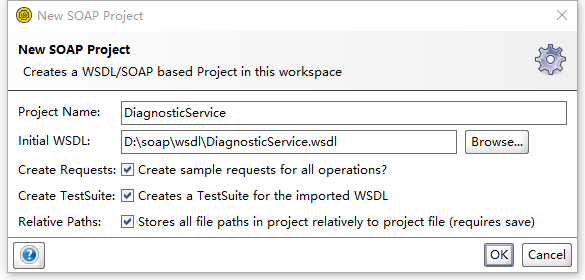
- 打开软件SOAPUI,点击菜单栏
File - New SOAP Project,选中文件DiagnosticService.wsdl,并选中所有复选框,然后一直点击确定按钮创建项目
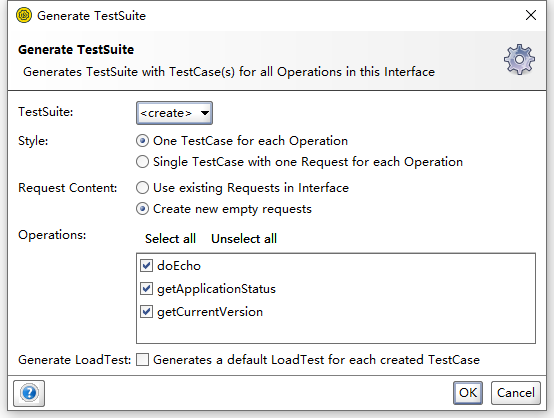
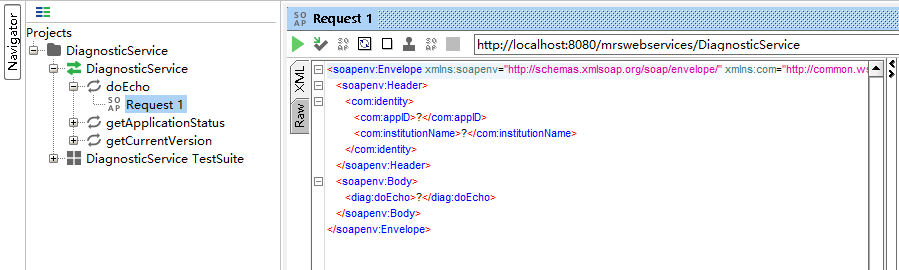
- 项目创建完成后,如图所示
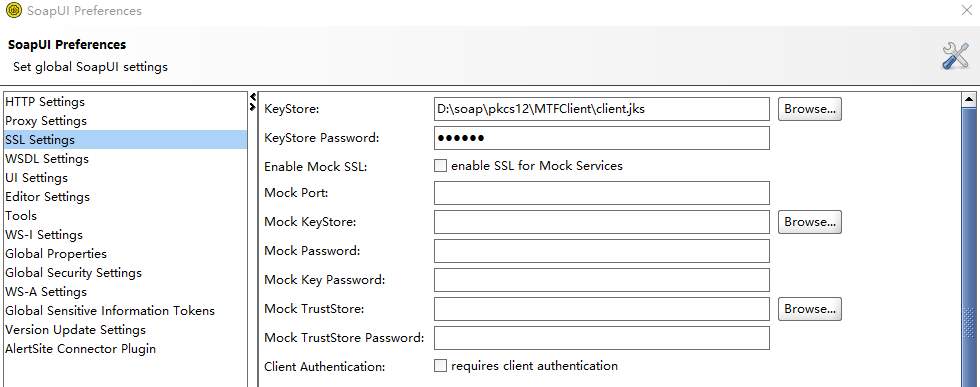
- 点击菜单栏
File - Preferences - SSL Settings,KeyStore一栏选中HTTPS秘钥文件cilent.jks并输入秘钥密码
- 双击项目名
DiagnosticService,在弹出的新窗口中选择WS-Security Configurations - Keystores,点击绿色+按钮,选择报文签名秘钥文件signing.jks并输入秘钥密码
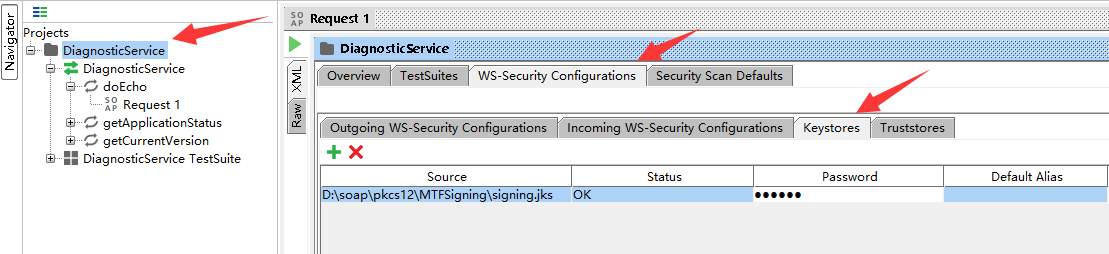
- 在弹出的新窗口中选择
WS-Security Configurations - Outgoing WS-Security Configurations,点击绿色+按钮并在弹出的输入框中输入MTF Sign后,点击完成
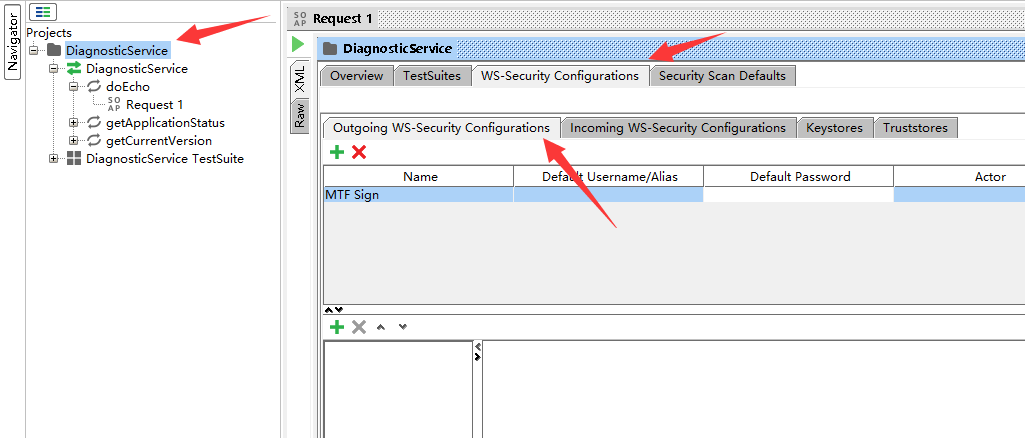
- 继续在该窗口,点击下方的绿色
+按钮并在弹出的下拉框中选中Timestamp,并修改右侧的值如图,修改Time to Live为60并取消选中复选框Milliseconds Precision
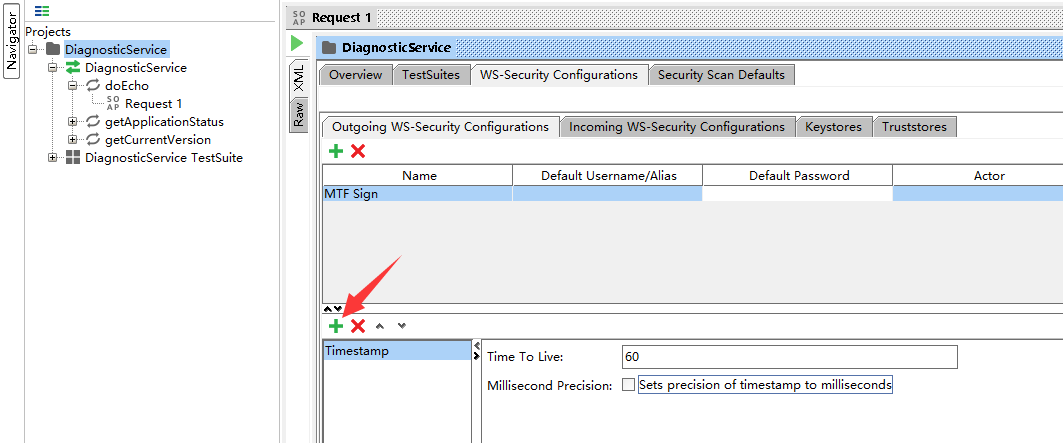
- 继续在该窗口,点击下方的绿色
+按钮并在弹出的下拉框中选中Signature,并修改右侧的值如图
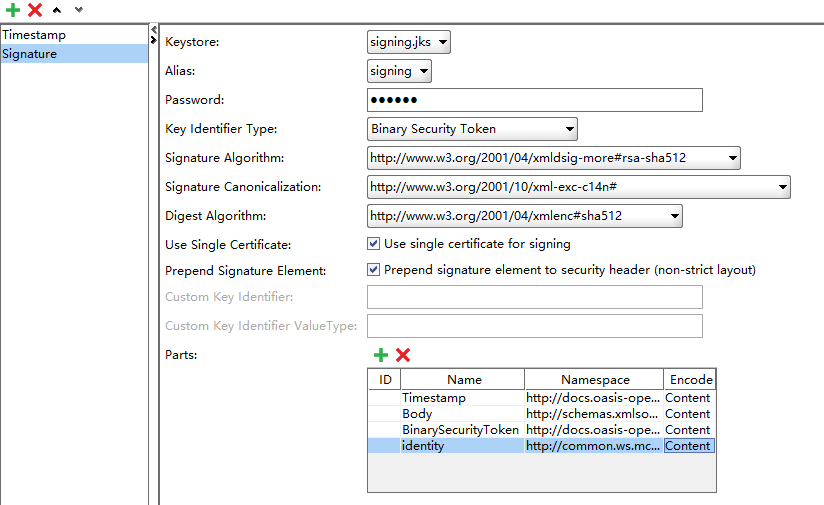
| key |
value |
| Keystore |
signing.jks |
| Alias |
signing |
| Password |
cil123 |
| Key Identifier Type |
Binary Security Token |
| Signature Algorithm |
http://www.w3.org/2001/04/xmldsig-more#rsa-sha512 |
| Signature Canonicalization |
http://www.w3.org/2001/10/xml-exc-c14n# |
| Digest Algorithm |
http://www.w3.org/2001/04/xmlenc#sha512 |
| Use Single Certification |
选中 |
| Name |
Namespace |
Encode |
| Timestamp |
http://docs.oasis-open.org/wss/2004/01/oasis-200401-wss-wssecurity-utility-1.0.xsd |
Content |
| Body |
http://schemas.xmlsoap.org/soap/envelope/ |
Content |
| BinarySecurityToken |
http://docs.oasis-open.org/wss/2004/01/oasis-200401-wss-wssecurity-secext-1.0.xsd |
Content |
| identity |
http://common.ws.mcrewards.mastercard.com/ |
Content |
- 双击
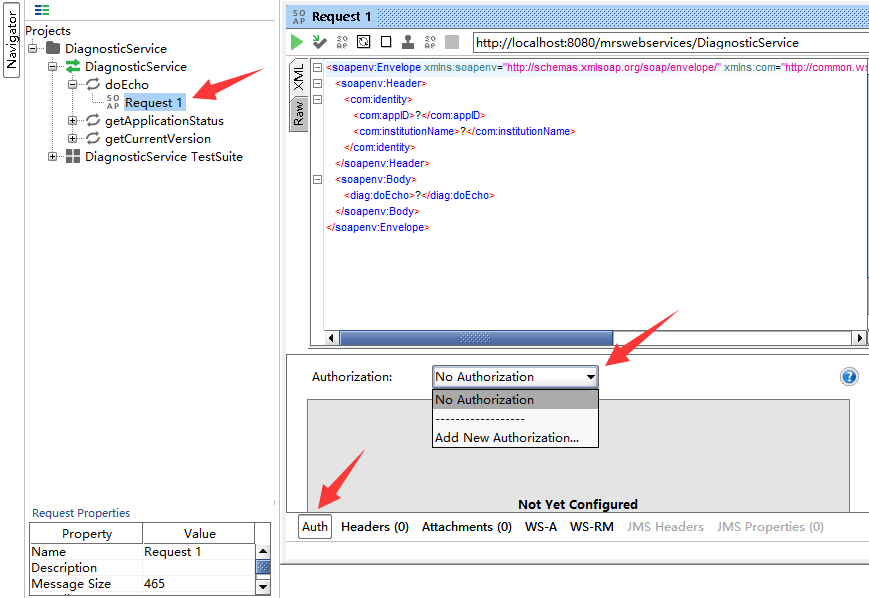
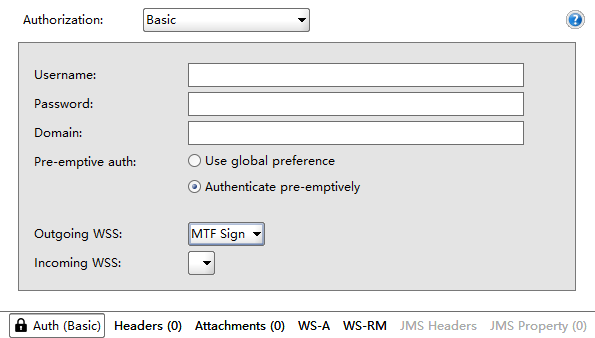
doEcho方法下面的Request 1,点击最下方的Auth栏,再选中Authorization下拉框中的Add New Authorization,在弹出的窗口中选择Basic后点击确定按钮,并设置成如下图:Pre-emptive auth选择Authenticate pre-emptively;Outgoing WSS选择MTF Sign
- 双击
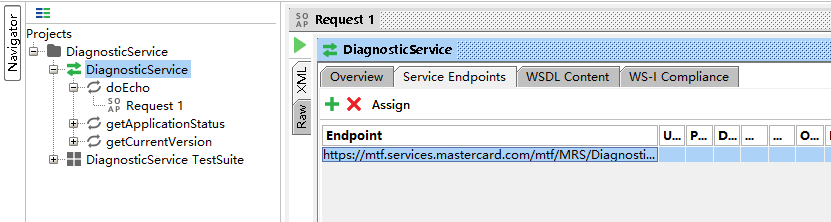
DiagnosticService,修改Service Endpoints中的Endpoint值为测试环境调用链接https://mtf.services.mastercard.com/mtf/MRS/DiagnosticService
- 双击
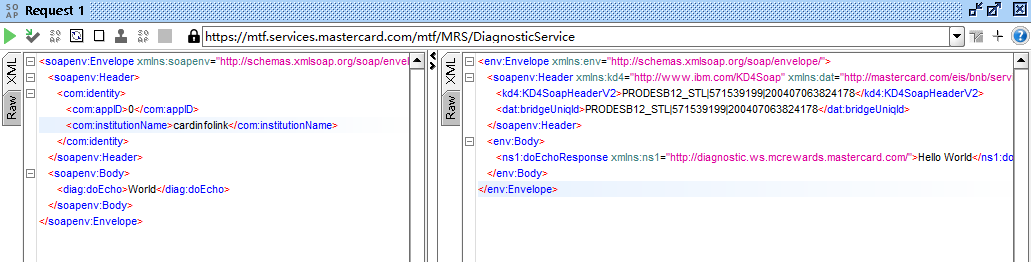
doEcho方法下面的Request 1,修改请求XML报文。点击调用按钮发起请求成功,返回报文如下图
此内容由惯性聚合(RSS阅读器)自动聚合整理,仅供阅读参考。 原文来自 — 版权归原作者所有。









