惯性聚合 高效追踪和阅读你感兴趣的博客、新闻、科技资讯
阅读原文 在惯性聚合中打开

推荐订阅源

云风的 BLOG
云风的 BLOG
IT之家
IT之家
OSCHINA 社区最新新闻
OSCHINA 社区最新新闻
V
Visual Studio Blog
博客园 - 司徒正美
美团技术团队
Last Week in AI
Last Week in AI
月光博客
月光博客
博客园 - 叶小钗
MongoDB | Blog
MongoDB | Blog
U
Unit 42
T
Tailwind CSS Blog
GbyAI
GbyAI
T
The Blog of Author Tim Ferriss
CTFtime.org: upcoming CTF events
H
Hackread – Cybersecurity News, Data Breaches, AI and More
酷 壳 – CoolShell
酷 壳 – CoolShell
Google DeepMind News
H
Help Net Security
Hugging Face - Blog
Hugging Face - Blog
爱范儿
爱范儿
freeCodeCamp Programming Tutorials: Python, JavaScript, Git & More
N
Netflix TechBlog - Medium
B
Blog RSS Feed
大猫的无限游戏
大猫的无限游戏
aimingoo的专栏
aimingoo的专栏
A
About on SuperTechFans
Y
Y Combinator Blog
罗磊的独立博客
D
DataBreaches.Net
有赞技术团队
有赞技术团队
MyScale Blog
MyScale Blog
博客园_首页
博客园 - 三生石上(FineUI控件)
G
Google Developers Blog
让小产品的独立变现更简单 - ezindie.com
雷峰网
雷峰网
博客园 - 【当耐特】
Engineering at Meta
Engineering at Meta
博客园 - Franky
M
MIT News - Artificial intelligence
B
Blog
The Cloudflare Blog
Apple Machine Learning Research
I
InfoQ
S
SegmentFault 最新的问题
F
Fortinet All Blogs
阮一峰的网络日志
阮一峰的网络日志
Stack Overflow Blog
Stack Overflow Blog
Microsoft Security Blog

祈雨的笔记

安全多方计算MPC spark原理解析 kueue执行源码分析 spark on k8s执行源码分析 spark-operator源码解析 系统压测遇到的缓存击穿问题 我的世界PC与安卓联机 蚂蚁金服流量投放平台的AIG改造 G1大对象致Old区占用率高 日志打印导致接口响应率下跌分析 Groovy加载类导致OOM分析 ERROR日志打印导致CPU满载 记OceanBase死锁超时 应用发版期间服务响应超时 Ark Serverless初探 系统优化复盘一二三 The user specified as a definer does not exist Kong网关初探 API网关选型调研 CPU火焰图常用工具 配置中心选型调研 root操作Nginx导致用户组错误 基于Proxifier使用代理 FastJSON字段智能匹配踩坑 Nacos初探 记一次Nginx服务器CPU满荷载故障 基于券系统分库分表的思考 limit不参与SQL成本计算致索引失效 Linux常用性能监控命令 golang低版本http2偶现400 hostname in certificate didn't match 常见对称加密原理以及应用 tcp_tw_recycle引起的TCP握手失败 记一次mysql执行DDL导致锁表 mysql磁盘占用查看 mysql对text字段update致磁盘增长 elasticsearch报错index read-only TIME_WAIT与Http的Keep-Alive 记一次TIME_WAIT导致连接数报警 记一次生产事故OOM问题排查 redis分布式锁RedissonLock的实现细节 webservice复杂加密签名(2)java调用 webservice复杂加密签名(1)SoapUI mysql延时关联 利用中间人拦截实现APP内H5窜改 MySQL表字符集不同导致关联查询索引失效 通过SSH隧道远程办公 数据落盘方案 BeanDefinitionRegistryPostProcessor扩展 mysql空间索引 HTTPS攻击 spring循环依赖过程解析 elasticsearch性能优化 mysql IS NULL 使用索引 mysql字符集utf8mb4失效踩坑 常用加密算法 xml与javaBean转换 初探InnoDB MVCC源码实现 mysql索引原理 redis之list源码分析 redis之key过期源码分析 redis之string源码分析 redis之hash源码分析 线程池之ThreadPoolExecutor mysql数据页结构 Using temporary与Using filesort mysql回表致索引失效 springboot(28)HTTP连接池 定时任务之ScheduledThreadPoolExecutor elasticsearch常用script聚合 elasticsearch实现like查询 elasticsearch实现乐观锁 elasticsearch准实时原理 springboot(27)自定义缓存读写机制CachingConfigurerSupport optimizer tracing arthas常用命令 HTTP和HTTPS详解 redis集群选举机制 kafka消息重试 一点压力测试的经验 kafka架构概念 explain分析sql语句字段的解释 JVM问题分析处理手册 logstash过滤器(2)date logstash过滤器(3)dissect logstash编码器(1)json logstash编码器(2)multiline logstash表达式 logstash输入(1)通用选项 logstash输入(3)file logstash过滤器(1)通用选项 logstash输入(2)stdin logstash安装 记一次前端vConsole导致JSON序列化错误排查 解决多个异步操作嵌套问题 fastjson反序列化失败autoType is not support POI自动调整列宽错误 Nginx+Lua实现动态黑名单 使用curl命令模拟POST和GET请求 ResponseEntity下载文件
RTMP串流服务
祈雨的笔记 · 2019-01-03 · via 祈雨的笔记

准备

nginx-rtmp-module

nginx-rtmp-module为nginx的一个模块,提供了:

  • RTMP/HLS/MPEG-DASH直播
  • FLV/MP4文件格式的RTMP视频点播,可以从本地文件系统或HTTP播放
  • 对分布式流媒体的支持
  • H264/AAC支持
  • 使用FFmpeg进行在线转码
  • HTTP回调(发布/播放/记录/更新等)
  • 在某些事件上运行外部程序(exec)
  • HTTP控制模块,用于录制音频/视频和丢弃客户端
  • 高级缓冲技术可将内存分配保持在最低水平,以实现更快的流式传输和更低的内存占用
  • 可以使用Wirecast,FMS,Wowza,JWPlayer,FlowPlayer,StrobeMediaPlayback,ffmpeg,avconv,rtmpdump,flvstreamer等等
  • XML/XSL中的统计信息,支持机器和人类可读的形式
  • Linux/FreeBSD/MacOS/Windows

安装

1
2
./configure --prefix=/usr/soft/nginx-1.12.0 --add-module=/usr/soft/nginx-rtmp-module-1.2.1
make && make install

配置

路径配置

1
2
mkdir -p /opt/rtmp/vod
cp /usr/soft/nginx-rtmp-module-1.2.1/stat.xsl /opt/rtmp

nginx配置

1
2
3
4
5
6
7
8
9
10
11
12
13
14
15
16
17
18
19
20
21
22
23
24
25
26
rtmp {
server {
listen 9000;
chunk_size 4096;
}
}

http {
...

server {
listen 80;
...

location /stat {
rtmp_stat all;
rtmp_stat_stylesheet stat.xsl;
}

location /stat.xsl {
# XSL文件路径为/opt/rtmp/stat.xsl
root /opt/rtmp/;
}
}

}

启动nginx

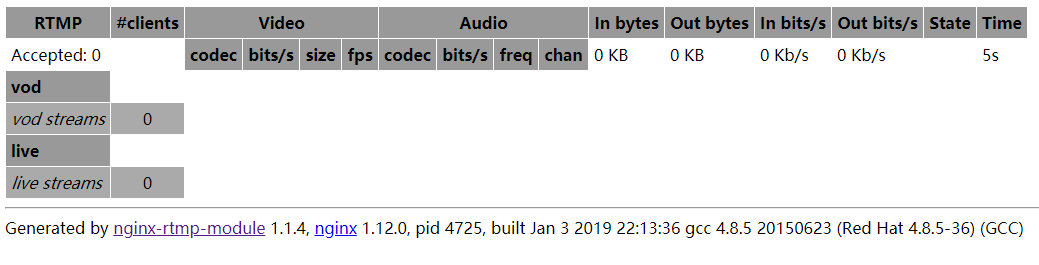
访问http://example.com/stat

image

点播

修改nginx配置

设置vod路径为/opt/rtmp/vod

1
2
3
4
5
6
7
8
9
10
rtmp {
server {
listen 9000;
chunk_size 4096;

application vod {
play /opt/rtmp/vod;
}
}
}

此时访问访问http://example.com/stat可以查看到控制台多出了vod一行。如果此时有人在访问点播视频,则可以在控制台看到每个视频的在线访问人数、网络速度等数据。

image

操作

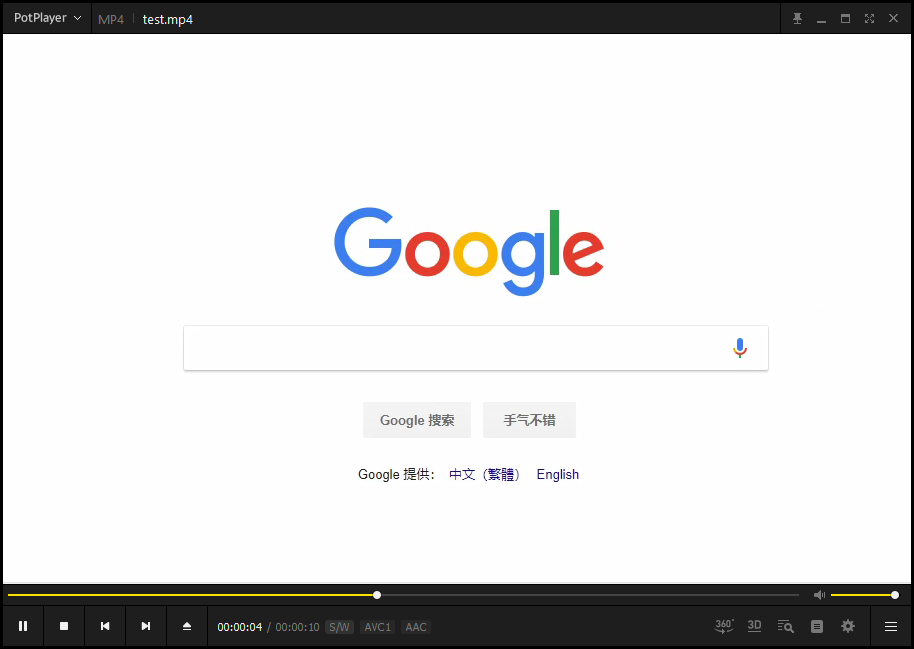
将视频文件放到vod路径下,例如/opt/rtmp/vod/test.mp4,然后就可以通过串流直接观看该视频。访问该视频文件的串流地址为rtmp://example.com:9000/vod/{文件名},例如:rtmp://example.com:9000/vod/test.mp4

image

直播

修改nginx配置

1
2
3
4
5
6
7
8
9
10
11
12
13
14
rtmp {
server {
listen 9000;
chunk_size 4096;

application vod {
play /opt/rtmp/vod;
}

application live{
live on;
}
}
}

此时访问访问http://example.com/stat可以查看到控制台多出了live一行。如果此时有人在直播,则可以在控制台看到当前在线的直播频道以及每个直播频道的访问人数、网络速度等数据。

image

操作

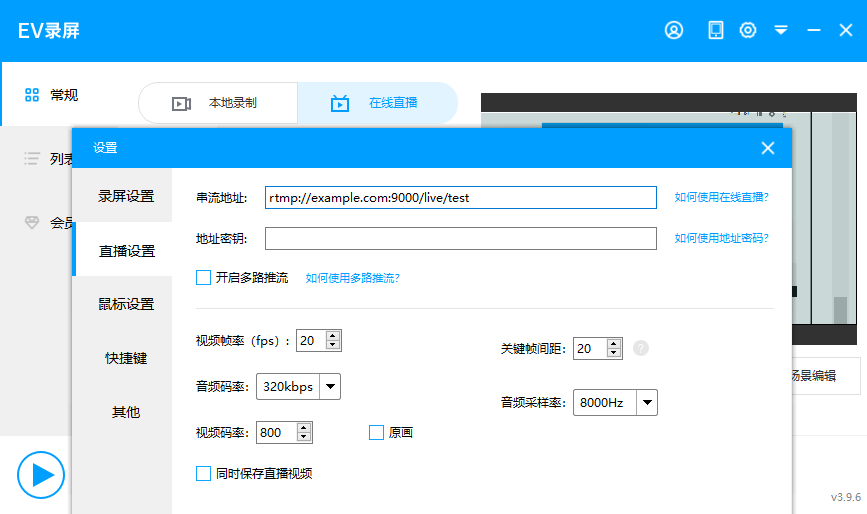
通过直播软件(例如EV录屏)设置串流地址rtmp://example.com:9000/live/{自定义ID}例如rtmp://example.com:9000/live/test,就可以将直播的视频数据发送到nginx。

image

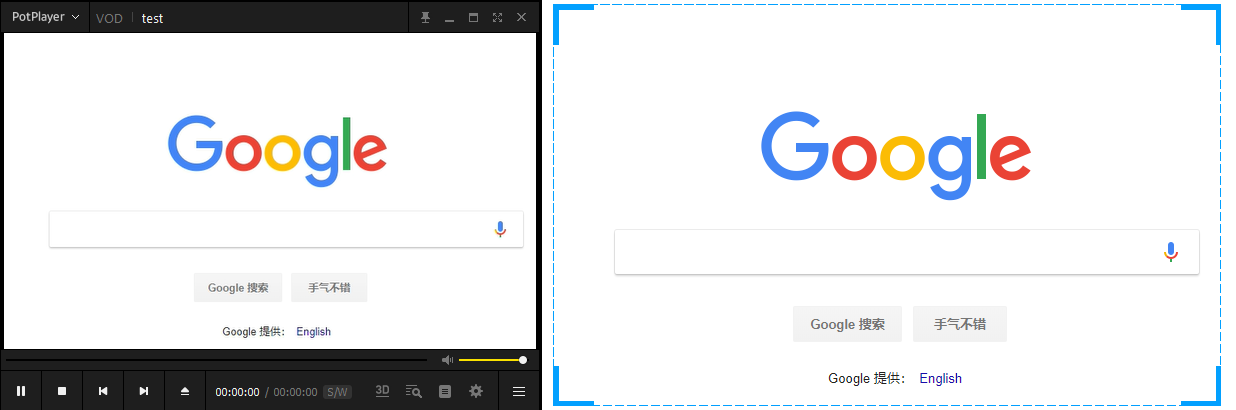
观看直播则访问与直播软件设置的相同的的串流地址即可,例如:rtmp://example.com:9000/live/test

image

更多配置

1
2
3
4
5
6
7
8
9
10
11
12
13
14
15
16
17
18
19
20
21
22
23
24
25
26
27
28
29
30
31
32
33
34
35
36
37
38
39
40
41
42
43
44
45
46
47
48
49
50
51
52
53
54
55
56
57
58
59
60
61
62
63
64
65
66
67
68
69
70
71
72
73
74
75
76
77
78
79
80
81
82
83
84
85
86
87
88
89
90
91
92
93
94
95
96
97
98
99
100
101
102
103
104
105
106
107
108
109
110
111
112
113
114
115
116
117
118
119
120
121
122
123
124
125
126
127
128
129
130
131
132
133
134
135
136
137
138
139
140
141
142
143
144
145
146
147
148
149
150
151
152
153
154
155
156
157
158
159
160
161
162
163
164
165
166
167
168
169
170
171
172
173
174
175
176
177
178
179
180
181
182
183
184
185
186
187
188
189
190
191
192
193
194
195
196
197
198
199
200
201
202
203
204
205
206
207
208
209
210
rtmp {

server {

listen 1935;

chunk_size 4000;

# TV mode: one publisher, many subscribers
application mytv {

# enable live streaming
live on;

# record first 1K of stream
record all;
record_path /tmp/av;
record_max_size 1K;

# append current timestamp to each flv
record_unique on;

# publish only from localhost
allow publish 127.0.0.1;
deny publish all;

#allow play all;
}

# Transcoding (ffmpeg needed)
application big {
live on;

# On every pusblished stream run this command (ffmpeg)
# with substitutions: $app/${app}, $name/${name} for application & stream name.
#
# This ffmpeg call receives stream from this application &
# reduces the resolution down to 32x32. The stream is the published to
# 'small' application (see below) under the same name.
#
# ffmpeg can do anything with the stream like video/audio
# transcoding, resizing, altering container/codec params etc
#
# Multiple exec lines can be specified.

exec ffmpeg -re -i rtmp://localhost:1935/$app/$name -vcodec flv -acodec copy -s 32x32
-f flv rtmp://localhost:1935/small/${name};
}

application small {
live on;
# Video with reduced resolution comes here from ffmpeg
}

application webcam {
live on;

# Stream from local webcam
exec_static ffmpeg -f video4linux2 -i /dev/video0 -c:v libx264 -an
-f flv rtmp://localhost:1935/webcam/mystream;
}

application mypush {
live on;

# Every stream published here
# is automatically pushed to
# these two machines
push rtmp1.example.com;
push rtmp2.example.com:1934;
}

application mypull {
live on;

# Pull all streams from remote machine
# and play locally
pull rtmp://rtmp3.example.com pageUrl=www.example.com/index.html;
}

application mystaticpull {
live on;

# Static pull is started at nginx start
pull rtmp://rtmp4.example.com pageUrl=www.example.com/index.html name=mystream static;
}

# video on demand
application vod {
play /var/flvs;
}

application vod2 {
play /var/mp4s;
}

# Many publishers, many subscribers
# no checks, no recording
application videochat {

live on;

# The following notifications receive all
# the session variables as well as
# particular call arguments in HTTP POST
# request

# Make HTTP request & use HTTP retcode
# to decide whether to allow publishing
# from this connection or not
on_publish http://localhost:8080/publish;

# Same with playing
on_play http://localhost:8080/play;

# Publish/play end (repeats on disconnect)
on_done http://localhost:8080/done;

# All above mentioned notifications receive
# standard connect() arguments as well as
# play/publish ones. If any arguments are sent
# with GET-style syntax to play & publish
# these are also included.
# Example URL:
# rtmp://localhost/myapp/mystream?a=b&c=d

# record 10 video keyframes (no audio) every 2 minutes
record keyframes;
record_path /tmp/vc;
record_max_frames 10;
record_interval 2m;

# Async notify about an flv recorded
on_record_done http://localhost:8080/record_done;

}


# HLS

# For HLS to work please create a directory in tmpfs (/tmp/hls here)
# for the fragments. The directory contents is served via HTTP (see
# http{} section in config)
#
# Incoming stream must be in H264/AAC. For iPhones use baseline H264
# profile (see ffmpeg example).
# This example creates RTMP stream from movie ready for HLS:
#
# ffmpeg -loglevel verbose -re -i movie.avi -vcodec libx264
# -vprofile baseline -acodec libmp3lame -ar 44100 -ac 1
# -f flv rtmp://localhost:1935/hls/movie
#
# If you need to transcode live stream use 'exec' feature.
#
application hls {
live on;
hls on;
hls_path /tmp/hls;
}

# MPEG-DASH is similar to HLS

application dash {
live on;
dash on;
dash_path /tmp/dash;
}
}
}

# HTTP can be used for accessing RTMP stats
http {

server {

listen 8080;

# This URL provides RTMP statistics in XML
location /stat {
rtmp_stat all;

# Use this stylesheet to view XML as web page
# in browser
rtmp_stat_stylesheet stat.xsl;
}

location /stat.xsl {
# XML stylesheet to view RTMP stats.
# Copy stat.xsl wherever you want
# and put the full directory path here
root /path/to/stat.xsl/;
}

location /hls {
# Serve HLS fragments
types {
application/vnd.apple.mpegurl m3u8;
video/mp2t ts;
}
root /tmp;
add_header Cache-Control no-cache;
}

location /dash {
# Serve DASH fragments
root /tmp;
add_header Cache-Control no-cache;
}
}
}