惯性聚合 高效追踪和阅读你感兴趣的博客、新闻、科技资讯
阅读原文 在惯性聚合中打开

推荐订阅源

P
Proofpoint News Feed
博客园 - 聂微东
Application and Cybersecurity Blog
MyScale Blog
MyScale Blog
罗磊的独立博客
H
Help Net Security
L
LangChain Blog
T
Threat Research - Cisco Blogs
量子位
S
Securelist
Last Week in AI
Last Week in AI
L
Lohrmann on Cybersecurity
T
The Exploit Database - CXSecurity.com
P
Privacy International News Feed
The Hacker News
The Hacker News
Vercel News
Vercel News
D
Darknet – Hacking Tools, Hacker News & Cyber Security
C
Cybersecurity and Infrastructure Security Agency CISA
T
The Blog of Author Tim Ferriss
T
Threatpost
Security Latest
Security Latest
P
Palo Alto Networks Blog
Microsoft Security Blog
NISL@THU
NISL@THU
F
Full Disclosure
WordPress大学
WordPress大学
cs.AI updates on arXiv.org
Stack Overflow Blog
Stack Overflow Blog
C
Check Point Blog
Hacker News - Newest:
Hacker News - Newest: "LLM"
酷 壳 – CoolShell
酷 壳 – CoolShell
H
Heimdal Security Blog
J
Java Code Geeks
Recorded Future
Recorded Future
Hugging Face - Blog
Hugging Face - Blog
G
GRAHAM CLULEY
Know Your Adversary
Know Your Adversary
K
KPMG report finds enterprise disconnect between AI and its ROI | CIO
阮一峰的网络日志
阮一峰的网络日志
U
Unit 42
B
Blog RSS Feed
月光博客
月光博客
C
Cisco Blogs
V
Visual Studio Blog
D
DataBreaches.Net
H
Hacker News: Front Page
博客园 - 叶小钗
N
News and Events Feed by Topic
爱范儿
爱范儿
A
Arctic Wolf

Holmesian Blog

Seafile docker部署相关问题记录 - Holmesian Blog MacBook 休眠恢复不能上网问题 - Holmesian Blog 再谈Go语言的交叉编译 - Holmesian Blog 自行更换 MacBook Pro (A1708) 的电池 HAProxy 区分流量特征 - Holmesian Blog 临时处理OCSP域名无法访问的问题 - Holmesian Blog 树莓派FFmpeg硬件加速 - Holmesian Blog 交叉编译Go程序 - Holmesian Blog 树莓派的HW CSum问题 - Holmesian Blog
缓解 MacBook Pro 开网页的发热问题 - Holmesian Blog
Holmesian · 2021-11-03 · via Holmesian Blog

提示:本文更新于 1684 天前,技术内容可能已发生变化,仅供参考。

情况

我的 MBP(A1708)自从把 Mac 版 Onedriver 干掉换成自建的 Seafile ,再把 Mac 版 Docker 丢进虚拟机中的 Ubuntu 里之后,很少会出现风扇狂响的情况。

可是最近发现又会出现风扇狂转的情况,经过排查发现这回是 Chrome Version (95.0.4638.69) 导致,通过 Macs Fan Control 查看发现温度一直会飙升到 81°C 以上。 通过 Chrome 的 Task Manager(任务管理器) 查看发现 GPU Process (显卡管理进程) 长时间占用大量资源。

PS:Mac 版Chrome Task Manager 没有快捷键,只能通过 More Tools > Task Manager调出

原因分析

由于 Chrome 是资源老虎,资源占用高本不是什么稀罕事,但是无论什么程序,持续的高资源占用都是非常不正常的,正常情况下绝大多数程序都应该维持低资源占用。

chrome copy.png

打开的网页是充斥着特效比较多的页面,看来这次情况大概率是由于“GPU 硬件加速”功能起到反作用导致的。浏览器所提供的“GPU 硬件加速”功能最初的目的是通过使用 GPU 完成一些网页渲染工作来降低 CPU 负载的,然而对于 GPU 性能本来就捉襟见肘的设备,这个选项反而让实际情况南辕北辙了。

新版的 Chrome(包括Edge)都已经将在最近版本中将“GPU 硬件加速”预设为开启,所以需要手动关闭。

解决方法

在 Chrome 的网址栏列输入“chrome://flags/”,然后将“Accelerated 2D canvas”以及“GPU rasterization” 设置为 Disabled ,重启 Chrome 。
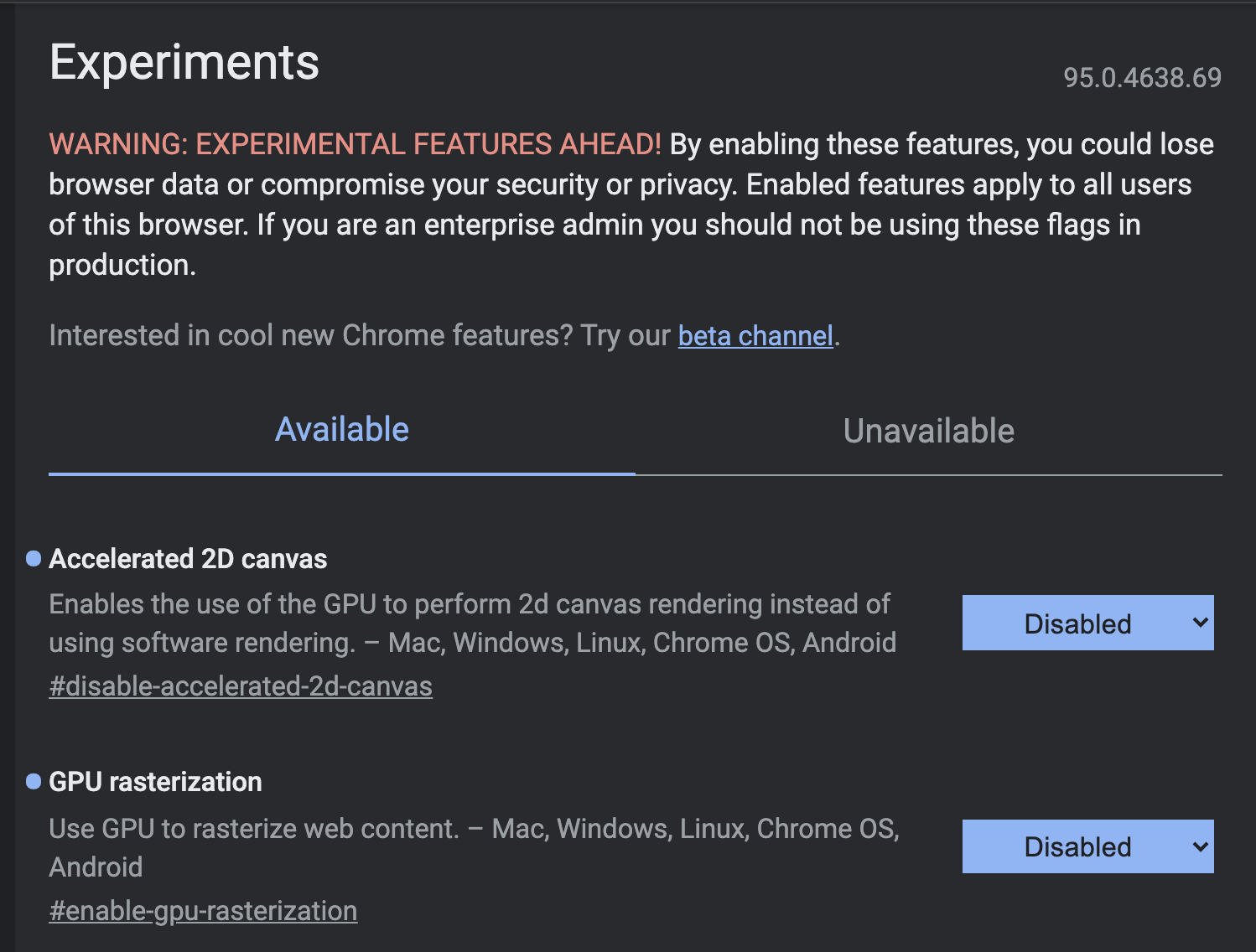
Screen Shot 2021-11-03 at 2.11.32 PM.png

风扇终于清净了……


使用微信扫描二维码赞赏


相关文章