







文章目录
刚更新完 Windows Codex,满心欢喜想用 Computer Use 自动操作——结果插件页一片灰色,Chrome 扩展也毫无反应?别慌,这不是 bug,而是更新切换了插件目录和运行时状态,导致旧进程‘卡’在了过期的通信链路上。
作为踩过无数坑的技术博主,阿斌今天直接给你‘手术刀级’修复方案:让 Codex 自己诊断并重建插件环境。无需手动删文件、改配置,只需一条提示词,3分钟找回所有功能。
下面是原理拆解 + 实操步骤,跟着做,彻底告别插件‘玄学’故障。
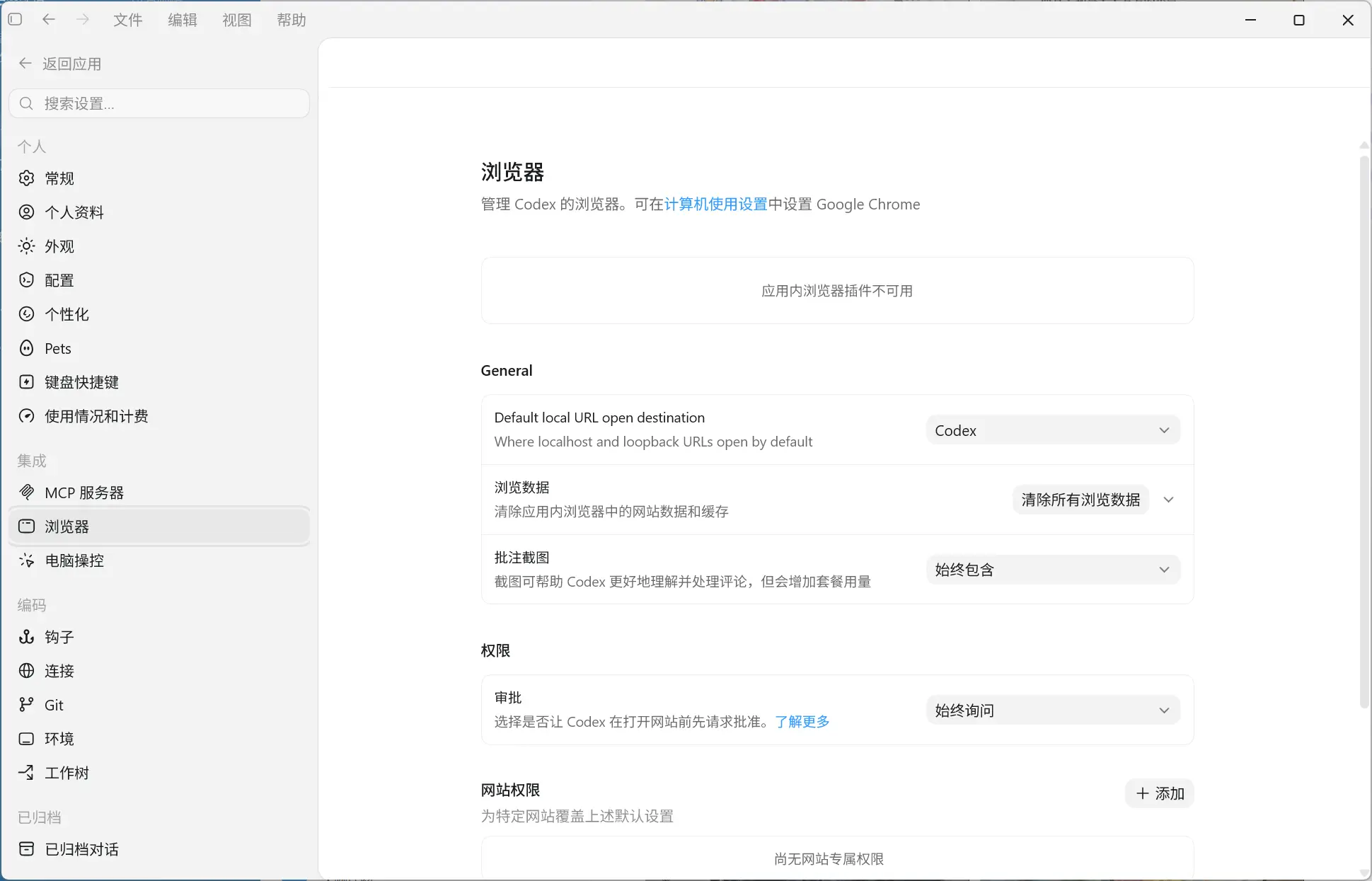
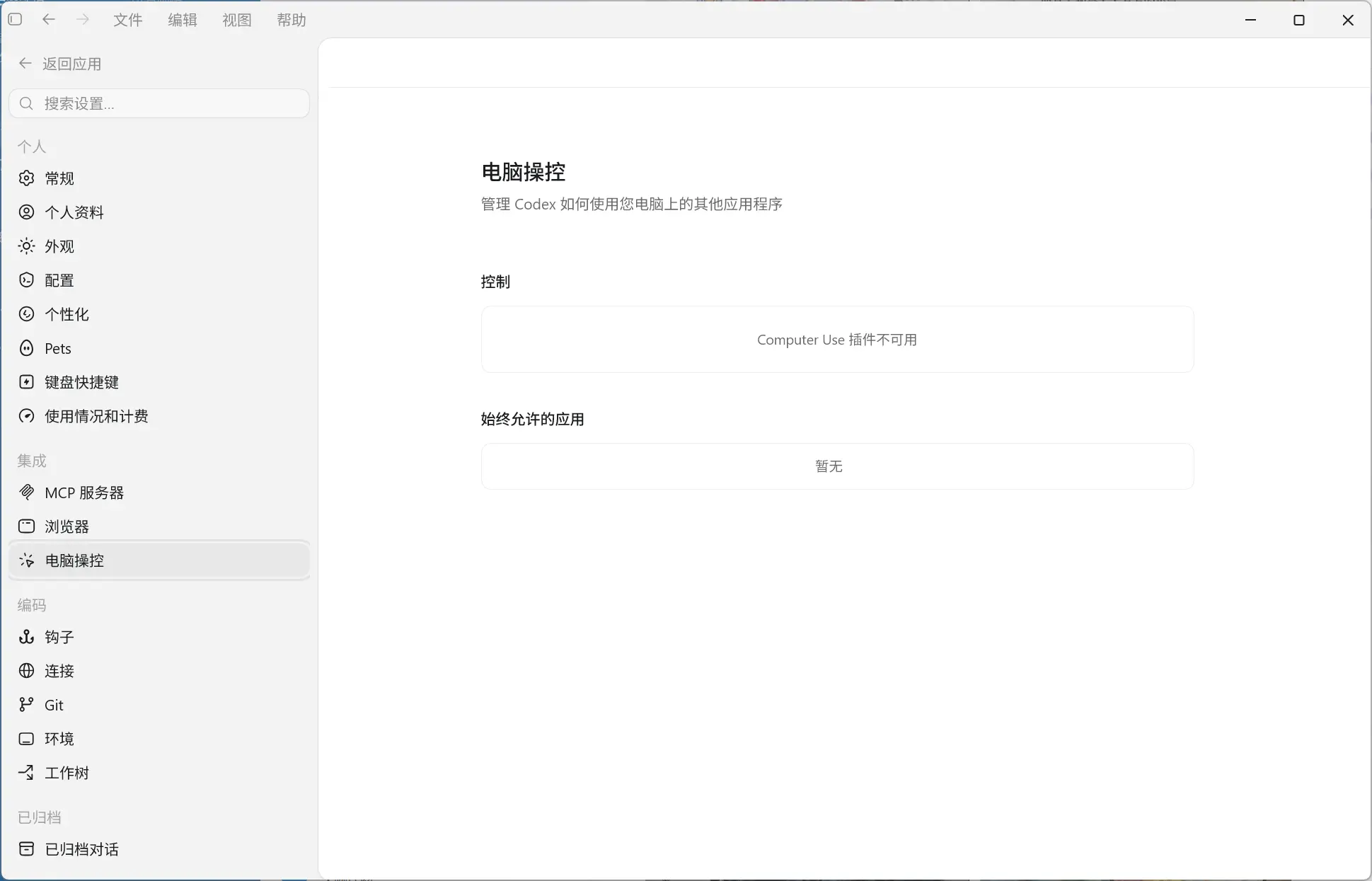
.tmp/bundled-marketplaces 目录残缺。EBUSY、resource busy or locked、plugin_cache_windows_file_lock、os error 5 等错误。marketplace.json 文件不存在或损坏,导致整个插件注册失败。Windows 用户(MacOS暂时没有测试过)将下面内容复制直接发给 Codex 来进行修复,修复前请先关闭所有关于 Chrome 的进程
你现在要在 Windows 本机环境中排查并尽量修复 Codex Desktop 的 bundled 插件异常。目标是 Windows 用户目录和 Windows Codex 安装目录。

我的问题现象可能包括:

- Codex 更新后 `Computer Use` 或 `Chrome` 插件消失、不可用、图标不加载。
- 插件页能看到 `computer-use@openai-bundled` / `chrome@openai-bundled`,但点进去报错类似:
  `marketplace file "%USERPROFILE%\.codex\.tmp\bundled-marketplaces\openai-bundled\.agents\plugins\marketplace.json" does not exist`
- 设置页里 Computer Use 显示 unavailable。
- Codex 日志里可能出现 `EBUSY`、`resource busy or locked`、`plugin_cache_windows_file_lock`、`os error 5`、`extension-host.exe`、`extension-host\windows\x64` 等关键词。

请按下面流程执行。所有路径必须通用化,使用 `$env:USERPROFILE`、`$env:LOCALAPPDATA`、`$env:ProgramFiles` 等变量,不要写死某个用户名。

---

0. 基本原则

1. 先诊断,确认是不是 Windows 文件锁导致的 bundled 插件半更新问题;不要一开始就删除目录或改配置。
2. 修复前必须备份。
3. 不要盲目修改 `[windows] sandbox`。只有日志明确出现 `os error 740` / `请求的操作需要提升` 时,才另行判断是否需要改 `sandbox = "unelevated"`;本提示词处理的是文件锁和 bundled 插件缓存损坏。
4. 不要暴露、打印或复制任何 API key、登录 token、auth.json 内容。
5. 如果你当前无法直接执行 Windows PowerShell,请生成可运行的 `.ps1` 修复脚本放到桌面,并告诉我用 PowerShell 执行。

---

1. 先收集路径

在 Windows PowerShell 中设置这些变量:

$CodexHome = Join-Path $env:USERPROFILE ".codex"
$BackupRoot = Join-Path $env:USERPROFILE "codex-plugin-backups"
$Desktop = [Environment]::GetFolderPath("Desktop")
$OpenAILocal = Join-Path $env:LOCALAPPDATA "OpenAI"
$CodexLocal = Join-Path $OpenAILocal "Codex"
$ExtensionManifest = Join-Path $OpenAILocal "extension\com.openai.codexextension.json"
$CodexNativeHosts = Join-Path $CodexHome "chrome-native-hosts.json"
$LocalNativeHosts = Join-Path $CodexLocal "chrome-native-hosts.json"
$BundledTmpRoot = Join-Path $CodexHome ".tmp\bundled-marketplaces\openai-bundled"
$BundledMarketplaceJson = Join-Path $BundledTmpRoot ".agents\plugins\marketplace.json"
$PluginCacheRoot = Join-Path $CodexHome "plugins\cache\openai-bundled"
$ChromeCacheRoot = Join-Path $PluginCacheRoot "chrome"
$ComputerUseCacheRoot = Join-Path $PluginCacheRoot "computer-use"

---

2. 修复前备份

创建带时间戳的备份目录,并备份这些文件和关键目录状态:

$Stamp = Get-Date -Format "yyyyMMdd-HHmmss"
$BackupDir = Join-Path $BackupRoot "openai-bundled-lock-repair-$Stamp"
New-Item -ItemType Directory -Force -Path $BackupDir | Out-Null

$FilesToBackup = @(
  (Join-Path $CodexHome "config.toml"),
  (Join-Path $CodexHome ".codex-global-state.json"),
  $CodexNativeHosts,
  $LocalNativeHosts,
  $ExtensionManifest
)

foreach ($file in $FilesToBackup) {
  if (Test-Path -LiteralPath $file) {
    Copy-Item -LiteralPath $file -Destination $BackupDir -Force
  }
}

$StateFile = Join-Path $BackupDir "pre-repair-state.txt"
@(
  "BackupDir=$BackupDir",
  "CodexHome=$CodexHome",
  "BundledTmpRoot=$BundledTmpRoot",
  "PluginCacheRoot=$PluginCacheRoot",
  "",
  "Processes:",
  (Get-Process extension-host,codex-computer-use -ErrorAction SilentlyContinue | Format-Table -AutoSize | Out-String),
  "",
  "Bundled tmp listing:",
  (if (Test-Path -LiteralPath $BundledTmpRoot) { Get-ChildItem -LiteralPath $BundledTmpRoot -Force -Recurse -ErrorAction SilentlyContinue | Select-Object -First 200 FullName,Length | Format-Table -AutoSize | Out-String } else { "missing" }),
  "",
  "Chrome cache listing:",
  (if (Test-Path -LiteralPath $ChromeCacheRoot) { Get-ChildItem -LiteralPath $ChromeCacheRoot -Force -ErrorAction SilentlyContinue | Format-Table -AutoSize | Out-String } else { "missing" }),
  "",
  "Computer Use cache listing:",
  (if (Test-Path -LiteralPath $ComputerUseCacheRoot) { Get-ChildItem -LiteralPath $ComputerUseCacheRoot -Force -ErrorAction SilentlyContinue | Format-Table -AutoSize | Out-String } else { "missing" })
) | Set-Content -LiteralPath $StateFile -Encoding UTF8

---

3. 判断是否属于 Windows 文件锁导致的 bundled 插件损坏

3.1 检查 Codex 插件状态

优先运行:

codex plugin marketplace list
codex plugin list

确认:

- `openai-bundled` marketplace 是否存在。
- `chrome@openai-bundled` 是否 installed / enabled。
- `computer-use@openai-bundled` 是否 installed / enabled。

如果 `codex` 命令因 WindowsApps alias 拒绝访问失败,请不要卡住,改为继续检查文件和日志。

3.2 检查 marketplace 文件和关键插件文件

Test-Path -LiteralPath $BundledMarketplaceJson
Test-Path -LiteralPath (Join-Path $BundledTmpRoot "plugins\chrome\.codex-plugin\plugin.json")
Test-Path -LiteralPath (Join-Path $BundledTmpRoot "plugins\chrome\scripts\browser-client.mjs")
Test-Path -LiteralPath (Join-Path $BundledTmpRoot "plugins\chrome\extension-host\windows\x64\extension-host.exe")
Test-Path -LiteralPath (Join-Path $BundledTmpRoot "plugins\computer-use\.codex-plugin\plugin.json")
Test-Path -LiteralPath (Join-Path $BundledTmpRoot "plugins\computer-use\scripts\computer-use-client.mjs")

如果 `marketplace.json` 缺失,或 `plugins\chrome` / `plugins\computer-use` 目录只有半截内容,说明 bundled marketplace 可能已损坏。

3.3 检查 latest 指向和缓存关键文件

$ChromeLatest = Join-Path $ChromeCacheRoot "latest"
$ComputerUseLatest = Join-Path $ComputerUseCacheRoot "latest"
Get-Item -LiteralPath $ChromeLatest -Force -ErrorAction SilentlyContinue | Format-List *
Get-Item -LiteralPath $ComputerUseLatest -Force -ErrorAction SilentlyContinue | Format-List *

Test-Path -LiteralPath (Join-Path $ChromeLatest "scripts\browser-client.mjs")
Test-Path -LiteralPath (Join-Path $ChromeLatest "extension-host\windows\x64\extension-host.exe")
Test-Path -LiteralPath (Join-Path $ComputerUseLatest "scripts\computer-use-client.mjs")
Test-Path -LiteralPath (Join-Path $ComputerUseLatest "node_modules\@oai\sky\bin\windows\codex-computer-use.exe")

异常特征:

- `latest` 指向 `%USERPROFILE%\.codex\.tmp\bundled-marketplaces\openai-bundled\plugins\chrome` 这类临时目录。
- 目标目录缺少 `scripts\browser-client.mjs`、`extension-host.exe`、`.codex-plugin\plugin.json`、插件图标等关键文件。

3.4 检查日志关键词

$LogRoots = @(
  (Join-Path $env:LOCALAPPDATA "Packages\OpenAI.Codex_2p2nqsd0c76g0\LocalCache\Local\Codex\Logs"),
  (Join-Path $CodexHome "sessions")
)

$Patterns = "EBUSY|resource busy or locked|plugin_cache_windows_file_lock|failed to back up plugin cache entry|failed to remove existing plugin cache entry|os error 5|拒绝访问|marketplace\.json.*does not exist|extension-host\\windows\\x64|Windows Computer Use helper paths are unavailable"

foreach ($root in $LogRoots) {
  if (Test-Path -LiteralPath $root) {
    Get-ChildItem -LiteralPath $root -Recurse -File -ErrorAction SilentlyContinue |
      Sort-Object LastWriteTime -Descending |
      Select-Object -First 80 |
      Select-String -Pattern $Patterns -AllMatches -ErrorAction SilentlyContinue |
      Select-Object Path,LineNumber,Line |
      Format-List
  }
}

如果同时满足下面多项,基本可以确认是本问题:

- 插件页报 `marketplace.json does not exist`。
- 图标不加载。
- `openai-bundled` 的 `.tmp\bundled-marketplaces` 目录缺文件。
- 日志出现 `EBUSY` / `resource busy or locked` / `plugin_cache_windows_file_lock` / `os error 5`。
- 锁相关路径涉及 `extension-host.exe` 或 `extension-host\windows\x64`。

如果主要错误是 `os error 740` / `请求的操作需要提升` / `windows sandbox failed: spawn setup refresh`,先停止本流程,改查 Windows sandbox 权限问题。

---

4. 如果确认是 Windows 文件锁导致的问题,执行修复

4.1 停止可能锁目录的残留进程

先提醒我关闭 Chrome。随后停止这些后台进程:

Get-Process extension-host -ErrorAction SilentlyContinue | Stop-Process -Force
Get-Process codex-computer-use -ErrorAction SilentlyContinue | Stop-Process -Force
Start-Sleep -Seconds 2

不要强杀当前 Codex Desktop 主进程,除非我明确同意;否则可能中断当前会话。

4.2 找到 Codex 安装包里的完整 openai-bundled 源

$BundledSource = $null
$PackageRoots = Get-ChildItem -LiteralPath (Join-Path $env:ProgramFiles "WindowsApps") -Directory -ErrorAction SilentlyContinue |
  Where-Object { $_.Name -like "OpenAI.Codex_*_x64__2p2nqsd0c76g0" } |
  Sort-Object LastWriteTime -Descending

foreach ($pkg in $PackageRoots) {
  $candidate = Join-Path $pkg.FullName "app\resources\plugins\openai-bundled"
  if (Test-Path -LiteralPath (Join-Path $candidate ".agents\plugins\marketplace.json")) {
    $BundledSource = $candidate
    break
  }
}

if (-not $BundledSource) {
  throw "找不到 Codex 安装包中的 openai-bundled 源目录,请先确认 Codex Desktop 已安装且 WindowsApps 可访问。"
}

"Bundled source: $BundledSource"

源目录必须包含:

Test-Path -LiteralPath (Join-Path $BundledSource ".agents\plugins\marketplace.json")
Test-Path -LiteralPath (Join-Path $BundledSource "plugins\chrome\.codex-plugin\plugin.json")
Test-Path -LiteralPath (Join-Path $BundledSource "plugins\computer-use\.codex-plugin\plugin.json")

4.3 读取插件版本

function Get-PluginVersion([string]$PluginDir) {
  $pluginJson = Join-Path $PluginDir ".codex-plugin\plugin.json"
  if (-not (Test-Path -LiteralPath $pluginJson)) {
    throw "缺少 plugin.json: $pluginJson"
  }
  $json = Get-Content -LiteralPath $pluginJson -Raw | ConvertFrom-Json
  if (-not $json.version) {
    throw "plugin.json 中缺少 version: $pluginJson"
  }
  return [string]$json.version
}

$ChromeVersion = Get-PluginVersion (Join-Path $BundledSource "plugins\chrome")
$ComputerUseVersion = Get-PluginVersion (Join-Path $BundledSource "plugins\computer-use")
"ChromeVersion=$ChromeVersion"
"ComputerUseVersion=$ComputerUseVersion"

4.4 重建损坏的 bundled marketplace

Get-Process extension-host -ErrorAction SilentlyContinue | Stop-Process -Force
Get-Process codex-computer-use -ErrorAction SilentlyContinue | Stop-Process -Force
Start-Sleep -Seconds 2

if (Test-Path -LiteralPath $BundledTmpRoot) {
  Remove-Item -LiteralPath $BundledTmpRoot -Recurse -Force -ErrorAction Stop
}

New-Item -ItemType Directory -Force -Path (Split-Path -Parent $BundledTmpRoot) | Out-Null
Copy-Item -LiteralPath $BundledSource -Destination $BundledTmpRoot -Recurse -Force

复制后校验:

Get-Content -LiteralPath $BundledMarketplaceJson -Raw | ConvertFrom-Json | Out-Null
Test-Path -LiteralPath (Join-Path $BundledTmpRoot "plugins\chrome\scripts\browser-client.mjs")
Test-Path -LiteralPath (Join-Path $BundledTmpRoot "plugins\chrome\extension-host\windows\x64\extension-host.exe")
Test-Path -LiteralPath (Join-Path $BundledTmpRoot "plugins\computer-use\scripts\computer-use-client.mjs")

4.5 重建 chrome / computer-use cache

$ChromeSource = Join-Path $BundledSource "plugins\chrome"
$ComputerUseSource = Join-Path $BundledSource "plugins\computer-use"
$ChromeVersionDir = Join-Path $ChromeCacheRoot $ChromeVersion
$ComputerUseVersionDir = Join-Path $ComputerUseCacheRoot $ComputerUseVersion

New-Item -ItemType Directory -Force -Path $ChromeCacheRoot | Out-Null
New-Item -ItemType Directory -Force -Path $ComputerUseCacheRoot | Out-Null

if (Test-Path -LiteralPath $ChromeVersionDir) {
  Remove-Item -LiteralPath $ChromeVersionDir -Recurse -Force
}
if (Test-Path -LiteralPath $ComputerUseVersionDir) {
  Remove-Item -LiteralPath $ComputerUseVersionDir -Recurse -Force
}

Copy-Item -LiteralPath $ChromeSource -Destination $ChromeVersionDir -Recurse -Force
Copy-Item -LiteralPath $ComputerUseSource -Destination $ComputerUseVersionDir -Recurse -Force

重建 latest,优先使用 junction;如果失败则复制成普通目录:

function Reset-Latest([string]$LatestPath, [string]$TargetPath) {
  if (Test-Path -LiteralPath $LatestPath) {
    Remove-Item -LiteralPath $LatestPath -Recurse -Force
  }
  cmd /c mklink /J "`"$LatestPath`"" "`"$TargetPath`"" | Out-Null
  if (-not (Test-Path -LiteralPath $LatestPath)) {
    Copy-Item -LiteralPath $TargetPath -Destination $LatestPath -Recurse -Force
  }
}

Reset-Latest (Join-Path $ChromeCacheRoot "latest") $ChromeVersionDir
Reset-Latest (Join-Path $ComputerUseCacheRoot "latest") $ComputerUseVersionDir

验证 latest 实际指向稳定版本目录,而不是 .tmp 或其他临时路径:

function Assert-LatestTarget([string]$LatestPath, [string]$ExpectedTarget) {
  $item = Get-Item -LiteralPath $LatestPath -Force -ErrorAction SilentlyContinue
  if (-not $item) {
    throw "latest 不存在: $LatestPath"
  }
  $actualTarget = $item.Target
  if (-not $actualTarget) {
    $keyFile = Join-Path $LatestPath "scripts"
    if (-not (Test-Path -LiteralPath $keyFile)) {
      throw "latest 是普通目录但缺少关键内容: $LatestPath"
    }
    "latest OK (plain dir): $LatestPath"
    return
  }
  if ($actualTarget -like "*\.tmp\bundled-marketplaces\*") {
    throw "latest 仍然指向 .tmp 临时目录,修复未生效: $actualTarget"
  }
  if ($actualTarget -like "*\chrome\latest*" -or $actualTarget -like "*\computer-use\latest*") {
    throw "latest 指向自身或循环引用: $actualTarget"
  }
  "latest OK (junction -> $actualTarget): $LatestPath"
}

Assert-LatestTarget (Join-Path $ChromeCacheRoot "latest") $ChromeVersionDir
Assert-LatestTarget (Join-Path $ComputerUseCacheRoot "latest") $ComputerUseVersionDir

校验关键文件:

$RequiredFiles = @(
  (Join-Path $ChromeVersionDir ".codex-plugin\plugin.json"),
  (Join-Path $ChromeVersionDir "scripts\browser-client.mjs"),
  (Join-Path $ChromeVersionDir "extension-host\windows\x64\extension-host.exe"),
  (Join-Path $ChromeVersionDir "assets\google-chrome.png"),
  (Join-Path $ComputerUseVersionDir ".codex-plugin\plugin.json"),
  (Join-Path $ComputerUseVersionDir "scripts\computer-use-client.mjs"),
  (Join-Path $ComputerUseVersionDir "node_modules\@oai\sky\bin\windows\codex-computer-use.exe"),
  (Join-Path $ComputerUseVersionDir "assets\app-icon.png")
)

$Missing = $RequiredFiles | Where-Object { -not (Test-Path -LiteralPath $_) }
if ($Missing.Count -gt 0) {
  throw "修复后仍缺少关键文件:`n$($Missing -join "`n")"
}

4.6 修复 Chrome native host JSON

$ExtensionHostExe = Join-Path $ChromeVersionDir "extension-host\windows\x64\extension-host.exe"
if (-not (Test-Path -LiteralPath $ExtensionHostExe)) {
  throw "找不到 extension-host.exe: $ExtensionHostExe"
}

function Write-JsonNoBom([string]$Path, $Object) {
  $jsonText = $Object | ConvertTo-Json -Depth 20
  [System.IO.File]::WriteAllText($Path, $jsonText, [System.Text.UTF8Encoding]::new($false))
}

foreach ($jsonPath in @($ExtensionManifest, $CodexNativeHosts, $LocalNativeHosts)) {
  if (-not (Test-Path -LiteralPath $jsonPath)) {
    continue
  }
  $obj = Get-Content -LiteralPath $jsonPath -Raw | ConvertFrom-Json
  $changed = $false

  if ($obj.path -and (($obj.path -like "*\chrome\latest\*") -or ($obj.path -like "*\.tmp\bundled-marketplaces\*"))) {
    $obj.path = $ExtensionHostExe
    $changed = $true
  }

  if ($changed) {
    Write-JsonNoBom $jsonPath $obj
  } else {
    Write-JsonNoBom $jsonPath $obj
  }
}

4.7 确认插件启用状态

检查 `$CodexHome\config.toml` 中是否存在这些插件配置。如果已经存在并 enabled,不要重复改:

[plugins."chrome@openai-bundled"]
enabled = true

[plugins."computer-use@openai-bundled"]
enabled = true

[plugins."browser@openai-bundled"]
enabled = true

如果插件缺失或 disabled,再备份后最小化修复。不要改模型 provider、API key、登录态或无关项目配置。

---

5. 最终验证

Get-Content -LiteralPath $BundledMarketplaceJson -Raw | ConvertFrom-Json | Out-Null

Test-Path -LiteralPath (Join-Path $BundledTmpRoot "plugins\chrome\assets\google-chrome.png")
Test-Path -LiteralPath (Join-Path $BundledTmpRoot "plugins\computer-use\assets\app-icon.png")
Test-Path -LiteralPath (Join-Path $ChromeCacheRoot "latest\scripts\browser-client.mjs")
Test-Path -LiteralPath (Join-Path $ChromeCacheRoot "latest\extension-host\windows\x64\extension-host.exe")
Test-Path -LiteralPath (Join-Path $ComputerUseCacheRoot "latest\scripts\computer-use-client.mjs")
Test-Path -LiteralPath (Join-Path $ComputerUseCacheRoot "latest\node_modules\@oai\sky\bin\windows\codex-computer-use.exe")

验证 native host JSON 不再指向 chrome\latest 或 .tmp:

foreach ($jsonPath in @($ExtensionManifest, $CodexNativeHosts, $LocalNativeHosts)) {
  if (-not (Test-Path -LiteralPath $jsonPath)) { continue }
  $content = Get-Content -LiteralPath $jsonPath -Raw
  if ($content -match [regex]::Escape("\chrome\latest\") -or $content -match [regex]::Escape("\.tmp\bundled-marketplaces\")) {
    throw "native host JSON 仍然指向不稳定路径: $jsonPath"
  }
  "NativeHost path OK: $jsonPath"
}

foreach ($jsonPath in @($ExtensionManifest, $CodexNativeHosts, $LocalNativeHosts)) {
  if (Test-Path -LiteralPath $jsonPath) {
    Get-Content -LiteralPath $jsonPath -Raw | ConvertFrom-Json | Out-Null"JSON OK: $jsonPath"
  }
}

如果可用,再运行:

codex plugin marketplace list
codex plugin list

重启 Codex Desktop 后,确认:

- 插件页可以打开 `Chrome` 和 `Computer Use`。
- 插件图标恢复。
- `computer-use@openai-bundled` 和 `chrome@openai-bundled` 是 installed / enabled。
- 设置页 Computer Use 不再显示 unavailable。

---

6. 最终回复要求

请最后告诉我:

1. 是否确认这是 Windows 文件锁导致的 bundled 插件半更新。
2. 证据是什么,例如日志中的 `EBUSY` / `plugin_cache_windows_file_lock` / `os error 5` / `marketplace.json does not exist`。
3. 备份目录在哪里。
4. 实际改了哪些文件或目录。
5. 哪些验证通过。
6. 如果没有修复,请明确卡在哪一步,不要假装已修好。下载 修复Chrome插件脚本 并解压
将 repair-codex-plugins.ps1 和 修复Codex插件.cmd 放到 C:\Users\用户名\.codex\tools 文件夹下
双击 修复Codex插件.cmd 文件
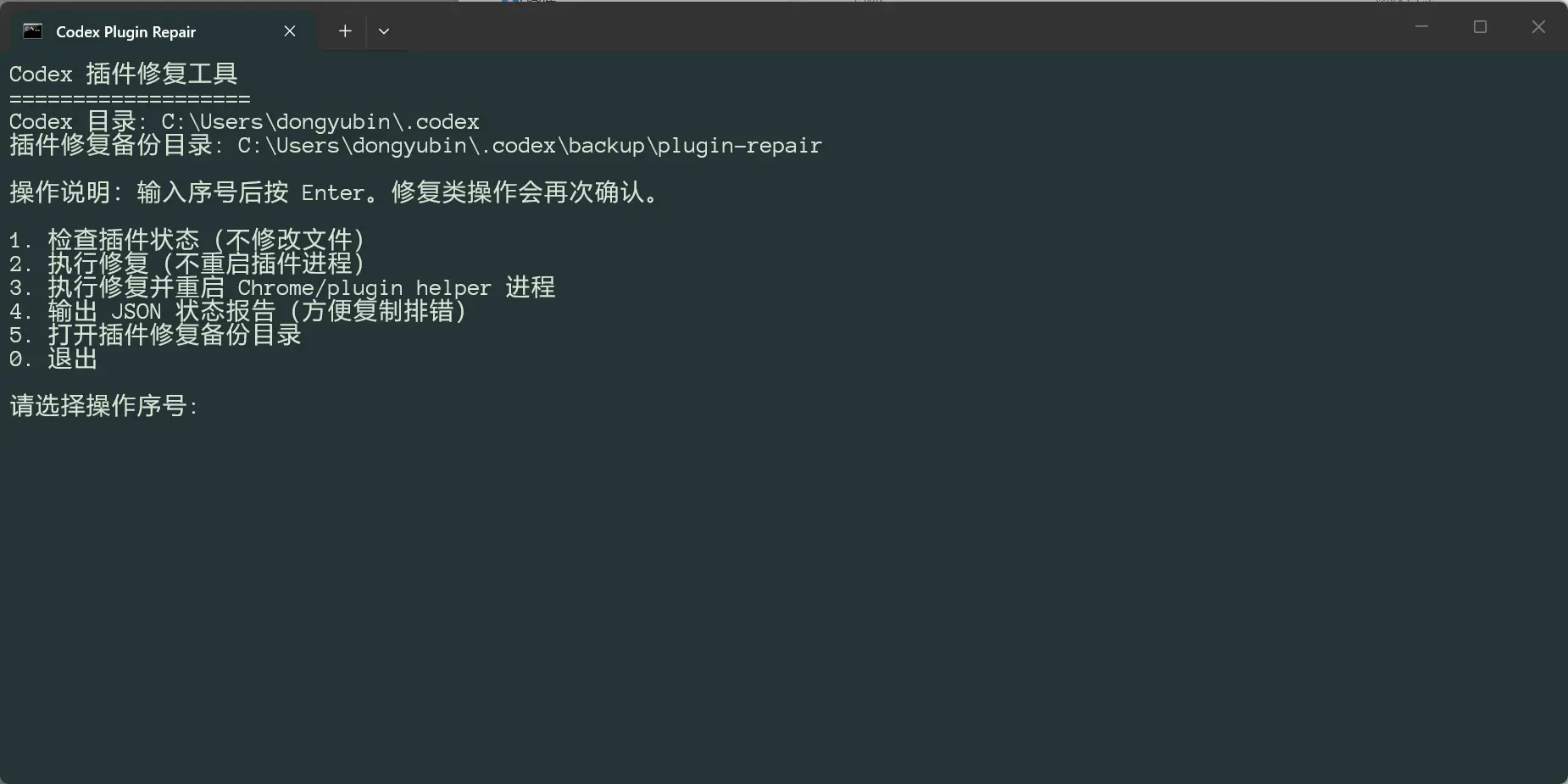
可以先选择 1 检查插件状态
再选择 3 执行修复
codex plugin marketplace list 和 codex plugin list 查看插件状态。%LOCALAPPDATA%\Packages\OpenAI.Codex_*\LocalCache\Local\Codex\Logs,查看是否有 EBUSY、resource busy or locked 等错误。%USERPROFILE%\.codex\config.toml,将 source 改为 %USERPROFILE%\.codex\plugins\cache\openai-bundled\marketplace-source。修复后重启 Codex Desktop,确认:
Chrome 和 Computer Usecomputer-use@openai-bundled 和 chrome@openai-bundled 是 installed / enabledunavailable此内容由惯性聚合(RSS阅读器)自动聚合整理,仅供阅读参考。 原文来自 — 版权归原作者所有。