









Introducing Astro 3.0!
Astro 3.0 is the first major web framework to support the View Transitions API. Fade, slide, morph, and even persist stateful elements across page navigation with ease. Until recently this had only been possible inside of JavaScript Single Page Applications (SPAs). But thanks to advances in the web platform, these features are now available for everyone in Astro 3.0.
Other release highlights include:
- Image Optimization (stable): Unflagged and better than ever.
- Faster Rendering Performance: Astro components render 30-75% faster.
- SSR Enhancements for Serverless: New ways to connect to your hosting platform.
- HMR Enhancements for JSX: Fast Refresh support for React and Preact.
- Optimized Build Output: Cleaner and more performant HTML.
Astro 3.0 is available now on npm. Visit astro.new to try out Astro 3.0 in your browser, or run the following command in your terminal to get started in a new project:
# Create a new Astro 3.0 project:
npm create astro@latest
Upgrading an existing project to Astro 3.0? Check out the v3.0 Upgrade Guide for full details and individual upgrade guidance for each change.
Astro View Transitions

View Transitions are a set of new platform APIs that unlock native browser transition effects between pages. Historically this has only been possible in Single Page Applications (SPAs), but web browsers and spec authors have been working hard over the last few years to bring native page transitions to the platform, and Astro 3.0 is the first web framework to bring them to the mainstream.
With Astro View Transitions, you can:
- Morph persistent elements from one page to another
- Fade content on and off the page, for a less jarring navigation effect
- Slide content on and off the page, for a bit more personality
- Persist common UI across pages, with or without a refresh
The best part about View Transitions in Astro is how simple they are to use. With just 2 lines of code, you can add a subtle — yet tasteful! — fade animation to your site. To try it yourself, import the ViewTransitions component and add to inside any page’s <head> element:
---
// Note: Make sure you add the "<ViewTransitions />" component
// to other pages as well, and not just one.
import {ViewTransitions} from 'astro:transitions';
---
<head>
<title>My View Transition Demo</title>
<ViewTransitions />
</head>
<body>
<!-- -->
</body>
Astro users have had early access to View Transitions since Astro 2.9. Our community has been experimenting ever since, providing early feedback that helped shape this final API you see today. Here are a few of our favorite demos from the community, to give you a sense of what is now possible:
Each demo feels like a native, client-side application. But they are not. It’s all server-rendered HTML, brought to life with Astro 3.0 and the new View Transitions API.
We’ve put a ton of effort in to make View Transitions work great across all browsers, even those that don’t yet support the native View Transition APIs. Astro 3.0 includes fallbacks for most browsers, in the form of a small, ~3kb script that Astro adds to your page automatically.
Learn more about View Transitions in our handy View Transitions guide, or this great article about the browser APIs by the Chrome team. Also read more about our journey to adopt View Transitions on the Chrome Developer blog.
Faster Rendering Performance
Rendering performance saw a major lift in Astro 3.0, with most components rendering 30% faster (vs. Astro 2.9). In complex benchmarks, the speed improvement can be as high as 75%.
Achieving this kind of speed-up was the result of a dedicated refactoring effort that was kicked off in Astro 2.10 and carried over the line for Astro 3.0. We removed as much unnecessary code as possible from hot paths in our build pipeline and optimized what remained. Unnecessary generators and async code were two of the biggest culprits. Every millisecond counts!
Image Optimization (stable)

Image optimization is now stable in Astro 3.0 and available in all projects.
You can import images from your codebase and place them on the page with the new built-in <Image> component. Astro will handle the rest: the build pipeline will automatically detect and optimize each image for you. The final rendered image tag will have an inferred width & height added for you, to prevent layout shift with automatic Cumulative Layout Shift (CLS) protection.
---
// Import the <Image /> component
import { Image } from "astro:assets"
// Import a reference to the image itself
import myImage from "../assets/penguin.png"
---
<Image src={myImage} alt="A very cool penguin!" />
We last wrote about image optimization back in June. Since then, we’ve landed several important improvements including:
- Full support for Vercel’s built-in image service. Add
imageService: trueto your Vercel integration configuration to see your production images optimized through their global CDN. - Migrating to Sharp as our new default optimization library. Sharp replaces our previous default
@squoosh/libwhich is no longer maintained. - Support for optimizing remote images. Content teams can continue to manage their images using their existing workflows and CMS tools.
Learn more about Image Optimization in our new Images guide.
SSR Enhancements for Serverless

On Monday we announced a new, official hosting partnership with Vercel. Collaboration with Vercel allowed us to make significant enhancements to our SSR story in Astro 3.0. These new features benefit all users, regardless of where they choose to host their website:
- Per-Route Code Splitting - Create smaller, individual server files for each route in your website. Serverless users (Vercel, Netlify, Cloudflare, etc.) can now see improved performance by reducing the loading of unused code on every request.
- Edge Middleware - Astro can now bundle your middleware for deployment on the edge. Edge middleware is distributed globally and runs on servers that are as close to your users as possible.
- Host Customization: Since no two hosting providers are alike, we’ve added an API to Astro that helps users better understand these differences. Hosting adapters (like
@astrojs/nodeand@astrojs/vercel) can now tell Astro which features they support. Astro can use this information to surface more useful, informative warnings during development and prevent unexpected production errors.
These features are all available today on Vercel, but any hosting adapter can be upgraded to add support. Over the coming months, we’ll be working with our community maintainers to help bring these features to any hosting platforms that can support them.
HMR Enhancements for JSX
React Fast Refresh now works in Astro 3.0 thanks to a major refactoring of our internal JSX build support. React, Preact, and Solid.js users should all see a significant improvement to Hot Module Reloading (HMR) and overall dev server stability in Astro 3.0.
Fast Refresh is a modern development feature where local changes are intelligently pushed to the browser without a page refresh. What makes Fast Refresh unique (vs. regular HMR) is that these updates are pushed to the browser without changing the current state of the UI.
In the demo below, pay attention to how the page never refreshes and the counter never resets to zero, despite the developer updating the template itself. That’s Fast Refresh.
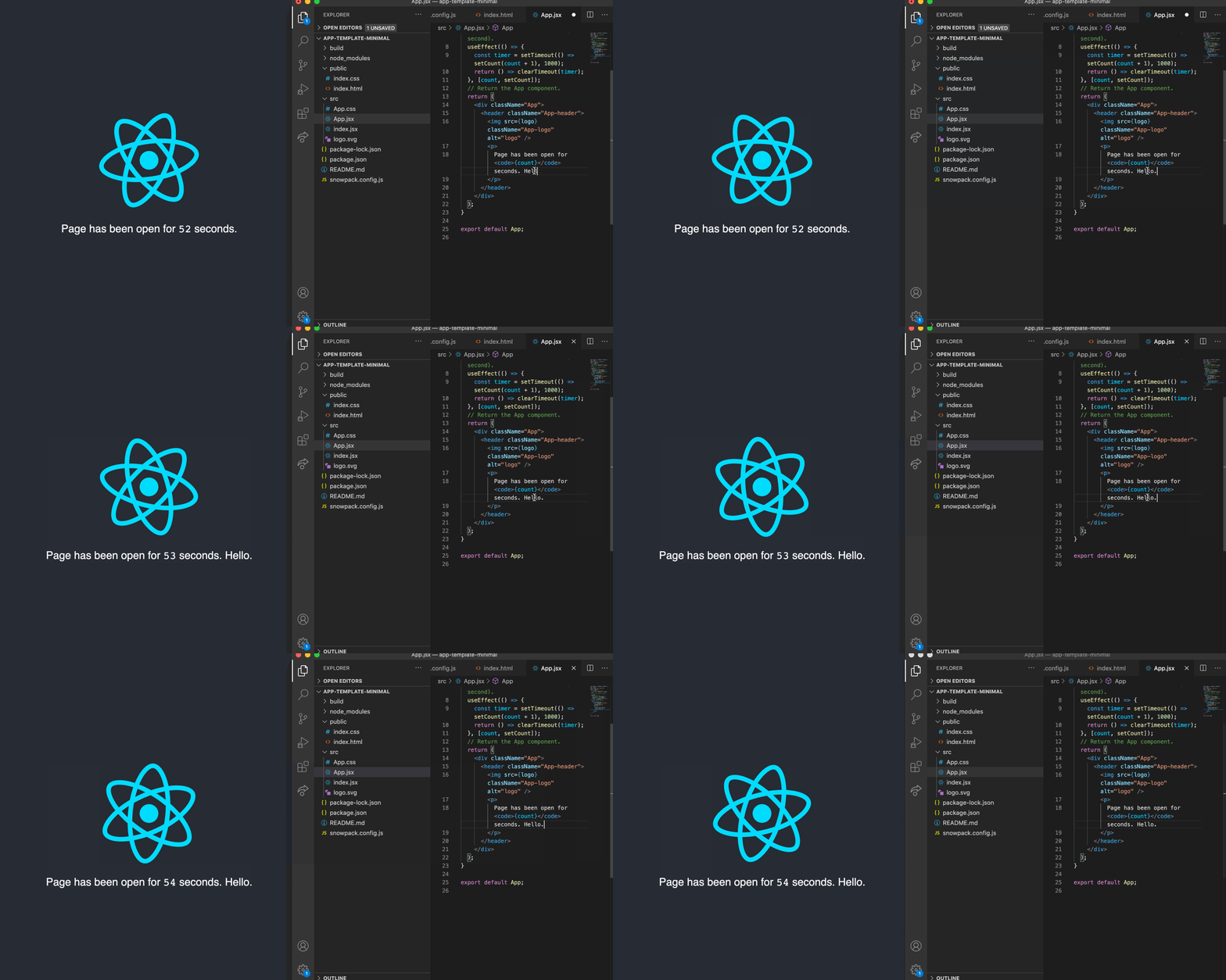
If you’ve ever built a modal or some other multi-step UI, then you probably have experienced the common frustration of seeing your page state refresh and reset after every change. Fast Refresh solves this problem, speeding up your development workflow.
Optimized Build Output

We’ve made several improvements to the overall build output in 3.0, including:
- HTML Minification: Astro 3.0 will now minify all HTML output automatically. Minified HTML results in a smaller payload over the wire and a faster overall response time.
- Component IDs: Those noisy
astro-XXXXXXclass names have been replaced with a new, dedicateddata-astro-cid-hashHTML attribute. This change leaves yourclass=""attributes more readable, with a more organized HTML output overall. - CSS Inlining: Astro 3.0 will now automatically inline small chunks of CSS into your HTML. This improves page load performance vs. older versions of Astro where a page might load many smaller CSS files as separate requests from the browser.
Try Astro 3.0 Today

Astro 3.0 is available now on npm. Visit https://astro.new/ to try out Astro 3.0 in your browser, or run the following command in your terminal to get started in a new project:
# Create a new Astro 3.0 project:
npm create astro@latest
Upgrading an existing project to Astro 3.0? Check out the v3.0 Upgrade Guide for full details and individual upgrade guidance for each change.