







Developer Portal — MCP
100Hires is an AI-native applicant tracking system (ATS). The 100Hires MCP server gives Claude, ChatGPT, Cursor, and any MCP-compatible AI assistant secure access to 130 tools for candidates, jobs, applications, and interviews — driven entirely by natural-language prompts.
One MCP endpoint, 130 tools — manage candidates, jobs, applications, interviews and messages with natural language.
Endpoint
https://mcp.100hires.com/mcp
Recruiting MCP, ATS MCP, hiring AI integration — bring your applicant tracking system into Claude, ChatGPT and Cursor with secure OAuth 2.1. Building a direct integration instead? See the 100Hires REST API documentation. New to 100Hires? Start a 14-day free trial.
Model Context Protocol is an open standard from Anthropic that lets AI assistants connect to external systems through a uniform interface — think of it as USB-C for AI tools.
AI assistants and IDEs that talk to MCP servers — Claude (web, Desktop, Code), ChatGPT, Cursor, VS Code, Codex, Windsurf, Zed.
The transport layer inside the host that speaks MCP over Streamable HTTP or stdio.
100Hires MCP server — exposes 130 tools backed by the public REST API, secured by OAuth 2.1.
100Hires runs a remote MCP server, not a local one.
There’s nothing to install, deploy or update on your machine — every client, including Claude Desktop and Cursor,
points at https://mcp.100hires.com/mcp and authorizes via OAuth.
New tools and bug fixes land server-side and reach all your assistants the next time they call tools/list.
Ten real prompts that work today, in plain English.
From zero to your first MCP prompt in under five minutes.
A 100Hires account on any plan, including the 14-day free trial. The MCP endpoint is available to every workspace.
One-click install for Cursor and VS Code; copy a snippet for everything else. All clients connect to https://mcp.100hires.com/mcp over Streamable HTTP; stdio-only clients use the mcp-remote shim.
Or in ChatGPT go to Settings → Apps and find 100Hires in the directory.
Click Connect, sign in, and click Allow.
In claude.ai, open the sidebar and click Customize.
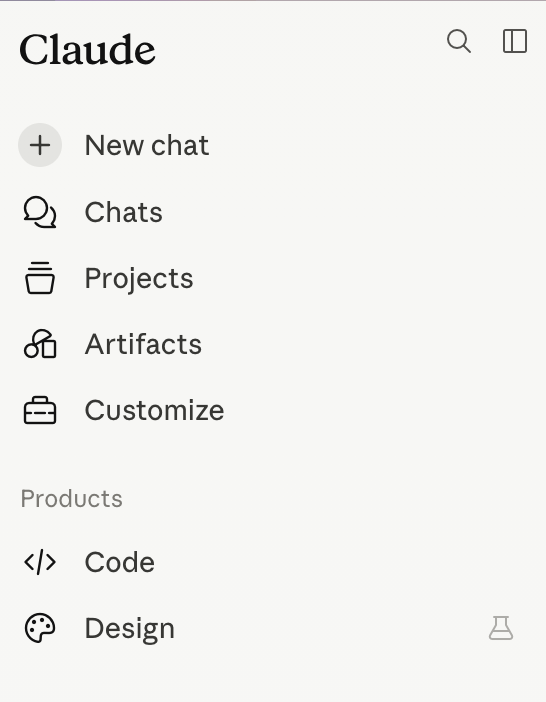
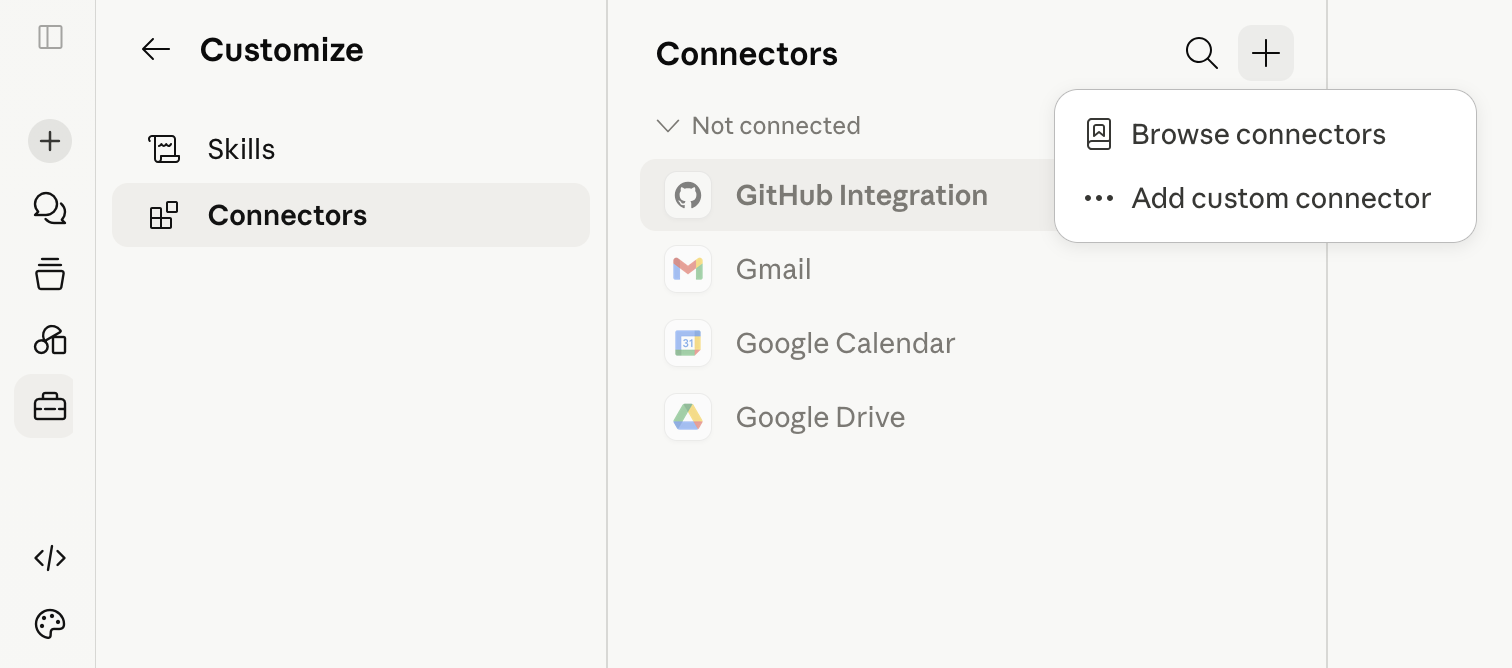
Go to Connectors, click +, and choose Add custom connector.
In the Add custom connector dialog, fill in:
100Hireshttps://mcp.100hires.com/mcp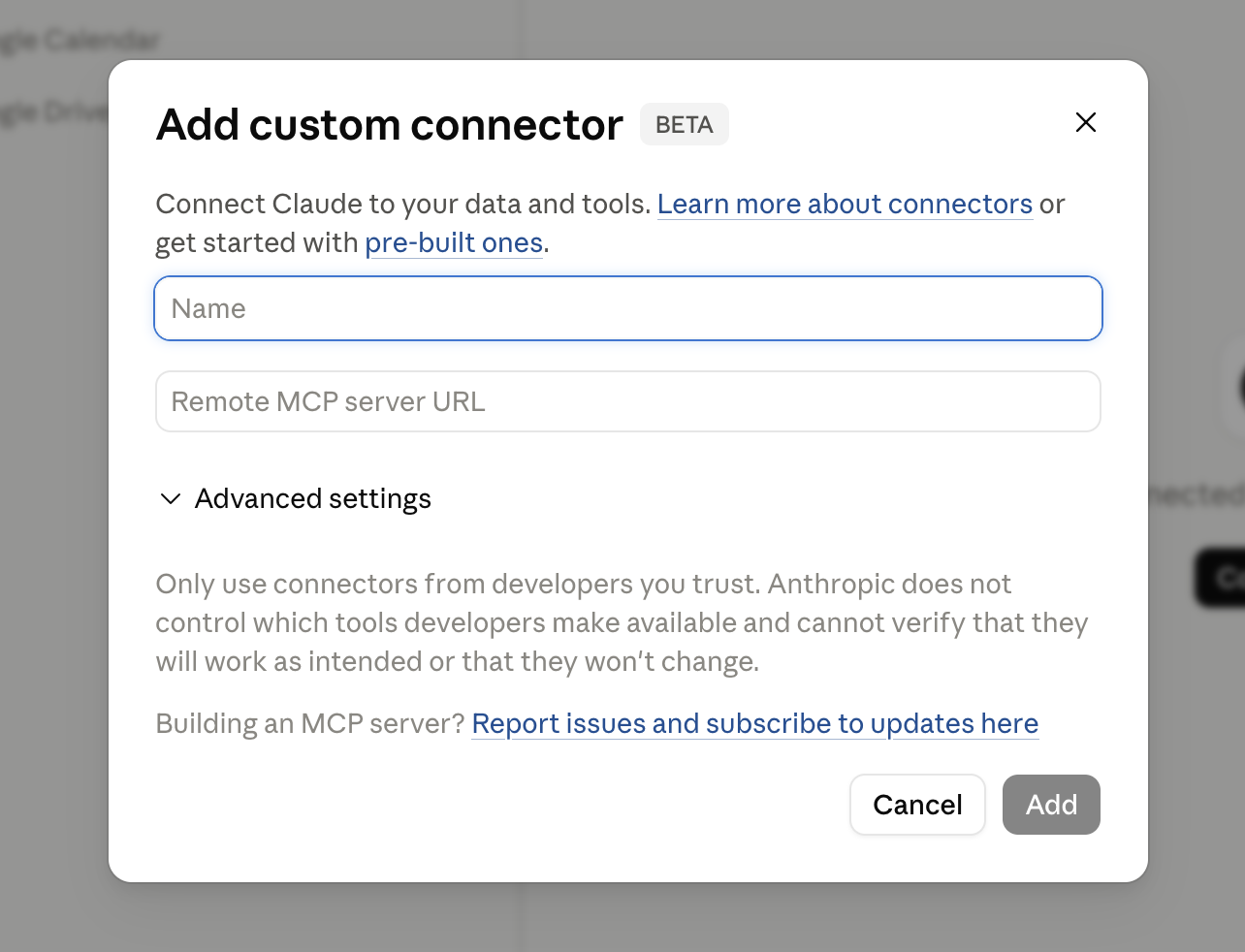
Claude opens the 100Hires consent screen. Sign in, click Allow, and you’re connected.
Install in Cursor
Click Install in Cursor to add 100Hires MCP automatically. Or paste the snippet below into ~/.cursor/mcp.json.
Install in VS Code
Opens VS Code and registers the server. Or paste the snippet into .vscode/mcp.json in your workspace.
Add the snippet to your Claude Desktop config and restart the app:
~/Library/Application Support/Claude/claude_desktop_config.json%APPDATA%\Claude\claude_desktop_config.jsonRun this in your terminal:
OpenAI Codex CLI — add the server, then run codex mcp login 100hires to authorize.
Connect 100Hires MCP headless from your own scripts, backends, and AI agents — no desktop client required.
Pass the server as a tool with type: "mcp" and the OpenAI platform calls the endpoint directly.
The example exposes only the read-only hires_list_jobs tool and skips approval for that tool —
add more tools to allowed_tools only after deciding which actions require approval.
Requires an OAuth access token — your app obtains it via the OAuth 2.1 flow (see Authentication). OpenAI does not store the token: send it with every request and refresh it yourself when it expires (access tokens live 1 hour).
from openai import OpenAI

client = OpenAI()

response = client.responses.create(
    model="gpt-5",
    tools=[{
        "type": "mcp",
        "server_label": "100hires",
        "server_url": "https://mcp.100hires.com/mcp",
        "authorization": "YOUR_OAUTH_ACCESS_TOKEN",
        "allowed_tools": ["hires_list_jobs"],
        "require_approval": "never"
    }],
    input="List all open jobs in 100Hires"
)

print(response.output_text)
Connect 100Hires MCP headless from the Anthropic SDK — the MCP connector lets the Messages API call the
server for you via mcp_servers, no local MCP client needed.
The connector runs tools without approval prompts, so the example enables only the read-only
hires_list_jobs tool — extend the allowlist in configs deliberately.
Requires an OAuth access token — your app obtains it via the OAuth 2.1 flow (see Authentication). Anthropic does not store the token: send it with every request and refresh it yourself when it expires (access tokens live 1 hour).
import anthropic

client = anthropic.Anthropic()

response = client.beta.messages.create(
    model="claude-opus-4-8",
    max_tokens=16000,
    messages=[{"role": "user", "content": "List all open jobs in 100Hires"}],
    mcp_servers=[{
        "type": "url",
        "url": "https://mcp.100hires.com/mcp",
        "name": "100hires",
        "authorization_token": "YOUR_OAUTH_ACCESS_TOKEN"
    }],
    tools=[{
        "type": "mcp_toolset",
        "mcp_server_name": "100hires",
        "default_config": {"enabled": False},
        "configs": {"hires_list_jobs": {"enabled": True}}
    }],
    betas=["mcp-client-2025-11-20"]
)

for block in response.content:
    if block.type == "text":
        print(block.text)
For stdio-only clients (Zed, Windsurf, n8n, older builds) use the mcp-remote shim.
It’s a third-party open source bridge:
github.com/geelen/mcp-remote.
Full list of MCP-compatible clients: modelcontextprotocol.io/clients.
Your client opens the 100Hires consent screen. Sign in, review the requested scope, click Allow. Tokens are stored on the client; 100Hires never sees its credentials.
Ask your assistant: “List all open jobs in 100Hires.” If you get a list back — you’re wired up. If not, see FAQ.
Keep human confirmation on for destructive tools. Feedback: support@100hires.com.
OAuth 2.1 with PKCE and Dynamic Client Registration. Hosts onboard themselves — no API keys to copy and paste, no client secrets to leak.
AI client → GET  /.well-known/oauth-authorization-server   (RFC 8414)
          → POST /oauth/register                            (DCR, RFC 7591)
          → GET  /oauth/authorize  + PKCE                   (consent in 100Hires)
          → POST /oauth/token                               (code → access_token)
          → POST /mcp  Authorization: Bearer <token>
A single scope, mcp:full, mirrors the permissions of the authorizing user.
Settings → Integrations → Connected AI clients lists every active session: client name (from DCR), last used, IP, scope, and a one-click Revoke.
Every token — OAuth or API key — is bound to a single 100Hires user. The MCP server only ever sees data that user could see in the UI; cross-company access is impossible. Sessions are listed under Settings → Integrations → Connected AI clients.
These tools modify or remove data and always require explicit IDs — assistants cannot batch-delete by query:
hires_delete_*hires_reject_applicationhires_disqualify_candidatehires_batch_reject_applications401 Unauthorized or Internal server errorYour access token has likely expired or was revoked. Disconnect and reconnect the MCP server in your client.
Claude clients store tokens locally. To force a fresh OAuth flow:
rm -rf ~/.mcp-auth/100hiresEmail support@100hires.com with the failing tool name, the time of the request and the error message your client showed.
npx mcp-remoteRun mcp-remote from the same shell as your client (e.g. WSL → WSL, not WSL → Windows host). Clear the on-disk token cache (~/.mcp-auth/100hires) when switching environments.
Yes. Both application/json and text/event-stream responses are supported. If you’re reverse-proxying, set proxy_buffering off for the SSE path.
此内容由惯性聚合(RSS阅读器)自动聚合整理,仅供阅读参考。 原文来自 — 版权归原作者所有。