







使用 Scoop + 版本管理器科学地管理你的开发环境!
提示:这篇文章中有个小小的彩蛋()
管理开发环境是一门学问。你是否有过这样的经历:
$ node
node: The term 'node' is not recognized as a name of a cmdlet, function, script file, or executable program.
Check the spelling of the name, or if a path was included, verify that the path is correct and try again.

很令人抓狂,对不对?这种问题一般是由不规范的 PATH 环境变量引起的,或是未添加,或是语法不对=v=
这种问题可以被称之为“开发环境污染”,这时候你可能会听从别人的建议重装应用(甚至重装电脑),但是无济于事,于是放弃折腾了()
不过,今天我会告诉你,重装不是唯一的方法,也不是最有效的。这种问题的最终解决办法都是使用包管理器,包括 Linux 上的 apt 和 yum,MacOS 上的Brew,或者是 Windows 上的Chocolatey和WinGet,还有今天我们要介绍的主角:Scoop。
上面写到,Win 上的包管理器除了 Scoop 外还有 Chocolatey 和 Winget,其中 Chocolatey 是老牌项目了,WinGet 则是微软亲生的包管理器。
奇怪,为什么放着老牌包管理器和官方包管理器不用,而去用 Scoop 呢?我们来对比一下:
| Winget | Chocolatey | Scoop | |
|---|---|---|---|
| 是否为中心化 | 是(Microsoft Store) | 是 | 否 |
| 是否有付费功能 | 无 | 有 | 无 |
| 包数量(截止 2022/12/19) | 3966(通过winget search ""并统计行数得出) | 9521 | 37793(官方 + 第三方源,可能有重复) |
| 发布方式 | 编写 Manifest 并手动提交 | 编写 Manifest 并手动提交 | 编写 Manifest 并从 bucket 中获取,无需手动提交 |
| 如何更新自己的包 | 手动更新 | 有 GitHub Actions 自动更新 | 有 GitHub Actions 自动更新 |
| 能否自定义运行安装脚本 | 可以 | 可以 | 可以 |
当然,以上的结果是带有我个人偏见的(大嘘)。Scoop 完全开源,发布自己包的方式也最为简单(加一个 json 文件提交到 GitHub 上就行),可拓展性也是三者中最高的(有诸如post_install等钩子函数可在安装的前后运行脚本)。因此,我选择了 Scoop,而不是 Chocolatey,或者 Winget。
好了 BB 了那么多我们也应该进入正题力()如何安装 Scoop 呢?官网给出了安装命令(先别急着运行):
> Set-ExecutionPolicy RemoteSigned -Scope CurrentUser
> irm get.scoop.sh | iex
Oh 这里注意一下,安装脚本会从 GitHub 上拉取 Scoop 的最新版源代码,这就意味着我们可能会受到长城的制裁而无法正常安装()相信大家都有办法解决对吧
虽然这么安装 Scoop 很快也很省事,但是如果你的 C 盘并不充裕,我不推荐你使用上面的命令进行安装。为啥呢,因为默认的程序安装目录在 C 盘啊(悲)以下的脚本可以让你自定义安装目录:
> irm get.scoop.sh -outfile 'install.ps1'
> .\install.ps1 -ScoopDir 'D:/.scoop' -ScoopGlobalDir 'D:/.scoop-global'
其中ScoopDir和ScoopGlobalDir可以随便替换成两个不相同的目录。
等待脚本执行完后,在终端里打个scoop看看吧:
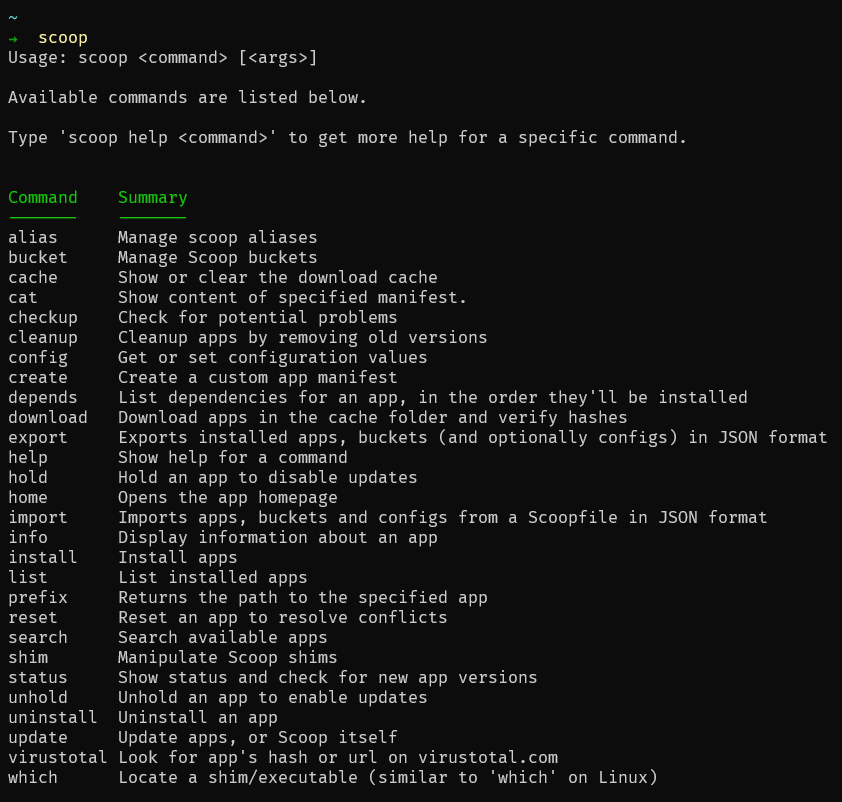
如果你看到了以上内容,那么恭喜你,成功力()先别急着装软件,我们再来了解些基本概念
Scoop 中程序的信息是怎么被获取的呢?这就涉及到 Manifest 和 Bucket 这两个重要概念。
其实理解起来也很简单,Bucket 相当于是一个 Manifest 的合集,而 Manifest 则包含了一个软件的一些信息,比如安装包的 URL 啊,名称啊,版本、简介等等。默认情况下 Scoop 会把 Main 这个官方维护的 Bucket 拉取到本地(你也可以去拉一些别的 Bucket,这个之后会说),其中包括了大量的开源软件。我们在运行scoop install foo的时候,Scoop 都会去这些 Bucket 中寻找名称一致的 Manifest,并从中获取软件安装包的链接,下载到本地进行安装。
终于要到使用环节了吗,感动()
我们先来搭一个 Node 环境吧,这里我们会使用版本管理器fnm。为什么不是 n / nvm / nvs?fnm 的一个重要特点就是模糊搜索,只需要给一个大版本号就能安装,同时其也是一个很新的项目,充满活力
> scoop install fnm

Installing 'fnm' (1.31.1) [64bit] from main bucket
fnm-x86_64-pc-windows-msvc.zip (4.5 MB) [==================================================================] 100%
Checking hash of fnm-x86_64-pc-windows-msvc.zip ... ok.
Extracting fnm-x86_64-pc-windows-msvc.zip ... done.
Linking D:.scoop\apps\fnm\current => D:.scoop\apps\fnm\1.31.1
Creating shim for 'fnm'.
'fnm' (1.31.1) was installed successfully!

> fnm install --lts # 安装LTS版本的Node
Installing Node v18.12.1 (x64)

> fnm default 18 # 使用最新版
注意啦,安装了之后还不能直接使用。打开 Powershell,执行:
在打开的记事本中添加:
fnm env --use-on-cd | Out-String | Invoke-Expression
这样子 Node 环境就搭好力()
Rust 的环境搭建也很简单啊:
> scoop install rustup-msvc
就一行命令()
不废话,上代码
有时自己需要的工具并不在 Main Bucket 中,这时候你试图执行scoop install osulazer时就会提醒你Couldn't find manifest for 'osulazer'.。怎么办呢?好办,去搜索下:
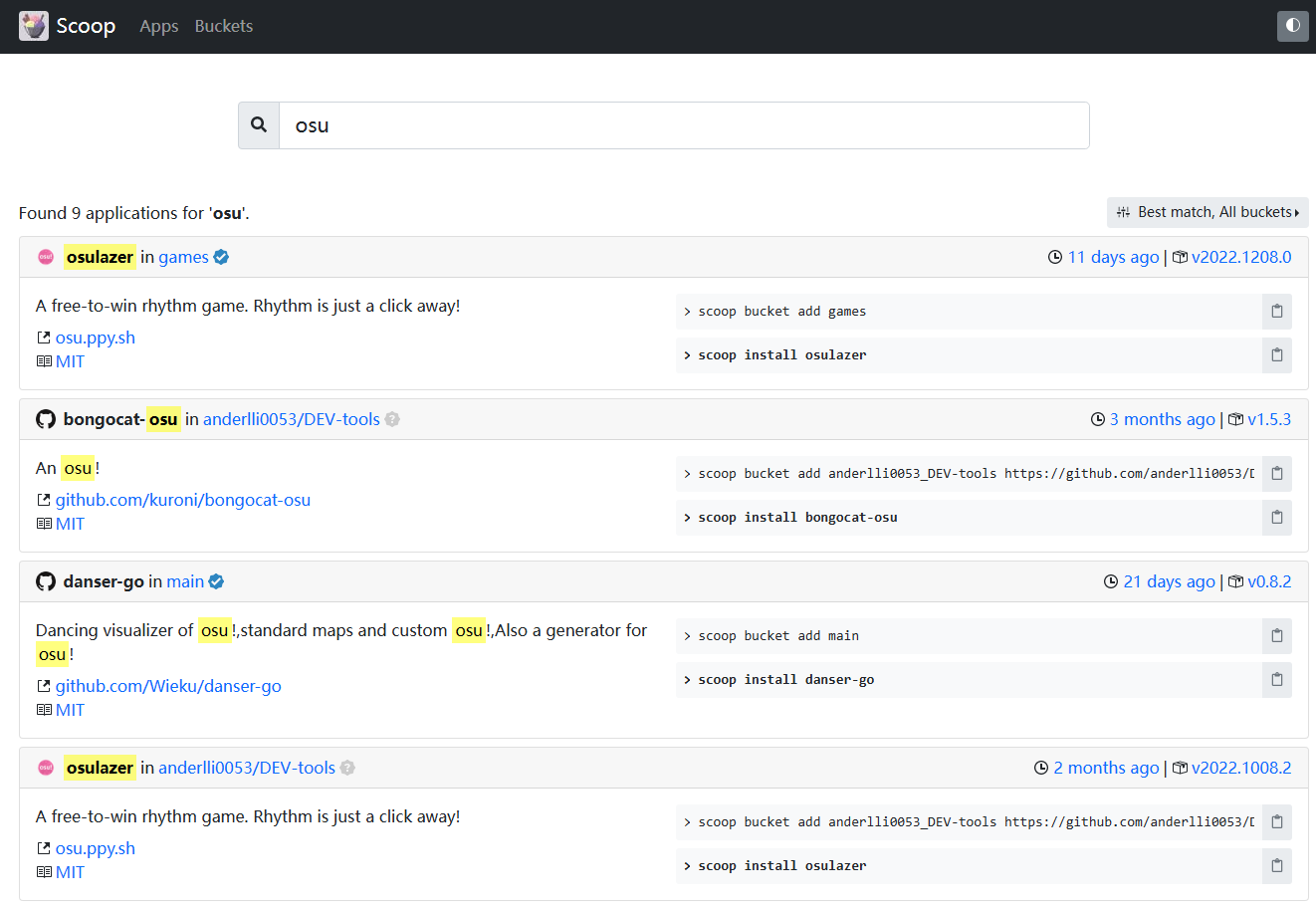
可以看到 osulazer 在 Games 这个 Bucket 里头。
那么我们执行:
> scoop bucket add games
> scoop install osulazer
就可以啦~
搜索结果中给出的两条命令分别是添加 Bucket 以及安装软件的命令,先执行上面那条,后执行下面那条。
没想到吧,Scoop 还能装字体()
Scoop 的字体都在 nerd-fonts 这个包中,执行scoop bucket add nerd-fonts即可。
注意:安装字体请务必全局安装,如
scoop install FiraCode-NF -g,原因见此
最后附上我用的软件:
>  scoop bucket list

Name       Source                                             Updated             Manifests
----       ------                                             -------             ---------
destiny    https://github.com/so1ve/destiny.git               2022/12/14 4:29:35          6
dorado     https://github.com/chawyehsu/dorado.git            2022/12/19 8:11:45        227
extras     https://github.com/ScoopInstaller/Extras           2022/12/19 16:27:47      1752
games      https://github.com/Calinou/scoop-games             2022/12/19 16:28:28       247
java       https://github.com/ScoopInstaller/Java             2022/12/17 16:18:12       253
main       https://github.com/ScoopInstaller/Main             2022/12/19 16:28:35      1129
nerd-fonts https://github.com/matthewjberger/scoop-nerd-fonts 2022/12/14 5:12:47        209
siku       https://github.com/amorphobia/siku.git             2022/12/17 0:39:11         57
versions   https://github.com/ScoopInstaller/Versions         2022/12/19 16:35:38       400

> scoop list

Installed apps:

Name               Version          Source     Updated             Info
----               -------          ------     -------             ----
7zip               22.01            main       2022-11-05 12:02:09
adb                33.0.3           main       2022-11-05 12:02:11
ag                 2.2.5            main       2022-11-05 12:02:16
aria2              1.36.0-1         main       2022-11-05 12:13:39
bat                0.22.1           main       2022-11-05 12:13:41
bazel              5.3.2            main       2022-11-05 12:17:02
bottom             0.6.8            main       2022-11-05 12:17:12
broot              1.16.2           main       2022-11-05 12:19:34
busybox            4784-g5507c8744  main       2022-11-14 10:04:28
cheat              4.4.0            main       2022-11-14 10:04:41
clink              1.4.0            main       2022-11-14 10:04:43
cloc               1.94             main       2022-11-05 12:22:03
cloudflared        2022.10.3        main       2022-11-05 12:41:57
cmake              3.24.3           main       2022-11-05 12:49:00
curlie             1.6.9            main       2022-11-05 12:49:38
dark               3.11.2           main       2022-11-05 12:53:24
delta              0.14.0           main       2022-11-05 12:53:27
deta               1.3.3-beta       main       2022-11-05 13:06:14
docker             20.10.21         main       2022-11-05 13:06:28
docker-compose     2.12.2           main       2022-11-05 13:12:24
dockercompletion   1.2010.1.211002  extras     2022-11-05 13:06:32
duf                0.8.1            main       2022-11-05 13:12:40
dust               0.8.3            main       2022-11-05 13:12:58
dvm                1.8.6            destiny    2022-11-05 12:53:39
fd                 8.5.2            main       2022-11-05 13:13:10
ffmpeg             5.1.2            main       2022-11-05 13:55:42
FiraCode-NF        2.2.2            nerd-fonts 2022-11-05 13:59:22
fnm                1.31.1           main       2022-11-05 14:00:09
fzf                0.35.0           main       2022-11-14 10:04:45
gh                 2.20.0           main       2022-11-14 10:04:49
gitui              0.21.0           main       2022-11-15 21:05:10
go                 1.19.3           main       2022-11-05 14:03:45
gow                0.8.0            main       2022-11-05 14:08:06
gpg                2.3.8            main       2022-11-05 14:10:58
gping              1.4.0            main       2022-11-05 14:11:04
gradle             7.5.1            main       2022-11-05 14:14:25
gsudo              2.0.2            main       2022-11-14 10:05:01
helix              22.08.1          main       2022-11-05 14:18:02
hexyl              0.10.0           main       2022-11-05 14:18:10
hub                2.14.2           main       2022-11-05 14:19:08
hugo-extended      0.105.0          main       2022-11-05 14:21:41
hyperfine          1.15.0           main       2022-11-05 14:22:08
jid                0.7.6            main       2022-11-05 14:22:30
jq                 1.6              main       2022-11-05 14:23:32
just               1.8.0            main       2022-11-05 14:23:46
lazygit            0.36.0           extras     2022-11-15 21:05:21
llvm               15.0.4           main       2022-11-05 16:31:03
lsd                0.23.1           main       2022-11-05 16:31:08
make               4.4              main       2022-11-05 16:31:19
mingit             2.38.1.windows.1 main       2022-11-05 11:46:47
mingw-nuwen        18.0             main       2022-11-05 16:36:36
msys2              2022-09-04       main       2022-11-05 16:37:24
neofetch           7.1.0            main       2022-11-05 16:37:26
neovide            0.10.3           extras     2022-11-14 10:05:06
neovim             0.8.0            main       2022-11-05 16:37:50
openssh            8.9.1.0p1        main       2022-11-05 11:48:09
oraclejdk17        17.0.3.1         destiny    2022-11-05 16:53:24
oraclejdk8         8u321            destiny    2022-11-05 16:54:46
posh-cargo         0.1.2.0          siku       2022-11-05 16:54:48
posh-docker        0.7.0            extras     2022-11-05 16:54:50
posh-git           1.1.0            extras     2022-11-05 16:54:52
powershell-preview 7.3.0-rc.1       destiny    2022-11-05 13:05:41
procs              0.13.3           main       2022-11-05 16:54:59
psreadline         2.2.6            extras     2022-11-05 16:55:00
refreshenv         2022.06.30       main       2022-11-05 16:55:39
ripgrep            13.0.0           main       2022-11-05 16:55:47
rustup-msvc        1.25.1           main       2022-11-05 17:14:00
scoop-completion   0.2.4            extras     2022-11-05 16:56:55
starship           1.11.0           main       2022-11-05 16:56:59
tdm-gcc            10.3.0           versions   2022-11-05 16:57:47
tinygo             0.26.0           main       2022-11-05 17:06:16
ttyd               1.7.2            main       2022-11-06 12:55:25
vcpkg              2022.10.19       main       2022-11-05 17:06:52
vcredist2010       10.0.40219.473   extras     2022-11-05 17:07:37
vcredist2022       14.34.31931.0    extras     2022-11-14 10:06:49
vhs                0.1.1            main       2022-11-06 12:55:30
vim                9.0              main       2022-11-05 17:10:32
vimtutor           0.2018.07.25     main       2022-11-05 17:10:33
wrangler           1.20.0           main       2022-11-05 17:10:38
youtube-dl         2021.12.17       main       2022-11-05 17:10:52
zig                0.10.0           main       2022-11-05 17:11:40
zoxide             0.8.3            main       2022-11-05 17:11:44
firacode-nf        2.2.2            nerd-fonts 2022-11-05 18:35:27 Global install
Noto-NF            2.2.2            nerd-fonts 2022-12-17 20:05:33 Global install
smiley-sans        1.0.0            nerd-fonts 2022-12-11 12:11:51 Global install