


环境介绍
系统:debian12
需求:使用fio进行硬盘io测试
安装fio
查看是否安装fio
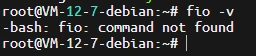
输入命令 fio -v来查看是否安装了
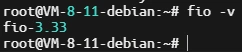
若安装了则会输出fio-版本,若未安装则会报错
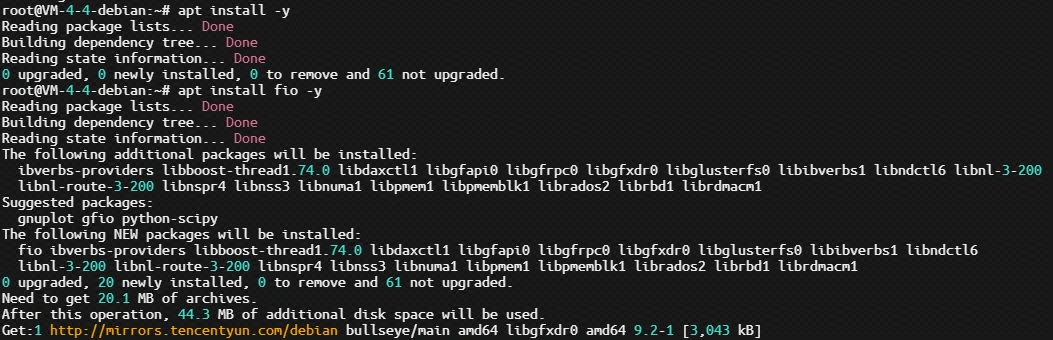
安装fio
输入命令 apt install fio -y即可完成安装
fio 用法
常用参数介绍
-filename=/dev/sdb		#要测试盘的名称,支持文件系统或者裸设备,/dev/sda2或/dev/sdb
-direct=1		 #测试过程绕过机器自带的buffer,使测试结果更真实(Linux在读写时,数据会先写到缓存,再在后台写到硬盘,读的时候也是优先从缓存中读,这样访问速度会加快,但是一旦掉电,缓存中数据就会清空,所有一种模式为DirectIO,可以跳过缓存,直接读写硬盘)
-ioengine=libaio		#定义使用什么io引擎去下发io请求,常用的一些 libaio:Linux本地异步I/O;rbd:通过librbd直接访问CEPH Rados
-iodepth=16		 #队列的深度为16,在异步模式下,CPU不能一直无限的发命令到硬盘设备。比如SSD执行读写如果发生了卡顿,那有可能系统会一直不停的发命令,几千个,甚至几万个,这样一方面SSD扛不住,另一方面这么多命令会很占内存,系统也要挂掉了。这样,就带来一个参数叫做队列深度。
-bs=4k           #单次io的块文件大小为4k
-numjobs=10      #本次测试的线程数是10
-size=5G         #每个线程读写的数据量是5GB
-runtime=60      #测试时间为60秒,可以设置2m为两分钟。如果不配置此项,会将设置的size大小全部写入或者读取完为止
-rw=randread     #测试随机读的I/O
-rw=randwrite    #测试随机写的I/O
-rw=randrw       #测试随机混合写和读的I/O
-rw=read         #测试顺序读的I/O
-rw=write        #测试顺序写的I/O
-rw=rw           #测试顺序混合写和读的I/O
-thread          #使用pthread_create创建线程,另一种是fork创建进程。进程的开销比线程要大,一般都采用thread测试
rwmixwrite=30    #在混合读写的模式下,写占30%(即rwmixread读为70%,单独配置这样的一个参数即可)
-group_reporting     #关于显示结果的,汇总每个进程的信息
-name="TDSQL_4KB_read_test"     #定义测试任务名称
扩展
-lockmem=1g       #只使用1g内存进行测试
-zero_buffers     #用全0初始化缓冲区,默认是用随机数据填充缓冲区
-random_distribution=random    #默认情况下,fio 会在询问时使用完全均匀的随机分布,有需要的话可以自定义访问区域,zipf、pareto、normal、zoned
-nrfiles=8        #每个进程生成文件的数量
随机读
fio -filename=/var/test.file -direct=1 -iodepth 1 -thread -rw=randread -ioengine=psync -bs=16k -size=2G -numjobs=10 -runtime=60 -group_reporting -name=mytest
顺序读
fio -filename=/var/test.file -direct=1 -iodepth 1 -thread -rw=read -ioengine=psync -bs=16k -size=2G -numjobs=10 -runtime=60 -group_reporting -name=mytest
随机写
fio -filename=/var/test.file -direct=1 -iodepth 1 -thread -rw=randwrite -ioengine=psync -bs=16k -size=2G -numjobs=10 -runtime=60 -group_reporting -name=mytest
顺序写
fio -filename=/var/test.file -direct=1 -iodepth 1 -thread -rw=write -ioengine=psync -bs=16k -size=2G -numjobs=10 -runtime=60 -group_reporting -name=mytest
混合读写
70%随机读,30%随机写,5G大小,4k块文件
fio -filename=/var/test.file -direct=1 -ioengine=libaio -bs=4k -size=5G -numjobs=10 -iodepth=16 -runtime=60 -thread -rw=randrw -rwmixread=70 -group_reporting -name="TDSQL_4KB_randread70-write_test"
70%顺序读,30%随机写,5G大小,4k块文件
fio -filename=/var/test.file -direct=1 -ioengine=libaio -bs=4k -size=5G -numjobs=10 -iodepth=16 -runtime=60 -thread -rw=rw -rwmixread=70 -group_reporting -name="TDSQL_4KB_read70-write_test"