惯性聚合 高效追踪和阅读你感兴趣的博客、新闻、科技资讯
阅读原文 在惯性聚合中打开

推荐订阅源

T
Threat Research - Cisco Blogs
freeCodeCamp Programming Tutorials: Python, JavaScript, Git & More
cs.AI updates on arXiv.org
V
Vulnerabilities – Threatpost
GbyAI
GbyAI
P
Proofpoint News Feed
L
LINUX DO - 热门话题
P
Palo Alto Networks Blog
A
About on SuperTechFans
T
Tenable Blog
M
MIT News - Artificial intelligence
IT之家
IT之家
I
Intezer
D
DataBreaches.Net
爱范儿
爱范儿
T
Threatpost
C
CERT Recently Published Vulnerability Notes
云风的 BLOG
云风的 BLOG
博客园 - 三生石上(FineUI控件)
WordPress大学
WordPress大学
K
Kaspersky official blog
大猫的无限游戏
大猫的无限游戏
A
Arctic Wolf
Y
Y Combinator Blog
Cyberwarzone
Cyberwarzone
酷 壳 – CoolShell
酷 壳 – CoolShell
D
Darknet – Hacking Tools, Hacker News & Cyber Security
H
Help Net Security
Microsoft Security Blog
Spread Privacy
Spread Privacy
奇客Solidot–传递最新科技情报
奇客Solidot–传递最新科技情报
AWS News Blog
AWS News Blog
博客园 - 聂微东
C
Check Point Blog
S
Securelist
有赞技术团队
有赞技术团队
雷峰网
雷峰网
aimingoo的专栏
aimingoo的专栏
Last Week in AI
Last Week in AI
Stack Overflow Blog
Stack Overflow Blog
MongoDB | Blog
MongoDB | Blog
D
Docker
G
GRAHAM CLULEY
T
The Exploit Database - CXSecurity.com
C
Cybersecurity and Infrastructure Security Agency CISA
T
Tailwind CSS Blog
L
Lohrmann on Cybersecurity
G
Google Developers Blog
C
Cyber Attacks, Cyber Crime and Cyber Security
L
LangChain Blog

噜啦

使用Python 在WordPress 自动发布文章 xmlrpc 404 Not Found 错误 cPanel面板 AirPods 小米8 安卓设备 音量小 终极解决方法 EHEH 免费,轻量的Linux服务器监控 SSL证书过期监控 - 噜啦 创建第一个仓库并配置local信息 add and commit - 噜啦 Git 最小配置 - 噜啦 Privacy Pass Cloudflare验证码通过神器 - 噜啦 du和ls查看文件大小不同的原因 - 噜啦 服务管理工具 systemctl - 噜啦 进程的控制与进程之间的关系 - 噜啦
easypanel 搭建typecho 开启全站https/ssl 伪静态 - 噜啦
博主: 噜啦 · 2020-05-22 · via 噜啦
  • 发布时间:
  • 2596 次浏览
  • 1087字数
  • 分类: 教程盒子
  1. 首页
  2. 正文  

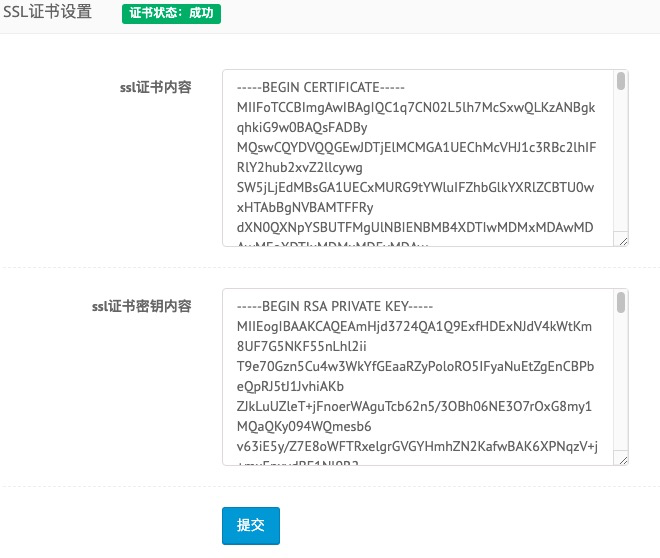
上传源码解压,配置好ssl证书后,选择php7.x,绑定域名,访问安装

如果暂时没有配置ssl,安装时直接使用https协议访问,忽略浏览器的报错,因为后期再配置也是没有问题的
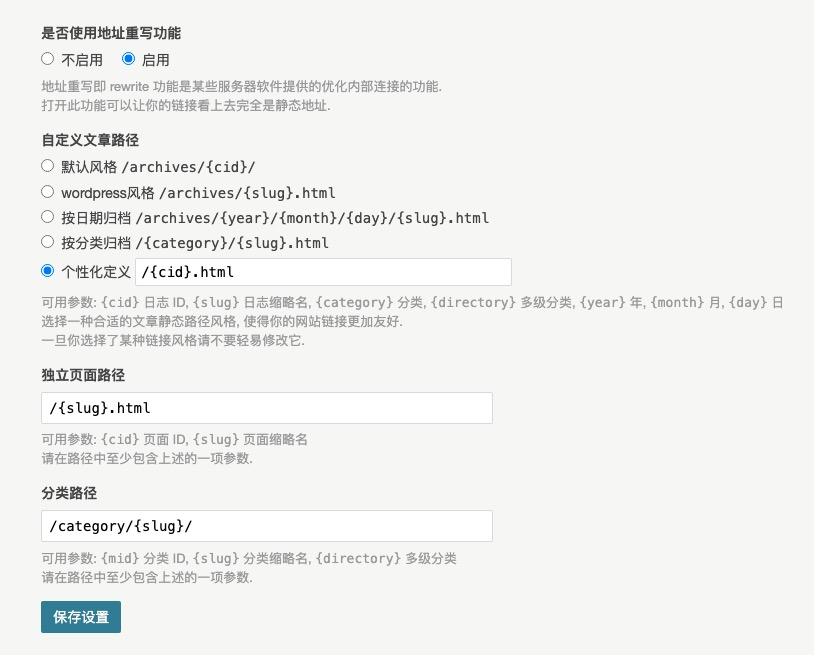
安装后,设置永久链接,勾选启用,设置你喜欢的链接风格,提交保存会提示不支持伪静态,再次保存即可忽略
编辑根目录下的 config.inc.php文件,增加开启全站ssl参数

/** 全站https */
define('__TYPECHO_SECURE__',true);

根目录创建.htaccess文件,增加伪静态以及强制跳转https参数

<IfModule mod_rewrite.c>
RewriteEngine On
# 下面是在根目录,文件夹要修改路径
RewriteBase /
RewriteCond %{REQUEST_FILENAME} !-f
RewriteCond %{REQUEST_FILENAME} !-d
RewriteRule ^(.*)$ /index.php/$1 [L]
</IfModule>
RewriteCond %{HTTPS} off
RewriteCond %{HTTP:X-Forwarded-SSL} !on
RewriteCond %{HTTP_HOST} ^lula\.fun$
RewriteRule ^(.*)$ "https\:\/\/lula\.fun\/$1" [R=301,L]

其中的网址匹配是使用的正则表达式,配置最后两行的符号需要使用转义字符\(反斜杠),例如我的https://coding.lula.fun/,其中的:./都需要转义,在其前加上\(反斜杠),即为https\:\/\/lula\.fun\/

配置好后浏览器使用http协议测试访问,会自动跳转到https协议

赞赏作者

如果觉得我的文章对你有用,请随意赞赏

easypanel 搭建typecho 开启全站https/ssl 伪静态

 •