惯性聚合 高效追踪和阅读你感兴趣的博客、新闻、科技资讯
阅读原文 在惯性聚合中打开

推荐订阅源

N
News and Events Feed by Topic
S
Security @ Cisco Blogs
S
Secure Thoughts
Attack and Defense Labs
cs.AI updates on arXiv.org
Hacker News - Newest:
Hacker News - Newest: "LLM"
Recent Commits to openclaw:main
H
Hacker News: Front Page
博客园 - 叶小钗
H
Heimdal Security Blog
Microsoft Security Blog
Forbes - Security
Forbes - Security
AI
AI
cs.CV updates on arXiv.org
T
Troy Hunt's Blog
罗磊的独立博客
Application and Cybersecurity Blog
爱范儿
爱范儿
GbyAI
GbyAI
The Last Watchdog
The Last Watchdog
TaoSecurity Blog
TaoSecurity Blog
C
CXSECURITY Database RSS Feed - CXSecurity.com
D
DataBreaches.Net
Recent Announcements
Schneier on Security
C
Cisco Blogs
美团技术团队
D
Docker
让小产品的独立变现更简单 - ezindie.com
WordPress大学
WordPress大学
月光博客
月光博客
雷峰网
雷峰网
Threat Intelligence Blog | Flashpoint
H
Hackread – Cybersecurity News, Data Breaches, AI and More
A
Arctic Wolf
B
Blog RSS Feed
Cisco Talos Blog
Cisco Talos Blog
C
Cybersecurity and Infrastructure Security Agency CISA
V
Vulnerabilities – Threatpost
V2EX - 技术
V2EX - 技术
Y
Y Combinator Blog
N
News and Events Feed by Topic
www.infosecurity-magazine.com
W
WeLiveSecurity
Security Archives - TechRepublic
G
GRAHAM CLULEY
Jina AI
Jina AI
Hugging Face - Blog
Hugging Face - Blog
酷 壳 – CoolShell
酷 壳 – CoolShell
The Hacker News
The Hacker News

逸思杂陈

家用网络 vlan 单线复用 Linux 平台 intel UHD 6xx 核显 openvino 探索 UI 区域检测的 vibe coding 复盘 mitmproxy 使用 esim 使用相关 阻止 bilibili 网页自动关注 Hexo 版本更新与技术债务 配置 Linux 作为主力操作系统 在 Linux 虚拟机中使用 PyAutoGUI 做自动化 语言的力量 联想笔记本 BIOS 跳过检测强制降级 redroid “设备未获得play保护机制认证” 问题 在 VSCode 中用 Rust 刷LeetCode 跨域的那些事 HomeBrew 与无 root 权限 Linux 环境包管理 给 macOS 词典增加生词本功能 关闭子进程打开的文件描述符 容器内进程优雅退出 Python 循环变量泄露与延迟绑定 bash 语法备忘 MySQL 自定义数据库路径
在 iOS 上访问安卓应用
Jay.Run · 2025-04-27 · via 逸思杂陈

有些应用在安卓上是独占的,iOS 上又没有比较好的替代品,而且 iOS 上没有能用安卓模拟器。
如果使用多个设备,维护的心智成本又高,被这个问题困扰了许久。

最近碰巧了解了 scrcpy, 用于远程控制安卓,终于解决了这个问题。

需要的工具

  1. 安卓环境:虚拟环境或者物理设备均可,这里使用虚拟环境。以下是可选的虚拟环境
  • PVE 的 PCT容器 (Proxmox Container Toolkit),需要打补丁
  • docker,基于Redroid 需要调整内核参数
  • WSA (Windows Subsystem for Android),与 scrcpy 配合有点问题,窗口有黑边。
  • VMware、VirtualBox等虚拟化平台,需要解决虚拟显卡。
  1. 使用 scrcpy-mobile 远程控制安卓环境, 当然 scrcpy 也支持 Windows、Linux、macOS

PCT 安卓容器

由于已有PVE环境,这里选用PCT,主要步骤

  1. 根据 PCT-patches 文档,给 PCT 打好补丁
  2. 根据 lineageOS 模板,新建安卓容器,注意去除Unprivileged container的勾选。
  3. 修改 lxc.init.cmd 选项,在后面增加以下参数,调整分辨率和iPad一致。
    1
    androidboot.redroid_width=1668 androidboot.redroid_height=2388 androidboot.redroid_fps=60

ps: 安卓容器对宿主机性能似乎有一定要求,J4125 只是勉强够用,流畅度一般。

macOS 中使用 scrcpy

安装 scrcpy ,连接命令

1
2
3
4
5
6
scrcpy --audio-codec=aac \
--video-codec=h264 \
--video-bit-rate=16M \
--max-fps=60 \
--tcpip=192.168.10.181:5555 \
--start-app=io.legado.app.release

参数解释

  • --audio-codec=aac 同步声音,使用 AAC 编码,默认参数可能导致没有声音
  • --video-codec=h264 使用 H.264 视频压缩编码
  • --video-bit-rate=16M 16Mbps 码率,高画质
  • --max-fps=60 最大帧率 60FPS,画面流畅
  • --tcpip=192.168.10.181:5555 Wi-Fi adb 连接设备
  • --start-app=io.legado.app.release (可选)连接后直接启动 Legado App,应用列表可使用adb shell pm list packages -3查看

iOS 中使用 scrcpy-mobile

appstore中安装 scrcpy-mobile

由于该应用的用户界面易用性比较差,表单也不支持有些 scrcpy 参数,这里直接使用快捷指令打开应用。
设置打开 scrcpy-mobile 后,开启引导式访问,防止误触。同时可以在 iOS 设置中开启引导式访问的面容id,防止频繁输入密码。
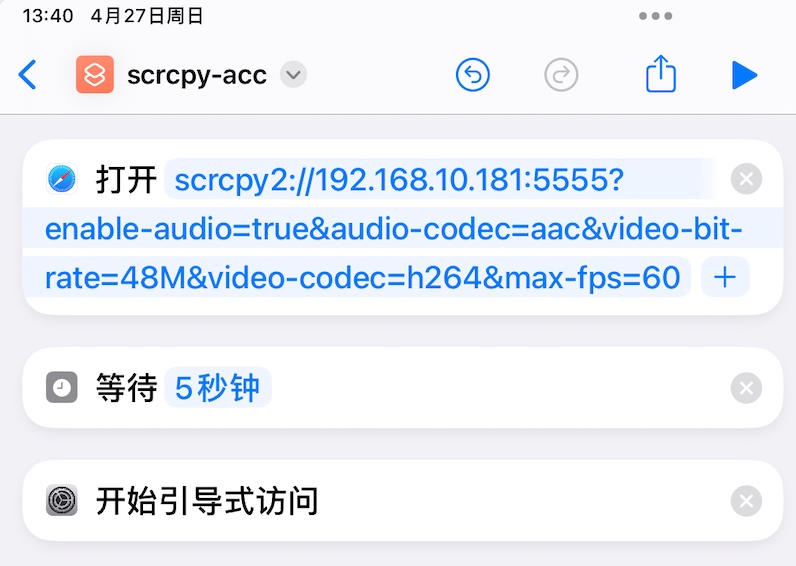
scrcpy-mobile 的 url schema

1
scrcpy2://192.168.10.181:5555?enable-audio=true&audio-codec=aac&video-bit-rate=16M&video-codec=h264&max-fps=60

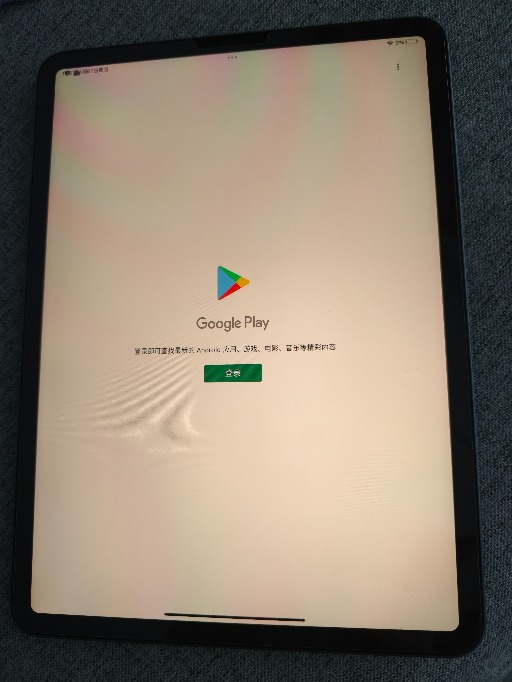
最后,这也未尝不算一种 NTR
IMG_202504275684_512x682

安卓环境设置(可选)

  1. 关闭导航栏:系统 > 手势 > 系统导航 > 手势导航
  2. 加快或者关闭系统动画:开发者选项 > 窗口动画缩放、过渡动画缩放、Animator 时长比例 > 关闭或者0.5x