





This is not a sponsored post. I am just a fan of 45Drives- to date they've sent me no equipment or compensation of any kind. Just want to be up front about that before I talk about their awesome Cockpit modules.
I'm working up an opinionated video about their pricing and marketing (tldw it's fine).
This blog post is a supplement to that video, discussing how I've installed and used the open source 45Drives Cockpit modules on non-45Drives servers.
In case you've missed it, Cockpit is a nice web-based frontend for Linux servers, which I think does a pretty good job of making Linux servers more discoverable and easy to manage.
It's not as fully-featured as TrueNAS or Proxmox, and it doesn't have to be. Those are both great projects in their own right, but sometimes you just want a nice GUI for your Linux server, and for many sysadmins, Cockpit fills the space nicely.
It's still traditional Linux, just a bit dressed up.
By default Cockpit shows you some logs and other basic information, but it can be easily extended using a modular design. I've found this to be a good balance for me- I mostly still prefer dropping to console on my servers, but it's very nice to have a graphical way to do some tasks.
It's actually become my preferred way to graphically manage QEMU/KVM VMs for my channel, and I'll probably do a video/post about that someday.
The Cockpit project has great instructions for installing it, and it's already included in a lot of distros: for RHEL-based distros it might be as easy as sudo systemctl enable --now cockpit.socket. On Debian, it isn't installed by default, but is right there in the cockpit package.
45Drives created lots of modules for Cockpit, which they host on their GitHub. I regularly use two of them: the ZFS module and the file sharing module.
As of writing, 45Drives is hosting two ZFS modules on their GitHub. They appear to be actively building a new one from scratch, but the one I've used on Debian and Rocky is the older module, which was forked from an earlier open source work.
Here in April 2025, I was unable to install the newest module on either Debian 12 or Rocky 9.5, running into dependency issues trying to build the extension. Considering it's had multiple commits in recent days, this is not surprising. I may update this post in the future if the situation changes, or write another one. For now, I recommend the older version.
You'll need to install ZFS on your system in order to use this module, obviously! This process is already well documented on the OpenZFS website. For Debian, this typically involves pinning backports if you want newer versions than you get from contrib. For Rocky, you have to add EPEL resources and an extra repo.
The OpenZFS website has excellent documentation explaining this process for many repos, not just Rocky and Debian. I've successfully used OpenZFS on Alpine, Fedora, and Ubuntu. The docs make this easy.
Here's a tip: if you're doing this in enterprise, keep in mind that you may have restrictions on adding third party repos, as the RHEL-based distro instructions require.
OpenZFS is usually a pretty well respected repository to add, but you might want to check with your compliance folks. Some cybersecurity insurance policies might give you a better rate if you're running ZFS, thanks to the ransomware resiliency.
So, you know, keep that in mind when asking your boss about it. :)
I'm a Debian user nowadays, but I've used these tools on RHEL-based distros as well, most recently Rocky Linux.
I prefer to grab these packages from GitHub directly via git, which you should make sure is installed on the system before going this route.
Then, from my home directory, I simply clone the repo:
git clone https://github.com/45drives/cockpit-zfs-manager.gitAnd then copy the zfs folder to the Cockpit plugin directory.
sudo cp -r cockpit-zfs-manager/zfs /usr/share/cockpit/It should show up right away in Cockpit (web portal is on port 9090 by default). Restart the service or the machine if it doesn't show up.
Once it's installed, using ZFS is now a breeze. Cockpit might bug you about a samba dependency, which if you're building a storage server, you're likely to be setting up anyway.
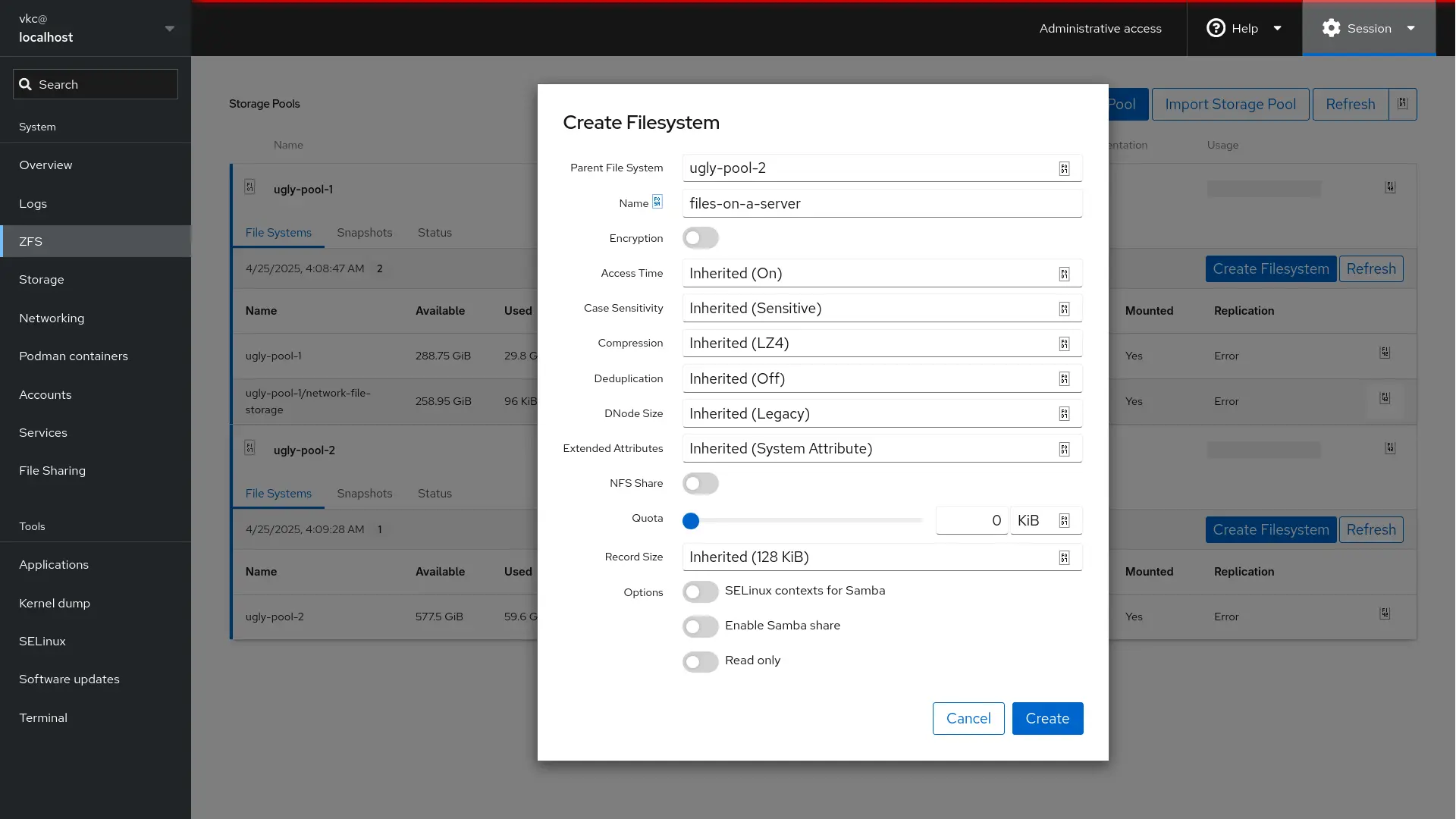
The GUI now gives you a simple point-and-click interface through some of the more common tasks a sysadmin would perform on a ZFS system. Like I said, it's not TrueNAS. But it doesn't have to be.
I still drop to terminal for the tough stuff, but this does make visually working through a pool a bit easier.
The share options are OK here, but you won't get great control over the permissions model easily, so I tend to skip setting shares here and instead go for the second 45Drives module...
The 45Drives file sharing module enables easy manipulation of Samba and NFS shares on a system. Big surprise.
As 45Drives packages this one as a .deb and an .rpm package, it's even easier to install than the last one... just use apt or dnf to install the downloaded file from the Releases section on GitHub.
While you're installing packages, you might want to install samba and possibly nfs-common.
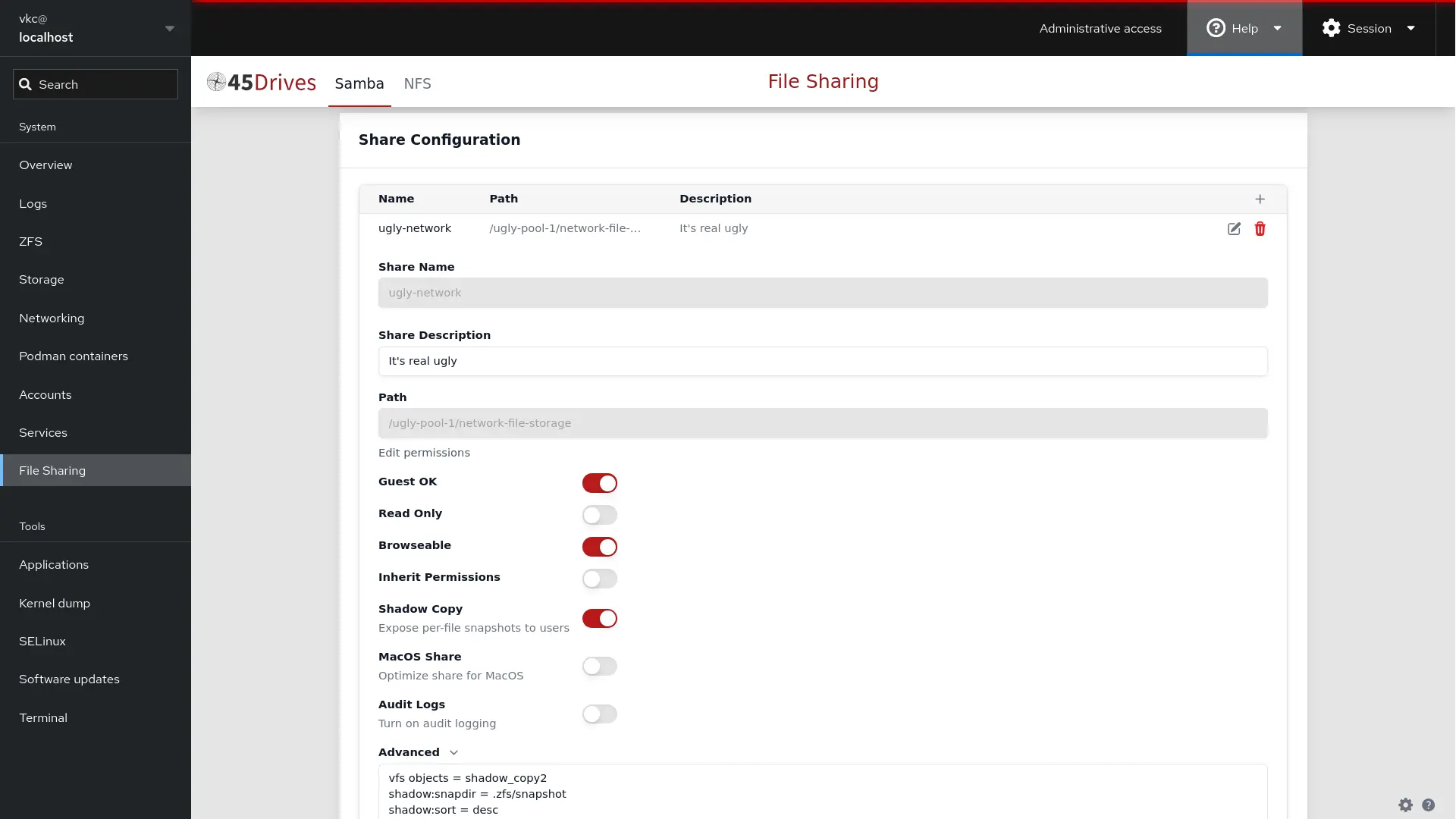
At present, this isn't as robust as something like TrueNAS, and it's not going to make ACLs point-and-click or integrate with an Active Directory configuration easily.
But if you're just after some basic sharing, this gets the job done nicely. I think it's perfect for someone just trying to spin up shares in a homelab or even a small office setup.
此内容由惯性聚合(RSS阅读器)自动聚合整理,仅供阅读参考。 原文来自 — 版权归原作者所有。