




During our last hack week, Aakanksha Sarda and I set out to build a library that helps JavaScript developers use the Dropbox API. My main goal was to take “static” Web applications to the next level. However, the JavaScript library can be useful for any application that runs a significant part of its logic in the browser, as well as for node.js server-side code.
If you prefer getting your hands dirty right away, go ahead and register for a Dropbox API key, set up an application in your Dropbox, borrow sample code, and read the library documentation.
Thanks to recent improvements in browser support and VM performance, I often find myself writing small and medium applications completely in JavaScript, whenever I can get away with it. JavaScript runs on users’ browsers, so all the application’s files are static, and can be served by any plain old file server such as nginx, pretty much any Web hosting service, and your humble Dropbox.
My interest in static Web apps is greatly influenced by how easy they are to deploy. For example, the deployment process for my Dropbox-hosted applications is the cp command (copy if you’re on Windows). Dropbox syncs the files to its servers, and even lets me revert a bad deployment. I’ve been using this beautiful, simple paradigm for all my applications that don’t need to store per-user data.
However, up until now, having to handle per-user data has been a different story. I needed a database to store the data and an application server to talk to the database server. My applications then needed accounts and authentication to ensure that users wouldn’t overwrite each others’ data. Finally, deploying a new version of the application involved pulling the updated code from a git repository, migrating the database schema, and restarting the application server. I was afraid I’d make a mistake, so I ended up writing complex scripts to handle the deployment.
To my despair, the code for having small applications store per-user data was much longer than the actual application code. Deploying the apps was a problem on its own, and left me yearning for the minimalistic “copy to Dropbox” approach. Fortunately, today’s announcement fixes everything!
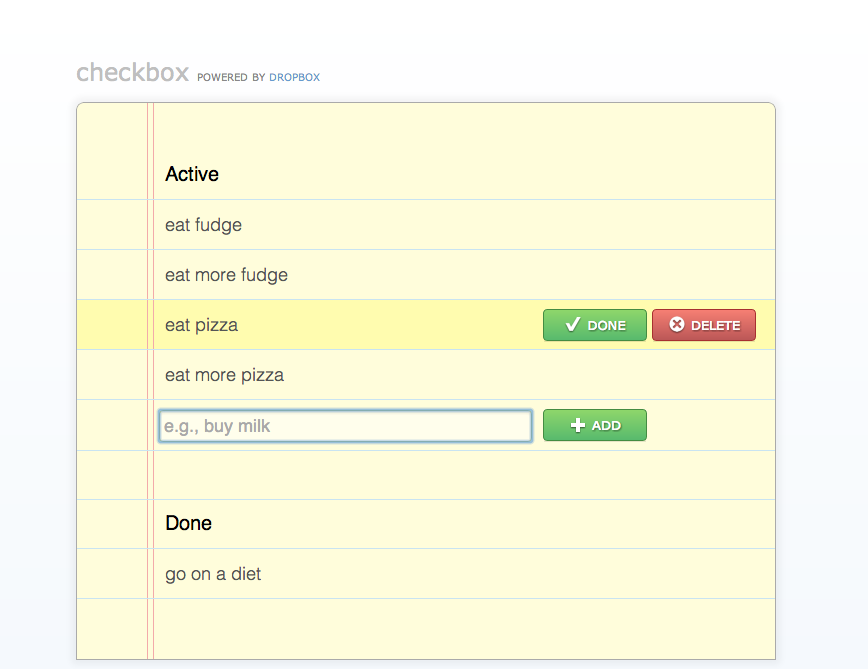
My hack week project, dropbox.js, makes it easy to use Dropbox for storing per-user data. For example, let’s consider Checkbox, a To Do manager hosted entirely in this Dropbox folder. While Checkbox won’t be winning design or usability awards any time soon, it is fully functional! It can store your To Do list right in your Dropbox, in less than 70 lines of HTML and less than 300 lines of commented CoffeeScript (which compiles into less than 350 lines of JavaScript).
Let’s skim the Checkbox source code. The action happens in the app’s CoffeeScript code. The Checkbox class is the application’s view and controller, so it renders the UI and handles DOM events. The Tasks and Task classes implement the data model and the Dropbox integration.
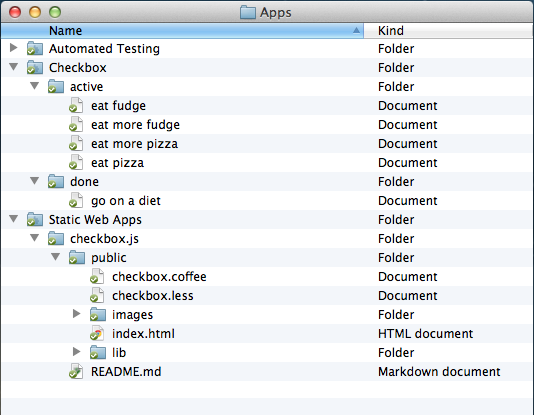
Checkbox uses the “App folder” Dropbox access level, so Dropbox automatically creates a directory for my app data in my users’ Dropboxes. The data model design favors ease of development and debugging. Each task is stored as a file whose name is the task’s description. Tasks are grouped under two folders, active and done. Operations on tasks cleanly map to Dropbox file operations in Dropbox. For example:
Most importantly, each Dropbox operation takes up one line of code in the Tasks implementation. Thanks to dropbox.js, the Checkbox source code is all about the application’s logic, and does not get distracted with infrastructure issues.
In the end, dropbox.js makes it easy for me to store my users’ data in a system whose features and reliability go beyond those of the storage backing many enterprise-grade applications. Checkbox-managed To Do lists are transmitted securely, stored redundantly, and backed up. My own To Do lists are in my Dropbox, so I debugged my application with my file manager, and deployed it using cp. I have never SSHed into a server, and I haven’t issued a single SQL query.
Want in on the action? This little JavaScript application can help you run small Web applications out of your Dropbox!
Hopefully, I’ve convinced you to try out dropbox.js for your next prototype or hobby project. In fact, I won’t be offended if you stop reading now and start using it! However, I think you’ll also find it interesting to read more about the goals, tough decisions, and story behind the library’s design. Let’s start with the goals:
I think that infrastructure libraries should silently support your development efforts, and stay out of your way. Every bit of brainpower lost on figuring out low-level issues is not spent on making your application awesome. So the overarching goal for dropbox.js is to have you spend as little time as possible thinking about it.
To that end, the libraries aims to follow the principle of least surprise, and to make the common use cases especially easy to implement. For example, the interfaces of the methods for reading and writing Dropbox files heavily borrow from fs.readFile and fs.writeFile in node.js, as you can see in the code below.
// Inefficient way of copying a file.
client.readFile(“source.txt”, function(error, data) {
    client.writeFile(“destination.txt”, data, function (error) {
        console.log(“Done copying.”);
    });
});
Dropbox has more features than your average filesystem, such as revision history, and these advanced features can be accessed by passing an options object. For example, the same readFile method can be used to retrieve an old revision of a file.
client.readFile(“source.txt”, { versionTag: “0400000a” },
            function(error, data) {
    console.log(“Done copying.”);
});
However, passing an options object is not mandatory, and the default options reflect the common use case, such as reading the most recent revision of a file. Compare and contrast with the Win32 CreateFile function, which takes 7 parameters.
Last but not least, the library’s interface acknowledges both experienced JavaScript programmers and experienced Dropbox API users. For example, listing a folder’s contents can be done by calling a readdir method, whose interface matches fs.readdir, or by calling a metadata method, whose interface is closer to the /metadata REST API.
I really hope that dropbox.js works out of the box for you, and helps you integrate with Dropbox quickly and painlessly. At the same time, I realize that a small library can’t possibly cover all the use cases, and some of you will have to extend or modify the library.
The library exposes some of its internals on purpose, so you can break the abstractions when you need to. For example, methods that make AJAX calls, such as readFile and writeFile, return the XmlHttpRequest object used for the AJAX call. If you want to implement progress bars for Dropbox operations, you can set up listeners for the relevant XmlHttpRequest events. To further encourage extension, the library’s internal methods are fully documented using JSDoc, just like the public APIs.
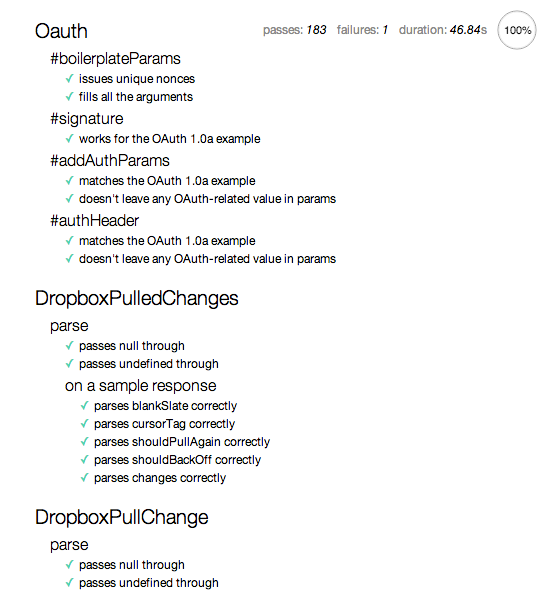
Asides from source code, dropbox.js includes an automated build script, and a mostly-automated test suite with very solid coverage. If you need to modify the library, the README file will help you use the test suite to verify the correctness of your changes and incorporate your changes in a minified library build or an npm package. The entire library is hosted on GitHub, so you can easily submit your patches and not get stuck maintaining a fork.
Perhaps the most delicate aspect of integrating with a Web service is the user authentication piece. Dropbox authentication uses a four-step process that bounces the user between the application’s Web page and the Dropbox servers, so applications will most likely need to customize the process. dropbox.js defines an authentication driver interface for the custom code, and also includes three implementations that will get you going through the prototype stage of your application. For example, the code below covers both library initialization and authentication.
var appKey = { key: “api-key”, secret: “api-secret”, sandbox: true };
var client = new Dropbox.Client(appKey);
client.authDriver(new Dropbox.Drivers.Redirect());
client.authenticate(function(error, data) {
    if (error) { return showError(error); }
    doSomethingUseful(client);  // The user is now authenticated.
});
While writing the JavaScript library, I struggled a lot figuring out how much I can diverge from the Dropbox REST API, in the name of offering a more intuitive API. While I didn’t want to create a RequestProcessorFactoryFactory-like monster, I also wanted to hide some aspects of the REST API that I found confusing. For example, the JavaScript library wraps the /metadata output, and uses the stat name for the concept of metadata, to match existing filesystem APIs. The rev parameter that shows up in many API calls is renamed to revisionTag in dropbox.js, to avoid the misconception that its value would be a sequential integers, like Subversion revisions. I look forward to seeing how this decision plays out, and to learning from it.
When I started working on the JavaScript library, I envisioned that the Dropbox object would implement a high-level API, and developers would only call into Dropbox.Client if they would need a low-level API. I had high hopes for the high-level API. It was supposed to provide File and Directory classes, automatically cache Dropbox data in IndexedDb, and automatically kick off the authentication process on token expiration. Unfortunately, by the end of the hack week, the low-level API was barely completed, so the current dropbox.js release ships an empty Dropbox object, and the code samples use Dropbox.Client. Ship early, ship often 🙂
dropbox.js was designed and developed during the most recent Dropbox hack week, a hackathon where we put our regular work on hold for 5 days and get to work on our crazy ideas and pet projects.
I got the idea to write a JavaScript client for the Dropbox API when I brainstormed for hack week projects, and I realized that all my ideas would be best prototyped as JavaScript applications. At first, I had many doubts about the idea. Would other people use this? Would I be able to make a decent API? Fortunately, I shared my idea with a few colleagues, who encouraged me to commit to the idea and post it to the company’s internal list of hack week projects.
After posting the project, I received an amazing (and humbling) amount of support from fellow Dropboxers. Before hack week, Chris Varenhorst added CORS headers to the Dropbox API responses, which allow dropbox.js to work in the browser.
During hack week, Aakanksha Sarda fleshed out the code for all the file operations, figured out how to deal with binary files (e.g., images), got the automated test suite running in the browser, and wrote Dropstagram, a Dropbox-powered photo-editing application, using WebGL shaders. A few other Dropboxers used dropbox.js and gave us great feedback and a sense of urgency. Rich Chan built a true Internet Terminal running on JavaScript and Dropbox and a stunning visualizer for the revision history of any text file in your Dropbox. Franklin Ta prototyped a Google Chrome extension that lets you download and upload files straight into / from your Dropbox. David Goldstein worked on a secret project that will make Dropbox apps even more awesome, and used dropbox.js to write a browser-based .zip unpacker for your Dropbox files.
Hack week provided an amazing backdrop for the development of dropbox.js. Graham Abbott set up a pod for everyone working with dropbox.js, so it was very easy for us to collaborate and exchange ideas and feedback. Jon Ying sprinkled some design magic on the applications that we developed. The kitchen staff stayed up and prepared hot food for us every night of the week. Dropboxers (including Drew and Arash) came by our pod, looked at our demos, and cheered us on.
After hack week, Chris Varenhorst, Dima Ryazanov, and Brian Smith helped me work through some last-minute technical difficulties. Jon Ying gave a makeover to the Checkbox sample app. Albert Ni, Alex Allain, Glara Ahn and Jon Ying helped make this blog post happen.
I hope you enjoyed reading about the dropbox.js. Above all, I really hope that you will go download the library, and build something amazing with it!
I expect that “powered by Dropbox” Web applications will become a great tool for learning Web programming and building class projects. I’ll walk the walk myself this coming winter, when I’ll teach Web Programming at MIT.
I look forward to learning about the projects that come out of the next Dropbox hack week, and I’ll be counting how many of them use dropbox.js 🙂
此内容由惯性聚合(RSS阅读器)自动聚合整理,仅供阅读参考。 原文来自 — 版权归原作者所有。