One of the biggest challenges of the mobile developer community at Dropbox in 2018 was our custom build system. Our build system was slow, hard to use, and didn’t support some use cases which were out of scope of the original design. After 4 months of work by our Mobile Platform team, we were able to remove our unicorn implementation for something much more modern and easy to maintain.
In our new build system, we wanted to improve on a couple of things that our current build system was hindering:
At Dropbox, we have a repository for all mobile development, called Xplat. One of the benefits is to easily share source code between our different mobile applications and across platforms. For a while, Dropbox invested heavily in cross-platform development via C++ that worked well for the apps that were developed at that time. We even open-sourced Djinni in 2014 to interface cross-platform C++ library code with platform-specific Java and Objective-C on Android and iOS. Most recently in early 2019, we made the decision to move away from C++ development, read more about why here. However, some of our mission critical libraries will remain on C++ e.g. DocScanner which uses OpenCV.
Since December 2016, Dropbox used a meta-build system to build our two mobile apps: Dropbox and Paper. It was a meta-build system in the sense that, for most of our modules, we didn’t write the Gradle build files by hand. These build files were autogenerated using an in-house system called BMBF. Additionally, BMBF would generate Java source code for our analytics, feature gating, and other common libraries written in C++.
What is BMBF? BMBF ( Buildy McBuildface Basic Modular Build Format) was a tool written in Python to help modularize our mobile code base.
BMBF provided guaranteed layered dependency order and reduced boilerplate in build files.
BMBF used a structured and opinionated file system layout. Then it was able to generate build.gradle and wire in those modules into settings.gradle. This made it ‘easy’ to create new modules or re-use an existing module without sacrificing the benefits that come from using the official tools for each platform.
The following module config file:
device.bmbf.yaml
Would get parsed by BMBF’s build system and output a build.gradle file
How did BMBF not meet our needs? BMBF was opinionated, it made it difficult to add functionality to our Gradle scripts that were not built into BMBF. If BMBF didn’t support a workflow that a product engineer required, they would either file a ticket on Mobile Platform, or tried to add the functionality themselves.
BMBF had numerous gotchas and a steep learning curve. BMBF required a very specific file and folder structure. BMBF was not compatible with Gradle incremental builds because build.gradle files were being re-created every time a developer built the app. It was not uncommon for engineers who had been with the company for 6+ months to still had no idea how to create a new module using BMBF. Our Slack channels and help forums were bombarded with questions on how to resolve errors that BMBF presents.
BMBF was initially built to help facilitate modularization and sharing code between iOS and Android. Over the years, the original maintainers that created BMBF moved on to other projects or left the company. Our current engineers were not eager to maintain a legacy meta build system and were more in favor of leveraging a standardized build system. Since we started using BMBF, we stopped writing cross-platform modules and even wanted to rewrite C++ modules into platform-specific iOS and Android code. The time had come to revamp our build system.
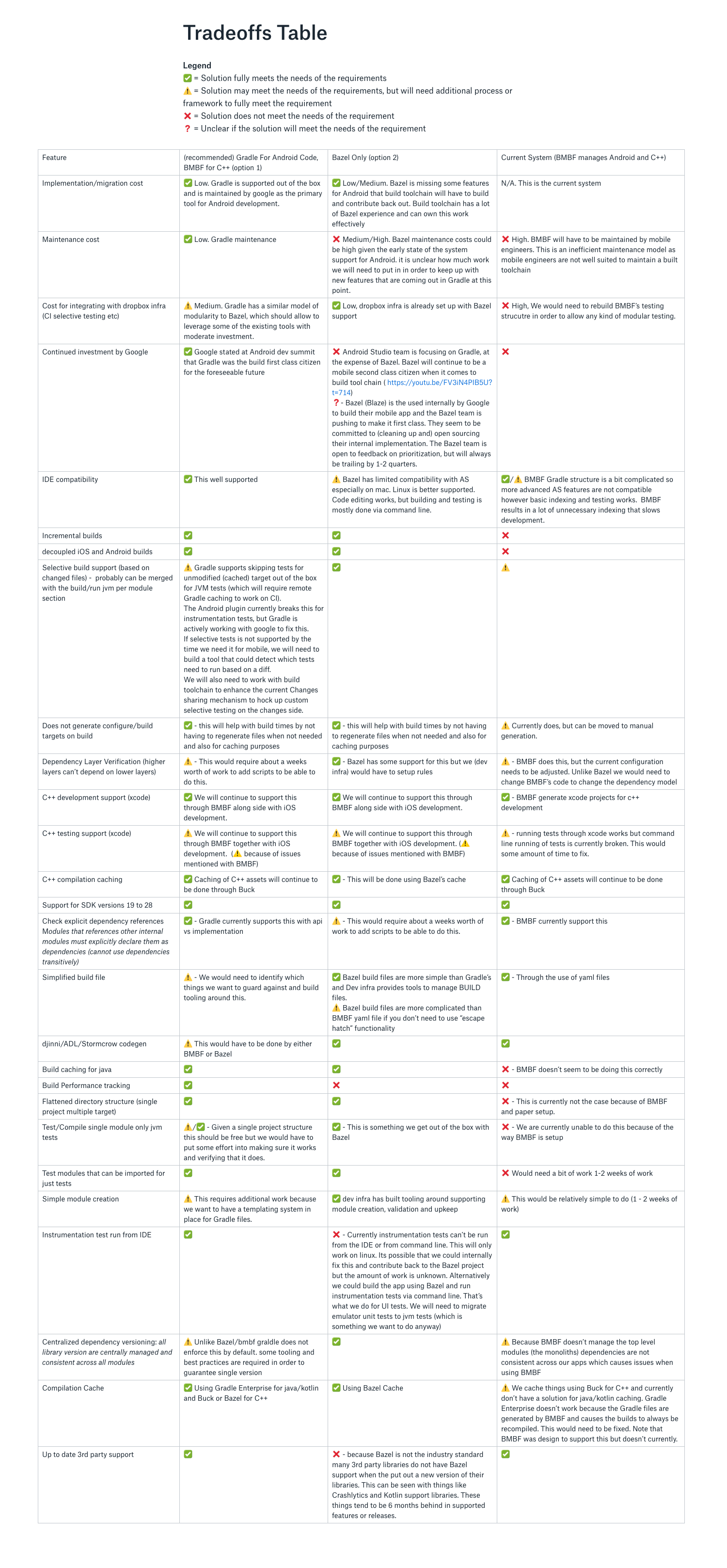
Our team worked for several weeks on evaluating and analyzing our options to review:
Our team created a sandbox environment to accurately compare different build systems.
Gradle Only
No work was needed for Gradle, as it was our baseline.
Bazel
While Bazel was widely used at Dropbox, its use didn’t propagate to our mobile teams. An engineer from Developer Infrastructure worked on generating all the BUILD.bzl files required for all our modules in order to successfully build an APK.
Buck
We did not evaluate Buck because it was not well supported by the community at the time and did not support Kotlin. Also, we did not have any in-house expertise in Buck at the time. We would have needed to dedicate 1-2 mobile engineers full time to work on Buck.
Using the prototypes, we compared the three different build systems’ build times and developer experience.
| Build times | Bazel Only | Gradle + BMBF Build | Gradle only |
|---|---|---|---|
| Clean Build no cache | 638 s | 252 s (with buck cache) | ~ 258 seconds |
| Clean Build w/cache | 81.459s | N/A | N/A |
| NoOp Build | 1.334s | 20-30 seconds | ~ 28.6 seconds |
| [Incremental] Main module modified | ~36 sec | ~181 seconds | ~ 124 seconds |
| [Incremental] Shared library module modified | ~29 sec | ~200 seconds | ~ 108 seconds |
Bazel Build System:
Gradle Build System:
BMBF Build System
Why not Buck as a build tool
We decided to move forward last year with the Gradle Build System, and we will soon be revisiting Bazel . The cheap migration cost from BMBF to the underlying Gradle lead to the decision to first deprecate BMBF.
Although Bazel was extremely fast with regard to the the build time, we were concerned about deteriorating the local developer experience. At the time of our evaluation, Bazel was not very mature. Gradle is the industry standard for building Android apps. Tooling and libraries available for Gradle will take time for it to become available for Bazel.
Find out how we implemented our new Android build system in part II of this post. If you are an Android or iOS engineer who gets excited about solving problems at scale and sharing your findings with the community we’d love for you to come join the team!
此内容由惯性聚合(RSS阅读器)自动聚合整理,仅供阅读参考。 原文来自 — 版权归原作者所有。