



惯性聚合 高效追踪和阅读你感兴趣的博客、新闻、科技资讯
阅读原文 在惯性聚合中打开

推荐订阅源

B
Blog
T
Threatpost
N
News and Events Feed by Topic
C
Cybersecurity and Infrastructure Security Agency CISA
Cyberwarzone
Cyberwarzone
C
CXSECURITY Database RSS Feed - CXSecurity.com
A
Arctic Wolf
C
Cyber Attacks, Cyber Crime and Cyber Security
AI
AI
GbyAI
GbyAI
Recent Announcements
Security Latest
Security Latest
Scott Helme
Scott Helme
W
WeLiveSecurity
S
Schneier on Security
人人都是产品经理
人人都是产品经理
Recent Commits to openclaw:main
博客园_首页
Forbes - Security
Forbes - Security
Simon Willison's Weblog
S
Security @ Cisco Blogs
The Register - Security
H
Hacker News: Front Page
V
Visual Studio Blog
P
Privacy & Cybersecurity Law Blog
P
Privacy International News Feed
TaoSecurity Blog
TaoSecurity Blog
奇客Solidot–传递最新科技情报
奇客Solidot–传递最新科技情报
N
News | PayPal Newsroom
Hacker News - Newest:
Hacker News - Newest: "LLM"
Google DeepMind News
freeCodeCamp Programming Tutorials: Python, JavaScript, Git & More
C
CERT Recently Published Vulnerability Notes
Y
Y Combinator Blog
D
Docker
I
InfoQ
AWS News Blog
AWS News Blog
CTFtime.org: upcoming CTF events
S
Securelist
L
LINUX DO - 最新话题
阮一峰的网络日志
阮一峰的网络日志
Help Net Security
Help Net Security
G
GRAHAM CLULEY
G
Google Developers Blog
The Last Watchdog
The Last Watchdog
Hugging Face - Blog
Hugging Face - Blog
Blog — PlanetScale
Blog — PlanetScale
cs.AI updates on arXiv.org
Stack Overflow Blog
Stack Overflow Blog
I
Intezer

木匣子

以 Maildir 方式备份邮件 后疫情之中国行 我的 Covid 经历 创建自签名 SSL 证书 写在 2021 年末 在 macOS 上使用 eGPU 的体验 给 Apollo-Link 打补丁 II 动森二维码生成器:服装类(后篇) 动森二维码生成器:服装类(前篇) 动森二维码生成器 for Aseprite 动森图鉴+开发笔记 给 Apollo-Link 打补丁 「攻略」JetBrains Quest S1E3 「攻略」JetBrains Quest S1E2 「攻略」JetBrains Quest S1E1 助你同时维护多个项目的终端神器:Tmux 中文博客的字体选型 使用 Webpack Loader 加载 Icon Font 映射 写在 2019 年末
Edge 浏览器无法访问 VirtualBox 内的网站
Lingjia · 2019-07-26 · via 木匣子

¶Issue

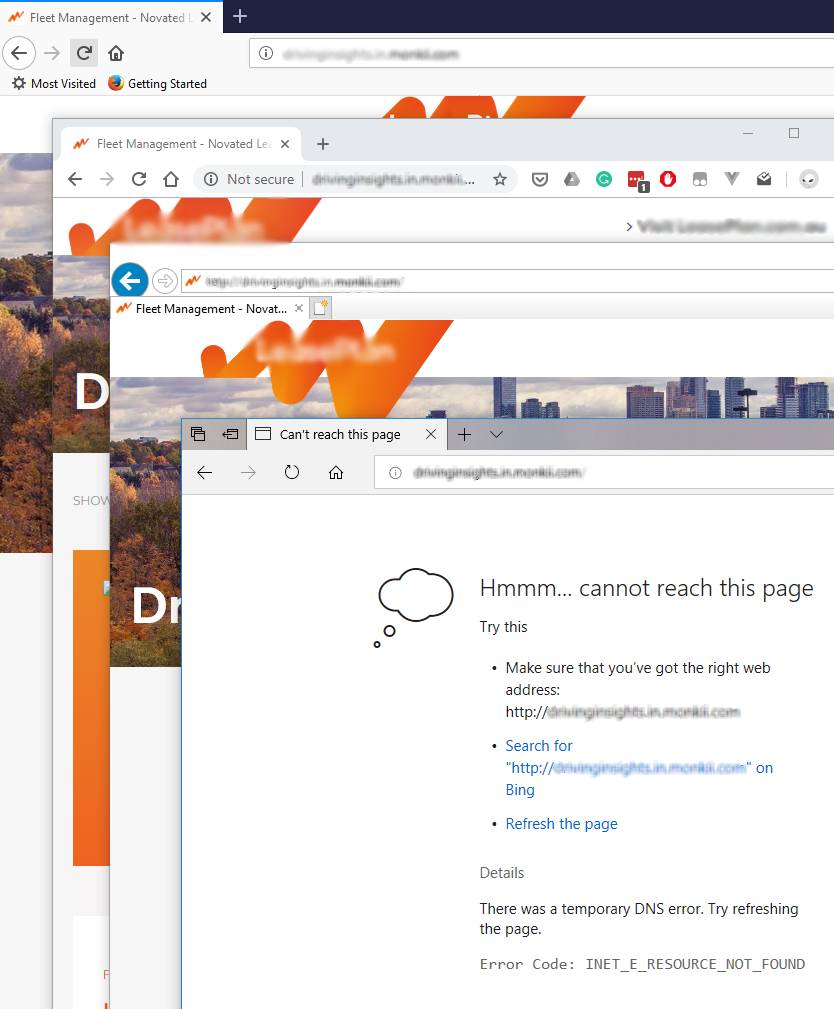
公司的项目会把 Development 阶段的网站用 Vagrant 管理,托管在 VirtualBox 虚拟机中。虚拟机使用的网络接口是 Host-Only 类型的,只允许主机访问虚拟机,而阻止内网中其它设备访问虚拟机(区别于桥接)。同时方便同一个主机上多个虚拟机之间组网通讯(提供 DHCP)。最近升级了 VirtualBox 到最新版 6.0 ,但遇到了个怪事。所有的浏览器都能正常打开虚拟机中的网站,唯独 Edge 浏览器不行:
issue-preview

访问网址会出现 DNS 错误的页面,并显示如下信息:

There was a temporary DNS error. Try refreshing the page.
Error Code: INET_E_RESOURCE_NOT_FOUND

发生临时 DNS 错误。请尝试刷新页面。
错误代码: INET_E_RESOURCE_NOT_FOUND

¶Solution

经过一番检索,试了好几种方法都没有搞定。最终在这个帖子里找了解决方案:

You can workaround this issue by changing your VirtualBox Host-Only Ethernet Adapter’s *NdisDeviceType to 0 and rebooting. You can find the key in Computer\HKEY_LOCAL_MACHINE\SYSTEM\CurrentControlSet\Control\Class\{4d36e972-e325-11ce-bfc1-08002be10318}\00XX. The downside to this is that now you’ll have an “Unidentified Network” in your Network and Sharing Center. It’s also managed by Windows Firewall now and by default it is in the Public Profile and it can’t be really changed easily.

– Jani L. Oct 4, 2017

如果你有多个 VirtualBox 网络接口,需要找到正确的网络适配器,可以在 Control Panel\All Control Panel Items\Network Connections 目录下右键相应的网络适配器,然后在 Properties > Networking > Configure... > EventsInformation 文本框架找到如下描述:

Driver Management has concluded the process to add Service
VBoxNetAdp for Device Instance ID ROOT\NET\0000 with the following
status: 0.

其中的 ROOT\NET\0000 应与注册表中 {4d36e972-e325-11ce-bfc1-08002be10318}\00XX\DeviceInstanceID 的键值相对应。则 00XX 就是你要修改的那个网络适配器了。

接下来要做的就是将该路径下键名为 *NdisDeviceType 的键值由 1 改为 0,并重启主机即可。

¶How / Why

MSDN 对 *NdisDeviceType 这个键的解释可以在这里找到。简而言之就是 UWP(Universal Windows Platform)程序会检查网络适配器的这个键来判断其是否是一个可以联网的网络接口,然后决定是否使用它。

IE 和其它浏览器不是使用 UWP 框架开发的,所以不受影响。而 Edge 正好躺枪。


本文在以下环境中测试

  • Windows 10 Pro(Version 1803, OS Build 17134.885)
  • Microsoft Edge 42.17134.1.0
  • Version 6.0.10 r132072 (Qt5.6.2)