



惯性聚合 高效追踪和阅读你感兴趣的博客、新闻、科技资讯
阅读原文 在惯性聚合中打开

推荐订阅源

WordPress大学
WordPress大学
MyScale Blog
MyScale Blog
freeCodeCamp Programming Tutorials: Python, JavaScript, Git & More
人人都是产品经理
人人都是产品经理
C
Check Point Blog
宝玉的分享
宝玉的分享
B
Blog RSS Feed
博客园 - 三生石上(FineUI控件)
量子位
Martin Fowler
Martin Fowler
酷 壳 – CoolShell
酷 壳 – CoolShell
Jina AI
Jina AI
IT之家
IT之家
阮一峰的网络日志
阮一峰的网络日志
博客园 - 叶小钗
J
Java Code Geeks
The Cloudflare Blog
Cyber Security Advisories - MS-ISAC
腾讯CDC
P
Proofpoint News Feed
美团技术团队
H
Help Net Security
B
Blog
博客园_首页

PetaPixel

Polaroid Go Generation 3 Is the World’s Smallest Instant Analog Camera China Lucky’s New Color C200 Film Has Arrived in the US and Looks Great Chinese Private Equity Firm HSG Emerges as Leading Bidder to Buy Stake in Leica Camera Leica Cine Compact 1 Projector Promises a Plug-and-Play Home Theater Experience There Are No Photos Allowed at the Studio Ghibli Amusement Park Xiaomi 17T Pro Review: High-End Photography Without the Flagship Price Photographer Builds the iPhone Camera App He Always Wanted New $50 Y2K-Inspired Compact Camera Looks Thin In Form and Function Save Big on Macro Photography Essentials Nvidia’s New Chip Aims to Upend the Creative Laptop Market Japanese Zoo Considering Photo Ban After US Tourists Invade Punch the Monkey’s Enclosure Years in the Making, Glass Imaging Is Delivering on its Promise to Transform Smartphone Photography Gen Z are Five Times More Likely to Have a Plan for Photos After Death Long Island Beach Where Marilyn Monroe Posed for Iconic Photos Honored With Plaque Camera Trap Captures One-Armed Gorilla Raising Newborn in the Wild Photographer’s Camera Gear Gets Jet Washed by 20-Foot Wave in Tahiti Photojournalists Say ICE Agents Targeted Them and Their Cameras at Delaney Hall Protests Model Sues Fashion Brand After it AI-Generated Pictures of Her Easy Macro Photography Tips for Incredible Close-Up Photos The Myth of Intent in Photography Samsung’s Competitors Have a Better Samsung Camera Than Samsung Does Thypoch Simera 50mm f/1.4 Review: Crisp and Clean The AI Film ‘Dreams of Violets’ Is How You Get Me to Hate Movies Photographer Documents the Vanishing Wildlife of the ‘American Amazon’ Press Photographer Releases 30-Year Archive of Iconic Celebrity Images Photographer Granted Rare Access to Cambridge’s May Balls for 40 Years Atmos Is a Weather App By Photographers, for Photographers A Feature-Length AI-Generated ‘Live Action’ Movie Is Premiering at Tribeca for Some Reason Despite Being a Member, YoloLiv Isn’t Complying with the Micro Four Thirds Standard ArcBlue C42 Is the World’s First Smart Full-Frame Astrophotography System
You Can Now Fly Around Google Earth in an Airplane
Matt Growcoot · 2026-06-15 · via PetaPixel

Google Earth has introduced a flight simulator mode, enabling users to fly through the vast amount of aerial photography data the company has amassed.

Google rolled out the new feature on Friday to all global users, and the best part is that anyone can use it in a web browser — no app required.

“We’ve recently added many of our most powerful professional desktop features to web,” Google writes on X. “Elevation profiles, new import types, but there’s always been one other feature you’ve been asking us to add to the web version of Google Earth, just for fun…”
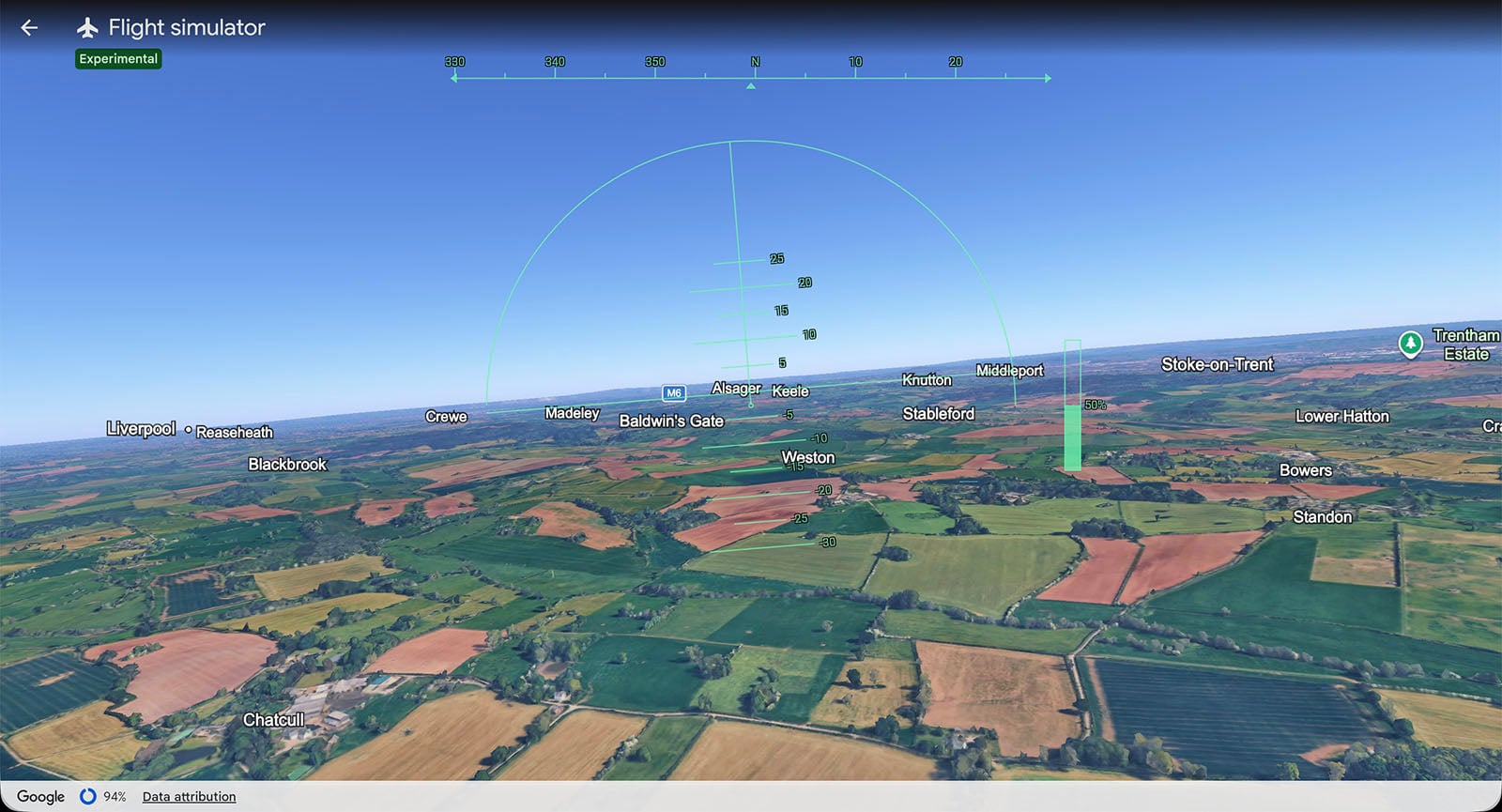
A screenshot of a flight simulator view over a patchwork of green and brown fields, with village names labeled. Navigation graphics and a horizon line are displayed on the screen.
PetaPixel took the plane out for a spin. It’s easy to try the new feature.

Flying around the world has always been a fun thing to do virtually. Microsoft Flight Simulator is one of the longest-running video game series of all time and has a loyal following. Some people have even built plane cockpits in their homes to play the game in.

The flight simulator mode on Google Earth was previously available as a hidden feature on the app. But it required downloading the software to the user’s computer. This new, experimental version is free to play using just a web browser, mouse, and keyboard.

How to Use Google Earth’s Flight Simulator Mode

Head on over to the Google Earth webpage, and select “Explore Earth.” Then find “Tools” on the toolbar, scroll down, and select “Flight Simulator.”

From there, you can fly anywhere on planet Earth. The aircraft can be controlled by using the up, down, left, and right arrow keys on your keyboard. The speed of the plane can be controlled by using the Page Up and Page Down keys — if they’re on your keyboard. Alternatively, you can just click on the power gauge on the right-hand side of the screen.

Users have complained that it is a little tricky to control. Ff the plane crashes, then you can simply restart. PetaPixel had a quick go on the flight simulator and can confirm it isn’t easy to maneuver. There’s a bit of trial and error involved and newbies might find themselves in a permanent barrel roll on their first try.

PetaPixel articles may include affiliate links; if you buy something through such a link, PetaPixel may earn a commission.

Love PetaPixel? Go Premium.

PetaPixel is the world’s largest independent photography publication and we’re only able to continue our work with your help. Become a PetaPixel Member now and support our mission to bring you regular, high-quality reviews, features, news, and more.

  • Remove banner ads
  • Gain access to full-resolution RAW and JPEG Sample Galleries
  • Get 5% off orders from KEH.com
  • Get a $15 coupon to spend at Moment
  • Get 10% off lighting equipment from FJ Westcott
  • Get 10% off film development, scanning, and printing from Blue Moon Camera and Machine