

惯性聚合 高效追踪和阅读你感兴趣的博客、新闻、科技资讯
阅读原文 在惯性聚合中打开

推荐订阅源

S
Security Affairs
W
WeLiveSecurity
S
Security Archives - TechRepublic
L
LINUX DO - 最新话题
L
LINUX DO - 热门话题
S
Schneier on Security
P
Proofpoint News Feed
P
Privacy International News Feed
Help Net Security
Help Net Security
MongoDB | Blog
MongoDB | Blog
Hacker News - Newest:
Hacker News - Newest: "LLM"
TaoSecurity Blog
TaoSecurity Blog
Threat Intelligence Blog | Flashpoint
让小产品的独立变现更简单 - ezindie.com
Scott Helme
Scott Helme
K
Kaspersky official blog
K
KPMG report finds enterprise disconnect between AI and its ROI | CIO
雷峰网
雷峰网
The Last Watchdog
The Last Watchdog
博客园 - Franky
H
Help Net Security
cs.AI updates on arXiv.org
Y
Y Combinator Blog
Recent Commits to openclaw:main
V
Visual Studio Blog
N
Netflix TechBlog - Medium
M
MIT News - Artificial intelligence
小众软件
小众软件
博客园 - 司徒正美
博客园 - 叶小钗
N
News | PayPal Newsroom
GbyAI
GbyAI
H
Heimdal Security Blog
Hacker News: Ask HN
Hacker News: Ask HN
人人都是产品经理
人人都是产品经理
Engineering at Meta
Engineering at Meta
V
V2EX - 技术
Simon Willison's Weblog
T
Tor Project blog
F
Fortinet All Blogs
美团技术团队
Last Week in AI
Last Week in AI
N
News and Events Feed by Topic
C
Cyber Attacks, Cyber Crime and Cyber Security
宝玉的分享
宝玉的分享
T
Threatpost
Cyber Security Advisories - MS-ISAC
钛媒体:引领未来商业与生活新知
钛媒体:引领未来商业与生活新知
Cisco Talos Blog
Cisco Talos Blog
PCI Perspectives
PCI Perspectives

PetaPixel

Polaroid Go Generation 3 Is the World’s Smallest Instant Analog Camera China Lucky’s New Color C200 Film Has Arrived in the US and Looks Great Chinese Private Equity Firm HSG Emerges as Leading Bidder to Buy Stake in Leica Camera Leica Cine Compact 1 Projector Promises a Plug-and-Play Home Theater Experience There Are No Photos Allowed at the Studio Ghibli Amusement Park Xiaomi 17T Pro Review: High-End Photography Without the Flagship Price Photographer Builds the iPhone Camera App He Always Wanted New $50 Y2K-Inspired Compact Camera Looks Thin In Form and Function Save Big on Macro Photography Essentials Nvidia’s New Chip Aims to Upend the Creative Laptop Market Japanese Zoo Considering Photo Ban After US Tourists Invade Punch the Monkey’s Enclosure Years in the Making, Glass Imaging Is Delivering on its Promise to Transform Smartphone Photography Gen Z are Five Times More Likely to Have a Plan for Photos After Death Long Island Beach Where Marilyn Monroe Posed for Iconic Photos Honored With Plaque Camera Trap Captures One-Armed Gorilla Raising Newborn in the Wild Photographer’s Camera Gear Gets Jet Washed by 20-Foot Wave in Tahiti Photojournalists Say ICE Agents Targeted Them and Their Cameras at Delaney Hall Protests Model Sues Fashion Brand After it AI-Generated Pictures of Her Easy Macro Photography Tips for Incredible Close-Up Photos The Myth of Intent in Photography Samsung’s Competitors Have a Better Samsung Camera Than Samsung Does Thypoch Simera 50mm f/1.4 Review: Crisp and Clean The AI Film ‘Dreams of Violets’ Is How You Get Me to Hate Movies Photographer Documents the Vanishing Wildlife of the ‘American Amazon’ Press Photographer Releases 30-Year Archive of Iconic Celebrity Images Photographer Granted Rare Access to Cambridge’s May Balls for 40 Years Atmos Is a Weather App By Photographers, for Photographers A Feature-Length AI-Generated ‘Live Action’ Movie Is Premiering at Tribeca for Some Reason Despite Being a Member, YoloLiv Isn’t Complying with the Micro Four Thirds Standard ArcBlue C42 Is the World’s First Smart Full-Frame Astrophotography System Film Friday: Kodak TMax 400 Is Far From a One-Trick Pony Sihoo Doro C300 Pro V2 Ergonomic Chair with Full-Body Adaptive Support Keeps You Comfortable and Creative Unknown Photographer Who Took First Royal Portrait Honored With Blue Plaque 15 of the Best Photos Smithsonian Just Added to Unsplash for Free The Challenge of Photographing Mountain Gorillas in the Mist of an Impenetrable Forest This Javelin Thrower Looks Like He is Impaling Himself in Crazy Optical Illusion Photo Capture One’s Private Equity Owner Is Trying to Sell It: Report Thypoch’s New Simera-C 16mm T1.9 Is its Widest Cinema Lens Yet Employee vs Contractor: What Photographers Need to Know Nat Geo’s New Documentary, ‘Time and Water,’ Tells a Story You’re Still Writing Massive Sample Gallery Update: Lumix L10, Sony a7R VI, and More Crafty Lens Cap for Leica M Hides AirTags Polaroid’s Limited Edition Purple Film Gives ‘Waste a Second Life’ Thypoch Voyager 24-50mm f/2.8 Review: Autofocus Zoom for a Bargain Xiaomi’s 17T Series Phones Feature Leica Tech and a New 5x Camera People Don’t Believe This Smartphone Wildlife Photographer’s Images are Real Leica’s Brand-New Metal Gray Paint Finish Looks Very Stylish Independent Audit Finds No Security Basis for Restricting DJI in the USA Witnesses in Nick Ut’s Defamation Trial Against Netflix Include ‘Napalm Girl’ Herself 70mm Film Festival to Show in Palm Springs This Weeekend Google’s New Gemini Omni AI Video Model Can Do Crazy Things Photographers Are Livid About a Photo Festival’s Camera-Busting Rage Room Capture One to Increase All Product Prices By 6% One-of-a-Kind Leica Rifle Camera Used by the Luftwaffe Could Fetch $160,000 The Ultimate ‘First Camera Purchase’ Accessory Tier List | The PetaPixel Podcast 8 Editing Problems Nik Collection 9 Actually Solves Halide Mark III Promises ‘Most Beautiful Photos Possible’ on iPhone New Film Will Chronicle the Life and Work of Brazilian Photographer Claudia Andujar Virginia Museum of Fine Arts Receives Major Gift of Nearly 2,000 Important Photographs Ilford and Expired Film Club Get Into the World Cup Spirit Photographer Arrested for Allegedly Failing to Deliver Quinceañera Photos Acer’s Three New Monitors Are Made for Photographers and Videographers A Streaming Service Made Up Entirely of AI-Generated Shows is About to Launch The Incredible Photography of ‘Obsession’ Spectacular Moment Meteor Explodes Behind Erupting Volcano Caught on Camera VSCO Terms of Use Explained: Why It Says It Isn’t Stealing Your Photos Calibrite Colorimeter Is the First That Hardware Calibrates Apple Displays How a Photographer Became a Writer to Tell an Even More Powerful Story Imagen Is Offering Full AI Editing Access for $10, Just In Time for Peak Season Misunderstanding of Fujifilm Film Announcement Causes Panic on Social Media Viltrox Vintage Z1 Pro Flash Offers Retro Style and Modern Performance for Under $60 Pope Leo Warns AI Images Are a ‘Powerful Amplifier’ of Disinformation Footage Reveals Newly Discovered Blue Octopus No Bigger Than a Golf Ball Wedding Photographer Seriously Injured After Being Stabbed by Guest Photographer Takes One in 1.7 Million Photo of Airplane Transiting the Sun Photographer Bitten by ‘Shark or Sea Lion’ During Surf Competition NYC Gallery Says it Has ‘Every Right’ to Create AI Version of Iconic Ansel Adams Photo Sony 100-400mm f/4.5 GM OSS Review: Zoom Zoom NYC Gallery Sold an AI-Generated Ansel Adams Photo Without Permission The Story Behind The Last Photograph of Oscar Wilde on His Death Bed I Fundamentally Disagree With Canon Building a Wall Between its V and C Series Cameras Underwater Cameras Capture Seals Resting in Secret ‘Bubble Caves’ Student Captures Cosmic Radiation on Film by Sending Negative to Space The Enduring Mystery Behind Iconic American Photograph ‘Lunch on a Beam’ The Hidden World of Insect Wings Revealed by Macro Photographer These Earbuds Have Tiny Cameras That Take Photos and Let Users Talk to AI About What They See Yashica Brings Beloved Characters to the Cheap Keychain Camera Segment Fujifilm Has Over 40 New Lens Ideas: ‘It’s Difficult to Convey How Much We Care About Our Lenses’ Why So Many Watch Enthusiasts Love One Specific Camera The 25 Best Memorial Day Deals for Photographers Thypoch’s Stylish Ksana 35mm f/2 Prime Promises 1980s-Inspired Flare Lyft Driver Tries to Scam Customer with AI-Generated Photo of ‘Damage’ to Vehicle What Does It Look to Take a Photo With Half a Lens? First Ever Photograph of ‘Rusty Lark’ Bird Thought to be Extinct for 94 Years Cannes Photographer Reveals His Trick of Getting Hollywood Stars to Look at His Camera IMAX Stock Soars as Takeover Talks Revealed Before the Frame: A Filmmaker’s Approach to Street Photography Scientists Are Building a Camera System to Monitor Zoo Animals’ Health MLS Game To Be First Pro Sports Broadcast Shot Entirely With iPhone Photographers Can Build Their Very Own Keychain Camera at Home
How to Leverage Linear Camera Profiles in Your Editing Workflow
Guest Author · 2026-06-14 · via PetaPixel

Linear Camera Profiles are one of those things that have been floating around the Lightroom community forever, but only a few people seem to use them. And while there are a lot of video tutorials on how to make a linear camera profile for your camera, there is almost nothing on how to use them in your editing workflow.

So over the last month, I took it upon myself to figure this out, and I think I finally have an editing method worth sharing. And of course, all this comes from the world of video editing. Where data is often captured with S-Log or other similar flat-looking gamma curves, all the color grading and editing is done on that flat-looking image, and then an output gamma transform is applied to get the final look.

The same idea can be applied to photography. Instead of editing an image that already has a contrast curve baked in, we work on a flatter, more linear starting point and only apply the final contrast and tonal shaping at the end. This gives us more control and also has the potential to give us much better color grades because of the way color mixes with the contrast curve.

What are Linear Camera Profiles?

A linear camera profile in Adobe Lightroom is just an alternative to “Adobe Color” or “Camera Standard” camera profiles that removes the built-in gamma curve and shows our RAW data in a nearly “straight” (linear) tonal response, aka it makes our photos look mostly grey and under-exposed. But the point of shooting RAW is not really to have a nice preview. We want the data, and working with a linear camera profile will give us better access to the raw data our cameras have captured. Just that our cameras apply a gamma curve to that data, so we can have a better preview of how our images are going to look.

But when editing, we don’t have to use the same gamma curve, and we can make our own. And if that’s the plan, it is probably worth switching our cameras to a more neutral profile while shooting as well for a better preview, but more importantly, for a more accurate live histogram that is not strongly influenced by the baked-in gamma curve.

Four side-by-side graphs compare tone curves labeled: linear camera profile, adobe standard profile, sony standard profile, and sony clear profile. The latter three feature curved red lines, while the first shows a diagonal line.
Profiles based on a Sony a7 III DNG file

These curves mean overall brighter-looking images, rolled-off highlights, shadow lifting, and lots of contrast in the shadows. And they are fine if we want our photos to have a clean, contrasty digital look. But since I want my photos to have a more filmic, cinema-like look, they are in the way most of the time. And also because the usual gamma curve has that massive bump in the highlights, highlight recovery becomes a bit more difficult in digital photography, and we can get into ugly artifacting while fighting the gamma curve. Compared to this, a Linear Camera Profile with no predefined gamma curve can offer way more flexibility when editing. But the one thing that a linear profile won’t give us is more dynamic range. Our sensor can only capture a certain amount of dynamic range, and no matter what camera profile we use, that won’t change. Linear Camera Profiles can only offer us more control over the data that the sensor in our cameras has already captured.

But “with great power comes great responsibility,” and in our case, this means more time spent editing and more complex workflows, so let’s learn how to make one of these profiles.

How to Make a Linear Camera Profile

Now that you are hyped about linear camera profiles and want to try editing with them, I have some bad news for you. You will first have to create one for every camera that you own and use regularly. But don’t you worry; it’s pretty simple, and there are a ton of videos out there on how to do this.

  • Download Adobe DNG Profile Editor
  • Export a RAW file as DNG from Adobe Lightroom
  • Open it in Adobe DNG Profile Editor
  • Go to Tone Curve → set it to a linear
  • Export the Linear profile you just created
  • Import it into Lightroom using the + in the profile browser
  • Restart Lightroom and mark it as a favorite camera profile

My New Workflow

Now comes the fun part. The new editing workflow that I developed tha is inspired by the way colorists use nodes in DaVinci Resolve. But before we start, keep in mind that video editing workflows are not linear.
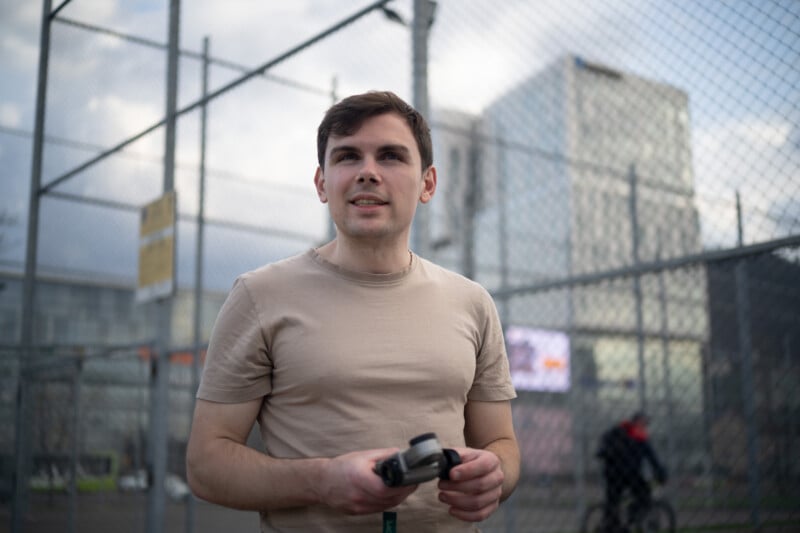
A man in a beige t-shirt stands outside holding a camera, with a chain-link fence and modern buildings in the background. A cyclist passes by in the distance. The scene appears to be in an urban environment.
Before

What matters more is understanding the order in which the software applies edits to the image, rather than the order in which we actually pull on the sliders. And the two can be quite different. In Lightroom, for example, the Tone Curve from the Curves panel is applied first, followed by the curve that’s built into the camera profile. After that, any curves created inside masks are applied on top of all the other edits we make in the standard editing panels in the order in which we create the masks (bottom to top).
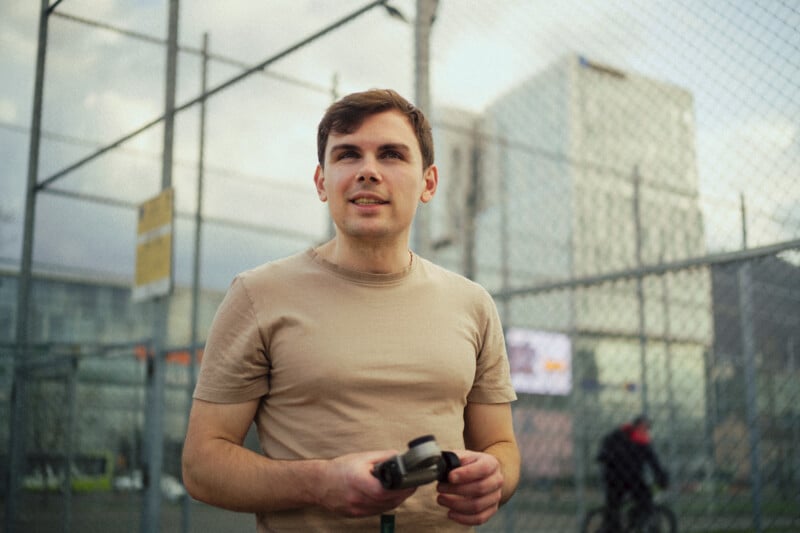
A young man in a beige t-shirt holds a game controller while standing on an outdoor basketball court with metal fencing. Modern glass buildings and a cyclist are visible in the background.
After; Film Emulation edit based on Linear Camera Profile using Color Response Curves

I usually start by addressing local exposure problems in my photo using my False Color Camera profile to spot those, and a bunch of masks to address them. I also like to set a proper white balance before switching to the Linear Camera Profile, especially if the photo has any kind of strong color cast, but at this step in the edit, I won’t do any type of color grading work or massive exposure adjustments.
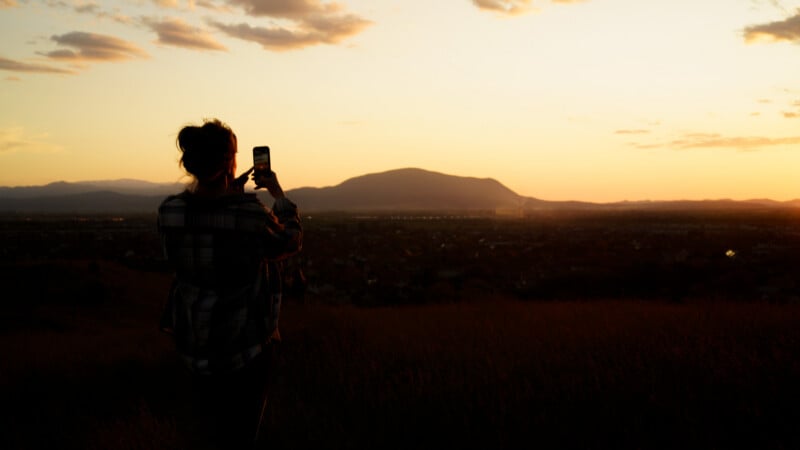
A person stands in a field at sunset, taking a photo with a phone. The sky is orange and yellow, with a few clouds, and a mountain is visible in the distance.
Before

Next, I’ll switch to the Linear Camera Profile and then, based on the content of the image, I will use the Exposure, Blacks, and Whites sliders to get a balanced exposure based on the histogram. Usually, at this step, I’m looking to open up my image and get a somewhat-centered exposure on the histogram while making sure the black and white points sit reasonably close to the left and right edges without clipping. Also, if needed, I’ll use the Shadows and Highlights sliders to recover more detail from the image data, but I try not to push them too far to avoid an HDR-looking result.

And right afterwards, I will create a “select all” mask (a Luminance Range mask that will include the entire image). Here I use the tone curve tool in the mask to create my own gamma curve that will be the equivalent of an output CST in DaVinci Resolve. And the way this new gamma curve will look can vary drastically based on the content of the photo and the artistic direction in which I’m going with my edit. For example, when doing film emulation, I usually go for wide filmic shoulders with large filmic shoulders, or, by contrast, if I am going for a clean modern look, I will go for a more moderate S curve that has the pivot point closer to middle grey. But generally, I do try to keep the curve as smooth as possible by using as few points as possible for smoother gradients.
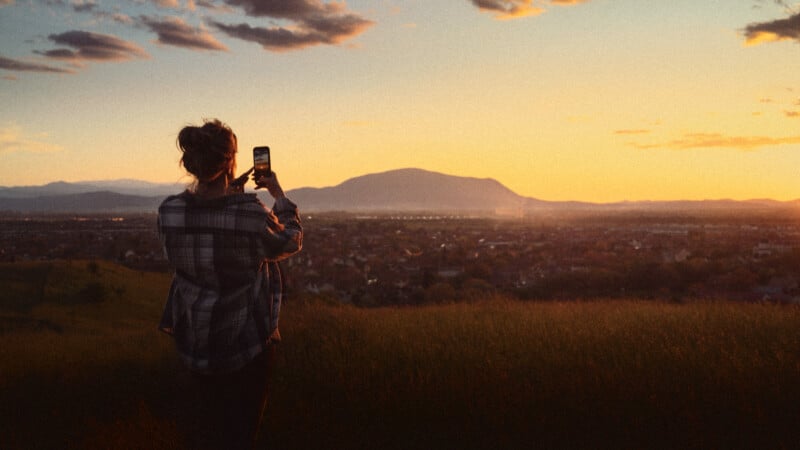
A person standing in a grassy field takes a photo of a scenic sunset over a city with mountains in the background, the sky glowing with orange and yellow hues.
After; Film Emulation edit based on Linear Camera Profile using Color Response Curves

With the custom gamma curve set, I move on to my usual color grading. Most of the time, I start with Color Response Curves, adjust the white balance to match the mood I’m going for, and then build the look further using the color wheels and HSL panel. At this stage, I also add grain, introduce subtle effects like lens sharpness falloff, and use masks to reshape light and color across the image. If I end up using a lot of tone curve masks while doing so, I’ll often copy the gamma curve, remove the original masks that I created, and paste the same settings into a new “Select All” mask. This mask now sits on top of the entire stack, so Lightroom applies it as the final step in the processing pipeline. This might be a bit extra on my side, but I like to make sure that I’m not messing up my color gradients with local masking.

Pros and Cons of This Workflow

Using the proposed Linear Camera Profile workflow is sometimes cumbersome, and I truly hate that Lightroom does not allow us to reorder masks by dragging and dropping them. But after more than a month of using linear camera profiles daily, I feel that they truly opened up more possibilities for my edits. I no longer feel like I am fighting to keep my images from getting crunchy when adding contrast or playing around with aggressive S curves, and the resulting photos often feel like they have way more details in them.
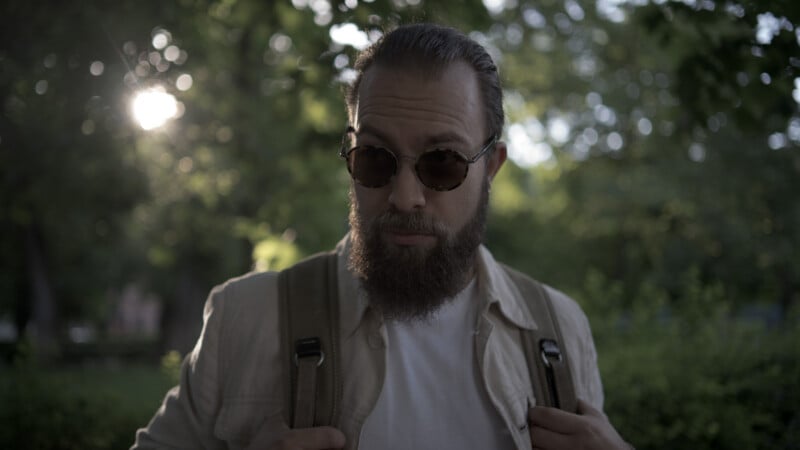
A bearded man wearing sunglasses and a light jacket stands outdoors, holding backpack straps, with sunlight and green foliage in the background.
Before

In terms of color, I also feel like this method gives smoother results because all the grading is done on a much flatter image, and then the saturation shift from the gamma curve lifts everything in a more balanced way. I notice this especially with the color wheels, where normally pushing them too far can easily lead to muddy tones and ugly color contamination. But when they sit under the S curve in my mask-based gamma setup, the saturation and contrast are distributed more naturally, so the color grade ends up being more vibrant in the midtones instead of pumping lots of color into the extreme shadows or very bright highlights. And I truly believe this helps me achieve a more natural representation of color.
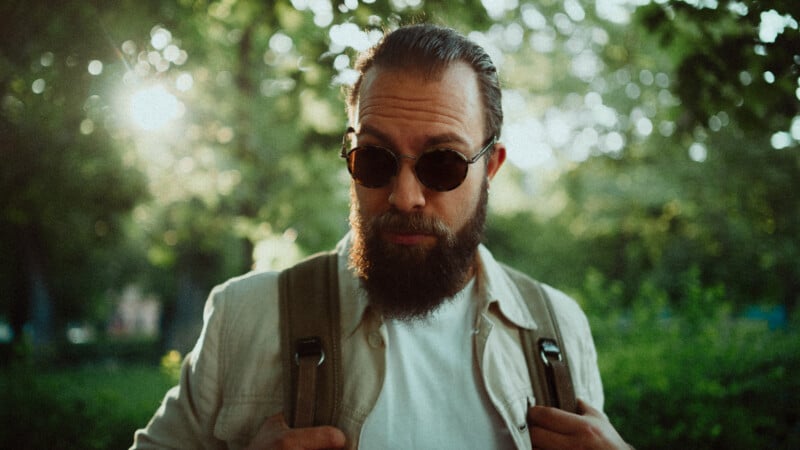
A bearded man wearing sunglasses and a light jacket stands outdoors, holding backpack straps, with sunlight and green foliage in the background.
After; Film Emulation edit based on Linear Camera Profile using Color Response Curves

So, in conclusion, because of how time-consuming it is to work with a Linear Camera Profile, I can’t really recommend this approach for every one of your photos. For most images, Lightroom’s standard profiles already do a good enough job and will get you to a finished result much faster. And honestly, I suspect the experience will only get better over time. I’ve already started building a library of pre-made gamma masks that I can apply on the fly, which removes a lot of the friction.

But for those moments when I need maximum control over tonal response, highlight roll-off, color separation, and overall image rendering, Linear Camera Profiles will be my go-to approach. It takes longer, but it also gives me a level of flexibility that feels much closer to a professional color grading workflow than a traditional Lightroom edit.


About the author: Vlad Moldovean is a photographer and visual artist from Brasov, Romania. The opinions expressed in this article are solely those of the author. You can find more of his work on his website, Facebook, and Instagram. This article was also published here.