




Many credential leaks start with a developer who needs a credential, doesn’t have a good place to put it, and improvises. It lands in an over-scoped CI/CD variable, a config file, or a .env committed “just for a moment.”
GitLab Secrets Manager, now in public beta with GitLab 19.0, keeps credentials in the same platform that runs your code and pipelines. Each secret is scoped to the jobs that need it and governed by the access controls you already use. Fewer secrets end up in the wrong place, and if one leaks, security and engineering teams can experience less disruption.
Developers often default to placing secrets in CI/CD variables. Set the variable at the project or group level, mask the value, and update the pipeline. From there, the value is injected into every job, and anyone with pipeline access can read it. This pattern inverts least privilege but keeps the build running.
The usual fix is a standalone vault. While this approach gets the secrets out of CI/CD config, it adds a permanent operational tax: another system to authenticate, another access model to maintain, and another audit stream to correlate during an incident.
GitLab Secrets Manager is a native GitLab capability built on OpenBao. It’s already part of your GitLab platform, so credentials stay within your existing project and group structure.
Developers can move a secret out of CI/CD variables by declaring it in .gitlab-ci.yml with the secrets: keyword:
      deploy:
  secrets:
    DATABASE_PASSWORD:
      gitlab_secrets_manager:
        name: db-password
  script:
    - deploy --password $DATABASE_PASSWORD
By default, GitLab writes the secret to a temporary file and provides its path as an environment variable scoped to that job. Passing the path instead of the value can reduce exposure in subprocesses, crash dumps, and telemetry.
A standalone secrets manager forces you to maintain two access models in parallel. Every team, application, and permission boundary you’ve already modeled in GitLab must be reconstructed in the secrets tool, and kept in sync as people join, change roles, and depart. When the two systems drift — a departed engineer’s credentials linger or an application accumulates access it no longer needs — the gaps become exploitable.
Secrets Manager uses your existing group and project structure as the isolation boundary for secrets, with no separate structure to build and maintain. You set read, create, update, and delete permissions per user, group, or role using the same controls you use for code. Secrets created at the group level are available to every project nested beneath it, so common credentials are defined once and inherited where they’re needed. When someone leaves or is removed from the project, they immediately lose access to its secrets.
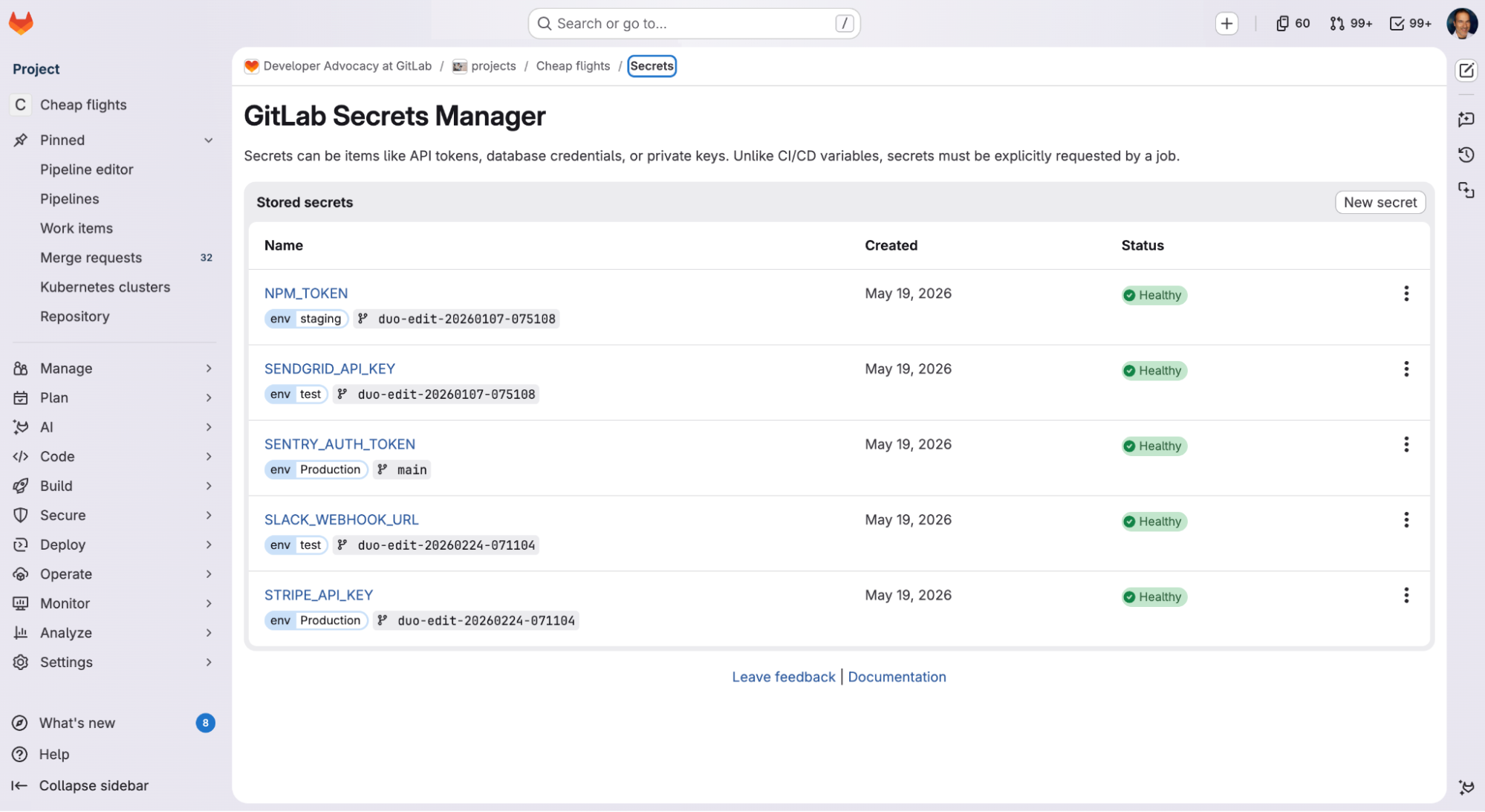 Project credentials stored in GitLab Secrets Manager
When the Axios npm package was compromised in March, organizations running a poisoned version had to operate as if every credential their pipelines touched was in an attacker’s hands. They scrambled to rotate exposed secrets and audit every system those secrets could reach.
The wider a secret’s scope, the more work it takes to remediate when exposed — and developers absorb that cost alongside the security team, in the form of blocked merges and broken builds. Narrow secret scoping shrinks cleanup to the systems a compromised credential was actually authorized to reach.
Secrets Manager limits the blast radius of compromised secrets by scoping each credential to the job that needs it. It decides which jobs can pull a given secret based on three job attributes: the environment it targets, the branch it runs on, and whether that branch is protected. Wildcards work on environment and branch, so you don’t have to enumerate every case. Because scopes are defined by job attributes GitLab already tracks, there’s no second system to reconcile with your pipeline.
When a job runs, it requests the value of the secret it needs. The secrets backend verifies the job’s identity, then checks its branch and environment against the scope rules before returning the value. You can combine conditions, so a single rule can require a job to run on a protected branch and target a production/* environment before it receives credentials. When the job ends, the secret is discarded. Nothing persists to the runner, and the job logs are masked. A CI variable, by contrast, remains readable in your project config indefinitely.
When a secret leaks or a dependency gets compromised, responders must trace the credential through every pipeline and job that used it. That sparks an urgent process of stitching together logs from the CI system, the secrets tool, the identity provider, and wherever else the credential touched.
GitLab Secrets Manager logs the create, update, and delete events for project- and group-level secrets to the same audit trail as the rest of the platform, so changes to your secrets inventory live alongside the rest of your governance record. Secret reads from CI/CD pipelines stream as audit events with originating pipeline and job IDs, so responders can trace where a secret was used without manually correlating data across systems. Audit logging is available on self-managed deployments today, with GitLab.com support anticipated to arrive during the public beta program.
GitLab Secrets Manager is in public beta for Premium and Ultimate users on GitLab.com and self-managed deployments, with GitLab Dedicated support arriving soon.
On GitLab.com, opt in and create your first secret. On self-managed deployments, follow the installation steps and learn how to use Secrets Manager as a developer.
Our integrations for HashiCorp Vault, AWS Secrets Manager, Azure Key Vault, and Google Cloud Secret Manager work alongside GitLab Secrets Manager, so you can adopt it on your own timeline.
Secrets Manager is free during the beta period. Once generally available, it will be a paid feature billed through GitLab Credits. You’ll need to opt in before anything is charged, and we’ll give you advance notice ahead of general availability.
Once you’ve tried Secrets Manager, let us know what you think so your feedback can shape the capability before general availability.
此内容由惯性聚合(RSS阅读器)自动聚合整理,仅供阅读参考。 原文来自 — 版权归原作者所有。