

惯性聚合 高效追踪和阅读你感兴趣的博客、新闻、科技资讯
阅读原文 在惯性聚合中打开

推荐订阅源

N
Netflix TechBlog - Medium
Microsoft Azure Blog
罗磊的独立博客
博客园 - 三生石上(FineUI控件)
aimingoo的专栏
aimingoo的专栏
B
Blog RSS Feed
V
Visual Studio Blog
P
Proofpoint News Feed
云风的 BLOG
云风的 BLOG
博客园 - 【当耐特】
大猫的无限游戏
大猫的无限游戏
Application and Cybersecurity Blog
C
Cyber Attacks, Cyber Crime and Cyber Security
The Cloudflare Blog
B
Blog
D
Darknet – Hacking Tools, Hacker News & Cyber Security
Apple Machine Learning Research
M
MIT News - Artificial intelligence
Know Your Adversary
Know Your Adversary
I
InfoQ
T
The Exploit Database - CXSecurity.com
V
Vulnerabilities – Threatpost
C
Cisco Blogs
Spread Privacy
Spread Privacy
钛媒体:引领未来商业与生活新知
钛媒体:引领未来商业与生活新知
P
Palo Alto Networks Blog
Simon Willison's Weblog
月光博客
月光博客
博客园 - Franky
Project Zero
Project Zero
G
Google Developers Blog
S
SegmentFault 最新的问题
博客园 - 聂微东
P
Privacy & Cybersecurity Law Blog
The GitHub Blog
The GitHub Blog
阮一峰的网络日志
阮一峰的网络日志
P
Privacy International News Feed
T
Threat Research - Cisco Blogs
S
Schneier on Security
Microsoft Security Blog
G
GRAHAM CLULEY
S
Security @ Cisco Blogs
Martin Fowler
Martin Fowler
A
Arctic Wolf
T
Tenable Blog
L
LINUX DO - 最新话题
TaoSecurity Blog
TaoSecurity Blog
Hugging Face - Blog
Hugging Face - Blog
有赞技术团队
有赞技术团队
让小产品的独立变现更简单 - ezindie.com

Deno

Deno 2.8 | Deno Claw Patrol: an open-source security firewall for agents | Deno Fresh 2.3: Zero JS by default, View Transitions, and Temporal support | Deno Deno 2.7: Temporal API, Windows ARM, and npm overrides | Deno Build a dinosaur runner game with Deno, pt. 6 | Deno Build a dinosaur runner game with Deno, pt. 5 | Deno Deno Deploy is Generally Available | Deno Introducing Deno Sandbox | Deno Build a dinosaur runner game with Deno, pt. 4 | Deno Build a dinosaur runner game with Deno, pt. 3 | Deno Build a dinosaur runner game with Deno, pt. 2 | Deno React / Next.js Denial-of-Service Vulnerability: Deno Deploy users protected | Deno Deno 2.6: dx is the new npx | Deno Build a dinosaur runner game with Deno, pt. 1 | Deno React Server Functions / Next.js Vulnerability: Deno Deploy users protected | Deno My highlights from the new Deno Deploy | Deno Deno's Other Open Source Projects | Deno How Deno protects against npm exploits | Deno Help Us Raise $200k to Free JavaScript from Oracle | Deno Deno 2.5: Permissions in the config file | Deno Fresh 2.0 Graduates to Beta, Adds Vite Support | Deno Deno 2.4: deno bundle is back | Deno JavaScript™ Trademark Update | Deno What's coming to JavaScript | Deno A brief history of JavaScript | Deno Reports of Deno's Demise Have Been Greatly Exaggerated | Deno An Update on Fresh | Deno How Plaid migrated 100 services to a new database platform 5x faster with Deno | Deno Deno 2.3: Improved deno compile, local npm packages, and more | Deno Add JSR packages with pnpm and Yarn | Deno Zero-config Debugging with Deno and OpenTelemetry | Deno Exploring Art with TypeScript, Jupyter, Polars, and Observable Plot | Deno Deno v Oracle Update 3: Fighting the JavaScript Trademark | Deno Build a custom RAG AI agent in TypeScript and Jupyter | Deno How to get deep traces in your Node.js backend with OTel and Deno | Deno toranoana.deno #20 登録受付中(2025年3月14日) | Deno Node just added TypeScript support. What does that mean for Deno? | Deno The Dino 🦕, the Llama 🦙, and the Whale 🐋 | Deno Publish a lint rule, get a prize | Deno Deno 2.2: OpenTelemetry, Lint Plugins, node:sqlite | Deno If you're not using npm specifiers, you're doing it wrong | Deno How Deno's documentation is evolving | Deno Oracle justified its JavaScript trademark with Node.js—now it wants that ignored | Deno Introducing the JSR open governance board | Deno Intro to Wasm in Deno | Deno Announcing OpenAI on JSR | Deno Deno in 2024 | Deno Goodbye WinterCG, welcome WinterTC | Deno Build a SolidJS app with Deno | Deno Run your Next.js SSR app on Deno Deploy | Deno Solve Advent of Code 2024 with Deno and Win Prizes! | Deno Deno v. Oracle: Canceling the JavaScript Trademark | Deno Deno 2.1: Wasm Imports and other enhancements | Deno Build a Typesafe API with tRPC and Deno | Deno Self-contained Executable Programs with Deno Compile | Deno Build a Database App with Drizzle ORM and Deno | Deno Introducing your new JavaScript package manager: Deno | Deno Announcing Growthbook on JSR | Deno Build an Astro site with Deno | Deno How to convert CommonJS to ESM | Deno Announcing Deno 2 | Deno The Final Touches: What’s New In v2.0.0-rc.10 | Deno Announcing Stable V8 Bindings for Rust | Deno Deno 2.0 Release Candidate | Deno Secure, efficient private npm registries with Cloudsmith and Deno | Deno Painting the Plane as We Fly It: Designing JSR | Deno Introducing Web Cache API support on Deno Deploy | Deno Deno 1.46: The Last 1.x Release | Deno Protect your cloud spend with new Deno Deploy spend limits | Deno What we got wrong about HTTP imports | Deno Benchmarking AWS Lambda Cold Starts Across JavaScript Runtimes | Deno Announcing Supabase on JSR | Deno Deno 1.45: Workspace and Monorepo Support | Deno Introducing KV Backup for Deno Subhosting | Deno A Gentle Intro to TypeScript | Deno Announcing Hono on JSR | Deno How We Made the Deno Language Server Ten Times Faster | Deno How the Guardian uses Deno to audit accessibility and performance across their 2.7 million articles | Deno Introducing More Flexible Domain Association for Deno Subhosting | Deno The stabilization process of the Standard Library has begun | Deno Deno 1.44: Private npm registries, improved Node.js compat, and performance boosts | Deno How we built a secure, performant, multi-tenant cloud platform to run untrusted code | Deno The Deno Standard Library is now available on JSR | Deno How to document your JavaScript package | Deno Your Low Code Solution Needs an Escape Hatch | Deno Deno 1.43: Improved Language Server performance | Deno How Slack used Deno to save months of engineering effort in launching their new platform | Deno JSR Is Not Another Package Manager | Deno Announcing the Hookdeck SDK on JSR | Deno Announcing the Neon Serverless Driver on JSR | Deno An intro to TSConfig for JavaScript Developers | Deno How we built JSR | Deno How Netlify used Deno Subhosting to build a successful edge functions product | Deno Introducing Simpler Project Creation in Deno Deploy | Deno Deno 1.42: Better dependency management with JSR | Deno Introducing deployctl, the command line interface for Deno Deploy | Deno Introducing JSR - the JavaScript Registry | Deno How to add Monaco to a Next.js app and securely run untrusted user code | Deno Survey Results and Roadmap | Deno Deno 1.41: smaller deno compile binaries | Deno
Announcing self-hosted Deno KV, continuous backups, and replicas | Deno
2023-11-10 · via Deno

When we first announced Deno KV, developers were captivated by the promise of a zero-config, strongly consistent, and globally replicated database crafted for JavaScript. The concept of adding state to servers, functions, and applications using just a single line of code has been well-received.

const kv = await Deno.openKv();

As we expanded Deno KV with features like TTL, remote connections to hosted databases, read replicas for reduced latency, and Deno Queues, the issue of potential vendor lock-in emerged. We understand the importance of this concern. Deno is intentionally built on web standards. This aligns with our philosophy: knowing Deno means knowing the web, which empowers you to reach over a billion internet users.

In line with our commitment to flexibility and openness, we’re excited to roll out these new features, empowering you to leverage Deno KV in the way that best suits your needs:

  • Self-host Deno KV with denokv
  • Continuous backup into S3 or GCS
  • Self-host a Deno KV replica
  • Point-in-time Recovery
  • What’s next

This release marks a significant step towards offering a versatile and powerful database solution. It can be customized for any environment, from cloud-native applications to on-premises deployments.

Self-host Deno KV with denokv

Deno KV currently comes in two flavors:
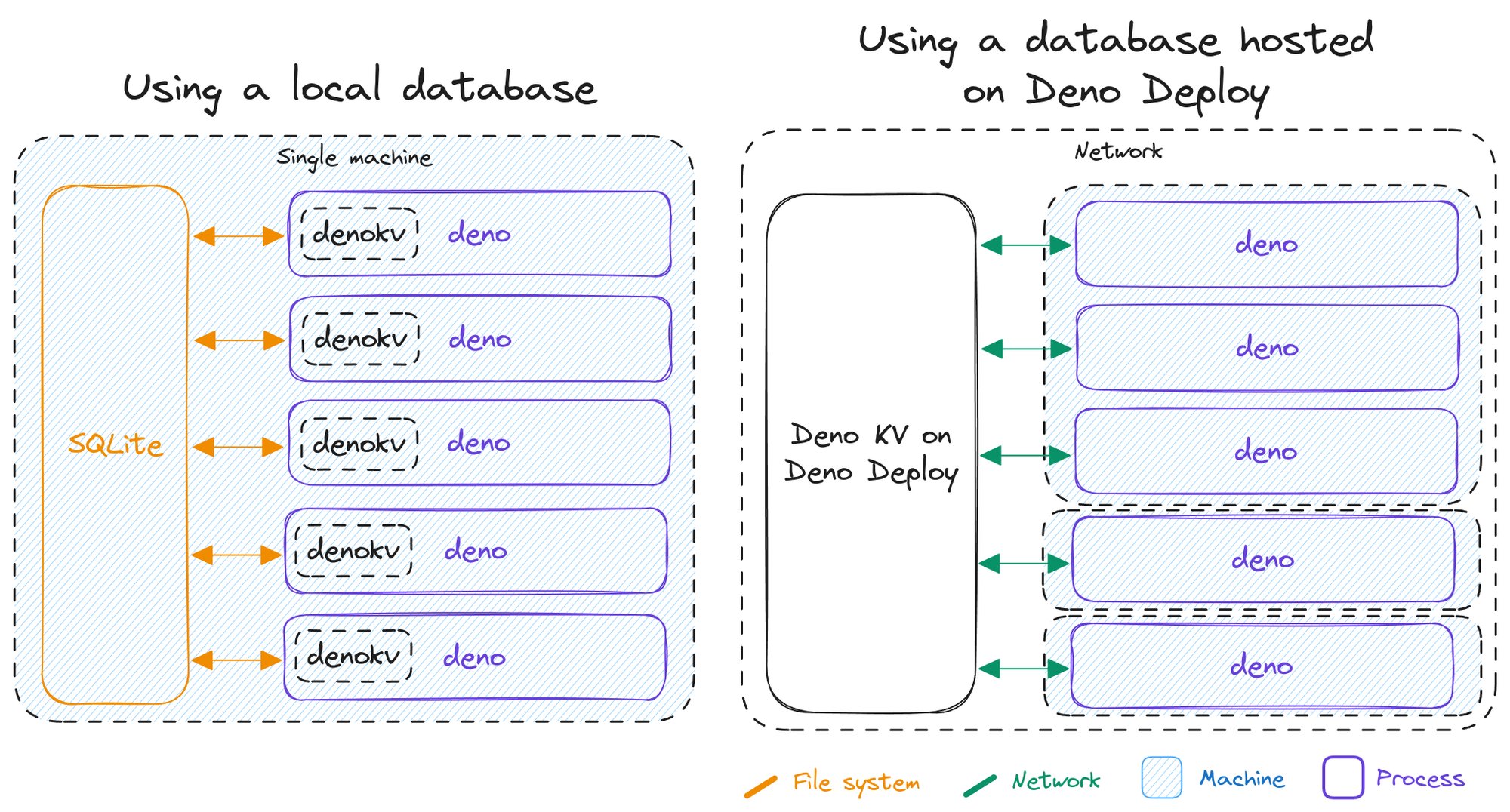
  • baked into the Deno runtime, backed by SQLite running in-process, useful for testing, development, and single-server production use-cases
  • hosted on Deno Deploy, backed by FoundationDB, with seamless scaling and global replication, useful for production apps and enterprise use-cases

Diagram of Deno KV locally and on Deno Deploy

The two existing ways to use Deno KV. Left: using the built in Deno KV backend in the CLI. Right: using a Deno KV database hosted on Deno Deploy.

Today, we’re announcing a third way to use Deno KV for users who prefer to self-host their database: a standalone denokv binary that you can run on your own server and connect to from the Deno CLI via KV Connect. Just like Deno itself, this binary is open source, MIT licensed, and perpetually free to use.

The standalone denokv server is backed by the same robust SQLite backend that powers the Deno KV implementation baked into the Deno CLI. This enables you to integrate with the wide array of SQLite tooling for backups, replication, point-in-time-recovery (PITR), and so on.
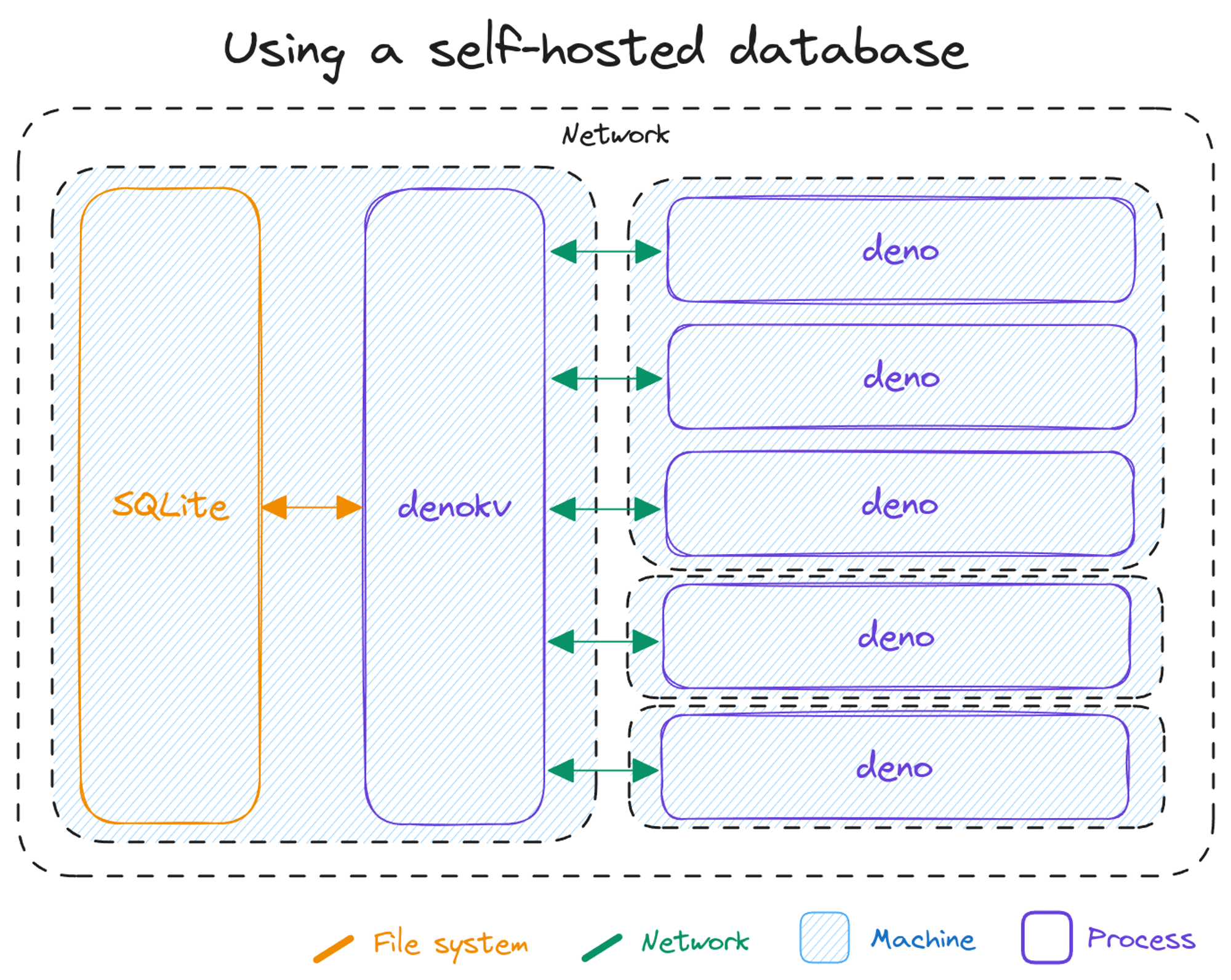
Diagram of self-hosted Deno KV

Using the new standalone `denokv` server, that is backed by SQLite.

To start a standalone denokv server, simply execute a single docker command. This mounts a local folder into the container to store the database, and it hosts a KV Connect endpoint at http://localhost:4512 for connections.

$ export DENO_KV_ACCESS_TOKEN=$(openssl rand -base64 15)
$ docker run -it --init -p 4512:4512 -v ./data:/data ghcr.io/denoland/denokv --sqlite-path /data/denokv.sqlite serve --access-token $DENO_KV_ACCESS_TOKEN
Opened database at /data/denokv.sqlite
Listening on http://0.0.0.0:4512

You can then just connect as usual with Deno.openKv:

const kv = await Deno.openKv("http://localhost:4512");

await kv.set(["users", "alice"], {
  name: "Alice",
  birthday: new Date(2018, 5, 13),
});

const { value } = await kv.get(["users", "alice"]);
console.log(value);

If you’re interested in trying it out, we’ve created a guide for running the standalone denokv server on Fly.io.

Be aware that unlike our hosted offering on Deno Deploy, you are fully responsible for backups, replication, scaling, and high availability when using the standalone denokv binary. We recommend you configure a tool like Litestream or LiteFS to continually backup the SQLite database that denokv uses.

Continuous backup into S3 or GCS

We’re excited to announce that starting today, you can continuously replicate or backup the data stored in Deno KV databases hosted on Deno Deploy to your own S3 or Google Cloud Storage buckets. This is in addition to the continuous backups that we internally perform for all data stored in hosted Deno KV databases to ensure high availability and data durability.

This replication happens continuously with very little lag, enabling point-in-time-recovery and live replication. Enabling this replication unlocks various interesting use-cases:

  • Retrieving a consistent snapshot of your data at any point in time in the past
  • Running a read-only data replica independent of Deno Deploy
  • Pushing data into your favorite data pipeline by piping mutations into streaming platforms and analytical databases like Kafka, BigQuery and ClickHouse

You can set up replication on Deno Deploy in just a few steps. We have an in-depth guide walking you through the process for both S3, and Google Cloud Storage buckets in the documentation.

Simply enter credentials to enable continuous replication backup.

Once your replication target is in the “Active” status, the replication is up to date and a consistent copy of the Deno KV database are stored in the bucket. While in the “Active” status, new mutations are continually written to the bucket in real time to keep the replica up to date.

But now, how do you read the data back out of the bucket?

Self-host a Deno KV replica

This is where the third new feature for today comes in: self-hosting a replica of your Deno KV database hosted on Deno Deploy. For this, we’ll use the denokv tool from earlier again, with the --sync-from-s3 flag. This will create a local replica of the data in the S3 bucket, continually syncing and keeping the local replica up-to-date with the data in the bucket:

$ export AWS_REGION=us-east-1
$ export AWS_ACCESS_KEY_ID=your-access-key
$ export AWS_SECRET_ACCESS_KEY=your-secret-key
$ export DENO_KV_ACCESS_TOKEN=$(openssl rand -base64 15)
$ denokv --sqlite-path=./data.sqlite3 serve --sync-from-s3 --s3-bucket your-bucket --s3-prefix some-prefix/6aea9765-2b1e-41c7-8904-0bdcd70b21d3/
Initial snapshot is complete, starting sync.
Listening on http://localhost:4512

Now you can connect to the local server with Deno.openKv:

const kv = await Deno.openKv("http://localhost:4512");

const { value } = await kv.get(["users", "alice"]);
console.log(value);

This is a read-only replica. Write operations like kv.set() are not supported.

In addition to a consistent snapshot of the remote database, the local replica also contains the entire history of the database since the S3 backup target was added. This can be used for point-in-time recovery: the ability to view the data in your database like it was at any point in time in the past.

Point-in-time recovery

After the initial sync of the local database has completed, you can use the subcommand denokv pitr list to list all recoverable points:

$ denokv --sqlite-path=./data.sqlite3 pitr list
0100000002d0fa520000    2023-11-09T10:37:23.935Z
0100000002d0fa510000    2023-11-09T10:37:23.935Z
0100000002d0fa500000    2023-11-09T10:37:23.935Z
0100000002c0f4c10000    2023-11-09T09:19:00.603Z
0100000002c0f4c00000    2023-11-09T09:19:00.603Z
0100000002b0ef310000    2023-11-09T09:15:32.815Z

To checkout a specific recoverable point, first stop any denokv serve --sync-from-s3 processes currently running on this database. Then, run denokv pitr checkout:

$ denokv --sqlite-path=./data.sqlite3 pitr checkout 0100000002b0ef310000
Snapshot is now at versionstamp 0100000002b0ef310000

You can now restart denokv serve, this time with the --read-only flag instead of the --sync-from-s3 flag. Now, all clients that connect to this database will see the data as it was at timestamp 2023-11-09T09:15:32.815Z.

Note that the --sync-from-s3 flag of denokv serve automatically syncs and keeps the latest snapshot checked out, so you should not explicitly specify this if you have checked out a specific versionstamp.

What’s next

Deno KV, along with Deno Queues, web standards APIs, and npm are key building blocks that make developing for the web easier, faster, and more productive. We’re constantly iterating to add features to make building with Deno even better, and have a lot more coming up in the future.

We’re always open to feedback and feature requests! Feel free to join our growing Discord or create an issue here.

Does your app need async processes or to schedule work in the future?

Deno Queues is a simple way to add scalable messaging and background processing to your app.