
惯性聚合 高效追踪和阅读你感兴趣的博客、新闻、科技资讯
阅读原文 在惯性聚合中打开

推荐订阅源

大猫的无限游戏
大猫的无限游戏
Security Archives - TechRepublic
T
Threat Research - Cisco Blogs
A
Arctic Wolf
S
Securelist
O
OpenAI News
T
Threatpost
Forbes - Security
Forbes - Security
N
News and Events Feed by Topic
S
Secure Thoughts
H
Heimdal Security Blog
S
Security Affairs
P
Privacy International News Feed
C
Cisco Blogs
C
CERT Recently Published Vulnerability Notes
Cyberwarzone
Cyberwarzone
N
News and Events Feed by Topic
Threat Intelligence Blog | Flashpoint
P
Palo Alto Networks Blog
S
Security @ Cisco Blogs
Hacker News - Newest:
Hacker News - Newest: "LLM"
博客园 - 三生石上(FineUI控件)
月光博客
月光博客
T
Tailwind CSS Blog
Exploit-DB.com RSS Feed
奇客Solidot–传递最新科技情报
奇客Solidot–传递最新科技情报
Hacker News: Ask HN
Hacker News: Ask HN
T
Troy Hunt's Blog
S
SegmentFault 最新的问题
腾讯CDC
V
Visual Studio Blog
Last Week in AI
Last Week in AI
H
Hacker News: Front Page
cs.CV updates on arXiv.org
OSCHINA 社区最新新闻
OSCHINA 社区最新新闻
Project Zero
Project Zero
WordPress大学
WordPress大学
NISL@THU
NISL@THU
博客园 - 【当耐特】
博客园 - Franky
Webroot Blog
Webroot Blog
博客园_首页
T
Tenable Blog
雷峰网
雷峰网
Google Online Security Blog
阮一峰的网络日志
阮一峰的网络日志
V2EX - 技术
V2EX - 技术
Recent Commits to openclaw:main
L
Lohrmann on Cybersecurity
The Hacker News
The Hacker News

Deno

Deno 2.8 | Deno Claw Patrol: an open-source security firewall for agents | Deno Fresh 2.3: Zero JS by default, View Transitions, and Temporal support | Deno Deno 2.7: Temporal API, Windows ARM, and npm overrides | Deno Build a dinosaur runner game with Deno, pt. 6 | Deno Build a dinosaur runner game with Deno, pt. 5 | Deno Deno Deploy is Generally Available | Deno Introducing Deno Sandbox | Deno Build a dinosaur runner game with Deno, pt. 4 | Deno Build a dinosaur runner game with Deno, pt. 3 | Deno Build a dinosaur runner game with Deno, pt. 2 | Deno React / Next.js Denial-of-Service Vulnerability: Deno Deploy users protected | Deno Deno 2.6: dx is the new npx | Deno Build a dinosaur runner game with Deno, pt. 1 | Deno React Server Functions / Next.js Vulnerability: Deno Deploy users protected | Deno My highlights from the new Deno Deploy | Deno Deno's Other Open Source Projects | Deno How Deno protects against npm exploits | Deno Help Us Raise $200k to Free JavaScript from Oracle | Deno Deno 2.5: Permissions in the config file | Deno Fresh 2.0 Graduates to Beta, Adds Vite Support | Deno Deno 2.4: deno bundle is back | Deno JavaScript™ Trademark Update | Deno What's coming to JavaScript | Deno A brief history of JavaScript | Deno Reports of Deno's Demise Have Been Greatly Exaggerated | Deno An Update on Fresh | Deno How Plaid migrated 100 services to a new database platform 5x faster with Deno | Deno Deno 2.3: Improved deno compile, local npm packages, and more | Deno Add JSR packages with pnpm and Yarn | Deno Zero-config Debugging with Deno and OpenTelemetry | Deno Exploring Art with TypeScript, Jupyter, Polars, and Observable Plot | Deno Deno v Oracle Update 3: Fighting the JavaScript Trademark | Deno Build a custom RAG AI agent in TypeScript and Jupyter | Deno How to get deep traces in your Node.js backend with OTel and Deno | Deno toranoana.deno #20 登録受付中(2025年3月14日) | Deno Node just added TypeScript support. What does that mean for Deno? | Deno Publish a lint rule, get a prize | Deno Deno 2.2: OpenTelemetry, Lint Plugins, node:sqlite | Deno If you're not using npm specifiers, you're doing it wrong | Deno How Deno's documentation is evolving | Deno Oracle justified its JavaScript trademark with Node.js—now it wants that ignored | Deno Introducing the JSR open governance board | Deno Intro to Wasm in Deno | Deno Announcing OpenAI on JSR | Deno Deno in 2024 | Deno Goodbye WinterCG, welcome WinterTC | Deno Build a SolidJS app with Deno | Deno Run your Next.js SSR app on Deno Deploy | Deno Solve Advent of Code 2024 with Deno and Win Prizes! | Deno Deno v. Oracle: Canceling the JavaScript Trademark | Deno Deno 2.1: Wasm Imports and other enhancements | Deno Build a Typesafe API with tRPC and Deno | Deno Self-contained Executable Programs with Deno Compile | Deno Build a Database App with Drizzle ORM and Deno | Deno Introducing your new JavaScript package manager: Deno | Deno Announcing Growthbook on JSR | Deno Build an Astro site with Deno | Deno How to convert CommonJS to ESM | Deno Announcing Deno 2 | Deno The Final Touches: What’s New In v2.0.0-rc.10 | Deno Announcing Stable V8 Bindings for Rust | Deno Deno 2.0 Release Candidate | Deno Secure, efficient private npm registries with Cloudsmith and Deno | Deno Painting the Plane as We Fly It: Designing JSR | Deno Introducing Web Cache API support on Deno Deploy | Deno Deno 1.46: The Last 1.x Release | Deno Protect your cloud spend with new Deno Deploy spend limits | Deno What we got wrong about HTTP imports | Deno Benchmarking AWS Lambda Cold Starts Across JavaScript Runtimes | Deno Announcing Supabase on JSR | Deno Deno 1.45: Workspace and Monorepo Support | Deno Introducing KV Backup for Deno Subhosting | Deno A Gentle Intro to TypeScript | Deno Announcing Hono on JSR | Deno How We Made the Deno Language Server Ten Times Faster | Deno How the Guardian uses Deno to audit accessibility and performance across their 2.7 million articles | Deno Introducing More Flexible Domain Association for Deno Subhosting | Deno The stabilization process of the Standard Library has begun | Deno Deno 1.44: Private npm registries, improved Node.js compat, and performance boosts | Deno How we built a secure, performant, multi-tenant cloud platform to run untrusted code | Deno The Deno Standard Library is now available on JSR | Deno How to document your JavaScript package | Deno Your Low Code Solution Needs an Escape Hatch | Deno Deno 1.43: Improved Language Server performance | Deno How Slack used Deno to save months of engineering effort in launching their new platform | Deno JSR Is Not Another Package Manager | Deno Announcing the Hookdeck SDK on JSR | Deno Announcing the Neon Serverless Driver on JSR | Deno An intro to TSConfig for JavaScript Developers | Deno How we built JSR | Deno How Netlify used Deno Subhosting to build a successful edge functions product | Deno Introducing Simpler Project Creation in Deno Deploy | Deno Deno 1.42: Better dependency management with JSR | Deno Introducing deployctl, the command line interface for Deno Deploy | Deno Introducing JSR - the JavaScript Registry | Deno How to add Monaco to a Next.js app and securely run untrusted user code | Deno Survey Results and Roadmap | Deno Deno 1.41: smaller deno compile binaries | Deno Webhooks suck, but here are alternatives | Deno
The Dino 🦕, the Llama 🦙, and the Whale 🐋 | Deno
Kitson Kelly · 2025-02-27 · via Deno

This is part 1 of a series on building LLMs with Deno. View the second part here.


I have had a desire for a while to understand what it would take to be able to interact with a locally hosted large language model and with the release of DeepSeek R1, a reasoning model, was enough of a prompt to figure out how to tackle it.

My day job is a Principal Technologist at CTO Labs, where we advise investors, senior executives and boards on technology. A topic that is always of interest is the impacts of emergent technologies on organizations, and at the moment there is no bigger technology topic than AI. One of the ways we keep fresh on those impacts is our own real world use cases.

Or view the accompanying tutorial on YouTube.

While I knew Python is the de facto language of data, ML and AI, I was also curious about the state of TypeScript/JavaScript in the space as well, because that is personally a lot more familiar to me. While I am biased, being a former core contributor to Deno, I have always liked the “batteries included” approach to being a development tool.

I was also curious about Jupyter notebooks, all my data scientist colleagues were strong advocates of them, and when I was a core contributor at Deno, I strongly advocated for us to pursue kernel support integrated into Deno, but I never had a personal use case that drove me to experiment with it.

Could my favorite development tool, plus a development environment specifically suited to the task, be an easy way to learn and experiment with AI? Skipping to the end, the answer is yes.

I am going to take you on the journey that I went on…

Getting started

There are a few components to our journey:

  • An environment for our language model – while you can connect up to various LLM hosting environments via APIs, we are going to leverage the Ollama framework for running language models on your local machine.
  • A large language model – we will use a resized version of DeepSeek R1 that can run locally.
  • A notebookJupyter Notebook for interactive code and text.
  • Deno – a runtime that includes a built-in Jupyter kernel. We assume a recent version is installed.
  • An IDE – we’ll use VSCode with built-in Jupyter Notebook support and the Deno extension (extension link).
  • An AI library/frameworkLangChain.js to simplify interactions with the LLM.
  • A schema validator – we’ll structure LLM output. We will use zod for this.

Performance varies based on your CPU/GPU and RAM. Ensure you have enough memory and processing power for local models.

Setting up a local model

Download and install Ollama if you haven’t already. Confirm the ollama command is available and the Ollama server is running on port 11434.

Install DeepSeek R1 8b parameter model:

ollama pull deepseek-r1:8b

Check availability with:

Creating a notebook

  1. Open VSCode. Create a new folder or path for your notebook.
  2. Install/update the Deno VSCode extension. Enable it with the Deno: Enable command from the palette, or create a deno.json.
  3. Use the Create: New Jupyter Notebook command and select Deno in the Select Kernel menu. If Deno isn’t listed, update or reinstall the Deno extension.

Using the model

LangChain.js provides a consistent interface for interacting with large language models, including Ollama. For example:

import { ChatOllama } from "npm:@langchain/ollama";

const model = new ChatOllama({
  model: "deepseek-r1:8b",
});

Generating a chain

LangChain.js makes it easier to create modular AI workflows, or “chains.”

import { z } from "npm:zod";
import { RunnableSequence } from "npm:@langchain/core/runnables";
import { StructuredOutputParser } from "npm:@langchain/core/output_parsers";
import { ChatPromptTemplate } from "npm:@langchain/core/prompts";

const zodSchema = z.object({
  answer: z.string().describe("answer to the user's question"),
  source: z.string().describe(
    "source used to answer the user's question, should be a website.",
  ),
});

const parser = StructuredOutputParser.fromZodSchema(zodSchema);

const chain = RunnableSequence.from([
  ChatPromptTemplate.fromTemplate(
    "Answer the users question as best as possible.\n{format_instructions}\n{question}",
  ),
  model,
  parser,
]);


Deno.jupyter.md`${parser.getFormatInstructions()}`;

Example JSON schema

Below is an example of a valid JSON schema for an object requiring a foo property that is an array of strings:

{
  "type": "object",
  "properties": {
    "foo": {
      "description": "a list of test words",
      "type": "array",
      "items": {
        "type": "string"
      }
    }
  },
  "required": ["foo"],
  "$schema": "http://json-schema.org/draft-07/schema#"
}

So the object {"foo": ["bar", "baz"]} matches the schema. The object {"properties": {"foo": ["bar", "baz"]}} is not valid.

In our chain above, any output is parsed and validated by zod. Your LLM’s JSON must match the schema exactly.

Here is the JSON schema instance your output must adhere to in this example:

{
  "type": "object",
  "properties": {
    "answer": {
      "type": "string",
      "description": "answer to the user's question"
    },
    "source": {
      "type": "string",
      "description": "source used to answer the user's question, should be a website."
    }
  },
  "required": ["answer", "source"],
  "additionalProperties": false,
  "$schema": "http://json-schema.org/draft-07/schema#"
}

Documenting our process

LangChain.js, Deno and Jupyter can document the flow visually:

const image = await chain.getGraph().drawMermaidPng();
const arrayBuffer = await image.arrayBuffer();

Deno.jupyter.image(new Uint8Array(arrayBuffer));

Which renders something like:
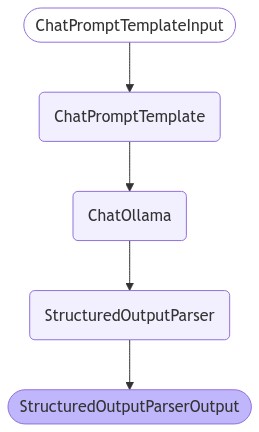
The langchain process output

Asking a question

Try asking a question:

const response = await chain.invoke({
  question: "What is a Deno?",
  format_instructions: parser.getFormatInstructions(),
});

console.log(response);

Sample output:

{
  "answer": "Deno is a runtime environment designed for web development...",
  "source": "https://deno.dev"
}

In the end

I found that Deno and Jupyter provide a fun, productive environment for local AI experiments. Most setup was related to running an LLM locally, which could easily be swapped for an API-based model like OpenAI or Anthropic.

I already knew how low-friction Deno can be, and now I’ve seen the benefits of Jupyter Notebooks for iterative exploration and thorough documentation. It’s become my go-to environment for learning and prototyping.

Using LLMs with Deno? 🐋 🦕 🦙 We want to hear from you!

Let us know on Twitter, Discord, YouTube, BlueSky, or Mastodon.