









At the core of Deno’s design goals is flexible and robust runtime security. With
Deno 1.36, we’re expanding your security options even further with --deny-*
flags. Along with our existing --allow-* flags, you can now configure both
allow and deny lists for network communication, file system access, and other
potentially sensitive APIs.
Along with these security features, you’ll find improved testing and benchmarking APIs, more robust Node.js and npm package support, language server improvements, and much more in 1.36.
If you have Deno installed, you can upgrade to version 1.36 in your terminal with:
Read on to learn more about the latest features and fixes available in Deno 1.36!
--deny-* flags, which
enable you to configure deny lists for domains, file paths, and other
resources to which access should be restricted.
node:os APIs with our latest polyfill, call native code
add-ons with process.dlopen, and more.
The Deno runtime offers security by default, empowering developers to
opt in to letting
their code and dependencies make network requests, access the filesystem, or use
other potentially hazardous APIs with the --allow-* CLI flags.
These options are and remain useful, but they are a bit inflexible in certain
scenarios. You can either give your program unfettered access to a given
feature, or you would have to configure specific domains or directories the
--allow-* options would enable. There’s no way to open up the sandbox with
just some domains or file paths excluded. In Deno 1.36, we introduce the
--deny-* family of runtime flags to enable more flexible permissions for your
Deno programs.
For example, if you’d like your program to have access to any URL it would like, except for a few specific IP addresses and domains, you can use:
$ deno run --allow-net --deny-net=api.evil.com mod.tsFor instance, if you want to give your program access to the whole filesystem,
except the /etc directory:
$ deno run --allow-read --deny-read=/etc --allow-write --deny-write=/etc mod.ts
Every CLI flag that previously had an --allow-* option will now have
corresponding --deny-* options too. The deny flags have higher precedence than
the allow flags, so if you use both on the same domains or a file path, the
access will still be denied:
$ deno run --allow-read=foo.txt --deny-read=foo.txt mod.ts
error: PermissionDenied: Requires read access to "foo.txt"...
A special shoutout is called for here to Asher Gomez and Nayeem Rahman, who led the implementation of this new feature. Thanks a ton for your contributions!
We intend to further improve and expand the capabilities of the permission system in the future. One of the features we are looking to implement is the ability to use pre-defined permissions from a configuration file - follow this issue for updates.
We’d love to hear your feedback on the new --deny-* flags, and about any other
needs you have related to the permission system. Let us know in
Discord, during one of our live events (also found on
the Discord), or by raising an issue
in GitHub.
Deno 1.36 also introduces improvements to testing and benchmarking in your
applications. On the testing side, you can now output the results of
deno test runs using
new, custom formatters.
Having a machine-readable test report is crucial in automated QA of your tests
and keeping large codebases maintainable. The JUnit XML format can be consumed
natively by many services like GitLab, CircleCI, Jenkins or BuildPulse. Starting
with Deno 1.36, you can pass the --reporter=junit flag to deno test to get
structured report data:
$ deno test --reporter=junit


 deno test --junit-path=test_report.xml
For folks who prefer short and sweet test reports we added a dot reporter that
provides a concise output, removing a lot of noise.
node:test polyfillIf you are coming to Deno from recent releases of Node.js, you can now use the
built-in test API from Node 20 in addition to
Deno.test or
describe/it API from the standard library.
Check it out for yourself in Deno with a simple test harness like the one below.
import assert from "node:assert";
import test from "node:test";

test("synchronous passing test", (t) => {

  assert.strictEqual(1, 1);
});

test("asynchronous passing test", async (t) => {


  assert.strictEqual(1, 1);
});
Not all API surface area has been covered yet, so if you hit a problem we would greatly appreciate a bug report.
deno bench improvementsThe granularity and precision of benchmarking in Deno have been improved with
the addition of new functionality to
Deno.bench.
In previous releases of Deno, the Deno.bench function gave surprising results
for the first bench case run due to a phenomenon called “JIT bias” - the V8
engine was over-optimizing benchmarked function and then bailing out of the
optimization on the subsequent functions, leading to non-representative results.
This has now been fixed, by running a “warmup” function before user defined
bench cases.
Additionally, you can now use Deno.BenchContext.start and
Deno.BenchContext.end to tell the benchmarking tool about the critical section
you want to measure. Everything outside of the section between these two calls
will be excluded from the measurement.
import { readAll } from "https://deno.land/std@0.197.0/streams/mod.ts";

Deno.bench("foo", async (b) => {

  const file = await Deno.open("a_big_data_file.txt");


  b.start();


  await readAll(file);


  b.end();


  file.close();
});
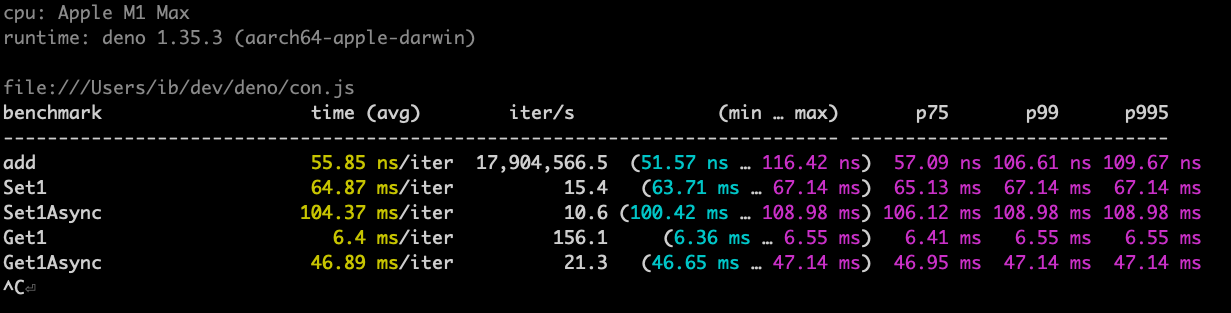
We also updated
deno bench output to
include information about iterations per second:
You can now run scripts from npm packages that are not configured in a package’s
bin property in package.json.
Example:
deno run -A npm:somepackage@0.0.1/foo/cli.mjsprocess.dlopen is availableYou can now use
process.dlopen
API to load native addons for Node.js.
AsyncLocalStorage up to 3.5x fasterWe optimized the implementation of
AsyncLocalStorage
from node:async_hooks module. Our benchmarks show that it’s up to 3.5x faster
than in Deno v1.35.3.
node:os is fully polyfilledThe getPriority, setPriority, and userInfo functions of
the Node.js os module are now available,
making node:os module fully pollyfilled.
Learn more about using Node.js built-ins in the Deno Manual.
Example:
import { getPriority } from "node:os";

console.log(getPriority());
Below, we’ve included a few other features and bug fixes that made their way into the release that we think will make a meaningful impact in your day-to-day work.
deno compile --no-terminalA new --no-terminal flag can now be used with
deno compile. If the
compiled binary is run on Windows, this flag will prevent the terminal window
from being opened.
Deno.createHttpClient.allowHostThe unstable
Deno.createHttpClient
now supports the allowHost option, making it possible to specify a Host
header for a fetch request.
const client = Deno.createHttpClient({
  allowHost: true,
});
const res = await fetch("http://example.com", {
  headers: {
    "host": "myhost.com",
  },
  client,
});
WebSocket APIYou can now use http: and https: URLs in the
WebSocket Web API,
Deno will automatically adjust the protocol to use ws: or wss: respectively:
const url = new URL("https://example.com");
const ws = new WebSocket(url);
console.log(ws.url);
Deno is now more resilient when downloading dependencies. Connecting to remote hosts can always fail due to intermittent connection problems or spurious errors on the remote server.
On such occasions, Deno will wait a short amount of time and retry the download, making CI pipelines more reliable and reducing the need to re-run commands.
Deno.Command APIBefore 1.36, if you tried to spawn a subprocess for a binary that was
non-existent with Deno.Command, you
were presented with an unhelpful error message:
$ deno
> new Deno.Command("this-binary-does-not-exist").spawn();
Uncaught NotFound: No such file or directory (os error 2)
    at spawnChildInner (ext:runtime/40_process.js:162:17)
    at spawnChild (ext:runtime/40_process.js:182:10)
    at Command.spawn (ext:runtime/40_process.js:440:12)
    at <anonymous>:2:48
With Deno 1.36, the error message will include the name of the binary that was not found:
$ deno
> new Deno.Command("this-binary-does-not-exist").spawn();
Uncaught NotFound: Failed to spawn: this-binary-does-not-exist: No such file or directory (os error 2)
    at spawnChildInner (ext:runtime/40_process.js:162:17)
    at spawnChild (ext:runtime/40_process.js:182:10)
    at Command.spawn (ext:runtime/40_process.js:440:12)
    at <anonymous>:2:48
Deno 1.36 contains a plethora of fixes and improvements to the LSP. This should make using Deno with an editor that supports an LSP (like Visual Studio Code) significantly more pleasant. Here are a few of the changes:
Deno namespace is missingdeno.json is more reliable"exclude" setting from deno.jsonnode: specifiers from import maps are properly handledBelieve it or not, the changes listed above still don’t tell you everything that got better in 1.36. You can view the full list of pull requests merged in Deno 1.36 on GitHub here.
We couldn’t build Deno without the help of our community! Whether by answering questions in our community Discord server or reporting bugs, we are incredibly grateful for your support. In particular, we’d like to thank the following people for their contributions to Deno 1.36.
Would you like to join the ranks of Deno community contributors? Check out our contribution docs here, and we’ll see you on the list next time.
Thank you for catching up with our 1.36 release, and we hope you love building with Deno!
🍋 Did you know? Fresh just got fresher.
Be sure to check out the release notes for Fresh 1.3, the latest iteration of the next-gen web framework for Deno.
此内容由惯性聚合(RSS阅读器)自动聚合整理,仅供阅读参考。 原文来自 — 版权归原作者所有。