








This is part 2 of a series on building LLMs with Deno. Check out the first part here.
In my previous blog post, I demonstrated how to interact with a local LLM via Deno. In this one, I want to go further and build an AI retrieval augmented generation (RAG) agent. RAG Agents are AI systems that combines retrieval based methods with generative models to produce more accurate, contextually relevant responses to queries.
As I mentioned in my previous post, my day job is now advising investors, boards and senior executives on the implications of technology. Specifically we do a lot of technical due diligence as part of an investment process into a company. We have a lot of highly confidential documents that we have to read and analyze in very short time frames. Looking into how AI could be an assistive tool, but in provably secure fashion, led to my experiments with RAG agents.
In this blog post we will do the following:
This blog post will build upon the previous blog post and assume that you have a recent version of Deno and Ollama installed locally.
In the last post we used Deepseek R1 with 8 billion parameters
(deepseek-r1:8b) with Ollama. While we still use Deepseek R1 to generate our
final output we are going to use two other models that are tailored to the
specific tasks we are going to perform with them:
mxbai-embed-large). An
embedding model is used to transform text into a form that easier to search by
AI systems.llama3.2:3b). This model supports
tooling, which allows the large language model to call out to tools/functions
that perform additional actions.⚠️ There are quite a few models that should support tools under Ollama. However, of those that were reasonably sized for running on a local machine, it was only Llama 3.2 that I could get to work.
You will want to make sure you have these models available locally:
ollama pull mxbai-embed-large
ollama pull llama3.2:3b
Before we start, let’s inform Deno how to best deal with npm dependencies that
we’ll be importing dynamically. In the project directory, ensure you have a
minimal deno.json like the following:
deno.json
{
  "nodeModulesDir": "auto"
}
Setting "nodeModulesDir" to "auto" will ensure module resolution works fine
here under a Jupyter notebook, though it’s possible you could forgo this step
and not run into any issues.
Note that some of the examples in this post are designed to specifically work under a Deno Jupyter notebook, like when we display the structure of the agent we will build. If you want to create a new Jupyter notebook, refer to the previous blog post.
The first step is to gather and process the documents for our agent. We will:
We’ll use Cheerio to fetch and parse the HTML, then use a recursive text splitter to break our blog posts into smaller documents so it can be more easily managed by the agent. Finally, we’ll convert the documents into a form that can be searched and managed by the agent.
⚠️ You can use other vector stores to persist the data. An ideal for running locally is Chroma. It is quite easy to setup a docker container and is well supported in LangChain.
Notebook [1]
import { OllamaEmbeddings } from "npm:@langchain/ollama";

const embeddings = new OllamaEmbeddings({
  model: "mxbai-embed-large",
});

import "npm:cheerio";
import { CheerioWebBaseLoader } from "npm:@langchain/community/document_loaders/web/cheerio";

const urls = [
  "https://deno.com/blog/not-using-npm-specifiers-doing-it-wrong",
  "https://deno.com/blog/v2.1",
  "https://deno.com/blog/build-database-app-drizzle",
];

const docs = await Promise.all(
  urls.map((url) => new CheerioWebBaseLoader(url).load()),
);
const docsList = docs.flat();

import { RecursiveCharacterTextSplitter } from "npm:@langchain/textsplitters";

const splitter = new RecursiveCharacterTextSplitter({
  chunkSize: 500,
  chunkOverlap: 50,
});
const allSplits = await splitter.splitDocuments(docsList);
console.log(`Split blog posts into ${allSplits.length} sub-documents.`);

import { MemoryVectorStore } from "npm:langchain/vectorstores/memory";

const vectorStore = await MemoryVectorStore.fromDocuments(
  allSplits,
  embeddings,
);

const retriever = vectorStore.asRetriever();
Cell output
Split blog posts into 170 sub-documents.
We have successfully retrieved, parsed, split, and stored three Deno blog posts for our AI agent.
In the context of Retrieval-Augmented Generation (RAG) agents, the term “graph” typically refers to a structured representation of information that enables efficient retrieval, reasoning, and context management within the agent’s decision-making or generation process.
The graph refers to the structured representation of information that enables
efficient retrieval, reasoning, and context management for the Agent. It will be
processing our query and requires a simple state. Let’s create that now, since
we can use its type to help build other parts of our system.
Notebook [2]
import { Annotation } from "npm:@langchain/langgraph";
import { BaseMessage } from "npm:@langchain/core/messages";

const GraphState = Annotation.Root({
  messages: Annotation<BaseMessage[]>({
    reducer: (x, y) => x.concat(y),
    default: () => [],
  }),
});
We have our retriever (an interface to search and access our documents), but we need to convert that into a tool which we will give to our agent:
Notebook [3]
import { createRetrieverTool } from "npm:langchain/tools/retriever";
import { ToolNode } from "npm:@langchain/langgraph/prebuilt";

const tool = createRetrieverTool(
  retriever,
  {
    name: "retrieve_blog_posts",
    description:
      "Search and return information about Deno from various blog posts.",
  },
);
const tools = [tool];

const toolNode = new ToolNode<typeof GraphState.State>(tools);
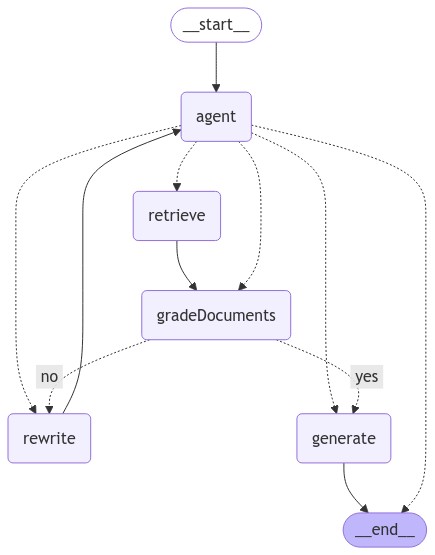
Next, we’ll create several nodes (functions) to perform discrete parts of our workflow:
shouldRetrieve() - determines if we need to retrieve documents from our
database.gradeDocuments() - grades documents to determine if they are relevant.checkRelevance() - orchestrates the grading of the documents.agent() - our core agent that determines the next action.rewrite() - rewrites our query to try to find relevant documents.generate() - generates the output based on the query and the documents
found.Each of these nodes takes the state of the graph and returns a message.
Notebook [4]
import { ChatPromptTemplate } from "npm:@langchain/core/prompts";
import { ChatOllama } from "npm:@langchain/ollama";
import { isAIMessage, isToolMessage } from "npm:@langchain/core/messages";
import { END } from "npm:@langchain/langgraph";
import { z } from "npm:zod";

function shouldRetrieve(state: typeof GraphState.State): string {
  console.log("---DECIDE TO RETRIEVE---");
  const { messages } = state;
  const lastMessage = messages[messages.length - 1];

  if (isAIMessage(lastMessage) && lastMessage.tool_calls?.length) {
    console.log("---DECISION: RETRIEVE---");
    return "retrieve";
  }

  return END;
}

async function gradeDocuments(
  state: typeof GraphState.State,
): Promise<Partial<typeof GraphState.State>> {
  console.log("---GET RELEVANCE---");

  const tool = {
    name: "give_relevance_score",
    description: "Give a relevance score to the retrieved documents.",
    schema: z.object({
      binaryScore: z.string().describe("Relevance score 'yes' or 'no'"),
    }),
  };

  const prompt = ChatPromptTemplate.fromTemplate(
    `You are a grader assessing relevance of retrieved docs to a user question.
  Here are the retrieved docs:

  -------

  {context}

  -------

  Here is the user question: {question}

  If the content of the docs are relevant to the users question, score them as relevant.
  Give a binary score 'yes' or 'no' score to indicate whether the docs are relevant to the question.
  Yes: The docs are relevant to the question.
  No: The docs are not relevant to the question.`,
  );

  const model = new ChatOllama({
    model: "llama3.2:3b",
    temperature: 0,
  }).bindTools([tool]);

  const { messages } = state;
  const firstMessage = messages[0];
  const lastMessage = messages[messages.length - 1];

  const chain = prompt.pipe(model);

  const score = await chain.invoke({
    question: firstMessage.content as string,
    context: lastMessage.content as string,
  });

  return {
    messages: [score],
  };
}

function checkRelevance(state: typeof GraphState.State): "yes" | "no" {
  console.log("---CHECK RELEVANCE---");

  const { messages } = state;
  const lastMessage = messages[messages.length - 1];
  if (!isAIMessage(lastMessage)) {
    throw new Error(
      "The 'checkRelevance' node requires the most recent message to be an AI message.",
    );
  }

  const { tool_calls: toolCalls } = lastMessage;
  if (!toolCalls || !toolCalls.length) {
    throw new Error(
      "The 'checkRelevance' node requires the most recent message to contain tool calls.",
    );
  }

  if (toolCalls[0].args.binaryScore === "yes") {
    console.log("---DECISION: DOCS RELEVANT---");
    return "yes";
  }
  console.log("---DECISION: DOCS NOT RELEVANT---");
  return "no";
}

async function agent(
  state: typeof GraphState.State,
): Promise<Partial<typeof GraphState.State>> {
  console.log("---CALL AGENT---");

  const { messages } = state;
  const filteredMessages = messages.filter((message) => {
    if (isAIMessage(message) && message.tool_calls?.length) {
      return message.tool_calls[0].name !== "give_relevance_score";
    }
    return true;
  });

  const model = new ChatOllama({
    model: "llama3.2:3b",
    temperature: 0,
    streaming: true,
  }).bindTools(tools);

  const response = await model.invoke(filteredMessages);
  return {
    messages: [response],
  };
}

async function rewrite(
  state: typeof GraphState.State,
): Promise<Partial<typeof GraphState.State>> {
  console.log("---TRANSFORM QUERY---");

  const { messages } = state;
  const question = messages[0].content as string;
  const prompt = ChatPromptTemplate.fromTemplate(
    `Look at the input and try to reason about the underlying semantic intent / meaning.

Here is the initial question:

-------

{question}

-------

Formulate an improved question:`,
  );


  const model = new ChatOllama({
    model: "deepseek-r1:8b",
    temperature: 0,
    streaming: true,
  });
  const response = await prompt.pipe(model).invoke({ question });
  return {
    messages: [response],
  };
}

async function generate(
  state: typeof GraphState.State,
): Promise<Partial<typeof GraphState.State>> {
  console.log("---GENERATE---");

  const { messages } = state;
  const question = messages[0].content as string;

  const lastToolMessage = messages.slice().reverse().find((msg) =>
    isToolMessage(msg)
  );
  if (!lastToolMessage) {
    throw new Error("No tool message found in the conversation history");
  }

  const context = lastToolMessage.content as string;

  const prompt = ChatPromptTemplate.fromTemplate(
    `You are an assistant for question-answering tasks. Use the following pieces of retrieved context to answer the question. If you don't know the answer, just say that you don't know. Use three sentences maximum and keep the answer concise.

Here is the initial question:

-------

{question}

-------

Here is the context that you should use to answer the question:

-------

{context}

-------

Answer:`,
  );

  const llm = new ChatOllama({
    model: "deepseek-r1:8b",
    temperature: 0,
    streaming: true,
  });

  const ragChain = prompt.pipe(llm);

  const response = await ragChain.invoke({
    context,
    question,
  });

  return {
    messages: [response],
  };
}
Now we need to add nodes to the workflow:
Notebook [5]
import { StateGraph } from "npm:@langchain/langgraph";

const workflow = new StateGraph(GraphState)
  .addNode("agent", agent)
  .addNode("retrieve", toolNode)
  .addNode("gradeDocuments", gradeDocuments)
  .addNode("rewrite", rewrite)
  .addNode("generate", generate);
And we then need to provide specific instructions on how the nodes relate to each other and compile our workflow:
Notebook [6]
import { START } from "npm:@langchain/langgraph";


workflow.addEdge(START, "agent");


workflow.addConditionalEdges(
  "agent",

  shouldRetrieve,
);

workflow.addEdge("retrieve", "gradeDocuments");


workflow.addConditionalEdges(
  "gradeDocuments",

  checkRelevance,
  {

    yes: "generate",
    no: "rewrite",
  },
);

workflow.addEdge("generate", END);
workflow.addEdge("rewrite", "agent");


const app = workflow.compile();


Deno.jupyter.image(
  await (await (await app.getGraphAsync()).drawMermaidPng()).bytes(),
);
The generated chart of Deno.jupyter.image is the below:
Finally, we can use our agent! Let’s ask our agent a question (“What are some new features of Deno 2.1?”) and see what the response is:
Notebook [7]
import { HumanMessage } from "npm:@langchain/core/messages";

const inputs = {
  messages: [
    new HumanMessage("What are some new features of Deno 2.1?"),
  ],
};

let finalState;
for await (const output of await app.stream(inputs)) {
  for (const [key, value] of Object.entries(output)) {
    console.log(`${key} -->`);
    finalState = value;
  }
}

const lastMessage = finalState.messages[finalState.messages.length - 1];
const content = lastMessage.content
  .replace("<think>", "<details><summary>Thinking...</summary>")
  .replace("</think>", "</details>");

Deno.jupyter.md`Generated output from agent:

${content}`;
Generated output from agent:
Thinking… Okay, so I need to figure out what the new features of Deno 2.1 are based on the provided context. Let me start by reading through the context carefully.
The first mention is about Wasm imports being supported in Deno 2.1. That’s a significant feature because it allows for better integration with WebAssembly, which can enhance performance and functionality.
Next, there’s something about asset files being embedded during compilation using
deno compile. This probably means that users can more easily include static assets like images or CSS without extra setup.Then, stack traces in permission prompts are mentioned. I’m not entirely sure what this entails, but it likely improves debugging by providing detailed error information when permissions are denied or issues arise during runtime.
The
deno taskcommand is said to be turbocharged, which suggests that tasks have been optimized for better performance and efficiency, making them run faster or more smoothly.There’s also a mention of Node.js and npm compatibility improvements. This could mean that Deno now works better with existing Node.js projects, making it easier to migrate or integrate with existing setups.
The
--allow-envwildcard feature is listed, which probably allows users to specify multiple environment files or handle environment variables more flexibly.Formatting and linting have been improved, so developers can expect better code quality checks and suggestions within their projects.
Display images in Jupyter notebooks indicates that Deno now supports rendering images directly within Jupyter notebooks, which could be useful for data visualization and education.
Overriding versions during publication with
deno publishgives users more control over how their packages are distributed, perhaps allowing for specific versioning strategies.LSP improvements suggest that the language server has been enhanced, making Deno a better choice for code editing environments like VS Code.
Performance and quality of life improvements are broad categories, but they indicate that Deno 2.1 focuses on making the tool more efficient and enjoyable to use overall.
Lastly, V8 13.0 is mentioned, which likely refers to an updated version of the V8 engine, providing better performance and features for Deno’s operations.
Putting this all together, Deno 2.1 introduces several key enhancements aimed at improving developer productivity, compatibility, and performance.
Deno 2.1 introduces several new features, including first-class WebAssembly (Wasm) support, embedded asset files during compilation, stack traces in permission prompts, a turbocharged
deno taskcommand, improved Node.js and npm compatibility, wildcard environment file support, enhanced formatting and linting, image display in Jupyter notebooks, version override options, LSP improvements, performance enhancements, and updates to the V8 engine.
I have always thought large language models would be an assistive tool, and my experiments with a Agent RAG have not only validated that, but also shown me how much you can achieve locally. Using Deno and a framework like LangChain really lets you experiment and fine tune quickly.
Being able to creating an AI agent that I have complete control over makes adding AI into solutions a distinct possibility. I’ll continue to explore RAG systems for my job, as the applications are boundless: data processing and analysis, image generation and interpretation, test generation, and checking security assumptions.
此内容由惯性聚合(RSS阅读器)自动聚合整理,仅供阅读参考。 原文来自 — 版权归原作者所有。