


Deno 1.44 introduces support for private npm registries, enabling users to use
internal packages with Deno by configuring an .npmrc file. Additionally, Deno
1.44 now supports gRPC connections, enabling robust high performance
communication to services like Google Cloud Platform. This release also improves
Node.js compatibility, and re-enables V8 pointer compression for significant
performance gains. As usual, a bunch of other features and improvements are
included in this release to make your development experience even smoother.
To upgrade to Deno 1.44, run the following in your terminal:
If Deno is not yet installed, run one of the following commands to install or learn how to install it here.
brew install deno


curl -fsSL https://deno.land/install.sh | sh


iwr https://deno.land/install.ps1 -useb | iex
What’s New in Deno 1.44
Deno.exitCode APIRequest.bytes() and Response.bytes()Deno.FsFile stabilizationsdeno serveWebSocket timeoutDENO_FUTURE=1Many large organizations host their own private npm registries to manage
internal packages. Deno 1.44 now supports using an .npmrc file to configure
Deno to fetch packages from this private registry. This feature is available
when using private packages in a package.json or when importing packages
directly using npm: specifiers.
// .npmrc
@mycompany:registry=http://mycompany.com:8111/
//mycompany.com:8111/:_auth=secretToken
{ "imports": { "@mycompany/package": "npm:@mycompany/package@1.0.0" } }
import { hello } from "@mycompany/package";

console.log(hello());
$ deno run main.ts
Hello world!
You can also use private npm packages in your package.json file:
// package.json
{
  "dependencies": {
    "@mycompany/package": "1.0.0"
  }
}
import { hello } from "@mycompany/package"; console.log(hello());
$ deno run main.ts
Hello world!Deno can now connect to gRPC services using the @grpc/grpc-js client library
from npm. This enables you to connect to gRPC services, such as Google Cloud
Platform from Deno. Here is an example using the Google Cloud Vision API via the
Google Cloud SDK to classify an image:
import { ImageAnnotatorClient } from "npm:@google-cloud/vision";

const client = new ImageAnnotatorClient();
const [result] = await client.labelDetection("./cat_dog.webp");
const labels = result.labelAnnotations;
console.log("Labels:");
for (const label of labels) {
  console.log(" - ", label.description);
}
gRPC is a high-performance, open-source, universal RPC framework that enables efficient communication between services. With gRPC support, you can build real-time, interactive applications that leverage the low-latency communication capabilities of gRPC.
This release marks a significant step forward in Deno’s compatibility with Node.js and npm packages.
As a major milestone, we have been able to run Next.js applications with Deno
with this release. While there are some rough edges, such as the need to use
DENO_FUTURE=1, we’re confident that we can work through these issues quickly.
We’ll publish a blog post soon with more details on how to run Next.js
applications with Deno.
For now, here is an example of running a Next.js application with Deno using the new Next.js server actions to stream a file:
Other Node.js compatibility improvements include:
Buffer.isUtf8() and Buffer.isAscii() which ts-node relies upon.process.uptime
around. This error occured because our implementation relied on this being
correct. We’ve rewritten process.uptime to not rely on any this references
anymore.SIG* listeners not being tracked in process.listeners. This fixes a
bug where the signal-exit package would not exit correctly. This package is
used in many popular CLI tools like vitest.tinypool unable to terminate worker_threads. This was caused by us
returning a different return code in Worker.terminate(). The tinypool
package is used very heavily in vitest.AsyncResource.emitDestroy() for tinypool to allow it to cleanly shut
down workers.MessagePort to Node worker_threads. This
addresses several errors related to worker communication in vitest.Process class to be instantiated without the new keyword. This
addresses an issue with jest, the popular test runner.perf_hooks.PerformaceObserver to get Next.js’ build command working.node_modules/.bin entries for packages with bin entry points. This
was a long requested feature in relation to npm support.package.json files more robust. Some npm packages
ship with a package.json file that doesn’t adhere to the expected data
types.fs.rmSync on a directory instead of
a file.findSourceMap for ava200 on
ServerResponse. This makes the 11ty dev server work.geteuid missing in node:process.response event. This fixes error
propagation in gRPC.process.env values to be deleted via the delete keyword. This
pattern is sometimes used in integrationt testing.worker_thread. With that resolved
SvelteKit is working.@solana/spl-governance npm package.napi_get_element and napi_set_element which makes npm DuckDB adapter
work with Deno.Additionally deno task got smarter when working with package.json files. If
it’s discovered that a task calls npm run <another_task>, Deno will use
deno task instead of running npm binary, see
#23036 for more details.
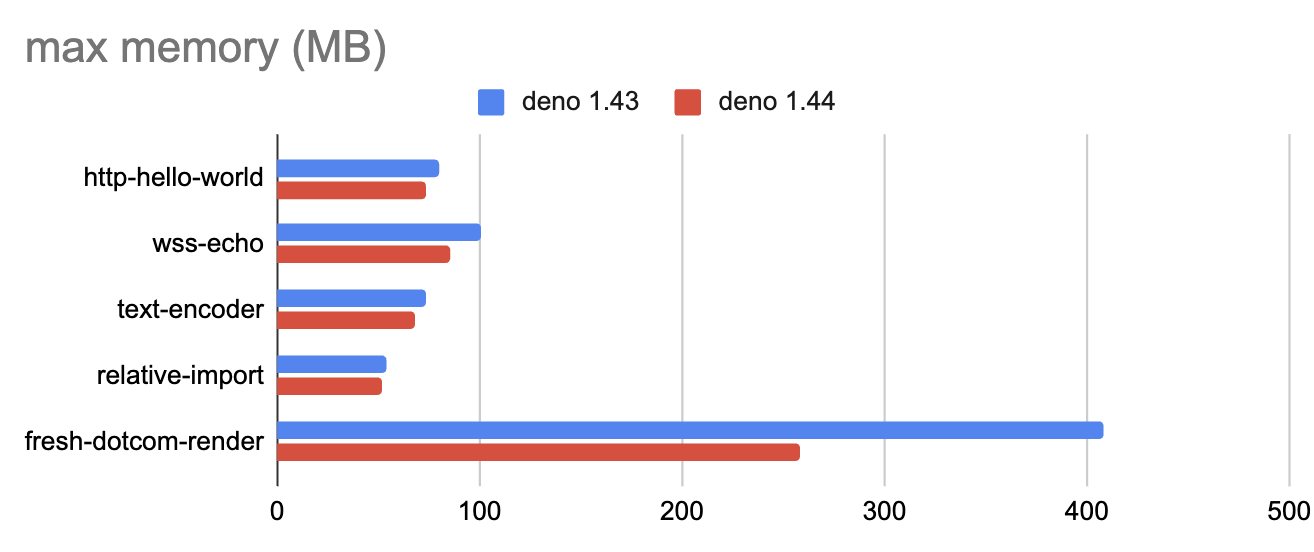
Deno 1.44 introduces several performance improvements that make Deno faster and more memory efficient. We expect many projects to see memory usage reductions between 5-30%, depending on the workload.
Reduced memory usage with V8 pointer compression: Re-enabling V8 pointer
compression allows V8 to store pointers more efficiently, greatly reducing
memory usage. This enhancement is particularly beneficial for real-world
scenarios with significant object allocations, leading to a notable reduction
in memory consumption.
Faster module loading: Optimized module loading by performing tasks in
parallel, including analyzing and emitting CommonJS exports and re-exports,
compiling TypeScript to JavaScript during deno cache operations, skipping
unnecessary directory lookups during module resolution, and downloading
metadata files as soon as possible. These enhancements significantly speed up
module processing and caching efficiency, reducing overall startup times.
These changes make projects with heavy use of dynamic imports around 2-3x
quicker to start (#23856,
#23894,
#23892,
#23851,
#23836).
Faster startup time in AWS Lambda: Using a Write-Ahead Logging (WAL) journal for SQLite databases in the DENO_DIR improves code caching and startup time for Deno instances, particularly beneficial in serverless environments like AWS Lambda. This change helps reduce the latency for cold starts, making serverless applications more responsive (#23955).
Improved language server performance: Caching semantic tokens for open documents in the LSP enhances language server performance, making development smoother and more efficient by reducing the time needed to re-analyze open files (#23799).
The Deno Standard Library offers a set of high quality packages that are audited by the core team and guaranteed to work with Deno.
These days, the Standard Library is be published exclusively to
JSR under the @std scope. Existing
versions of the Standard Library will continue to live at https://deno.land/std.
This move, alongside Deno’s new workspaces functionality, is part of the changes
coming in Deno 2. For more details, check out
the Standard Library’s roadmap
for stabilization.
Deno.exitCode APIThis release adds a new, stable Deno.exitCode API. You can use this API to get
and set the would-be exit code of your program:
console.log("Initial code", Deno.exitCode);

try {
  console.log("Try to retrieve data...");
  await fetch("https://doesnt.exist");
} catch (e) {
  console.log("Failed to retrieve data");

  Deno.exitCode = 42;

}

console.log("Exit code after the task", Deno.exitCode);
$ deno run --allow-net exit_code.ts
Initial code 0
Try to retrieve data...
Failed to retrieve data!
Exit code after the task 42
$ echo $?
42
You can use this API to assign a particular exit code, but not exit immediately,
like when using Deno.exit(code?) API. This API allows to perform additional
cleanup before the program finishes.
This API is very similar to process.exitCode API from Node.js, however
Deno.exitCode has stronger validation and requires to set a valid decimal exit
code. Both APIs work in tandem and reflect values as expected:
import process from "node:process";

console.log("Deno 1 - exit code -", Deno.exitCode);
console.log("Node.js 1 - exit code -", process.exitCode);

Deno.exitCode = 42;

console.log("Deno 2 - exit code -", Deno.exitCode);
console.log("Node.js 2 - exit code -", process.exitCode);

process.exitCode = 70;

console.log("Deno 3 - exit code -", Deno.exitCode);
console.log("Node.js 3 - exit code -", process.exitCode);
$ deno run exit_code.ts
Deno 1 - exit code - 0
Node.js 1 - exit code - 0
Deno 2 - exit code - 42
Node.js 2- exit code - 42
Deno 3 - exit code - 70
Node.js 3 - exit code - 70
$ echo $?
70
Thanks to Luke Edwards for suggestion and initial implementation of this API.
Request#bytes() and Response#bytes()The Fetch API specification was
updated recently with a new .bytes()-method on both the Request and
Response classes. This small change improves quality of life significantly
when working with bytes. You no longer have to get the underlying ArrayBuffer
and convert it to Uint8Array.
const response = await fetch("https://example.com");
const buffer = new Uint8Array(await response.arrayBuffer());


const response = await fetch("https://example.com");
const buffer = await response.bytes();
This release brings a big update to an existing rule and a new lint rule.
no-undefined-varsno-undefined-vars now works in JSX and TSX files:
import React from "react";
const Foo = () => {
  return "Hello world!";
};
This improvement will be particularly useful for users of Fresh.
This rule is still enabled by default, like in previous releases.
no-boolean-literal-for-argumentsIt is common to define functions that can take booleans as arguments. However,
passing boolean literals as parameters can lead to lack of context regarding
the role of the argument inside the function in question:
function redraw(allViews: boolean, inline: boolean) {

}

redraw(true, true);
This rule enforces that all boolean parameters need to use “self-documenting” constants:
function redraw(allViews: boolean, inline: boolean) {

}

const ALL_VIEWS = true;
const INLINE = false;
redraw(ALL_VIEWS, INLINE);
Thanks to Jorge Martin Juarez for implementing this rule.
This rule is disabled by default. You can enable it in your deno.json(c)
config file like so:
{
  "lint": {
    "rules": {
      "include": ["no-boolean-literal-for-arguments"]
    }
  }
}
Deno’s built-in test runner received a new --clean flag which will empty the
coverage directory before running the test suite. This seems like a minor
change, but it solves the problem where coverage data for long deleted files was
still around.
deno test --coverage --clean
Be aware that this flag will cause conflicts when running multiple deno test
commands in parallel or in series, and then viewing the aggregated coverage
report. If you are running tests in parallel, you should not use the --clean
flag. If running in series, only pass the --clean flag to the first
deno test invocation.
We noticed that long running tests can cause confusion as to whether the test runner is still working when no output is shown:
$ deno test slow_test.ts
Check file:///tmp/test_slow.ts
running 1 test from test_slow.ts
test ...
'test' has been running for over 1m0s
'test' has been running for over 2m0s
 ok (2m10s)

ok | 1 passed | 0 failed (2m10s)
You can configure the interval of these messages using the
DENO_SLOW_TEST_TIMEOUT env var that accepts the number of seconds after which
the message is printed. We are considering adding a hard timeout to slow tests
that will forcefully abort the test. We’d love to hear your
feedback about this feature.
Deno.FsFile stabilizationsYou no longer need to use the --unstable-fs flag, which frequently caused
issues in various contexts, including with frameworks like Next.js. The
following methods have been stabilized:
Deno.FsFile.syncData[Sync]() and Deno.FsFile.sync[Sync]()
(#23733)Deno.FsFile.unlock[Sync]() and Deno.FsFile.lock[Sync]()
(#23754)These stabilizations remove the need for the unstable flag, making file system operations smoother and more reliable. By incorporating these changes, the API now supports essential file synchronization and locking capabilities directly within the stable Deno runtime. This enhancement is particularly useful for ensuring data integrity and handling concurrent file operations effectively.
Deno’s FFI API allows you to call native libraries from JavaScript code. In Deno 1.44, we’ve made some changes to improve this functionality.
We have updated the handling of u64 and i64 types from native code.
Previously, these symbols were represented as number | bigint. Starting with
v1.44, they are always of type bigint. This change aligns the API with
JavaScript’s handling of large integers and ensures better performance and type
consistency. While this is a breaking change, the API remains unstable, and we
are using this opportunity to address type quirks as we move towards
stabilization of the Deno.dlopen() API.
(#23981,
#23983)
These updates are part of our ongoing efforts to stabilize the FFI API for Deno 2, ensuring it provides a robust and consistent experience for calling native libraries from Deno.
deno serveIt’s been a month the deno serve command was added to Deno. It allows you to
write servers in a declarative way. We noticed that often during development you
want the server to start and don’t really care which port it will spawn on. For
that reason we’ve added support for passing --port 0, which returns a random
free port selected by your operating system.
$ deno serve --port 0 server.ts
deno serve: Listening on http://localhost:58333/
WebSocket timeoutDeno has a ping/pong mechanism for WebSocket API that keeps connections
alive. Unfortunately the default timeout of 120s was too long for many popular
reverse-proxy servers like Nginx. Many of these servers have a default timeout
of 60s by default. This caused connections to Deno WebSocket servers to close
prematurely.
The default “idle” timeout for ping/pong messages was lowered to 30s. Most
WebSockets servers should be more reliable with this change, without any manual
intervention.
Thanks to Alex Gleason for implementing this change.
This month we spent a good chunk of time cleaning up the language server which resulted in several performance improvements and bug fixes, namely:
DENO_FUTURE=1We continue to ship changes that will take effect in Deno 2, that you can try
today by running Deno with DENO_FUTURE=1 environment variable.
This release brings following changes:
deno install now handles adding dependencies to deno.json(c) and
package.json files, making migration of Node.js projects much easier.--unstable-fs flag is not needed)--unstable-webgpu flag is not needed)--unstable-ffi flag is not needed)deno install properly sets up node_modules/.bin/ entries for npm
packages with binary entrypointsWe couldn’t build Deno without the help of our community! Whether by answering questions in our community Discord server or reporting bugs, we are incredibly grateful for your support. In particular, we’d like to thank the following people for their contributions to Deno 1.44: Alex Gleason, Antoine du Hamel, Bedis Nbiba, charlotte ✨, chirsz, Evan, Felipe Baltor, futsuuu, Hajime-san, Hasan-Alrimawi, Kenta Moriuchi, Kyle Kelley, Luke Edwards, Mathias Lafeldt, Mattias Buelens, Mike Mulchrone, Milly, Simon Lecoq, Volker Schlecht.
Would you like to join the ranks of Deno contributors? Check out our contribution docs here, and we’ll see you on the list next time.
Believe it or not, the changes listed above still don’t tell you everything that got better in 1.44. You can view the full list of pull requests merged in Deno 1.44 on GitHub here.
Thank you for catching up with our 1.44 release, and we hope you love building with Deno!
🍋 Fresh 2.0 is right around the corner.
Our next major Fresh release will be simpler with a more composable, routing API. Read more here.
此内容由惯性聚合(RSS阅读器)自动聚合整理,仅供阅读参考。 原文来自 — 版权归原作者所有。