惯性聚合 高效追踪和阅读你感兴趣的博客、新闻、科技资讯
阅读原文 在惯性聚合中打开

推荐订阅源

Cyber Security Advisories - MS-ISAC
博客园 - 【当耐特】
阮一峰的网络日志
阮一峰的网络日志
S
Secure Thoughts
Threat Intelligence Blog | Flashpoint
钛媒体:引领未来商业与生活新知
钛媒体:引领未来商业与生活新知
T
Tenable Blog
T
Tailwind CSS Blog
WordPress大学
WordPress大学
宝玉的分享
宝玉的分享
Webroot Blog
Webroot Blog
cs.CL updates on arXiv.org
The Cloudflare Blog
T
Threat Research - Cisco Blogs
V
Visual Studio Blog
Jina AI
Jina AI
V
V2EX
I
InfoQ
Latest news
Latest news
P
Proofpoint News Feed
T
Threatpost
Engineering at Meta
Engineering at Meta
P
Proofpoint News Feed
美团技术团队
The Register - Security
L
LangChain Blog
Apple Machine Learning Research
aimingoo的专栏
aimingoo的专栏
GbyAI
GbyAI
Cloudbric
Cloudbric
Microsoft Azure Blog
C
Cisco Blogs
U
Unit 42
Microsoft Security Blog
MyScale Blog
MyScale Blog
V
Vulnerabilities – Threatpost
TaoSecurity Blog
TaoSecurity Blog
freeCodeCamp Programming Tutorials: Python, JavaScript, Git & More
Recent Commits to openclaw:main
W
WeLiveSecurity
博客园 - 司徒正美
T
The Exploit Database - CXSecurity.com
小众软件
小众软件
Y
Y Combinator Blog
Recent Announcements
量子位
酷 壳 – CoolShell
酷 壳 – CoolShell
让小产品的独立变现更简单 - ezindie.com
博客园_首页
N
News and Events Feed by Topic

Discord Blog

Making It Easier Than Ever to Connect with Friends in League & VAL! Every Voice and Video Call on Discord Is Now End-to-End Encrypted How to Link Discord to Battlefield 6, Marvel Rivals & More Official Discord Integrations for Steal a Brainrot, Grow a Garden, Brookhaven RP, and more Celebrate Discord’s 11th Birthday with an Exclusive Set of Emoji and Wallpapers Nitro Now Comes with Xbox Game Pass and New Benefits. Welcome to Nitro Rewards. Stock Up in the New Rust Shop! Enjoy a Discord-Only 20% Sale on Most Items until 5/21 How Discord Automates ScyllaDB Clusters at Scale Discord Patch Notes: May 4, 2026 You’ve Got (Too Much) Mail: Behind the Scenes of the 3/25/26 Voice Outage Measure Less to Learn More: Using Fewer, Higher-quality Metrics to Capture What Matters Discord Patch Notes: April 6, 2026 MULTIPLAYER SEQUEL TO ACCLAIMED AAAA GAME “THE LAST MEADOW” ANNOUNCED: PLAYABLE NOW Making Discord on Desktop Look Just Right: Display Settings to Ease the Eyes Discord Patch Notes: December 8, 2025 Building on the Social Layer of Games: What’s New from GDC 2026 Gift Ideas for the Dedicated Discord User in Your Life Discord Update: November 6, 2025 Changelog During October, Treat a Friend to Nitro and Trick Out Your Profile for Halloween 🎃 Discord Social SDK Updates & Integrations Go Beyond, Plus Ultra! with the My Hero Academia Collection STAR WARS™ Makes Its Way to Discord Worthy of a Plaque: Nameplates Land in the Shop Announcing Discord’s Social SDK, Helping Power Your Game’s Social Experiences A Cornucopia of Updates Make Discord on Desktop Fresher Than a Crisp Fall Breeze Starting Your First Discord Server Transforming Game Discovery with Instant Play Experiences on Discord Introducing the Discord for Business Newsletter, Vol. 1 Discord Update: March 24, 2026 Changelog Discord Update: December 19, 2024 Changelog How Multi-Factor Authentication Helps Keep Your Discord Account Safe How ROOST is Advancing Online Safety You’re Now Discord Official: Developers, Claim Your Game and Verify Your Server Discord Patch Notes: March 6, 2026 Tracing Discord's Elixir Systems (Without Melting Everything) Getting Global Age Assurance Right: What We Got Wrong and What's Changing Discord Patch Notes: February 4, 2026 Osprey: Open Sourcing our Rule Engine How to Change Your Theme to Bring Your Vibe to Discord Your Discord Checkpoint is Rolling Out! Celebrate What You Did in 2025 How to Customize Your Discord Profile How to Make and Use Custom Emoji on Discord Save and Display Your Faves: Add Discord Shop & Marvel Rivals Items to Your Profile’s Wishlist Discord Patch Notes: November 4, 2025 Bringing In-Game Commerce to Discord Communities Reward Your Play: Complete Quests. Earn Orbs. Get Sweet Stuff. How to Share What You’re Playing, Listening to, or Watching as Your Status on Discord Staff Picks, September 2025: Welcome to Our Video Game Museum From Single-Node to Multi-GPU Clusters: How Discord Made Distributed Compute Easy for ML Engineers Discord Patch Notes: October 7, 2025 Discord Update: September 25, 2025 Changelog New Looks for Nitro, New Looks for You. Get Yourself a Nitro-exclusive Profile Bundle! Discord Patch Notes: September 3, 2025 Bringing DAVE to All Discord Platforms Discord’s Powerful Cross-Platform Chat: Ready for Your Game Introducing the Community Server Cleanup Report for August 2025 Discord for Business Vol. 2: Cannes-worthy ad product updates Discord Patch Notes: August 4, 2025 ROOST Announces “Coop” and “Osprey”: Free, Open-Source Trust and Safety Infrastructure for the AI Era *FLAILS AROUND* SUMMER SPECIAL! JOIN NITRO, GET AN EXTRA MONTH OF NITRO ON US! Get More From Your Boosts With New Server Perks Discord Patch Notes: July 7, 2025 Discord Update: June 30, 2025 Changelog Authenticity Matters: Discord's Pride Month 2025 Staff Picks, June 2025: Summer of Showcases How to Set Up Your Server’s Roles for Members, Mods & Admins Gift Nitro and Earn A Flavorful Splash for your Avatar Discord Patch Notes: June 3, 2025 How to Use the Discord Soundboard & Add More Sounds Checkpoint 3: Leveling Up Discord Quests with Orbs and Advanced Measurement Thank You for Ten Years Staff Picks, May 2025: The Games That Brought Us to Discord Discord Patch Notes: May 1, 2025 How Discord Indexes Trillions of Messages Passing the Torch Discord Appoints Humam Sakhnini as Chief Executive Officer Staff Picks, April 2025: All The Adaptations Make More Closet Space! Nitro Members Can Now Keep Avatar Decoration Quest Rewards for Longer How to Use Discord’s In-Game Overlay to Talk While Playing on PC The Game Developer Playbook, Part One: Getting Started on Discord The Game Developer Playbook, Part Two: Early Access and Pre-Launch MAJOR NEWS: DISCORD ANNOUNCES ITS FIRST IN-HOUSE AAAA VIDEO GAME, “THE LAST MEADOW” Overclocking dbt: Discord's Custom Solution in Processing Petabytes of Data Wicked Saints Turns Players into IRL Superheroes with the Help of e.l.f. Beauty and Discord Discord Update: March 25, 2025 Changelog How to Stream Games and Applications to Discord from Desktop or Mobile Discord Patch Notes: April 3, 2025 Checkpoint 2: Our First Year With Discord Quests How to Create & Upload Your Own Stickers on Discord Revamped Overlay & Refreshed Desktop Give Game Time a Boost Discord Announces First Mobile Ad Format, Broadening Advertising Opportunities Announcing Discord’s Social SDK, Helping Power Your Game’s Social Experiences The Game Developer Playbook: Three Incredible Game-Focused Communities Modern Image Formats at Discord: Supporting WebP and AVIF Discord Patch Notes: March 11, 2025 Supercharging Discord Mobile: Our Journey to a Faster App December Staff Picks: It’s Giving Games Discord Patch Notes: February 3, 2025 Leveling Up Black Voices in Gaming How Discord Seamlessly Upgraded Millions of Users to 64-Bit Architecture
How to Use Nitro: A Beginner’s Guide to Discord’s Premium Subscription
Clyde · 2026-05-14 · via Discord Blog

The Discord Nitro logo.

Editor’s Note: In May 2026, Nitro received one of its biggest expansions to date! We’ve updated this article to reflect all the cool new updates.

What is Discord Nitro? How does it work? Is Nitro free? And if not, where do you buy it? These are all things that may be swirling around your mind as you take a peek at everything that it has to offer. 

If you’re looking to expand your Nitro knowledge, you’re in the right place. Let’s talk about what Discord Nitro is all about, what sorts of perks it gives, and even ways to try Nitro for free before becoming a member yourself. 

So, what is Discord Nitro?

Bottom line: it’s a membership that supercharges your Discord experience. If you ever see someone who’s got an animated profile banner, or a different profile for each server they’re in, or who wows everyone in #general with cool custom emojis from another server they’re in, that’s Nitro at work right there. 

Other ways to know if someone has Discord Nitro: their streaming quality is clearer than a new pair of spectacles, their display name is a crazy cool font with a deep green glow, or they just gave YOU a two-week trial to Nitro. How kind of them!    

But hold up! We see you already trying to become a Nitro member, and we love your excitement, but we got a few tidbits of knowledge you might wanna know before committing. 

First: there’s actually two styles of Nitro membership, Nitro and Nitro Basic.

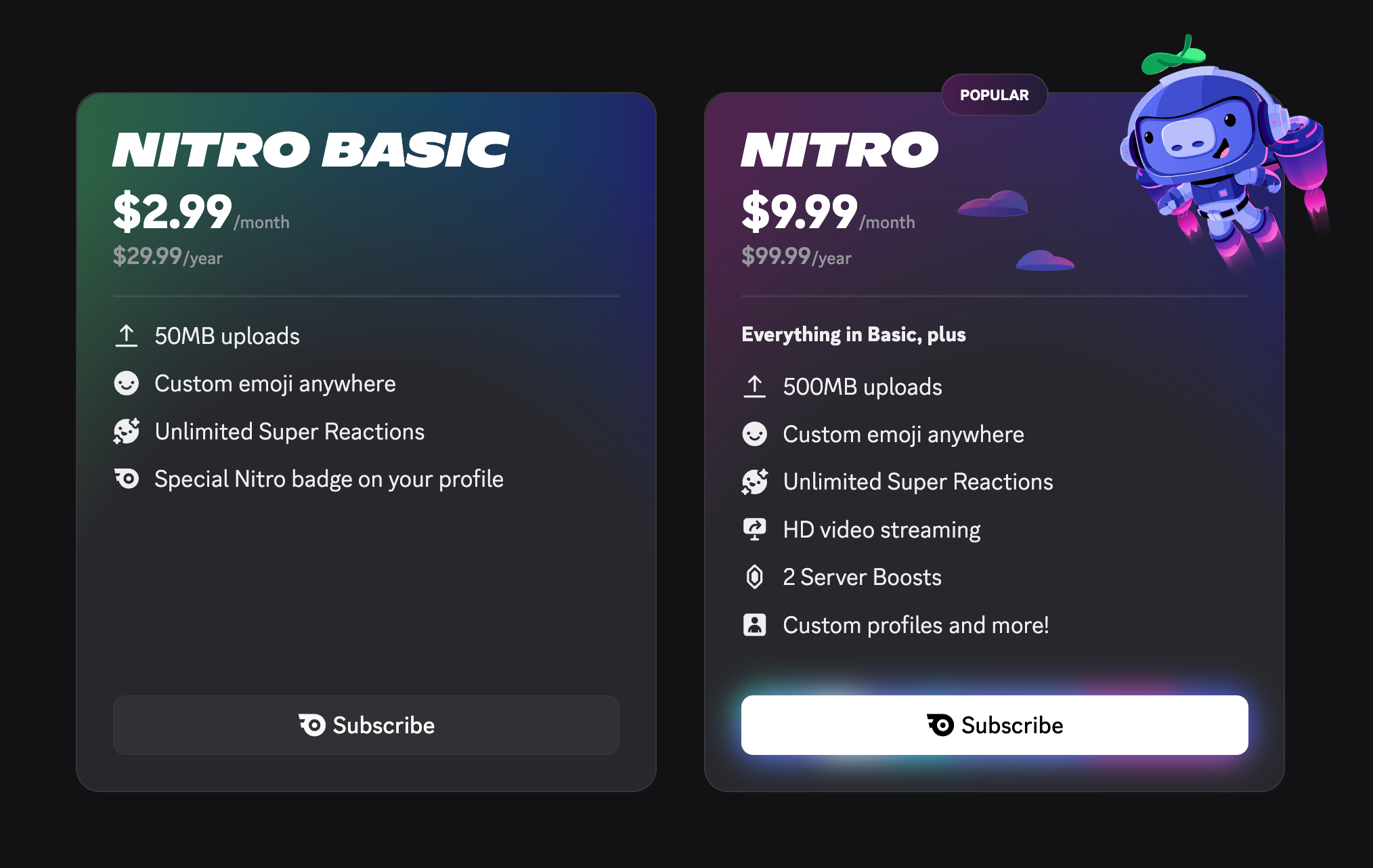
Discord Nitro vs Nitro Basic: What Each Tier Includes

Nitro and Nitro Basic both include additional ways to express yourself and have more fun on Discord, including using custom emojis and stickers anywhere, custom video backgrounds, and a snazzy profile badge that changes color the longer you’re a member. 

The standard Nitro goes even further, with animated avatars and profile banners, HD streaming, two Server Boosts, an Orbs boost for all completed Quests, and even perks for stuff outside of Discord, like gaming hardware discounts and access to over 50 games and 10 hours of cloud gaming each month with Xbox Game Pass for eligible subscribers. 

A simplified overview of the Nitro and Nitro Basic differences

Yes, Nitro even includes PC (and console) games thanks to Xbox Game Pass. You’ll no longer have the excuse of “idk what to play” ever again. 

It’s totally up to you which style you want to go for. You can subscribe to either of the two Nitro tiers whenever you’d like, and managing your plan is as easy as going to User Settings > Nitro.

So how much does Discord Nitro Cost?

At the time of writing, in the US, Discord Nitro costs $9.99 if you pay per month, or $99.99 if you decide to pay on a yearly cadence. As for Nitro Basic, that’s $2.99 per month, or $29.99 for a year upfront. 

If you’re not in the US, you might be looking at a different price point. You can check your region’s pricing from the Nitro Localized Pricing support article or in User Settings > Nitro

Where can I buy Discord Nitro?

You can subscribe to Discord Nitro on any platform you use Discord on, including desktop, web, and mobile. You’re gonna want to check out User Settings > Nitro to get started. 

You can subscribe to Discord Nitro on any platform you use Discord on, including desktop, web, and mobile. You’re gonna want to check out User Settings > Nitro to get started. 

Can I Try Discord Nitro Before Becoming a Nitro Member?

Yes! There are actually two ways you can try out Nitro yourself before taking the plunge and becoming an esteemed Nitro member yourself.

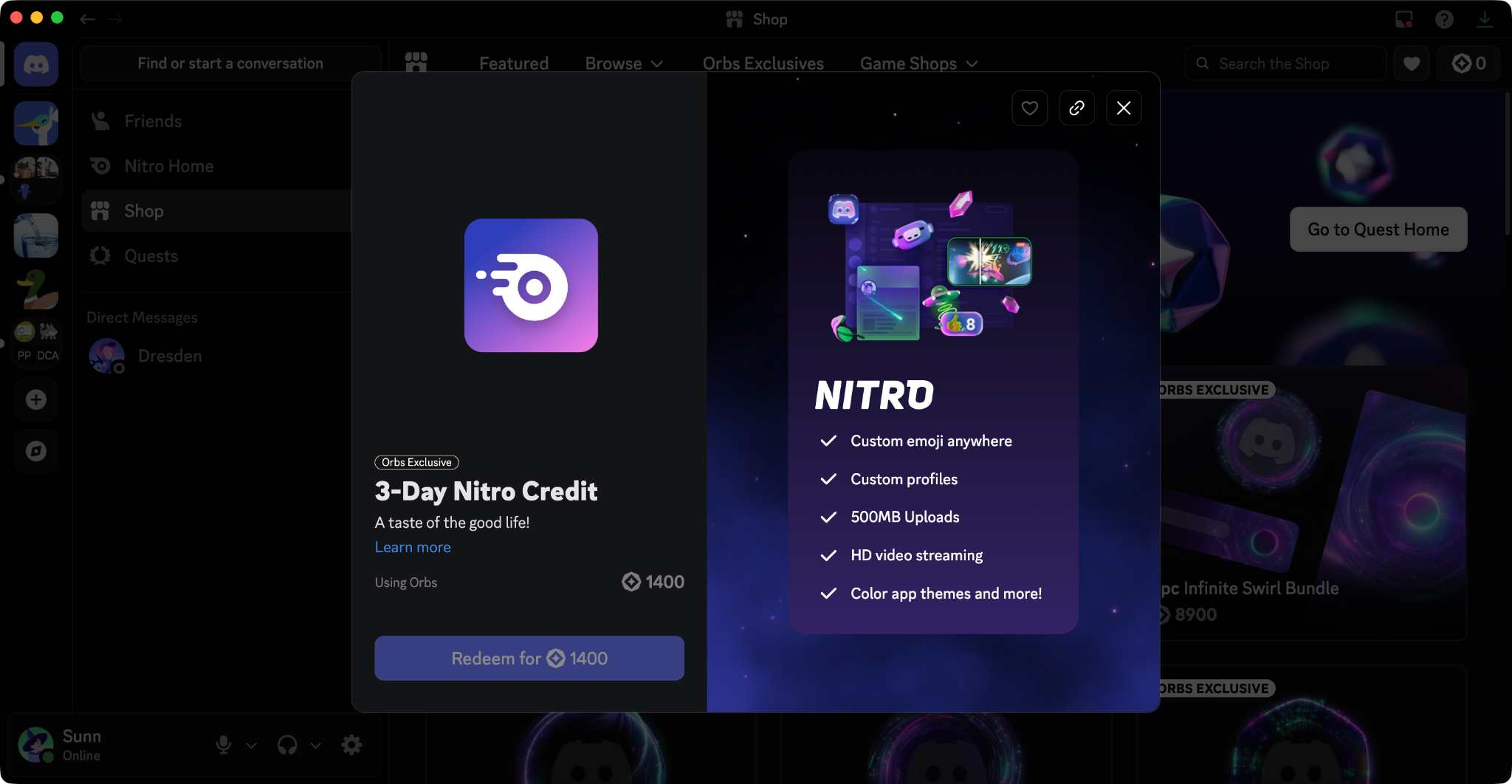
The first way: redeem Discord Orbs for some Nitro! If you’ve never checked out Quests before, the gist of it is: you’ll complete a specific action, such as playing a specific game, in exchange for some Discord Orbs. 

Nitro Credit in the Orbs Shop. 

Once you collect enough Orbs, you can exchange 1400 mystical spheres for 3 days of Nitro. 

Alternatively, your Nitro-having friends can share two-week trials with up to three friends who aren’t currently Nitro members, or if it’s been a long time since they were a Nitro member. 

You should slyly drop this support article on sharing Nitro in your DMs with your Nitro friend. Ya’know, as a hint, just in case they don’t know how to share their Nitro…

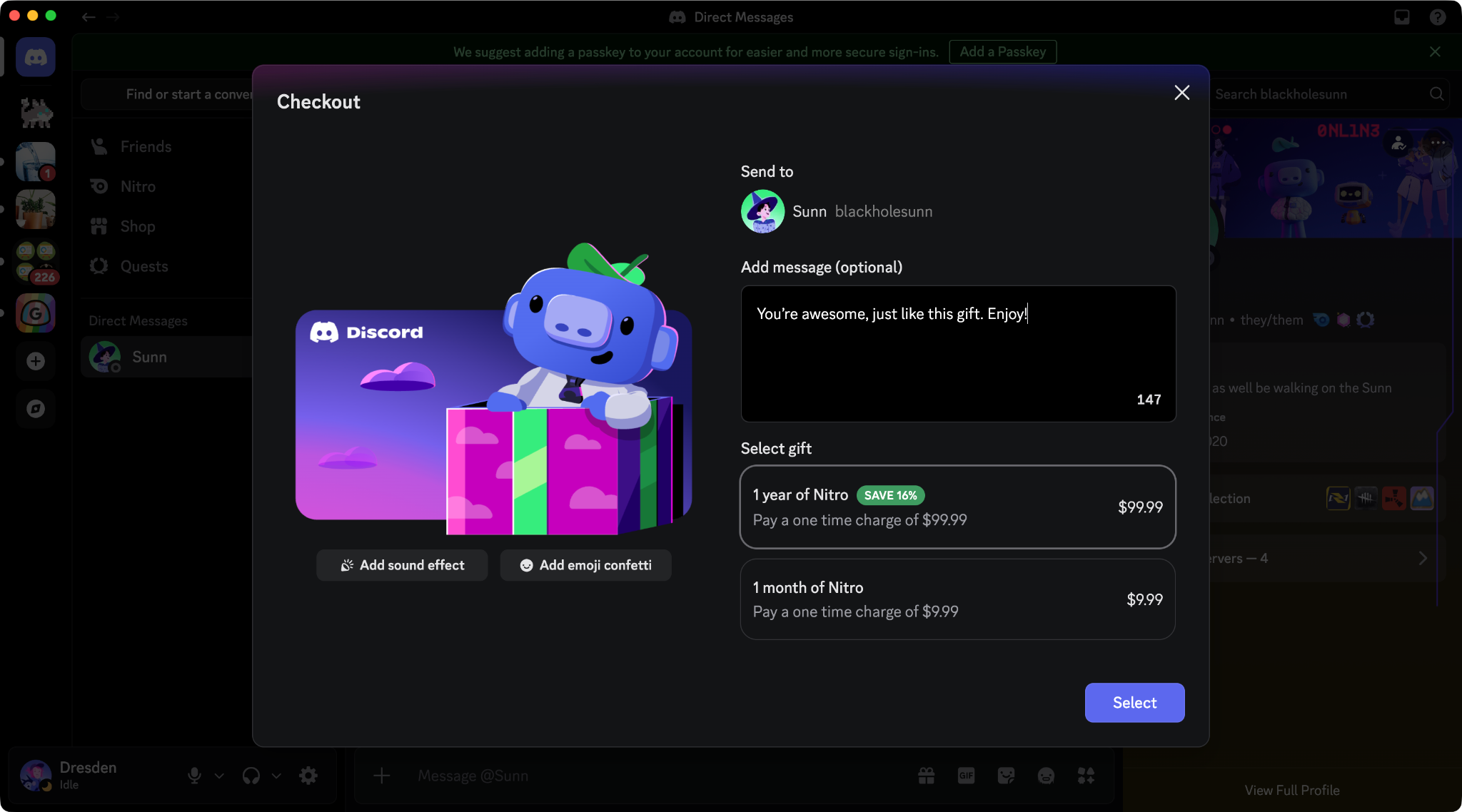
My friend gifted me Nitro! How do I redeem my Nitro gift?

First, give your friend a big ol’ “Thank you!” Then, simply click the Accept button in-app to redeem your Nitro.

A Nitro Gift link being shared by a user in Discord. 

Sunn about to receive Nitro from a friend. How sweet! 

Can I redeem and stack multiple Nitro gifts?

Oh, absolutely

If you’re already a Nitro member and get gifted even more Nitro, it’ll roll over to the end of your subscription as credit. The next time you would have been billed, Discord will use your Nitro credit instead. 

You can also add any Nitro credit obtained from exchanging Discord Orbs to the end of your membership time, but not Nitro trials. 

One important note: your credit won’t apply immediately if you’ve accepted a gift for a version of Nitro different from the one you’re already a member of. If you are currently rockin’ Nitro Basic and receive a standard Nitro gift, your credit will kick in after you switch from Basic to Nitro. 

Don't worry though, if you decide to still accept your gift, your Nitro credits will live in your account until you decide to switch plans. 

Avoiding Nitro Scams: How can I tell my Nitro Gift is Real?

Good question! Nitro gifts will use the URL “https://discord.gift/” with that exact spelling.

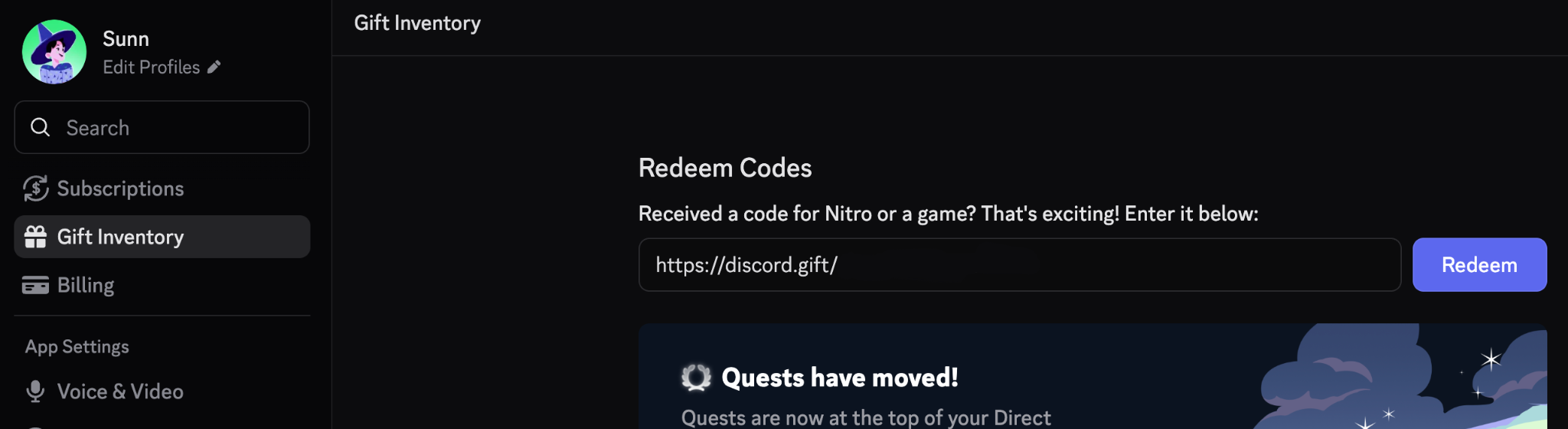
If you really want to play it safe, don’t even click any links or boxes. Just copy and paste the entire redemption link into User Settings > Gift Inventory. We’ll kindly and safely inform you if it works, and you’ll have some new Nitro perks afterward!

Sunn’s gift link from the previous image is pasted in a text field labeled “Redeem Codes.” 

Place your link directly within User Settings > Gift Inventory > Redeem Codes.

Generally, you should make sure that any offers you entertain come from a reputable source. Or to be extra-extra-sure, grab some Nitro yourself (or for a friend) directly within User Settings.

What happened to Nitro Classic?

The short version is: Nitro Classic has been retired, and Nitro Basic has taken its place. If you already have a Nitro Classic membership, you can keep it as long as your membership is active.

New to Nitro and looking for a lower-commitment taster? We really suggest you check out Nitro Basic — we think you’ll like it.

Clyde

Your personal guide to all things Discord, Clyde is here to support you throughout your experience in the app. Got questions? Pressed the wrong button? Clyde's got your back.

related articles