



惯性聚合 高效追踪和阅读你感兴趣的博客、新闻、科技资讯
阅读原文 在惯性聚合中打开

推荐订阅源

Recent Commits to openclaw:main
N
News | PayPal Newsroom
TaoSecurity Blog
TaoSecurity Blog
Google Online Security Blog
NISL@THU
NISL@THU
T
Threatpost
C
CXSECURITY Database RSS Feed - CXSecurity.com
K
KPMG report finds enterprise disconnect between AI and its ROI | CIO
Engineering at Meta
Engineering at Meta
AWS News Blog
AWS News Blog
D
Darknet – Hacking Tools, Hacker News & Cyber Security
cs.AI updates on arXiv.org
P
Privacy International News Feed
B
Blog
PCI Perspectives
PCI Perspectives
Martin Fowler
Martin Fowler
Spread Privacy
Spread Privacy
P
Proofpoint News Feed
T
Tenable Blog
F
Fortinet All Blogs
G
GRAHAM CLULEY
V2EX - 技术
V2EX - 技术
C
Check Point Blog
Project Zero
Project Zero
P
Palo Alto Networks Blog
J
Java Code Geeks
W
WeLiveSecurity
OSCHINA 社区最新新闻
OSCHINA 社区最新新闻
Threat Intelligence Blog | Flashpoint
T
The Exploit Database - CXSecurity.com
博客园 - 司徒正美
P
Privacy & Cybersecurity Law Blog
S
SegmentFault 最新的问题
Last Week in AI
Last Week in AI
Forbes - Security
Forbes - Security
C
Cybersecurity and Infrastructure Security Agency CISA
Security Latest
Security Latest
cs.CL updates on arXiv.org
Vercel News
Vercel News
Recent Announcements
博客园 - Franky
cs.CV updates on arXiv.org
Recorded Future
Recorded Future
The Last Watchdog
The Last Watchdog
MongoDB | Blog
MongoDB | Blog
人人都是产品经理
人人都是产品经理
酷 壳 – CoolShell
酷 壳 – CoolShell
Cisco Talos Blog
Cisco Talos Blog
量子位
Cyber Security Advisories - MS-ISAC

Discord Blog

Making It Easier Than Ever to Connect with Friends in League & VAL! Every Voice and Video Call on Discord Is Now End-to-End Encrypted How to Link Discord to Battlefield 6, Marvel Rivals & More Official Discord Integrations for Steal a Brainrot, Grow a Garden, Brookhaven RP, and more Celebrate Discord’s 11th Birthday with an Exclusive Set of Emoji and Wallpapers Nitro Now Comes with Xbox Game Pass and New Benefits. Welcome to Nitro Rewards. How to Use Nitro: A Beginner’s Guide to Discord’s Premium Subscription Stock Up in the New Rust Shop! Enjoy a Discord-Only 20% Sale on Most Items until 5/21 How Discord Automates ScyllaDB Clusters at Scale Discord Patch Notes: May 4, 2026 You’ve Got (Too Much) Mail: Behind the Scenes of the 3/25/26 Voice Outage Measure Less to Learn More: Using Fewer, Higher-quality Metrics to Capture What Matters Discord Patch Notes: April 6, 2026 MULTIPLAYER SEQUEL TO ACCLAIMED AAAA GAME “THE LAST MEADOW” ANNOUNCED: PLAYABLE NOW Making Discord on Desktop Look Just Right: Display Settings to Ease the Eyes Discord Patch Notes: December 8, 2025 Building on the Social Layer of Games: What’s New from GDC 2026 Gift Ideas for the Dedicated Discord User in Your Life Discord Update: November 6, 2025 Changelog During October, Treat a Friend to Nitro and Trick Out Your Profile for Halloween 🎃 Discord Social SDK Updates & Integrations Go Beyond, Plus Ultra! with the My Hero Academia Collection STAR WARS™ Makes Its Way to Discord Worthy of a Plaque: Nameplates Land in the Shop Announcing Discord’s Social SDK, Helping Power Your Game’s Social Experiences Starting Your First Discord Server Transforming Game Discovery with Instant Play Experiences on Discord Introducing the Discord for Business Newsletter, Vol. 1 Discord Update: March 24, 2026 Changelog Discord Update: December 19, 2024 Changelog How Multi-Factor Authentication Helps Keep Your Discord Account Safe How ROOST is Advancing Online Safety You’re Now Discord Official: Developers, Claim Your Game and Verify Your Server Discord Patch Notes: March 6, 2026 Tracing Discord's Elixir Systems (Without Melting Everything) Getting Global Age Assurance Right: What We Got Wrong and What's Changing Discord Patch Notes: February 4, 2026 Osprey: Open Sourcing our Rule Engine How to Change Your Theme to Bring Your Vibe to Discord Your Discord Checkpoint is Rolling Out! Celebrate What You Did in 2025 How to Customize Your Discord Profile How to Make and Use Custom Emoji on Discord Save and Display Your Faves: Add Discord Shop & Marvel Rivals Items to Your Profile’s Wishlist Discord Patch Notes: November 4, 2025 Bringing In-Game Commerce to Discord Communities Reward Your Play: Complete Quests. Earn Orbs. Get Sweet Stuff. How to Share What You’re Playing, Listening to, or Watching as Your Status on Discord Staff Picks, September 2025: Welcome to Our Video Game Museum From Single-Node to Multi-GPU Clusters: How Discord Made Distributed Compute Easy for ML Engineers Discord Patch Notes: October 7, 2025 Discord Update: September 25, 2025 Changelog New Looks for Nitro, New Looks for You. Get Yourself a Nitro-exclusive Profile Bundle! Discord Patch Notes: September 3, 2025 Bringing DAVE to All Discord Platforms Discord’s Powerful Cross-Platform Chat: Ready for Your Game Introducing the Community Server Cleanup Report for August 2025 Discord for Business Vol. 2: Cannes-worthy ad product updates Discord Patch Notes: August 4, 2025 ROOST Announces “Coop” and “Osprey”: Free, Open-Source Trust and Safety Infrastructure for the AI Era *FLAILS AROUND* SUMMER SPECIAL! JOIN NITRO, GET AN EXTRA MONTH OF NITRO ON US! Get More From Your Boosts With New Server Perks Discord Patch Notes: July 7, 2025 Discord Update: June 30, 2025 Changelog Authenticity Matters: Discord's Pride Month 2025 Staff Picks, June 2025: Summer of Showcases How to Set Up Your Server’s Roles for Members, Mods & Admins Gift Nitro and Earn A Flavorful Splash for your Avatar Discord Patch Notes: June 3, 2025 How to Use the Discord Soundboard & Add More Sounds Checkpoint 3: Leveling Up Discord Quests with Orbs and Advanced Measurement Thank You for Ten Years Staff Picks, May 2025: The Games That Brought Us to Discord Discord Patch Notes: May 1, 2025 How Discord Indexes Trillions of Messages Passing the Torch Discord Appoints Humam Sakhnini as Chief Executive Officer Staff Picks, April 2025: All The Adaptations Make More Closet Space! Nitro Members Can Now Keep Avatar Decoration Quest Rewards for Longer How to Use Discord’s In-Game Overlay to Talk While Playing on PC The Game Developer Playbook, Part One: Getting Started on Discord The Game Developer Playbook, Part Two: Early Access and Pre-Launch MAJOR NEWS: DISCORD ANNOUNCES ITS FIRST IN-HOUSE AAAA VIDEO GAME, “THE LAST MEADOW” Overclocking dbt: Discord's Custom Solution in Processing Petabytes of Data Wicked Saints Turns Players into IRL Superheroes with the Help of e.l.f. Beauty and Discord Discord Update: March 25, 2025 Changelog How to Stream Games and Applications to Discord from Desktop or Mobile Discord Patch Notes: April 3, 2025 Checkpoint 2: Our First Year With Discord Quests How to Create & Upload Your Own Stickers on Discord Revamped Overlay & Refreshed Desktop Give Game Time a Boost Discord Announces First Mobile Ad Format, Broadening Advertising Opportunities Announcing Discord’s Social SDK, Helping Power Your Game’s Social Experiences The Game Developer Playbook: Three Incredible Game-Focused Communities Modern Image Formats at Discord: Supporting WebP and AVIF Discord Patch Notes: March 11, 2025 Supercharging Discord Mobile: Our Journey to a Faster App December Staff Picks: It’s Giving Games Discord Patch Notes: February 3, 2025 Leveling Up Black Voices in Gaming How Discord Seamlessly Upgraded Millions of Users to 64-Bit Architecture
A Cornucopia of Updates Make Discord on Desktop Fresher Than a Crisp Fall Breeze
Clyde · 2026-04-07 · via Discord Blog

A constellation of new features and upgrades to the desktop app. Three friends are hanging out beside it.

This fall, things around the Discord desktop app are starting to feel like a fresh fall breeze! Making new emoji is getting faster to help you get straight to lovingly spamming a new emoji creation in chat, and a cornucopia of desktop improvements, including a redesigned Settings page, some big-name PC games integrating Discord into them, and Family Center updates for guardians. 

Emoji Making, Now Easy as :Pie:

If you’ve ever used Discord at any point, you know how important making your own emoji and posting them everywhere is. They’re used to add your favorite memes and inside jokes to your posts, or as a way to show off your artistic side by creating an entire set of unique emoji for your friends to use! ✨

Obtaining them is usually the easy part. Uploading them used to be the “strangely harder-than-expected” part, but that’s about to get WAY easier. The next time you’re thinking to yourself, “wait… I got a good idea for another cursed Sunfish emoji,” you’ll see an “Add Emoji” button in your emoji picker, like the one below. ⬇️
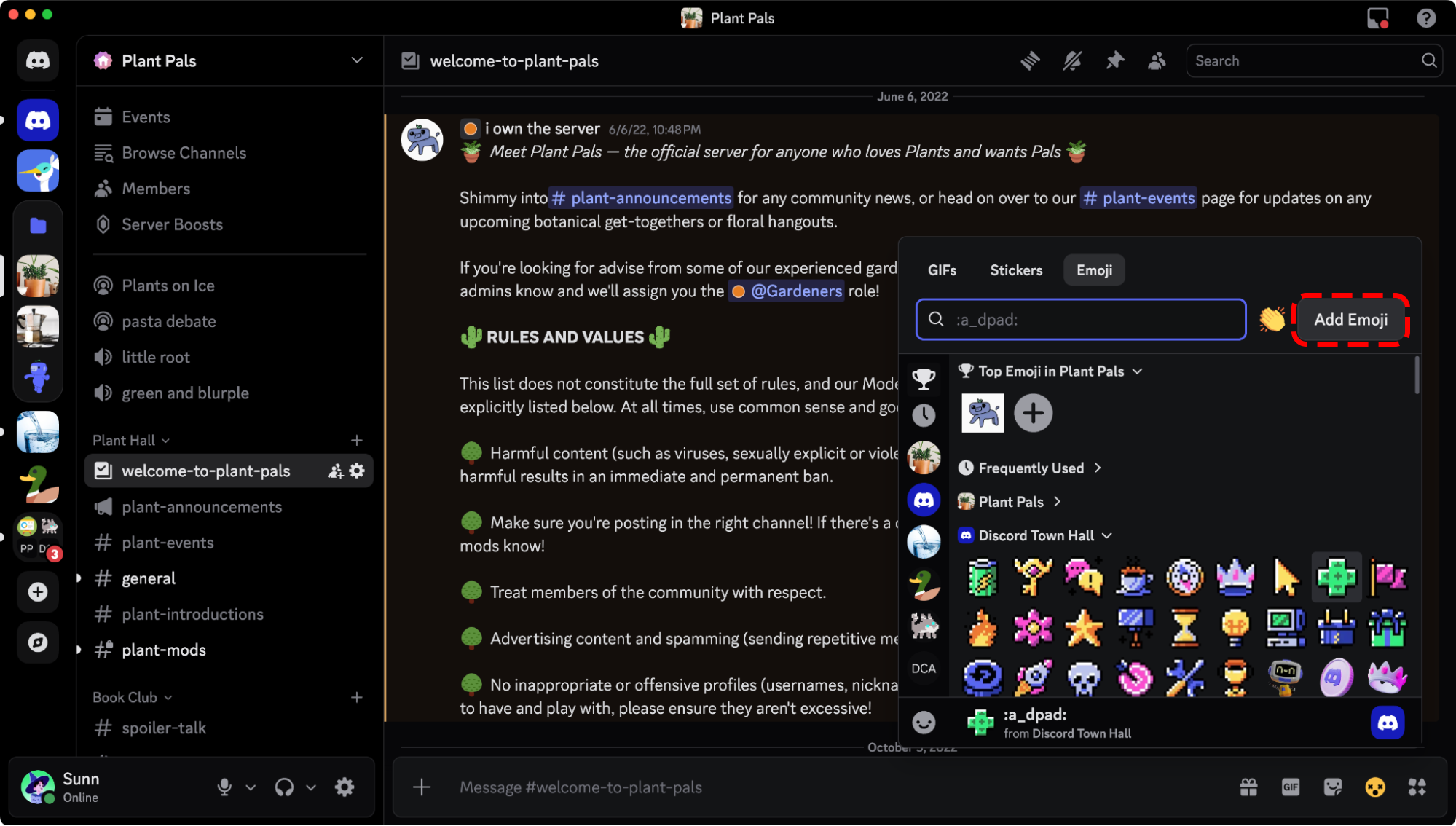
The new “Add Emoji” button in the Emoji Picker.

Add it!! Add it!!

Click on that button and upload the image or GIF you wanna add as an emoji, and a brand new emoji editing tool will appear! This new modal will let you crop or rotate your emoji before uploading it, without leaving chat

The new emoji editing screen.

On the right, you’ll see a preview of what your emoji will look like when it’s posted and as a reaction, plus a quick way to give the emoji a new :name: and the option to choose which server you want to upload it to. You’ll only see servers listed that you have the proper permissions to “Upload Emoji” to, so there’s little chance of accidentally adding it to a random server (unless you’re a mod for like, 100 servers, in which case, that’s on you). 

The best part? You no longer have to resize your emojis in a separate photo editing app before uploading. Gone are the days of “Uhhh… make sure the emoji is 128x128 resolution, PNG file type, file size is unde-” Stop that. You don’t have to worry about all that nonsense anymore. Just go upload it!

Visit 👉 this article 👈to learn all the details on uploading emojis. 

Set the Subject for the Group DM Before Pulling Everyone In

Group DMs are a great way to quickly bring a small group of friends together for a pick-up game or just have a simpler way to talk without having to set up a server and fiddle with Roles and Permissions. 
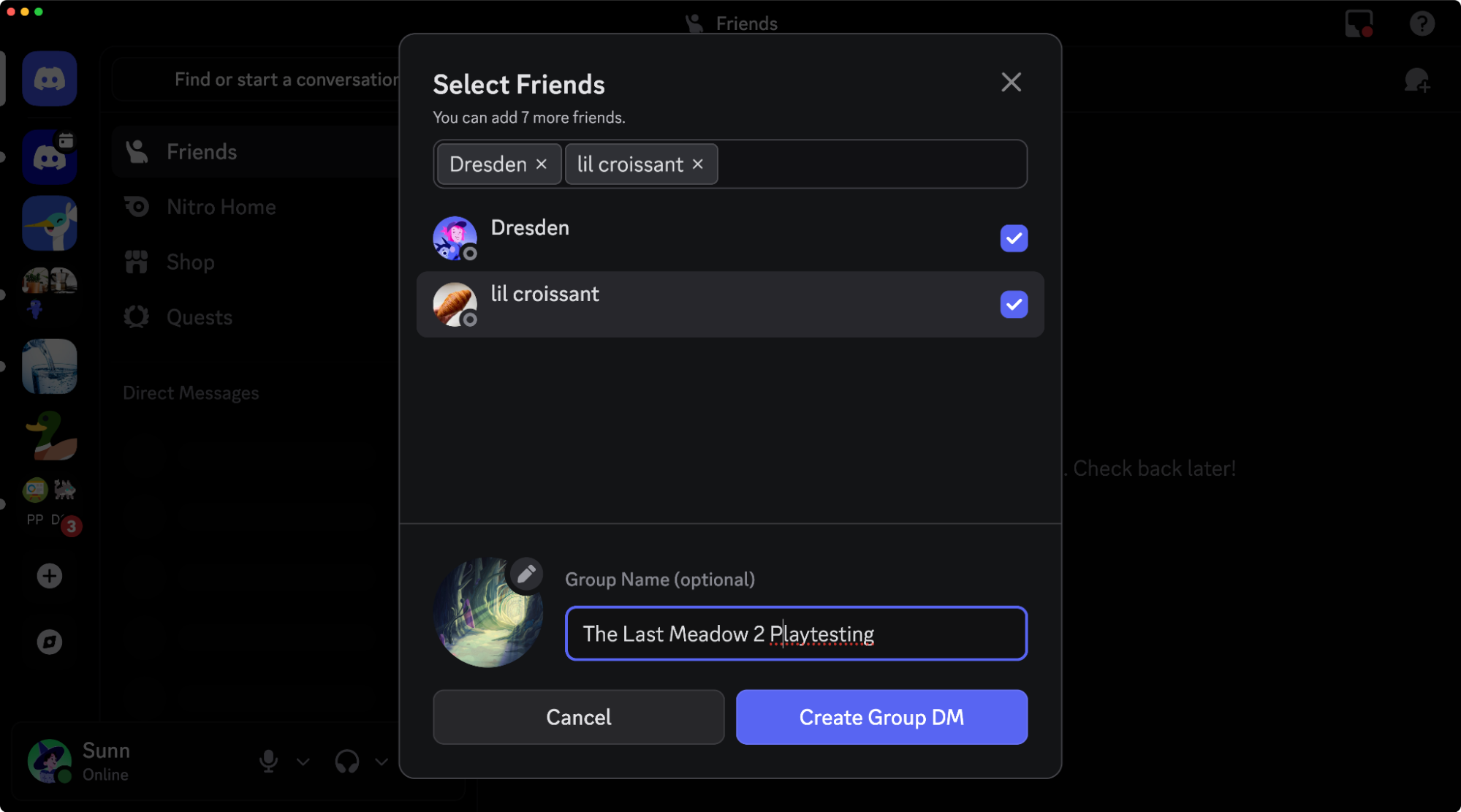
Group DM customization options.

Now, when you start up a new Group DM, you’ll be able to give it a name and icon before fully creating it. No more having to name the GDM after you’ve already added six other people who have been spamming “WHY AM I HERE HEL- oh, it’s game night again, my bad.” 

Redesigned Settings on Desktop

Throughout the coming months, the Settings page will undergo a light spring cleaning and reorganization so it visually matches the rest of Discord and is easier to navigate. (Marketing calls it more intuitive.) It’s now in a fancy floating window, like other menus throughout Discord, and some settings have been moved to better-suited categories. 

The updated Settings page.

That does mean that a few options may have scooted away from where you’re used to seeing them, but don’t fret too much: the Settings search bar is still available at the top of the Settings directory if you wanna zip straight to the option you’re looking for. It’ll even narrow down the Settings directory options on the left to show you where it’s at for next time. 

Discord, But DIRECTLY IN Your Favorite Multiplayer Games

What’s Discord without the reason why Discord exists in the first place: the games. Having the entire squad in the same voice call to give each other pointers, or just talk about something completely unrelated to the game as you spend time with your buddies, is what makes Discord special to so many out there. 

Recently, some of the most popular multiplayer games you’re likely playing with your friends have been integrating Discord, letting you link your account directly to the game! But what’s that mean, exactly? Well, depending on the game, this can give you access to some slick new Discord-powered capabilities, including:

  • Seeing your Discord friends on your in-game friends list, and inviting them to your game with just a click from within the game. 
  • Messaging your Discord friends using in-game chat. They can reply back in Discord, and you’ll see it as an in-game message!  
  • Showing off more details about what you’re playing as your status, whether you’re pushing the objective or messing around in a casual game mode. 

Marvel Rivals is one of the latest games to take advantage of these slick new features! After you link your Discord account to Marvel Rivals, you’ll be able to message your Discord friends using Marvel Rivals’ in-game chat, letting you quickly chat without having to take your eyes off the fight brewing in front of you. It’s basically cross-multiverse comms.
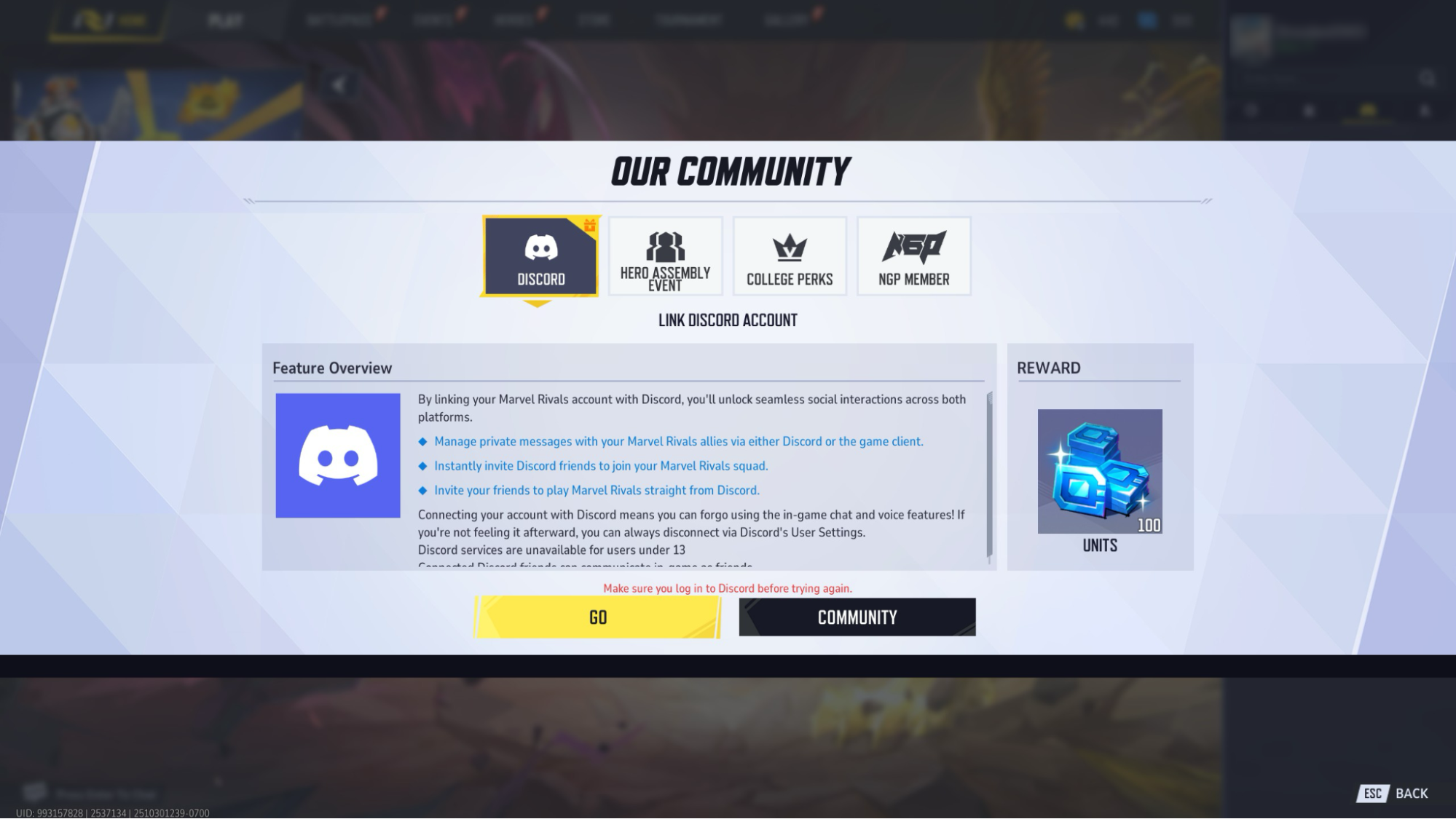
Marvel Rivals account linking page.

You’ll also be able to see your Discord Friends list directly in Marvel Rivals, and invite them to your Marvel Rivals lobby with just a click

More and more games are adding Discord features just like these, including Battlefield 6 and SUPERVIVE. And if you’ve got questions about the finer details of how it all works, check out our Help Center!

Updated Family Center

For the cool parents and guardians reading this blog post, we’re rolling out new Family Center features over the next week to help guardians understand and play a more active role in their teens’ online experiences. 
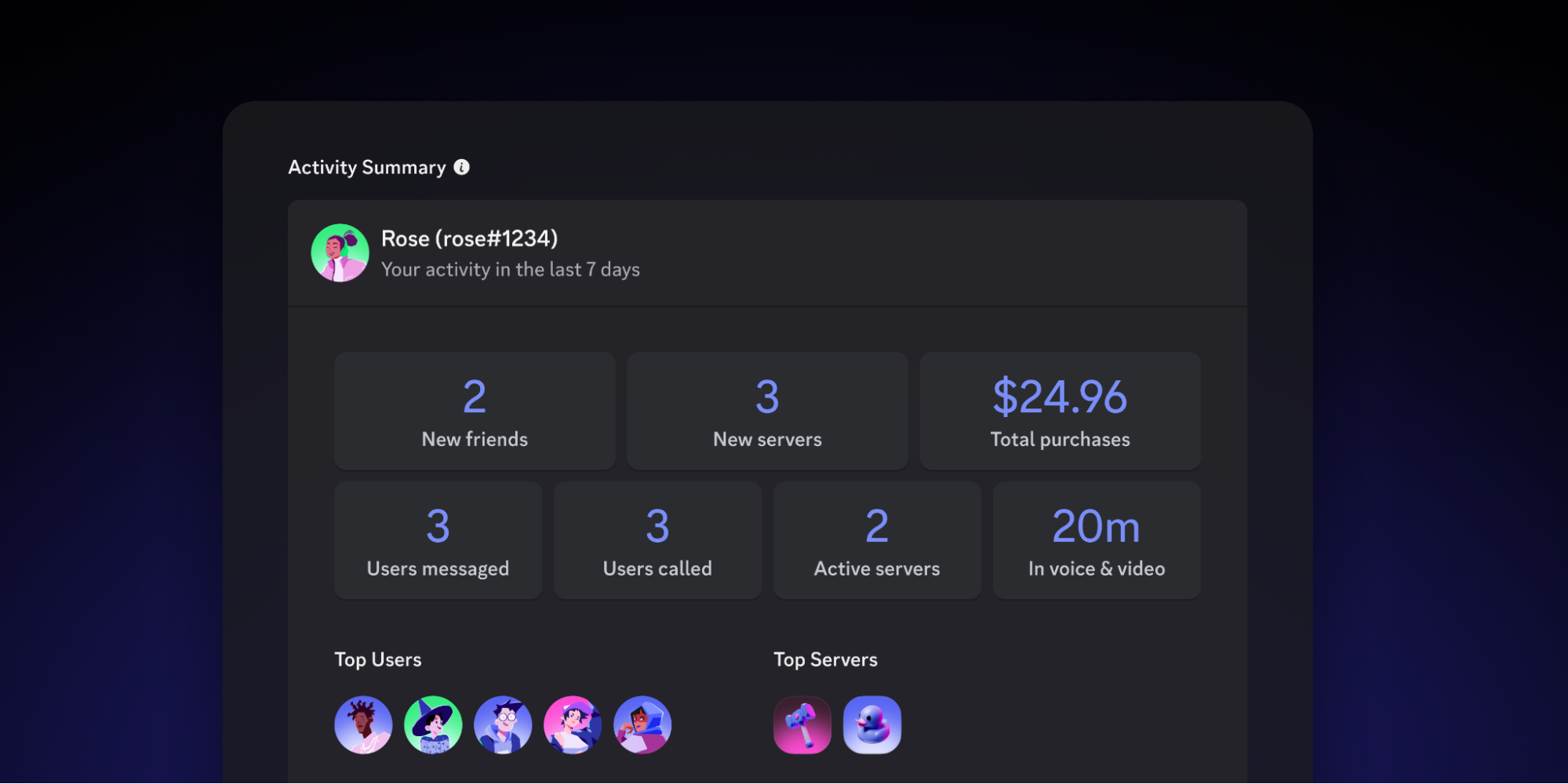
The updated Family Center.

If you have a teen using Discord that you’d like to help make safe and responsible choices online, check out our Safety Center article detailing all of our Family Center updates. 

All of these shiny new things? They’re all available to try out on the desktop app right now. Use the fancier Search powers on the top-right of the client, go upload some new emoji and see how easy it is, or invite your Discord friends to queue up and play the latest Marvel Rivals season, directly in the game. 

These aren’t the only things we’re updating… we post everything we’ve fixed lately in our monthly Patch Notes series, and bigger updates (like this one!) get shared in our in-app Changelog

And if there’s something you’d like to see updated or added in the future, let us know! You can always find us over on X, TikTok, and Instagram. Don’t forget our Feedback Center

Clyde

Your personal guide to all things Discord, Clyde is here to support you throughout your experience in the app. Got questions? Pressed the wrong button? Clyde's got your back.

related articles