惯性聚合 高效追踪和阅读你感兴趣的博客、新闻、科技资讯
阅读原文 在惯性聚合中打开

推荐订阅源

WordPress大学
WordPress大学
Cyberwarzone
Cyberwarzone
The GitHub Blog
The GitHub Blog
云风的 BLOG
云风的 BLOG
P
Proofpoint News Feed
小众软件
小众软件
Recent Announcements
博客园 - 三生石上(FineUI控件)
Security Archives - TechRepublic
W
WeLiveSecurity
Cloudbric
Cloudbric
博客园 - 司徒正美
美团技术团队
N
News and Events Feed by Topic
Exploit-DB.com RSS Feed
PCI Perspectives
PCI Perspectives
宝玉的分享
宝玉的分享
H
Help Net Security
H
Hackread – Cybersecurity News, Data Breaches, AI and More
Google DeepMind News
Help Net Security
Help Net Security
Last Week in AI
Last Week in AI
S
Schneier on Security
N
News | PayPal Newsroom
B
Blog RSS Feed
L
LINUX DO - 最新话题
T
Troy Hunt's Blog
S
Secure Thoughts
雷峰网
雷峰网
aimingoo的专栏
aimingoo的专栏
L
Lohrmann on Cybersecurity
G
Google Developers Blog
Microsoft Azure Blog
Hacker News - Newest:
Hacker News - Newest: "LLM"
T
Tenable Blog
S
Securelist
L
LangChain Blog
Recent Commits to openclaw:main
I
InfoQ
H
Heimdal Security Blog
Cisco Talos Blog
Cisco Talos Blog
F
Full Disclosure
Y
Y Combinator Blog
酷 壳 – CoolShell
酷 壳 – CoolShell
K
Kaspersky official blog
T
Tailwind CSS Blog
奇客Solidot–传递最新科技情报
奇客Solidot–传递最新科技情报
钛媒体:引领未来商业与生活新知
钛媒体:引领未来商业与生活新知
阮一峰的网络日志
阮一峰的网络日志
C
Cisco Blogs

Discord Blog

Every Voice and Video Call on Discord Is Now End-to-End Encrypted How to Link Discord to Battlefield 6, Marvel Rivals & More Official Discord Integrations for Steal a Brainrot, Grow a Garden, Brookhaven RP, and more Celebrate Discord’s 11th Birthday with an Exclusive Set of Emoji and Wallpapers Nitro Now Comes with Xbox Game Pass and New Benefits. Welcome to Nitro Rewards. How to Use Nitro: A Beginner’s Guide to Discord’s Premium Subscription Stock Up in the New Rust Shop! Enjoy a Discord-Only 20% Sale on Most Items until 5/21 How Discord Automates ScyllaDB Clusters at Scale Discord Patch Notes: May 4, 2026 You’ve Got (Too Much) Mail: Behind the Scenes of the 3/25/26 Voice Outage Measure Less to Learn More: Using Fewer, Higher-quality Metrics to Capture What Matters Discord Patch Notes: April 6, 2026 MULTIPLAYER SEQUEL TO ACCLAIMED AAAA GAME “THE LAST MEADOW” ANNOUNCED: PLAYABLE NOW Making Discord on Desktop Look Just Right: Display Settings to Ease the Eyes Discord Patch Notes: December 8, 2025 Building on the Social Layer of Games: What’s New from GDC 2026 Gift Ideas for the Dedicated Discord User in Your Life Discord Update: November 6, 2025 Changelog During October, Treat a Friend to Nitro and Trick Out Your Profile for Halloween 🎃 Discord Social SDK Updates & Integrations Go Beyond, Plus Ultra! with the My Hero Academia Collection STAR WARS™ Makes Its Way to Discord Worthy of a Plaque: Nameplates Land in the Shop Announcing Discord’s Social SDK, Helping Power Your Game’s Social Experiences A Cornucopia of Updates Make Discord on Desktop Fresher Than a Crisp Fall Breeze Starting Your First Discord Server Transforming Game Discovery with Instant Play Experiences on Discord Introducing the Discord for Business Newsletter, Vol. 1 Discord Update: March 24, 2026 Changelog Discord Update: December 19, 2024 Changelog How Multi-Factor Authentication Helps Keep Your Discord Account Safe How ROOST is Advancing Online Safety You’re Now Discord Official: Developers, Claim Your Game and Verify Your Server Discord Patch Notes: March 6, 2026 Tracing Discord's Elixir Systems (Without Melting Everything) Getting Global Age Assurance Right: What We Got Wrong and What's Changing Discord Patch Notes: February 4, 2026 Osprey: Open Sourcing our Rule Engine How to Change Your Theme to Bring Your Vibe to Discord Your Discord Checkpoint is Rolling Out! Celebrate What You Did in 2025 How to Customize Your Discord Profile How to Make and Use Custom Emoji on Discord Save and Display Your Faves: Add Discord Shop & Marvel Rivals Items to Your Profile’s Wishlist Discord Patch Notes: November 4, 2025 Bringing In-Game Commerce to Discord Communities Reward Your Play: Complete Quests. Earn Orbs. Get Sweet Stuff. How to Share What You’re Playing, Listening to, or Watching as Your Status on Discord Staff Picks, September 2025: Welcome to Our Video Game Museum From Single-Node to Multi-GPU Clusters: How Discord Made Distributed Compute Easy for ML Engineers Discord Patch Notes: October 7, 2025 Discord Update: September 25, 2025 Changelog New Looks for Nitro, New Looks for You. Get Yourself a Nitro-exclusive Profile Bundle! Discord Patch Notes: September 3, 2025 Bringing DAVE to All Discord Platforms Discord’s Powerful Cross-Platform Chat: Ready for Your Game Introducing the Community Server Cleanup Report for August 2025 Discord for Business Vol. 2: Cannes-worthy ad product updates Discord Patch Notes: August 4, 2025 ROOST Announces “Coop” and “Osprey”: Free, Open-Source Trust and Safety Infrastructure for the AI Era *FLAILS AROUND* SUMMER SPECIAL! JOIN NITRO, GET AN EXTRA MONTH OF NITRO ON US! Get More From Your Boosts With New Server Perks Discord Patch Notes: July 7, 2025 Discord Update: June 30, 2025 Changelog Authenticity Matters: Discord's Pride Month 2025 Staff Picks, June 2025: Summer of Showcases How to Set Up Your Server’s Roles for Members, Mods & Admins Gift Nitro and Earn A Flavorful Splash for your Avatar Discord Patch Notes: June 3, 2025 How to Use the Discord Soundboard & Add More Sounds Checkpoint 3: Leveling Up Discord Quests with Orbs and Advanced Measurement Thank You for Ten Years Staff Picks, May 2025: The Games That Brought Us to Discord Discord Patch Notes: May 1, 2025 How Discord Indexes Trillions of Messages Passing the Torch Discord Appoints Humam Sakhnini as Chief Executive Officer Staff Picks, April 2025: All The Adaptations Make More Closet Space! Nitro Members Can Now Keep Avatar Decoration Quest Rewards for Longer How to Use Discord’s In-Game Overlay to Talk While Playing on PC The Game Developer Playbook, Part One: Getting Started on Discord The Game Developer Playbook, Part Two: Early Access and Pre-Launch MAJOR NEWS: DISCORD ANNOUNCES ITS FIRST IN-HOUSE AAAA VIDEO GAME, “THE LAST MEADOW” Overclocking dbt: Discord's Custom Solution in Processing Petabytes of Data Wicked Saints Turns Players into IRL Superheroes with the Help of e.l.f. Beauty and Discord Discord Update: March 25, 2025 Changelog How to Stream Games and Applications to Discord from Desktop or Mobile Discord Patch Notes: April 3, 2025 Checkpoint 2: Our First Year With Discord Quests How to Create & Upload Your Own Stickers on Discord Revamped Overlay & Refreshed Desktop Give Game Time a Boost Discord Announces First Mobile Ad Format, Broadening Advertising Opportunities Announcing Discord’s Social SDK, Helping Power Your Game’s Social Experiences The Game Developer Playbook: Three Incredible Game-Focused Communities Modern Image Formats at Discord: Supporting WebP and AVIF Discord Patch Notes: March 11, 2025 Supercharging Discord Mobile: Our Journey to a Faster App December Staff Picks: It’s Giving Games Discord Patch Notes: February 3, 2025 Leveling Up Black Voices in Gaming How Discord Seamlessly Upgraded Millions of Users to 64-Bit Architecture
Making It Easier Than Ever to Connect with Friends in League & VAL!
Clyde · 2026-06-03 · via Discord Blog

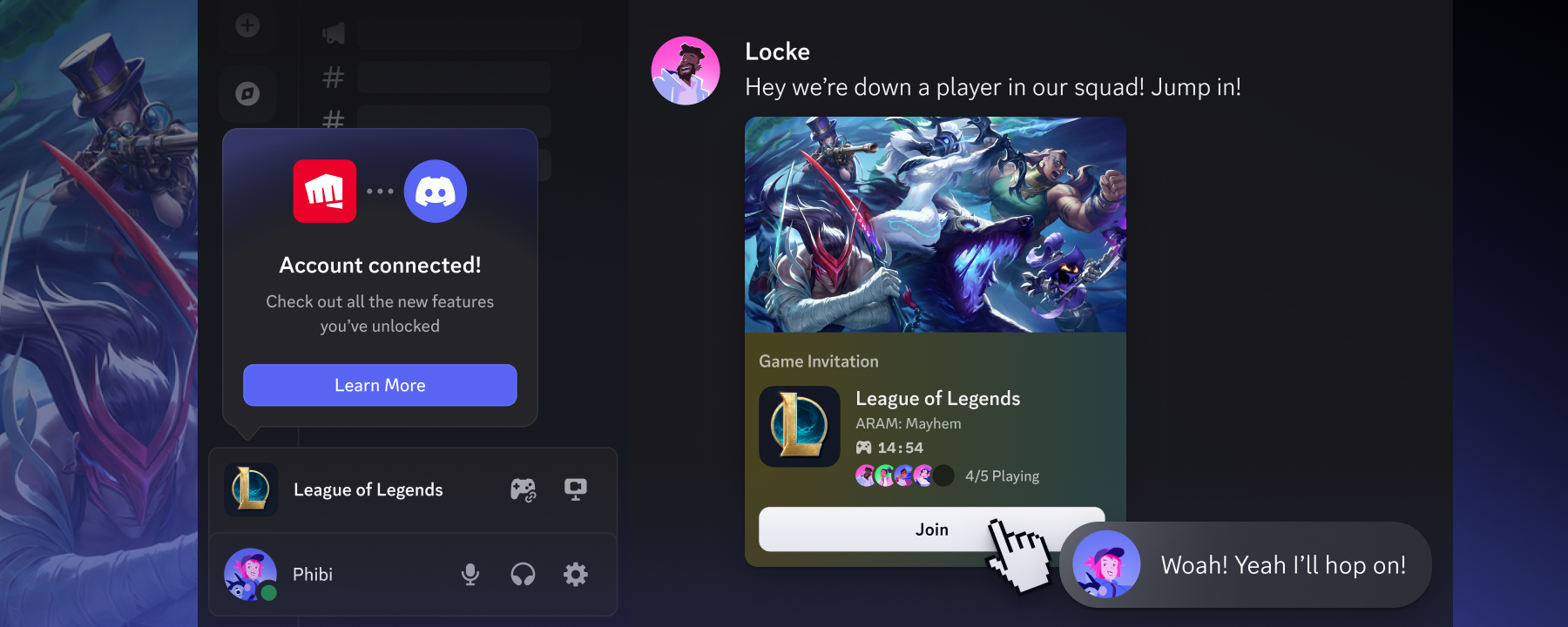
Demonstration of inviting a League of Legends-playing friend to a game lobby directly through Discord.

Two of the most played games while on Discord are League of Legends and VALORANT. Just last December, during our inaugural Checkpoint, we even gave League of Legends the esteemed title of Discord’s Most Popular Game 2025 (seriously, y’all *really* love League). 

Every time League or VAL popped up as one of someone’s top-played games, we know that translates to countless hours with friends rank grinding, counter-jungling, and spamming the soundboard for the buddy who just pulled off an ace. 

These moments connecting with friends are truly special, but being forced to stall your game and scour online friends lists when your 5-stack is down a player takes this time away. That’s why we’re teaming up with Riot to make connecting with friends even faster and bring your Discord friends right into the games

Queue Up With Friends Easier Through Discord & Riot Account Linking

What if, instead of hopping from client to client, trying to find someone to play with, you could see your VAL or League-playing Discord friends and invite them right from the game?

Wild idea, right? Actually, it’s real. Starting with a beta test in League of Legends, by linking your Discord and Riot accounts, you’ll be able to:

  • See which of your Discord friends play the game right in your in-game friends list
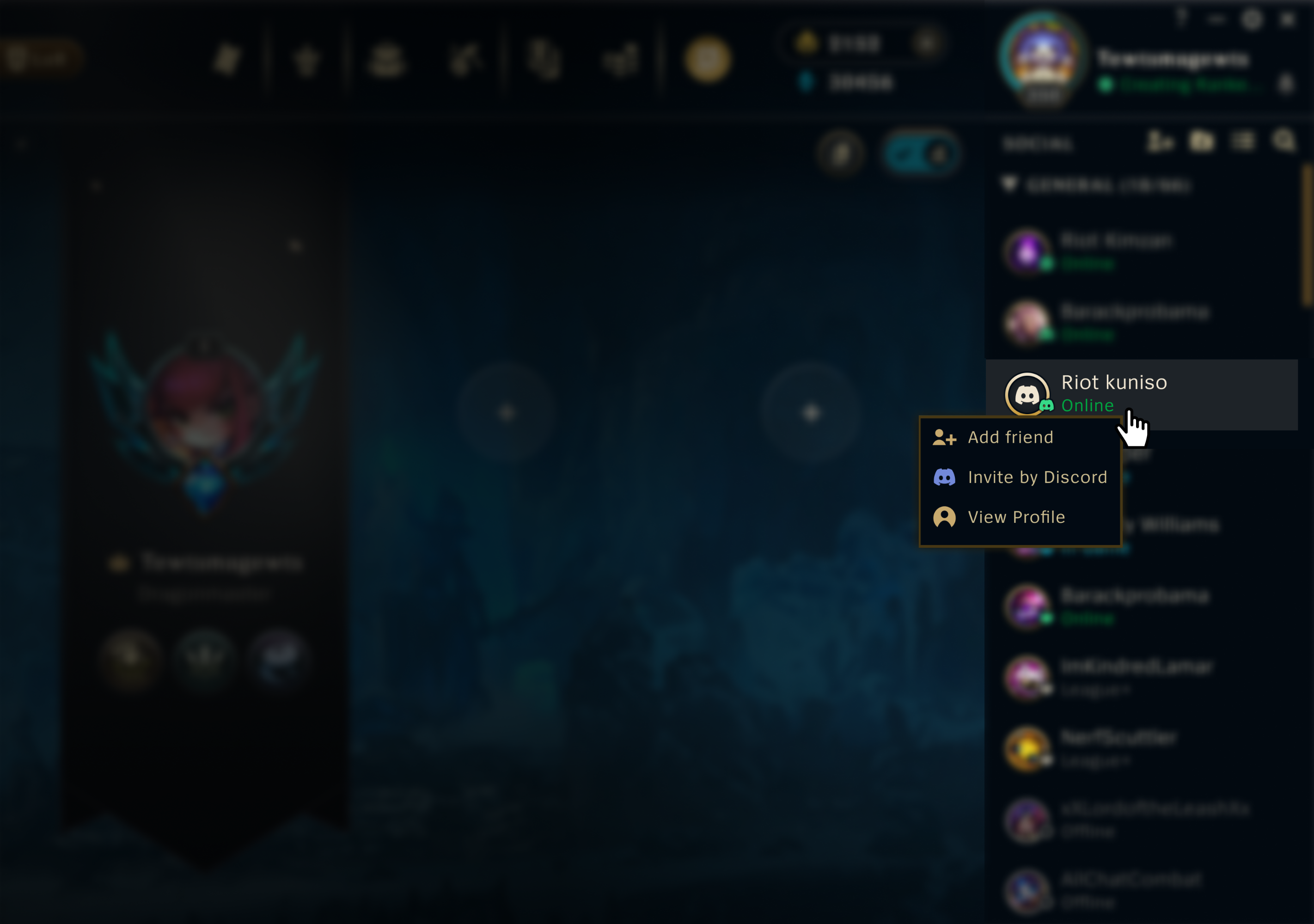
  • Invite Discord friends to your party straight from the game
  • Drop a link to join your party into a Discord server, DM, or anywhere else your friends are
  • Check friends’ game status in Discord, like match time or party size, so you always know when you can jump in

The “Invite by Discord” option shown in the Friends List in League of Legends.

How to Link Your Riot Account to Discord

If you’re reading this right now then it probably means you’re not actively in a match. Or maybe you are, in that case wow, you must REALLY trust your jungle pathing. 

Either way, this’ll be quick: in regions where Discord-powered features are available, you can link your accounts inside Discord before (or during) your next match:

  • In Discord, head to “User Settings”.
  • Click “Connections”, then click on Riot Games’ iconic fistbump logo. You may need to click “View More.”
  • Read through the required permissions, follow the prompts, and then you’re set!

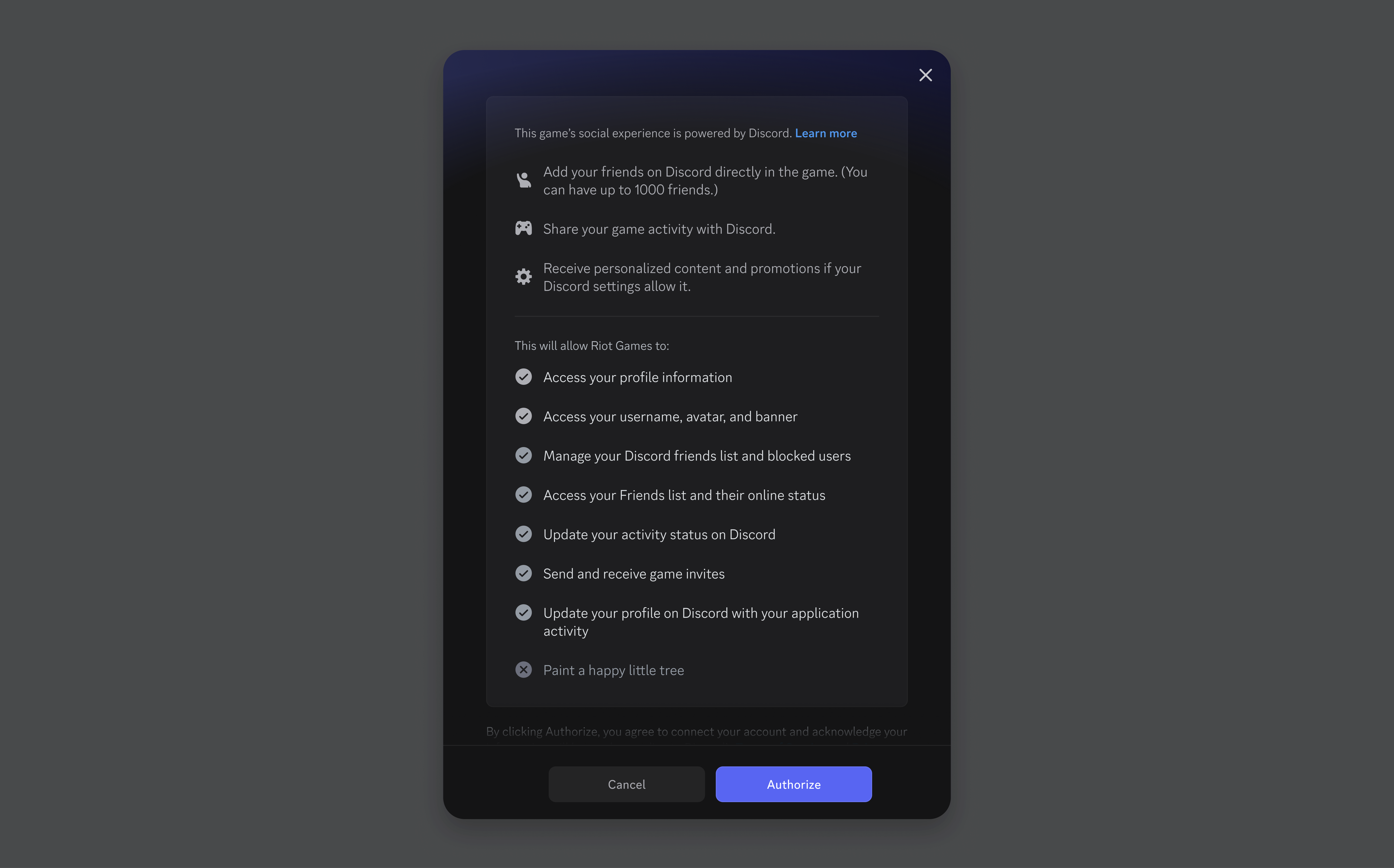
An in-app listing of all the required permissions needed for account linking to work. It includes access to a user’s profile information, username, avatar, and banner. It can also access your Discord friends list and manage it, including for blocking others. Finally, it can access and update your in-game activity status, send and receive game invites, and update your recent activity on your Discord profile.

You can also link your Riot & Discord accounts through Riot's in-game clients (League of Legends & VALORANT) account management page. Riot’s got their own tutorial for getting your accounts linked through the in-game method below. 

Need some support? Head over to our support article about these new account-linking features and get back into the fray once you’re done. 

When you link your accounts, only the info necessary to have the integration function properly is shared such as your Riot ID, Discord display name/accountID, and game status. Before connecting your Discord account, you'll see a clear permissions screen (like the one above) that points out what you’re authorizing to share. You’ll have the option to unlink at any time in User Settings.

All these slick new Discord-powered features for League of Legends are currently rolling out in select regions (Brazil: May 7th, US & Canada: May 20th) and then expanding to all other regions soon. Integration with VALORANT will be rolling out in a similar Beta later this summer. All players can still link their accounts through Riot’s account management page starting today, but you won’t see the new social features until after the Beta ends.

For more information on regional rollouts and a full FAQ, check out these resources: 

Got your Riot and Discord accounts all set up? Now go hop into that matchmaking queue and get some more wins under your belt!  

Clyde

Your personal guide to all things Discord, Clyde is here to support you throughout your experience in the app. Got questions? Pressed the wrong button? Clyde's got your back.

related articles