惯性聚合 高效追踪和阅读你感兴趣的博客、新闻、科技资讯
阅读原文 在惯性聚合中打开

推荐订阅源

S
SegmentFault 最新的问题
T
Troy Hunt's Blog
A
About on SuperTechFans
钛媒体:引领未来商业与生活新知
钛媒体:引领未来商业与生活新知
酷 壳 – CoolShell
酷 壳 – CoolShell
罗磊的独立博客
H
Hackread – Cybersecurity News, Data Breaches, AI and More
G
Google Developers Blog
Cyber Security Advisories - MS-ISAC
人人都是产品经理
人人都是产品经理
博客园 - 聂微东
Stack Overflow Blog
Stack Overflow Blog
L
LINUX DO - 最新话题
IT之家
IT之家
博客园 - 【当耐特】
S
Securelist
WordPress大学
WordPress大学
Hacker News - Newest:
Hacker News - Newest: "LLM"
S
Secure Thoughts
Exploit-DB.com RSS Feed
cs.CL updates on arXiv.org
T
Threatpost
Scott Helme
Scott Helme
CTFtime.org: upcoming CTF events
Recent Commits to openclaw:main
O
OpenAI News
宝玉的分享
宝玉的分享
Attack and Defense Labs
W
WeLiveSecurity
Blog — PlanetScale
Blog — PlanetScale
Google DeepMind News
让小产品的独立变现更简单 - ezindie.com
K
KPMG report finds enterprise disconnect between AI and its ROI | CIO
V
V2EX
Recorded Future
Recorded Future
T
Threat Research - Cisco Blogs
SecWiki News
SecWiki News
V
Visual Studio Blog
F
Full Disclosure
T
Tor Project blog
A
Arctic Wolf
美团技术团队
Google DeepMind News
博客园 - 司徒正美
OSCHINA 社区最新新闻
OSCHINA 社区最新新闻
Webroot Blog
Webroot Blog
奇客Solidot–传递最新科技情报
奇客Solidot–传递最新科技情报
D
Docker
爱范儿
爱范儿
大猫的无限游戏
大猫的无限游戏

Discord Blog

Making It Easier Than Ever to Connect with Friends in League & VAL! Every Voice and Video Call on Discord Is Now End-to-End Encrypted How to Link Discord to Battlefield 6, Marvel Rivals & More Official Discord Integrations for Steal a Brainrot, Grow a Garden, Brookhaven RP, and more Celebrate Discord’s 11th Birthday with an Exclusive Set of Emoji and Wallpapers Nitro Now Comes with Xbox Game Pass and New Benefits. Welcome to Nitro Rewards. How to Use Nitro: A Beginner’s Guide to Discord’s Premium Subscription Stock Up in the New Rust Shop! Enjoy a Discord-Only 20% Sale on Most Items until 5/21 How Discord Automates ScyllaDB Clusters at Scale Discord Patch Notes: May 4, 2026 You’ve Got (Too Much) Mail: Behind the Scenes of the 3/25/26 Voice Outage Measure Less to Learn More: Using Fewer, Higher-quality Metrics to Capture What Matters Discord Patch Notes: April 6, 2026 MULTIPLAYER SEQUEL TO ACCLAIMED AAAA GAME “THE LAST MEADOW” ANNOUNCED: PLAYABLE NOW Making Discord on Desktop Look Just Right: Display Settings to Ease the Eyes Discord Patch Notes: December 8, 2025 Building on the Social Layer of Games: What’s New from GDC 2026 Gift Ideas for the Dedicated Discord User in Your Life Discord Update: November 6, 2025 Changelog During October, Treat a Friend to Nitro and Trick Out Your Profile for Halloween 🎃 Discord Social SDK Updates & Integrations Go Beyond, Plus Ultra! with the My Hero Academia Collection STAR WARS™ Makes Its Way to Discord Worthy of a Plaque: Nameplates Land in the Shop Announcing Discord’s Social SDK, Helping Power Your Game’s Social Experiences A Cornucopia of Updates Make Discord on Desktop Fresher Than a Crisp Fall Breeze Starting Your First Discord Server Transforming Game Discovery with Instant Play Experiences on Discord Introducing the Discord for Business Newsletter, Vol. 1 Discord Update: March 24, 2026 Changelog Discord Update: December 19, 2024 Changelog How Multi-Factor Authentication Helps Keep Your Discord Account Safe How ROOST is Advancing Online Safety You’re Now Discord Official: Developers, Claim Your Game and Verify Your Server Discord Patch Notes: March 6, 2026 Tracing Discord's Elixir Systems (Without Melting Everything) Getting Global Age Assurance Right: What We Got Wrong and What's Changing Discord Patch Notes: February 4, 2026 Osprey: Open Sourcing our Rule Engine How to Change Your Theme to Bring Your Vibe to Discord Your Discord Checkpoint is Rolling Out! Celebrate What You Did in 2025 How to Customize Your Discord Profile Save and Display Your Faves: Add Discord Shop & Marvel Rivals Items to Your Profile’s Wishlist Discord Patch Notes: November 4, 2025 Bringing In-Game Commerce to Discord Communities Reward Your Play: Complete Quests. Earn Orbs. Get Sweet Stuff. How to Share What You’re Playing, Listening to, or Watching as Your Status on Discord Staff Picks, September 2025: Welcome to Our Video Game Museum From Single-Node to Multi-GPU Clusters: How Discord Made Distributed Compute Easy for ML Engineers Discord Patch Notes: October 7, 2025 Discord Update: September 25, 2025 Changelog New Looks for Nitro, New Looks for You. Get Yourself a Nitro-exclusive Profile Bundle! Discord Patch Notes: September 3, 2025 Bringing DAVE to All Discord Platforms Discord’s Powerful Cross-Platform Chat: Ready for Your Game Introducing the Community Server Cleanup Report for August 2025 Discord for Business Vol. 2: Cannes-worthy ad product updates Discord Patch Notes: August 4, 2025 ROOST Announces “Coop” and “Osprey”: Free, Open-Source Trust and Safety Infrastructure for the AI Era *FLAILS AROUND* SUMMER SPECIAL! JOIN NITRO, GET AN EXTRA MONTH OF NITRO ON US! Get More From Your Boosts With New Server Perks Discord Patch Notes: July 7, 2025 Discord Update: June 30, 2025 Changelog Authenticity Matters: Discord's Pride Month 2025 Staff Picks, June 2025: Summer of Showcases How to Set Up Your Server’s Roles for Members, Mods & Admins Gift Nitro and Earn A Flavorful Splash for your Avatar Discord Patch Notes: June 3, 2025 How to Use the Discord Soundboard & Add More Sounds Checkpoint 3: Leveling Up Discord Quests with Orbs and Advanced Measurement Thank You for Ten Years Staff Picks, May 2025: The Games That Brought Us to Discord Discord Patch Notes: May 1, 2025 How Discord Indexes Trillions of Messages Passing the Torch Discord Appoints Humam Sakhnini as Chief Executive Officer Staff Picks, April 2025: All The Adaptations Make More Closet Space! Nitro Members Can Now Keep Avatar Decoration Quest Rewards for Longer How to Use Discord’s In-Game Overlay to Talk While Playing on PC The Game Developer Playbook, Part One: Getting Started on Discord The Game Developer Playbook, Part Two: Early Access and Pre-Launch MAJOR NEWS: DISCORD ANNOUNCES ITS FIRST IN-HOUSE AAAA VIDEO GAME, “THE LAST MEADOW” Overclocking dbt: Discord's Custom Solution in Processing Petabytes of Data Wicked Saints Turns Players into IRL Superheroes with the Help of e.l.f. Beauty and Discord Discord Update: March 25, 2025 Changelog How to Stream Games and Applications to Discord from Desktop or Mobile Discord Patch Notes: April 3, 2025 Checkpoint 2: Our First Year With Discord Quests How to Create & Upload Your Own Stickers on Discord Revamped Overlay & Refreshed Desktop Give Game Time a Boost Discord Announces First Mobile Ad Format, Broadening Advertising Opportunities Announcing Discord’s Social SDK, Helping Power Your Game’s Social Experiences The Game Developer Playbook: Three Incredible Game-Focused Communities Modern Image Formats at Discord: Supporting WebP and AVIF Discord Patch Notes: March 11, 2025 Supercharging Discord Mobile: Our Journey to a Faster App December Staff Picks: It’s Giving Games Discord Patch Notes: February 3, 2025 Leveling Up Black Voices in Gaming How Discord Seamlessly Upgraded Millions of Users to 64-Bit Architecture
How to Make and Use Custom Emoji on Discord
Locke · 2026-01-15 · via Discord Blog

Abstract artwork of Discord-themed emojis on a bright background.

Emoji on Discord are special. Thanks to the mystical power of PNGs (and sometimes GIFs), you can make a tiny little picture out of almost any symbol, in-joke, or bizarre late-night inspiration. Got a story about how your friend chugged 9 million Scoville hot sauce directly from the bottle? Hot sauce skull emoji. Need a unique way to welcome your friends and/or terrify them the second they message you? Create an emoji of yourself waving hello! Spilled soda on your keyboard? You guessed it: replace the non-functioning letters with cunningly camouflaged emojis. The possibilities are truly endless.

We’re so keen on the darn things, we decided to make a blog post answering all the most frequently-asked FAQs about them on one easily-referenced page. So break out the ✏️and 📜 and let’s dive in!

What IS a custom emoji on Discord?

First off: Emoji are tiny lil’ pictures you can drop into your Discord messages. You can also use them as a Reaction to display an emoji next to someone’s message in DMs and server text channels, and as part of your custom status message, helping sum up your feelings in a handful of pixels. 

Discord has plenty of default emojis, but also lets communities create, upload, and use their own. You can use them just like you would ✨normal emojis ✨, injecting a little bit of extra personality, emotion, and fun into your messages.

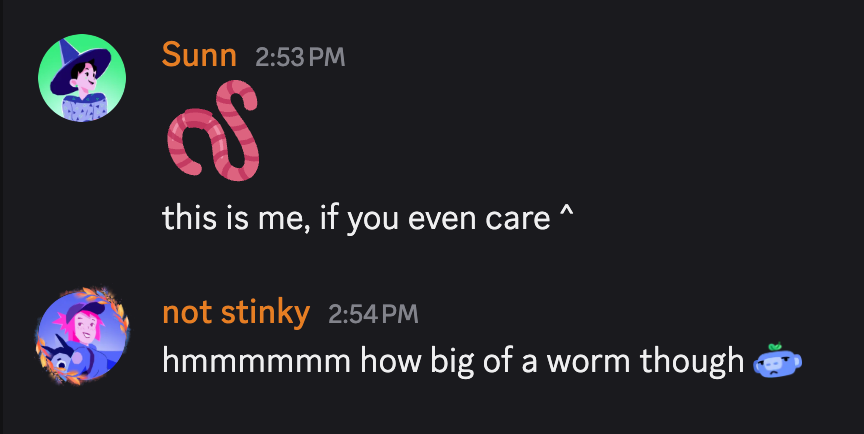
A conversation between two friends. One of them sent a normal emoji of a worm, while the other sent a custom Wumpus emoji.

How can I add my own custom emoji to Discord?

Emojis live in Discord servers, so you’ll need to hop over to a server that allows you to upload custom emojis. Then head into Server Settings > Emoji.

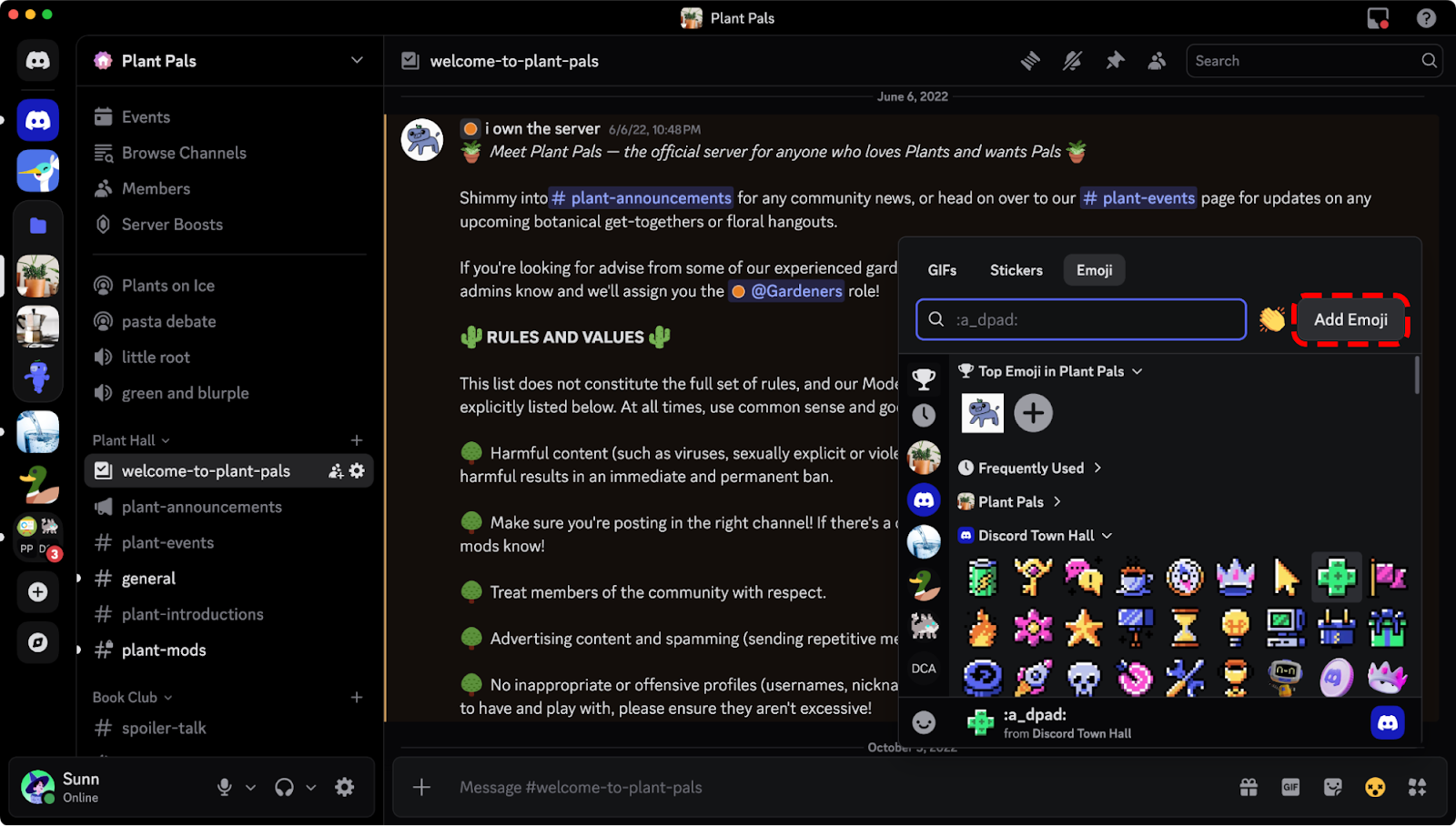
You can also upload your emotes directly from within your emoji picker. This option appears if you have the right server perms to upload them to a server you’re in. You won’t have to worry about dumping an emoji into some random server, like the infinite abyss that is your PC’s Downloads folder. 

The "Add Emoji" button in the emoji picker on desktop.

Do keep in mind that when you upload custom Discord emojis, you’re adding them to a specific server, to be used by that specific community. To use those custom emojis in a different server, you’ll need to either upload them to each server you want to use them in or subscribe to Discord Nitro.

What are the file requirements to upload a Discord emoji?

There are no file size limitations! Well, kinda

The app used to be pretty stingy about uploading something that fit the exact size and dimension requirements, but nowadays you can upload any ol’ image and Discord’ll do all the resizing for ya! Gone are the days of people going “Uhhh… make sure the emote is 128x128 exactly, PNG file type,” and all that nonsense. 

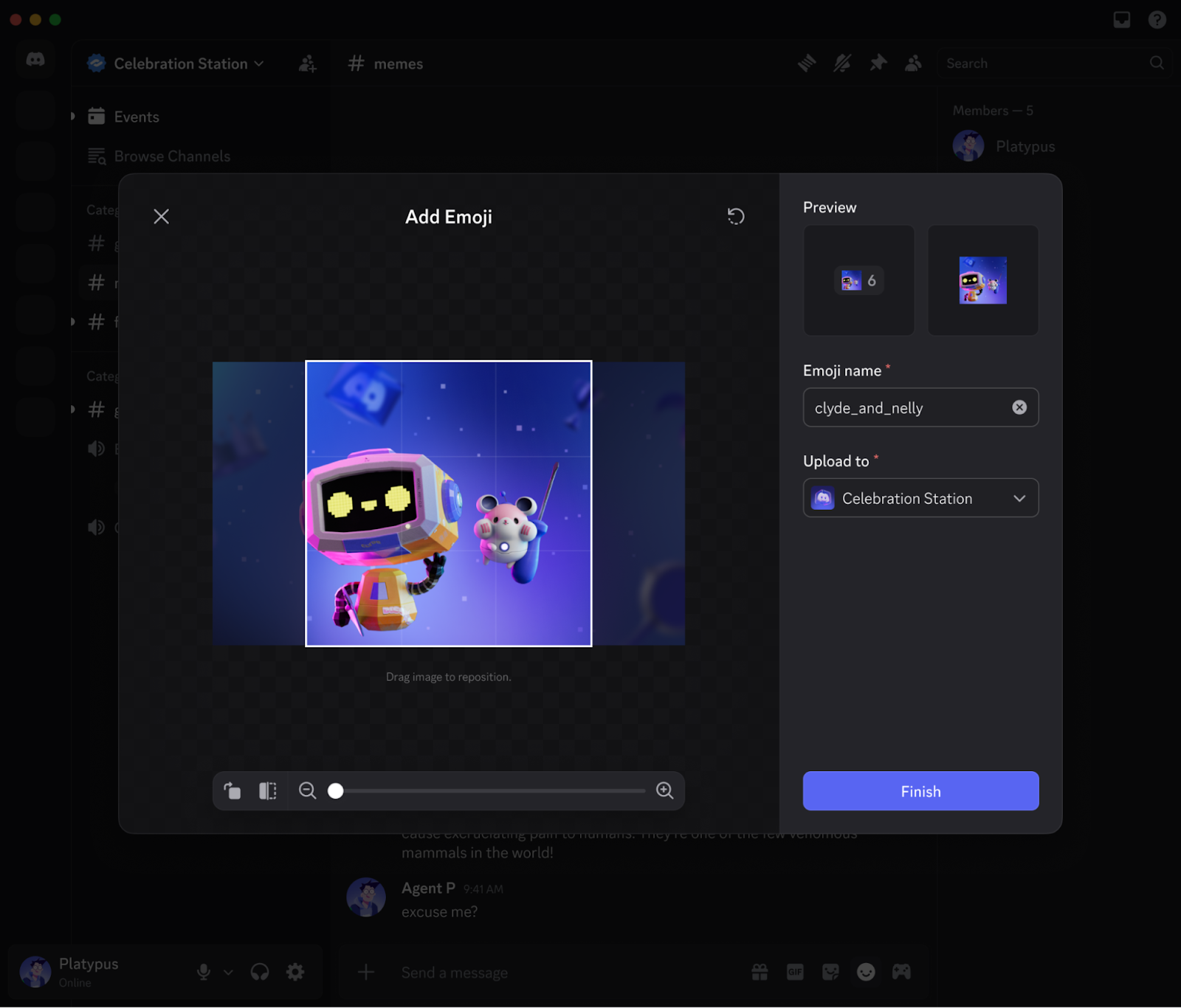
When you go to upload your next beautiful(ly cursed) emoji, you’ll see a screen like this below:

The emoji creation window on desktop.

Here, instead of preparing your emoji before uploading, you can resize and crop as you upload! You already spent all that time taking the perfect screencap of your friend’s absolutely disgusted face while eating a rancid sandwich — the app will do the rest. 

If you’re still interested in the optimal emoji sizes for Discord, we got those deets for ya below. We’ll still fix things up while you upload, so it’s no sweat if you don’t adhere to them… they’re more like guidelines nowadays. 

  • File type: Use either a JPEG, PNG, GIF, WEBP, or AVIF image. 
  • File size: 256 KB. If your emoji’s a bit bigger, we’ll go ahead and compress it.
  • Dimensions: 128x128. Bigger or smaller will work, but 128x128 is juuuust right.
  • Name: Every emoji gets a short name of at least 2 characters, which you’ll type out when you want to use it. Like :joy:, or :GiantHead:, or :SunfishPog:

If you ever lose this bookmark, don’t fret: these requirements are provided right where you’ll go to upload your beautiful work, in Server Settings > Emoji.

Do I need to do anything special to upload animated emojis versus static emojis?

Nope! Same deal. It’ll end up in the special “Animated Emoji” section instead of the “Emoji” section, but you’ll need to be a Nitro member to use those newly-uploaded animated emojis. 

Is there a limit to what kinds of emojis I can make?

The only limit is your imagination! Also, our Community Guidelines and Terms of Service. Those are actually extremely important limits. You gotta, as Legal puts it, “comply with our policies” so you don’t go and get yourself in trouble for a silly ‘lil emoji. 

One wrinkle that’s worth calling out: emojis can’t be age-restricted. That means that if you’d normally have to put something behind an Age Restricted gate for it to be allowed on Discord, you aren’t allowed to make it into an emoji. For example: no graphic violence, no adult content, and make sure you have the rights to upload that silly little froggy.

I’ve seen some people post bigger Discord emojis. How do they do that?

They’re wizards.

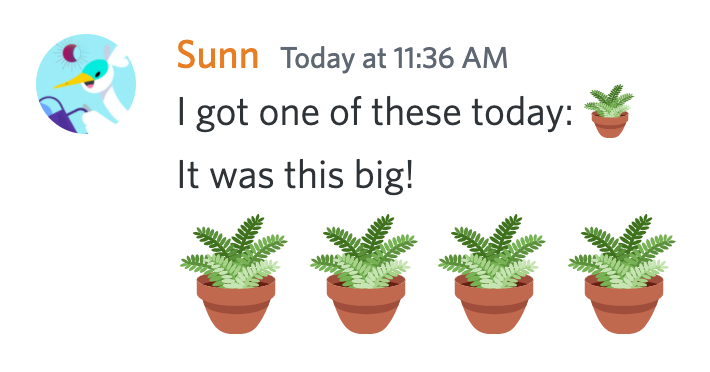
Just kidding. The secret is that if your message contains only emojis, they’ll show up bigger than normal once you post. Compare and contrast these two messages:

A user sending a normal emoji within a message. They then send a message with only emojis, causing them to get larger. 

You can post up to 27 emojis in a single message, and as long as you don’t include any regular text, they’ll all turn into big emojis — or jumbojis, as we like to call them, but spellcheck has flagged that for some reason. Post more than 27 emoji? Small again. 

Hope that helps. Congratulations on graduating wizard academy!

How many emojis can one Discord server have?

The standard Discord server can have up to fifty ordinary custom emojis, plus fifty more animated custom emojis. That’s for everyone — so if Angie uploads 49 animated emojis and Bobert uploads 1, nobody else can add more.

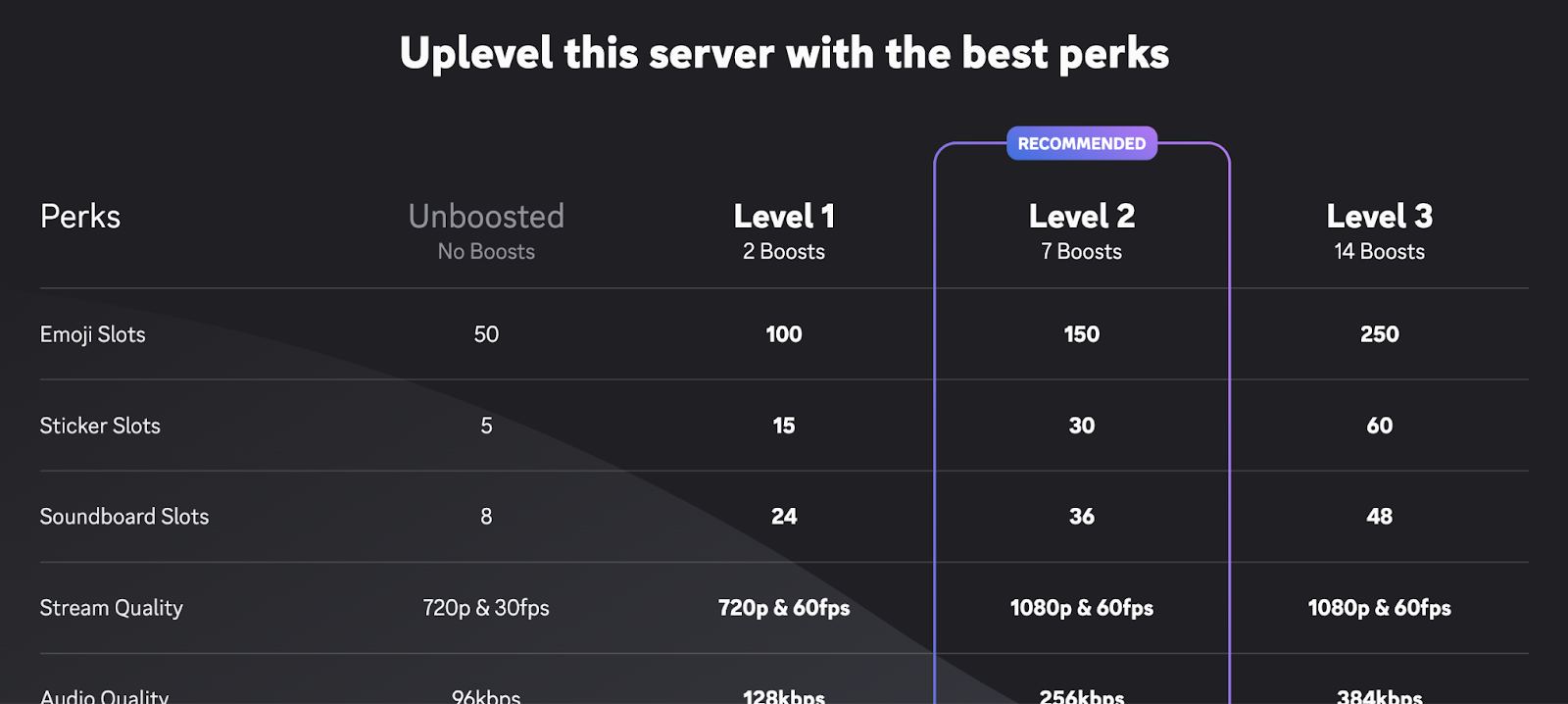
Where things get interesting is if your server’s been Boosted. Raising your server’s Boost Level also increases its emoji limit: Level 1 servers can hold up to 100 standard and 100 animated emoji, up to 150 of each emoji type at Level 2, and up to 250 each at Level 3. So if you want an emoji for every moon in the solar system, good news: you just gotta do some Boosting first. 

A screenshot of all three levels of Server Boosting perks offered. 

A small portion of all the available Boosting perks. “Emoji slots” is at the top! 

Discord keeps changing my text to emojis! How can I disable that?

We hear you: you didn’t mean 😀, you meant :), and there is most certainly a difference.

If you’d prefer to keep your text emotes just the way you wrote them, head into User Settings > Chat. There you’ll find a toggle for “Automatically convert emoticons in your messages to emoji.” Switch it off if you want control over what’s a :) and what’s a 🙂.

The settings option to toggle “Automatically convert emoticons in your messages to emoji.” 

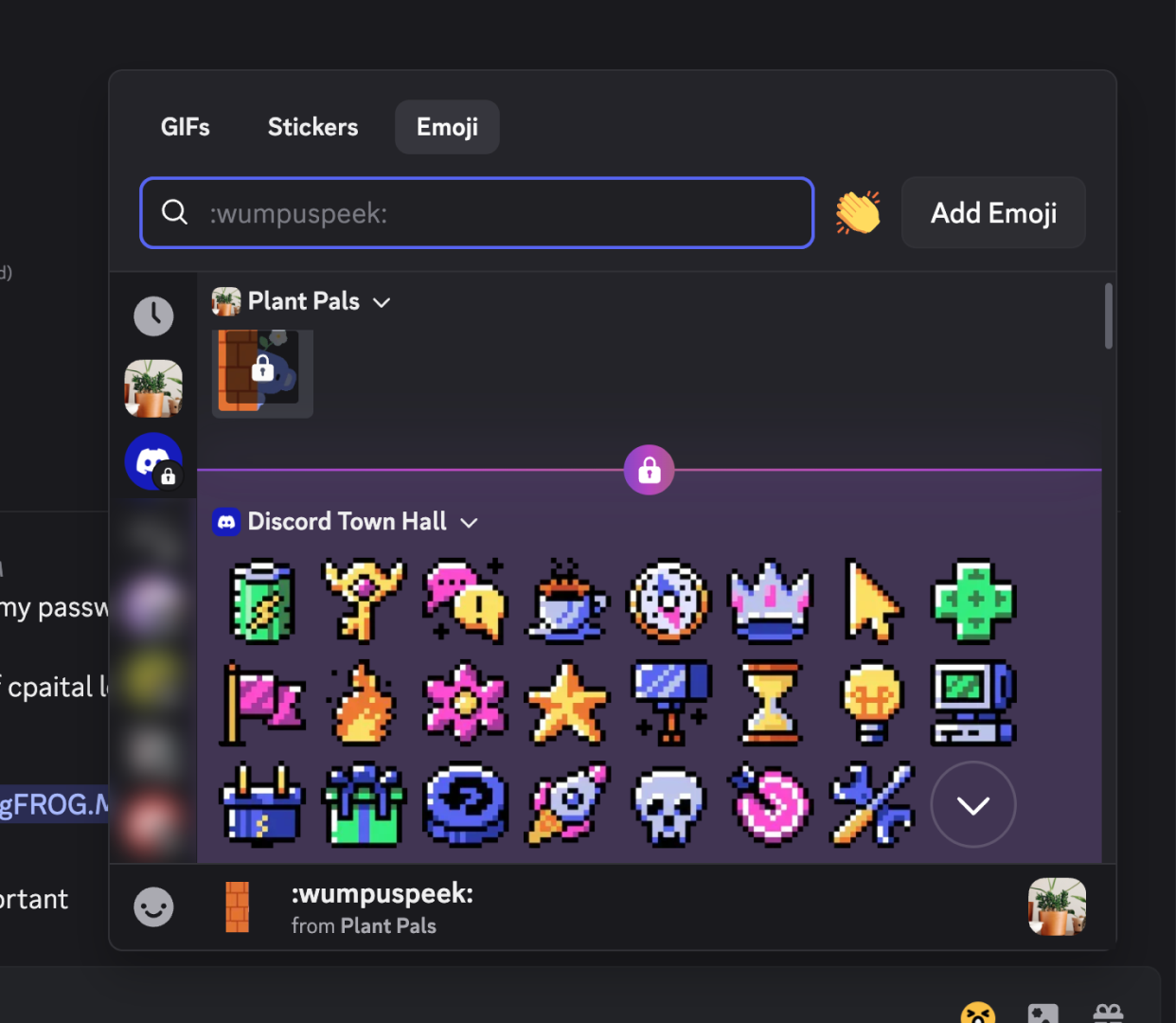
I tried to use a custom emoji in a Discord server, but there’s a lock icon on them! Why can’t I use it?

A screenshot of the emoji selector. Some emojis are greyed out due to the server’s moderation settings.

There are a few reasons why a custom emoji you’re trying to use might be locked out:

  • You aren’t currently a Nitro member, and therefore can’t use emojis from an outside community.
  • The server has chosen not to allow members to use emojis from outside communities, even if they do have Discord Nitro.
  • The server lost some custom emoji slots when it went down a Server Boost tier (but once it’s boosted back where it was, the emoji will unlock again!) 

If none of those things are true, check in with support.

What’s an “emoji server?”

It’s not really a formal category of servers. Basically, they’re community-run Discord servers that boost themselves up to the max so they can hold a who-o-o-le lot of emojis. Like any community, they’ve come together for a shared purpose, which in this case happens to be collecting small pictures of their favorite things.

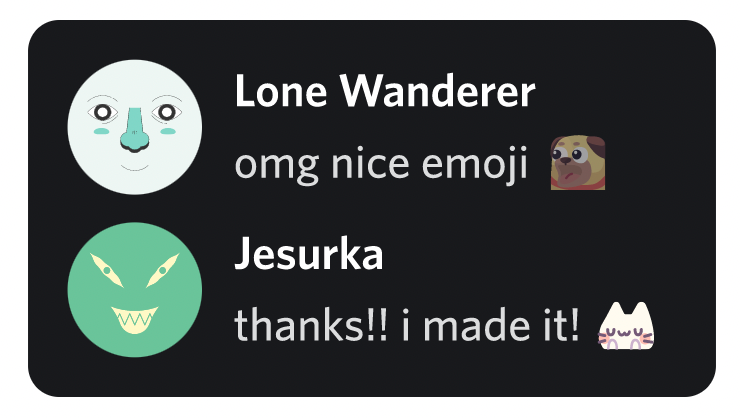
A conversation between two users: One says “omg nice emoji” with an emoji of a dog making an excited face. The other replies “thanks!! I made it!” with an emoji of a cat making a flustered expression.

If you’ve got Nitro, these servers offer a convenient way to load up on hundreds of quality emojis to use in other servers. Either way, you can make friends with fellow emoji enthusiasts! That sounds nice.   

We hope this clears up some of the myths and mysteries about our precious natural resource, the Discord Emoji. Did we miss an important question? Send us a tweet and let us know.

Locke

Locke's years of experience throughout the universe make him the most knowledgeable person to teach you about All Things Discord. Has a soft spot for Nutella and jack cheese sandwiches.

related articles