









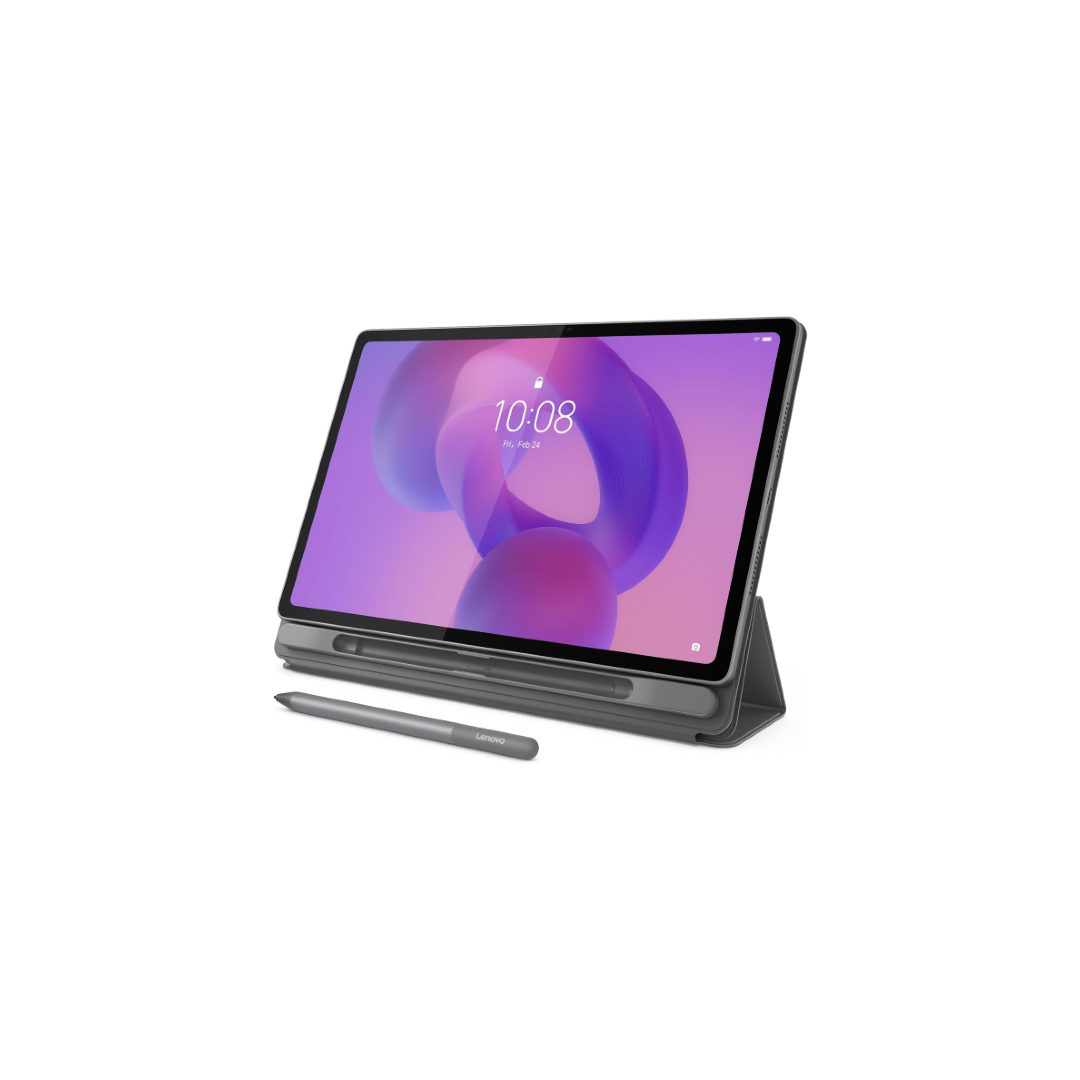
The Lenovo Idea Tab Plus offers a big, high-res IPS display, solid battery life, and it offers stylus and keyboard case support. Those aren't things you can take for granted in this segment. The catch is that it ships with a limited update guarantee, making it a tough sell for anyone planning to hold onto it for more than a couple of years.
Lenovo has been making a whole bunch of strong Android tablets for a while now, but following them is a nightmare because the company has an inexplicable aversion to simple numeric naming. It often expects you to remember whether you’re looking at a Tab Plus, Idea Tab, Yoga Tab, Tab M, Legion Tab, or whatever other combination of words it chose that year.
Thankfully, Lenovo’s current budget tablet lineup — the Idea family — is a little easier to understand. There is the Lenovo Idea Tab, the Lenovo Idea Tab Plus, and the Lenovo Idea Tab Pro. The one I’ve been using is the middle child, the Lenovo Idea Tab Plus ($279.99 at Amazon), and it goes directly against the Samsung Galaxy Tab A11 Plus I recently reviewed.
That matters because I ended that review by calling the Galaxy Tab A11 Plus the default budget Android tablet choice for most people. After spending a month with the Lenovo Idea Tab Plus, I don’t think Samsung has suddenly lost that crown. But I do think there is now a clear set of people who should skip the Galaxy Tab A11 Plus and buy Lenovo’s tablet instead, but there’s one big caveat that keeps me from giving it a wider recommendation.

Rushil Agrawal / Android Authority
Physically, the Lenovo Idea Tab Plus is about as interesting as most budget tablets, which is to say, not very. Gray metal body, flat edges, a single rear camera, and the general personality of office furniture. But it feels solid, which matters more than looking flashy at this price.
Compared to the Galaxy Tab A11 Plus, it is noticeably larger with a 12.1-inch display versus Samsung’s 11-inch panel. That extra inch doesn’t sound like much, but the larger size and weight are definitely noticeable, especially in portrait orientation. The Lenovo isn’t unwieldy, but it sits in that in-between zone where you’re more likely to prop it up than hold it for long stretches.
Lenovo does make good use of the space, though. There are four speakers along the top and bottom edges, a microSD card slot, and a 3-point pogo pin connector on one side for the optional folio keyboard. No fingerprint scanner, so you’re relying on face unlock, which works acceptably in good lighting but isn’t something you’ll love in a dimly lit room.
The Idea Tab Plus makes smart use of its design with extra features you don't typically see on tablets at this price point.
The pogo pin is worth calling out, as Samsung doesn’t offer one on the Tab A11 Plus. That means Samsung’s tablet can’t connect cleanly to keyboard cases, and you’re stuck with Bluetooth if you want a keyboard setup. That works, but it’s never as seamless as snapping into a keyboard case and getting started.
Lenovo sells a proper keyboard case for the Idea Tab Plus, and the Amazon listing at the time of writing even bundles the tablet with a folio case and stylus pen included. My review unit didn’t come with either, so I couldn’t test them personally. The Galaxy Tab A11 Plus doesn’t support any active stylus at all, so Lenovo wins this part simply by giving you the option.

Rushil Agrawal / Android Authority
Galaxy Tab A11 Plus 5G (the smaller one) vs the Lenovo Idea Tab Plus
The Idea Tab Plus has a 12.1-inch 2.5K IPS LCD with a 90Hz refresh rate. The Galaxy Tab A11 Plus also has a 90Hz panel, but its display is lower-resolution and still uses a TFT LCD. I complained about that in my Galaxy Tab A11 Plus review, and using these two tablets side by side made the difference easier to understand.
When you’re looking at both screens head-on, the difference is still forgivable. Both tablets get similarly bright in regular use, and the color difference isn’t night and day at first glance. Lenovo’s colors look a little warmer and richer, but it’s not like the Galaxy Tab looks unusable when placed next to it.
The bigger difference appears the moment you tilt the tablets even slightly. Samsung’s display starts washing out much more quickly, while Lenovo’s IPS panel holds its colors and contrast better at an angle. That matters if you’re watching something with another person, using it propped up while cooking, eating, or pretending to work while actually watching YouTube. I’m not saying Lenovo packed a premium display into its budget tablet, but it is clearly better than Samsung’s TFT panel.
The quad-speaker setup on the Lenovo Tab, tuned with Dolby Atmos, gets loud and is well-suited for media consumption. Don’t expect any real bass, but for YouTube and Netflix on the couch, it holds up fine. The Idea Tab Plus does have one quirk I didn’t expect. It caps YouTube streaming at 1440p, while the Samsung can go up to 4K. You probably don’t need 4K on either of these screens, but I noticed something else.
Even at 1440p, the Lenovo would occasionally pause to buffer on the same video that the Samsung played without interruption. The Wi-Fi radio that Lenovo has opted for could be a factor here. I ran a few Wi-Fi speed tests, and almost every time, the Galaxy Tab A11 Plus showed faster download and upload speeds. Although it could also be about the chipset handling the decode load less efficiently.
That’s because the Idea Tab Plus runs on a MediaTek Dimensity 6400, a 6nm processor that sits meaningfully below the MediaTek MT8775 in the Galaxy Tab A11 Plus, as evidenced by the benchmark numbers. In real-world use, the Lenovo isn’t a bad performer. Browsing, streaming, and casual multitasking all work decently well. But when I put both tablets side by side, the Galaxy Tab A11 Plus consistently opened apps faster.
Gaming is the same story. Casual games run fine on the Lenovo Tab. But this is not the tablet I’d buy for heavier gaming. The performance isn’t quite there, and the size also works against it. The 12.1-inch display is great for watching something, but it can feel too big to hold comfortably for long gaming sessions.
The Idea Tab Plus ships on Android 15 with Lenovo’s ZUI skin, and setup is the worst part of owning this tablet. Lenovo walks you through multiple screens of pre-selected app installs, and if you’re not paying attention, you’ll end up with games and utilities you never asked for. Even if you manually uncheck everything, there are at least a dozen pre-installed apps here that don’t need to be.
Once you’re past that, ZUI mostly gets out of your way. It’s nimble enough for day-to-day use, but the visual design looks like it hasn’t been updated since the early 2010s. Lenovo does offer some genuinely useful tablet features here, with the biggest one is PC Mode. It is basically Lenovo’s DeX alternative, which turns the tablet into a more computer-like experience with resizable floating windows, a taskbar-style layout, and a desktop-style version of Chrome.

Rushil Agrawal / Android Authority
It’s more capable than I expected at this price, and paired with the keyboard case, you could genuinely get some work done on it. Lenovo has also built a dedicated note-taking and sketching app, and the overall software experience around pen input seems well thought through.
The software support situation is the biggest reason not to buy this tablet long-term.
The Idea Tab Plus gets two Android updates and four years of security updates. That already sounds weak, but it gets worse when you look at the starting point. My review unit was already on Android 16 when I booted it, and Lenovo’s update promise appears to count from Android 15. So realistically, this tablet should only get one more major Android update, which isn’t reassuring at all.
Samsung, on the other hand, promises seven years of updates for the Galaxy Tab A11 Plus. That’s ridiculous in the best way for a budget tablet, even though I don’t know how many people will still want to use its hardware in the 2030s.

Rushil Agrawal / Android Authority
The Lenovo Idea Tab Plus has a 10,200mAh battery, which is much larger than the 7,040mAh battery inside the Galaxy Tab A11 Plus. Screen-on time was good as expected, but what surprised me more was the standby battery life. I left the tablet idle for five to six days with Wi-Fi still on, and it only dropped by around 15-20%. That might not sound exciting, but it matters for a device like this. A tablet that quietly survives a week on standby instead of being dead every time you remember it exists is doing its job well.
Charging is another easy Lenovo win. The Idea Tab Plus supports up to 45W wired charging, while the Galaxy Tab A11 Plus tops out at 25W. Both tablets ship without a charger in the box, though, so you will have to invest in a compatible fast charger.
The Idea Tab Plus has a 13MP rear camera and an 8MP front camera. That looks better than the 8MP rear and 5MP front cameras on the Galaxy Tab A11 Plus, but the real-world gap is narrower than the numbers suggest. Samsung’s image processing partially compensates for the resolution difference, and photos from both tablets sit firmly in the “emergency use only” category.
One small but practical edge for the Lenovo: it lets you use the screen as a fill light for selfie videos, brightening the display to illuminate your face in low-light conditions.

Rushil Agrawal / Android Authority
The Idea Tab Plus gets a lot right. The display is genuinely better than the best its closest rivals can offer, battery life is strong, PC Mode is more useful than expected, and native keyboard and stylus support gives it a lane that Samsung simply can’t compete in at this price.
Its weaknesses are just as real, however. Performance is only okay, the software skin looks dated, and there’s no 5G option in the US. The size, while great for media, means this is more of a prop-it-up tablet than a hold-it-in-one-hand tablet, but the real drawback is that meager update policy that will only see it get one more full Android version before support is retired.
If you hadn’t guessed by now, the closest competitor to the Idea Tab Plus is the Galaxy Tab A11 Plus ($209.99 at Amazon). Choosing between them is quite simple thanks to the deal-breakers that cut both ways. If you need the Samsung ecosystem benefits, 5G connectivity, or long-term software support, the Lenovo isn’t the tablet for you. If you want stylus input or a proper keyboard case connection, the Galaxy Tab A11 Plus can’t help you.
Students, note-takers, and people who want to watch movies and shows will find a lot to like with the Idea Tab Plus.
Beyond that, it comes down to what kind of tablet user you are. Students, note-takers, and people who primarily use a tablet for movies and shows will find a lot to like with the Idea Tab Plus. If you just want a reliable, future-proof device that stays out of your way, the Samsung is the safer bet.
If the Idea Tab Plus is close to what you want but the chipset gives you pause, the Idea Tab Pro ($379.99 at Amazon) is worth a look. For around $100 more, you get a significantly faster chip, a larger 12.7-inch 3K 144Hz display, and faster Wi-Fi 6E. Just know that the Idea Tab Pro launched on Android 14 and is limited to two OS updates, so it tops out at Android 16. Although Lenovo has already announced the Idea Tab Pro Gen 2, and while we haven’t tested it, it might be worth the wait if you want better support.
As for the Lenovo Idea Tab Plus, it gets enough right to stand out, especially for entertainment, notes, and light productivity. But the weaker performance and short software support keep it from being an easy default recommendation. With a few tweaks for the next generation, though, this could be the future budget Android tablet to beat.
MSRP: $279.99
The Lenovo Idea Tab Plus is a value-focused Android tablet with a 12.1-inch 2.5K 90Hz display, MediaTek Dimensity 6400 processor, and a large 10,200mAh battery. Paired with Dolby Atmos speakers, pen support, and up to 256GB of storage, it's built for entertainment, studying, and everyday productivity.
Positives
Cons
Thank you for being part of our community. Read our Comment Policy before posting.
此内容由惯性聚合(RSS阅读器)自动聚合整理,仅供阅读参考。 原文来自 — 版权归原作者所有。