







引言
2021 第二届”祥云杯”网络安全技能大赛
比赛时间:2021-08-21 09:00 ~ 2021-08-22 09:00
又是一个打 CTF 的周末,这周打了个祥云杯,摸鱼摸鱼,累累(
喵喵主要在看 Misc 题目,其他题目看的不多,和队友们一起来玩的。
鸣雏恋
在喜欢的人面前,我可不能……丢脸啊……因为我,喜欢鸣人君…………
docx 里面藏了东西,直接解压提取
key.txt 零宽隐写
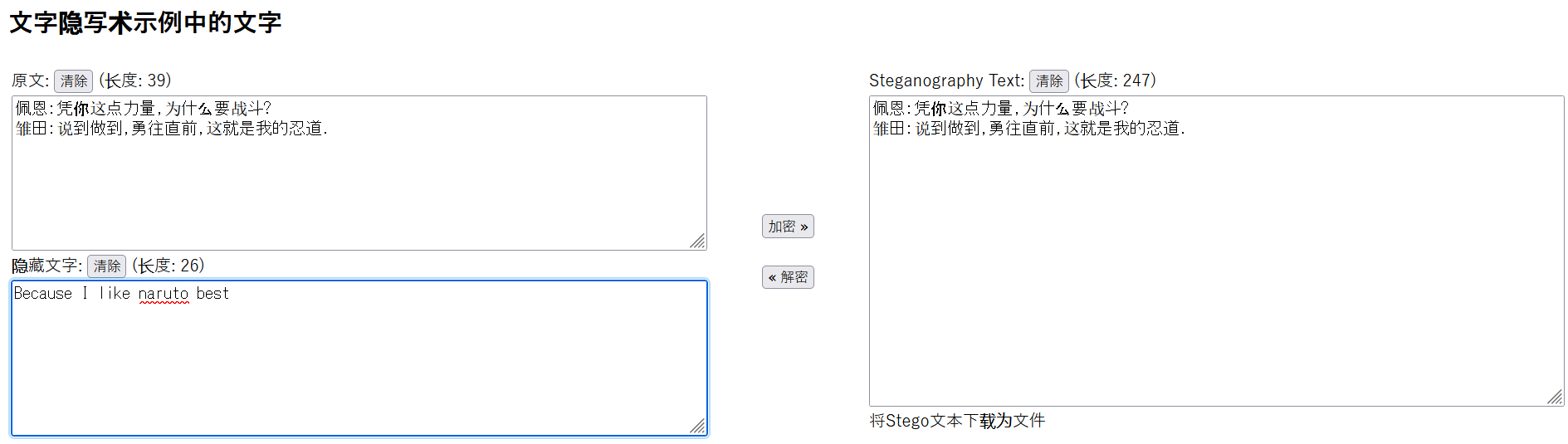
Because I like naruto best 作为密码,解压得到一堆的图片
发现只有两种图片,换成 0/1 导出,得到一张图片,上面就有 flag
import os

files = os.listdir('out/')

with open('out/0.png', 'rb') as f:
    f0 = f.read()

with open('out/1.png', 'rb') as f:
    f1 = f.read()

data = []
for i in range(129488):
    filename = 'out/' + str(i) + '.png'
    print(filename)
    with open(filename, 'rb') as f:
        content = f.read()
    if content == f0:
        data += [0]
    elif content == f1:
        data += [1]

print(data)

d = ''.join(map(str, data))
with open('data1.txt', 'w') as fout:
    fout.write(d)

len(data)

result = ''.join(list(map(str, data)))
for i in range(0, len(result), 8):
    byte = result[i:i+8]
    print(chr(int(byte, 2)), end="")
flag{57dd74fb21bb1aee50f19421bf836f23}
层层取证
附件下载 提取码(GAME)
(本题附件较大)
(这个文件镜像 13GB 也太大了吧……
他这个是用 ftk 提的镜像
从内存镜像里导出 bitlocker 密钥
$ volatility --plugins=plugins/bitlocker -f memdump.mem --profile=Win7SP1x64 bitlocker
Volatility Foundation Volatility Framework 2.6

Address : 0xfa800d12e7e0
Cipher  : AES-128
FVEK    : 0ff9192acdbf1df3c6dc36fb58cf76ce
TWEAK   : b423bd84872ff72b583bb9bdee1762ac
取证大师挂载磁盘,解开 bitlocker,xiaoming 桌面上有个 flag.txt ,和内存 notepad 进程里的内容一致
hint: 你连电脑都不能仿真打开,还想要flag ?加密盘里发现有个 2.pcapng 流量包
大部分流量是在搜 CTF、flag、黑客 啥的,不过 strings 发现有个 flag.docx,在一堆 udp 流量里发现了这个 rar
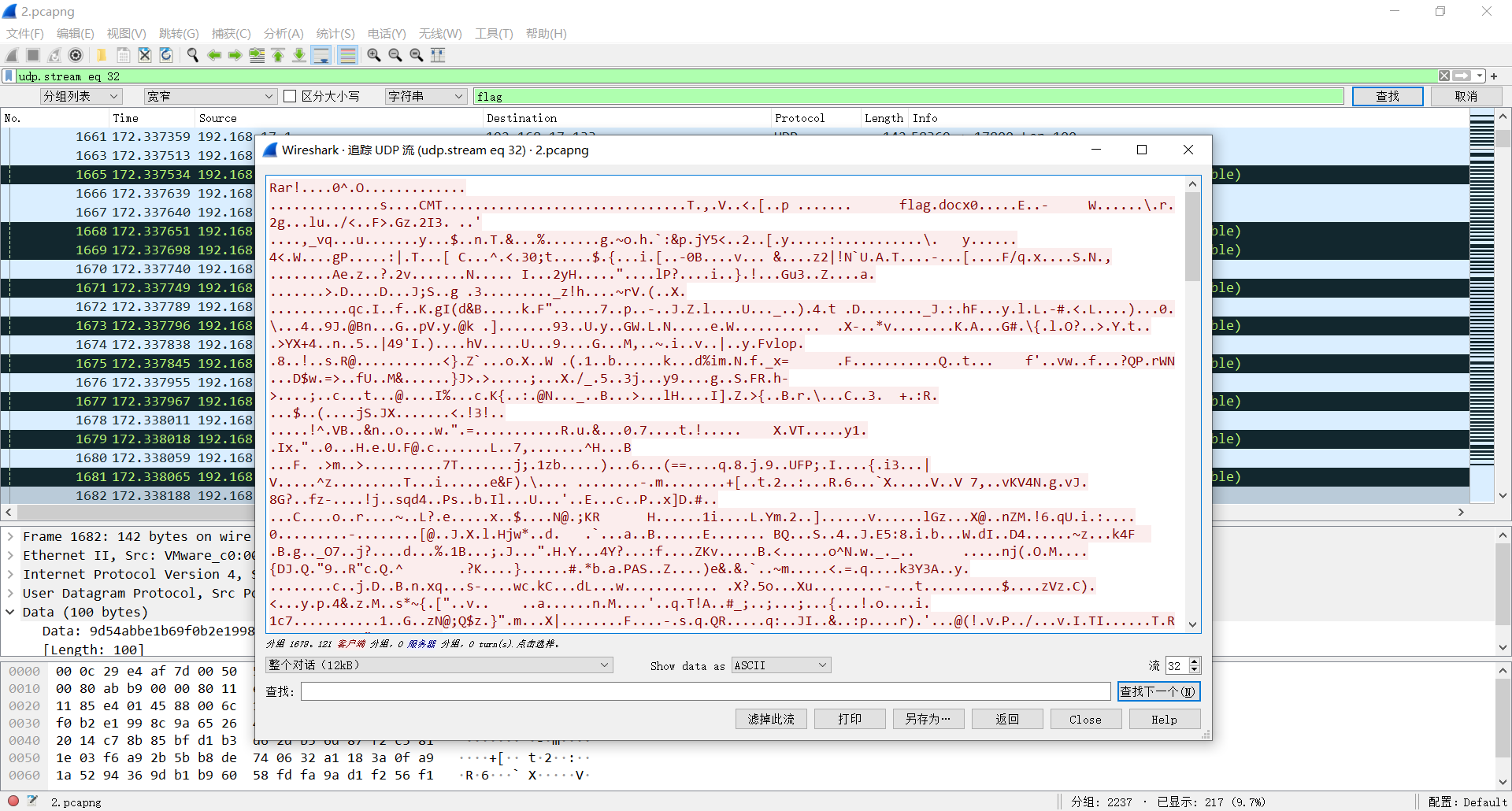
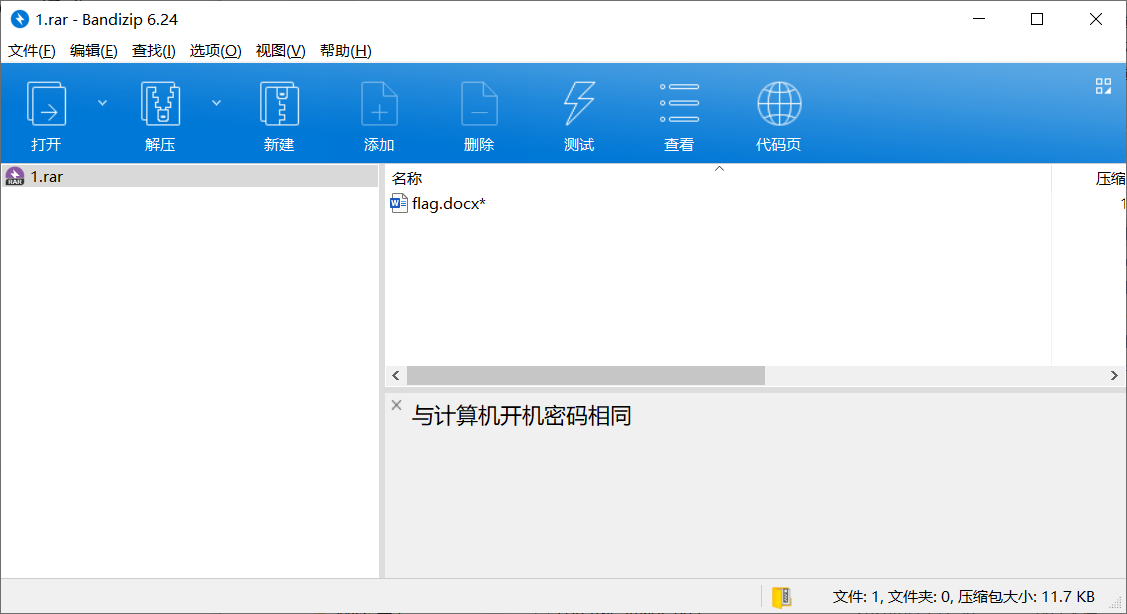
从内存镜像 hashdump 解 hash 得到开机密码为 xiaoming_handsome,但是解压得到的 docx 还有个打开密码。
仿真发现便签下面还藏了个便签……
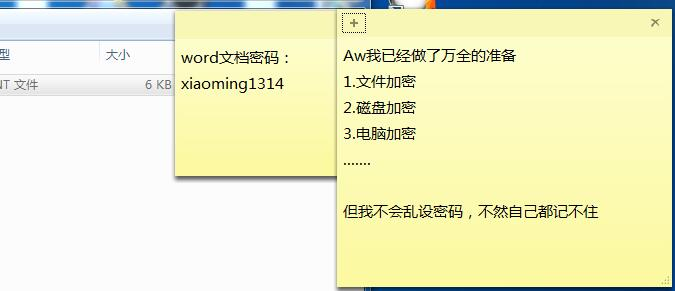
或者也可以直接读取文件 StickyNotes.snt
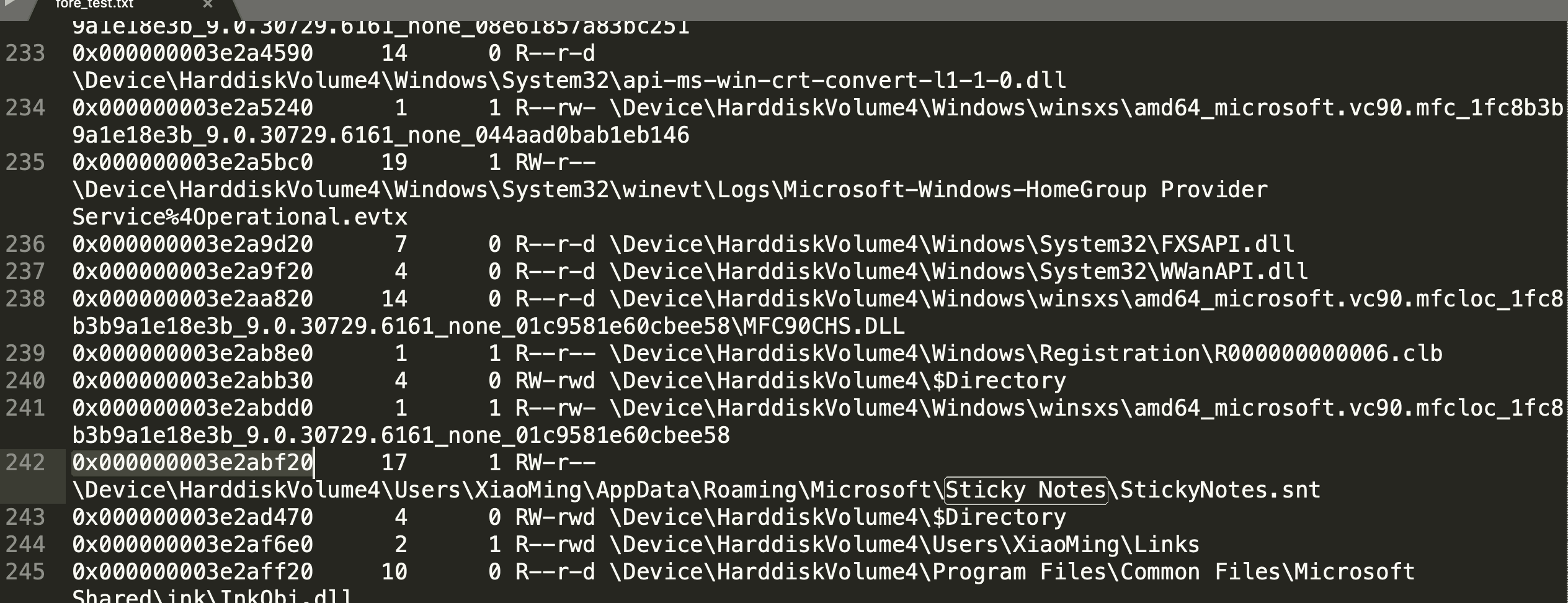
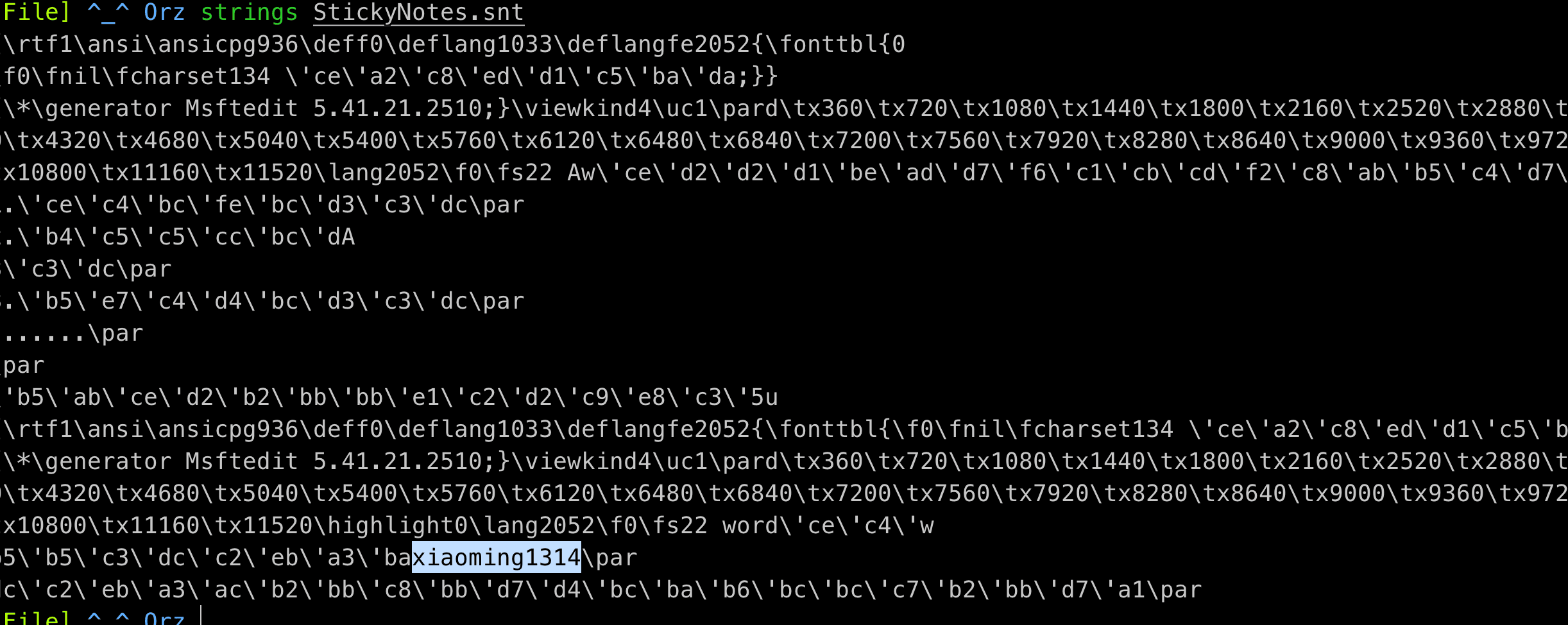
用 xiaoming1314 打开 word,拿到 flag
flag{9ca871b668f2-b668-097c-cbm8-9op404c891e2}
考古
小明在家里翻到一台很古老的xp笔记本,换电池之后发现可以正常开机,但是发现硬盘空间不足。清理过程中却发生了一些不愉快的事情…
咋又是取证啊((
$ volatility -f memory --profile=WinXPSP2x86 cmdscan
Volatility Foundation Volatility Framework 2.6
**************************************************
CommandProcess: csrss.exe Pid: 620
CommandHistory: 0x3833938 Application: cmd.exe Flags: Allocated, Reset
CommandCount: 16 LastAdded: 15 LastDisplayed: 15
FirstCommand: 0 CommandCountMax: 50
ProcessHandle: 0x404
Cmd #0 @ 0x3832110: It's useless to find so many things
Cmd #1 @ 0x3832ed0: ........................
Cmd #2 @ 0x52c778: what can i do about it
Cmd #3 @ 0x3833360: Heard that there is a one-click cleaning that is very useful
Cmd #4 @ 0x52b3c8: try it
Cmd #5 @ 0x52b7e8: "C:\Documents and Settings\Administrator\??\Oneclickcleanup.exe"
Cmd #6 @ 0x5224a0: what???
Cmd #7 @ 0x52d5c0: what happened??
Cmd #8 @ 0x52d410: who is 1cepeak?
Cmd #9 @ 0x3832de0: what's the meaning of hack?
Cmd #10 @ 0x3830e50: oh,no
Cmd #11 @ 0x52af40: holy shit
Cmd #12 @ 0x3830cf8: aaaaaa
Cmd #13 @ 0x522d28: Nonononononononononononono!!!!!!!!!!!!!!!!
Cmd #14 @ 0x522d88: "C:\Documents and Settings\Administrator\??\Oneclickcleanup.exe"
Cmd #15 @ 0x5224b8: fuc
**************************************************
这个 Oneclickcleanup.exe 很可疑,于是 dump 出来看一下逆一下。
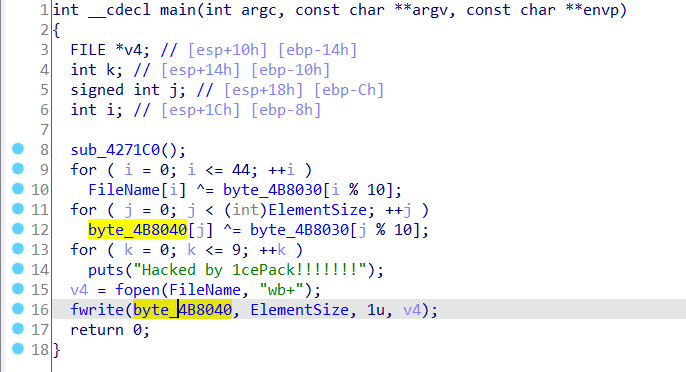
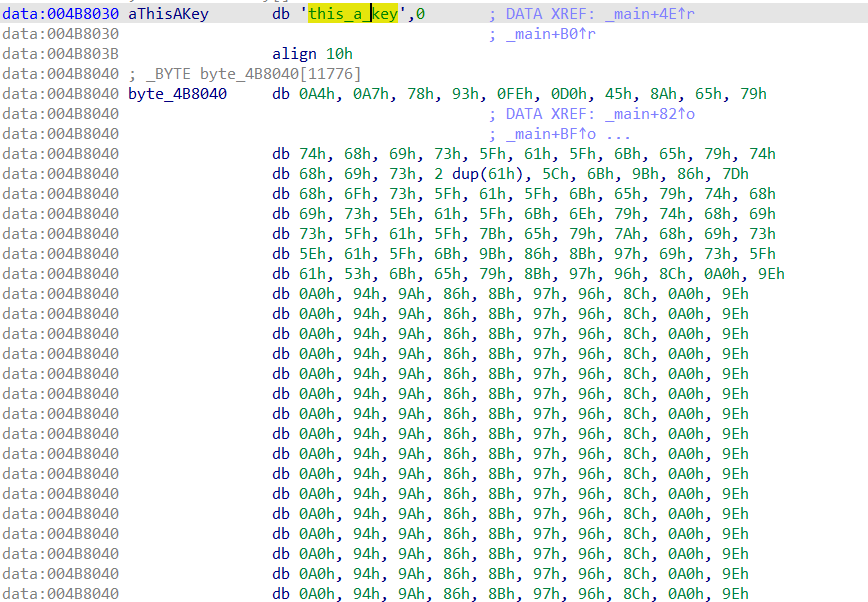
可以看到循环异或这个 key,即 this_a_key,然后把内容写入文件。
按逻辑写个脚本导出
data = bytearray()
with open('data.txt', 'r', encoding='utf-8') as f:
    while True:
        s = f.readline()
        if not s:
            break
        l = s.split(',')
        # print(l)
        for i in l:
            d = i.strip()
            data.append(int(d, 16))

print(data)

key = b'this_a_key'
data_decode = bytearray()

for i in range(len(data)):
    data_decode.append(data[i] ^ key[i % len(key)])

print(data_decode)

with open('1.doc', 'wb') as f:
    f.write(data_decode)
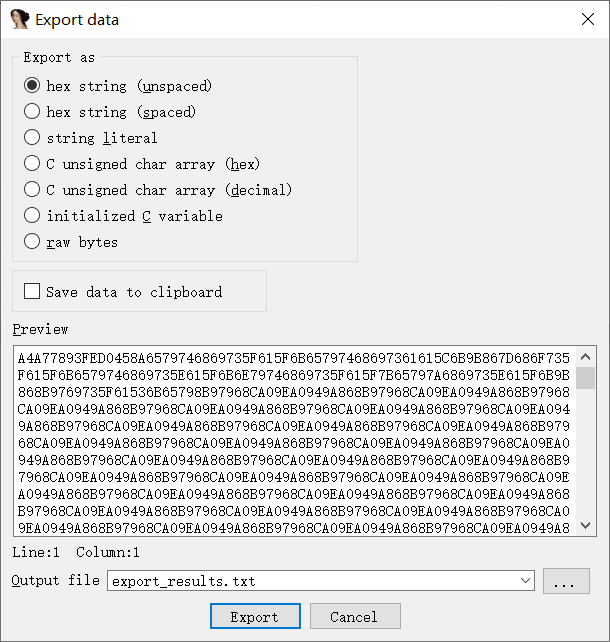
赛后问了问队里 binary 爷爷,才知道 IDA 里直接按 Shift + E 就能直接导出数据,这样就不用复制粘贴然后自己手动处理这个原始数据了……
同理,文件名,不过貌似没啥用(
# filename
filename = bytearray()
filename += b'7R570'
with open('data2.txt', 'r', encoding='utf-8') as f:
    s = f.readline()
    while True:
        s = f.readline()
        if not s:
            break
        d = s.strip()
        filename.append(int(d, 16))
print(filename)

filename_decode = bytearray()
for i in range(len(filename)):
    filename_decode.append(filename[i] ^ key[i % len(key)])
print(filename_decode)
# bytearray(b'C:\\Documents and Settings\\All Users\\Templates')
发现文件是个 doc,里面就一句话
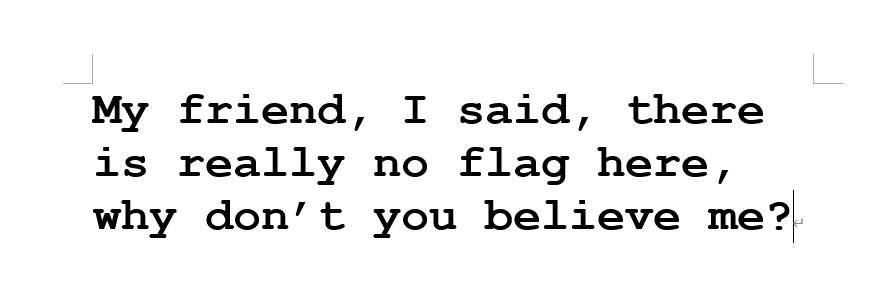
查看文件 hex,发现这句话后面还有点东西,参考前面的异或逻辑,这里爆破了一下 key,最后发现 key 是 -。。
import string
with open('1.doc', 'rb') as f:
    raw = f.read()

# l = string.ascii_letters
l = [bytes([i]) for i in range(1, 256)]

for i in l:
    x = bytearray()
    for data in raw:
        x.append(ord(i) ^ data)
    # print(x)
    if b'flag' in x:
        print('!!!!!!!!!!!!')
        print(i)
        print(x)
    print('=======================')
    print()
顺便和原始文件对比一下。

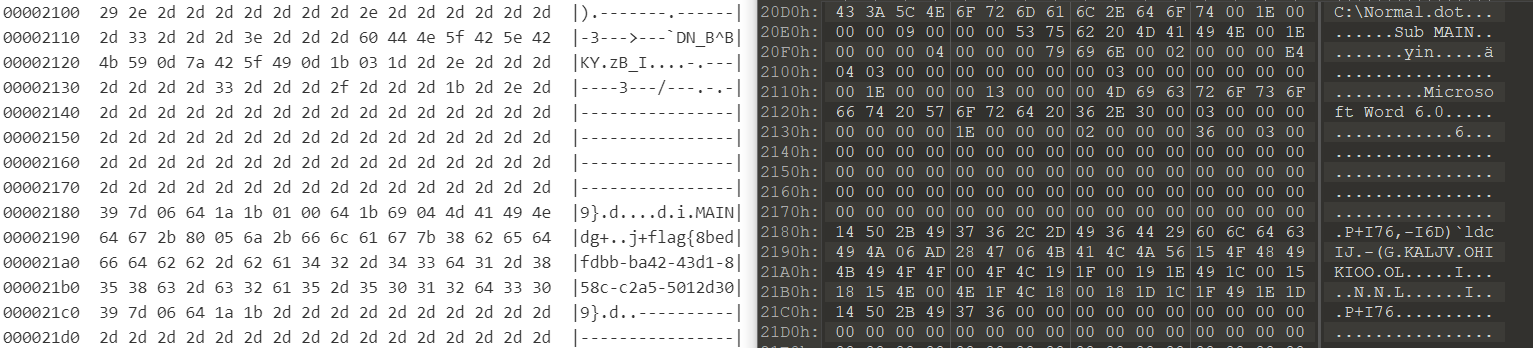
flag{8bedfdbb-ba42-43d1-858c-c2a5-5012d309}
ChieftainsSecret
Our agent risked his life to install a mysterious device in the immemorial telephone, can you find out the chieftain’s telephone number? Flag format: flag{11 digits}
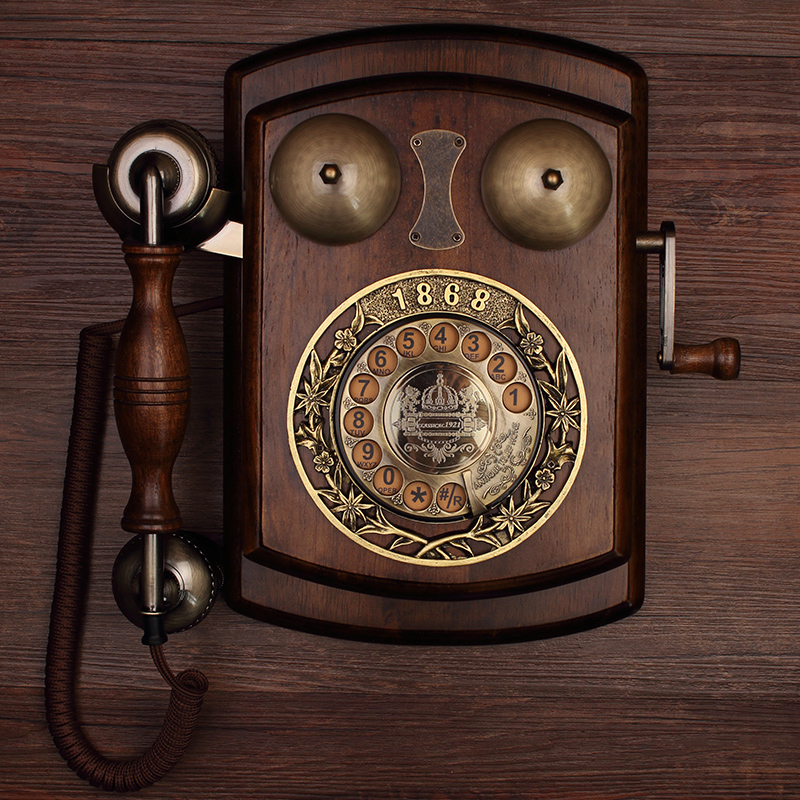
图种,后面有个压缩包,解压得到电路图和数据。
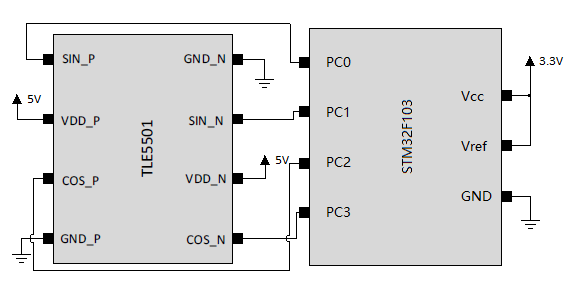
TLE5501 这个芯片是个角度和线性位置传感器,通过采集磁场的变化,他能反应出角度变化,然后输出差分的正余弦信号。
应该是老式拨号那个盘,他相当于采集了那个的角度数据
https://www.mouser.cn/new/infineon/infineon-tle5501-e0001-e0002-xensiv-sensors/
https://www.mouser.sg/new/infineon/infineon-tle5501-evaluation-kit/
https://www.infineon.com/cms/cn/product/sensor/magnetic-sensors/magnetic-position-sensors/angle-sensors/tle5501-e0001/
(Datasheet 解题上用处不太大
给了单片机采集到的信号,考虑通过正余弦值求解角度,这个应该就是转盘的角度,应该和拨盘上的数字成正比
先把数据画个图
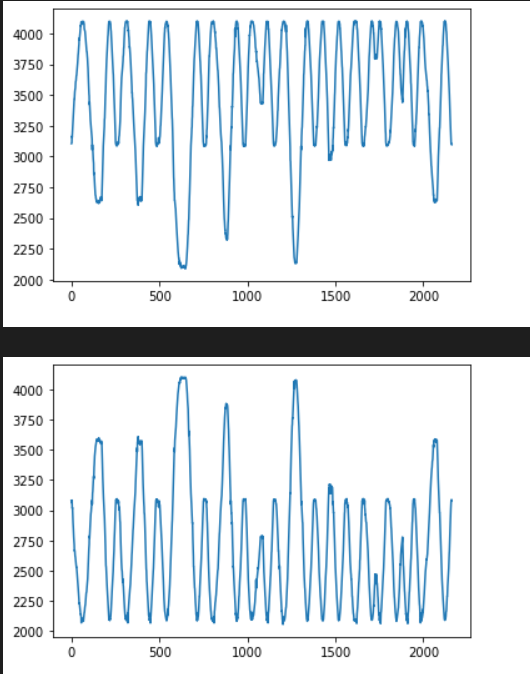
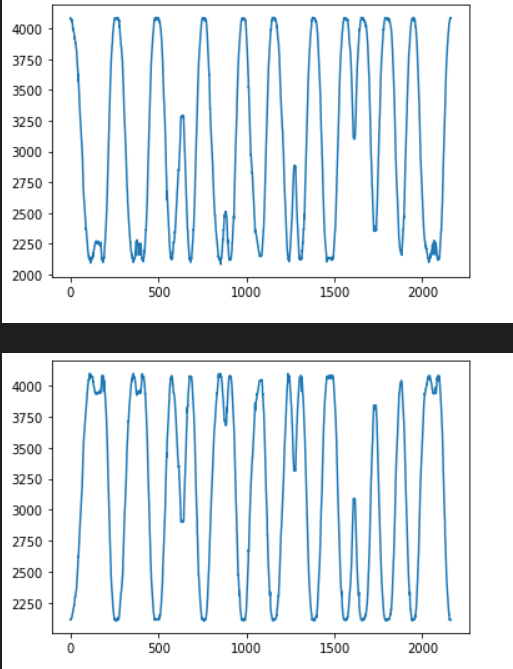
可以看出确实是差分的正余弦信号,考虑把这个四元组转换为角度
import math
import matplotlib.pyplot as plt
import numpy as np

# plt.figure()
data1 = []
data2 = []
data3 = []
data4 = []

with open('adc.csv', 'r') as f:
    f.readline()
    for i in range(2162):
        s = f.readline()
        # print(s)
        s = s.split(',')
        data1.append(int(s[0]))
        data2.append(int(s[1]))
        data3.append(int(s[2]))
        data4.append(int(s[3]))

print(len(data1))

data_sin = np.array(data1)-np.array(data2)
data_sin = data_sin/max(data_sin)

data_cos = np.array(data3)-np.array(data4)
data_cos = data_cos/max(data_cos)

angle = np.arcsin(data_sin)/np.pi*180
plt.plot(angle)
plt.grid(True)
# plt.show()


angle2 = np.arccos(data_cos)/np.pi*180
plt.plot(angle2)
plt.grid(True)
plt.show()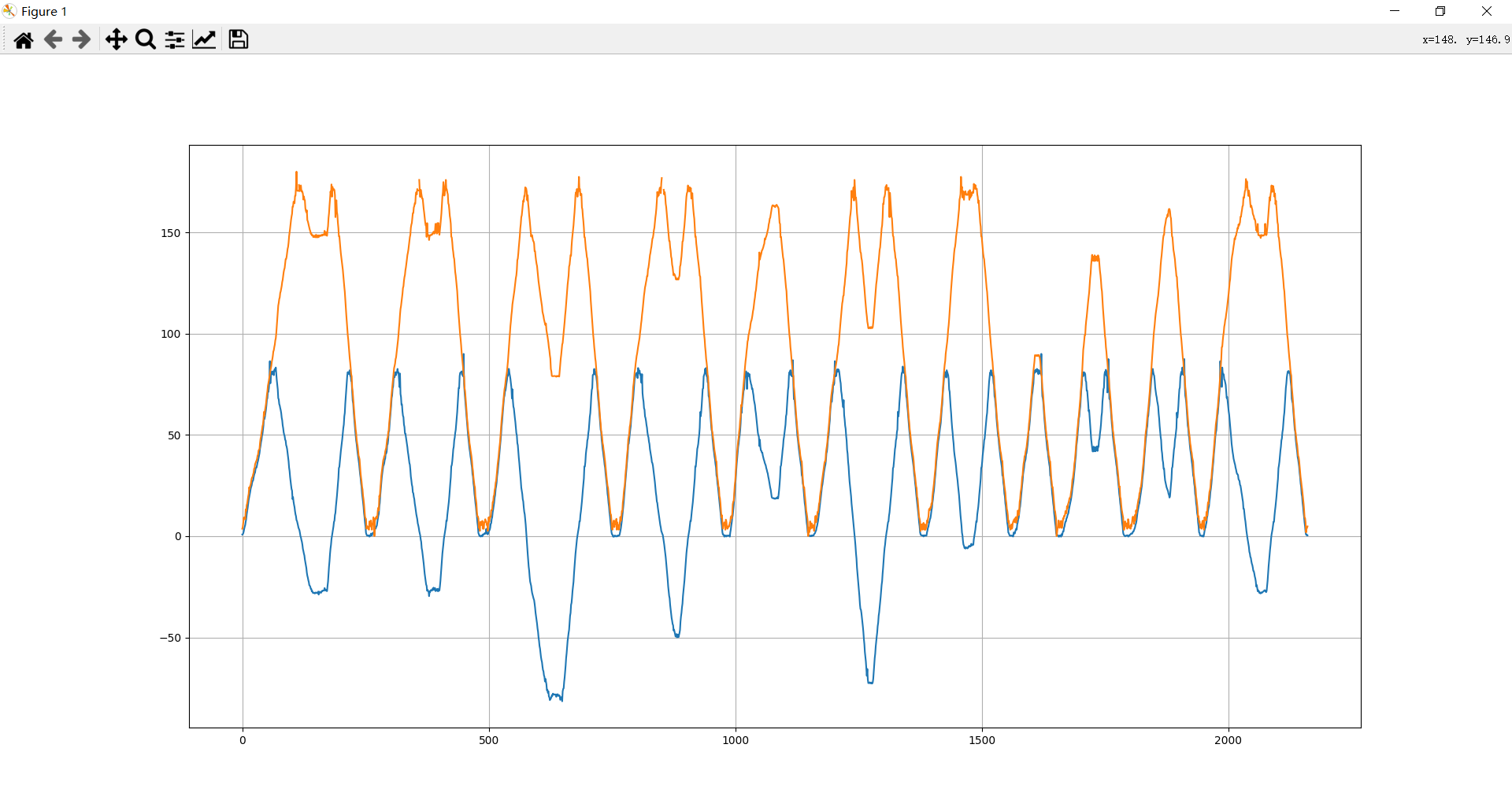
由于超过了180度中间的角度会反而减小,要加回去。。
整来整去还不如直接读坐标,得到大概角度分别为 212, 212, 282, 234, 164, 258, 193, 90, 140, 161, 212
最后手动用量角器出了……难受死了(
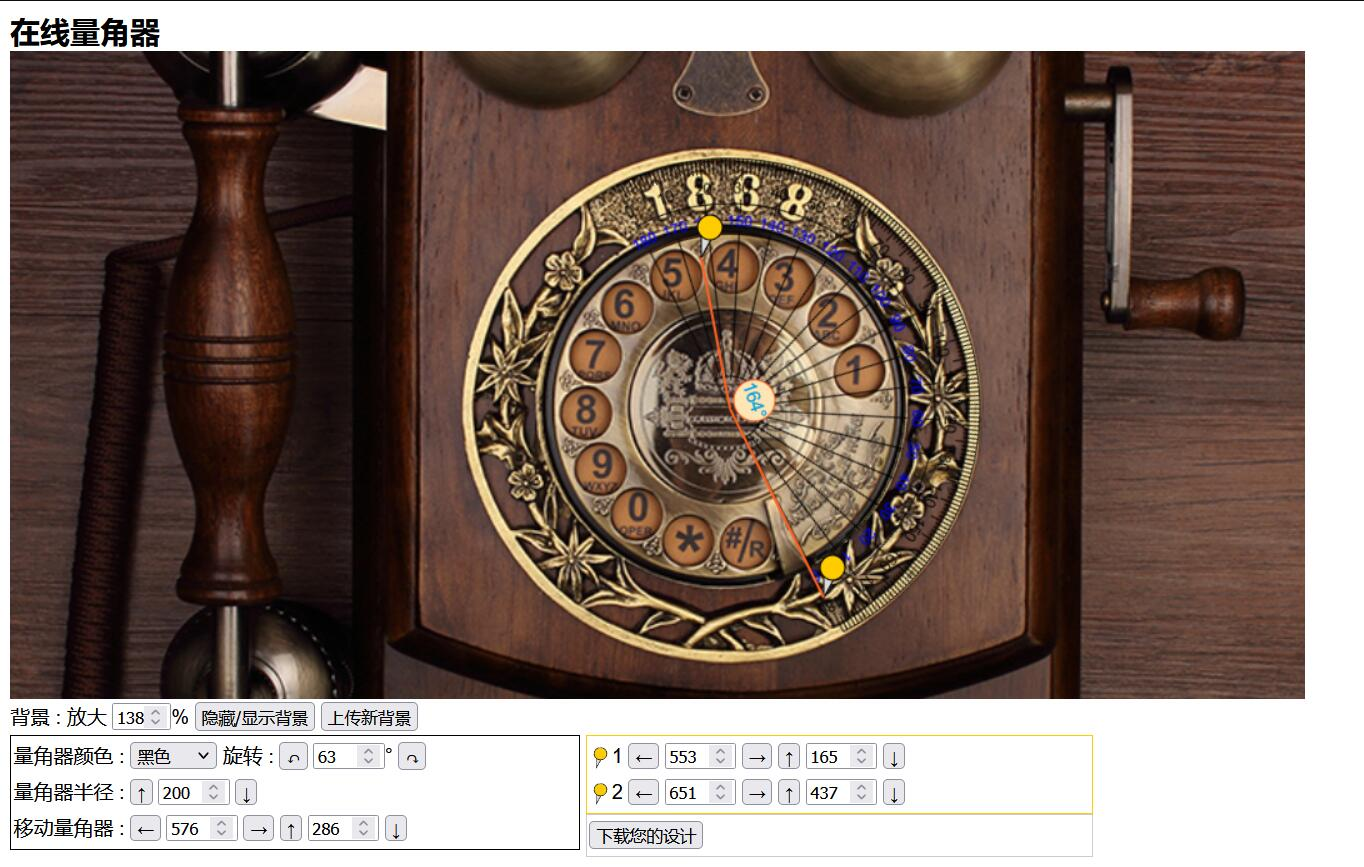
flag{77085962457}
(寻思着大概每个数字差 360/15=24 度,多试几次其实也行
比赛后想到,sin cos 值都给了,为啥不直接求 tan 然后 arctan 出角度啊,以及,直接 excel 里算更方便。
喵喵是 fw……
小结
取证好烦啊……一堆脑洞,而且占喵喵硬盘一堆空间,盘都满了啊啊啊啊啊。
很难得在 CTF 里还能碰到硬件相关或者沾边的题目,而且一次还来俩,还有个逆向题给了个 ARM 单片机连接 W25Q16 内存芯片,给了个 hexdump 样式的文本文件,还有一个逻辑分析仪抓到的信号,喵喵以为这个 hex 是内存了,最后发现其实是要逆向这个 hex 文件……
想不到还能在 CTF 里复习数电知识 233333.
太卷啦太卷啦,又是最后几分钟疯狂掉排名。
最后排 34 但只进前 30,难受受,又不能出去线下摸鱼旅游了,喵呜呜。
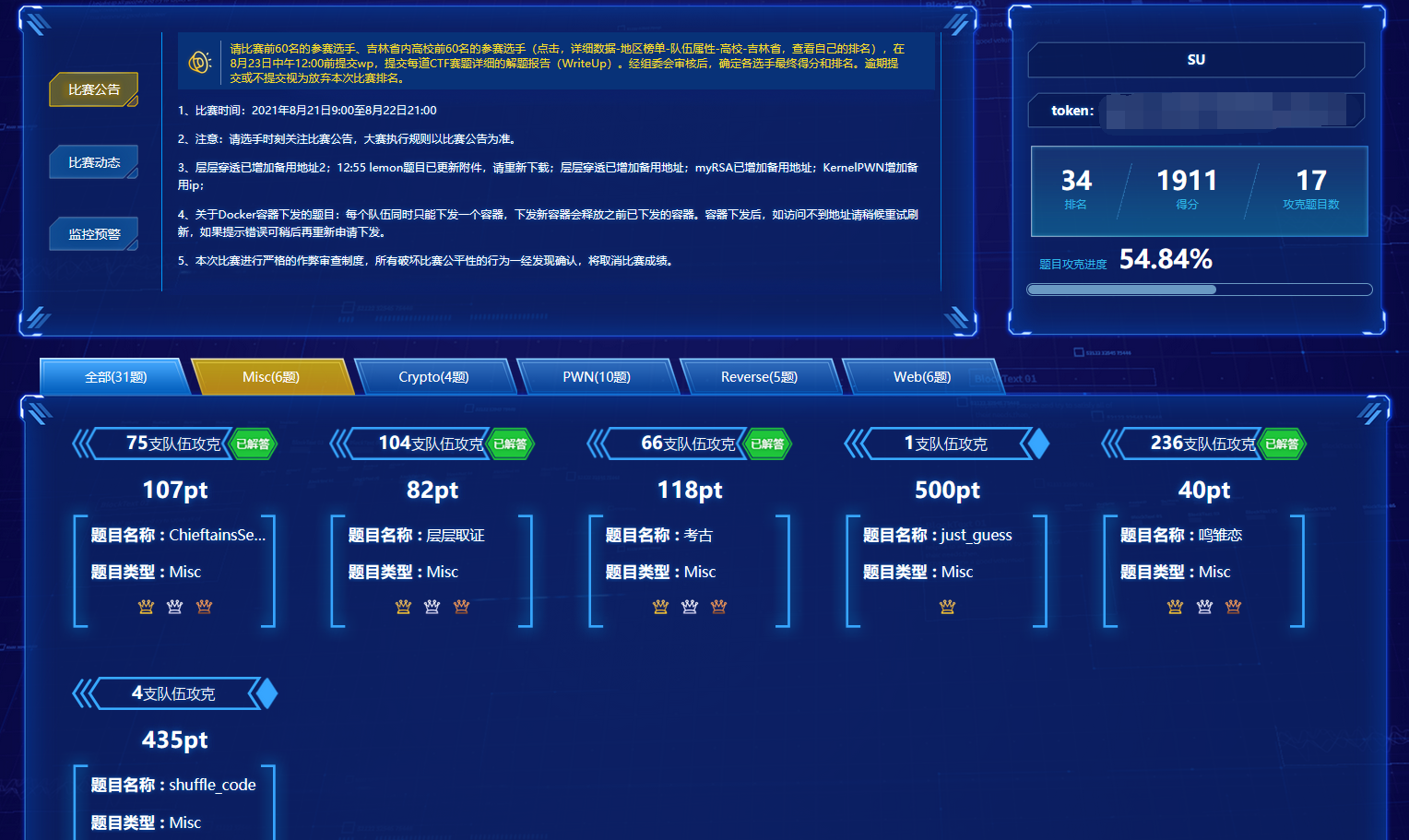
pwn 题也太多了吧……
这次没得空看 web 题,喵喵是 fw,喵呜呜。
感谢队友们带咱一起玩 qwq~
(溜了溜了喵