


在 GitHub 中,我们能看到每个人都在折腾个人同名仓库的 profile,我在这上边也花了不少的时间,在这个冲浪经历中,感觉外国人折腾的好像要更厉害一些,浏览过程中看到有人能直接在个人的 profile 中生成博客最近更新文章,很是新颖,于是就学习了一下。
本文就来讲一下,如何借助 Github Actions 自动获取博客 rss 文章并呈现在 profile 中。
所用 Actions: blog-post-workflow (opens new window)
使用配置其实非常简单,基本上阅读完官方介绍文档就可以上手使用了,这里说一两个需要注意的地方。
首先添加 Actions 配置文件,e.g. .github/workflows/blog-rss.yml:
name: Latest blog post workflow
on:
schedule: # Run workflow automatically
- cron: "0 * * * *" # Runs every hour, on the hour
workflow_dispatch: # Run workflow manually (without waiting for the cron to be called), through the Github Actions Workflow page directly
jobs:
update-readme-with-blog:
name: Update this repo's README with latest blog posts
runs-on: ubuntu-latest
steps:
- name: Checkout
uses: actions/checkout@v2
- name: Pull in eryajf posts
uses: gautamkrishnar/blog-post-workflow@v1
with:
max_post_count: 6
committer_username: "eryajf"
committer_email: "eryajf@163.com"
feed_list: "https://wiki.eryajf.net/rss.xml"
template: "$newline- $randomEmoji(💯,🔥,💫,🚀,🌮,📝,🥳,💻,🧰,🏊,🥰,🧐,🤓,😎,🥸,🤩,🤗,🤔,🫣,🤭,🤠,👹,👺,🤡,🤖,🎃,😺,🫶,👍,💪,💄,👀,🧠,🧑🏫,👨🏫,💂,🧑💻,🥷,💃,🕴,💼,🎓,🐻,🐵,🙉,🦄,🦆,🦅,🦍,🦣,🐘,🦒,🦏,🐎,🦩,🐲,🌝,🌜,🌏,🌈,🌊,🎬,🎭,🚀,🚦,⛽️,🗽,🎡,🌋,🌁,💡,🕯,🪜,🧰,⚗️,🔭,🪄,🎊,🎉,) [$title]($url) $newline"
1
2
3
4
5
6
7
8
9
10
11
12
13
14
15
16
17
18
19
20
21
很多配置见名知意,对照官方文档也都能找到答案,这里就不多赘述。
在内容将要写入的地方配置如下内容:
<!-- BLOG-POST-LIST:START -->
<!-- BLOG-POST-LIST:END -->
1
2
脚本会每个小时运行一次,自动将获取到的内容写入到两段注释中间。
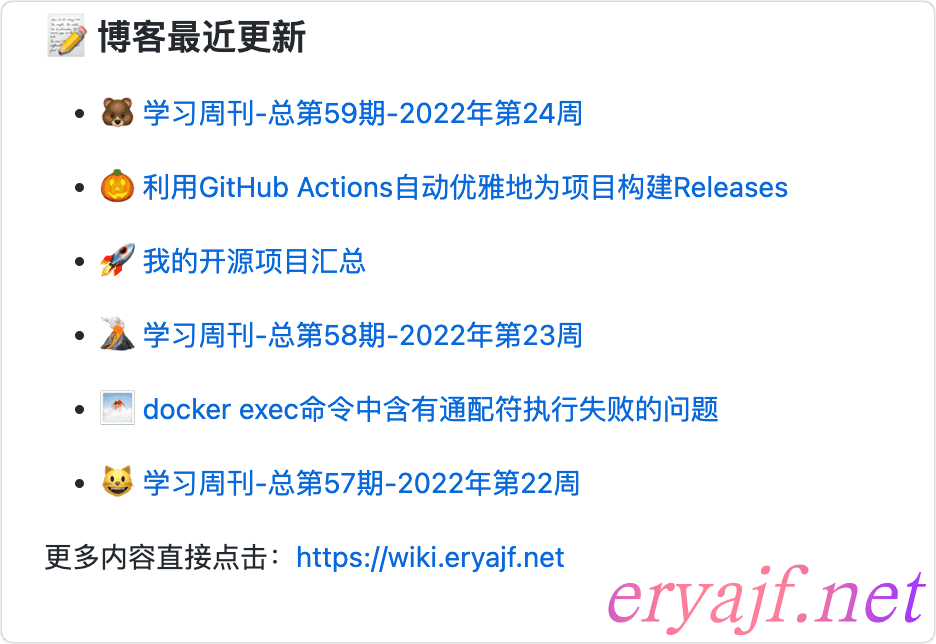
生成内容效果如下:
接下来讲几个注意点,以备扩展该工具时使用。
如果你有多个内容源需要订阅,则可以在 Actions 中添加如下标识:
    - name: Pull in eryajf posts
        uses: gautamkrishnar/blog-post-workflow@v1
        with:
          max_post_count: 6
          comment_tag_name: "eryajf"
1
2
3
4
5
在 README 中则需要添加如下内容:
<!-- eryajf:START -->
<!-- eryajf:END -->
1
2
comment_tag_name将与写入到 README 中的 tag 对应,就能实现多个源写入到同一个文件内了。
正是借助这个能力,我创建了一个 read-list (opens new window) 的项目。
其他的就不多说了,基本上参照我的内容,配合官方文档都可以自己玩起来了。
此内容由惯性聚合(RSS阅读器)自动聚合整理,仅供阅读参考。 原文来自 — 版权归原作者所有。